SEO & Traffic Growth

LinkedIn Insight Tag + Conversions API

PrestaShop LinkedIn Insight Tag module, B2B conversion tracking with server-side retries and deduplication

Version
1.5.36
Updated
PrestaShop
1.6 to 9
Price: €69.00
Tax excluded
Partner price €55.20 Partner price for agencies Agencies with a partner account pay less on every module, depending on what they buy: 20% approved partner 25% from €1,000 a month 30% from €3,000 a month Average of the last 12 months, excl. VAT. Become a partner

LinkedIn Insight Tag + Conversions API reports your PrestaShop customers' actions to LinkedIn through the browser and your shop server. A Partner ID starts browser measurement; server delivery adds an access token and conversion-rule numbers.

LinkedIn Campaign Manager manages advertising, conversion reports and professional audience insights. Campaigns use your chosen budget and bids; LinkedIn lists no separate charge for either measurement route.

You switch individual actions on or off and add rules for quote requests or catalogue downloads. Purchases share one identifier, value and currency across both routes to prevent double counting. Marketing consent is handled with MPR Cookies Revolution or MPR Cookie Banner, and employee visits stay excluded.

The server route preserves paid-order evidence when the browser report is blocked, keeping your LinkedIn revenue figures tied to actual purchases.

Professional Setup We fully configure the module to your needs: all options set, tested & verified within 1 business day. +€29.00
Visual Integration CSS & template adjustments to match your theme: includes cross-device verification and screenshot review. +€49.00

In the box

  • Lifetime licence for one shop
  • 12 months of updates, security fixes free forever
  • 3 months of support by mypresta.rocks
  • PrestaShop 1.6 to 9

Recent changes

  • One download for every shop: each shop gets its own 30-day trial from installation, then you activate it with your licence key.
  • Shared components updated to the current release set.
Full changelog

Summary of what the module offers

LinkedIn Insight Tag + Conversions API connects the commercial actions in a PrestaShop store with LinkedIn Campaign Manager. The Insight Tag records the browser route, while a separate route from the shop server protects important conversion evidence when that browser route is interrupted.

  • Quick connection: one LinkedIn Partner ID starts the Insight Tag, with a secure access token for server delivery.
  • Distinct commercial actions: page visits, product interest, cart, wishlist, checkout, purchase, search and registration each have their own controls.
  • One purchase through two routes: browser and server reports share an identifier, order value and currency.
  • Delivery that survives interruptions: a queue retries failed reports and keeps their result in the shop.
  • Purposeful data: consent, employee exclusion, separate shop settings and duplicate-tag protection define what is reported.
  • Proof before reliance: readiness checks, a live LinkedIn probe and recent delivery history expose the working connection.
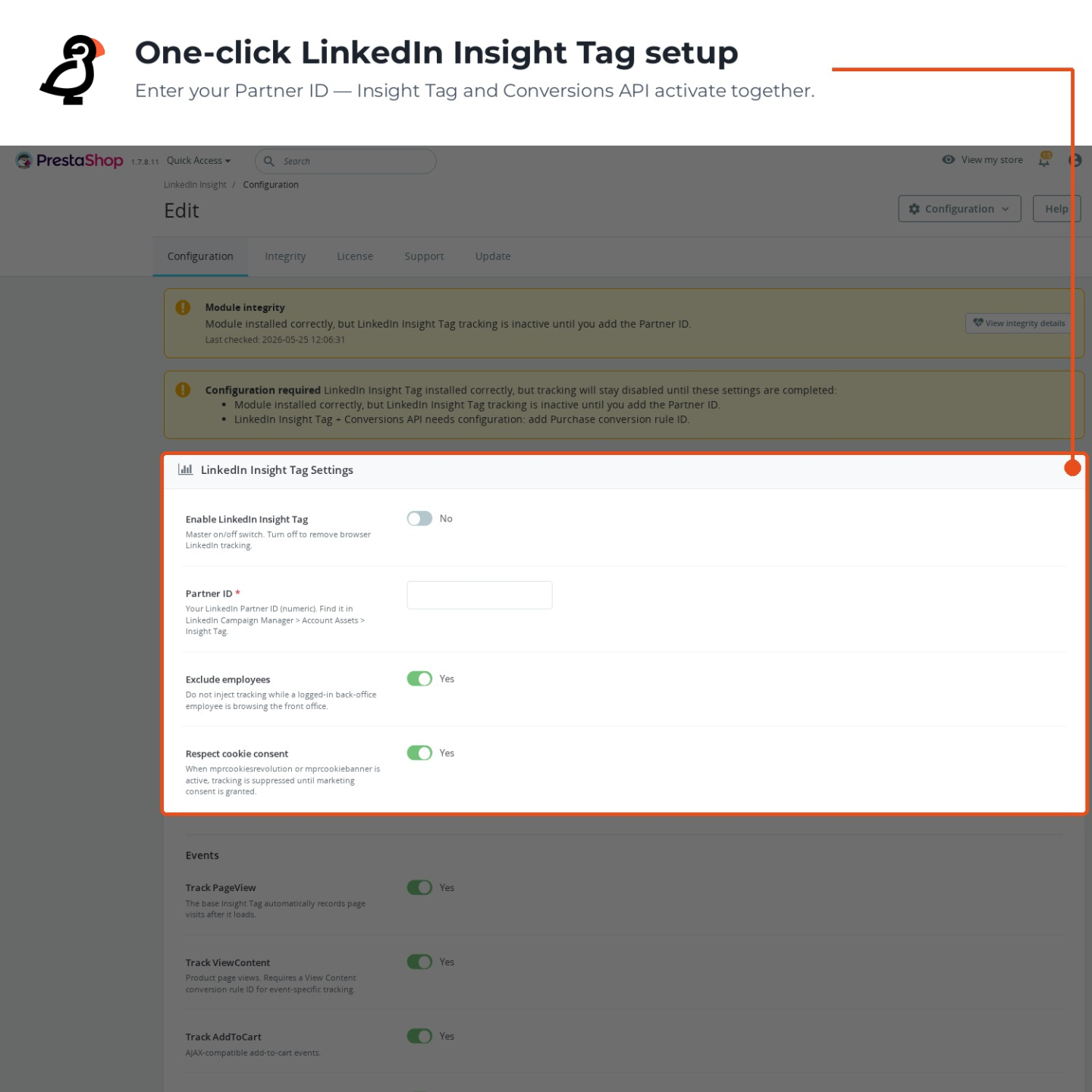
The LinkedIn Insight Tag + Conversions API configuration screen in the PrestaShop back office

Which shop actions become separate LinkedIn conversions?

The standard path covers page visits, product views, successful additions to the cart and wishlist, checkout starts, searches with the submitted phrase, registrations and completed purchases. Every action has its own switch and LinkedIn conversion-rule number, so Campaign Manager receives separate outcomes instead of one undifferentiated stream of shop visits.
Custom rules extend that path to activity specific to the business. A click on a quote button, a catalogue download, a selected page address, a finance section or a named action from a configurator becomes its own conversion. Each rule carries controlled details, a once-only or repeated policy and a choice of browser reporting alone or both delivery routes.

LinkedIn Campaign Manager turns the supplied signals into conversion attribution, campaign reports, retargeting audiences and professional audience insights. The module provides the store evidence, while LinkedIn processes it inside the advertising account.

The LinkedIn Insight Tag + Conversions API configuration screen

How does one purchase reach LinkedIn twice without becoming two sales?

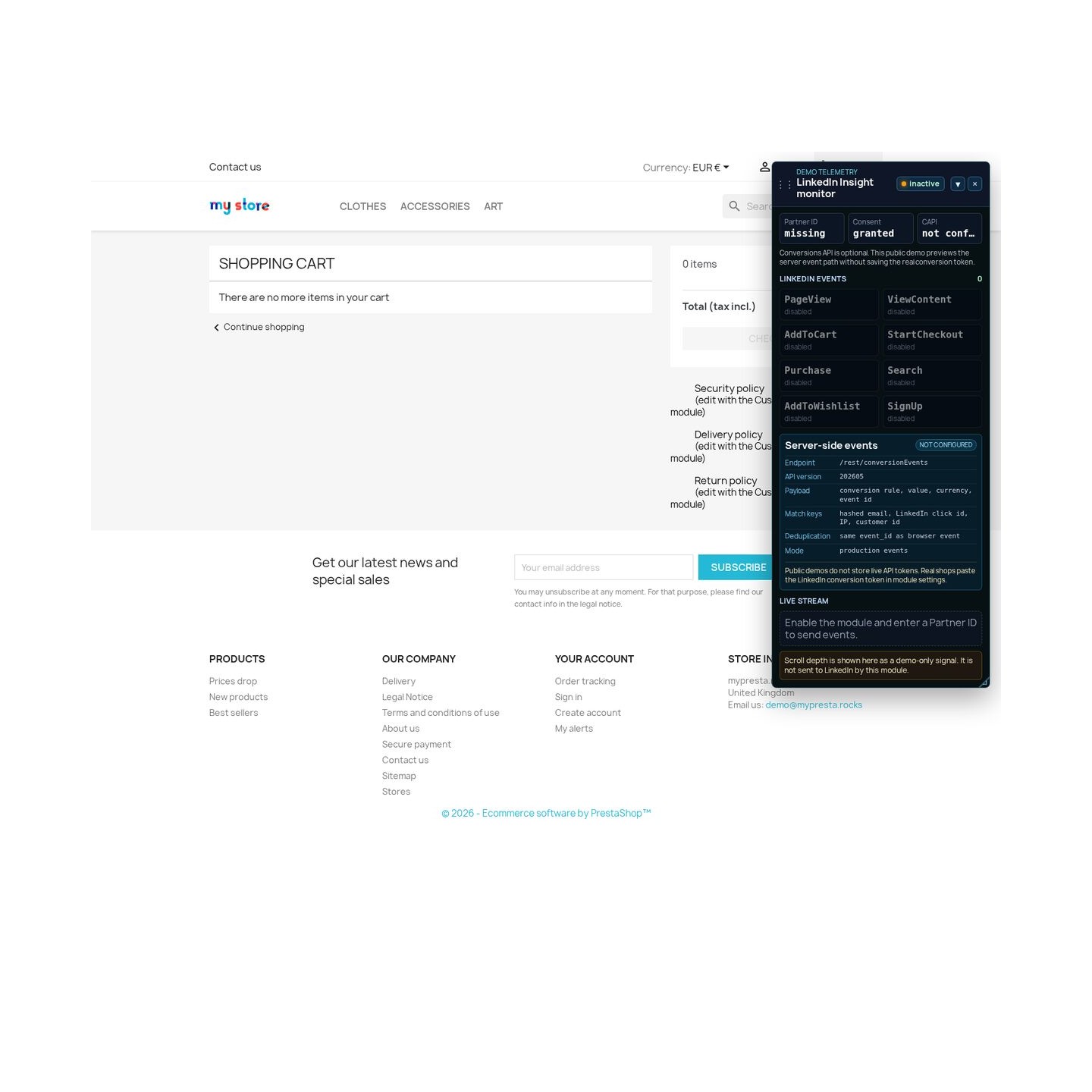
The order-confirmation page reports the purchase through the customer’s browser. Independently, PrestaShop places the same purchase in its server delivery queue when the order is validated. Both copies carry one stable identifier derived from the order, plus the same order value and currency, so LinkedIn recognises one sale rather than two unrelated conversions.

The server report strengthens matching with the LinkedIn ad-click identifier and the protected email address and customer reference when they are available. Name and country add purchase context, while IP matching remains under a separate merchant switch. These details give LinkedIn firmer evidence for connecting an order with the campaign that brought it.

If a browser restriction or blocked script interrupts the first route, the server copy still preserves the completed order. If both arrive, the shared identifier protects campaign revenue and cost-per-order figures from double counting.

Storefront monitor with partner ID, events and the shared event ID used for Conversions API deduplication

What happens when server delivery is interrupted?

Each eligible conversion enters a queue that refuses a second row for the same event identifier. The module processes the first waiting records immediately and checks the remaining work every five minutes. An unsuccessful delivery receives up to six attempts with increasing intervals, while a stalled send returns to processing automatically.

The settings page separates waiting, sending, accepted and failed records. Recent entries show the number of attempts, LinkedIn’s response and the last error, so the merchant or agency sees whether the cause is an access token, rejected information or a temporary connection problem.

After the cause is corrected, the retry control returns a terminal failure to delivery with a renewed set of attempts. Other valid records continue through the queue, so one rejected conversion does not hold back the rest.

The LinkedIn Insight Tag + Conversions API installation check

Who and what stays outside the tracking data?

With MPR Cookies Revolution or MPR Cookie Banner active, marketing consent governs both the Insight Tag and the server route. A grant on the open page starts later reporting, while withdrawal stops further browser and server signals. Without the required marketing decision, no quiet conversion leaves in the background.

Employees signed in to the shop panel remain outside storefront tracking, so product checks and test orders do not distort customer conversion rates. If another installed module already owns the same LinkedIn Partner ID, LinkedIn Insight Tag + Conversions API suppresses duplicate output and identifies the owner in its settings.

Every shop in a multistore installation keeps its own Partner ID, conversion rules, access token, action policy and delivery view. Separate brands, countries and LinkedIn advertising accounts therefore do not mix their conversion evidence.

Storefront panel showing tracking held back until marketing consent, with the captured ad click ID

How quickly is the connection launched and proved?

The short path consists of installing the module, entering the numeric LinkedIn Partner ID and switching on browser measurement. Server delivery adds the access token and the conversion-rule numbers for the actions that matter. No theme file changes sit between the initial settings and the first measured visit.

The same screen then opens into detailed control. Standard actions remain individually switchable, store-specific rules define local conversion moments, IP matching has its own choice and the access token stays masked. Numeric identifiers and rule definitions are checked before saving.

The readiness table names missing essentials, a controlled test conversion confirms LinkedIn’s acceptance, and the delivery history shows waiting, accepted and rejected records with their responses. The merchant sees configuration, store delivery and LinkedIn acceptance before campaign reports become the basis for budget decisions.
The LinkedIn Insight Tag + Conversions API update screen
  • Reference
    mprlinkedininsight
  • Version
    1.5.36
  • Released
  • Updated
  • PrestaShop Compatibility
    PS 1.6 – 9.x
  • Pricing Model
    One-time Purchase
  • Module Type
    Front-office
  • GDPR Relevant
    Yes
  • Business Goal
    Marketing & Retargeting
  • External Account Needed
    Yes
  • Module Complexity
    Lightweight Widget
  • Customer Journey Stage
    Attract Visitors
  • Works With Platform
    Ad & Analytics Networks

What customers say about us

Company reviews
5.0 ★ ★ ★ ★ ★ (4 reviews)
Customer Reviews for PrestaShop Modules and Support

No product reviews yet

Be the first to share your experience with this product.

Write a Review

Quick start

  1. Upload the mprlinkedininsight ZIP through Modules > Module Manager > Upload a module.
  2. Click Configure, enter your positive numeric Partner ID, and review Exclude employees and Respect cookie consent.
  3. Enter the browser conversion rule IDs you need. For the default enabled Track Purchase, supply Purchase conversion ID, or turn that event off until you have a rule.
  4. Set Enable LinkedIn Insight Tag to Yes, save, and resolve any destination ownership warning.
  5. For CAPI, add Conversions API access token, enable Enable Conversions API events, and enter separate Server conversion ID: ... rules for the events you need. Save.
  6. Open a customer browser with marketing/service consent, then test a product view, successful cart addition and checkout against your configured LinkedIn conversion rules.
  7. Place a test order, inspect its browser conversion and optional server queue, and verify the send_linkedin_conversions worker. Review the readiness checks and actual queue HTTP results.

Requires PrestaShop 1.6.0.0 or later and PHP 7.1 or later.

Open the full help page

Loading tab content...
30 days return right
Easy return - no questions asked
Plug & Play Modules
Install, set up and take profit
Dedicated Support First
Priority Help & Satisfaction Over Sales

Who builds and maintains this module

Built and maintained by David Miller and mypresta.rocks. David Miller has worked with PrestaShop since 2013, and the company behind this shop has been registered since 3 December 2018. Every module in this catalogue is our own work, so your questions to support reach the people who wrote the code. The changelog on this page lists every update with its date.

About us

More modules

B2B Account Approval, Trade Account

LinkedIn Insight Tag + Conversions API measures your LinkedIn ads with ecommerce events and server-side conversions, and Trade Account turns the business visitors they bring into approved wholesale customers with an application form and group pricing. B2B advertising with a B2B destination.

Cookies Revolution

LinkedIn Insight Tag + Conversions API tracks your LinkedIn ad conversions, and Cookies Revolution collects visitor consent by category with script blocking and consent logs. B2B campaigns measured with consent in order.

Blog Revolution

Blog Revolution publishes the expert content that business buyers read, and LinkedIn Insight Tag + Conversions API measures which LinkedIn campaigns bring readers who go on to buy. Content worth promoting, and the tracking to see if it works.

Loading...
Back to top