

Latvian Address Autocomplete: setup and help
Quick start
- Upload and install the module ZIP in PrestaShop. No service account, key or payment setup is needed.
- Open Configure, or the Latvian Address entry in the back office menu; in multishop select one shop you can manage.
- Check that Latvia is active and available on the native address forms you use.
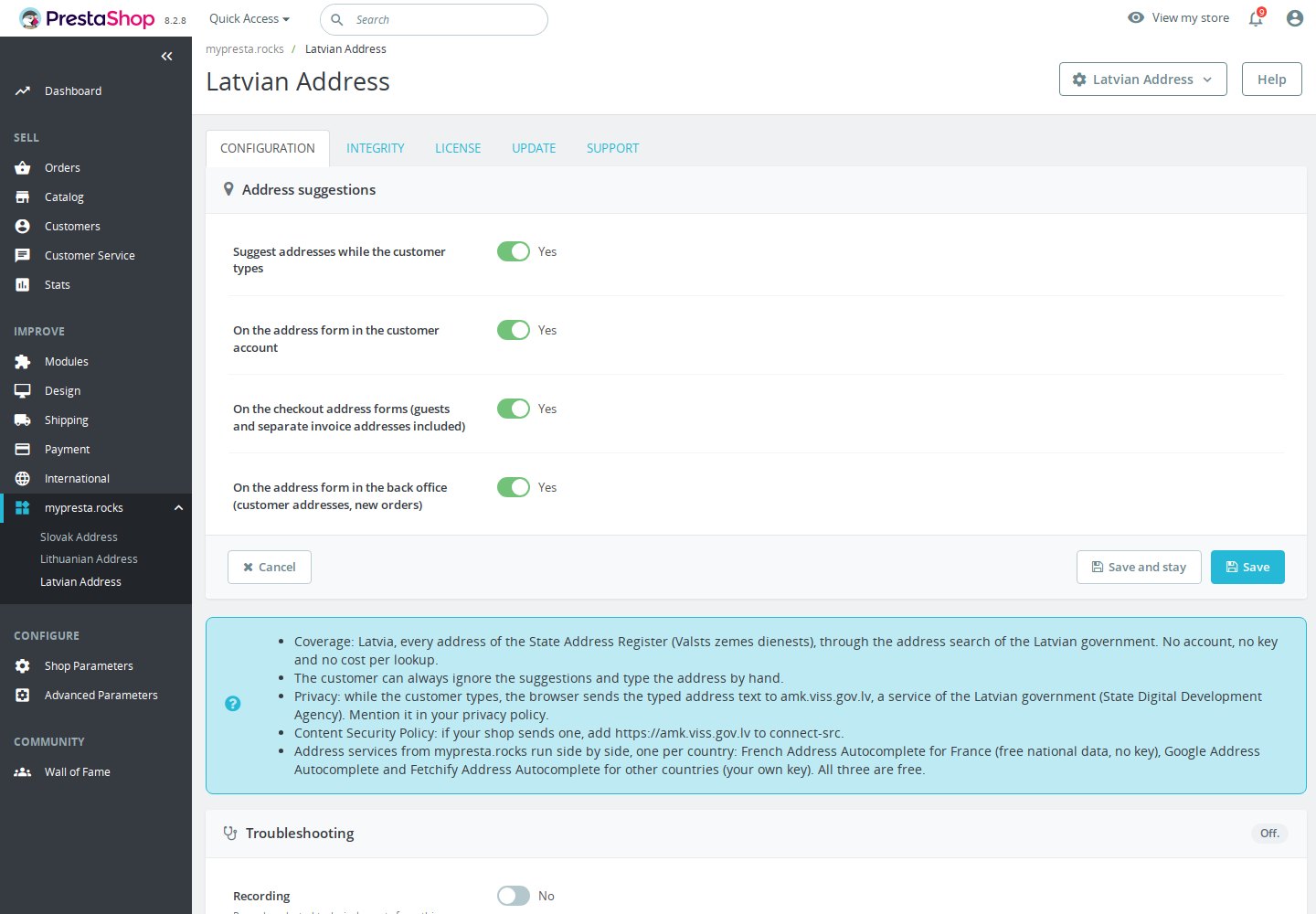
- Choose the overall, account, checkout and back office switches in order and save. There is no country selector here.
- Runs beside French Address Autocomplete, Google Address Autocomplete and Fetchify Address Autocomplete; keep all of them at their latest version.
- Merge the service origin into your existing CSP and mention the browser connection in your privacy notice.
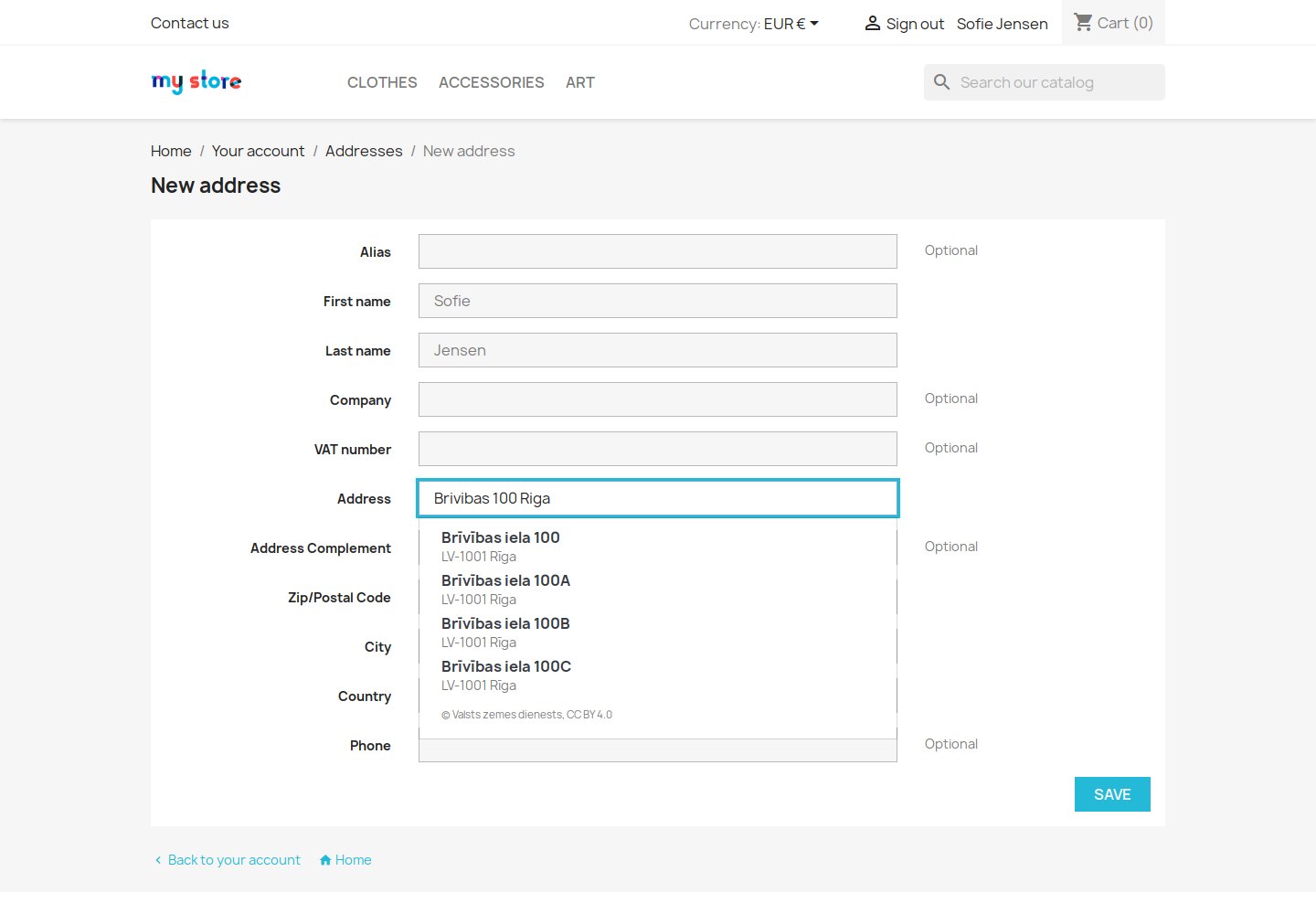
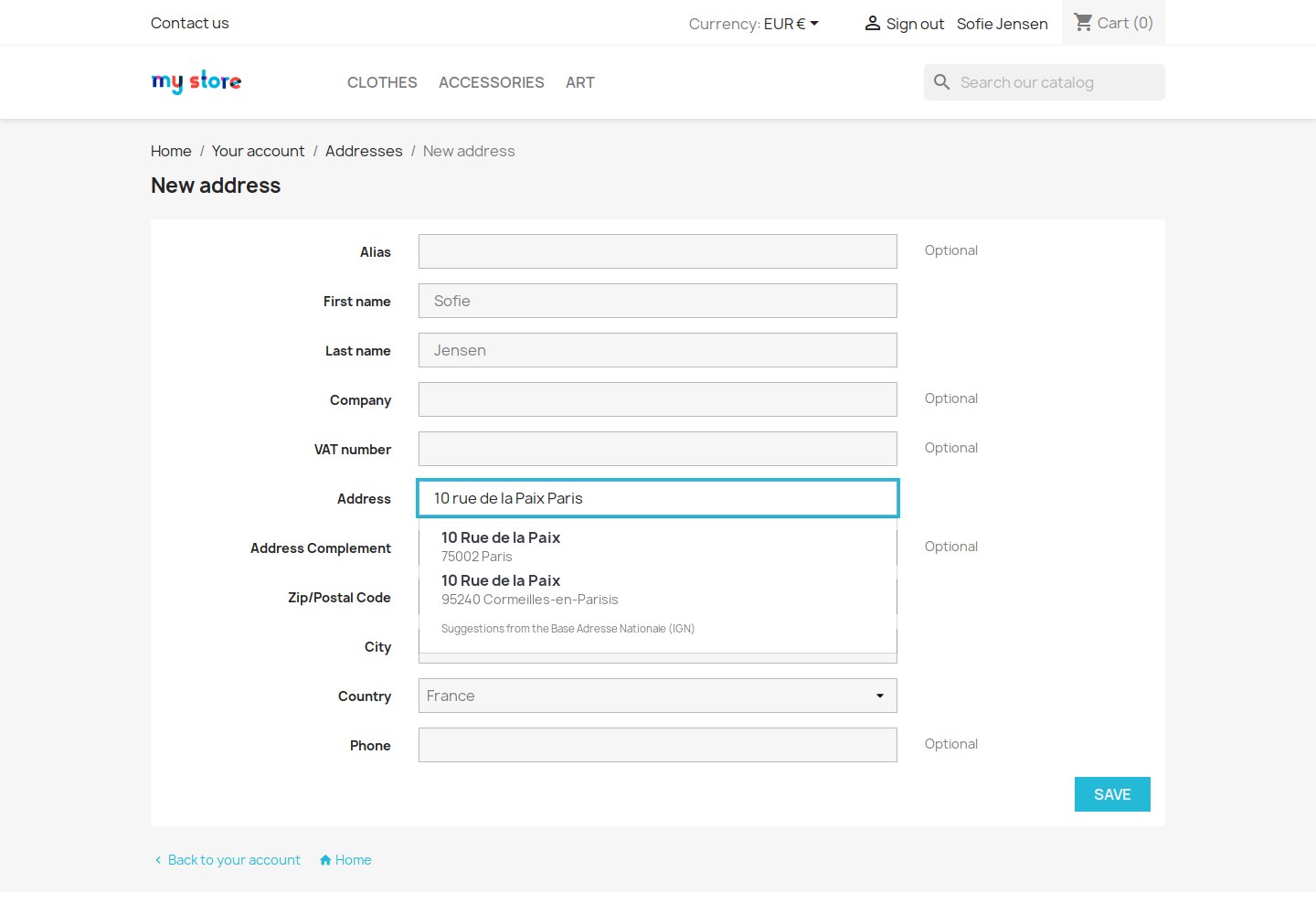
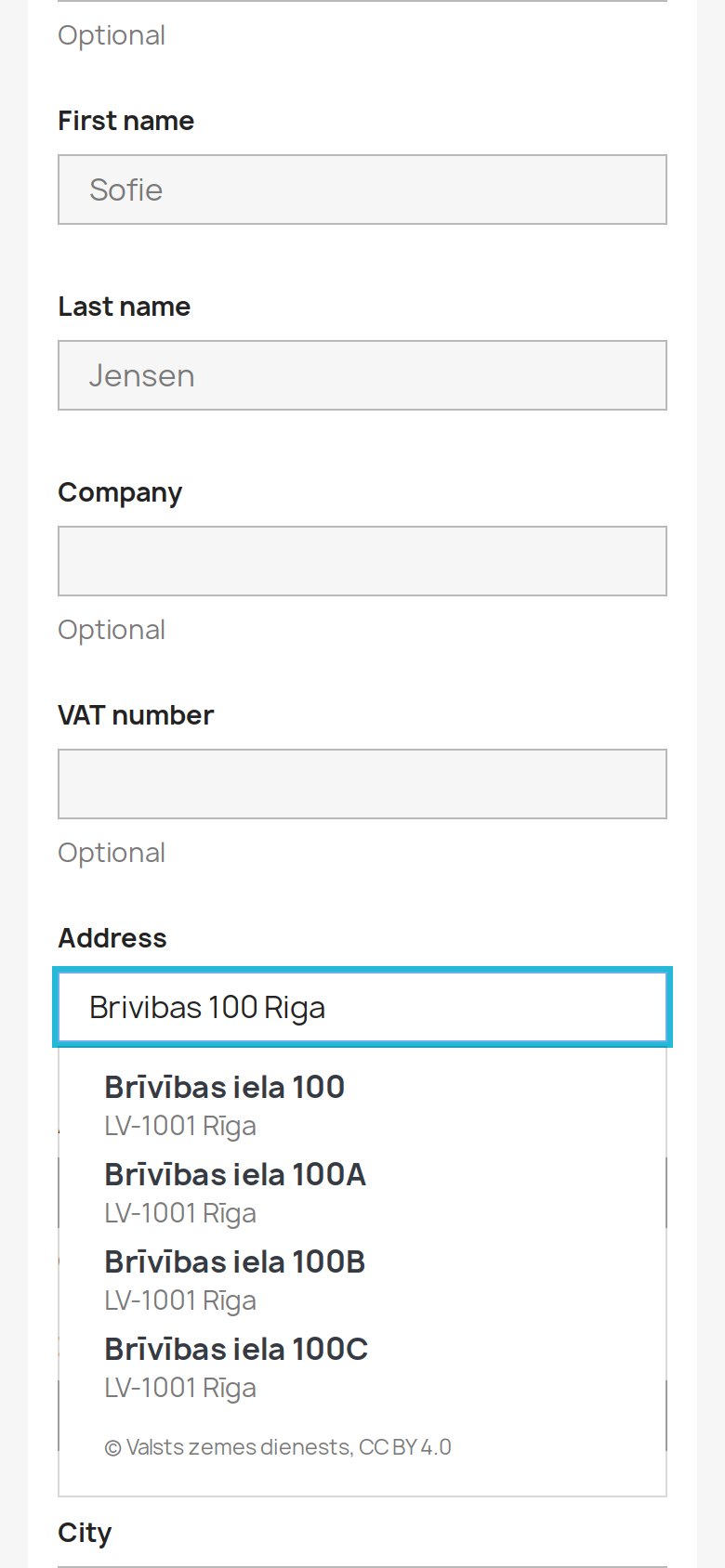
- Select Latvia and type Brivibas 100 Riga. Verify the actual returned street, house, LV-NNNN postcode and town. Also test a rural house name, typed flat, manual entry, guests, invoices, staff/new orders, France with French Address Autocomplete and phone width.
Setup manual
Latvian Address Autocomplete is a free PrestaShop module for entering addresses in Latvia. A chosen State Address Register result fills the street and house number or house name, postcode in LV-NNNN format when returned, and town or rural locality. Valsts zemes dienests supplies the national data through the government’s AMK search without an account, key or cost per lookup.
Features
- Latvian address suggestions. Official State Address Register data on native account and checkout forms, including guests.
- Filled together. Street, house number or name, returned LV-NNNN postcode and town or rural locality.
- Fixed Latvia coverage. House names and villages without streets; typed flats use premises results.
- Back office. Postal address help for staff in Customers › Addresses.
- Everyday entry. Touch, keyboard and screen-reader announcements; manual entry remains.
- No service account. Free module and national data, four switches and no key.
Configuration options
- Suggest addresses while the customer types: overall switch, first in the form.
- On the address form in the customer account: native account addresses.
- On the checkout address forms (guests and separate invoice addresses included): native checkout, guests and invoices.
- On the address form in the back office (customer addresses, new orders): native customer address forms used by staff, including new-order windows served by Customers > Addresses.
Install the free module and open Configure in Module Manager, or the Latvian Address entry in the back office menu. Choose the overall, account, checkout and back office switches in that order, then Save. All default to on. In multishop select one shop you can manage. No service account, key or country field is required.
One page contains Configuration, Integrity, License, Update and Support in that order. After the switches come coverage/free-service, manual-entry, privacy and CSP notes, then sibling guidance. Settings texts are supplied in English, German, French, Polish, Italian, Spanish and Latvian. These are interface languages, not translated address data; a Support section does not promise included support.
The worldwide siblings alone have “Use for these countries”. Empty means all countries available to the form; a selected list restricts that sibling. Latvian Address remains fixed to LV. Runs beside French Address Autocomplete, Google Address Autocomplete and Fetchify Address Autocomplete; keep all of them at their latest version.
Customization examples
Allow the service in your Content Security Policy
Allow https://amk.viss.gov.lv in connect-src, as used by the module and supplied service probes. Scripts and styles are served by your shop. Merge the example into your existing content security policy, preserving theme rules, inline styles/nonces and other modules. With French Address Autocomplete also allow https://data.geopf.fr in connect-src. Check browser requests and the policy on your shop. Runs beside French Address Autocomplete, Google Address Autocomplete and Fetchify Address Autocomplete; keep all of them at their latest version.
script-src 'self';
style-src 'self';
connect-src 'self' https://amk.viss.gov.lv;
Retain apartment and delivery details
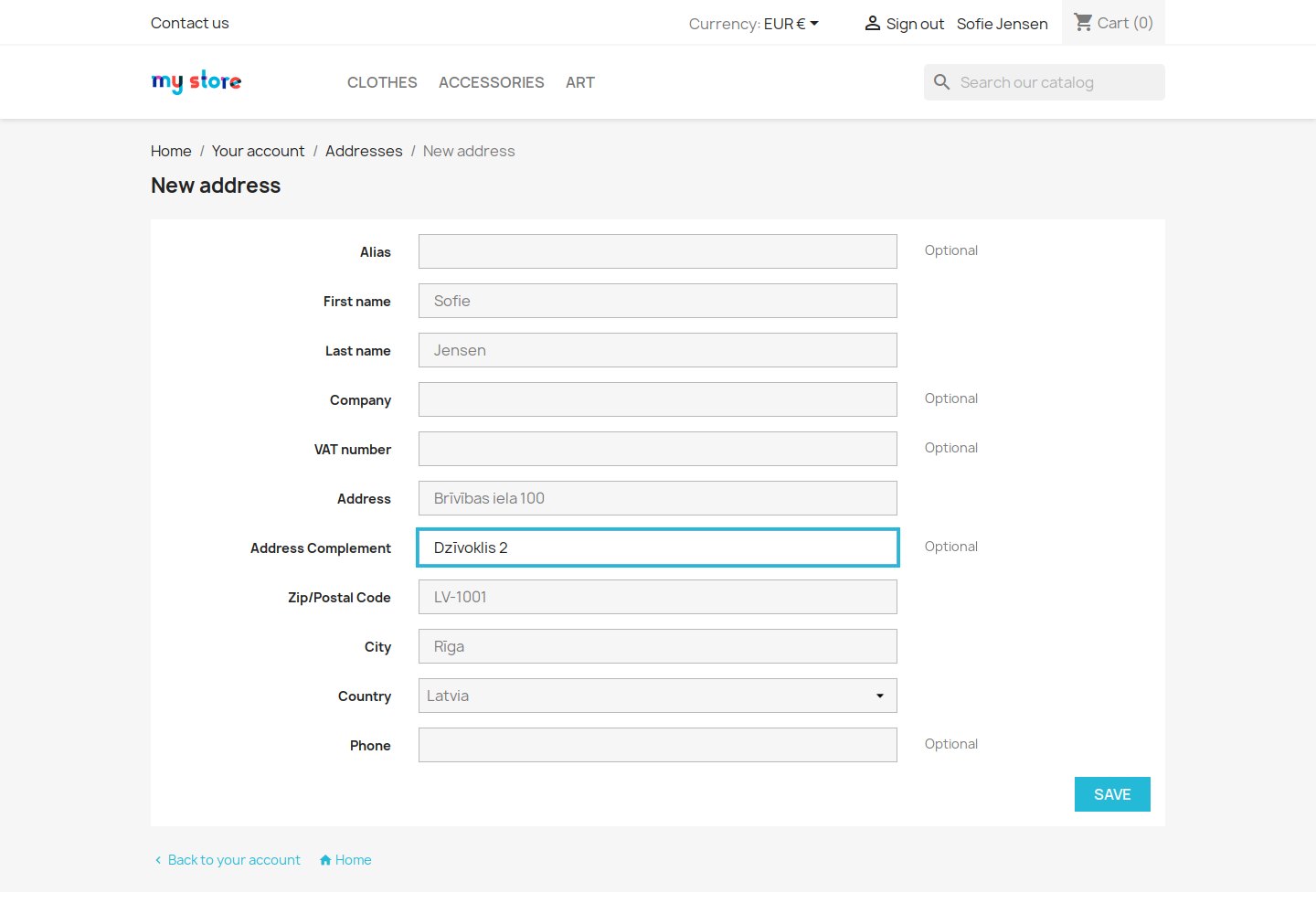
The selected country, second address line, name, company and telephone remain unchanged. A typed flat such as Brīvības 38-12 Rīga searches premises and can fill Brīvības iela 38 - 12 on line one as the register writes it. A pick replaces line one: check the chosen house and flat, and add missing apartment, floor or entrance details after selection or on line two. The module does not put the flat in a separate field.
Installation
Requirements
- General PrestaShop range: PS 1.6 – 9.x. Exact declared floor: PrestaShop 1.6.1.0, PHP 7.1 or later. Native address fields and Bootstrap 3, 4 or 5 presentation; Latvia must be available.
- Check that Latvia is active and available on the native address forms you use.
Runs beside French Address Autocomplete, Google Address Autocomplete and Fetchify Address Autocomplete; keep all of them at their latest version.
Runs beside French Address Autocomplete, Google Address Autocomplete and Fetchify Address Autocomplete; keep all of them at their latest version.
How it works
Suggestions begin after three characters and a short typing pause. The browser sends a direct GET to https://amk.viss.gov.lv/rest/address with the typed text in search, limit=20, struct= and type=108 for buildings or 109 for a typed flat. Local accent folding, word-prefix matching and ranking prefer the exact house or flat number, then the typed city or village. At most five unique valid results are displayed. Selection reuses the returned address without a second lookup. Rows need a house identifier and city or rural hierarchy; a missing postcode is allowed, but an invalid nonempty code is rejected.
At slow moments the plain line “Searching addresses…” appears while the search is pending. Each request gives up after ten seconds. The customer can always enter or edit the address by hand.
Selected address fields
A chosen result fills street and house number(s) or house name as returned by the register. In Rīga this can be Brīvības iela 100, postcode LV-1001 and town Rīga. Without a street, the house name or number fills line one. The town field takes the city, or the available village, parish and municipality together. A returned slash house number stays whole. If no postcode is returned, selection clears the previous code so the customer can complete it.
The worldwide siblings alone have “Use for these countries”. Empty means all countries available to the form; a selected list restricts that sibling. Latvian Address remains fixed to LV. Runs beside French Address Autocomplete, Google Address Autocomplete and Fetchify Address Autocomplete; keep all of them at their latest version.
French Address Autocomplete can answer its French destinations through BAN on the same enabled native forms. Google Address Autocomplete or Fetchify Address Autocomplete can serve other destinations when configured separately. Fixed or country-limited services are considered before unrestricted ones; matching service IDs then determine order. A failed search does not automatically try another service.
Staff receive the same address help in Customers > Addresses. The back office switch is independent of account and checkout. Native new-order windows are covered when served through that page; custom routes and forms need testing. The bundled engine supports marked checkout address forms and uses per-shop service settings shared with Checkout Revolution.
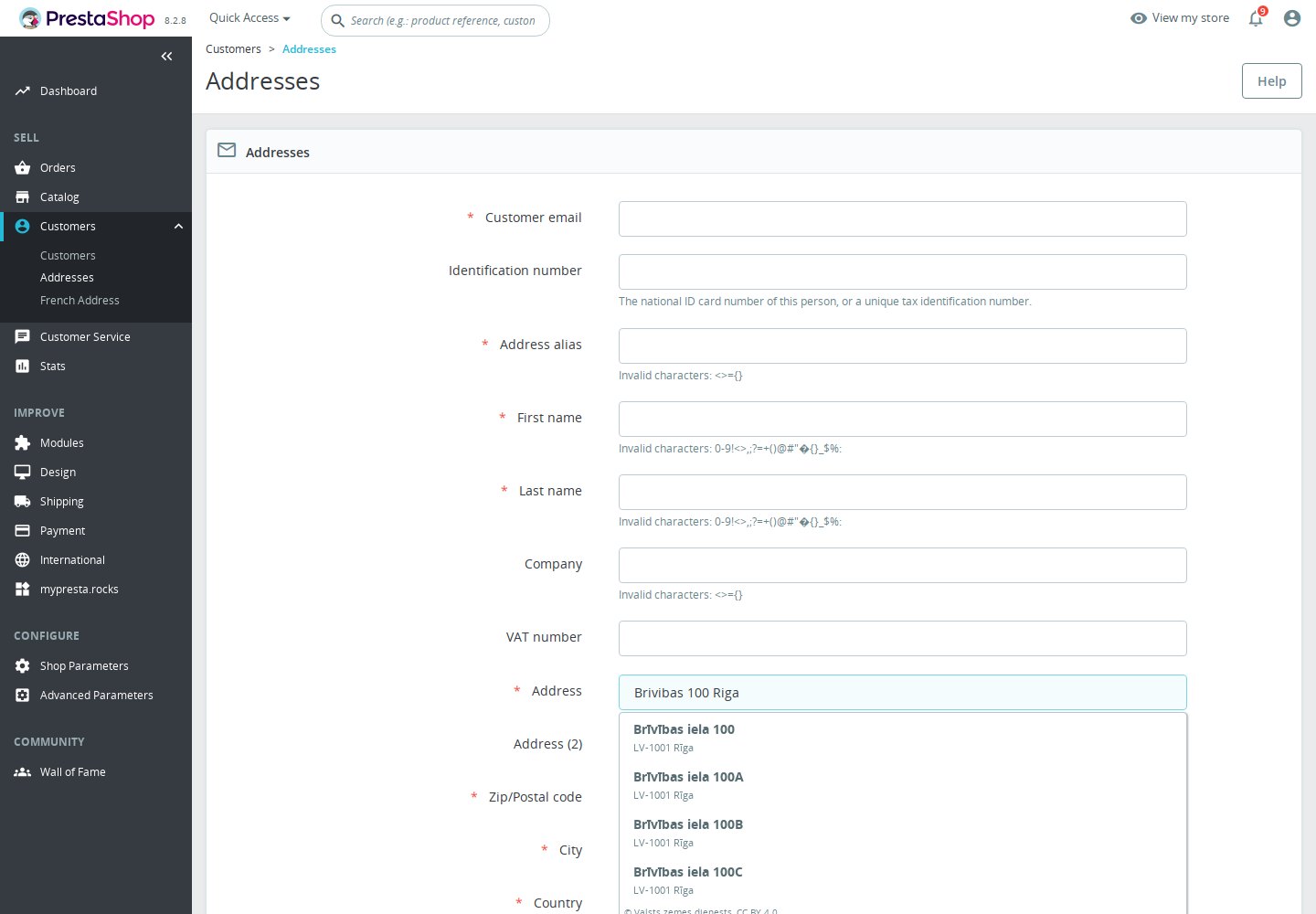
On a phone, tap a result beneath the street field. With a keyboard, use the arrows and Enter to select; Escape or Tab dismisses the list. Screen readers receive result announcements. Two-line options show the street or house name, then postcode and town or rural locality. The shared list follows the theme’s Bootstrap presentation.
The list shows the credit © Valsts zemes dienests, CC BY 4.0. No match leaves the list closed. Service failure announces unavailable suggestions; manual entry and editing remain available. Saving never requires a suggestion, and the module does not validate delivery addresses on submission.
Privacy and data credit
The browser sends the text typed into the street search directly to https://amk.viss.gov.lv, with fixed search options and building or premises type according to a typed flat. No key, selected-country, language, name, email, telephone, company or second-line parameter is added. Anything typed in the search field is sent. Credentials are disabled. The direct connection exposes visitor IP and browser information; origin and referring-page information follow browser policy. There is no search-history feature or shop proxy; diagnostics omit queries and returned address bodies. Chosen addresses save normally through PrestaShop. Mention the transfer in your privacy notice.
© Valsts zemes dienests, CC BY 4.0. Data and licence: State Address Register, CC BY 4.0. Address conventions: Latvijas Pasts. Service: AMK documentation.
Honest limits
- Coverage, freshness and availability depend on the register and service. No complete postcode directory, unlimited-use promise or guarantee of every address.
- A query containing a postcode can miss an exact building. Try street + number + town. Rural place names are kept together; a long value or other field limit can prevent filling.
- Flats require a typed house-flat pattern and a returned premises result. A pick replaces line one; add missing details afterwards. Missing postcodes need manual completion.
- HTTP 429 pauses according to Retry-After or ten seconds. Errors, malformed answers and ten-second timeouts retain manual entry, without automatic service failover.
- Custom themes, routes, new-order windows and suite forms need checking. No map, geolocation, coordinates, automatic country selection, submit-time validation or delivery guarantee. Free with lifetime updates and no included support commitment.
Troubleshooting
- No Latvian results: select Latvia, check its active status and the overall/form switches, then try street + number + town.
- Runs beside French Address Autocomplete, Google Address Autocomplete and Fetchify Address Autocomplete; keep all of them at their latest version.
- No matching house or postcode: check the returned address and complete missing details manually. Try without a postcode.
- Unavailable suggestions: inspect browser requests/CSP for amk.viss.gov.lv, wait after a rate limit and continue manual entry.
- Custom form or layout issue: test a native address form, phone and keyboard use, and the new-order route.
Questions
7
Is Latvian Address Autocomplete free?
Yes. The module is free with lifetime updates and no included support commitment. Lookups require no account or key and have no per-lookup charge.
Do I need a key or an account?
No. No service account or API key is required.
Which countries and fields are covered?
For Latvia, it fills street and house number or name, LV-NNNN postcode when available, and city or rural locality. A typed house-flat pattern can return a premises address. Add missing details manually; the selected country and other fields stay unchanged.
Does it cover guests, invoice addresses and staff?
Yes, on native account and checkout forms, including guests and separate invoice addresses, and in Customers > Addresses. New-order address windows are covered when served by that page; custom forms need testing.
Can I run it with other address modules?
Yes, with French Address Autocomplete, Google Address Autocomplete and Fetchify Address Autocomplete. Keep all modules current and configure worldwide services for other destinations. A failed search does not automatically switch services.
What does the browser send to amk.viss.gov.lv?
The street-search text and fixed search options go directly to amk.viss.gov.lv. The service also sees the visitor’s IP and browser information; other form fields are not added.
Must customers choose a suggestion to save?
No. Customers can enter, edit and save addresses manually, including when suggestions are unavailable.
Known Issues
No known issues
There are currently no open or resolved issues registered for this module.
Feature Requests
No feature requests for this module yet
Missing something? Suggest it, and follow its progress here.
Changelog
v1.0.12026-11-10
- First release: suggests Latvian addresses from the official national address register while the customer types on the checkout, account and back office address forms, and fills in the street, house number or house name, postcode and town.
- Free: no account, no key and no cost per lookup.
- Works beside the other mypresta.rocks address modules and inside Checkout Revolution.