

PHP2Shell: what PrestaShop shops should do about CVE-2026-109618 and CVE-2026-109619, even when they cannot upgrade


On 21 October 2026 the PHP project shipped an emergency release for two critical vulnerabilities in PHP itself, now known together as PHP2Shell: CVE-2026-109618 and CVE-2026-109619. Both can let an attacker run code on a web server without logging in, and on some setups before any line of your shop's code has run.
For most websites the advice is short: update PHP and restart it. For PrestaShop shops it is not that simple, and that is why we wrote this. Every PrestaShop release before 9.0 officially supports PHP 8.1 at most, and PHP 8.1 and everything older received no official fixed release. So a large share of the PrestaShop shops in the world cannot just "update PHP" this week.
This guide covers what the vulnerabilities are, how to find out whether your shop is actually exposed (the version number alone will not tell you), what to do on each PrestaShop version, and the workaround we use for shops that cannot be upgraded right now: moving them, on a staging copy first, to a vendor-patched PHP 7.4 and fixing the pieces of code that break. It is a bridge, not a destination. It is also far better than staying exposed or switching the shop off.
How we checked
The vulnerability details, fixed versions and temporary measures follow the PHP project's advisory. Vendor package statuses come from vendor announcements and published reports on them and change week by week, so confirm yours with your host. PrestaShop's PHP ranges come from PrestaShop's system requirements, and the PrestaShop 1.6 details below were checked in the 1.6.1.23 source code itself.
What PHP2Shell is, in plain words
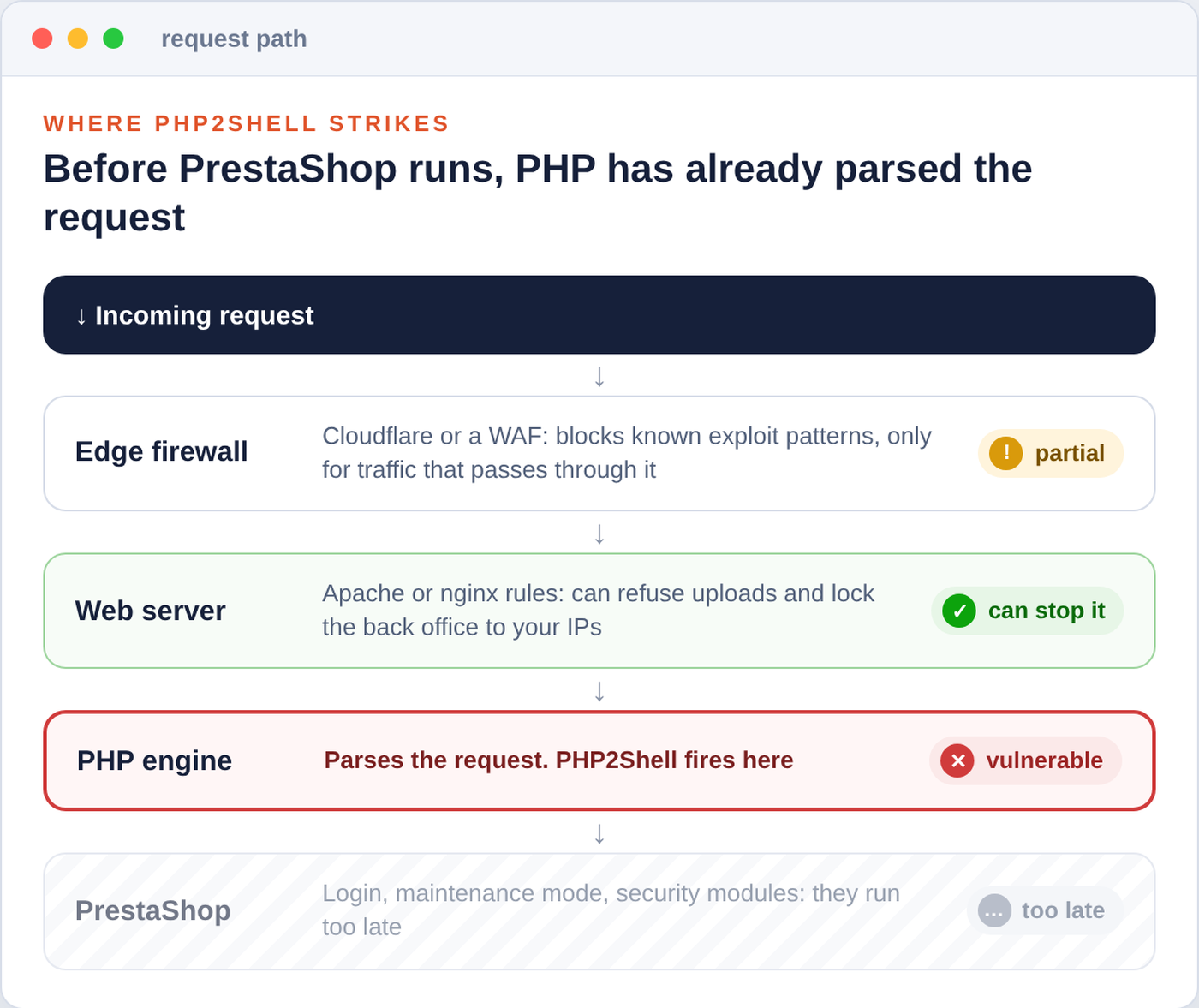
Both flaws live in the PHP engine, the part that receives a web request and prepares it before your shop's code starts. That is why no PrestaShop update, module or theme can fix them. Only a fixed PHP can.
| CVE | Name | What goes wrong |
|---|---|---|
| CVE-2026-109618 | RCE via OOM corruption | When PHP runs out of memory at the wrong moment, request data is left half prepared, and the clean-up afterwards treats it as valid. Large crafted requests can trigger it. |
| CVE-2026-109619 | RCE via stale global state | Internal state from one request survives after its memory has been freed, and a later request handled by the same PHP worker can use it. |
Researchers also demonstrated that an attacker can read memory of PHP workers without logging in. That memory can hold passwords, session tokens and API keys from other visitors' requests, which is why the clean-up section at the end of this guide matters even if nobody planted anything on your server.
Every PHP installation that serves web requests is in scope: PHP-FPM, Apache with mod_php, php-cgi, FrankenPHP and LiteSpeed. The PHP project rates the risk highest for mod_php, where it demonstrated an exploit that fires before any application code runs. That detail matters for PrestaShop owners: the back-office login, the shop's maintenance mode and every security module run after PHP has already parsed the request, so none of them stand in the way.
Protection has to sit in front of PHP. Anything inside PrestaShop runs after the damage is done.
How worried should you be?
The flaws are serious and attack traffic appeared quickly: Amazon's honeypots recorded an attempt on 17 October, four days before disclosure, and Cloudflare reported attacks on the morning of the release. At the same time, the e-commerce security firm Sansec reports that the public exploits do not work against a default PHP installation and mostly need a second bug, such as a file-inclusion hole in the application, so it considers mass exploitation less likely. Treat it as urgent, without panic: the goal is a fixed PHP under your shop as soon as possible.
The timeline
| Date (2026) | What happened |
|---|---|
| August | The flaws are found independently by two research teams and reported to PHP. |
| 17 October | First exploitation attempt recorded in honeypot telemetry. |
| 20 October | Details leak. The PHP project announces a critical security release for the next day. |
| 21 October | PHP 8.5.12, 8.4.27, 8.3.36 and 8.2.35 released, plus minimal source-only backports for 7.4, 8.0 and 8.1. Linux distributions and long-term support vendors had the patches in advance. Cloudflare deploys WAF rules for the known exploit vectors. |
| 22 October | CloudLinux publishes fixed builds of its PHP Selector versions, covering PHP 5.2 to 5.6, 7.0 to 7.4 and 8.0 to 8.5. |
Why PrestaShop shops have it harder
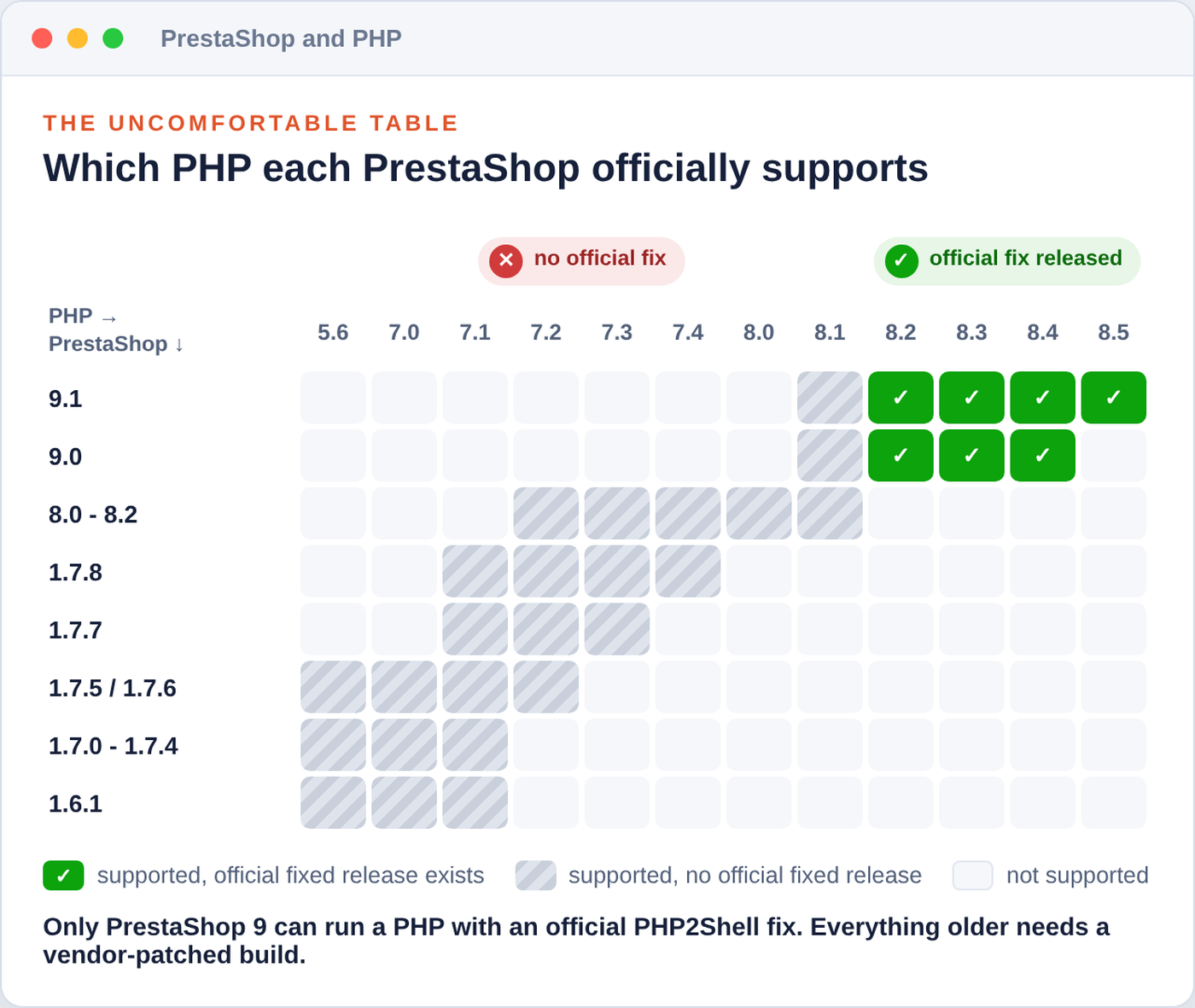
Here is the uncomfortable table. It shows the highest PHP version each PrestaShop line officially supports, from PrestaShop's own system requirements, next to whether an official fixed PHP release exists for it.
| PrestaShop | Supported PHP | Official fixed PHP within range? | Your realistic path |
|---|---|---|---|
| 9.0 | 8.1 to 8.4 | Yes: 8.2.35, 8.3.36, 8.4.27 | Fixed release of your PHP branch |
| 9.1 | 8.1 to 8.5 | Yes: also 8.5.12 | Fixed release of your PHP branch |
| 8.0 to 8.2 | 7.2 to 8.1 | No | Vendor-patched 7.4, 8.0 or 8.1, or upgrade PrestaShop to 9 |
| 1.7.8 | 7.1 to 7.4 | No | Vendor-patched 7.4 |
| 1.7.7 | 7.1 to 7.3 | No | Patched build of your branch if your host has one, otherwise the 7.4 bridge |
| 1.7.5 and 1.7.6 | 5.6 to 7.2 | No | Patched build if your host has one, otherwise the 7.4 bridge |
| 1.7.0 to 1.7.4 | up to 7.1 | No | Patched build if your host has one, otherwise the 7.4 bridge |
| 1.6.1.x | up to 7.1 | No | Patched build if your host has one, otherwise the 7.4 bridge |
"No" in the third column does not mean "no fix exists". It means the fix has to come from somewhere other than php.net: a Linux distribution, your hosting panel's vendor, a long-term support provider, or a PHP you build from source with the PHP project's minimal backport. That is where most PrestaShop shops have to look this week, and it is also where the good news is hiding.
Every row without a green cell depends on a vendor backport, or on the 7.4 bridge.
Step 1: find out what your shop really runs
Two traps catch almost everyone here.
The first trap: the PHP you see in SSH is not necessarily the PHP that serves your shop. Servers often have several PHP versions installed side by side, and the command line can use a different one from the web server. In PrestaShop, open Advanced Parameters, Information: the PHP version shown there is the one actually handling your shop's requests. Your hosting panel's PHP setting for the domain should say the same.
The second trap: the version number does not tell you whether you are patched. Distributions and hosting vendors backport security fixes into the version you already have and keep its old number. A "PHP 7.4.33" can be fully fixed on one server and wide open on another. The proof is in the vendor's advisory for your exact package, or in a written answer from your host.
# Optional: some servers advertise their PHP version. This does not prove patch status.
curl -sS -I https://www.example-shop.com/ | grep -i '^X-Powered-By:'

# Supporting evidence from package changelogs. A hit for both CVEs is a good sign.
# No hit proves nothing: some vendors only log a version update. Then ask the vendor.
# Adjust the package name to the PHP version and handler that serves your shop.

# Debian and Ubuntu
zgrep -E 'CVE-2026-10961[89]' /usr/share/doc/php7.4-fpm/changelog.Debian.gz

# RHEL, AlmaLinux, Rocky and CloudLinux system PHP
rpm -q --changelog php-fpm | grep -E 'CVE-2026-10961[89]'

# cPanel EasyApache (ea-php) and CloudLinux PHP Selector (alt-php)
rpm -q --changelog ea-php74-php-fpm | grep -E 'CVE-2026-10961[89]'
rpm -q --changelog alt-php74-common | grep -E 'CVE-2026-10961[89]'
Your host may already have a patched old PHP, even PHP 5
This is the part most owners of older shops do not know. Several hosting vendors ship their own builds of old PHP versions and patched those too:
- CloudLinux PHP Selector (alt-php): fixed builds for PHP 5.2 to 5.6, 7.0 to 7.4 and 8.0 to 8.5 reached the stable repositories on 22 October, on CloudLinux 7, 8 and 9 (CloudLinux 10 gets them through TuxCare's repository).
- CloudLinux's builds of cPanel PHP (ea-php): patched from ea-php52 up to ea-php85, keeping the old version numbers.
- cPanel's own EasyApache PHP: official releases for 8.2 to 8.5 and backports for 8.1 (8.1.34-5), 8.0 (8.0.30-12) and 7.4 (7.4.33-19). cPanel's own builds of 7.3 and older did not get a fix; cPanel points those users to TuxCare.
- Red Hat and its rebuilds: fixes are published stream by stream. Check the errata for the exact PHP stream your server has enabled, and do not assume a plain system update covered it: early reports listed some streams as fixed and others as still waiting.
- TuxCare Endless Lifecycle Support: paid long-term support with patches for end-of-life PHP versions.
So the same label, "PHP 7.1" in your hosting panel, can mean patched on one host and vulnerable on the next. Before you plan any code work, ask your host one precise question. Here is a message you can send as it is:
Subject: PHP2Shell (CVE-2026-109618, CVE-2026-109619) on my account

Hello,
my shop runs on PHP X.Y (handler: PHP-FPM / mod_php / LiteSpeed) on your servers.
Does the PHP build serving my site include the fix for CVE-2026-109618 and
CVE-2026-109619? Please tell me the exact package version and whether the PHP
processes have been restarted since it was installed. If my version has no fix,
which patched PHP versions can I switch to on my plan?
Thank you.
If the answer is "yes, both fixed and restarted", the urgent part is done without touching a line of code. Read the section on investigating a possible compromise, then plan your upgrade calmly.
Restart, or the fix is not running
Running PHP workers keep the old code in memory. After any update, restart PHP-FPM, LiteSpeed or Apache fully (a graceful reload is not enough with mod_php). Containers must be rebuilt from a patched image, not just restarted. If your server takes PHP from the volunteer-run Remi repository, note that it had no update on release day, so check again before assuming you are covered.
Step 2: choose the path for your PrestaShop version
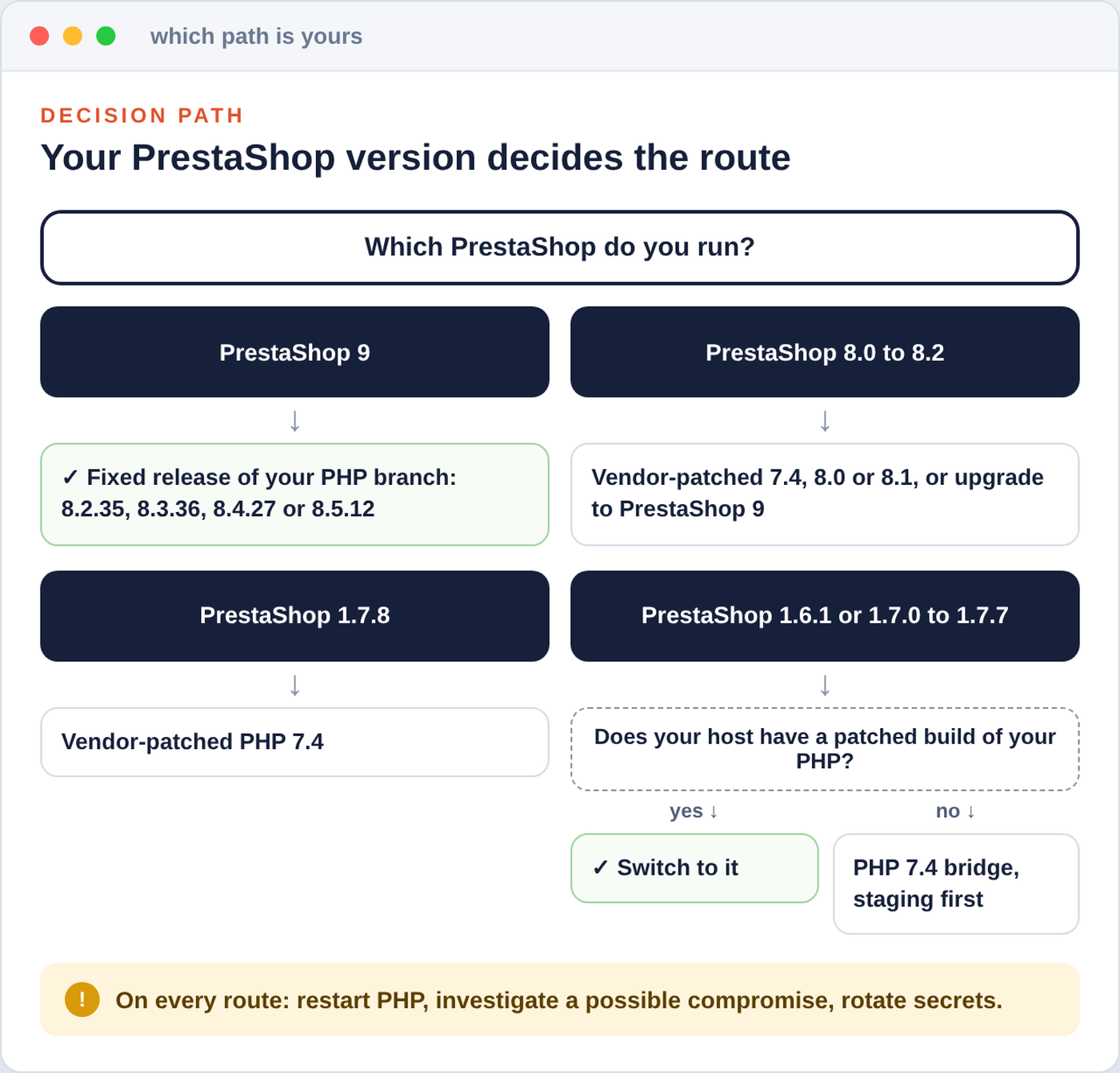
Whatever your version, the first choice is the same: a fixed package for the PHP branch your shop already runs on. Changing to another PHP branch is a bigger step, and it always goes through a staging copy first, with your modules, overrides and checkout tested.
Ask your host before you plan any code work: the cheapest route is a patched build you already have.
PrestaShop 9
Update to the fixed release of your branch: 8.2.35, 8.3.36 or 8.4.27, or 8.5.12 on 9.1. Restart and confirm the version on the Information page. If your 9.0 shop still runs on PHP 8.1, moving to 8.2 or newer is a branch change: test it on staging first, or use a vendor-patched 8.1 for the meantime.
PrestaShop 8.0 to 8.2
Officially these support PHP 7.2 to 8.1, and none of those has a release from php.net. That leaves more vendor options than it seems: a patched 8.1 (cPanel's 8.1.34-5, CloudLinux's alt-php81, Ubuntu 22.04's php8.1 package, TuxCare), but also a patched 8.0 or 7.4 from the same vendors, all inside PrestaShop 8's official range. If no patched build is available anywhere for you, the lasting answer is an upgrade to PrestaShop 9. Until you have a fixed runtime, apply the temporary measures below.
PrestaShop 1.7.8
PHP 7.4 is its official ceiling, and patched 7.4 builds are relatively easy to find: cPanel 7.4.33-19, CloudLinux alt-php74, TuxCare, and distribution packages where your vendor has published them. If your shop is on an older PHP, moving it to a patched 7.4 stays within 1.7.8's official range. Test it on staging anyway.
PrestaShop 1.6.1.x and 1.7.0 to 1.7.7
These officially stop at PHP 7.1, 7.2 or 7.3. First, ask your host whether your current version has a patched build (see above). If it does, switch to it and the urgent part is done. If it does not, this is where our workaround comes in.
The workaround we use: a patched PHP 7.4 bridge
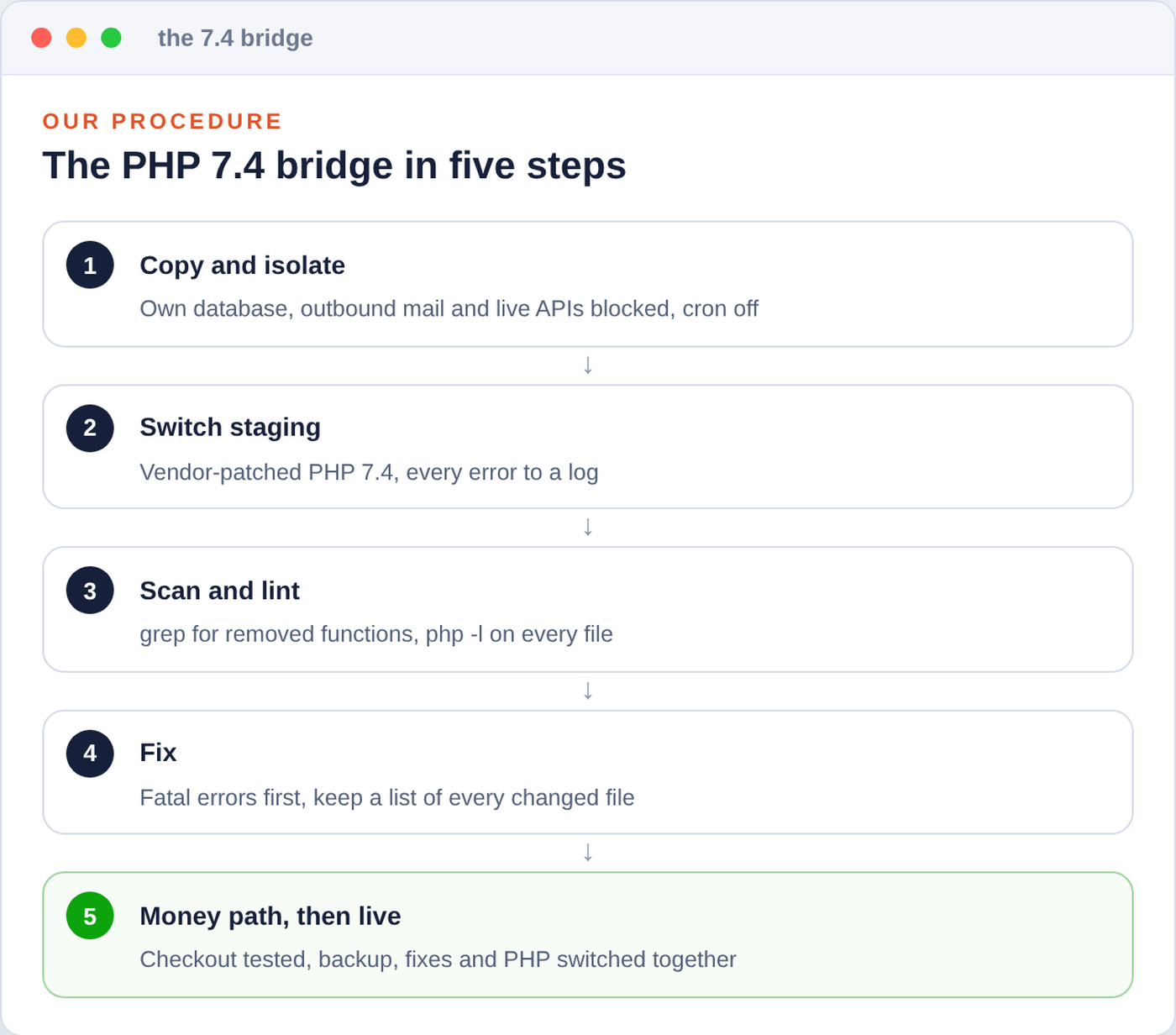
This is what we actually do for shops we look after that cannot be upgraded this month. The idea: run the shop on a PHP 7.4 that a vendor still patches, even though the shop's PrestaShop version officially stops below 7.4, and fix the pieces of code that do not cope. In our experience the PrestaShop 1.6.1 and 1.7 core mostly produces notices and deprecations on 7.4, not fatal errors. What really breaks is usually a handful of old modules and overrides. It is a workaround, and we say so plainly: you run outside PrestaShop's official support matrix for a while. But it closes the hole, and it keeps the shop selling while you plan the real upgrade.
A bridge, not a destination: it closes the hole and keeps the shop selling until the real upgrade.
A concrete example of why 7.4 works where PHP 8 would not: PrestaShop 1.6.1.23's own Cookie.php contains $this->_path{0}. On PHP 7.4 that curly-brace syntax is only deprecated; on PHP 8.0 it is a fatal error. That one line is the difference between a bridge that holds and a shop that does not load.
1. Build a staging copy and make it harmless
Copy the files and the database to a separate place, for example a subdomain with password protection. Then, before the copy answers a single request:
- Point it at its own database. The copied configuration still contains the live database's credentials (
config/settings.inc.phpon 1.6,app/config/parameters.phpon 1.7). Change them to the staging database, ideally with a database user that has no access to production. Everything below assumes you did this first. - Cut its ways out. Before the copy answers its first request or runs any job, block outgoing mail and connections to your live services (payment, carrier and marketplace APIs) at server level, independently of PrestaShop, and allow only the sandbox services you want to test. PrestaShop settings alone are not enough: some modules send mail or talk to marketplaces through their own connections. Then disable the copied cron jobs and switch every payment module to test or sandbox mode.
- Keep visitors and search engines out with password protection on the web server.
Then, in the staging database only:
-- STAGING DATABASE ONLY. Replace ps_ with your table prefix.
-- 1. PrestaShop itself never sends email from this copy
UPDATE ps_configuration SET value = '3' WHERE name = 'PS_MAIL_METHOD';

-- 2. Point the copy at its own address (single shop, installed at the domain root)
SELECT id_shop_url, id_shop, domain, domain_ssl, physical_uri FROM ps_shop_url;
UPDATE ps_shop_url
SET domain = 'staging.example-shop.com', domain_ssl = 'staging.example-shop.com', physical_uri = '/'
WHERE id_shop_url = 1;
UPDATE ps_configuration SET value = 'staging.example-shop.com'
WHERE name IN ('PS_SHOP_DOMAIN', 'PS_SHOP_DOMAIN_SSL');
On a multistore installation, map each shop URL separately instead of using the single-shop example.
2. Switch the copy to the patched 7.4 and collect every error
Select the patched PHP 7.4 for the staging site in your hosting panel. Set error_reporting to E_ALL, log errors to a file and keep them off the screen. Check that the log really receives entries, then rank what breaks, most frequent first:
# Rank PHP errors on staging, most frequent first (standard PHP log format)
grep -E 'PHP (Fatal error|Parse error|Recoverable fatal error|Warning|Notice|Deprecated):' /path/to/php-error.log \
  | sed -E 's/^\[[^]]*\] //' | sort | uniq -c | sort -rn | head -40
3. Scan the code that usually breaks
Before clicking through the shop, a quick static scan of modules, overrides and the theme points at the usual suspects. It is a partial checklist: it misses indirect calls, calls split over several lines and some curly-brace offsets, so an empty result does not prove compatibility. Review every hit.
# Functions that PHP 7.x removed or deprecated
grep -rnE --include='*.php' \
  '\beach\s*\(|create_function\s*\(|get_magic_quotes_(gpc|runtime)\s*\(|\bmysql_[a-z_]+\s*\(|\beregi?(_replace)?\s*\(|\bsplit\s*\(|mcrypt_[a-z_]+\s*\(' \
  modules override themes

# preg_replace calls: check each one for the removed /e modifier
grep -rnE --include='*.php' '\bpreg_replace\s*\(' modules override themes

# String offsets with curly braces ($str{0}), deprecated in PHP 7.4
grep -rnE --include='*.php' '\$[A-Za-z_][A-Za-z0-9_]*\{[^}$]*\}' modules override themes

# Syntax check of every PHP file with the target PHP binary, from the staging root
# (its name varies: php7.4, php74, /opt/cpanel/ea-php74/root/usr/bin/php ...)
find . -type f -name '*.php' -exec php7.4 -l {} \; | grep -v '^No syntax errors'
A clean syntax check only proves the files parse. It says nothing about missing extensions or how checkout behaves, which is what step 5 is for.
4. Fix what breaks, smallest change first
These are the breakages we meet most often when an old shop moves to PHP 7.4, and the fix for each:
| Code | Changed in | What you see | Fix |
|---|---|---|---|
mysql_*, ereg*, split() | removed in 7.0 | Fatal error: call to undefined function | PrestaShop's Db class, preg_* functions, keeping the behaviour identical |
preg_replace with the /e modifier | removed in 7.0 | A warning, and the function returns null, so text silently goes missing | preg_replace_callback with the same logic |
mcrypt_* | removed in 7.2 (still available as a separate extension) | Fatal error: call to undefined function | See the note on encryption below |
each() | deprecated in 7.2 | "The each() function is deprecated" | foreach |
create_function() | deprecated in 7.2 | "Function create_function() is deprecated"; the callback still runs on 7.4 | An anonymous function with identical behaviour |
count() on null or a string | warning since 7.2 | "count(): Parameter must be an array or an object that implements Countable" | Check the type first (is_countable() on 7.3 and newer). The result itself did not change: null still counts as 0 and a string as 1 |
continue inside switch | warning since 7.3 | "continue" targeting switch is equivalent to "break" | continue 2 or break, whichever the author meant |
$str{0} | deprecated in 7.4 | "Array and string offset access syntax with curly braces is deprecated" | $str[0] |
| Array access on null or false | notice since 7.4 | "Trying to access array offset on value of type null" (or "bool" for false) | isset() or a default value |
get_magic_quotes_gpc() | deprecated in 7.4 | "Function get_magic_quotes_gpc() is deprecated" | Remove the call: it has always returned false since PHP 5.4 |
implode($pieces, $glue) | deprecated in 7.4 | "implode(): Passing glue string after array is deprecated. Swap the parameters" | implode($glue, $pieces) |
| Nested ternary without brackets | deprecated in 7.4 | "Unparenthesized `a ? b : c ? d : e` is deprecated" | Add brackets |
Fix fatal errors first, then warnings on the checkout path, then the rest. Notices and deprecations are not harmless just because visitors never see them: a module's own error handler can turn them into exceptions, and a flood of them can fill the disk. Where a module has an update from its author, prefer the update to a patch of your own, and keep a written list of every file you change: you need it for the live switch and again at the real upgrade. While you are in the configuration, remove php_value and php_flag lines in .htaccess for settings PHP no longer knows. The PHP advisory specifically asks for invalid or deprecated per-request settings to go.
A note on encryption
PrestaShop 1.6.1.23 encrypts its cookies with OpenSSL when it is available, but the code that signs them still reads the mcrypt constant MCRYPT_RIJNDAEL_128. Without mcrypt, PHP 7.4 warns on every request and uses a different value, so everybody's cookies stop matching (and on PHP 8 it is a fatal error). The fix that keeps existing cookies valid is to define the constant with the value mcrypt used, in a file PrestaShop 1.6 loads early on its own:
Older 1.6 releases and some modules call mcrypt functions directly. Those need the separate mcrypt extension for 7.4 or a rewrite, and data already encrypted with mcrypt has to stay readable afterwards: OpenSSL is not a drop-in swap for existing encrypted values.
<?php
// config/defines_custom.inc.php (PrestaShop 1.6 includes this file automatically)
// PHP 7.2+ ships without mcrypt, but the 1.6.1 cookie signature still reads this
// constant. Same value as the mcrypt extension defined, so existing cookies stay valid.
if (!defined('MCRYPT_RIJNDAEL_128')) {
    define('MCRYPT_RIJNDAEL_128', 'rijndael-128');
}
This is the code in question, unchanged from PrestaShop 1.6.1.23 (classes/Rijndael.php):
// PrestaShop 1.6.1.23, classes/Rijndael.php
protected function generateHmac($encrypted)
{
    $macKey = $this->generateKeygenS2k('sha256', $this->_key, $this->_iv, 32);
    return hash_hmac(
        'sha256',
        $this->_iv . MCRYPT_RIJNDAEL_128 . $encrypted,
        $macKey
    );
}
5. Walk the money path, then switch with the fixes
On staging, go through everything that earns money or creates work: home page, category pages with filters, search, product pages with combinations, cart, checkout with every carrier and every payment method in test mode, order confirmation, the back office order page, invoice and delivery slip PDFs, every module's configuration page, imports and the cron URLs.
When the log stays quiet, plan the live switch in a quiet hour:
- Take a backup you have actually restored once, files and database.
- Deploy the tested code fixes and switch PHP together. The fixes live on staging until you copy them across. Never copy the staging database over the live one.
- Check checkout immediately, then watch the error log for 48 hours.
- If you must roll back to the old, unpatched PHP, restrict access to the shop while you do, and keep it restricted until a fixed runtime is back.
A bridge has two ends
Vendor coverage for old PHP versions differs, and so do the terms. Get written confirmation of what your vendor covers and how changes are announced, and set your own date for the real upgrade. The list of files you changed for the bridge is the first input for that project. Our article on migrating from PrestaShop 1.6 to 8 or 9 covers what comes next.
Until you are patched: temporary measures
The PHP project published measures that reduce exposure to specific attack paths. In its own words, they do not make an installation safe, and only an update is a complete fix. They do not buy a safe waiting period either. They are worth applying for the hours or days until a fixed PHP runs under your shop. Here is how they translate to a PrestaShop shop.
PHP settings
These must be set in php.ini, in the PHP-FPM pool or in the server configuration, not in .user.ini and not with ini_set(). Then restart every PHP worker.
; Temporary PHP2Shell measures in php.ini (restart PHP afterwards)
; PrestaShop's core does not use upload progress tracking, so this is safe to switch off
session.upload_progress.enabled = 0
; Smaller request bodies. Example values: use your shop's real needs,
; and never raise a lower limit you already have
post_max_size = 32M
upload_max_filesize = 24M
max_file_uploads = 10

; In a PHP-FPM pool file (for example /etc/php/7.4/fpm/pool.d/shop.conf) the same
; settings look like this; remove the leading semicolons to activate them:
; php_admin_flag[session.upload_progress.enabled] = off
; php_admin_value[post_max_size] = 32M
; php_admin_value[upload_max_filesize] = 24M
Test the uploads your team really uses after changing the limits: a large module archive or a big product image can exceed them. The official list also suggests memory_limit = -1 against the out-of-memory flaw, enforced so that no application setting can bring back a limit. That lets a single request use all of the server's memory, so it is only for administrators who can put a container or cgroup memory limit around PHP and know what happens when it is hit. It does not close the flaw completely, and the advisory warns against using RLIMIT_AS or RLIMIT_DATA instead. On shared hosting, leave it to your host. On PHP 8.5, the advisory also lists fatal_error_backtraces = 0.
Refuse uploads where the shop does not need them
The known exploit arrives as a multipart/form-data request, the format browsers use for file uploads. Most of a PrestaShop shop's front office never needs it. Blocking it outside the back office cuts that known path. What stops working: file attachments in the contact form, file fields in product customisation, and any module that lets customers upload files. For most shops that is an acceptable trade for a few days.
One condition first: the exception for the back office only makes sense if the back office is locked to your own IP addresses at the web server, so that requests from anywhere else never reach PHP. A PrestaShop login page cannot protect against a flaw that fires before PrestaShop runs. Our article on back-office security has ready-made allow lists for Apache and nginx. If you cannot lock the back office, leave the exception out and pause back-office uploads for a few days too.
On Apache, put this at the very top of the shop's .htaccess, above the line # ~~start~~, so PrestaShop keeps it when it regenerates the file. Replace admin-folder-name with your back-office folder:
# Temporary PHP2Shell measure: refuse multipart requests outside the back office.
# Remove after patching.
<IfModule mod_rewrite.c>
RewriteEngine On
RewriteCond %{HTTP:Content-Type} multipart/form-data [NC]
RewriteCond %{REQUEST_URI} !^/admin-folder-name/
RewriteRule ^ - [F]
</IfModule>
The rule only works where mod_rewrite is active and .htaccess files are allowed to use it, so test it: a harmless upload to the contact form should now get a 403 error page, and that error page must not itself be a PHP script.
On nginx, in the shop's server block:
# Temporary PHP2Shell measure: refuse multipart requests outside the back office.
set $block_multipart 0;
if ($http_content_type ~* "multipart/form-data") { set $block_multipart 1; }
if ($uri ~ "^/admin-folder-name/") { set $block_multipart 0; }
if ($block_multipart) { return 403; }
Use $uri, the normalised path, as above. The raw $request_uri could be tricked with a path like /admin-folder-name/../index.php.
The edge in front of your shop
- Cloudflare deployed WAF rules for the known exploit vectors, for free plans too. They only help if all traffic to your shop really passes through Cloudflare and nobody can reach your server directly, and on paid plans you should confirm the managed rules are set to block. Attackers were reported probing ways around the rules.
- Imunify360, common on shared hosting, released rules that block the public exploit tool and variants of CVE-2026-109619. According to CloudLinux, its rules do not yet cover CVE-2026-109618. Other firewalls have their own, different coverage.
- Maintenance mode does not help. PrestaShop decides to show the maintenance page after PHP has already processed the request. If your host cannot patch soon, ask whether it can stop untrusted requests from reaching PHP at all.
After patching: investigate a possible compromise
Attempts were seen before the disclosure, and the memory-disclosure flaw can leak secrets without leaving a trace in your shop. If your shop ran an unpatched PHP on the internet after mid-October, spend an hour on these checks. They find common traces; a clean result cannot prove that nothing happened.
# Executable files in folders that should hold images and uploads.
# PrestaShop ships an index.php in nearly every folder: compare those with a clean copy too.
find img upload download -type f \( -iname '*.php' -o -iname '*.phtml' -o -iname '*.phar' \)

# Files changed since the first exploitation attempts (17 October 2026), caches included.
# Leads only: timestamps can be faked. Read the whole list.
find . -type f -newermt '2026-10-17 00:00:00 UTC'
-- Back-office accounts, newest first. Anything you do not recognise?
SELECT id_employee, firstname, lastname, email, active, last_connection_date
FROM ps_employee
ORDER BY id_employee DESC;The surest comparison is against a clean copy of your PrestaShop release, your modules and a backup from before 17 October, JavaScript files included, since injected payment skimmers live there. If you find something, preserve the evidence and contain it before you change any password, or the new credentials leak the same way.
Then rotate the secrets a memory leak could have exposed, from a device you trust: every back-office password, API keys of payment, carrier and marketplace modules, webservice keys and SMTP passwords. For the database password, change it on the database server and in the shop's configuration at the same moment (config/settings.inc.php on 1.6, app/config/parameters.php on 1.7 and newer), plus anything else that connects with it, or the shop goes down.
Do not rotate the cookie key by reflex
PrestaShop's _COOKIE_KEY_ looks like an obvious secret to change. On PrestaShop 1.6 it is part of every customer's and employee's password hash, and on 1.7 and newer it is still needed for older password hashes that have not been upgraded since a migration (modern bcrypt hashes do not use it). Changing it locks those accounts out and logs everyone off. Change it only with a recovery plan for staff and customer passwords.
Want a second pair of eyes?
Our free, open-source Security Scan looks for common traces of an attack, including stray PHP files in asset folders and exposed configuration, and gives you a prioritised report. If you want the whole thing reviewed, the PrestaShop Security Audit & Hardening Report is a done-for-you check by our team. And if your shop needs the 7.4 bridge or a vendor-patched PHP set up and watched, that is everyday work in our PrestaShop Store Care & Maintenance Plan. Our own modules are written for PHP 7.1 and newer, so a patched 7.4 or 8.x does not leave them behind; as with any module, check each one's requirements against the PHP and PrestaShop versions you choose.
Frequently asked questions
Is PrestaShop itself vulnerable?
The flaws are in PHP, not in PrestaShop. Every PrestaShop version is exposed if the PHP under it is unpatched, and no PrestaShop update can fix that. Only a fixed PHP build, from php.net or from a vendor, does.
My host says I am on PHP 7.1. Am I vulnerable?
It depends on whose build it is. Some hosting vendors, CloudLinux among them, patched even PHP 5 and 7 builds. Others did not. The version number stays the same either way, so ask your host for the package version and confirmation that it contains the fix for both CVEs.
Will Cloudflare or a firewall protect me?
Partly. Edge rules block the known exploit patterns and buy time, but only for traffic that actually passes through them, attackers adapt, and coverage differs between vendors and between the two flaws. Treat them as a speed bump while you patch.
Should I take my shop offline?
Some government agencies advised taking systems offline when they cannot be fixed. For a shop, the order we follow is: ask your host for a patched build today, apply the temporary measures and the upload block, and get a fixed PHP under the shop as fast as possible. If none of that is possible soon, restricting public access is the remaining option. PrestaShop's maintenance mode does not count, because PHP processes the request before PrestaShop shows the maintenance page.
Will moving from PHP 7.1 to 7.4 break my modules?
Usually a few of them need small fixes, very often the patterns listed above. That is exactly why you do it on a staging copy first, with errors logged, before the live shop switches.
Is the PHP 7.4 bridge a permanent solution?
No. It closes this hole and keeps the shop selling, but you run outside PrestaShop's official support matrix and depend on your vendor's continued coverage for 7.4. Use the time to plan the upgrade to a current PrestaShop and PHP.
Do I need to change passwords?
If your shop ran an unpatched PHP on the internet after mid-October, yes: back-office passwords, the database password and API keys, after checking for signs of compromise. Leave the cookie key alone unless you have a recovery plan for passwords.
Sources
- PHP project: security advisory and release announcements, with the advisories GHSA-w8hw-w9fx-j79w and GHSA-6wmf-4rv5-p3rp
- PrestaShop: 1.6 and 1.7, 8 and 9 system requirements
- CloudLinux: PHP2Shell coverage and package status
- Sansec: PHP2Shell research for e-commerce


