

LinkedIn Integration: setup and help
Quick start
- Upload and install mprlinkedinintegration, then click Configure.
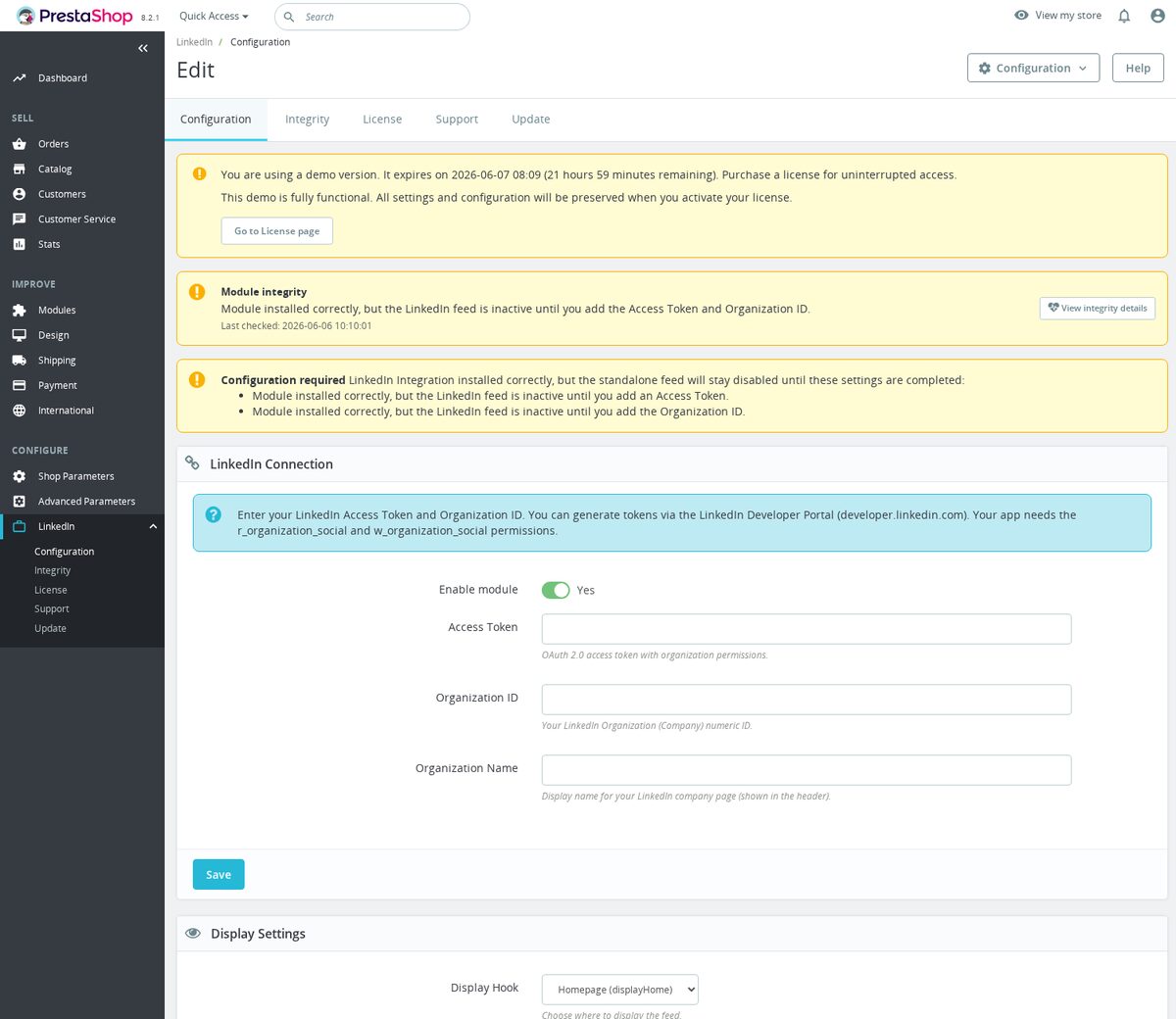
- Enter Access Token, Organization ID, and Organization Name in LinkedIn Connection.
- Keep Enable module on and choose Display Hook.
- Set Layout Mode to Grid, List, or Slider and leave Lazy Load Images enabled, then save.
- Open the selected storefront position. Saving the settings clears the feed cache.
- Check post text, images, follow link, and mobile output.
- If needed, publish one Blog Revolution test article manually before enabling Enable Auto-Publish.
Requires PrestaShop 1.6.0.0 or later and PHP 7.1 or later.
Setup manual
Install and connect LinkedIn
Upload and install mprlinkedinintegration in Modules > Module Manager, then click Configure. Use the equivalent module upload screen on older PrestaShop versions. The module provides Configuration, Integrity, License, Support, and Update pages.
Requires PrestaShop 1.6.0.0 or later and PHP 7.1 or later.
In LinkedIn Connection, enter Access Token and Organization ID. The ID must contain 1 to 20 digits and cannot start with zero. Enter Organization Name if you want a specific display name. Save and check the connection result. A configured token and ID are required before the standalone feed can render.
This module reads LinkedIn organization pages, not personal-profile feeds. Its connection help specifies organization social read and write permissions, r_organization_social and w_organization_social. Obtain credentials with access to the intended organization. The module does not provide a pasted-widget-code mode or a complete token-issuance workflow.
Connection and display settings
| Setting | Default | What it does |
|---|---|---|
| Enable module | Yes | Enables the standalone feed, subject to credentials and takeover state. |
| Access Token | Empty | OAuth token used for organization feed and publishing requests. |
| Organization ID | Empty | Numeric destination organization. |
| Organization Name | Empty | Name used in the header and author area. |
| Display Hook | displayHome | Selects the storefront position. |
| Section Title | Follow us on LinkedIn | Heading above the feed. |
| Show Follow Button | Yes | Shows the link to the organization page. |
| Follow Button Text | Follow | Text used before the organization name. |
| Show on Mobile | Yes | Allows the feed for mobile visitors. |
Supported placement hooks are displayHome, displayFooterBefore, displayFooter, displayLeftColumn, and displayRightColumn. The theme must render the selected hook. The follow link uses https://www.linkedin.com/company/{ORGANIZATION_ID}.
Layout, metadata, and advanced settings
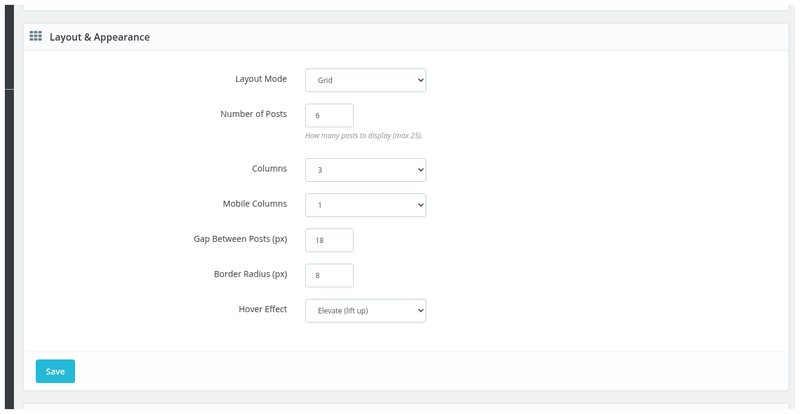
Layout
| Setting | Default | When to change it |
|---|---|---|
| Layout Mode | Grid | Choose Grid, List, or Slider. Slider includes navigation arrows and optional automatic scrolling. |
| Number of Posts | 6 | Sets the requested display count. Actual output depends on returned public posts. |
| Columns | 3 | Desktop column count. |
| Mobile Columns | 1 | Mobile column count. |
| Gap Between Posts (px) | 16 | Card spacing. |
| Border Radius (px) | 8 | Card corners. |
| Hover Effect | Elevate | Select Elevate, Glow, Border, or None. |
Post metadata
| Setting | Default | Use |
|---|---|---|
| Show post text | Yes | Show commentary. |
| Max text length | 300 | Truncate commentary. Use 0 for no limit. |
| Show media/images | Yes | Show usable media thumbnail URLs returned by LinkedIn. |
| Show date | Yes | Display the post date or relative time. |
| Show reactions count | Yes | Display returned reaction counts. |
| Show comments count | Yes | Display returned comment counts. |
| Show author | Yes | Show the organization author area. |
The stored THEME value defaults to light and is passed as a markup data attribute. The current form does not expose a separate Theme picker; do not expect a configuration control for every stored key.
Advanced
| Setting | Default | Use |
|---|---|---|
| Auto-Scroll (Slider) | No | Automatically advances posts in Slider mode and adds a pause/resume button. |
| Scroll Speed | 5000 | Interval between automatic slide advances in milliseconds, with a minimum of 2000. |
| Cache Duration | 3600 seconds | Feed cache lifetime before a new API fetch. |
| Lazy Load Images | Yes | Uses native browser lazy loading with a normal image src. Disable for eager loading. |
Slider navigation and automatic scrolling use the bundled JavaScript. Automatic scrolling pauses on hover, keyboard focus, touch interaction, and hidden tabs, and stays off when reduced motion is requested.
The cache file is /modules/mprlinkedinintegration/mprlinkedin_feed_cache.json. The web process needs permission to write in that module directory. Save the feed configuration to clear the cache when you need an immediate refresh. Otherwise, the next uncached or expired-cache request fetches posts.
Publish Blog Revolution posts
Publishing is implemented for MPR Blog Revolution posts. It is not a product publisher.
The Blog Posts panel lists recent Blog Revolution entries and offers manual publishing when the token, organization, and publishing policy allow it. Select a test article, review its title and caption template, then use its publish action when you intend to create a real LinkedIn post.
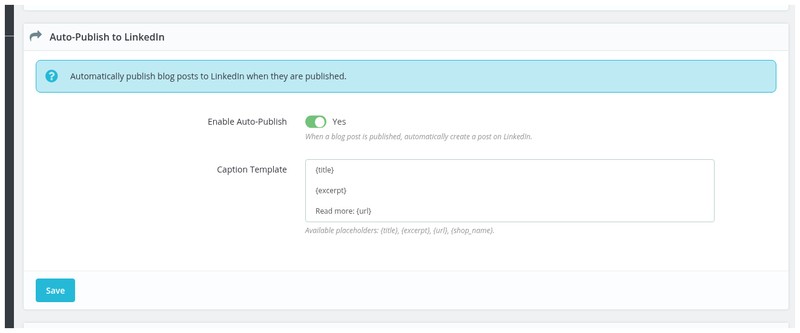
Enable Auto-Publish defaults to No. Enable it only after verifying manual publishing. The lifecycle hooks can publish eligible Blog Revolution posts when saved with published status. Published-history checks prevent the module from deliberately publishing the same source again for the tracked destination. An uncertain remote result needs inspection before retrying.
Caption Template defaults to:
{title}

{excerpt}

Read more: {url}
Supported template values include {title}, {excerpt}, {url}, and {shop_name}. For example:
{title}

{excerpt}

Read the full article: {url}

{shop_name}
The standalone feed and automatic publishing step aside when Social Revolution's LINKEDIN_ACTIVE takeover flag is enabled. Manage that platform in the owning module and verify the actual takeover state, rather than assuming installation alone activates it.
Publishing also checks employee write access and shared outbound-write policy. Development/staging hosts can be blocked. An older social publishing package loaded by another module can block writes; update the participating social modules together.
Verify the feed and publishing
- Save valid credentials, choose a layout, and leave Lazy Load Images enabled for the initial test.
- Open the configured storefront hook and check title, cards, text, and image loading.
- Click a post and the follow link; they should open LinkedIn destinations.
- Check desktop and mobile output.
- If publishing is required, publish one controlled Blog Revolution article and confirm the actual LinkedIn post and stored published state.
- Enable Auto-Publish only after that test, then verify one newly published article.
Visitors read feed cards in your store. Likes and comments are handled on LinkedIn, not inside the store. Media may be absent when the API returns internal URNs without usable thumbnail URLs.
Customize and troubleshoot
Theme template paths are:
themes/your-theme/modules/mprlinkedinintegration/views/templates/hook/feed.tpl
themes/your-theme/modules/mprlinkedinintegration/views/templates/hook/post_item.tpl
Use .mprli-section, .mprli-title, .mprli-follow-btn, and .mprli-item for theme CSS. For example:
.mprli-follow-btn {
  background: #0a66c2;
  border-radius: 4px;
}
If no feed appears, check enabled state, Organization ID validation, token, organization permissions, takeover flag, hook, cache, and whether the API returned public posts. The feed and publisher use the same API version from the shared social publishing package, currently LinkedIn-Version: 202601. If LinkedIn rejects an API version, update the module and participating social modules; there is no API-version setting.
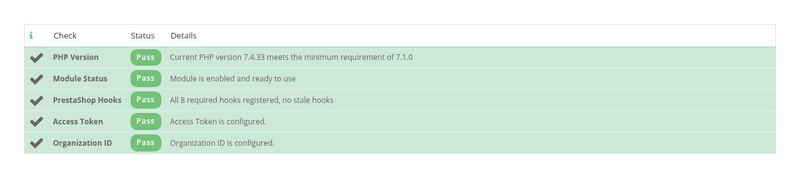
If media is blank, check Show media/images and inspect the returned URL. If slider controls do nothing, check that the module JavaScript and stylesheet load through displayHeader and that theme overrides preserve the slider markup. If publishing is unavailable, check Blog Revolution data, employee edit permission, credential validity, outbound policy, and shared package compatibility. Use Integrity for module infrastructure checks.
Uninstall
Record your settings and publishing history before uninstalling. Uninstall removes the module menu, configuration, and feed cache and invokes schema cleanup. The shared publisher tables are marked shared and are not dropped by that schema cleanup. Remote LinkedIn posts are not deleted by uninstalling this module.
Screenshots



Questions
No questions about this module yet
Ask anything about installation, compatibility or setup. Answers appear here.
Known Issues
4
Module could not load on PHP 7.1
Connection credential could not be saved from setup
Administration labels stayed in English
Setup status stayed out of date
Feature Requests
3
Implemented
LinkedIn company feed
Automatic LinkedIn publishing
One-click updates
Changelog
v1.1.02026-10-05
- Addedadmin menu management via MenuInstaller for streamlined module setup
- AddedLicense management tab with key management and renewal options
- Addedself-healing integrity checks for automatic diagnostics and repair
- Addedcomplete FR/DE/ES/IT/PL translations
Older releases
v1.0.132026-08-13
- Addedcomplete FR/DE/ES/IT/PL translations
- FixedRender install integrity in linkedin integration
Demo
Test the full module
- Ready demo shop Explore a ready demo shop in your browser.
- No registration No account, email or store domain needed.
By opening this demo you accept the demo terms and the privacy policy.