

The SEO work PrestaShop will not do for you
Complete technical SEO guide for PrestaShop: friendly URLs, canonical tags, hreflang, structured data, XML sitemaps, and Core Web Vitals optimization.
What actually moves PrestaShop SEO (and what doesn't)
We've watched client shops lose 40% of their organic traffic overnight from a single misconfigured canonical, and we've watched others double their indexed pages after an afternoon spent fixing duplicate slugs. After running and rescuing SEO on dozens of PrestaShop shops since 2013, the pattern is the same: it isn't keyword density or "more content". It's URLs, canonicals, structured data, and crawl waste. Get those right and you stop fighting your own site for visibility. Get them wrong and no amount of blog posts will save the shop.
This page is the reference we run through ourselves when we audit a new client. It covers the exact setting paths, the database tables we query, and the patterns we ship in our own SEO modules, Smart SEO Revolution Suite, Advanced SEO Sitemap Builder, Automatic SEO Schema Rich Snippets, Smart SEO Friendly URL Manager, so you can build the same checks into your own workflow whether or not you use them.
A 10,000-product shop with clean URLs and proper canonicals will outrank a 50,000-product competitor with messy ones. We've seen this play out on real shops. The technical layer is the ceiling. Content is the work you do under it.
URL structure and friendly URLs
SEO & URLs settings in PrestaShop 8 Back Office.
Friendly URLs, URL schema for products/categories/CMS, and the route configuration all live on this page.
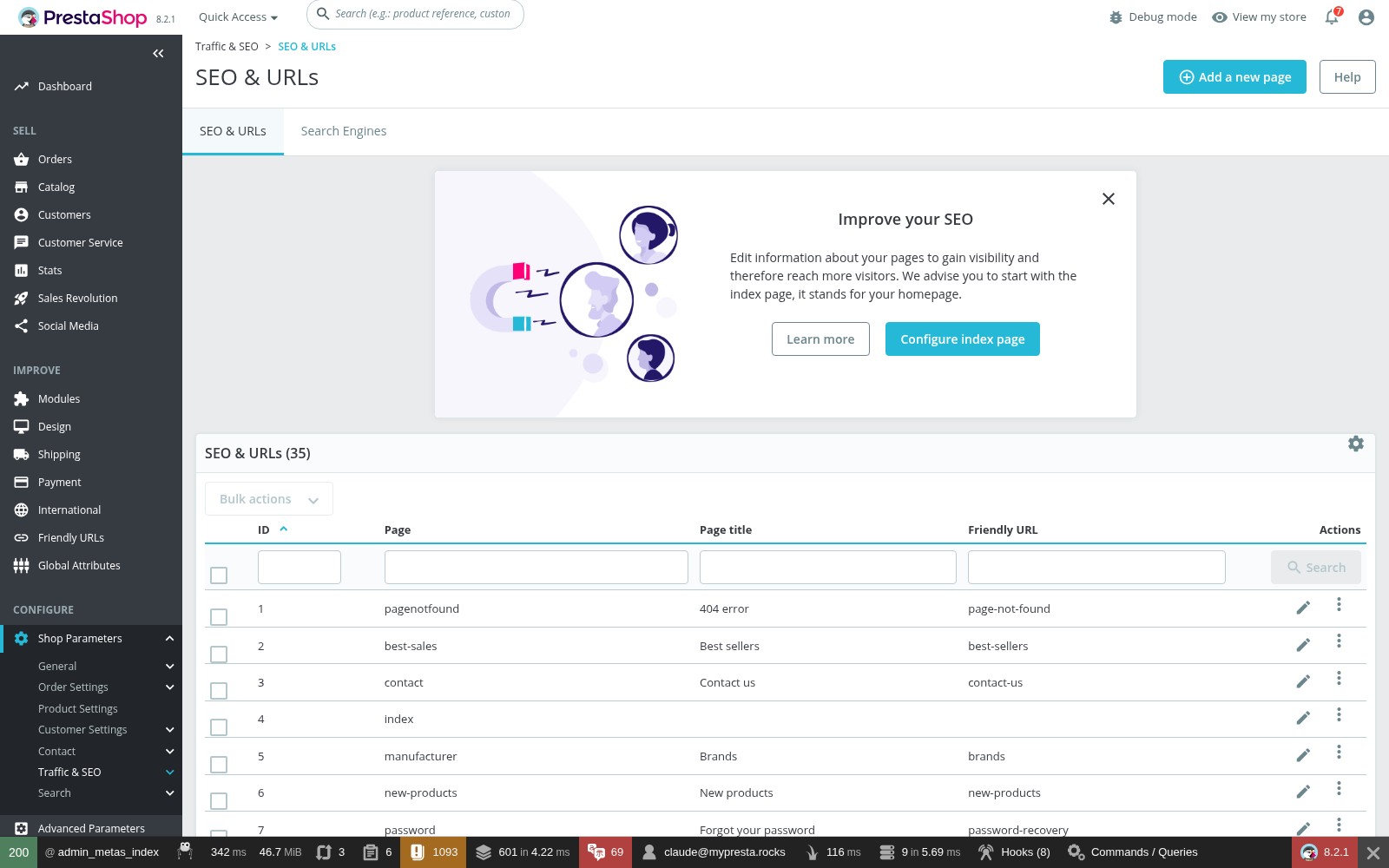
Shop Parameters → Traffic & SEO → SEO & URLs, switch Friendly URL on. That's step zero. It turns index.php?id_product=42 into /mens-leather-wallet-42.html. On Apache, PrestaShop writes .htaccess for you. On Nginx (what our hosting clients mostly run) you write the rewrites yourself.
After enabling, hit Generate .htaccess file. If the shop lives in a subdirectory, double-check RewriteBase. We've debugged enough "friendly URLs return 404" tickets that the answer is almost always one of those two things.
Removing IDs from URLs (PS 8+)
In Shop Parameters → Traffic & SEO, find Route to products and Route to categories:
# Default (with ID)
{category:/}{id}-{rewrite}.html

# Clean URL (no ID): PS 8+
{category:/}{rewrite}.html
Cleaner, yes. Riskier, also yes. PrestaShop resolves clean URLs via ps_product_lang.link_rewrite. Two products with the same slug? First match wins, the other product becomes unreachable.
Before flipping this switch, run this against the shop's database:SELECT link_rewrite, id_lang, COUNT(*) as cnt FROM ps_product_lang GROUP BY link_rewrite, id_lang HAVING cnt > 1;
Fix every duplicate before you ship the change. Otherwise live products disappear from the catalogue and you find out from a customer complaint.
For shops that don't want to police every slug and redirect by hand, Smart SEO Friendly URL Manager handles the URL layer end to end. The strategic background (why canonicals matter, how PrestaShop generates duplicates) is in PrestaShop URL Structure: Clean URLs, Canonicals and Avoiding Duplicate Content.
URL rules we enforce on every shop
- Trailing slashes: categories end with
/, products with.html. Pick one pattern per type and 301 the other. If both/shoesand/shoes/return 200, Google sees two pages. - Keep slugs short: 3–5 words.
/mens-leather-wallet.htmlbeats/mens-genuine-italian-leather-bifold-wallet-brown.html, both for ranking and for shareability. - Hyphens, not underscores: Google treats hyphens as word separators. PrestaShop already does this, don't fight it.
- Never change live URLs without 301s. Use the SEO & URLs page to add redirects for any URL you change. We have seen shops nuke their rankings by mass-renaming product slugs without redirects.
Meta titles and descriptions
Product SEO tab in PrestaShop 8.
Meta title, meta description, friendly URL, redirection settings, and tags, all on one tab. This is where per-product SEO is configured, and where most merchants never look.

Every page in PrestaShop has its own meta title and description, stored per language in _lang tables:
# Products:    ps_product_lang  → meta_title, meta_description, link_rewrite
# Categories:  ps_category_lang → meta_title, meta_description, link_rewrite
# CMS pages:   ps_cms_lang      → meta_title, meta_description, link_rewrite
# Static pages: ps_meta_lang    → title, description, url_rewrite
If a product has no meta title, PrestaShop falls back to the product name. "Classic T-Shirt" becomes <title>Classic T-Shirt</title>, no brand, no shop name, no differentiator. That's the title competing in Google's results. Don't accept the default for any product you actually want ranked.
Title patterns that work
Google displays roughly 50–60 characters before truncation. Important words first, shop name last:
# Product:  Primary Keyword - Key Feature | Store Name
# Category: Category Name - Differentiator | Store Name
# CMS:      Page Topic - Store Name
Meta descriptions
Meta descriptions don't rank you. They affect click-through, which is what actually fills the basket. Google shows ~155 characters on desktop, ~120 on mobile. A call to action, a price hint, a free-shipping note. Any of those work. What doesn't work is the same generic description duplicated across 800 products.
If you can't write unique descriptions for a 10,000-product catalogue, leave them blank. Google generates a snippet from the page content, and it's almost always more relevant than boilerplate. Half-effort meta tags are worse than no meta tags.
Bulk updates via SQL
For large catalogues, templated meta titles via SQL save days. Join ps_product_lang against ps_category_lang on the default category, CONCAT() the product name with the category name, write the result back. Always run as SELECT first, always take a database backup before the UPDATE. We've broken catalogues with a stray WHERE clause more than once. Backups make it a 5-minute fix instead of a 5-hour one.
Canonical URLs
PrestaShop themes generate canonical tags from head.tpl. Products canonicalize to the base product URL, categories to the unfiltered base. That handles the obvious cases. What it doesn't handle:
- Pagination:
/wallets/?page=2and?page=3are indexable by default. Each paginated page should self-canonicalize.noindexthe deep ones if you don't want them ranking. - Sorting:
?order=product.price.asccreates a near-duplicate. Block in robots.txt or noindex. - Faceted navigation: the worst offender. Five filters with five values each is 3,000+ combinatorial URLs per category. Block them in robots.txt and noindex them. Belt and braces.
- Product in multiple categories: PrestaShop canonicalizes to the default category. This is correct, don't try to "fix" it.
Google killed rel="prev"/rel="next" in 2019. Anyone still telling you to use them is reading a 2018 article. Canonicals and noindex are the only tools for pagination now.
Multistore canonicals
Each store should canonicalize to its own domain. Cross-domain canonicals are only correct if one store is intentionally subordinate to another, which is rare. PrestaShop handles this correctly when stores have separate domains; use Product Canonical Manager when product-level exceptions need explicit control. See our multistore guide for the details.
Hreflang for multilingual shops
Without hreflang, Google picks one language version of your shop and suppresses the others. We've audited shops where the German version of the catalogue had zero impressions because the English version was outranking it for German queries. Hreflang fixed it in a single deploy.
<link rel="alternate" hreflang="en" href="https://shop.com/en/wallet.html">
<link rel="alternate" hreflang="fr" href="https://shop.com/fr/portefeuille.html">
<link rel="alternate" hreflang="x-default" href="https://shop.com/en/wallet.html">
Use language-country codes (en-GB, en-US) when you have region-specific pricing or content. Use language-only (en, fr) otherwise. Always include x-default as the fallback for everyone who isn't covered.
Where shops trip over hreflang
- Missing return tags. Page A points to B, B doesn't point back to A. Google silently ignores both. We see this every time we audit a multilingual shop that was set up by hand.
- Wrong codes.
en-UKdoesn't exist. It'sen-GB. ISO 639-1 for language, ISO 3166-1 Alpha 2 for country. - Hreflang on non-canonical URLs. If the page canonicalizes elsewhere, its hreflang is ignored. The two have to agree.
- Hreflang on noindex pages. Noindexed pages can't be hreflang targets. Pick one or the other.
One broken return tag invalidates the entire hreflang cluster for that page. Validate with TechnicalSEO.com's hreflang validator before you trust Search Console's "no errors" message, that lags by days.
For multistore with separate domains per language, the default theme only handles languages within one shop. Cross-domain hreflang means modifying head.tpl to query ps_shop_url and build per-shop URLs. Hreflang Tags Manager or our SEO suite handles this; if you're rolling your own, expect a half-day of careful work to get the bidirectional mapping right.
Structured data / Schema.org
Structured data is what gets you star ratings, price badges, and availability indicators in search results. PrestaShop themes ship basic Product schema, but it's usually incomplete, and incomplete schema is what Google flags as a quality signal against you.
Product schema
Google's minimum for a rich result: name, image, price, priceCurrency, availability. Miss any one of those and the rich result silently doesn't appear. Add sku, brand, and aggregateRating wherever you have them.
The schema lives in different files depending on theme: classic themes use templates/catalog/product.tpl or a partial like _partials/microdata/product-jsonld.tpl; Hummingbird (PS 8+/9) keeps it in templates/catalog/_partials/product-details.tpl. If you're inheriting a custom theme, grep the templates for application/ld+json and read what's actually being output.
BreadcrumbList and Organization
PrestaShop's breadcrumb module should emit BreadcrumbList JSON-LD automatically, confirm with Rich Results Test. Organization schema goes site-wide via a displayHeader hook: business name, logo URL, contact details, social profiles. Five minutes of work, visible in search results for every query on your brand.
FAQ schema and custom JSON-LD
CMS pages with question-and-answer content can use FAQPage schema for expanded snippets. For anything your theme doesn't cover, inject JSON-LD via displayHeader: detect the controller, build the schema array in PHP, output it with json_encode() inside a <script type="application/ld+json"> tag. If you're writing this as a module, our hooks guide explains where displayHeader belongs and how to keep the module upgrade-safe.
For shops that need Product, Offer, Breadcrumb, Organization, and FAQ schema without touching theme templates, Automatic SEO Schema Rich Snippets is the module we maintain for exactly this. Background reading: Google Rich Snippets for PrestaShop and Schema Markup for PrestaShop.
Always validate with Google's Rich Results Test. Half-implemented schema is worse than none. It tells Google your structured data is unreliable and they stop trusting it across the site.
XML sitemap
PrestaShop ships the Google Sitemap module (gsitemap). Configure it in Modules → Module Manager. Include products, categories, CMS pages. Skip suppliers unless they have a real customer-facing role. The module splits into multiple files for large catalogues and writes sitemap.xml in the root.
Set up a daily cron hitting modules/gsitemap/gsitemap-cron.php with its secure key. The sitemap going stale is one of the silent ways indexation degrades. Submit to Google Search Console and watch the coverage report. For multistore, each shop generates its own sitemap on its own domain automatically.
Big shops outgrow gsitemap fast. Once you need image URLs, language alternates, excluded entities, or regeneration that doesn't lock the database, you want Advanced SEO Sitemap Builder: the module we built after one too many client shops timed out generating sitemaps on cron. The wider strategy is in The Complete Guide to XML Sitemaps for PrestaShop SEO.
A sitemap is a suggestion, not a guarantee. Only put canonical, indexable URLs in it, URLs you actually want ranked. No disabled products, no filtered pages, no cart or checkout URLs. We've seen sitemaps with 80,000 entries where 60,000 were faceted nav. Google reads that as a low-quality shop.
Robots.txt
Generate it from Shop Parameters → Traffic & SEO → Robots file generation. The default blocks admin directories but misses the crawl-budget killers. Add these:
# Block shopping flow (no SEO value)
Disallow: /cart
Disallow: /order
Disallow: /my-account
Disallow: /search

# Block filtered/sorted duplicates (crawl budget killers)
Disallow: /*?order=
Disallow: /*?q=
Disallow: /*&order=
Disallow: /*&q=

Sitemap: https://your-domain.com/sitemap.xml
Blocking filter parameters stops Google crawling the combinatorial duplicate pages and frees the crawl budget for real products and categories. On a shop with 50 categories and faceted navigation, this alone can move tens of thousands of pointless URLs out of the crawl queue.
robots.txt blocks crawling, not indexing. If something external links to a blocked URL, Google can still index it without crawling. For real removal from the index, usenoindexmeta tags orX-Robots-Tagheaders. We've had to explain this to clients who blocked URLs in robots.txt and were furious they still showed up in Google.
Because robots.txt overlaps with .htaccess and server headers, review the PrestaShop security hardening guide before adding sweeping rules to production. One typo in a Disallow: line has taken whole sites out of the index.
Image SEO
Product images bring real traffic via Google Images, and on visually-led catalogues (fashion, home, jewellery) that can be 15–25% of total organic. PrestaShop auto-generates alt tags from the product name and rewrites filenames from link_rewrite. Tweak the alt template in Shop Parameters → Traffic & SEO: adding category or brand to the default pattern is the easiest SEO win in the back office.
Modern formats: PS 8+ supports WebP, PS 9 adds AVIF. Enable in Design → Image Settings, quality 80–85, regenerate thumbnails. Lazy loading: modern themes add loading="lazy" below the fold; Automatic SEO Images Lazy Tags is useful when theme coverage is uneven. Never lazy-load the main product image, that's your LCP element, and lazy-loading it tanks Core Web Vitals. Image sitemap: the gsitemap module can include images so Google finds them even if they're loaded via JavaScript.
For catalogues where writing alt text by hand isn't realistic, Automatic SEO Images Alt Tags keeps image metadata consistent. The performance side (compression, lazy loading, LCP) is in PrestaShop Image Optimization.
Core Web Vitals
CWV is a confirmed ranking factor. PrestaShop has a handful of patterns that fail it predictably, and they're the same patterns on every shop we audit.
CLS (Layout Shift): target under 0.1
The usual suspects: images without width/height attributes; web fonts causing FOUT (fix with font-display: swap plus preload); JS-loaded banners that push content down after first paint (set a CSS min-height); cookie consent bars injected into document flow instead of overlaid with fixed positioning.
LCP (Largest Contentful Paint): target under 2.5s
On product pages, LCP is almost always the main product image. Compress aggressively, serve WebP or AVIF, and preload with <link rel="preload" as="image" fetchpriority="high">. Never lazy-load it. If TTFB is over 1.5s, no frontend trick will save you. The bottleneck is the server. See our performance guide and Performance Revolution.
INP (Interaction to Next Paint): target under 200ms
Every module that hooks displayHeader or displayFooter ships JS that fights for the main thread. Third-party scripts (analytics, chat widgets, ad pixels) should load with defer/async or through a tag manager. If field INP is bad but lab INP is fine in PageSpeed Insights, the cause is third-party scripts firing on real user interactions. We see this constantly on shops with five different chat widgets installed.
Page speed for SEO
The full performance treatment is in our performance optimization guide. For SEO specifically, three things matter most.
CCC (Combine, Compress, Cache)
Enable all three in Advanced Parameters → Performance. CCC drops HTTP requests from 20–40 down to 3–5 for CSS and JS, which typically takes 1–2 seconds off first paint. Caveat: modules that inject raw <link> tags through displayHeader bypass CCC entirely. If CCC isn't helping your shop, audit those modules first.
Font loading
Self-host fonts (kills the DNS lookup to fonts.googleapis.com), font-display: swap, preload the primary body font with <link rel="preload" as="font" type="font/woff2" crossorigin>, and subset to drop unused character ranges. A typical PrestaShop shop loads 4–8 weights of one Google Font. Most need 2.
Module JS strategy
Modules should register JS with 'attributes' => 'defer' in their registerJavascript() calls. Deferred JS stays out of the CCC bundle by design but doesn't block rendering. If a module uses bottom position without defer, that's a flag. Open the file and add it, or report it to the developer.
Internal linking
Your category tree is your internal link architecture. Every category page is a potential ranking page for a keyword cluster. For automation across products, categories, CMS, and blog content, Automatic Internal SEO Linker is the module we built for this exact problem; the strategy behind it is in Internal Linking for E-Commerce.
Category hierarchy
Structure categories to match search intent: "Shoes" for the head term, "Mens Running Shoes" for the long tail. A flat category with 1,000 products wastes the opportunity to rank for dozens of specific terms. PrestaShop's category tree builds the linking hierarchy automatically through breadcrumbs and navigation. Design the tree, get the linking for free.
Breadcrumbs
Breadcrumbs on every page type. When a product sits in multiple categories, PrestaShop builds the breadcrumb from the default category, so set each product's default to its most specific relevant category. We've seen "Shoes → Product" breadcrumbs on shops that should have been "Shoes → Mens → Running → Trail → Product". Five times the internal linking, same effort.
Cross-selling
Accessories and related products create product-to-product internal links, they distribute link equity and they raise AOV. Configure in Catalog → Products → Associated products. And don't let CMS pages become orphans. Size guides, shipping policies, care instructions, link them from the relevant product descriptions, not just the footer.
Indexation control
Not every URL belongs in Google's index. Letting Google index thousands of filtered URLs dilutes crawl budget and trains the algorithm to see you as a low-signal shop.
Faceted navigation
One category with 5 colours, 8 sizes, and 4 price ranges generates 160 filtered URLs. Multiply across 100 categories and you have 16,000 near-duplicate pages. Three-layer defence:
- Block filter parameters in robots.txt (stops crawling).
- Add
noindexto filtered pages (stops indexing if crawled some other way). - Canonical filtered pages to the base category (consolidates ranking signals onto the page that should rank).
Exception: filter combinations that match real search queries ("black leather wallets", "size 10 running shoes") should be indexed with unique meta data. Pick the high-volume combinations manually and treat them as standalone landing pages. Block everything else.
Pagination strategy
- Self-referencing canonicals on every paginated page.
- Noindex deep pages. Pages 4+ rarely earn rankings. Keep them
followso Google still discovers the linked products. - More products per page. 48 instead of 12 reduces a 17-page paginated category to 5 pages, concentrating link equity on fewer URLs.
The mistakes we see on almost every audit
Duplicate home page
Home page accessible at /, /index.php, /en/, /en/index.php. Redirect index.php to the root:
RewriteCond %{THE_REQUEST} ^[A-Z]{3,9}\\ /index\\.php\\ HTTP/
RewriteRule ^index\\.php$ / [R=301,L]
WWW and HTTPS normalisation
Pick www or non-www. Pick HTTPS. 301 everything else to the canonical version in a single hop. PrestaShop's "Enable SSL" setting only affects link generation, it doesn't redirect HTTP traffic. You have to add server-level redirects in .htaccess. Order matters: force HTTPS first, then normalise www. Test with curl -I -L, every extra hop costs latency and bleeds link equity.
The rest of the list
- Category page 1 duplicates. Both
/shoes/and/shoes/?page=1return 200. 301?page=1to the base URL. - Copied supplier descriptions. If you imported them, so did 200 competitors. Write unique descriptions for at least your top 20% by revenue. The rest can wait.
- Empty categories. Active categories with zero products are thin content. Join
ps_categorywithCOUNTonps_category_product, find the empties, noindex or delete. - Missing meta titles. Query
ps_product_langfor emptymeta_title, those products run on the bare product name as their title tag.
If working through this checklist exposes redirect loops, mystery 404s, or white screens, switch to the PrestaShop troubleshooting guide before pushing more changes. SEO fixes on a broken shop are wasted work.
The audit checklist we actually run
Quarterly, or after any major change to the shop. Whatever boxes don't tick, fix in order, technical foundation first, then on-page, then schema, then crawlability.
Technical foundation
- Friendly URLs enabled, no
index.php?id_product=URLs in Google. - SSL enabled and forced, every HTTP request 301s to HTTPS.
- WWW normalisation, single-hop redirect, no chains.
- Robots.txt blocks admin, cart, checkout, search, filter parameters.
- XML sitemap generated, current, submitted to Search Console.
On-page
- Unique meta titles on every product and category, under 60 characters.
- Meta descriptions unique or intentionally blank, no boilerplate duplicates.
- One H1 per page, matching the page topic.
- All product images have descriptive alt text.
- Canonical tags present on every page, correct under pagination.
- Hreflang correct if multilingual: bidirectional, x-default present.
Structured data
- Product schema validates in Rich Results Test with name, image, price, availability.
- BreadcrumbList schema on product and category pages.
- Organization schema site-wide.
Crawlability
- Search Console Coverage report, no unexpected errors or excluded pages.
- Filtered URLs not exploding in Google's index.
- No empty categories indexed.
- No soft 404s (out-of-stock products returning 200 with empty content).
Performance
- Core Web Vitals passing in field data (Search Console → Core Web Vitals).
- No mobile usability errors.
- Product pages under 3s load time. Performance guide.
Tools we use
Google Search Console for indexation, CWV, and search performance. Screaming Frog for crawling (free up to 500 URLs, paid for anything bigger). PageSpeed Insights for lab and field CWV. Rich Results Test for schema. Ahrefs Webmaster Tools for free technical audit plus backlinks.
SEO isn't set-and-forget. Theme updates break schema. New modules add redirect chains. Bulk imports overwrite meta titles. A 30-minute quarterly walk through this list catches issues before they cost rankings, and we've yet to audit a shop where it took longer than that.
Related reading
Our SEO modules
- Smart SEO Revolution Suite: combined toolkit covering URLs, metadata, schema, sitemaps, automation.
- Smart SEO Friendly URL Manager: cleaner URL patterns with safe redirect handling.
- Advanced SEO Sitemap Builder: sitemap control for large or multilingual catalogues.
- Automatic SEO Schema Rich Snippets: Product, Offer, Breadcrumb, Organization, FAQ schema.
- Automatic SEO Images Alt Tags: consistent alt text where manual editing doesn't scale.
- Automatic Internal SEO Linker: contextual internal links across products, categories, CMS, blog.
- Performance Revolution: page speed and Core Web Vitals.
PrestaShop SEO articles
- PrestaShop URL Structure: Clean URLs, Canonicals and Avoiding Duplicate Content
- Google Rich Snippets for PrestaShop: How Schema Markup Drives More Clicks
- Schema Markup for PrestaShop: Getting Rich Results Without Coding
- The Complete Guide to XML Sitemaps for PrestaShop SEO
- PrestaShop Image Optimization: Alt Tags, Lazy Loading and Page Speed
- Internal Linking for E-Commerce: The SEO Strategy Most Stores Ignore
Technical guides
- PrestaShop Performance Optimization: caching, TTFB, frontend weight.
- PrestaShop Security Hardening: headers, server rules, module audits.
- PrestaShop Troubleshooting: white screens, 500s, redirect problems.
- PrestaShop Hooks Guide: safe extension points for schema and SEO-adjacent module behaviour.
- PrestaShop Hosting Guide: hosting choices that affect crawlability, TTFB, CWV.
Related questions
- Can I add hreflang and noindex rules to PrestaShop pages?
- Will hreflang tags fix my multilingual SEO problems?
- My SEO module shows "missing schema markup" in some tools. Is this a problem?
- Setting up 301 redirects in PrestaShop after a migration
- PrestaShop .htaccess redirects: writing rules without breaking your store
- What does the PrestaShop SEO Audit actually check?