

KSeF E-Invoicing: setup and help
Quick start
- Install the module ZIP, select one shop and leave the environment at KSeF TEST. Use fictitious orders and customer data for practice.
- Open the KSeF settings and create the TEST identity. For other credentials, use a token from the MF application or an authentication certificate for that environment.
- Check the connection, seller NIP and address. Choose the sending mode and start point, then review which PrestaShop order states issue invoices.
- Configure the module sending job to run every minute using the cron instructions shown by your installation. Confirm the health panel records its runs.
- Create a test order and let PrestaShop issue its invoice. Check the KSeF order block, acceptance, UPO download and native invoice PDF.
- If using offline modes, request or upload a separate Offline certificate and check that KOD II is ready. Enable purchase invoice receiving only when wanted and set its history start date.
- Review corrections, receiving and outage behaviour on synthetic data. Going to PRODUCTION is a separate deliberate confirmation with real production credentials, seller NIP and shop domain.
Setup manual
KSeF E-Invoicing connects PrestaShop invoices and credit slips to KSeF (Krajowy System e-Faktur). It keeps submission status and UPO, marks invoice PDFs and receives purchase invoices. The merchant remains responsible for invoice content; this module provides no tax advice.
Features
Sending and printed invoices
PrestaShop issues and numbers the invoice. The module prepares FA(3) from its stored amounts, freezes the outgoing document and lets the scheduled worker send it, follow status and fetch UPO. A credit slip becomes a KOR referencing its original. Check an order's status in the KSeF block, then follow Details to download its UPO from the document page.
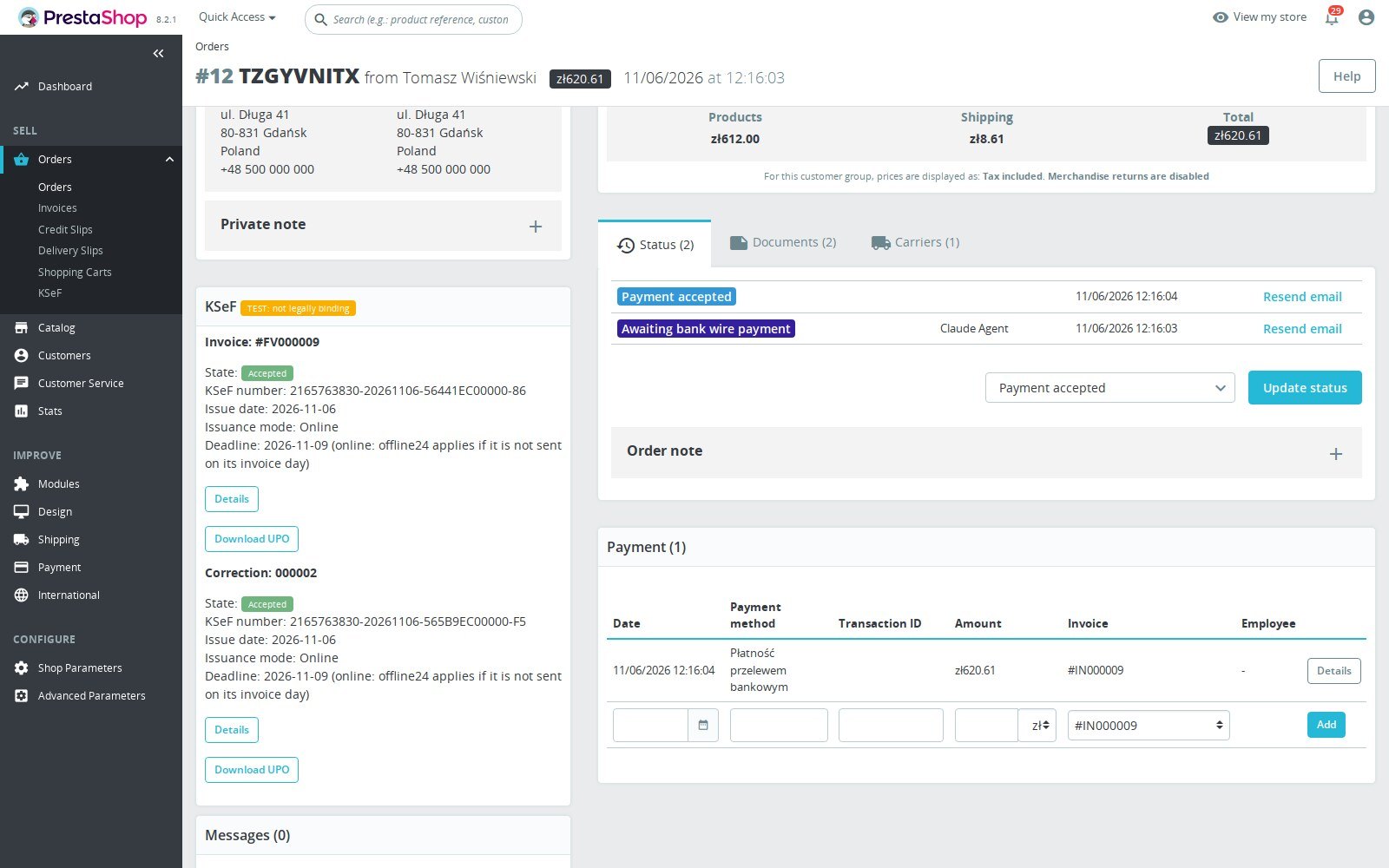
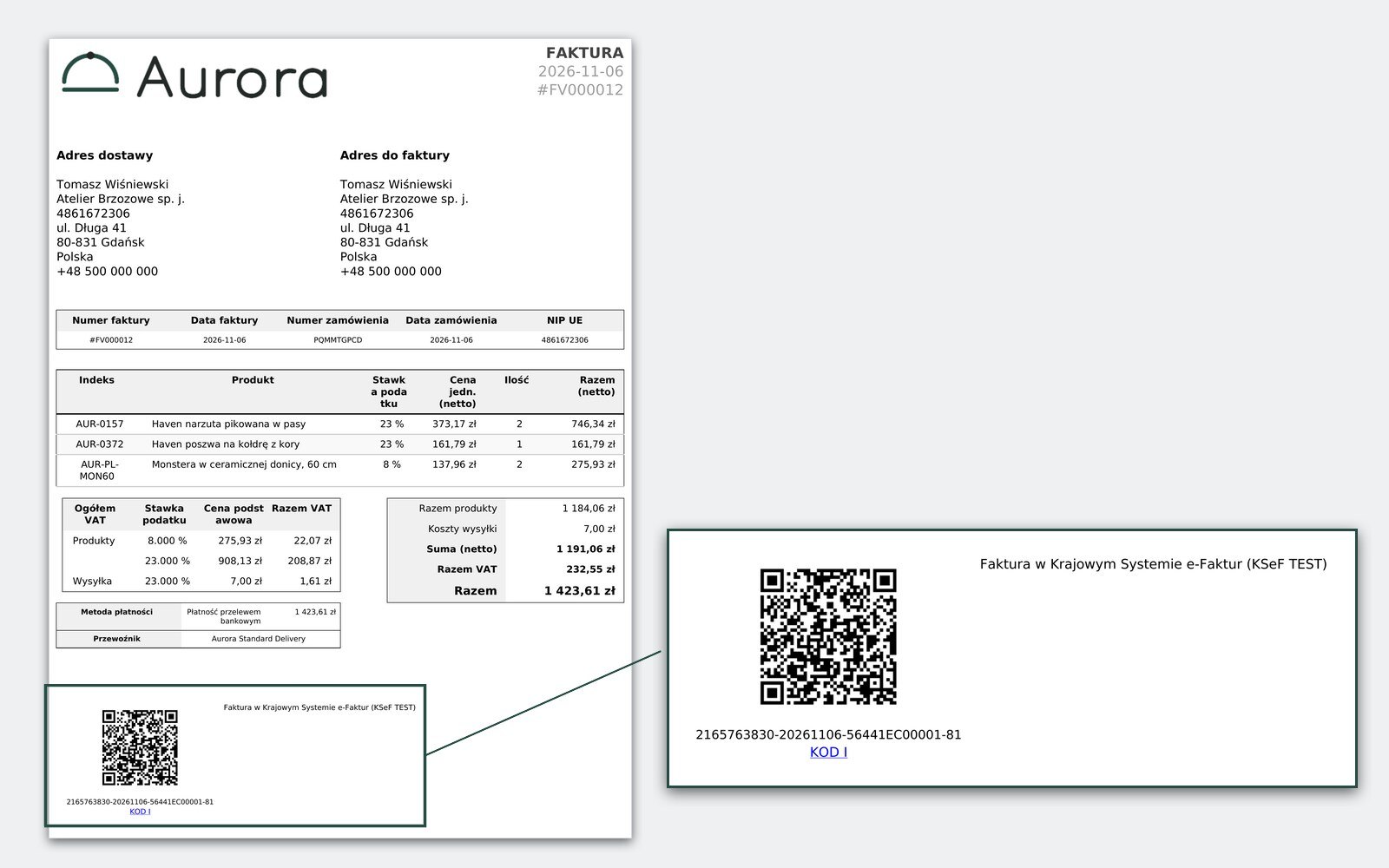
After acceptance the native invoice PDF carries the KSeF number and KOD I. Before KSeF accepts an invoice issued offline, the PDF can also carry KOD II with a valid separate Offline certificate. Without that certificate KOD II is absent and staff see a warning. Total-failure documents outside KSeF carry no KSeF codes.
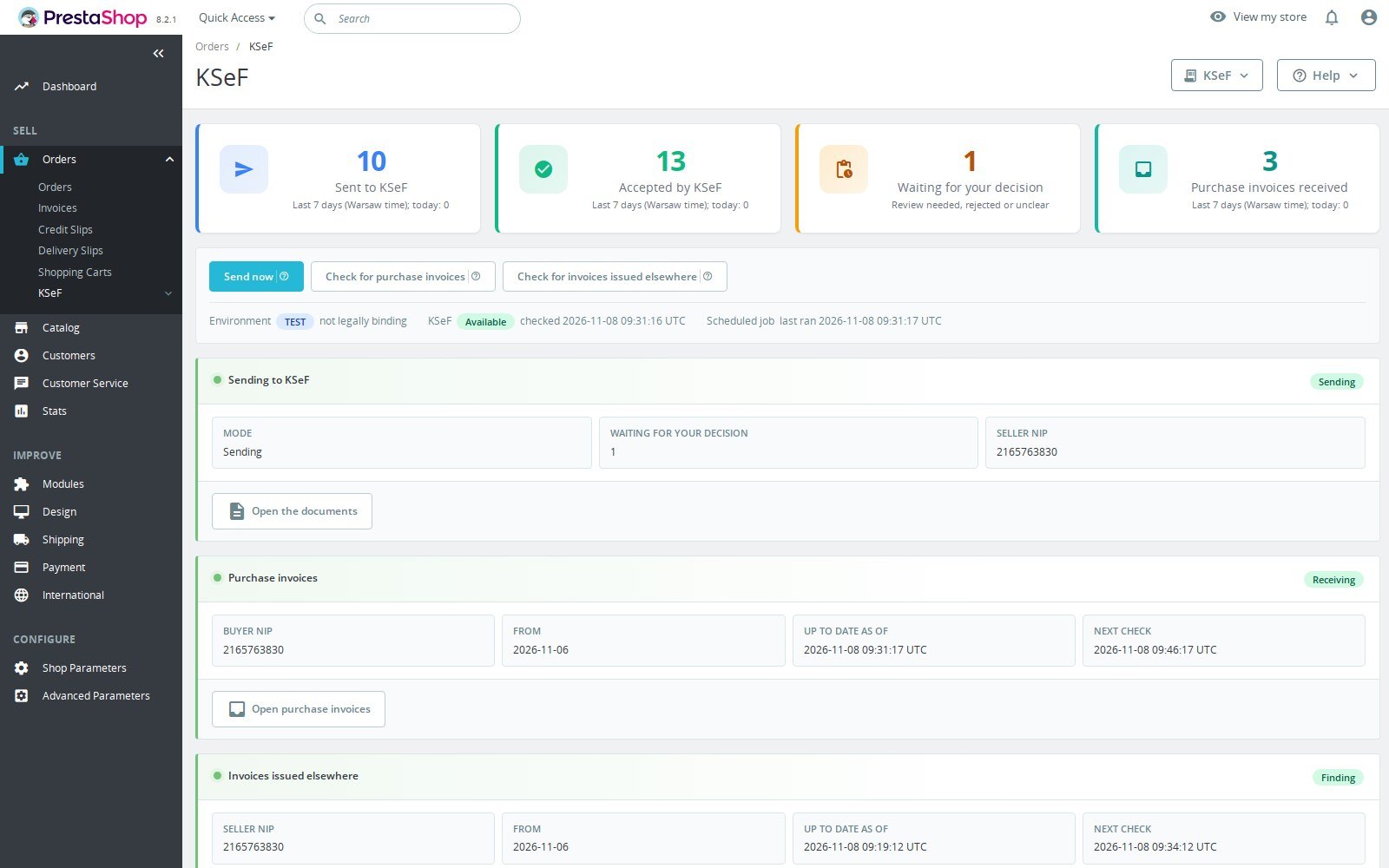
Overview and receiving purchase invoices
The overview shows documents and health. Sent, accepted and received counts cover today and six previous Warsaw calendar days. Accepted imports count when verified; old records without the event timestamps do not receive invented historical counts.
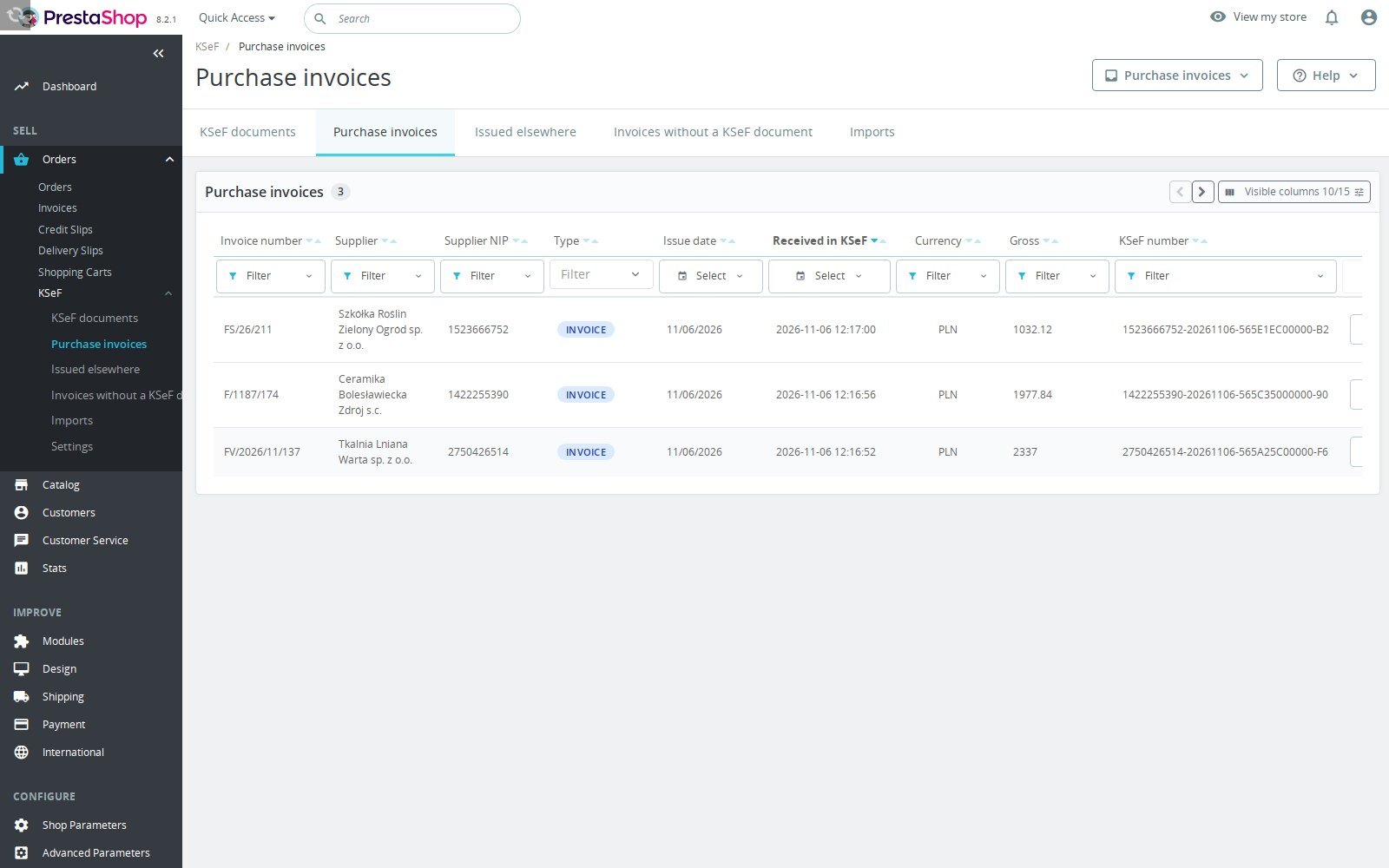
Receiving is off by default. Enable it for the selected shop and environment with a history start date and credentials with invoice-read permission. The inbox has filters, a readable invoice view and an original XML download. The downloaded bytes must match KSeF's hash. Shops sharing a seller NIP and environment share the inbox. The readable view is the module's view, not an official Ministry visualisation or an accounting posting.
Corrections and refunds
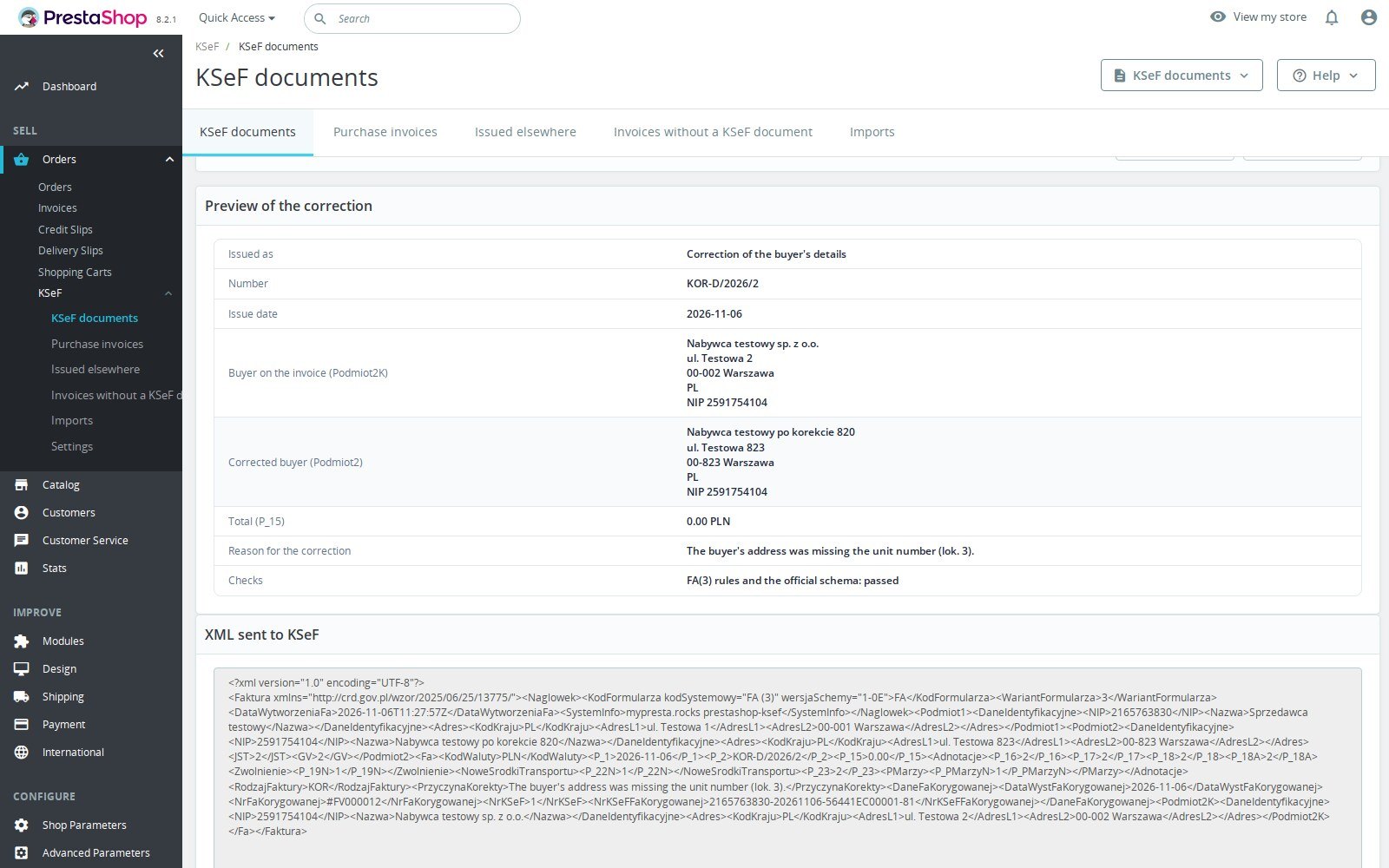
Use the accepted invoice's KSeF document page to preview corrections. Buyer-data corrections change name or address while retaining the tax identity and amounts. Changing the NIP uses the wrong-NIP workflow: a zero correction, then a replacement invoice held until KSeF accepts that zeroing. Preview and issue with a reason; the manual workflow does not alter a PrestaShop payment, refund or stock movement.
Chosen-amount refunds wait for staff to confirm their allocation over VAT codes. The form proposes a split, but no split is applied without staff confirmation. Corrections need the original invoice and every earlier correction finished in KSeF; an imported invoice also needs its historical baseline reconciled.
Configuration options
Credentials and going to production
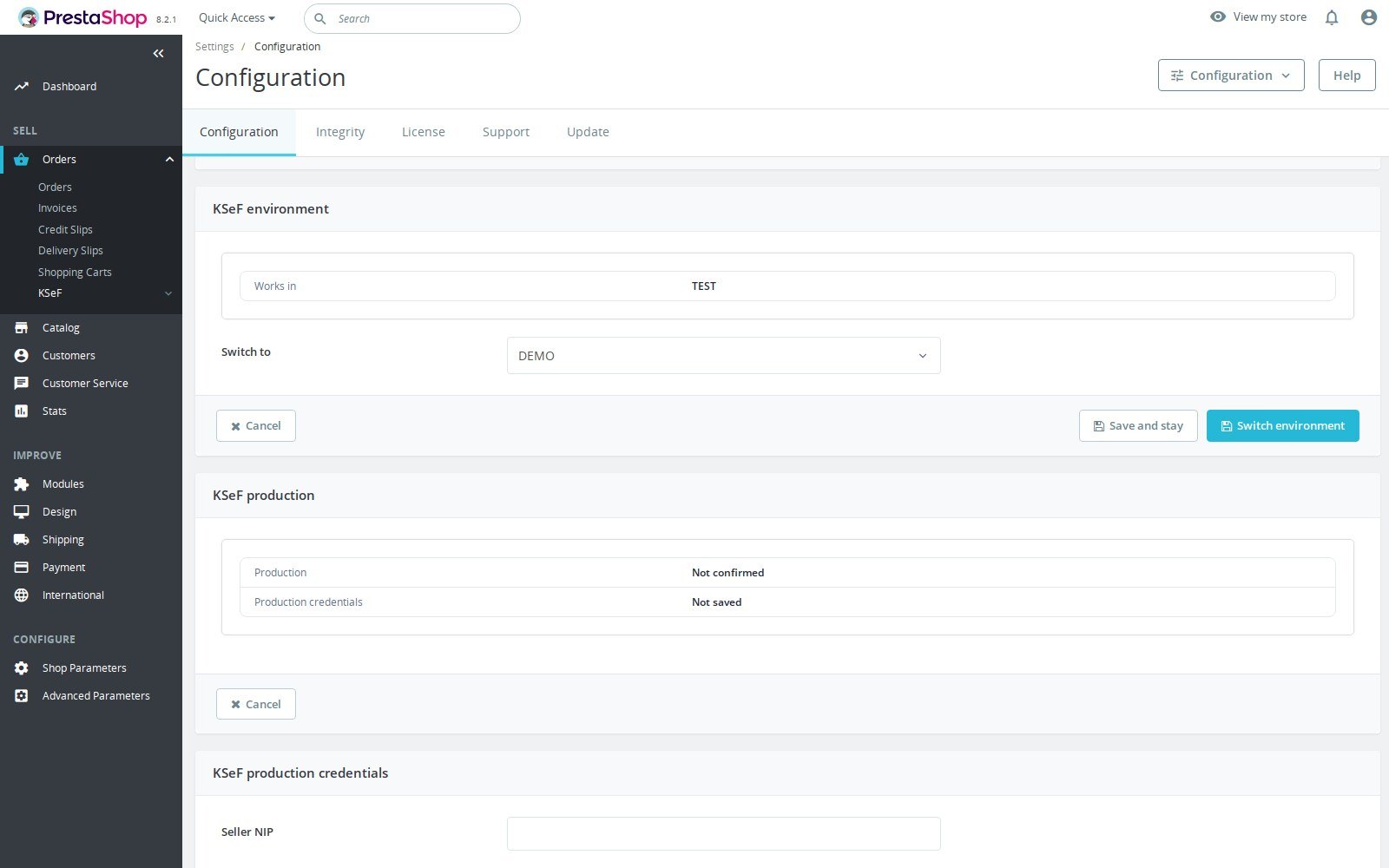
Each shop has TEST, DEMO and PRODUCTION settings and credentials. TEST uses a fictitious identity and replaces the seller and buyer in outgoing XML. Use synthetic data in both TEST and DEMO. DEMO uses the merchant's DEMO token or certificate. Obtain a token from the MF KSeF application for the correct environment, enter the seller NIP and token in the connection form, or use an authentication certificate with its matching private key and password where required. Test the connection after saving.
PRODUCTION has its own token or authentication certificate. An employee with edit and credential rights opens the production preview, reviews the seller, shop address and start point, then types the seller NIP and domain to confirm. This is the step that enables legally binding sending. The binding covers the shop, the seller NIP, the shop domain, this installation and the saved credentials. A changed binding needs confirmation again. Pause sending to hold new submissions; status recovery can continue when the binding permits it. Returning after leaving production needs confirmation again. Obtain the owner's written go before a real shop switches to PRODUCTION.
Development hosts, restored databases and copies under another domain are refused. An identical copy of both shop files and database on the same domain cannot be distinguished by this guard; the host must isolate it or block its outbound production access.
Offline certificates and outages
The certificate of type Offline signs KOD II; it is separate from the authentication certificate. With certificate sign-in, request the Offline certificate from the settings. Token users upload an Offline certificate from the MF application. Only a valid, matching, active Offline certificate can supply KOD II.
Local removal and revocation at KSeF are separate actions. In-module revocation needs certificate sign-in and confirmation; token users revoke in the MF application. A requested revocation stops KOD II signing with that serial while the result is resolved.
The Ministry Latarnia production feed supplies outage evidence in every environment, including TEST. The recorded issuance mode controls waiting, offline handling and total-failure exclusions. Eligible queued documents resume after an outage through the scheduled job. Review the feed status and document reasons; the module does not guarantee every document will be accepted automatically.
Customization examples
Importing invoices already in KSeF
Select the shop and environment, then use Invoices already in KSeF in settings or the per-invoice Already in KSeF action. A simple CSV can contain:
id_order_invoice,ksef_number
123,REPLACE_WITH_THE_EXISTING_KSEF_NUMBER
The second value is a placeholder for an actual number already held by KSeF. JSON is also supported. Preview the file, resolve conflicts and unmatched identities, then upload the same file to commit. The worker downloads the original, checks seller NIP, shop invoice number and issue date, and preserves the XML. Registered imports are never submitted again. No UPO is invented or fetched by this import path.
An import can be accepted while its correction baseline remains incomplete. Reconcile ambiguous line mappings and historical corrections before attempting later corrections. Eligible identity conflicts can be accepted with a required staff reason and recorded evidence; inspect what differs before using that action.
Choose the review workflow
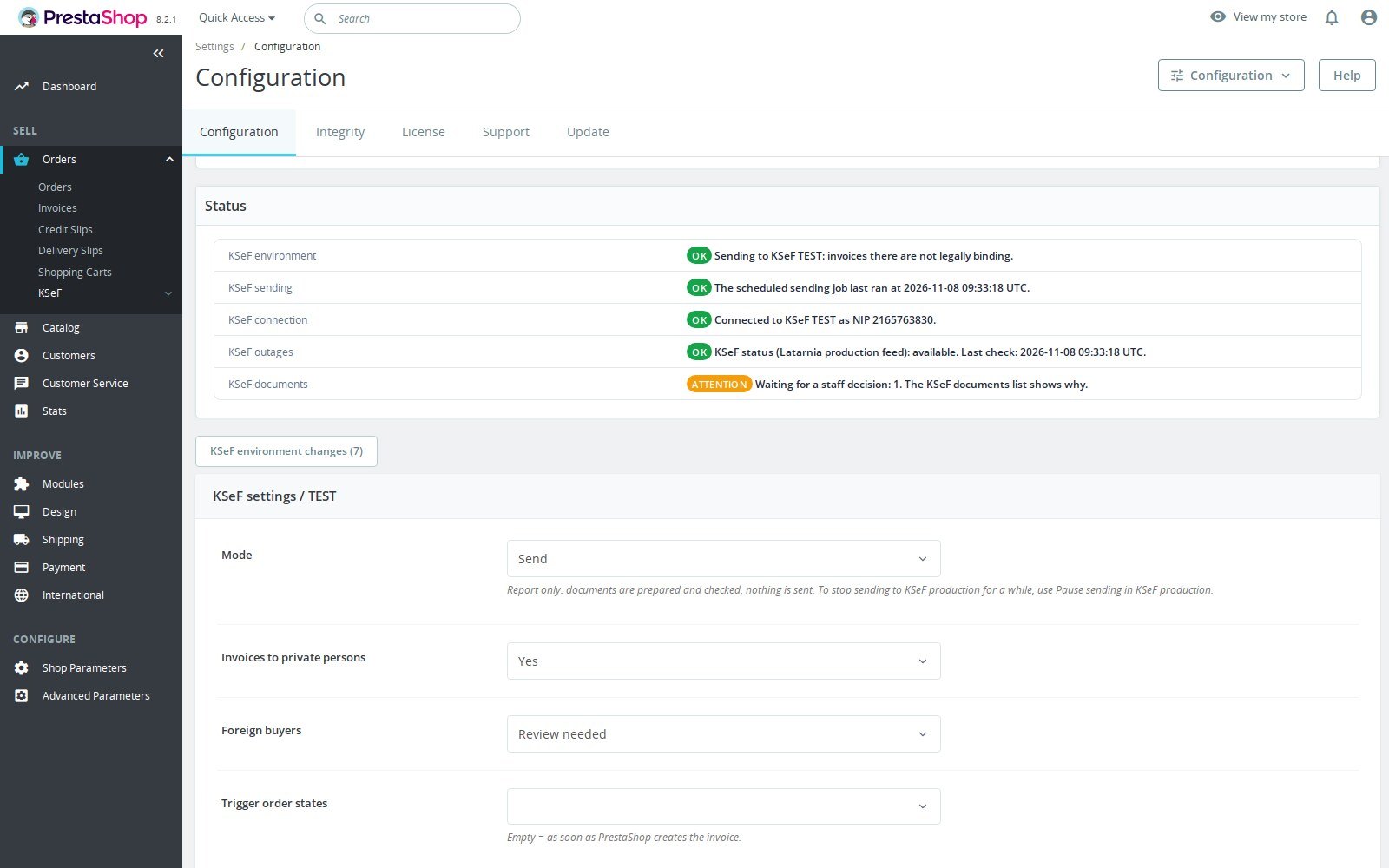
Use buyer-data corrections for a name or address; use the wrong-NIP flow for a changed buyer NIP. Confirm chosen-amount refund splits yourself. Configure the private-person sending policy and review foreign-buyer VAT treatment. Never use staff approval to bypass missing fiscal evidence.
Installation
Requirements
Declared minimum: PrestaShop 1.6.1.0, with support through 9.x, and PHP 7.1 or later. Tested on fresh installs of PrestaShop 1.6.1.24 with PHP 7.1, 1.7.8.11 with PHP 7.4, 8.2.8 and 9.2.0 with PHP 8.1, and its connection to KSeF production (sign-in and receiving) was checked on PHP 8.4.
PHP needs cURL, DOM/libxml, JSON, mbstring and OpenSSL. The seller must have a valid Polish NIP. Allow the chosen KSeF environment and the Ministry Latarnia feed; sending requires the scheduled job. Install through PrestaShop's module manager and inspect Integrity after installation. Keep backups and credentials secure. The price is 79 EUR excluding VAT, with 12 months of updates and 3 months of support.
Select a single shop before configuring credentials, production confirmation or receiving. Settings are per shop, while purchase inboxes are shared for the same NIP and environment. The module provides English, Polish, German, French, Spanish and Italian strings; that is separate from the store listing translations.
How it works
The invoice hook discovers the document after PrestaShop numbers it. Preparation reads stored invoice and credit-slip amounts, validates FA(3), then preserves the XML for submission. The scheduled worker sends prepared documents, follows uncertain outcomes and records KSeF acceptance and UPO. Invalid or incomplete fiscal facts require review. The order card and PDF use the recorded document rather than generating a second commercial invoice.
The same job verifies imports and receives purchase invoices in the time its run has left. Credentials and access tokens are sealed in storage. Invoice facts and XML, purchase-invoice metadata and XML, correction input and staff audit identifiers remain fiscal records in the shop database. The module registers no dedicated GDPR export, deletion or anonymisation hook and offers no automatic retention cleanup. Uninstall retains documents, events and settings; the merchant must set access and retention policies for these records.
Honest limits
- The module sends invoices PrestaShop issues and handles its KSeF correction workflows. It does not issue fiscal receipts, post purchase invoices to accounting or give tax advice. The seller must have a valid Polish NIP.
- Acceptance depends on invoice data, credentials, KSeF availability and the scheduled job. Company data without a valid tax identity, unsupported VAT treatment, incomplete refunds or missing historical evidence can remain in review. Foreign buyers need their treatment reviewed.
- KOD II needs an active Offline certificate. A total-failure exclusion has no KSeF QR code. An identical same-domain copy of the files and database needs hosting isolation.
- Receiving requires invoice-read rights. Its readable view is supplied by this module; keep the original XML for the complete source document.
- Imports are never resent, and the import path provides no UPO. A verified invoice may still need line mapping and historical corrections before later corrections work. Seven-day accepted counts include imports at verification time.
Troubleshooting
- No document is sent: check the selected shop, environment, sending mode, start point, invoice-issuing order state, scheduled job and health reasons. A held document needs its stated problem resolved.
- Production is locked or sign-in fails: check environment-specific credentials, permissions, seller NIP, domain and installation identity. Review and confirm a changed binding with the responsible administrator; never bypass a copy refusal.
- UPO or KOD II is missing: UPO follows an accepted module submission; an imported invoice does not fetch one here. For KOD II check the separate Offline certificate, validity, matching NIP and revocation state.
- Receiving or outage status is stale: check receiving is enabled, history start date, invoice-read rights, the scheduled job and Latarnia connection. Preserve the shown error and retry time; downloaded XML must pass its hash check.
- A correction or import remains in review: read the mismatch, settle earlier corrections, reconcile the imported baseline and historical refunds, or confirm the chosen-amount VAT split. Preview again after source changes. Contact support with document IDs and redacted reasons, never tokens or private keys.
Questions
7
Does this module create my PrestaShop invoices?
No. PrestaShop issues and numbers its own invoices. The module prepares their FA(3) documents, sends them to KSeF and follows acceptance. Credit slips become KOR corrections. Separate staff workflows handle buyer-data corrections and wrong buyer NIP. It does not issue fiscal receipts.
Can I try KSeF before enabling production?
Yes. Each shop starts in TEST and can use DEMO with separate credentials. TEST substitutes fictitious seller and buyer identities in the outgoing XML. Production needs its own credentials and a confirmation with the seller NIP and shop domain. Use synthetic invoice data in TEST and DEMO.
Can I sign in with a token or certificate?
Yes. Save a KSeF token obtained from the Ministry application or an authentication certificate for the chosen environment. KOD II needs a separate certificate of type Offline. With certificate sign-in the module can request and revoke that Offline certificate; token users upload it and revoke through the Ministry application.
What appears on the invoice PDF?
After acceptance the native PrestaShop invoice PDF carries the KSeF number and KOD I verification code. Before acceptance an offline invoice can carry KOD I and KOD II when a valid Offline certificate is ready. Without it staff see a warning and KOD II is absent. A document excluded during a total failure has no KSeF QR code.
Can I receive purchase invoices from KSeF?
Yes. Enable receiving and set a history start date for the shop and environment. Credentials need invoice-read permission. The back office lists received purchase invoices, shows a readable view and downloads the original XML. This is an inbox for inspection, not an accounting posting or supplier-payment service.
What if KSeF is unavailable or an invoice needs correction?
The module reads the Ministry Latarnia outage feed and applies the recorded outage mode. Eligible documents wait and resume through the scheduled job; total-failure documents can be kept outside KSeF. Preview buyer-data and wrong-NIP corrections in the back office, and confirm VAT allocations for chosen-amount refunds. Review the reason shown for any document that remains held.
Which shops and versions can use it?
It is for Polish sellers with a valid NIP, using PrestaShop 1.6.1 to 9.x and PHP 7.1 or later. Fresh installs were checked on PHP 7.1, 7.4 and 8.1, and the connection to KSeF production on PHP 8.4. It supports multistore and six module languages. The price is 79 EUR excluding VAT, with 12 months of updates and 3 months of support. You remain responsible for invoice content; the module provides no tax advice.
Known Issues
No known issues
There are currently no open or resolved issues registered for this module.
Feature Requests
No feature requests for this module yet
Missing something? Suggest it, and follow its progress here.
Changelog
v1.4.02026-11-11
- Link invoices that another program issued in KSeF in your company's name (for example FakturaXL) to their PrestaShop orders: the received invoices page suggests the matching orders (same total, currency and buyer, with the customer's name), and later refunds of those orders become KSeF corrections of that invoice.
- Before an imported invoice can be corrected, it must be the same sale as its shop invoice: total, currency and buyer (tax number, or the name for a private person); staff acceptance of a held import checks this too.
- Withdraw a registration made with the wrong shop invoice while no correction is built on it; the audit trail keeps the record.
- Record a held refund as corrected outside this module (for example in FakturaXL), so it is never corrected twice and later refunds of the order go ahead.
- Refunds are read in the order's own price basis; a refund of a chosen amount on an invoice in the other basis is held with a plain reason.
- A daily email to staff lists the KSeF documents held for review, without buyer data; choose the recipients and the hour per shop.
- A refund whose credit slip number was reused after a deletion is held for review instead of correcting another order's invoice.
- Updatedlicence component.
Demo
Test the full module before you buy
Buy a licence later and keep your settings.
- Your 30-day demo Test it on your own shop for 30 days from the first install.
- Ready demo shop Explore a ready demo shop in your browser.
- No registration No account, email or store domain needed.
By downloading, you accept the demo terms and privacy policy.
By opening this demo you accept the demo terms and the privacy policy.