Integrations & Data Export

KSeF E-Invoicing

Send PrestaShop invoices and corrections to KSeF, keep their UPO and receive purchase invoices in the back office.

Version
1.4.0
Improvements
77
Updated
PrestaShop
1.6.1 to 9
Price: €79.00
Tax excluded
Partner price €63.20 Partner price for agencies Agencies with a partner account pay less on every module, depending on what they buy: 20% approved partner 25% from €1,000 a month 30% from €3,000 a month Average of the last 12 months, excl. VAT. Become a partner

KSeF E-Invoicing connects the invoices and credit slips PrestaShop already issues to Poland's Krajowy System e-Faktur. Begin in KSeF TEST, connect your credentials and schedule the sending job.

New invoices and corrections go to KSeF in the background. Your team sees their status, downloads UPO confirmations and finds the KSeF number and QR code on the invoice PDF.

Receive purchase invoices in a separate list, open a readable view or download the original XML. Seven-day counts show documents sent, accepted and received.

Preview buyer-data corrections, correct a wrong buyer NIP through a zero correction and replacement invoice, and confirm the VAT split for chosen-amount refunds. Register invoices already in KSeF without sending them again.

TEST, DEMO and PRODUCTION have separate credentials per shop. Production needs a deliberate confirmation; copy guards, outage modes and audit records help your team control sending. You remain responsible for invoice content.

Share
1 viewed

In the box

  • Lifetime licence for one shop
  • 12 months of updates, security fixes free forever
  • 3 months of support by mypresta.rocks
  • PrestaShop 1.6.1 to 9

Recent changes

  • Link invoices that another program issued in KSeF in your company's name (for example FakturaXL) to their PrestaShop orders: the received invoices page suggests the matching orders (same total, currency and buyer, with the customer's name), and later refunds of those orders become KSeF corrections of that invoice.
  • Before an imported invoice can be corrected, it must be the same sale as its shop invoice: total, currency and buyer (tax number, or the name for a private person); staff acceptance of a held import checks this too.
  • Withdraw a registration made with the wrong shop invoice while no correction is built on it; the audit trail keeps the record.
Full changelog

How do PrestaShop invoices reach KSeF?

  • Automatic sending. FA(3) invoices and KOR corrections from PrestaShop invoices and credit slips.
  • Visible progress. Order status, KSeF number and downloadable UPO.
  • Invoice PDF. KSeF number and QR code, with a second code for offline documents when the certificate is ready.
  • Purchase invoices. A received list, readable view and original XML.
  • Seven-day counts. Sent, accepted and received documents in the back office.
  • Controlled production. TEST and DEMO first, a guarded production switch and an audit trail.

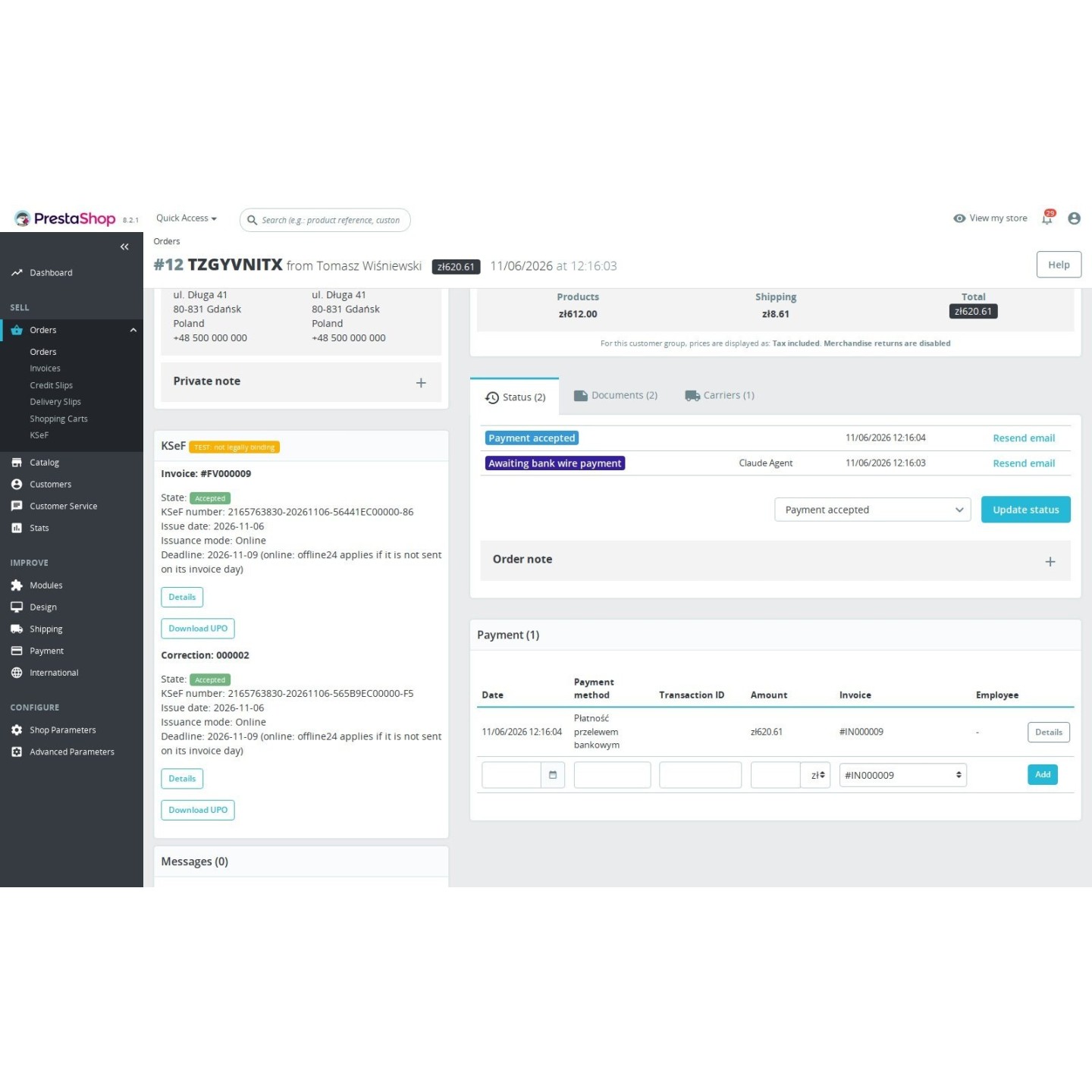
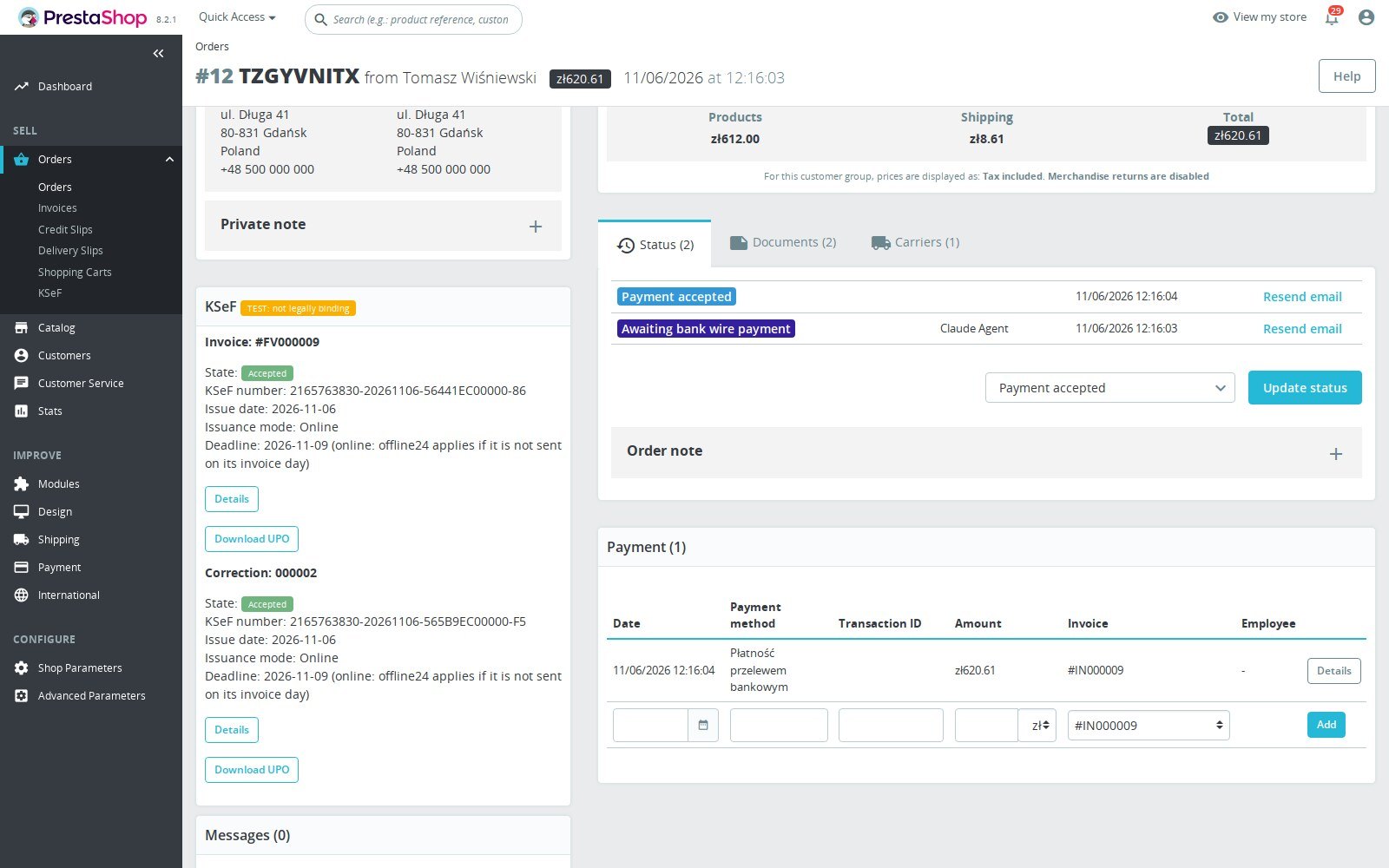
PrestaShop decides when to issue the invoice through its order states. The module prepares its KSeF document from the stored invoice amounts, then the scheduled job sends it and follows the response. The order shows progress and links to document details, where staff download UPO and check acceptance without keeping a second spreadsheet. Documents that need a decision wait for review with a reason.

PrestaShop order KSeF block showing document status, the KSeF number and a link to document details

Where will customers find the KSeF number?

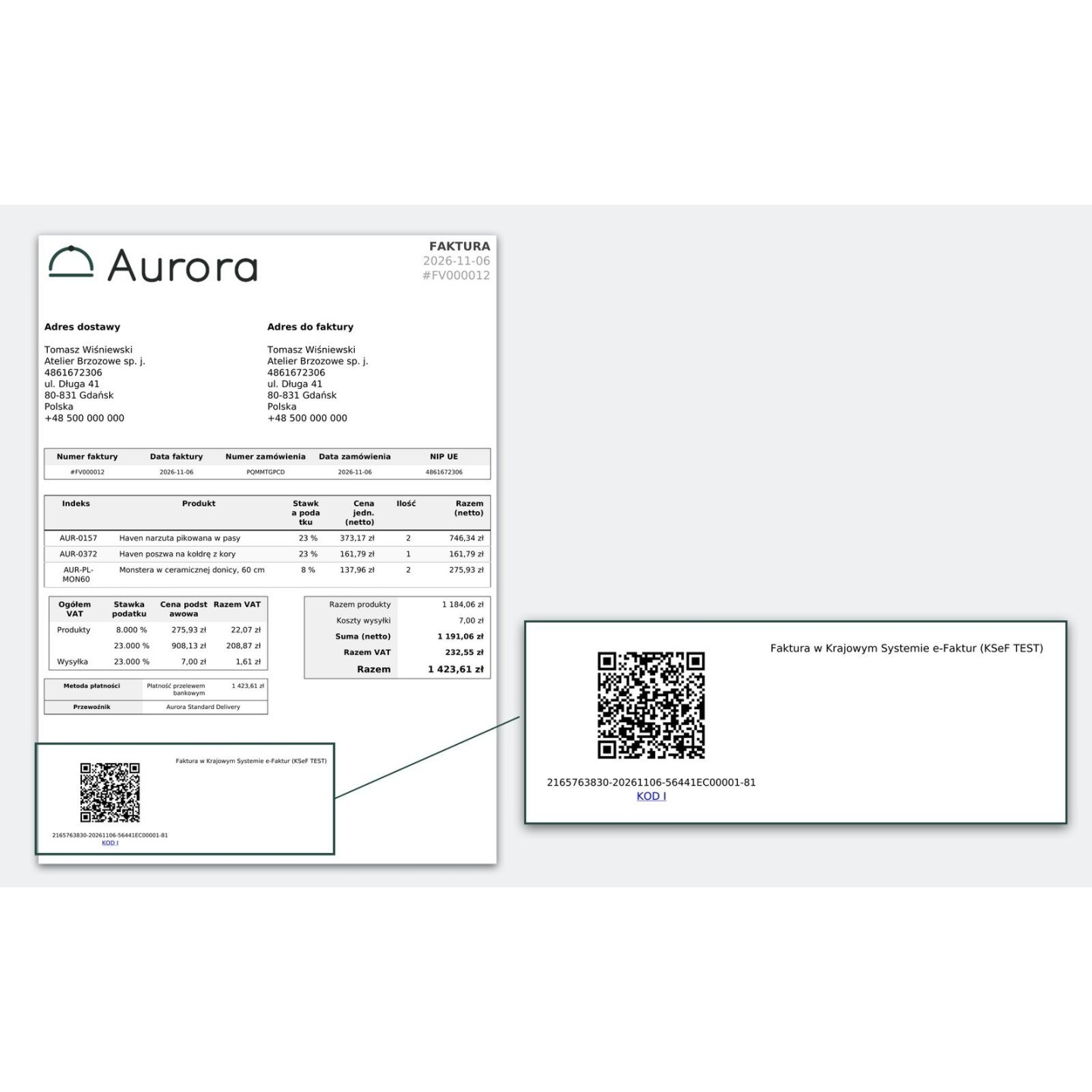
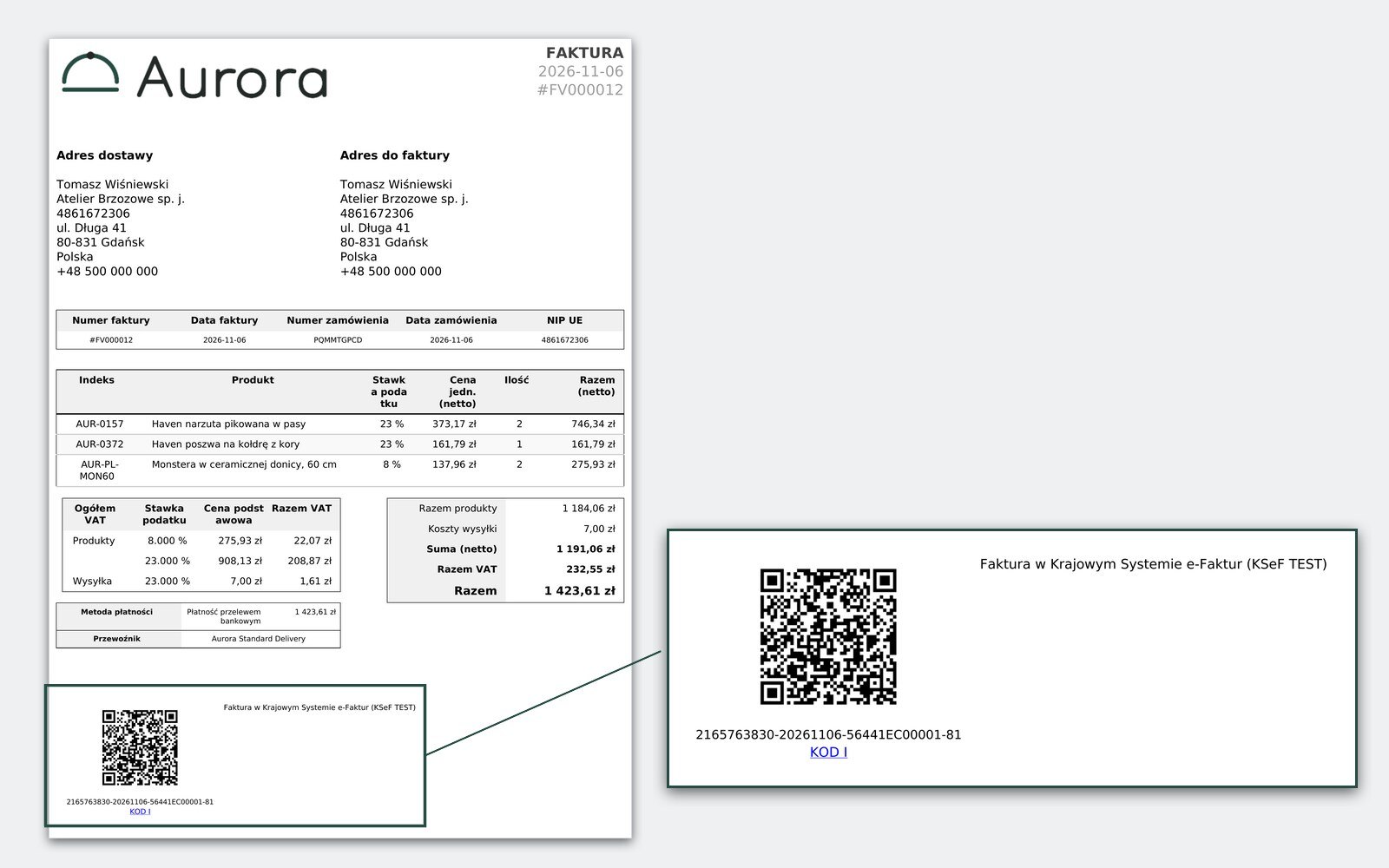
The KSeF number and verification QR code appear on PrestaShop's invoice PDF after acceptance. Before acceptance, an invoice issued offline can carry KOD I and KOD II, provided a valid Offline certificate is configured. Staff see a warning when it is missing. Documents excluded during a total failure carry no KSeF codes. PrestaShop continues to supply the invoice PDF your customer downloads.

PrestaShop invoice PDF with the KSeF number and verification QR code

What has been sent, accepted or received?

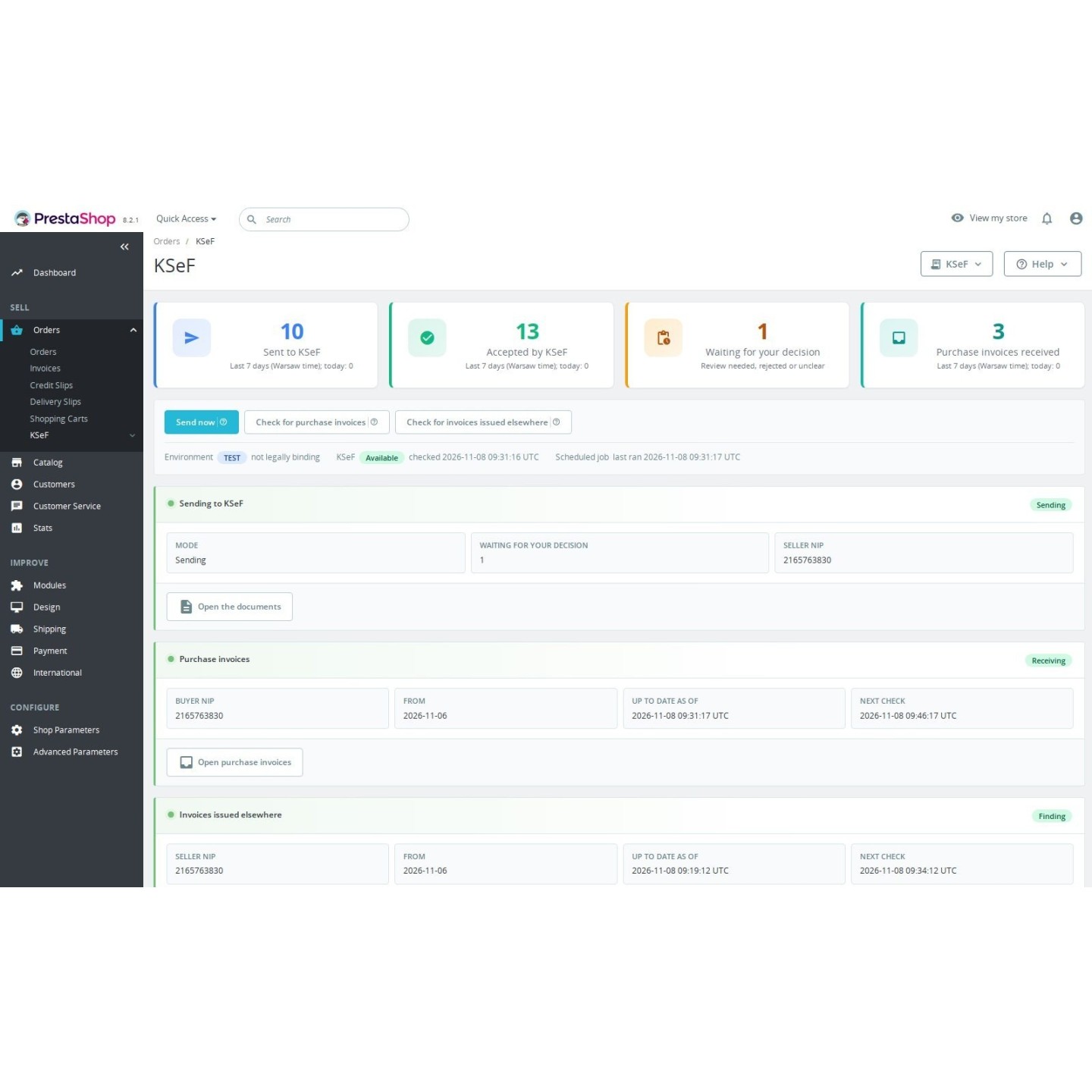
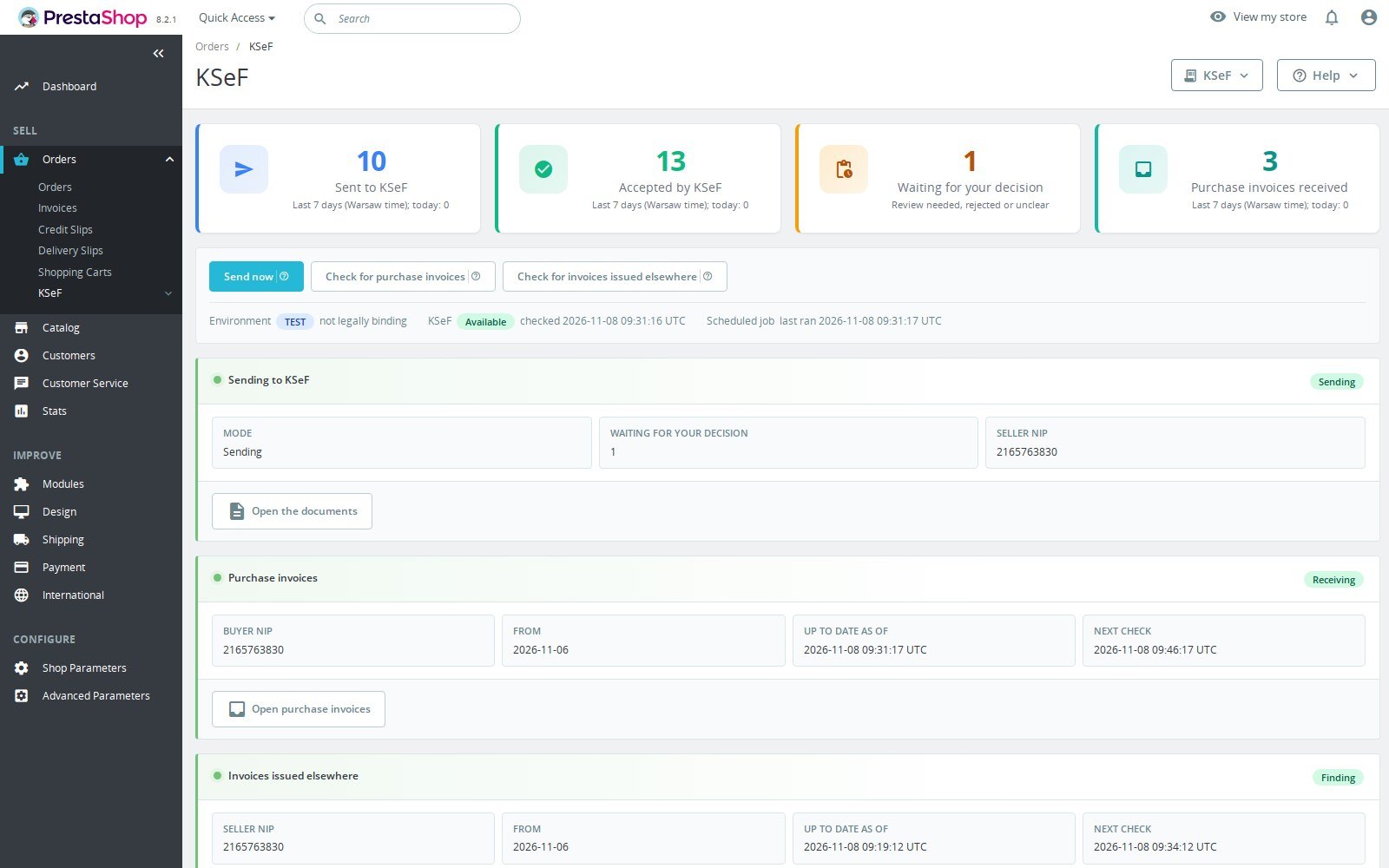
The KSeF overview brings outgoing documents and health information into the back office. Counts cover today and the six preceding days in Warsaw time: documents sent, accepted and purchase invoices received. The figures use recorded events, so they describe activity rather than the current queue alone. An imported invoice can count as accepted when verified, although this module never sent it.

KSeF back office overview with documents, seven-day sent and accepted counts, receiving count and health

Can your team receive purchase invoices too?

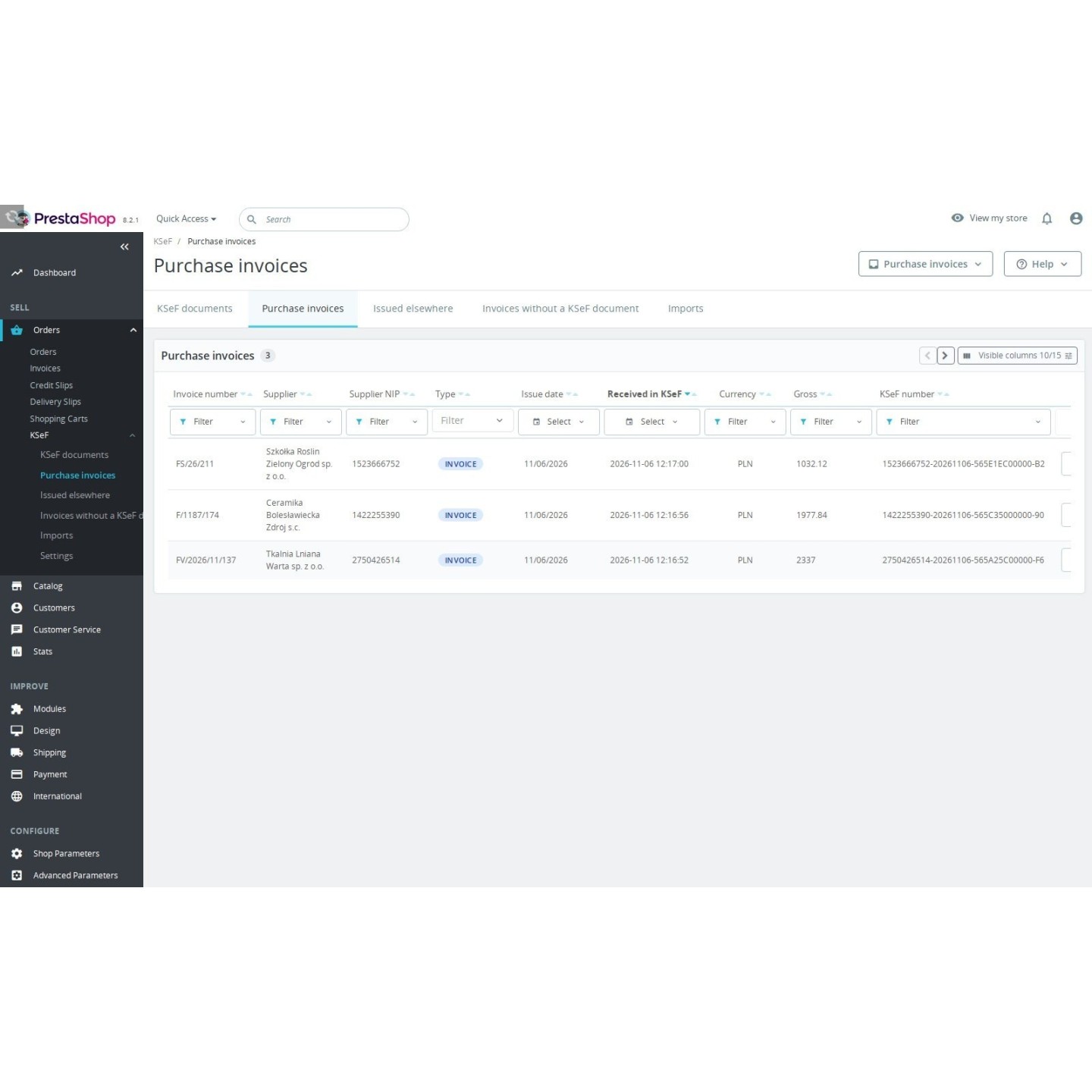
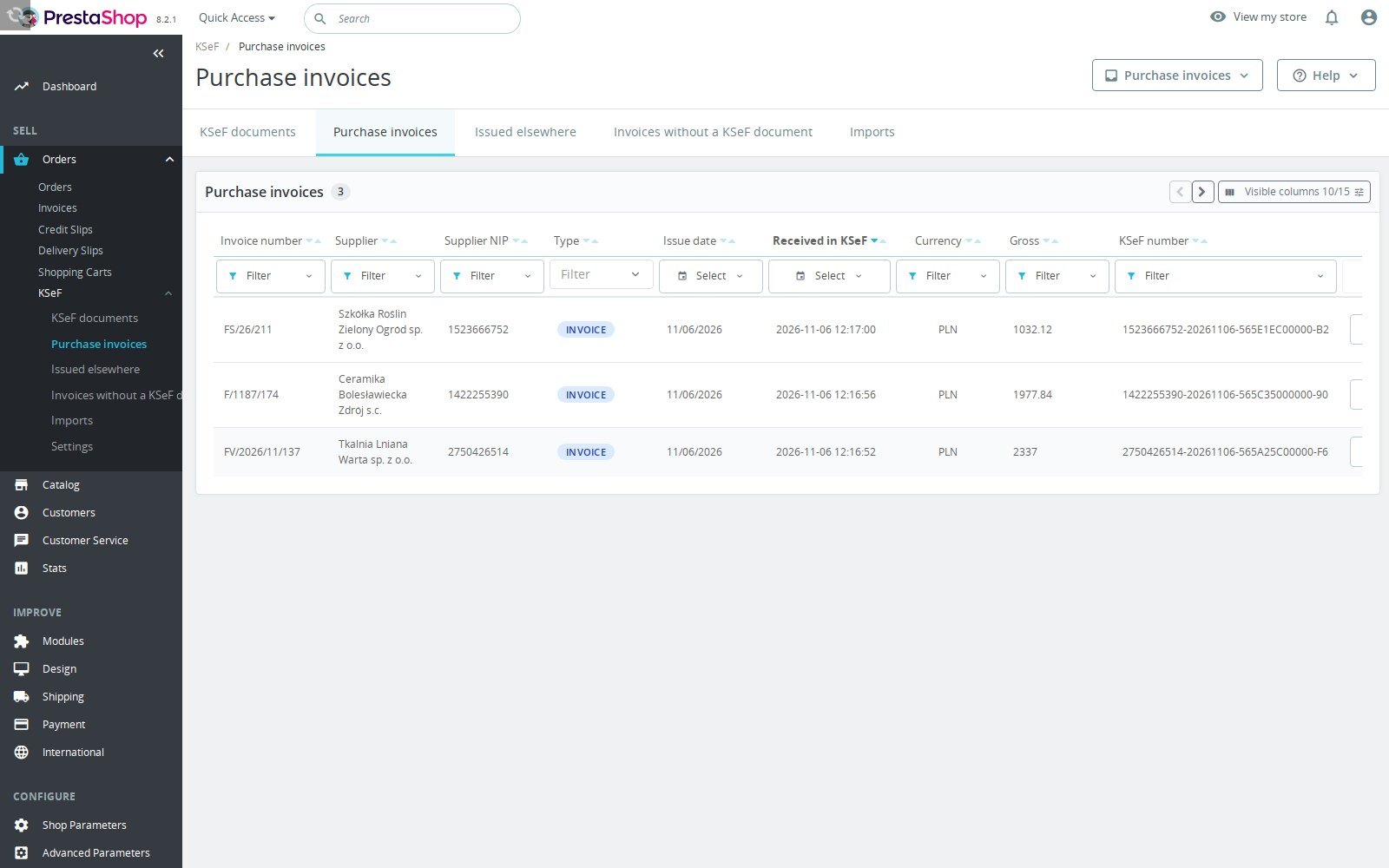
Turn on receiving for the selected shop and environment, choose its history start date and use credentials allowed to read invoices. Purchase invoices arrive in their own filtered list. Open a readable view of the parties, lines, VAT and totals, or download the original XML. The stored bytes are checked against KSeF's hash. This gives staff a place to inspect incoming documents before their accounting work.

Purchase invoices received from KSeF, with the readable invoice view

How do you handle corrections and refunds?

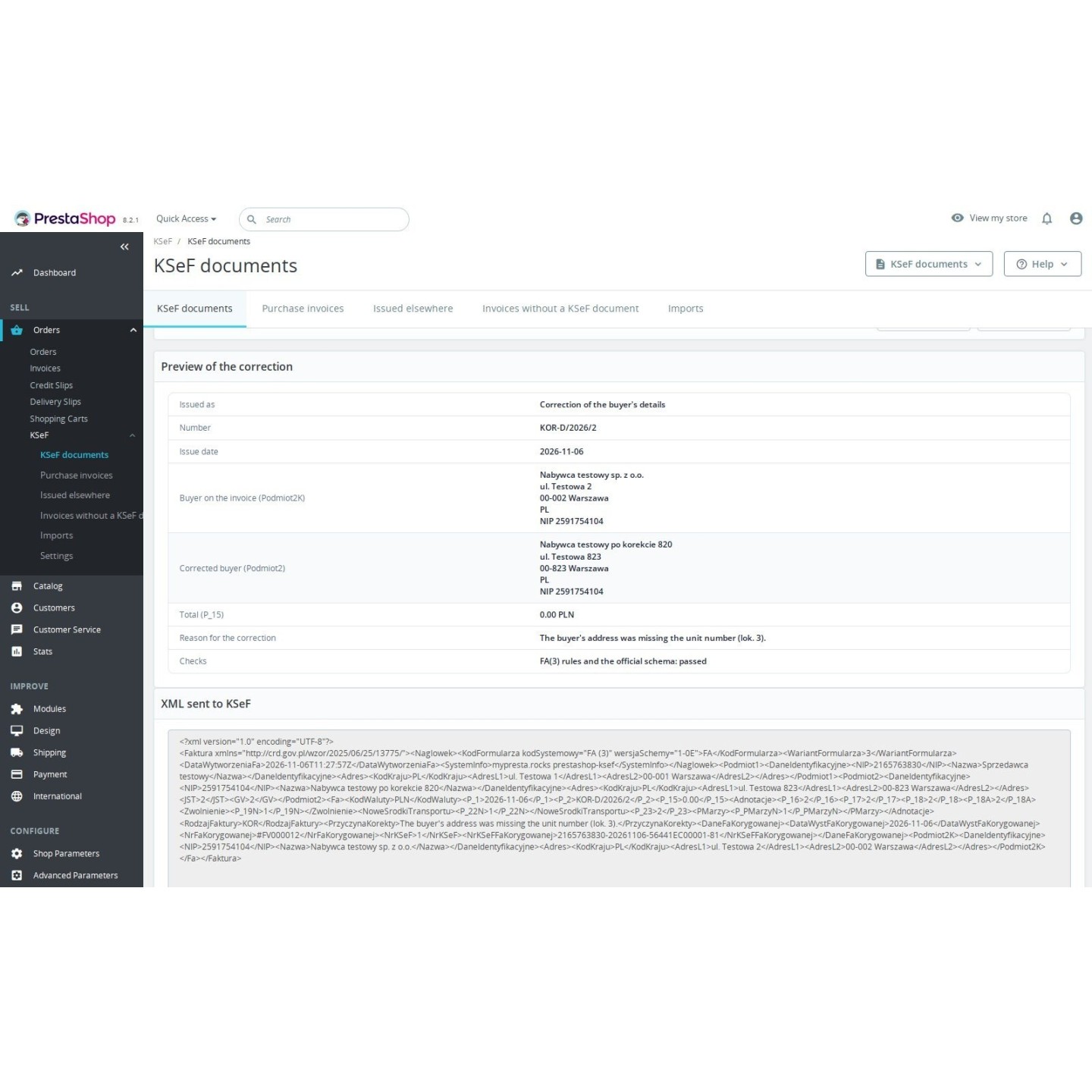
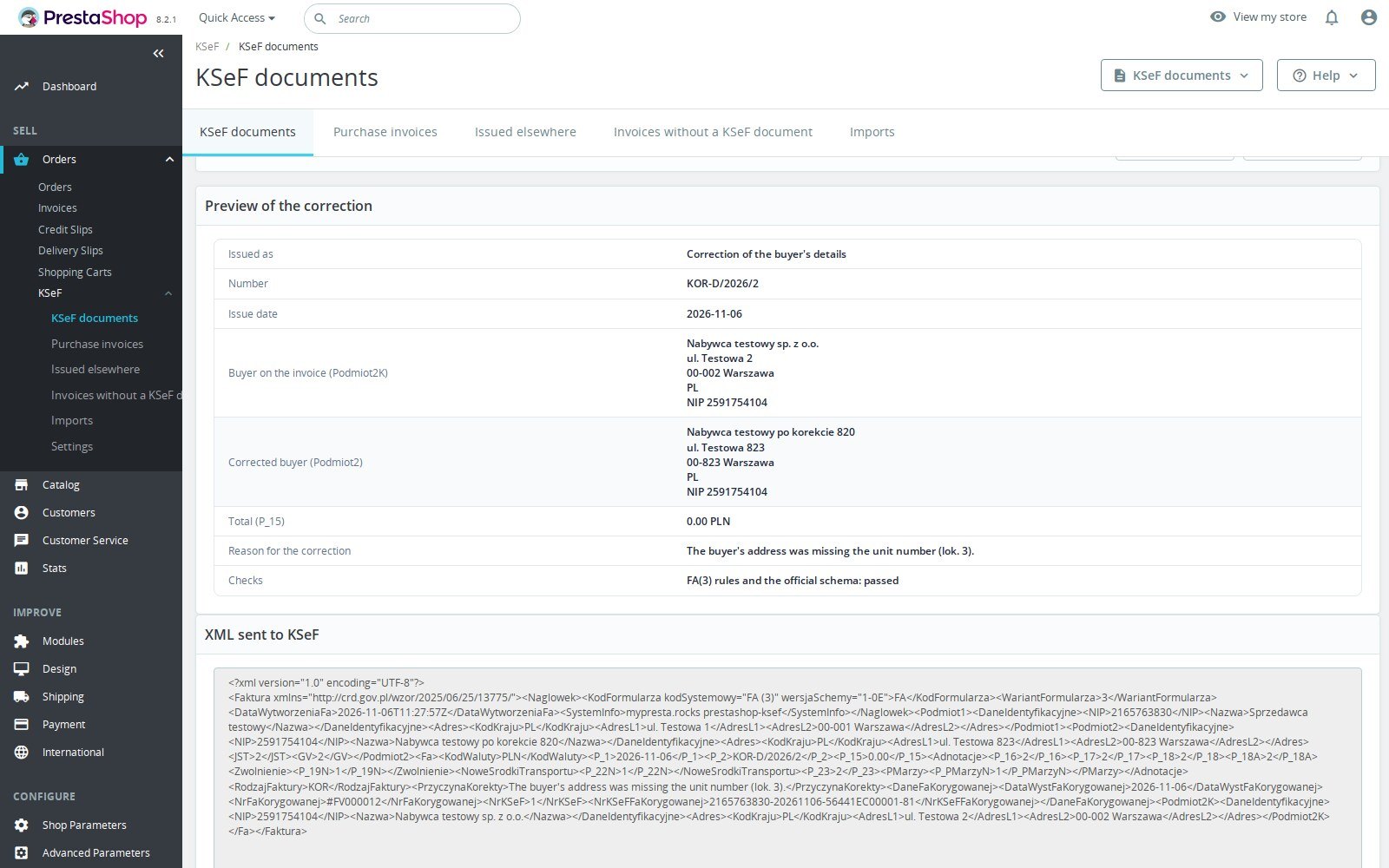
Credit slips become KOR corrections linked to the original invoice. For a buyer's name or address, preview a buyer-data correction. A wrong buyer NIP follows a zero correction, then a replacement invoice released after KSeF accepts the zeroing. Chosen-amount refunds wait for staff to confirm their VAT split. Invoices already in KSeF can be registered and verified without resending; later corrections need a complete, reconciled baseline.

Back office preview of a buyer-data correction or wrong buyer NIP correction

How do you keep production sending deliberate?

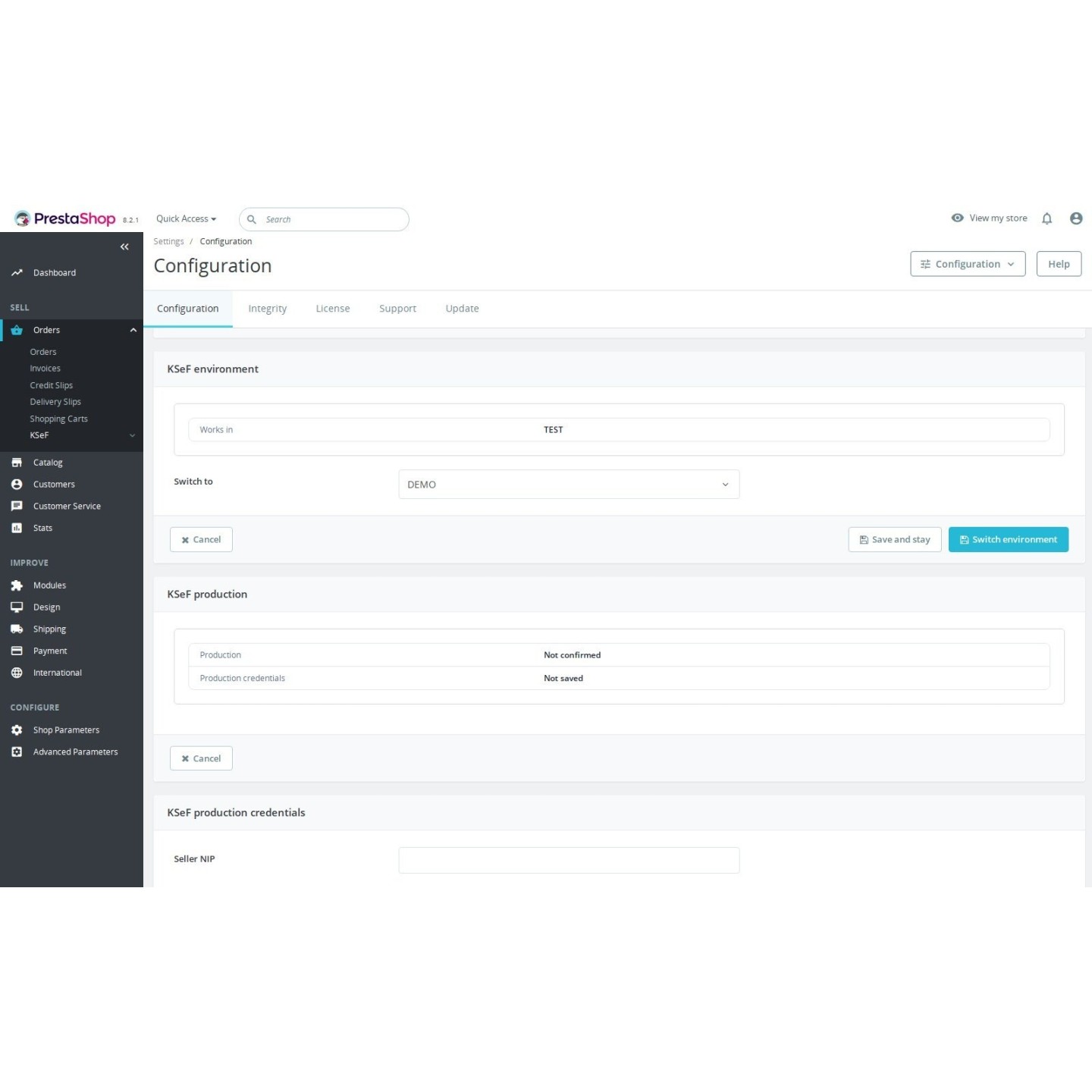
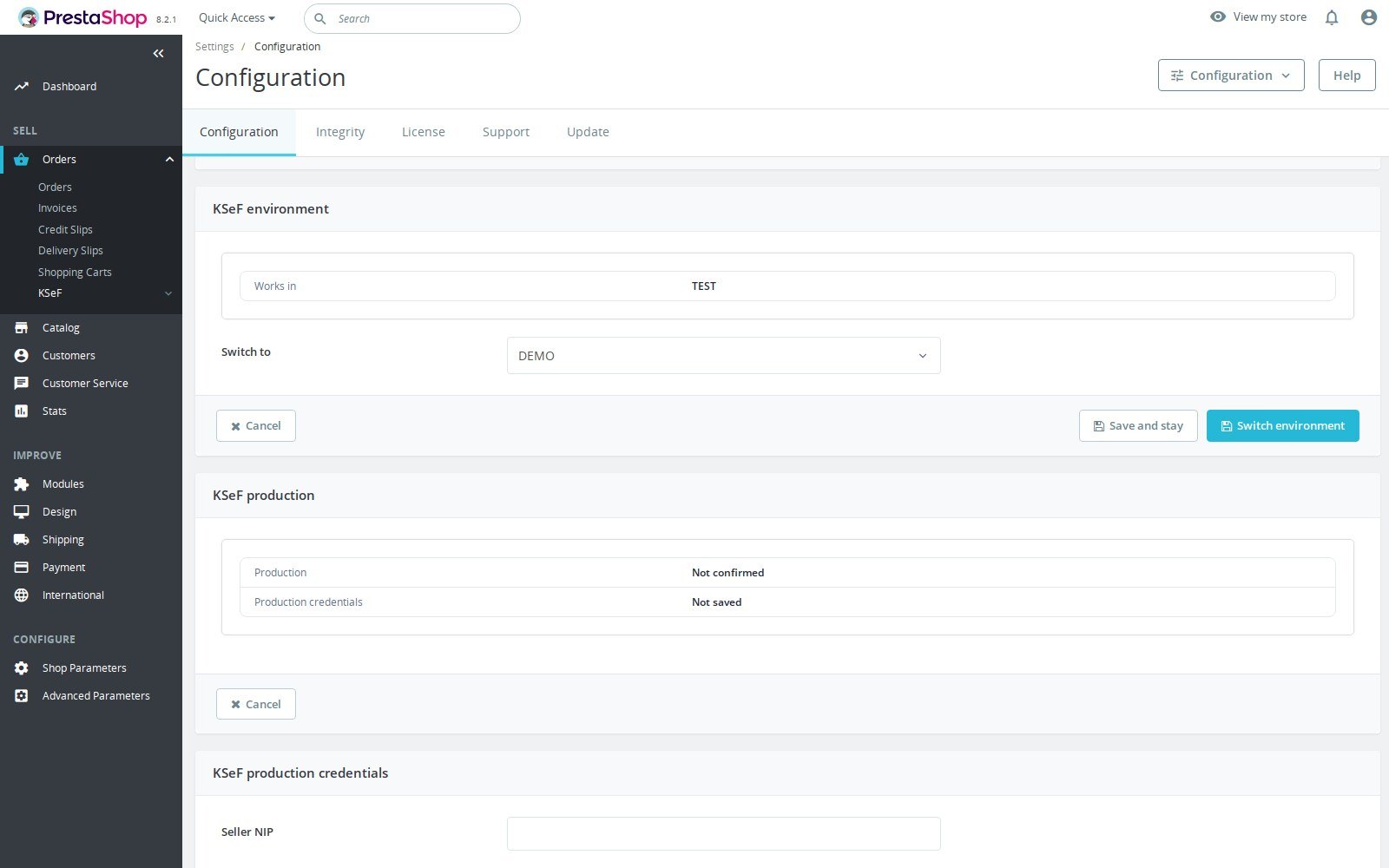
Each shop chooses TEST, DEMO or PRODUCTION with separate credentials and settings. Confirming production means reviewing the seller and shop, then typing the NIP and domain. Changes to that binding stop sending until confirmed again. Development and restored copies are blocked by the deployment checks. Latarnia outage evidence controls waiting and offline modes, while document and environment histories record the decisions. An identical same-domain copy needs hosting isolation.

KSeF settings with TEST, DEMO and PRODUCTION, credentials and the guarded production switch
  • Reference
    mprksef
  • Version
    1.4.0
  • Improvements
    77
  • Released
  • Updated
  • PrestaShop Compatibility
    PS 1.6 – 9.x
  • Pricing Model
    One-time Purchase
  • Module Type
    Back-office
  • GDPR Relevant
    Yes
  • Business Goal
    Streamline Operations
  • External Account Needed
    Yes
  • Module Complexity
    Feature-Rich Module
  • Customer Journey Stage
    Manage Store

What customers say about us

Company reviews
5.0 ★ ★ ★ ★ ★ (4 reviews)
Customer Reviews for PrestaShop Modules and Support

No product reviews yet

Be the first to share your experience with this product.

Write a Review

KSeF E-Invoicing connects PrestaShop invoices and credit slips to KSeF (Krajowy System e-Faktur). It keeps submission status and UPO, marks invoice PDFs and receives purchase invoices. The merchant remains responsible for invoice content; this module provides no tax advice.

Open the full help page

Loading tab content...
30 days return right
Easy return - no questions asked
Plug & Play Modules
Install, set up and take profit
Dedicated Support First
Priority Help & Satisfaction Over Sales

Who builds and maintains this module

Built and maintained by David Miller and mypresta.rocks. David Miller has worked with PrestaShop since 2013, and the company behind this shop has been registered since 3 December 2018. Every module in this catalogue is our own work, so your questions to support reach the people who wrote the code. The changelog on this page lists every update with its date.

About us

More modules

Invoice CSV List Exporter

KSeF E-Invoicing manages **submission and acceptance in KSeF**. It sends the invoices PrestaShop has issued, keeps their status and UPO, and puts the KSeF number on the native PDF. That answers whether the structured document reached the national system. Invoice CSV List Exporter provides **a CSV list of PrestaShop invoices** from its back office export form. Staff can run an invoice export and save its settings. It gives the team a tabular file for their own checks and work outside the shop. Together they cover **KSeF delivery and a separate invoice list**. Use KSeF E-Invoicing for the structured documents and their acceptance, then export the shop invoice list when a colleague needs a file. This pairing does not add KSeF numbers or UPO to the CSV, and it does not claim an automatic accounting connection.

Orders CSV List Exporter

KSeF E-Invoicing keeps **the invoice submission record** on the PrestaShop order. Its status, KSeF number and UPO concern the invoice and any correction, while the shop continues to manage the order itself through its usual workflow. Orders CSV List Exporter supplies **a separate CSV export of orders** through its back office export form. The team can run the export and save its settings, giving staff a file to use when reviewing the order work alongside invoicing. Together they give staff **document status and an order list for their own checks**. The KSeF module follows the structured invoice; the exporter makes order data available in a tabular file. No shared reconciliation, automatic matching, KSeF status column or transfer of UPO into that CSV is claimed. Staff decide how to use the exported order list.

Custom Invoice Numbering

KSeF E-Invoicing sends **the number PrestaShop gives each invoice**. It reads the formatted number of the PrestaShop invoice and writes it into the FA(3) document, so the invoice carries the same number in KSeF and on its PDF. Custom Invoice Numbering decides **what that number looks like**. Its tag-based format builder sets prefixes, the year or month and the counter, with independent counters for invoices, delivery slips and credit slips and yearly or monthly resets. The formatted number is stored when the invoice is created, so it does not change later. Used together, **your own invoice series reaches KSeF as it is**. Set the format before the first invoice goes to KSeF and keep it stable afterwards, and every structured invoice carries the number your accountant expects to see.

Loading...
Back to top