

Marketing Revolution: setup and help
Quick start
- Install the Marketing Revolution ZIP and open Marketing > Dashboard.
- Open Marketing > Platforms and configure one destination, such as GTM Container ID or GA4 Measurement ID, then enable it.
- In Marketing > Settings > General, review Product Identifier, Price Format and Category Hierarchy Depth.
- Configure the consent provider and review the Consent settings before enabling tracking.
- Turn Enable Tracking on and inspect a customer session with the required consent.
- Test product views, a confirmed cart addition and an order; inspect the destination, item IDs, amounts and transaction identity.
- Check Tracking Log and the platform status; configure external scheduled execution for any server API or recovery route.
- Turn Debug Mode off after verification and review other installed tags for duplicate destinations.
Requires PrestaShop 1.6 or later and PHP 7.1 or later.
Setup manual
Install and plan the tracking destinations
Upload the release ZIP through Modules > Module Manager > Upload a module, then install it. Open Marketing > Dashboard. Use Marketing > Platforms to configure destinations and Marketing > Settings for shared controls.
Requires PrestaShop 1.6 or later and PHP 7.1 or later.
Start with one destination. Decide whether GA4 will run directly or through your GTM container. If both routes send to the same property, configure them carefully to avoid duplicate events. Review other installed tracking modules and tags as well.
Give employees the appropriate view and edit permissions for the module controllers. Platform saves and actions require edit permission and a valid admin token.
Configure Google Tag Manager and GA4
Open Marketing > Platforms, choose the platform and open its configuration. Most platform forms have an Enabled switch, initially off. Save the destination ID before enabling it.
Google Tag Manager
Enter GTM Container ID, such as GTM-XXXXXXX. The initial ID is empty. The module supplies ecommerce pushes to dataLayer; you still configure and publish the tags and triggers inside your container.
Track Contact Signals and Track Product Engagement start off. Exclude Employee Browsers also starts off in this suite. Turn it on if your staff visits should be excluded.
For contact and product engagement, test the corresponding controls before enabling them broadly. A GTM container can produce its own page view. The module does not send a separate generic page_view event to GTM for every page.
Google Analytics GA4
| Setting | Default | What to enter or change |
|---|---|---|
| GA4 Measurement ID | Empty | Your G-XXXXXXXXXX stream identifier. |
| Measurement Protocol API Secret | Empty | Required for eligible server recovery. Leave the password field empty to retain a saved secret. |
| IP Anonymization | Off/unset | Adds anonymize_ip to the GA4 tag configuration. |
| User ID Tracking | Off/unset | Sends a logged-in customer's ID only when the customer is identified and has given the required data-sharing consent. |
| Track Contact Signals | Off | Enables supported contact signals. |
| Exclude Employee Browsers | Off | Excludes recognized employee visits. |
| Recover Missing GA4 Purchases | Off | Sends a purchase to GA4 from the server when its order confirmation page was never shown. Needs the GA4 API secret and Cookies Revolution consent, and covers only orders placed after you turn it on. |
For recovery, save the API secret and enable Recover Missing GA4 Purchases. This requires the MPR Cookies Revolution consent integration. Recovery considers purchases recorded after enabling the feature when the customer did not reach the order confirmation page. Orders placed before activation are excluded. Missing buyer identity, consent or a matching destination holds delivery.
Google product engagement controls
GTM and GA4 expose these controls in their own forms:
| Setting | Default | What it changes |
|---|---|---|
| Track Product Engagement | Off | Enables the optional engagement tracker. |
| Product Engagement Event Name | high_intent_product_engagement |
Names the engagement event. |
| Minimum Gallery Views | 3 | Gallery-view threshold. |
| Minimum Variant Changes | 1 | Variant-change threshold. |
| Minimum Detail Clicks | 1 | Product-detail interaction threshold. |
| Product Dwell Time (seconds) | 45 | Product dwell threshold. |
| Option Event Throttle (milliseconds) | 1500 | Limits repeated option interactions. |
| Gallery Selectors | Empty | Empty uses shared tracker selectors; otherwise enter one CSS selector per line. |
| Variant Selectors | Empty | Override only for different variant markup. |
| Detail Selectors | Empty | Override only for different detail controls. |
Test selectors in your actual theme. These controls record observed interactions; they do not establish a purchase or require an advertising conversion label.
Configure Google Ads
Enter Google Ads Conversion ID, such as AW-123456789, and enable the platform. All labels start empty. Fill only the conversion actions you want:
| Setting | Trigger |
|---|---|
| Purchase Conversion Label | Eligible order confirmation. |
| Add to Cart Conversion Label | Confirmed supported cart additions. |
| Begin Checkout Conversion Label | Supported checkout-start event. |
| View Item Conversion Label | Product view. |
| Page View Conversion Label | Page-level conversion. |
| Sign Up Conversion Label | Supported account registration. |
| Search Conversion Label | Supported search event. |
An empty label disables that conversion. The platform also has Track Contact Signals and Exclude Employee Browsers, both off initially. Contact conversions use Phone Click Conversion Label, Chat Start Conversion Label and Confirmed Contact Form Conversion Label, each empty initially. Use the label for the intended action.
Optional refund corrections
Correct Refunded Google Ads Conversions starts off. Configure these fields before enabling it:
| Setting | Default | Purpose |
|---|---|---|
| Google Ads Customer ID | Empty | Account receiving the adjustments. |
| Purchase Conversion Action Resource | Empty | Full customers/<id>/conversionActions/<id> resource matching the purchase label. |
| Google Ads OAuth Credentials File | Empty | Readable credentials JSON outside the web root. |
| Google Ads Developer Token | Empty | API developer token. |
| Google Ads Manager Customer ID | Empty | Manager account when needed. |
| Google Ads API Version | v24 |
API client version. |
| Additional Full Refund / Cancellation State IDs | Empty | Extra states treated as full corrections. |
| Partial Refund State IDs | Empty | Your partial-refund states. |
The OAuth file must contain the OAuth client ID, client secret and refresh token. Save the fields and check readiness before you enable corrections. Only purchases sent from the browser after setup can be corrected; older conversions are left as they are. The correction task runs only when your cron scheduler runs it.
Configure Meta Pixel
Open Meta Pixel and enter Pixel ID, initially empty. Enable Facebook Pixel starts off. The suite's Exclude employees default is off. Respect cookie consent starts on. Persist marketing consent withdrawals starts off.
The standard switches Track ViewContent, Track AddToCart, Track InitiateCheckout, Track Purchase, Track Search, Track AddToWishlist and Track CompleteRegistration start on. Disable events your setup does not use. Wishlist and registration events need a supported successful action.
Track custom events starts off. Custom event rules starts empty and accepts the documented JSON trigger rules. Configure and test a rule before enabling it.
Enable Conversions API purchase events starts off on a fresh installation. Add Conversions API access token before enabling it. The token field preserves a saved token when left empty. Test event code starts empty. Graph API version starts at v25.0.
This is server purchase delivery alongside the browser Pixel, with a shared event identity for deduplication. It is not limited to an hourly missed-purchase resend. Check the connection panel, provider queue and Meta's own diagnostics. Clear a temporary test code before production use.
Configure the other platform forms
The module also supports these destinations. Their destination credentials start empty and their master switches start off. Use the form for the network you actually use.
| Platform | Identifier or account fields |
|---|---|
| TikTok Pixel | TikTok Pixel ID. |
| Pinterest Tag | Pinterest Tag ID. |
| Snapchat Pixel | Pixel Id. |
| LinkedIn Insight Tag | Partner id. |
| Reddit Pixel | Reddit Pixel ID. |
| X (Twitter) Pixel | Pixel ID through its provider form. |
| Microsoft Advertising UET | Microsoft UET tag ID. |
| Criteo OneTag | Criteo Partner ID. |
| AdRoll Pixel | AdRoll Advertiser ID and AdRoll Pixel ID. Both are needed. |
| Outbrain Pixel | Outbrain Marketer IDs. |
| Quora Pixel | Quora Pixel ID. |
| Taboola Pixel | Taboola Account ID. |
| Yandex Metrica | Counter identifier through its provider form. |
| Microsoft Clarity | Project identifier through its provider form. |
Events, privacy and custom rules
Each provider maps the shared events to its supported API. Review its event switches individually. Each advertising platform receives only the events it supports.
Where offered, Track phone-link clicks, Track actual chat starts, Track successful contact forms and Track product engagement start off. Any corresponding Phone target, Chat target, Form target or Engagement target starts empty. Enter the exact account-issued target where the form requires one. Targets are not invented from the Pixel ID.
Send confirmed forms through the server API starts off where supported. A form counts only when the server reports a successful submission; clicking Submit is not enough. Phone clicks and actual chat starts are separate signals. Product engagement thresholds uses the shared defaults of 3 gallery views, 1 variant change, 1 detail click, 45 seconds and 1500 milliseconds. Change its JSON only to match your intended thresholds and theme selectors.
Custom event rules is empty initially and custom tracking starts off where present. Rules can select supported clicks, URLs, controllers or DOM events. Provider restrictions still apply. Criteo, for example, maps to its supported OneTag vocabulary instead of accepting arbitrary new event names.
Review employee exclusion separately on each platform. It is not one universal on-by-default switch. This suite preserves off defaults for Google, Meta, TikTok, Snapchat, Reddit and AdRoll employee exclusion. Consent, outbound-host and ownership checks still apply independently.
Optional server delivery
Server delivery is set up per platform and starts off for the optional routes below. Enter the required credentials and review the platform's consent settings before you enable it.
| Platform | Server setup |
|---|---|
| TikTok | Events API access token, optional Test event code, Events API batch limit. The initial batch limit is 20. |
| Enable Conversions API, Pinterest ad account ID, Conversions API access token, API test mode and Queue batch limit. Test mode starts off; batch limit is 20. | |
| Snapchat | Capi Enabled, Capi Access Token, Capi Test Event Code and Capi Batch Limit. The initial batch limit is 20. |
| Reddit Conversions API, Conversions API token, API test mode, Test event ID and Conversions batch limit. Batch limit is 20; test mode, consented IP/user-agent forwarding and consented purchase matching data start off. | |
| X | Provider Conversions API credentials, including consumer and access credentials. API version defaults to 12 and batch limit to 20. |
| Criteo | Enable server-side purchase tracking, Server-side region, Server-side desktop page ID, Server-side mobile page ID, Forward IP address and user agent, Server-side queue batch limit. Initial region is eu; batch limit is 20. Use the API page IDs assigned to your account. |
| Outbrain | S2s Enabled and the provider's server settings. Batch limit is 20. |
| Quora | Enable Conversions API events, Quora ad account ID, Conversions API access token and Queue batch limit. Batch limit is 20. |
| Taboola | S2s Enabled, plus Purchase Evidence Enabled for purchases. Sends up to 20 events per run. |
| Microsoft UET | Conversions API, Conversions API token, Queue batch limit and Capture durable buyer consent for server purchases. Batch limit is 20. Optional online refund corrections require the verified account/tag/goal binding and their own API settings. |
| Provider server-conversion configuration and the account's conversion identifiers. | |
| Yandex | Provider Measurement Protocol purchase configuration. |
For Pinterest, Include tax in purchase value, Include shipping in purchase value and Subtract discounts from purchase value each start off. Review these provider-specific values instead of assuming the general price setting decides the purchase total.
Provider test buttons have different behavior. A button named Check test availability or Check test requirements can return guidance without sending an event. Use a provider's documented test route and required test identifiers. A retry action puts eligible failed rows back into processing; it does not repair missing credentials or missing original consent.
Configure ChatGPT Ads
Open ChatGPT Ads (OpenAI). Both the global Enable Tracking switch and this form's Tracking enabled must be on for this destination.
| Setting | Default | What it does |
|---|---|---|
| Tracking enabled | Off | Master control for this platform. |
| Pixel ID | Empty | Website data-source identifier. |
| Browser Pixel | On | Loads the browser Pixel when allowed. |
| Conversions API (server) | On | Queues eligible purchases for server delivery. |
| Conversions API key | Empty | Server key. Leave empty to retain the saved key. |
| Page views | On | Browser page events. |
| Product views | On | Product-view events. |
| Add to cart | On | Supported confirmed additions. |
| Checkout started | On | Supported checkout starts. |
| Purchases | On | Purchase reporting. |
| Account registrations | On | Supported registrations. |
| Visitor consent | Required through MPR Cookies Revolution | Controls whether the platform needs the configured consent integration. |
| Send hashed customer data | On | Adds eligible matching identifiers when consent allows them. |
| Ignore shop employees | On | Excludes recognized employee browsing. |
| Item IDs | Product ID | Product ID or product and combination ID. The active ChatGPT feed module can determine this value. |
| Purchase value | Order total paid, tax and shipping included | Alternatives use products including or excluding tax. |
Obtain the Pixel ID and Conversions API key for the intended data source. The API key is separate from an Advertiser API key. With required consent, server delivery needs the appropriate advertising-storage grant; the browser also needs the user-data signal. Withdrawal suppresses queued events that are still waiting.
The browser and server use a shared purchase identity to support remote deduplication. The destination handles purchase reporting and attribution. Failed waiting events expire after 6 days and 22 hours in the bundled queue.
Check test-mode availability does not send an event or validate a sample purchase. Retry failed events requeues eligible failed events for the selected shop and Pixel ID.
Turning Browser Pixel off leaves server delivery separately controlled. For a purchase-only setup, leave Purchases on and turn the other commerce events off. Product-and-combination IDs use values such as 42-7; products without a combination retain their product ID.
The optional contact and engagement switches described above also start off here. If the standalone Pixel for ChatGPT Ads module uses the same destination, coordinated ownership decides which module emits and processes the shared queue. Review the ownership status before diagnosing duplicates.
Configure Google Customer Reviews
Open its platform form and set:
| Setting | Default | What to enter |
|---|---|---|
| Enable Google Customer Reviews | Off | Turn on after configuration. |
| Merchant ID | Empty | Numeric Merchant Center ID. |
| Estimated Delivery Days | 7 | Estimate after confirmation, from 0 to 365 days. |
| Badge Position | Bottom Right | Bottom Right, Bottom Left or Inline. |
| Badge Language | en |
Google language code for the badge. |
Test the badge and the survey opt-in on an eligible order confirmation. Your Merchant Center account must support Google Customer Reviews; Google decides that, not the module settings.
These settings support global, shop-group and shop inheritance. Use inherited settings removes local overrides for this platform. Most other module settings are shared across shops. Selecting a shop does not by itself create independent GA4, Meta or OpenAI credentials.
Run the scheduled tasks
Connect the installed cron infrastructure to regular external execution. The module registers these task identifiers:
| Task | Interval | Purpose |
|---|---|---|
send_platform_conversions |
300 seconds | Provider conversion and confirmed-contact queues. |
send_yandex_measurement_protocol |
300 seconds | Yandex purchase queue. |
recover_google_purchases |
300 seconds | Eligible GA4 recovery. |
adjust_google_ads_conversions |
300 seconds | Eligible Google Ads corrections. |
send_openai_conversions |
300 seconds | OpenAI server events and retries. |
purge_google_tracking_evidence |
86400 seconds | Deletes stored Google tracking data older than 90 days. |
purge_openai_attribution |
86400 seconds | OpenAI click references older than 35 days. |
Use the authenticated runner or command from the scheduler installed for this shop. Do not expose an unauthenticated write endpoint. The main server workers do not run from visitor traffic. A task runs only when your host actually calls the scheduler, so check that it does.
Check storefront events and troubleshoot
The storefront receives tracking scripts rather than a new visible widget, except for optional review badge and survey output. Normal integration uses displayHeader, displayBeforeBodyClosingTag, displayOrderConfirmation, displayAfterBodyOpeningTag and media hooks, plus cart/account/order actions and the legacy footer path.
Shared collection covers page views, product views, supported listings and searches, cart views, checkout starts, registrations and logins. Browser tracking supplies confirmed cart additions and supported successful wishlist additions. Check checkout-step signals and other interactions separately; do not assume they are collected automatically. Each provider applies its own supported mappings and gates.
- Configure one platform with the global switch still off.
- Check its required credentials and consent integration.
- Enable the platform and Enable Tracking, then browse as a customer.
- Verify product IDs, prices, currency and category data in browser requests or GTM preview.
- Add and remove a product. Check the confirmed event and its quantity.
- Complete checkout and inspect the purchase destination, value, currency, items and transaction identifier.
- Check Tracking Log, provider status/queues and remote diagnostics separately.
- Test refusal, consent withdrawal and your scheduled server route if enabled. Turn Debug Mode off afterwards.
No tracking: check both switches, required credentials, consent, employee/internal-traffic status, outbound-host rules and ownership notices. Tracking is held on unsupported staging/clone routes.
Missing purchases: for browser delivery, check that your checkout shows the normal order confirmation page, which runs the order-confirmation hook. For an enabled API route, check the server queue and the scheduler status. Browser blockers, refused consent and platform outages can still stop tracking.
Duplicate events: review the coordinated owner, older independent modules, hardcoded theme tags and tags published in GTM. Native ps_facebook or ps_googleanalytics integrations with the same destination can still emit duplicate tags and have explicit warnings.
Purchase log says observed: this records the order-confirmation observation and active platform list. It is not a receipt from the external platform.
Unexpected search or customer data: the module sanitizes terms containing email or phone data and applies matching-consent checks. Inspect actual payloads for your setup rather than assuming all data is included.
Keep theme integrations compatible
For custom product cards, keep the product identity available to the supported tracker. The original pattern is:
<article class="product-miniature" data-id-product="123" data-list-name="Category page">
  <h3 class="product-title"><a href="/example-product">Example product</a></h3>
  <span class="price" content="49.99">49.99</span>
</article>
After changing markup, test clicks and real cart additions: the cart event is sent only when a product is actually added, so a matching selector is not enough.
GTM purchase data uses an ecommerce object. For example, a configured container can receive:
dataLayer.push({ ecommerce: null });
dataLayer.push({
  event: 'purchase',
  ecommerce: {
    transaction_id: '123',
    value: 99.99,
    tax: 16.67,
    shipping: 4.99,
    currency: 'EUR',
    items: [{
      item_id: 'SKU-001', item_name: 'Example product',
      item_brand: 'Example brand', item_category: 'Category',
      item_category2: 'Subcategory', price: 99.99, quantity: 1
    }]
  }
});
This illustrates the data shape. Do not paste a second purchase sender into the theme. Configure the container to consume the module's existing output.
Disable or uninstall
Turn Enable Tracking off to stop tracking. Events already in the queue and consent withdrawals are processed on their own schedule. Back up any log or configuration you need before uninstalling.
Uninstall through Module Manager. The module removes its menu, registered tasks, its own database tables, configuration and its queue/attribution ownership through the shared packages. Shared tables follow their package cleanup rules. Previously reported remote events are not erased by uninstalling the module.
Screen references


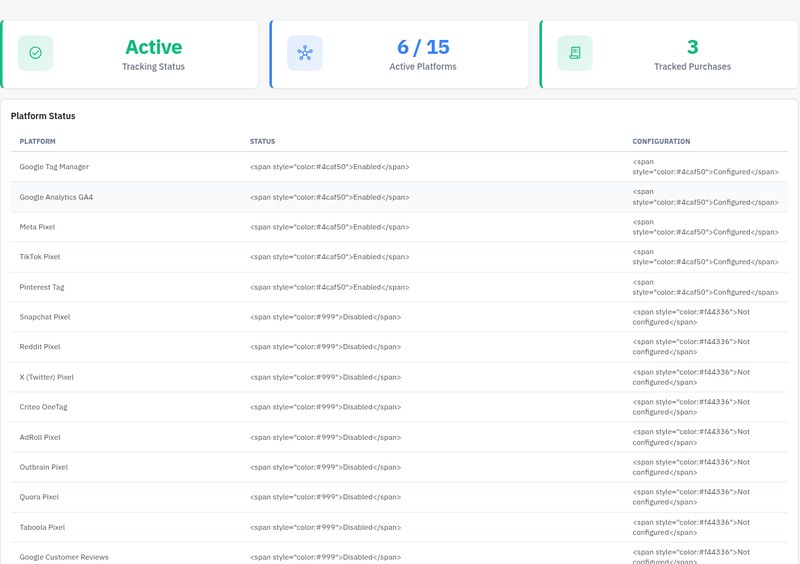
Questions
4
Do I need to use Google Tag Manager, or can I use GA4 directly?
You can use GTM or send directly to GA4. GTM receives ecommerce events in GA4 ecommerce format; direct GA4 sends them through gtag.js.

Choose one route to each GA4 property to avoid duplicate events.
GTM requires CONTAINER_ID; direct GA4 requires MEASUREMENT_ID. Enable the platform and the global tracking switch, and configure consent.
GTM: GTM-XXXXXXX; configure and publish your container tags.
Direct GA4: G-XXXXXXXXXX; no GTM tags are needed for that route.
Optional GA4 purchase recovery requires an API secret and the MPR Cookies Revolution consent integration.
Configure either route under Platforms in Marketing Revolution.
What is Meta Conversions API (CAPI) and do I need it?
Meta CAPI sends eligible purchases from your server alongside the browser Pixel. Marketing Revolution uses a shared event identity for deduplication.
Purchases enter the Meta queue during order validation. Delivery requires credentials, the applicable consent and external scheduled execution; it does not use an hourly missed-purchase scan.
Setup:
1. Enter your Meta Pixel ID.
2. Save the CAPI access token.
3. Enable Conversions API purchase events.
4. Connect the external scheduler.
5. Use a Test event code for testing, then clear it.
Delivery:
Order validated -> eligible purchase queued.
send_platform_conversions -> scheduled every 300 seconds.
Queue worker -> Meta Graph API.
Browser and server -> shared purchase event identity.
Meta Events Manager -> check received events.CAPI is optional. Enable it if you want server purchase reporting to Meta; it does not bypass consent or guarantee attribution.
How do I verify that tracking is working correctly?
Test product views, confirmed cart additions and purchase in browser requests and platform diagnostics.
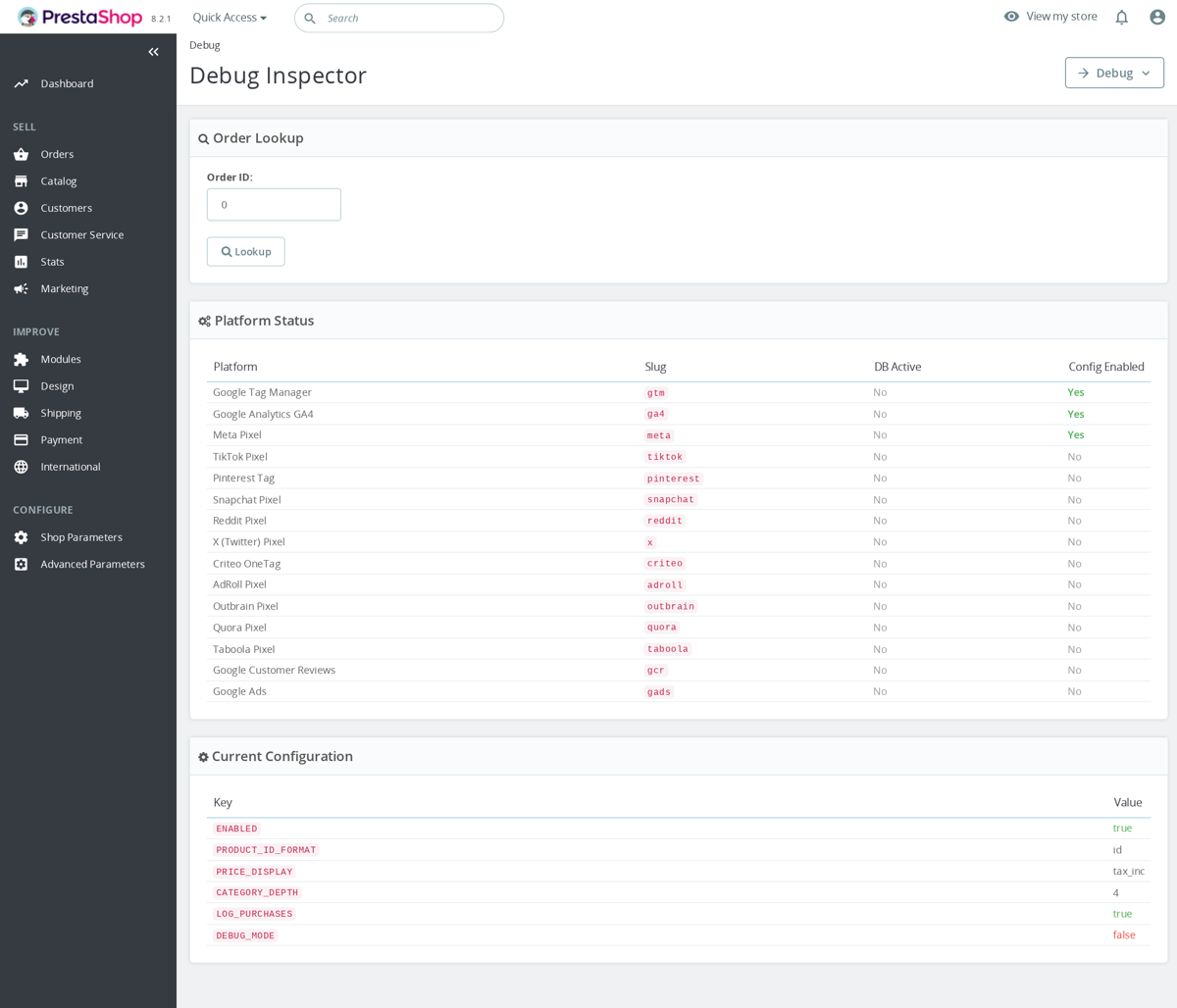
Debug Inspector rebuilds current order data; it is not a historical delivery record.
Check transaction ID, items, value and currency.
Cart additions need successful updateCart or PrestaShop 1.6 AJAX responses. Check add_shipping_info and add_payment_info separately from purchase; automatic step detection is absent.
- GTM: inspect
dataLayer:eventandecommerce. - GA4: Realtime; DebugView requires the debug flag.
- Google Ads: set the conversion label.
- Meta CAPI: Test event code, Test Events, queue and scheduler.
Turn Debug Mode off afterwards; Marketing Revolution has no universal console event logger.
Are custom checkout modules automatically covered by checkout tracking?
Checkout tracking depends on the integration. The page collector builds begin_checkout for the order and orderopc controllers in private cart context, while purchases use the order-confirmation hook and provider checks. A custom checkout using another controller or confirmation flow needs its own verification. A recorded purchase does not mean the earlier checkout events were captured too, so check those events separately.
Known Issues
13
Platform defaults on installation
Module removal
Multishop event processing
Tag Manager event delivery
Security hardening
Registration event continuity
Purchase recovery
Tag Manager engagement events
Google Ads identifiers
Consent manager conflicts
Settings selection fields
Administration filters
Server-side resent purchases appear as new users in GA4
When the missed purchase resender fires via cron, it generates a pseudo client ID (random digits + timestamp) because the original browser's _ga cookie is not available. This means resent purchases appear as separate sessions/users in GA4 reports.
Workaround: Enable User-ID tracking in the GA4 platform config. If the customer was logged in during purchase, the User-ID will link the server-side event to their existing user profile.
Workaround
Enable User-ID tracking in the GA4 platform config. If the customer was logged in during purchase, the User-ID will link the server-side event to their existing user profile.
Resolution note
Server-side purchase events now properly set user_id from the original customer account when available. The GA4 Measurement Protocol adapter extracts the customer ID from the order data and includes it in the server-side payload, allowing GA4 to attribute resent purchases to the correct user profile. For logged-in customers, resent events link to the existing user via User-ID.
Feature Requests
13
Implemented
Tracking setup warnings
Tabbed settings
One-click module updates
Google Customer Reviews
Remarketing engagement events
Variant tracking and consent integration
ChatGPT Ads tracking
Advertising event and delivery controls
Meta connection assistance
Microsoft purchase corrections
Per-platform consent controls
Consistent purchase delivery
Multishop review settings
Changelog
v1.6.02026-10-02
- Addedthe full ChatGPT Ads feature set of the Pixel for ChatGPT Ads module: Browser Pixel switch, a switch for each of the six events, Ignore shop employees
- AddedSend test purchase (validate only), failed server event count with Retry failed events, and tracking, consent and item ID status notices
- Fixedserver-only ChatGPT Ads setups: consent changes now reach the server without the browser Pixel
- FixedSave and stay on platform settings, and a rejected save now keeps the values you entered
- Fixedloading of tracking scripts on PrestaShop 1.6
- Fixedmodule updates now require edit permission on the update screen
Older releases
v1.5.02026-10-01
- AddedChatGPT Ads (OpenAI) platform: Pixel loaded only after visitor consent, with page, product, add to cart, checkout, registration and purchase events
- Addedevery order also sent through the OpenAI Conversions API, counted once together with the browser event
- Addedwithdrawn consent stops orders still waiting to be sent; shop employees are never counted
- Addeditem IDs that follow the ChatGPT product feed, and order value with or without tax and shipping
- Addedworks next to the Pixel + Conversions API for ChatGPT Ads module: Marketing Revolution takes over a shared Pixel ID
- Fixedshared integrity package update
v1.2.132026-05-19
- AddedAdd native tracking config warnings
- Addedcomplete FR/DE/ES/IT/PL translations
- FixedComplete shared package release surface
- FixedSupport scalar select choices in admin forms
v1.2.02026-04-20
- Addedadmin menu management via MenuInstaller for streamlined module setup
- Addedself-healing integrity checks for automatic diagnostics and repair
- AddedLicense management tab with key management and renewal options
- Addedcomplete FR/DE/ES/IT/PL translations
- Improvedadmin list columns with visual badge indicators and multiselect filters
- Improvedsettings form organization with tabbed layout
- Fixedadmin list filters — sorting, searching, and filtering now work correctly on all columns
v1.1.02026-01-19
- AddedGoogle Ads Conversion Tracking adapter with per-event conversion labels
- Support for purchase, add_to_cart, begin_checkout, view_item, sign_up, search, and page_view conversion labels
- Intelligent gtag.js sharing between GA4 and Google Ads (no duplicate loading)
- Google Ads remarketing audience list support via page_view events
v1.0.02025-12-15
- Initialrelease with 14 platform adapters
- InitialGoogle Tag Manager with full dataLayer ecommerce events
- InitialGoogle Analytics GA4 with direct gtag.js and IP anonymization
- InitialMeta (Facebook) Pixel with full event set
- InitialMeta Conversions API (CAPI) with hashed customer data matching
- InitialTikTok Pixel: ViewContent, AddToCart, PlaceAnOrder events
- InitialPinterest Tag: pagevisit, addtocart, checkout with line items
- InitialSnapchat Pixel: VIEW_CONTENT, ADD_CART, PURCHASE events
- InitialReddit Pixel: ViewContent, AddToCart, Purchase with value tracking
- InitialX (Twitter) Pixel with value and currency tracking
- InitialCriteo OneTag with device detection and viewHome/viewItem/viewList/viewBasket/trackTransaction
- InitialAdRoll Pixel with segment-based tracking
- InitialOutbrain Pixel: VIEW_CONTENT, ADD_TO_CART, PURCHASE events
- InitialQuora Pixel: ViewContent, AddToCart, InitiateCheckout, Purchase
- InitialTaboola Pixel with revenue tracking
- InitialGoogle Customer Reviews post-purchase opt-in with trust badge
- InitialFull GA4 Enhanced Ecommerce: 14 events (view_item, view_item_list, select_item, add_to_cart, remove_from_cart, add_to_wishlist, begin_checkout, add_shipping_info, add_payment_info, sign_up, login, search, purchase, refund)
- InitialGA4 Measurement Protocol server-side API for ad-blocker-proof tracking
- InitialAutomatic missed purchase resender cron (configurable 6-72h lookback)
- InitialCheckout step detection via MutationObserver for add_shipping_info and add_payment_info
- InitialConsent Mode v2 bridge: MPR Cookies Revolution, Cookiebot, IAB TCF v2, OneTrust
- InitialConfigurable product ID format (product ID, reference, EAN-13, UPC)
- InitialAdmin dashboard with tracking status and recent orders
- InitialPlatform manager with one-click enable/disable
- InitialTracking log with order link, platforms, source, and status badges
- InitialDebug inspector: look up any order payload, copy-to-clipboard
- InitialCompatible with PrestaShop 1.6.0.0 through 9.x
Demo
Test the full module before you buy
Buy a licence later and keep your settings.
- Your 30-day demo Test it on your own shop for 30 days from the first install.
- Ready demo shop Explore a ready demo shop in your browser.
- No registration No account, email or store domain needed.
By downloading, you accept the demo terms and privacy policy.
By opening this demo you accept the demo terms and the privacy policy.