




Marketing Revolution supplies sixteen advertising and analytics destinations with a shared stream of PrestaShop shopping events. You install the module and enter the identifiers for the networks your store uses.
Those destinations include Google Analytics, Google Ads, Meta, ChatGPT Ads and TikTok. Each network supplies its account identifier and sets its own charges; most measurement accounts are free, with network costs separate from the module.
You enable platforms individually and keep identifiers separate by shop. Events carry exact product variants, values and currencies. Consent controls distinguish analytics from advertising, while ownership checks prevent duplicate tracking for tags the module can coordinate. Server purchase delivery and hourly recovery support Google Analytics, Meta and ChatGPT Ads.
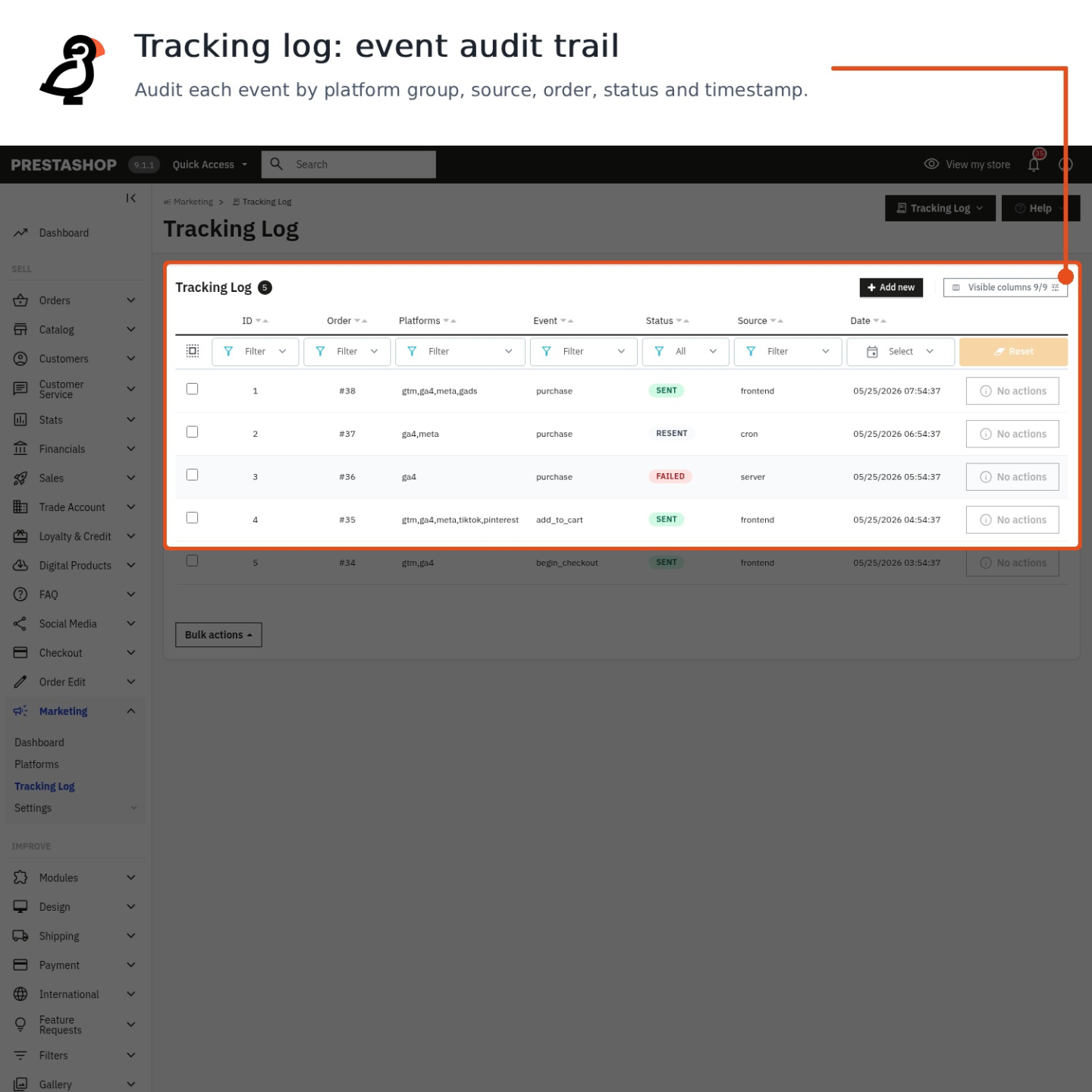
The purchase ledger identifies valid orders missing from reports, giving the recovery process the records needed to send those sales afterwards.
Summary of what the module offers
Marketing Revolution gives a PrestaShop store one measurement layer for the sixteen supported destinations, built to report the truth.
- Sixteen destinations, one stream: Google, Meta, ChatGPT Ads, TikTok and twelve more, fed identical commerce data.
- Precise payloads: exact variants, brand, categories, values, coupons, currencies.
- Signals others never send: high-intent engagement measured on the product page.
- Purchase recovery: server delivery plus hourly recovery of missed orders for Google Analytics, Meta and ChatGPT Ads, subject to consent.
- Consent handling: four consent families understood, duplicate tags prevented where the module can coordinate them.
- Operations: dashboard, purchase ledger, diagnostics with one-click repairs.

How many tracking modules does this replace?
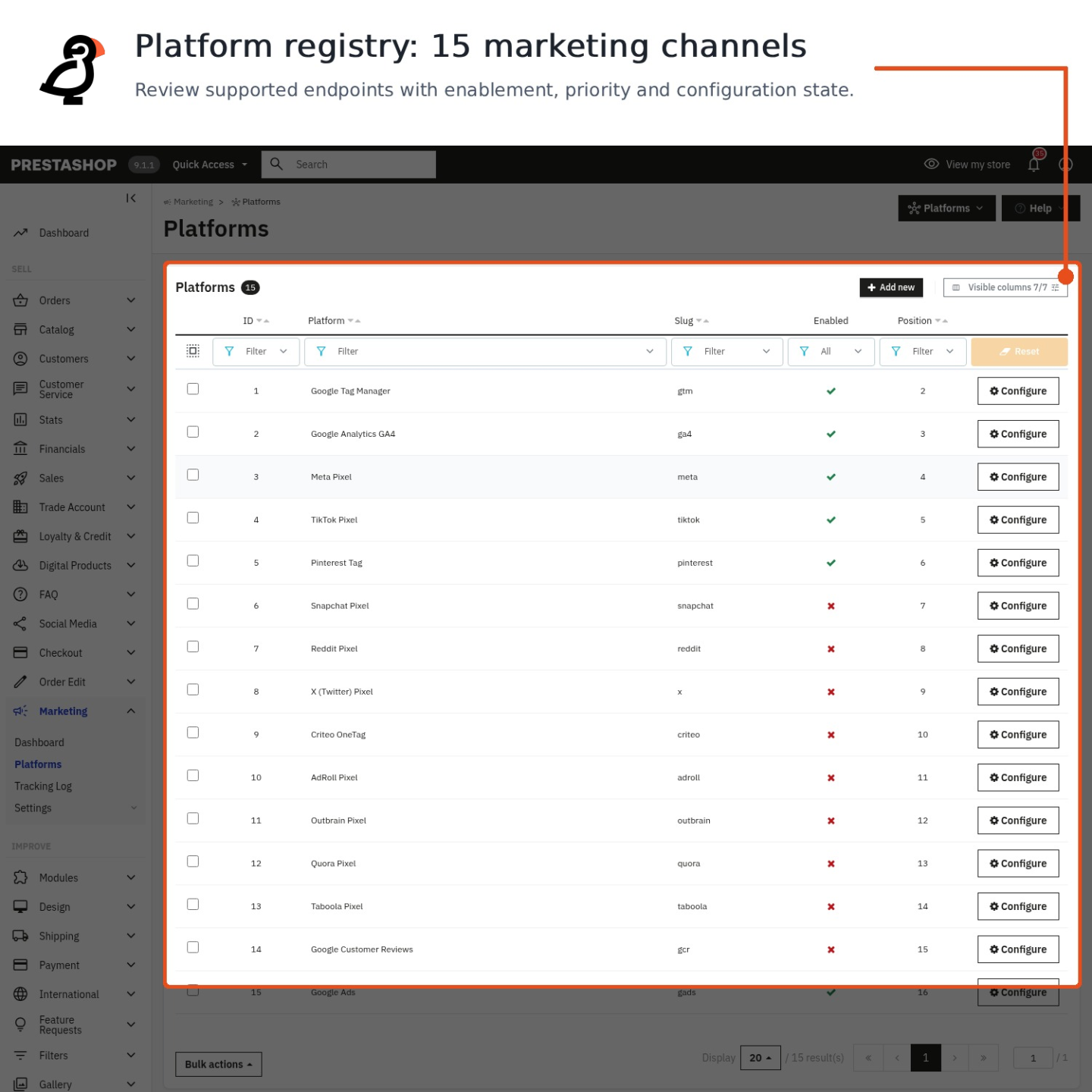
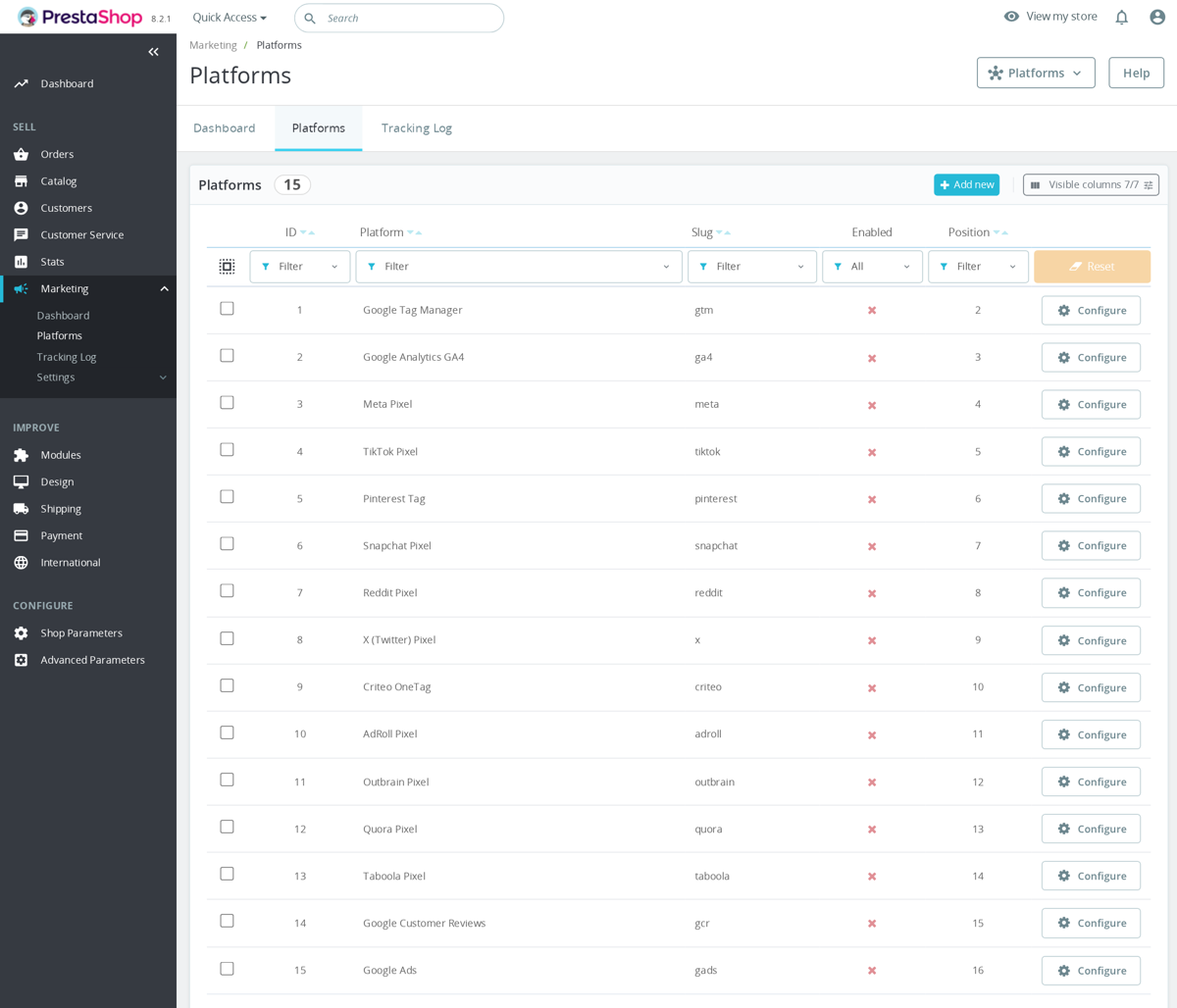
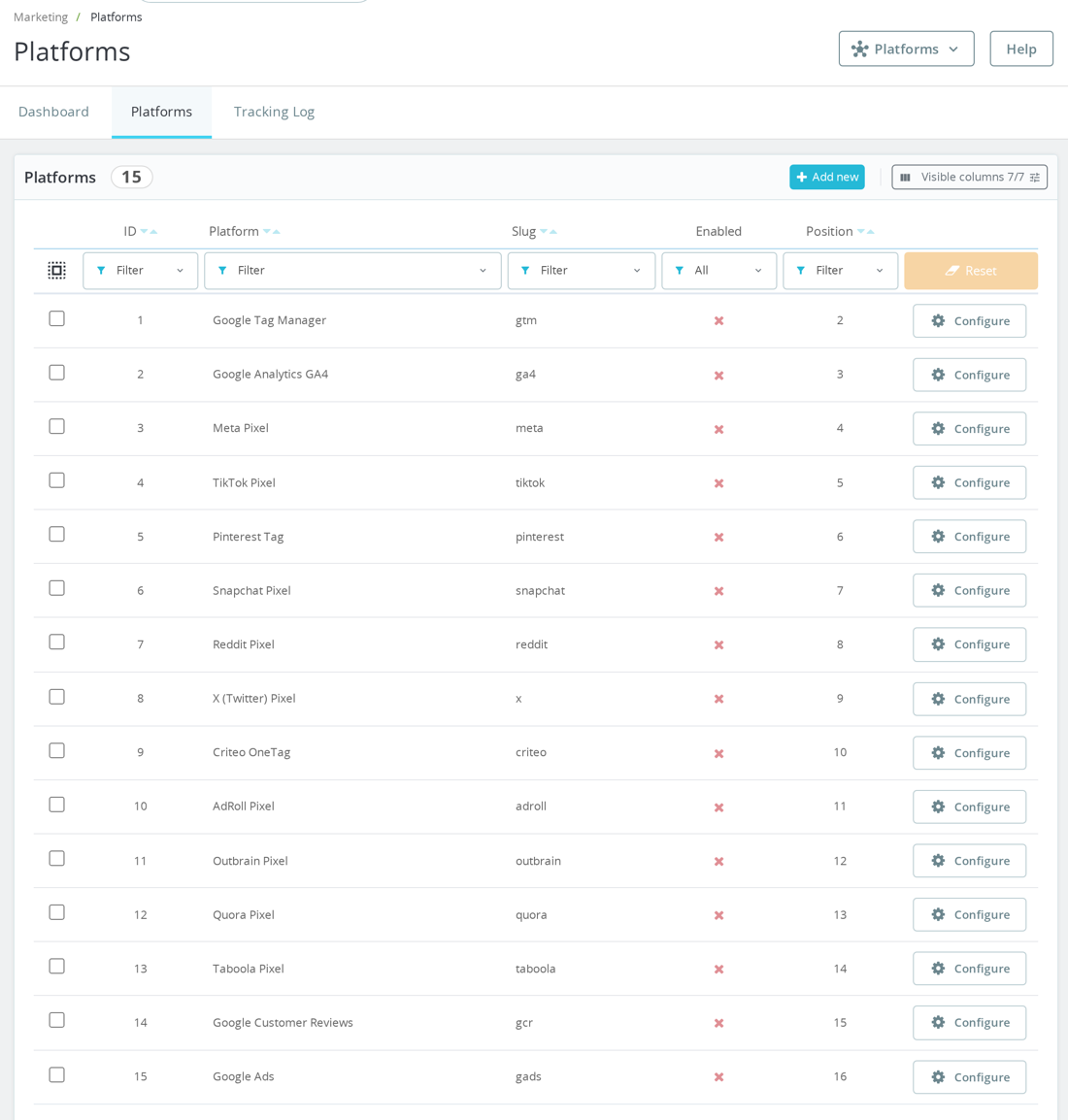
It replaces separate tracking modules for the sixteen destinations listed below. Google Tag Manager, Google Analytics, Google Ads, Meta, ChatGPT Ads, TikTok, Pinterest, Snapchat, Reddit, X, Criteo, AdRoll, Outbrain, Quora, Taboola and Google Customer Reviews are each a switch and an identifier field, not a separate module. Every active network receives the same normalized events, with its own mapping of store events to conversions. Since version 1.6.0, ChatGPT Ads brings ads inside ChatGPT conversations into the same measurement layer, with the sales data bidding needs to find buyers. The OpenAI Pixel loads only after consent through MPR Cookies Revolution, and purchases also reach the OpenAI Conversions API from the server, counted once alongside the browser event.
Each platform keeps its own settings screen, including the mapping of store events to that network’s conversions, and in a multistore each shop runs its own identifiers. Turning a network on later is pasting one identifier, not installing anything.

What does it measure that standard tracking misses?
Standard tracking sees pages and purchases. This module also sees the behaviour between them: deep browsing across the catalogue, repeated gallery viewing, image zoom, options being chosen, a configuration completed, an add-to-cart attempted, a long attentive visit. These combine into a consolidated high-intent signal, sent as an event your networks optimize toward.
Products are reported to the exact variant, with manufacturer, price, quantity and up to four category levels, so the shoe in size 42 and the shoe in size 44 are different facts, and remarketing audiences are built from the products a visitor viewed and carted. Campaigns stop optimizing on page views and start optimizing on buyers.

What happens to the purchases the browser loses?
A purchase confirmation page that never finishes loading, a blocker, a closed tab: every store loses a share of its reported purchases this way, and every lost purchase makes a winning campaign look weaker than it is. This module delivers purchases server to server to Google Analytics, Meta and ChatGPT Ads, beyond the reach of blockers, with hashed customer data strengthening match rates.
On top of that, an hourly worker compares valid orders against the module’s own purchase ledger, finds any order that never reported, rebuilds its full payload and delivers it after the fact. The consequence is the one that matters most on this page: your networks receive recoverable purchase data where consent allows, helping you allocate budget using attributed revenue.

Does it respect the cookie banner, and can tags double-fire?
Consent is read from four families of consent tools: the MPR consent banner, Cookiebot, OneTrust and the generic industry consent signal. Analytics and advertising consent are applied separately, engagement measurement waits for analytics consent, and duplicate consent commands are suppressed when another tool owns them. Tracking obeys the banner without going dark where it is allowed to see.
For tags the module can coordinate, an ownership check confirms it owns the platform and identifier before firing, helping prevent double counting. Where a native tag exists that the module cannot yet coordinate, the back office says so explicitly instead of staying silent.
How do I know the whole thing is working?
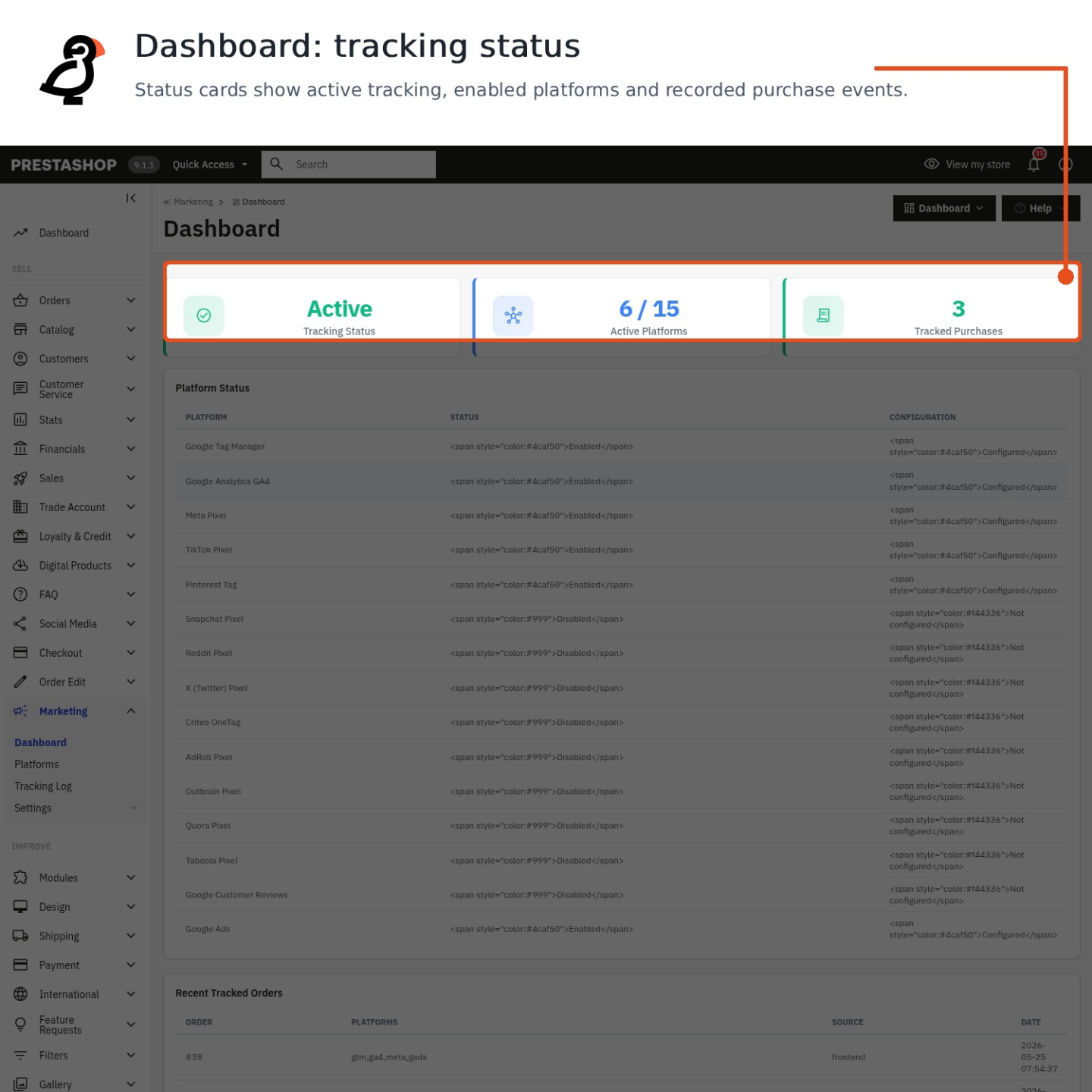
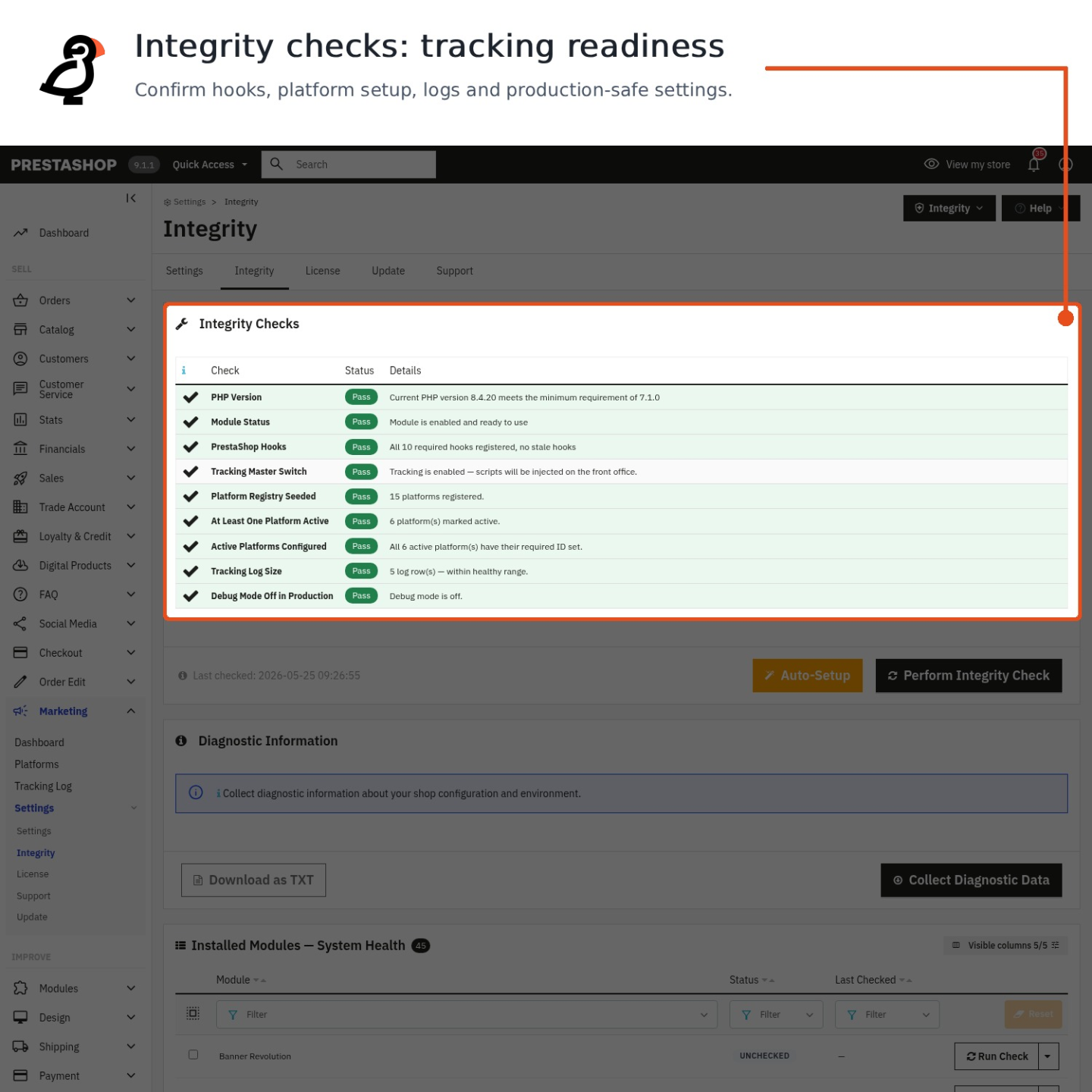
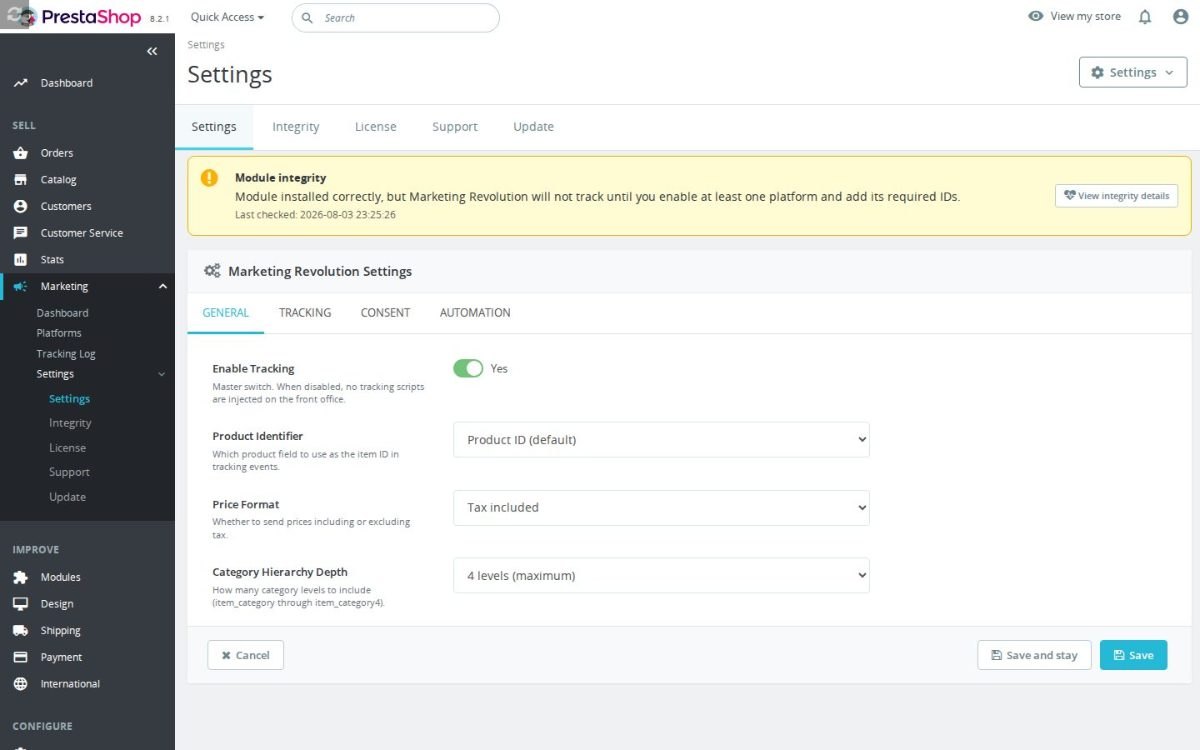
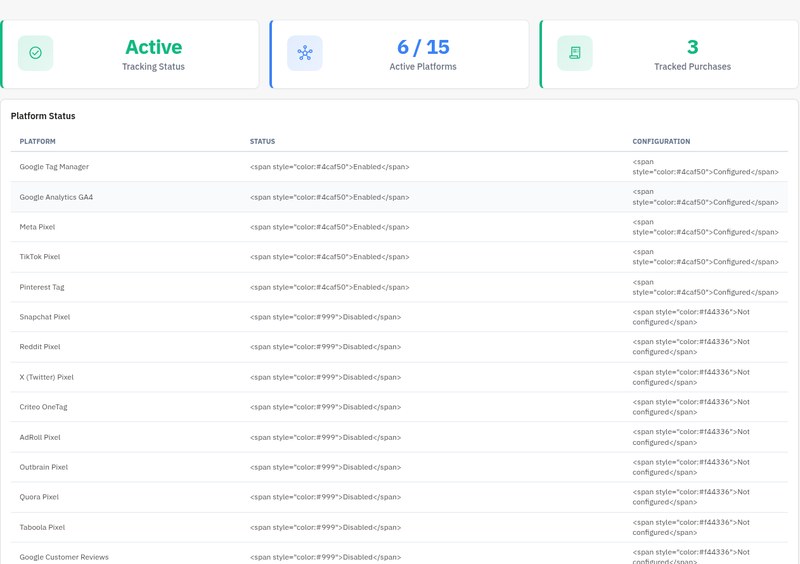
The dashboard answers at a glance: tracking health, how many platforms are live, how many purchases were tracked. The ledger lists every recorded purchase, the debug screen shows the events as they flow, and the diagnostics screen checks the master switch, the platform registry, required identifiers and log growth, with one-click repairs for what it finds, including switching off debug mode on a production store.
So the recurring agency conversation about whether the pixel is broken ends with a screenshot of a green dashboard, and the monthly numbers meeting starts from figures everyone can trust.
-
Referencemprmarketingrevolution
-
Version1.10.0
-
Improvements206
-
Released
-
Updated
-
PrestaShop CompatibilityPS 1.6 – 9.x
-
Pricing ModelOne-time Purchase
-
Module TypeFront & Back-office
-
GDPR RelevantYes
-
Business GoalMarketing & Retargeting
-
External Account NeededYes
-
Module ComplexityFeature-Rich Module
-
Customer Journey StageAttract Visitors
-
Works With PlatformAd & Analytics Networks
Be the first to share your experience with this product.
Marketing Revolution centralizes PrestaShop marketing tracking for GA4, GTM, ad pixels, retargeting tags, Google Ads, ChatGPT Ads, and Google Customer Reviews. It helps merchants keep product, cart, checkout, and purchase data consistent across the platforms they actually use.
Can I use this alongside my existing Google Analytics module?
You can, but never let two modules inject the same Google Analytics tag, that double-counts every event and inflates your reports. Pick one module per platform: if you enable GA4 in Marketing Revolution, disable or uninstall any other GA4 module first, and vice versa.
If you want a single dedicated PrestaShop Google Analytics module instead, our standalone Google Analytics GA4 module handles GA4 on its own (browser plus server-side Measurement Protocol and Consent Mode v2). Running it side by side with another GA pack is fine only if exactly one of them is sending GA4. The other should keep GA4 switched off.
It is also fine to split platforms: use Marketing Revolution for, say, TikTok, ChatGPT Ads and Pinterest while a separate module owns GA4. The rule is one tag per platform, not one module per store.
Marketing Revolution is built around a master tracking switch plus platform-specific adapters. That means a safe mixed setup is possible: for example, keep your existing GA4 module active, leave the GA4 adapter disabled in Marketing Revolution, and enable only TikTok, Pinterest, ChatGPT Ads, Reddit or Meta in Marketing Revolution. The front office config exposes the active platform slugs, so Debug Mode makes it easy to see what the module thinks is active.
- Unsafe: another module loads
G-XXXXXXXXXXand Marketing Revolution GA4 direct also loads the same measurement ID. - Usually safe: Marketing Revolution pushes GTM dataLayer events while a separate GA4 module owns direct GA4, as long as the GTM container is not also firing GA4 ecommerce tags for the same property.
- Safe split: existing GA4 module owns GA4; Marketing Revolution owns Meta, ChatGPT Ads, TikTok, Pinterest, Snapchat, Reddit or other non-GA platforms.
When testing, open the page source or browser network panel and search for the GA4 Measurement ID and GTM container ID. Seeing one intentional owner is normal; seeing the same GA4 property loaded from multiple modules is the warning sign.
What happens to tracking data if I uninstall the module?
Uninstalling removes the module's tracking log table and its platform configuration from your database. Data already sent to Google Analytics, Meta, ChatGPT Ads and other platforms stays in those services. Uninstalling does not delete anything held outside your shop. If you plan to reinstall later, export your platform configuration first (pixel IDs, API keys) so you do not have to look them up again.
Learn more about Marketing Revolution, unified tracking for PrestaShop.
Does the module support Google Customer Reviews?
Yes. Google Customer Reviews (GCR) is one of the platforms you can turn on in Marketing Revolution. Enter your Google Merchant Center ID and set the estimated delivery days, which defaults to 7. The module has a purchase-confirmation opt-in script path and a separate badge script path for showing Google's rating badge.
GCR works differently from analytics and ad platforms. It is not used for standard ecommerce events such as view_item, add_to_cart or purchase. Enable it for review collection and the Google trust badge, but keep GA4, Google Ads, Meta, ChatGPT Ads or another analytics/ad platform enabled for actual conversion tracking.
The opt-in payload currently includes the Merchant Center ID, the PrestaShop order ID and an estimated delivery date calculated from the configured number of days. The adapter has fields for customer email, delivery country and product GTINs, but the order and product extractors used to build the payload do not populate customer_email, delivery_country_iso or item ean13. In the current code those values are empty unless the extractors are extended.
Required configuration: MERCHANT_ID
Default: ESTIMATED_DELIVERY_DAYS = 7
Current payload limit: email, delivery country and product GTIN are not populated by the extractors
The badge and opt-in are intentionally separate from ecommerce tracking. The badge script is deferred to the page footer, while the opt-in is generated from purchase data on the confirmation page. There is a badge position setting in the platform configuration, but the current badge renderer appends the rating badge with the merchant ID and does not currently pass the selected position into the rendered badge attributes, so verify the visual placement in your theme.
GCR is built into Marketing Revolution. For the bigger picture on reviews and trust badges, see our guide to trust badges.
Do I need to use Google Tag Manager, or can I use GA4 directly?
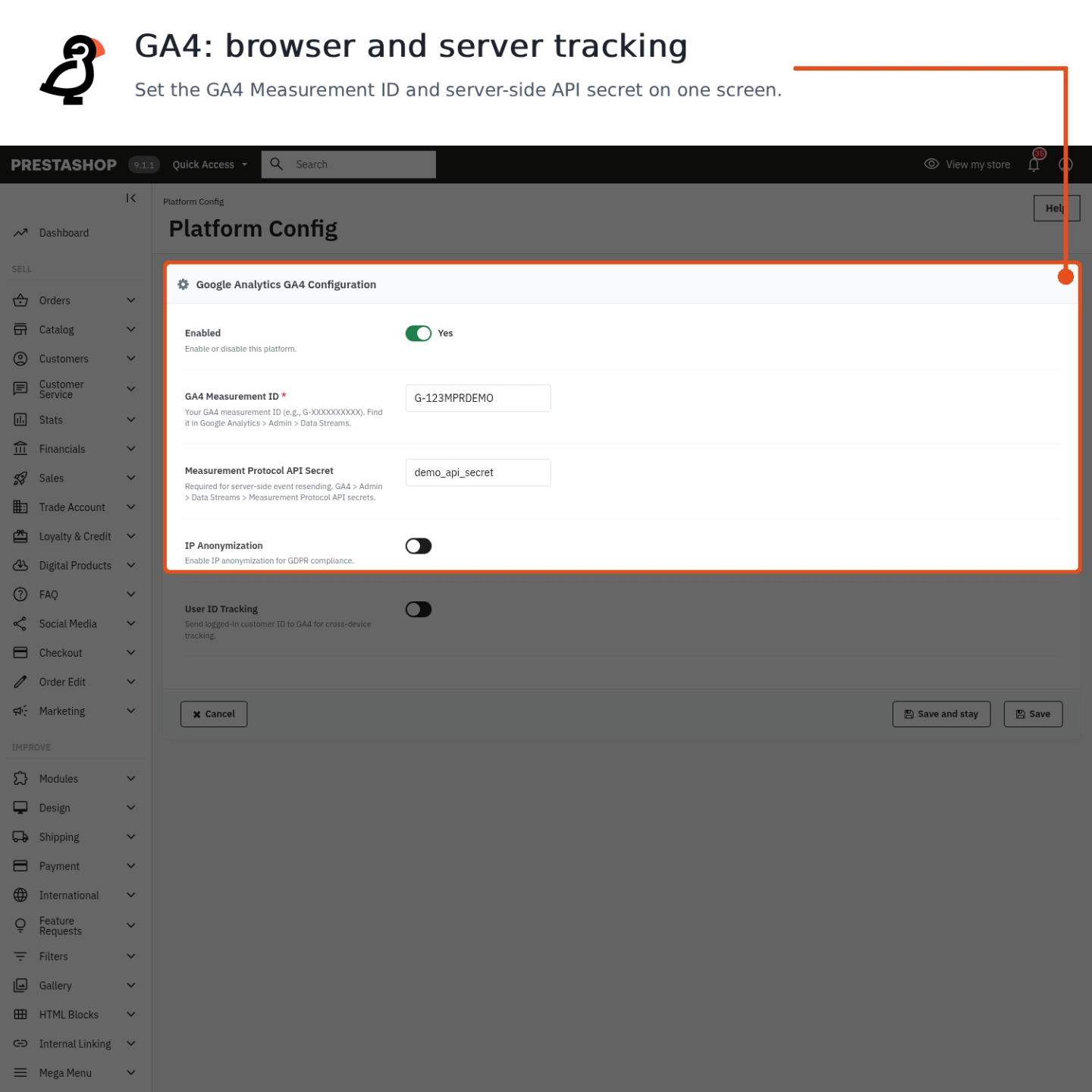
Either works, and you can run both at once. Turn on the GTM platform and enter your container ID if you want everything to flow through Tag Manager, the module pushes all ecommerce events to the dataLayer in GA4 Enhanced Ecommerce shape, so any tag you build there receives them. Prefer to skip GTM? Turn on the GA4 platform, enter your Measurement ID, and the module loads gtag.js and sends events to Analytics directly.

Each platform is enabled on its own, so running GTM and GA4 together is fine: many shops use GTM for custom tags and triggers while GA4 direct handles native event tracking. The common mistake is double-counting, if GTM is already firing a GA4 tag from the dataLayer, don't also enable the GA4 direct platform for the same property, or you'll record each event twice. Pick one path to GA4 and keep it.
In the module these are separate adapters with separate required fields: GTM needs a CONTAINER_ID, while GA4 direct needs a MEASUREMENT_ID. The master tracking switch must be enabled first; if tracking is disabled, or if a platform is active but missing its required ID, the front-office scripts for that platform are not injected.
GTM route: enable GTM + CONTAINER_ID = GTM-XXXXXXX; create GA4 tags inside Tag Manager from dataLayer events.
Direct route: enable GA4 + MEASUREMENT_ID = G-XXXXXXXXXX; leave GTM out of the GA4 path.
GA4 direct also has optional settings that GTM does not use in the same way: IP anonymization, user ID tracking for logged-in customers, and an API secret for server-side resend of missed purchases. GTM is better when you want one container to control several vendors; GA4 direct is cleaner when you only want the module to send the standard GA4 ecommerce events without building tags in GTM.
This is part of Marketing Revolution, which unifies tracking for Google, Meta, ChatGPT Ads and more from one place.
Does Marketing Revolution work with Consent Mode v2?
Yes. Marketing Revolution includes a Consent Mode v2 bridge that connects supported cookie banners to Google's consent signals. It is designed to detect four consent platforms automatically: MPR Cookies Revolution, Cookiebot, any IAB TCF v2 banner, and OneTrust.
When the bridge runs with window.mprMarketingConfig.consentMode available, it sets Google's default consent for analytics and ads to the configured default values, usually denied for an EU-style setup, and then updates consent when the visitor accepts the relevant categories. The bridge passes consent state to Google; it does not block third-party scripts on its own. Script blocking remains the job of the cookie banner or CMP.
There is an important current-code ordering caveat. The bridge exits immediately if window.mprMarketingConfig is not already defined, while the header template prints platform init scripts and page event scripts before it defines that config object. Because of that, the current build does not guarantee that denied/default consent is applied before Google tags or page events run. For strict Consent Mode sequencing, verify the actual rendered order in your theme or adjust the module so the config and default consent command are present before any Google init/event scripts.
Consent Mode is disabled by default in the module settings. When enabled and when the bridge has the config object in time, the default module values are denied for analytics storage and denied for ads storage unless you deliberately change them.
The bridge sends Google's v2 consent fields: analytics_storage, ad_storage, ad_user_data and ad_personalization. It also leaves functionality_storage and security_storage granted, and uses a wait_for_update window of 500 milliseconds so a CMP update can arrive before Google processes hits.
Default EU-style setup: Consent Mode enabled; analytics default = denied; ads default = denied; CMP accepts analytics + marketing; bridge updates Google consent to granted.If your CMP is not one of the supported integrations, you need a small custom bridge that calls the same update path when the visitor changes consent. Without that, Google will keep whatever consent state was last sent to it, even though the banner UI changed.
Marketing Revolution handles the tracking side; for the banner itself see Cookies Revolution, our GDPR consent module.
How does the missed purchase resender work?
It recovers purchases that browser-side tracking missed: the module logs the purchase events it does capture, and the hourly cron compares recent valid PrestaShop orders against that log to find any order that never produced a purchase event. Each missed order is then replayed server-side.
Resends go out through the GA4 Measurement Protocol and/or the Meta Conversions API. This only runs if you have entered the server-side credentials - a GA4 API secret and/or a Meta access token; without them there is no channel to send through, so the job skips. You choose how far back it looks: 6, 12, 24, 48 or 72 hours. ChatGPT Ads also sends every purchase through the OpenAI Conversions API; failed server events can be retried, and withdrawn consent stops orders still waiting to be sent.
The feature is off by default. To use it, enable missed purchase resending, keep purchase logging enabled, and make sure the module's cron is running; the module registers an hourly resend_missed_purchases task. The default lookback is 24 hours, and the lookup selects valid PrestaShop orders in that window that have no purchase row in the module's tracking log.
- GA4 resend: requires the GA4 Measurement ID and API secret. The module sends the purchase through Measurement Protocol.
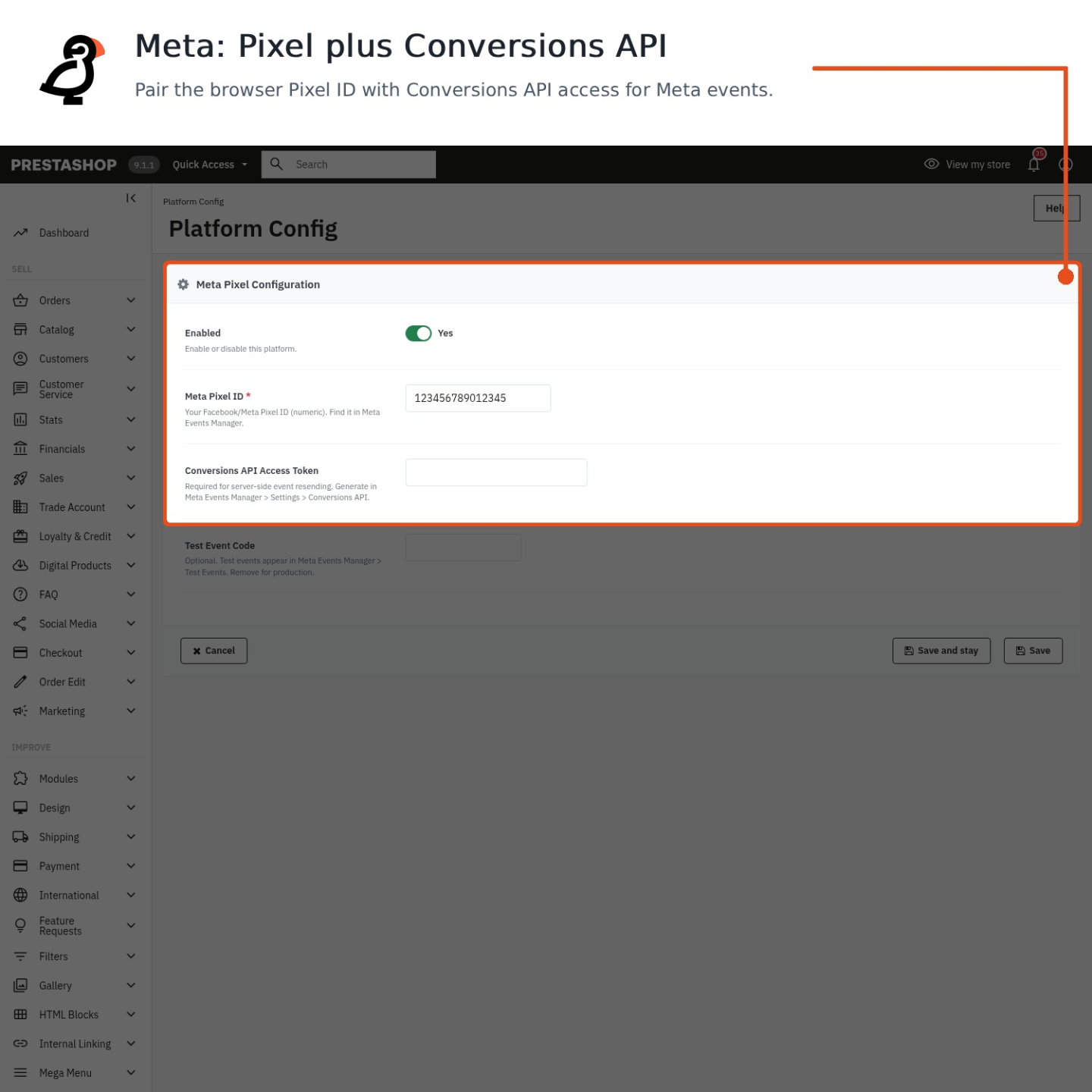
- Meta resend: requires the Meta Pixel ID and Conversions API access token. A Meta test event code can be used while testing.
- Logging: after a successful resend, the cron writes a purchase log entry with source
cron_resend, so recovered orders are recorded and will not be resent again.
A useful detail: this is not a magic replay of the customer's exact browser session. For a missed order, the module rebuilds the order payload from PrestaShop order data and sends it server-side. That is still valuable for purchase attribution and reporting, though browser-only details that were never captured may not exist for the resend.
The resender is built into Marketing Revolution, our all-in-one tracking module.
What is Meta Conversions API (CAPI) and do I need it?
Meta Conversions API (CAPI) sends purchase events to Meta from your server instead of relying only on the visitor's browser. In Marketing Revolution, the Meta server-side sender uses your Pixel ID and CAPI access token, then posts purchase events to Meta's Graph API. The point is to recover purchases that browser tracking can miss because of ad blockers, consent timing, checkout redirects or a customer closing the confirmation page too early.
CAPI works with the missed-purchase resender. The module logs purchase tracking, the scheduled resend task runs every hour, looks back over the configured window, and sends missed orders through the configured server-side APIs. For Meta, the payload includes the Purchase event, currency, value, product contents, order ID and enhanced matching data. Email, phone, first name, last name, city, postcode, state and country are normalized and SHA-256 hashed before sending; client IP and user agent are sent unhashed because Meta expects those fields in that form.
Minimal CAPI checklist:
1. Meta Pixel ID in the Meta platform settings.
2. Meta CAPI access token in the Meta platform settings.
3. Optional Test Event Code while validating in Meta Events Manager.
4. Enable Resend Missed Purchases if you want the hourly server-side recovery job.
5. Keep the browser pixel enabled too, because CAPI complements it rather than replacing normal frontend tracking.
Event flow:
Customer reaches order confirmation -> browser pixel tries to send Purchase.
Marketing Revolution logs the purchase tracking attempt.
Hourly cron task -> ResendMissedPurchases finds completed orders not logged as tracked inside the lookback window.
MetaConversionsApi::sendPurchase() -> POST /{pixel_id}/events with Purchase, value, currency, contents, order_id and hashed customer data.
Meta Events Manager -> use the Test Event Code first, then remove it for live traffic.You need CAPI if Meta ads matter to your reporting or optimization. If you do not run Meta campaigns, it is optional. If you do run Meta campaigns, it is one of the highest-impact tracking improvements because it reduces the gap between real PrestaShop orders and what Meta can attribute.
Will this module slow down my store?
If you're worried a tracking module will make your PrestaShop store slow, here's the honest answer: Marketing Revolution is lighter than running a separate module for each platform. Instead of 8 to 16 separate JavaScript SDKs, each adding its own DOM queries and event listeners, you get one unified event layer that all platforms share.
It also loads gtag.js once and shares it between GA4 and Google Ads when both are active, so you don't pay for that script twice. The honest limit: every platform you enable still adds its own SDK script, so turning on all 16 platforms is more JavaScript than turning on 3. Enable only the platforms you actually use and the overhead stays small.
If raw speed is your real concern, pair it with Performance Revolution, which handles caching and front-end optimisation directly.
How do Google Ads conversion labels work?
A conversion label is what tells Google Ads which action just happened. A purchase, an add-to-cart, a sign-up. You create each label inside Google Ads (Tools & Settings → Conversions → Tag setup), then paste it into the matching field in the module's Google Ads platform, along with your AW- conversion ID.

You get a separate label field for each tracked action: purchase, add to cart, begin checkout, view item, sign up, search, and a page-view label that fires on every page load to build remarketing audiences. Only the actions you give a label to send a conversion. Leave a field empty and that action is simply skipped, so you control exactly what counts. The common mistake is reusing one label for everything; use a distinct label per action so your reporting separates a sale from a cart add. If you also run GA4 direct, the module reuses the already-loaded gtag.js rather than loading it twice.
The required field is the Google Ads conversion ID. Labels are optional per event, but no label means no Google Ads conversion call for that action. Purchase uses its own purchase label and can include transaction ID, value and currency; non-purchase events such as view item, add to cart, begin checkout, sign up and search are only sent when their matching label exists.
Google Ads conversion ID: AW-123456789
Purchase label: AbCdEfGhIjK
send_to: AW-123456789/AbCdEfGhIjK
The page-view label is different from ecommerce conversion labels: it can fire on every page load for remarketing audience building. If you do not need page-view conversion pings, leave that label empty and keep ecommerce labels only for actions you actually want to count.
Google Ads conversion tracking is part of Marketing Revolution, our all-in-one tracking module.
Can I track custom events beyond the standard ecommerce set?
Yes, but the usual workflow is to use the events that Marketing Revolution pushes to the data layer and then create your custom triggers in Google Tag Manager. The module pushes ecommerce events with a clean event name and an ecommerce object, so GTM can listen for those events and fire your own tags.
For example, a GTM custom-event trigger for a high-value purchase could be configured like this:
Trigger type: Custom Event
Event name: purchase
Some Custom Events
Condition: ecommerce.value greater than 500

Useful Data Layer Variables:
ecommerce.transaction_id
ecommerce.value
ecommerce.currency
ecommerce.items
The module resets the previous ecommerce object before pushing a new one, then pushes a payload such as { event: 'add_to_cart', ecommerce: {...} } or { event: 'purchase', ecommerce: {...} }. In GTM you can use those event names directly, add conditions, and map the ecommerce fields into Google Ads, GA4, Meta, or custom HTML tags.
This is different from defining arbitrary new event names inside the module interface. The module supplies the ecommerce data layer foundation; GTM is the right place to create custom triggers, filters, and vendor-specific tags from that data.
The standard event set is broader than just purchase. Server-side page context can emit page_view, view_item, view_item_list, search and begin_checkout. Browser interactions add events such as select_item, add_to_cart, remove_from_cart, add_to_wishlist, add_shipping_info and add_payment_info. Purchase is sent from the order-confirmation hook after the order exists.
A platform gotcha: GTM receives the clean ecommerce object, but direct platform adapters do not all support every event. Google platforms cover the ecommerce set most fully; some social platforms map only selected actions, and unsupported event names are skipped rather than forced into a wrong vendor event. Use GTM when you need custom routing, extra conditions or a vendor event name that is not built into the module.
What product identifier is sent in tracking events?
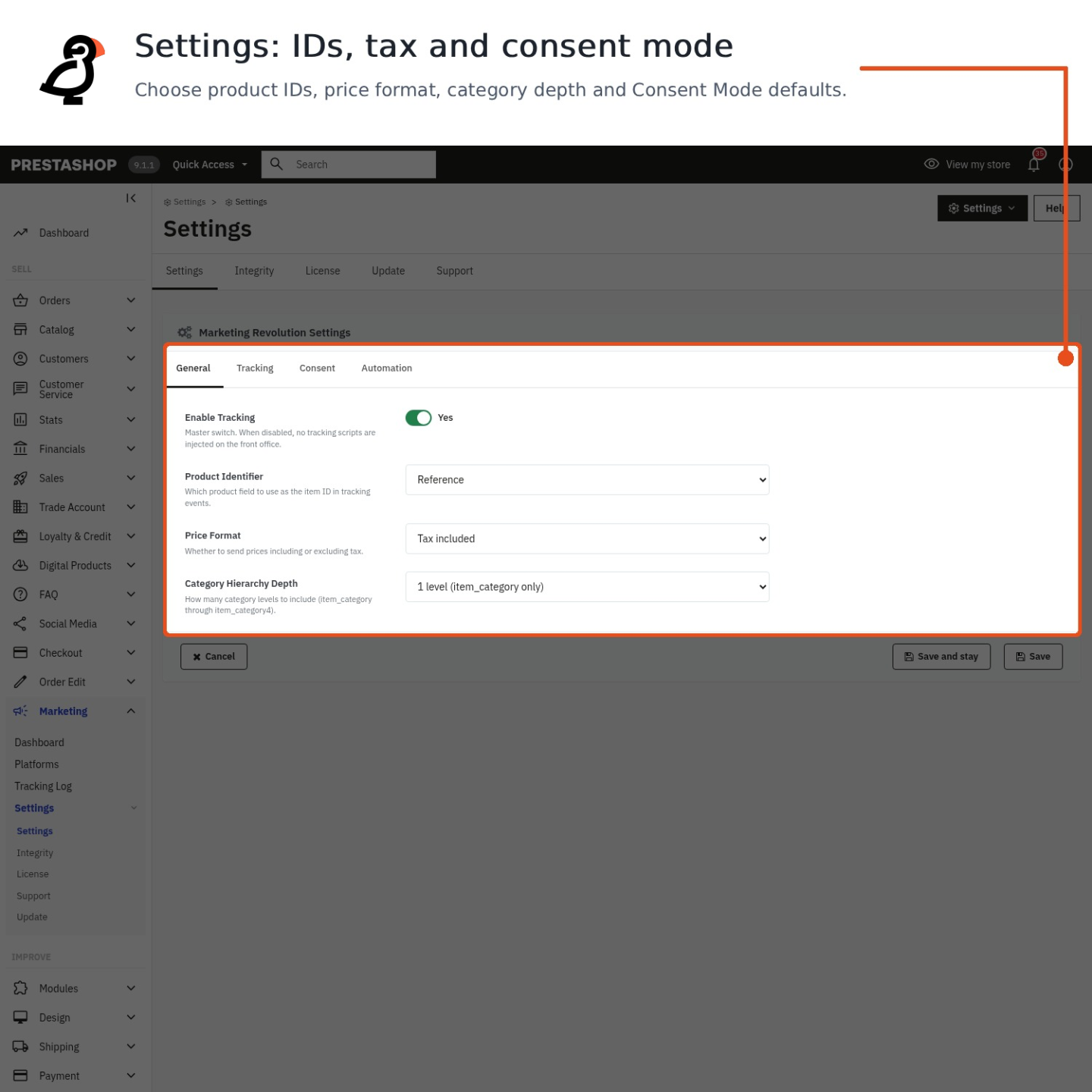
By default the module sends the PrestaShop product ID as the item_id in every tracking event. You can switch this under the Product Identifier setting to the product Reference, the EAN-13 barcode, or the UPC instead. Whatever you pick is used consistently across product views, cart events and the purchase event.
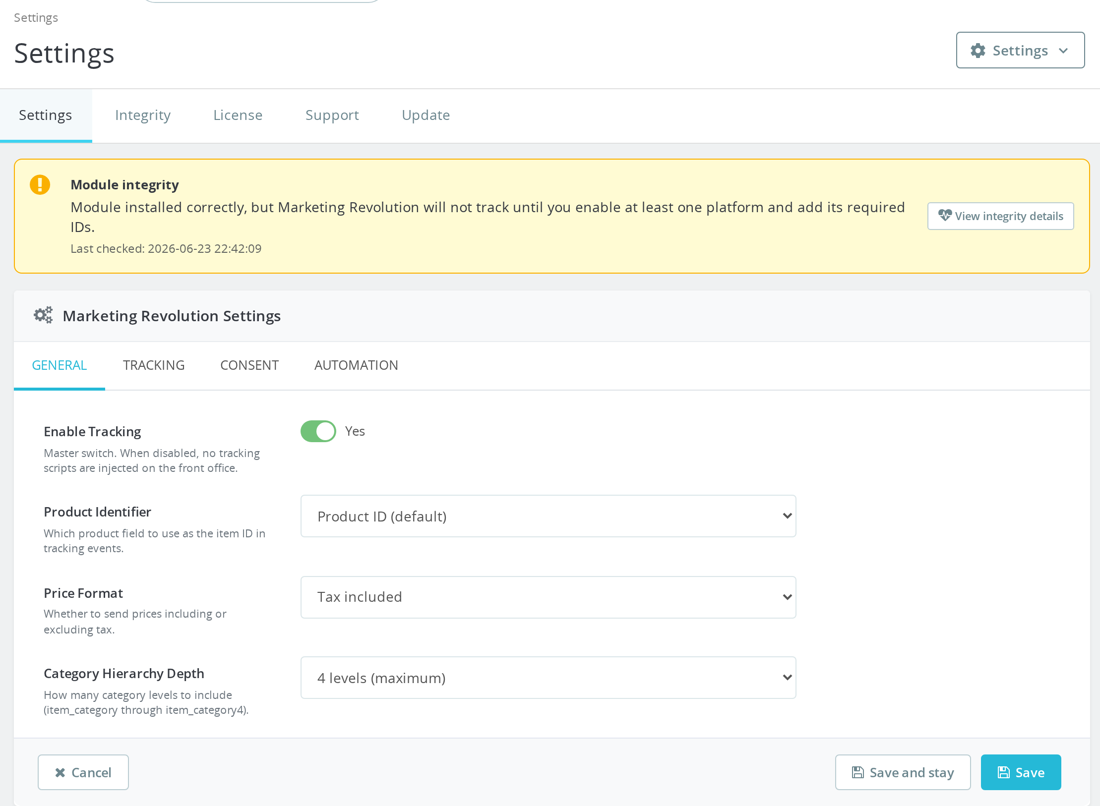
This matters most for Google Merchant Center and Shopping: if your product feed keys items by, say, EAN, your tracking events should send the same identifier so conversions match the right products in your feed. A useful safeguard, if a product has no value in the field you chose (an empty reference or barcode), the module falls back to the product ID for that item, so events never go out with a blank ID. Set the identifier to match your feed so your events use the same identifier format as your product feed.
The same extractor is used for product pages, category/list impressions, cart products and order products, so the setting affects browser events and server-side purchase rebuilds. The related defaults are also worth checking: prices are sent tax included by default, category depth defaults to 4, and data language defaults to the current shop language.
Example: PRODUCT_ID_FORMAT = ean13; product has EAN-13 = 5901234123457; item_id = 5901234123457.
Fallback example: PRODUCT_ID_FORMAT = reference; product reference is empty; item_id = PrestaShop product ID.
For product variants, the payload can include an item_variant value when combination data is available. Category fields are built from the product's category tree up to the configured depth, excluding the root and home categories, which keeps ecommerce reports cleaner.
This is part of Marketing Revolution, our all-in-one tracking module.
Does this work with PrestaShop multistore?
Yes. Marketing Revolution is multistore-aware on PrestaShop multistore setups. Every tracking event is stored with the shop ID it came from, and category-hierarchy lookups respect the active shop context, so your data stays attributed to the right store.
One honest limit to know up front: the platform configuration, your GA4 measurement IDs, Meta and other pixel IDs, API keys, is currently stored globally, not per shop. What that means in practice:
- If your stores share the same advertising accounts, this is exactly what you want. Set it once, all stores report into the same properties.
- If each store needs its own GA4 property or its own pixel, the module applies one set of IDs across the group, so you'd configure for your primary store.
If separate per-shop pixel IDs are essential to your setup, tell us about your store group before buying and we'll confirm whether it fits. Full details on Marketing Revolution.
How do I verify that tracking is working correctly?
Turn on Debug Mode in the module settings - it prints events to your browser console as they fire, tagged [MPR Marketing], so you can open your browser's developer tools and watch add-to-cart, checkout and other events go out in real time.
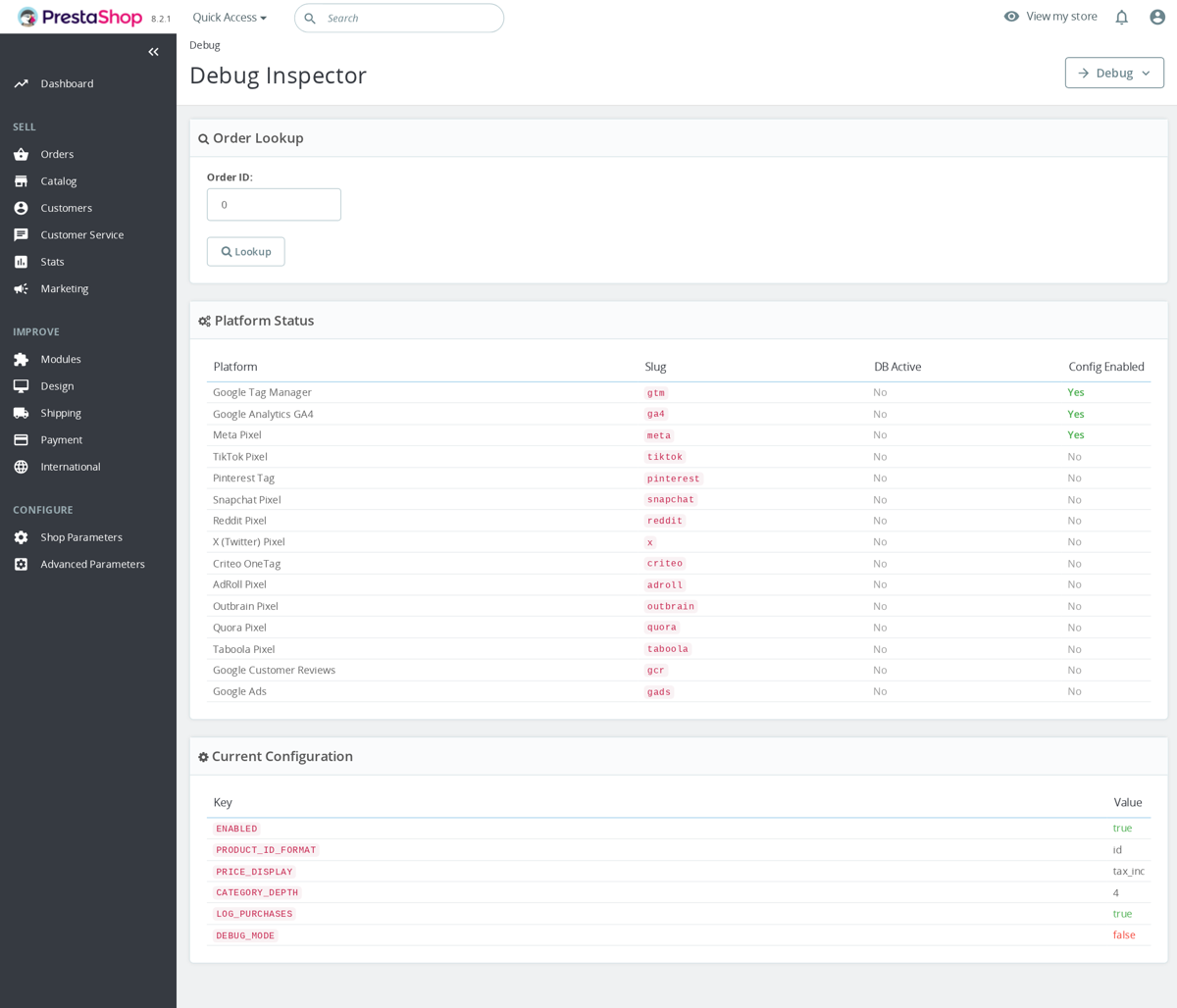
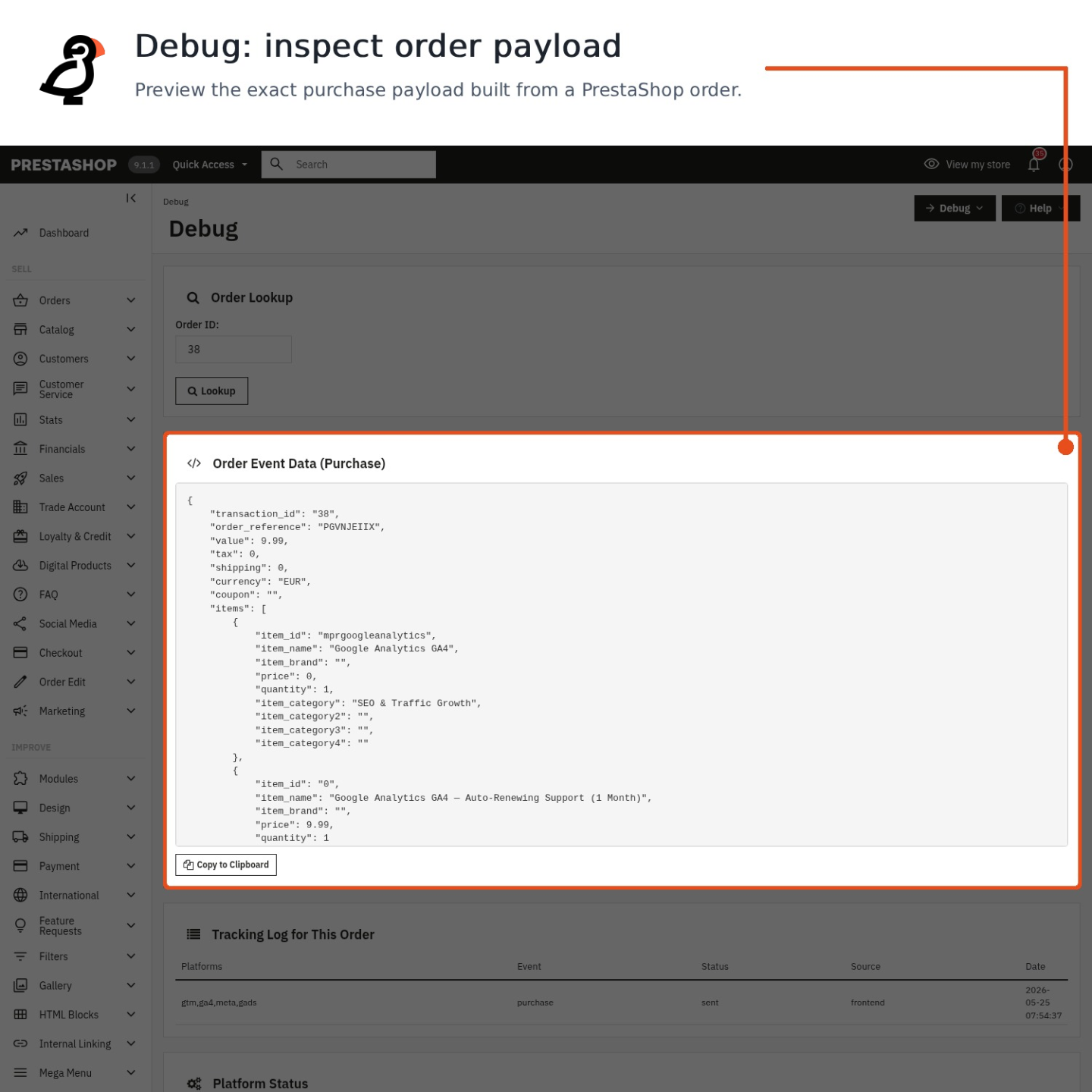
For purchases, use the built-in Debug Inspector: enter an order and it rebuilds the current order/debug payload from the module extractors, alongside order log and configuration context. That lets you validate values, currency and product identifiers, but it is not the exact historical platform-specific JSON that was previously transmitted. Then check the receiving end - for Meta, fill in the Test Event Code and inspect Meta Events Manager → Test Events; for GA4, watch Realtime or DebugView in Google Analytics. The common mistake is leaving Debug Mode on in production - switch it off once you have confirmed everything, since it logs to every visitor's console.
The Debug Inspector is order-based, so it is best for checking purchase data: transaction ID, order reference, value, tax, shipping, currency, coupon and items. It also shows module configuration such as product identifier format, price display, category depth, purchase logging and Debug Mode state, which helps spot mismatches between your feed and your tracking events.
For browser events, test the exact user journey you care about. Add-to-cart is detected from PrestaShop's updateCart event on newer shops, with a PrestaShop 1.6 click fallback. Checkout step events depend on compatible checkout markup, so use the browser console and network/tag debugger to confirm add_shipping_info and add_payment_info separately from purchase.
- GTM: check that
dataLayerreceives the expectedeventname andecommerceobject. - GA4 direct: check Realtime or DebugView for the event name, value, currency and item IDs.
- Google Ads: an event only fires when the matching conversion label is configured.
- Meta CAPI: the Test Event Code applies to server-side CAPI calls, not every browser-only event.
Debug Mode and the Inspector are built into Marketing Revolution.
Is the module compatible with PrestaShop 1.6?
Yes, Marketing Revolution supports PrestaShop 1.6.0.0 and above. On 1.6 there are two minor limitations:
- The
displayAfterBodyOpeningTaghook does not exist on 1.6, so the noscript fallbacks for GTM, Meta and Pinterest are not rendered. - Add-to-cart tracking falls back to intercepting clicks on the cart buttons instead of the
updateCartevent used on newer versions, which is slightly less reliable on heavily customised themes.
Everything else, server-side tracking, purchase events and the platform integrations, behaves the same across versions.
Will checkout step tracking work with custom checkout modules?
Marketing Revolution can track checkout progress, but only when the checkout exposes the step structure the module is watching.

There are three separate pieces to keep in mind. The begin_checkout event is built from PrestaShop checkout/order controller context. The purchase event is sent from the order confirmation hook after the order exists. The in-browser add_shipping_info and add_payment_info events are detected by JavaScript when the active checkout step changes.
- Default PrestaShop checkout: usually works, because it uses a checkout container and active step classes such as delivery and payment steps.
- Checkout Revolution: it uses its own modal/section checkout UI, so Marketing Revolution should not be assumed to see the default PrestaShop step selectors unless a bridge/custom integration is added.
- Third-party one-page checkout: works only if it keeps compatible markup such as
#checkoutor.checkout-processwith an active.checkout-step.-currentwhose id or data step contains delivery/shipping/payment. A Vue/React checkout or custom OPC with unrelated selectors may still track purchase, but may miss shipping and payment step events.
If step events matter for GA4 or ad platforms, test the checkout with the browser network/tag debugger after choosing the checkout module. Do not rely on the purchase event alone to prove that shipping and payment step events are firing.
The exact browser-side watcher looks for a #checkout or .checkout-process container, observes changes, then searches for .checkout-step.-current or .step.-current. If the active step id or data-step contains delivery or shipping, it sends add_shipping_info; if it contains payment, it sends add_payment_info.
<section id='checkout'><div class='checkout-step -current' id='checkout-delivery-step'>...</div></section>That means a checkout can be visually perfect and still invisible to step tracking if its active step is only stored in JavaScript state. In that case, either add compatible markup/classes to the checkout template or create a small bridge that dispatches the Marketing Revolution event when the custom checkout changes step.
- Addedthe full ChatGPT Ads feature set of the Pixel for ChatGPT Ads module: Browser Pixel switch, a switch for each of the six events, Ignore shop employees
- AddedSend test purchase (validate only), failed server event count with Retry failed events, and tracking, consent and item ID status notices
- Fixedserver-only ChatGPT Ads setups: consent changes now reach the server without the browser Pixel
Works Well With Marketing Revolution
Modules our team genuinely pairs with this one, and exactly why each belongs in the same setup.

A store using Marketing Revolution consolidates advertising and analytics events across many platforms, GTM, GA4, Google Ads, Meta, TikTok, Pinterest and more, into one controlled place instead of scattered snippets. That governs how shopping events are sent, but it does not produce the product feed that Google Shopping campaigns need to have something to advertise in the first place.
Smart Google Merchant Feed Manager covers that by shaping catalogue data into protected XML feeds or Content API syncs for Google Merchant Center, with profiles for markets, languages, currencies and target countries. It builds the product feed, a separate job from event tracking.
Running both, your store supplies Shopping with a well-formed product feed and reports the surrounding shopping events through a consolidated tracking layer. The feed gets products listed while Marketing Revolution handles consistent ecommerce event data across platforms, two independent pieces, one feeding the listings and the other measuring the activity around them.

A store using Marketing Revolution sends ecommerce events to many advertising and analytics platforms from one place. In the EU and similar regions, those marketing and analytics tags should only fire according to the shopper's consent, and Marketing Revolution applies that choice from supported consent tools.
Cookies Revolution covers that by collecting and enforcing consent for necessary, functional, analytics and marketing cookies. It blocks matching external and inline scripts before consent, reactivates allowed ones once it is granted, and records each decision. It governs consent, a separate concern from sending events.
Running both, your store gathers and enforces shopper consent through Cookies Revolution while Marketing Revolution manages the platform events themselves. The consent layer holds marketing and analytics scripts until the visitor accepts and reactivates them afterwards, so your store keeps consolidated tracking and a compliant, consent-aware approach to when those tags are allowed to run.

A store using Marketing Revolution centralises advertising and analytics events across platforms, which makes the stack tidier but does not, on its own, prove the data flowing through it is correct, GTIN gaps, price mismatches, broken tags or double-counted conversions can still hide inside a clean-looking setup. The module organises events, it does not independently audit them.
Feed & Tracking Audit — Technical Review covers that as an expert service, checking Merchant feed quality, GA4/Ads conversion tracking, pixels and Product/Offer schema, finding the faults before your next campaign. It is human review, separate from the tracking tool.
Running both, you manage events day to day through Marketing Revolution and have a specialist validate that the feed and tracking are actually sound before spending. The module keeps the stack consolidated, while the audit catches the data and measurement faults that quietly waste ad budget, so problems surface before campaigns rather than after.
Checkout step detection may not fire with custom checkout modules
PS 1.6: Noscript fallbacks not rendered (displayAfterBodyOpeningTag hook missing)
Server-side resent purchases appear as new users in GA4
Criteo viewList limited to 3 product IDs per specification
Quora Pixel purchase event does not include revenue data
 30 days return right
Easy return - no questions asked
 Plug & Play Modules
Install, set up and take profit
 Dedicated Support First
Priority Help & Satisfaction Over Sales
You might also like


Who builds and maintains this module
Built and maintained by David Miller and mypresta.rocks. David Miller has worked with PrestaShop since 2013, and the company behind this shop has been registered since 3 December 2018. Every module in this catalogue is our own work, so your questions to support reach the people who wrote the code. The changelog on this page lists every update with its date.