
Free Customer Experience & Engagement

Estonian Address Autocomplete

PrestaShop: Estonian address suggestions fill street, number, postcode and town with free In-AKS data

Version
1.0.2
Improvements
6
Updated
PrestaShop
1.6.1 to 9
Price: Free

Estonian Address Autocomplete is a free PrestaShop module for entering addresses in Estonia. A chosen result fills the street with returned house, flat or building numbers, a five-digit postcode and town. Maa- ja Ruumiamet supplies national ADS address data through In-AKS without an account, key or cost per lookup.

The module uses Estonian national ADS address data through In-AKS, the successor to In-ADS. Type a street, number and town, such as narva mnt 5 tallinn. Named farms without streets are supported too, for example Männiku in Kõrveküla, Tapa vald. Results depend on returned data and service availability. Street-only suggestions need manual completion.

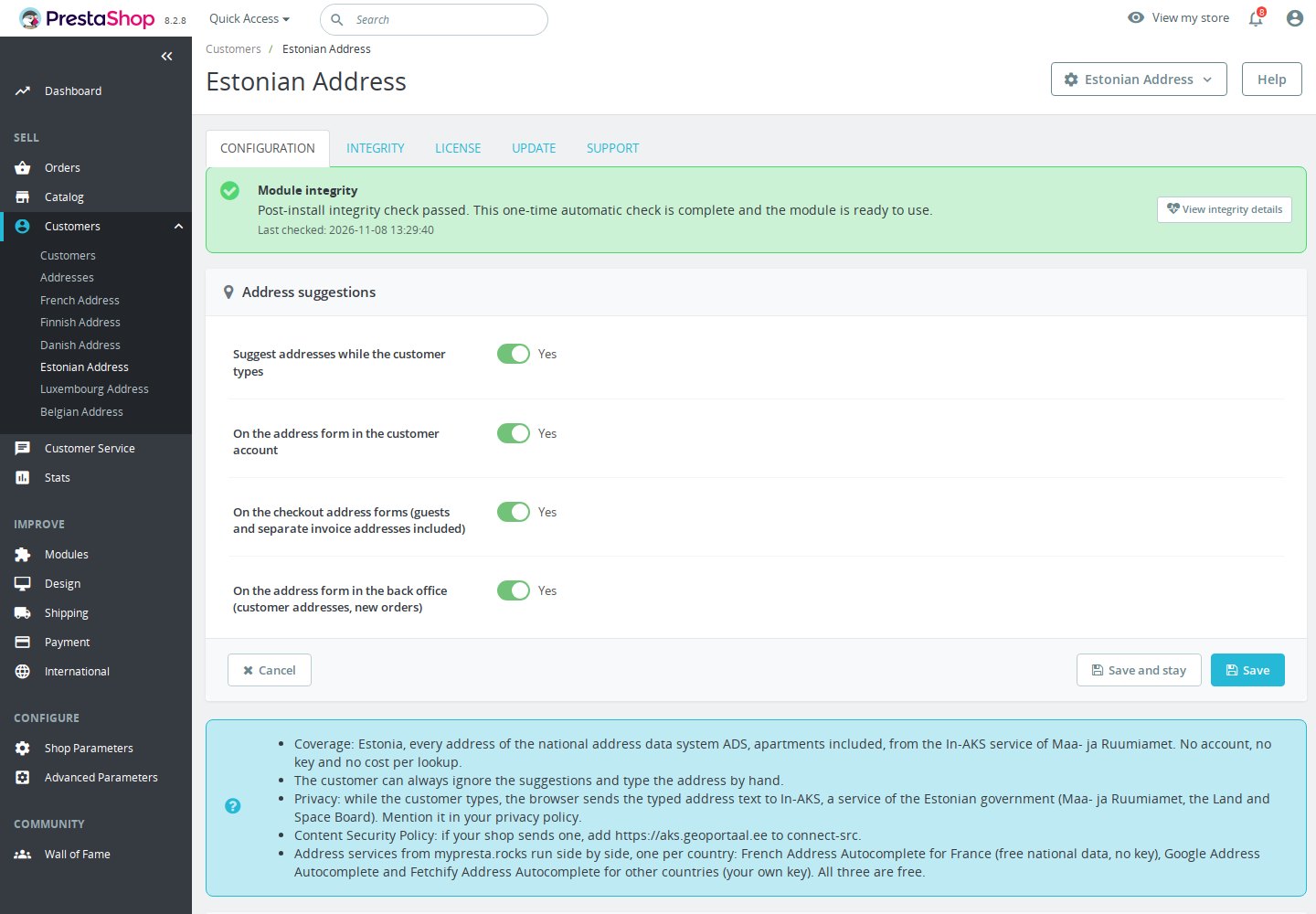
Four switches let you enable suggestions overall and separately on native account, checkout and back office forms. Guest checkout and separate invoice addresses are included. Estonia remains the fixed coverage, so this module has no country selector or provider token field.

Your team gets the same help in Customers > Addresses. With French Address Autocomplete enabled on the same forms, Estonia uses In-AKS and French destinations use BAN. A worldwide Google or Fetchify module can serve other countries. Customers can always type and edit the address manually.

The selected country, second address line, name, company and telephone remain unchanged. A returned flat number stays in line one; keep extra floor or entrance details on line two. Check street or property name, all numbers, postcode and town before saving. Customers can edit the result or enter an address manually. A street-only choice clears the postcode and leaves the house number and postcode to complete.

Pro account: €0.00 excl. VAT on approval, up to €0.00 excl. VAT depending on your purchases. Apply for a pro account

See the tiers
DiscountConditionThis product
−20% On approval €0.00 excl. VAT
−25% Average at least €1,000 in spending per month in the last 12 months €0.00 excl. VAT
−30% Average at least €3,000 in spending per month in the last 12 months €0.00 excl. VAT

By downloading, you accept the free-module terms and privacy policy.

In the box

  • Lifetime licence for one shop
  • Lifetime updates, including security fixes
  • No support included, available separately
  • PrestaShop 1.6.1 to 9

Recent changes

  • Engine 4: every mypresta.rocks address module now shares one address engine, so the Slovak, Lithuanian and Latvian modules work beside the others; source credits in the form the sources ask for.
Full changelog

How does Estonian Address Autocomplete shorten address entry?

  • Estonian address suggestions. Official In-AKS ADS data in native account and checkout forms, including guests.
  • Filled together. Street or farm name, returned house/flat numbers, NNNNN postcode and town.
  • Fixed Estonia coverage. National ADS data, flats and named farms; street-only results need completion.
  • Back office. The same postal address help for staff in Customers > Addresses.
  • Everyday entry. Phone taps, keyboard navigation and screen-reader announcements; manual entry remains.
  • No service account. A free module using free national data, with four separate switches and no key.

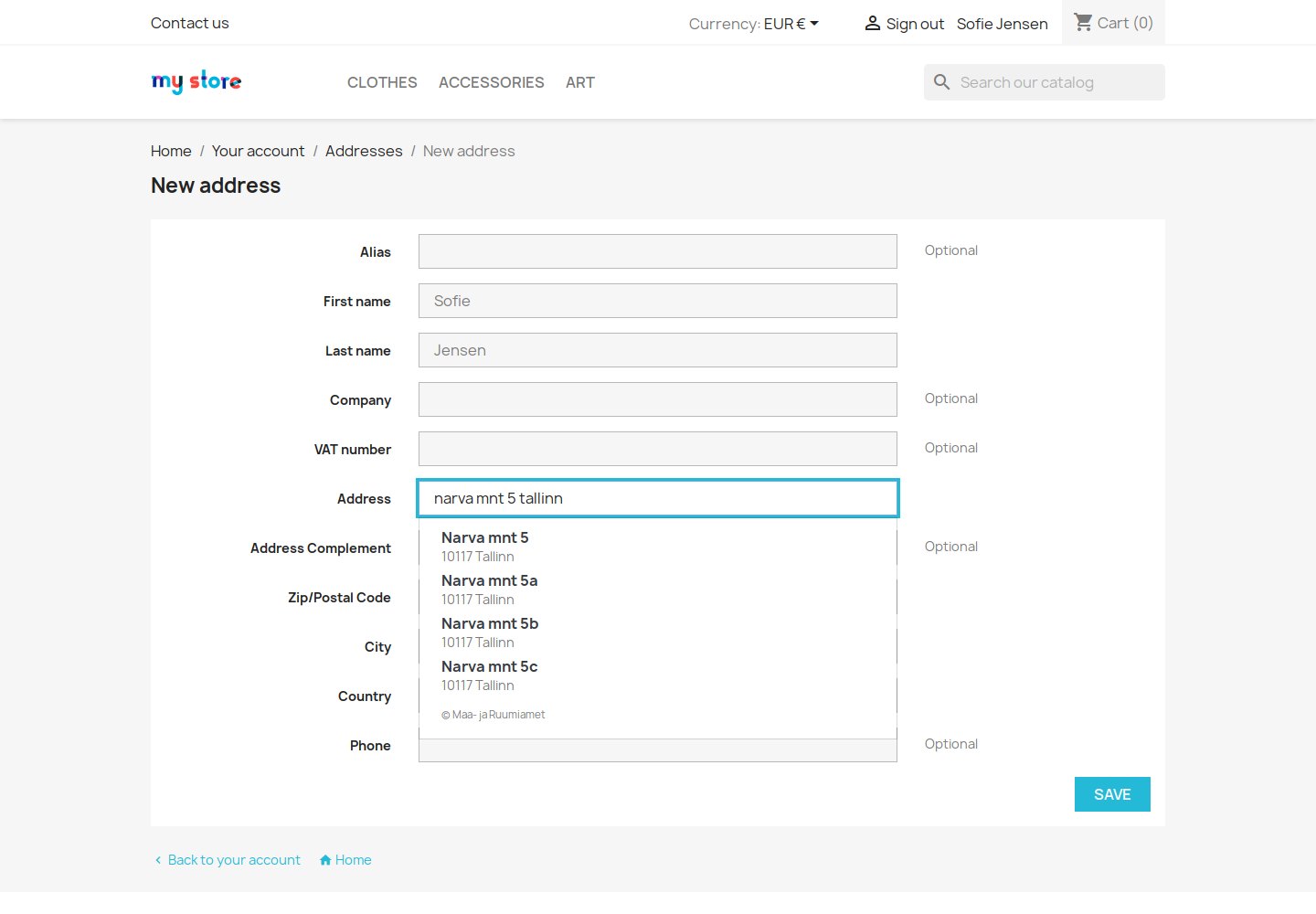
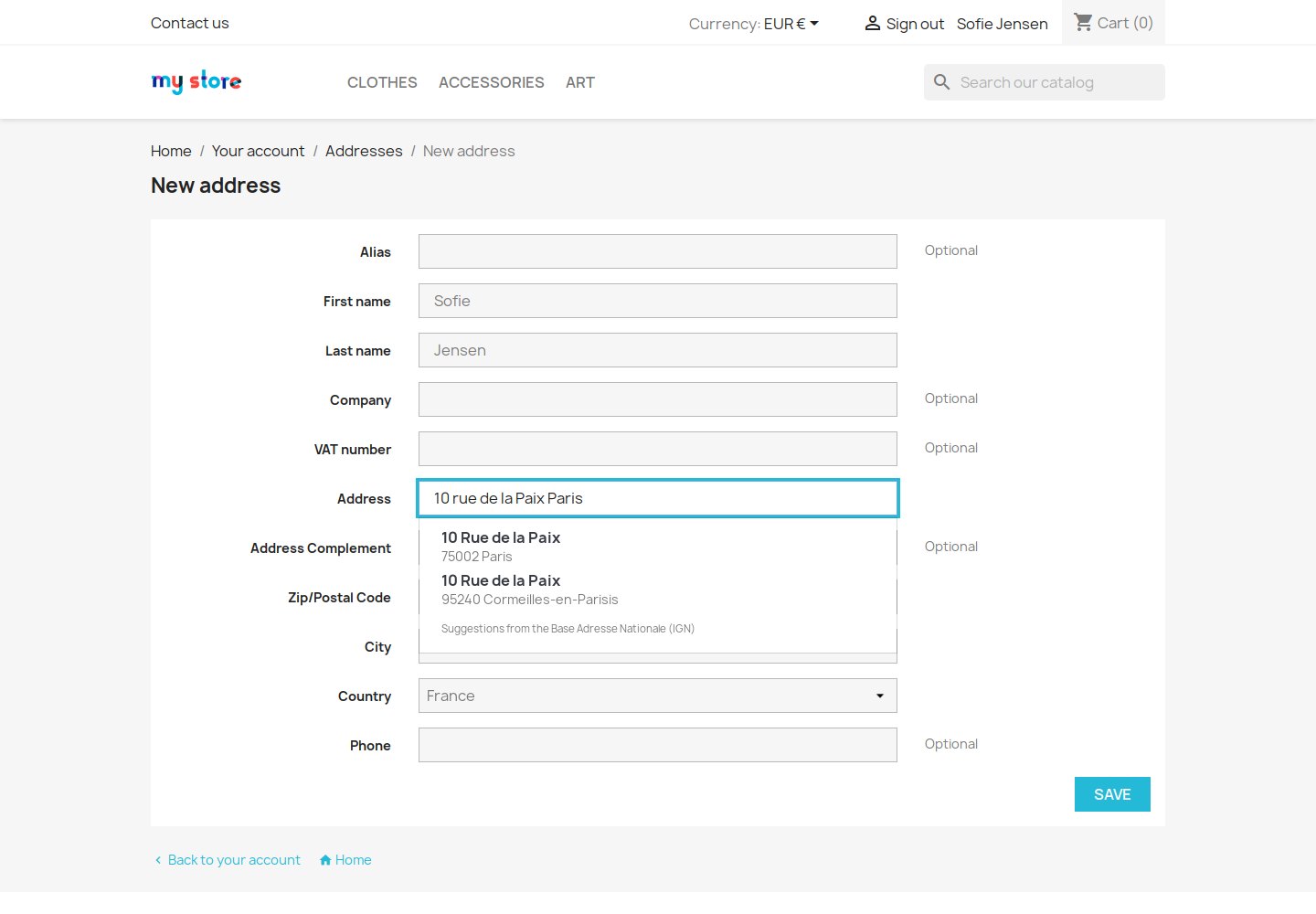
Estonian Address Autocomplete puts In-AKS suggestions under the street field customers already use. A search such as narva mnt 5 tallinn can return numbered addresses to choose from. Selecting a result fills the native form, keeping the customer in the existing address step. Use the full street name, number and town when a short query is too broad.

Tallinn street search narva mnt 5 tallinn showing In-AKS address suggestions in PrestaShop

What happens when someone chooses a suggestion?

A chosen result keeps the address line as returned, such as Narva mnt 5, Narva mnt 5-10 for house 5 and flat 10, or Narva mnt 5a/1. The postcode has five digits without spaces, such as 10117. Tallinn districts become Tallinn; Tartu linn becomes Tartu. Rural settlements keep the municipality, such as Ülenurme alevik, Kambja vald. A named farm can fill Männiku, 73605 and Kõrveküla, Tapa vald without inventing a street or number.

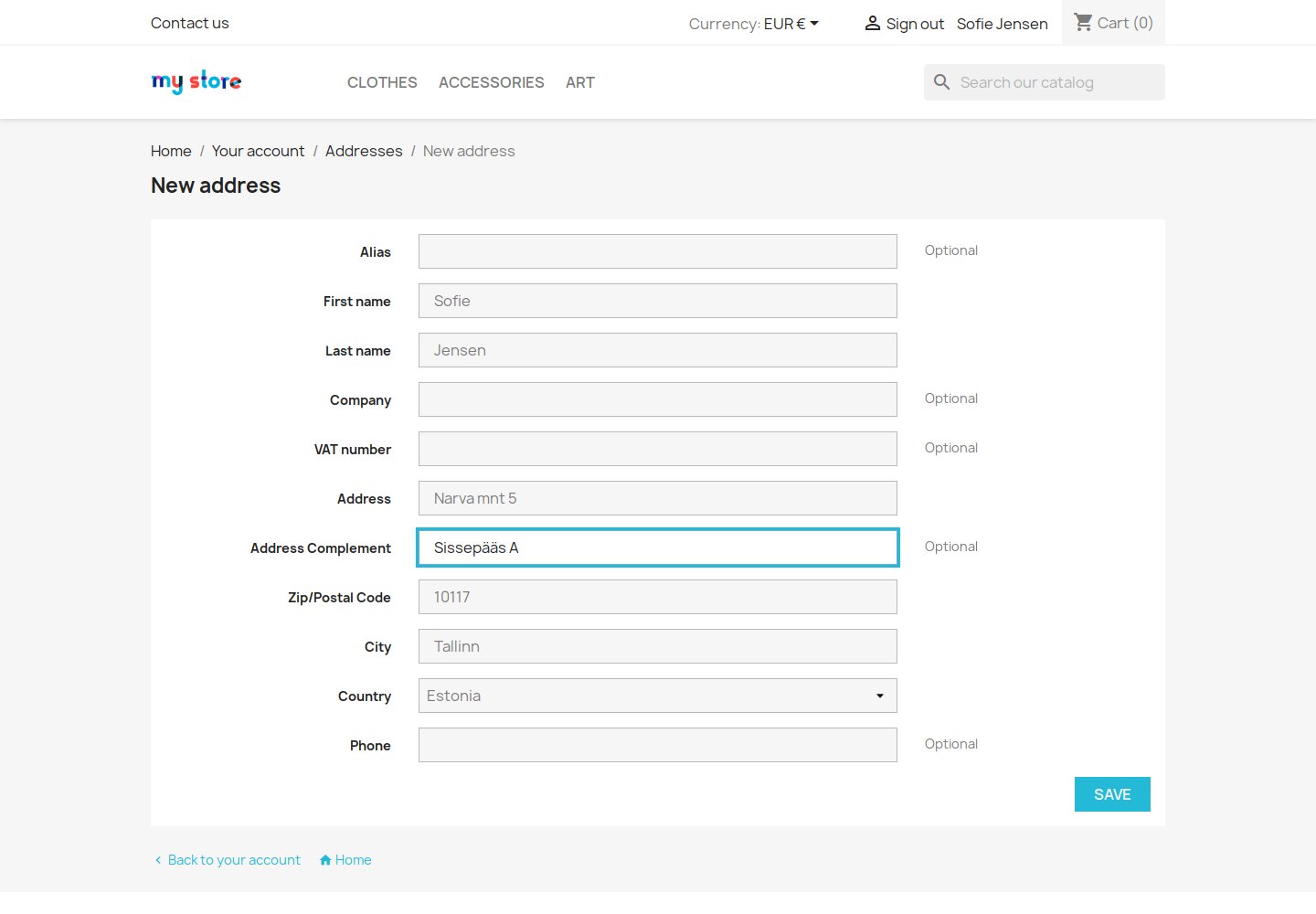
The selected country, second address line, name, company and telephone remain unchanged. A returned flat number stays in line one; keep extra floor or entrance details on line two. Check street or property name, all numbers, postcode and town before saving. Customers can edit the result or enter an address manually. A street-only choice clears the postcode and leaves the house number and postcode to complete.

Selected Estonian address fills Narva mnt 5, 10117 and Tallinn; line two stays intact

Which countries receive Estonian suggestions?

The module uses Estonian national ADS address data through In-AKS, the successor to In-ADS. Type a street, number and town, such as narva mnt 5 tallinn. Named farms without streets are supported too, for example Männiku in Kõrveküla, Tapa vald. Results depend on returned data and service availability. Street-only suggestions need manual completion.

French Address Autocomplete can provide BAN suggestions for its French destinations on the same native forms. Google Address Autocomplete or Fetchify Address Autocomplete can answer other destinations when configured separately. A failed In-AKS search does not automatically switch to another service.

Use for these countries belongs to worldwide address modules. Their selected lists narrow their own coverage; empty means every country available to the form. Estonian Address has fixed EE coverage and no such field. Runs beside French Address Autocomplete, Google Address Autocomplete and Fetchify Address Autocomplete; keep all of them at their latest version.

France chosen in the same form, where French Address Autocomplete answers instead of In-AKS

Where does the back office team receive help?

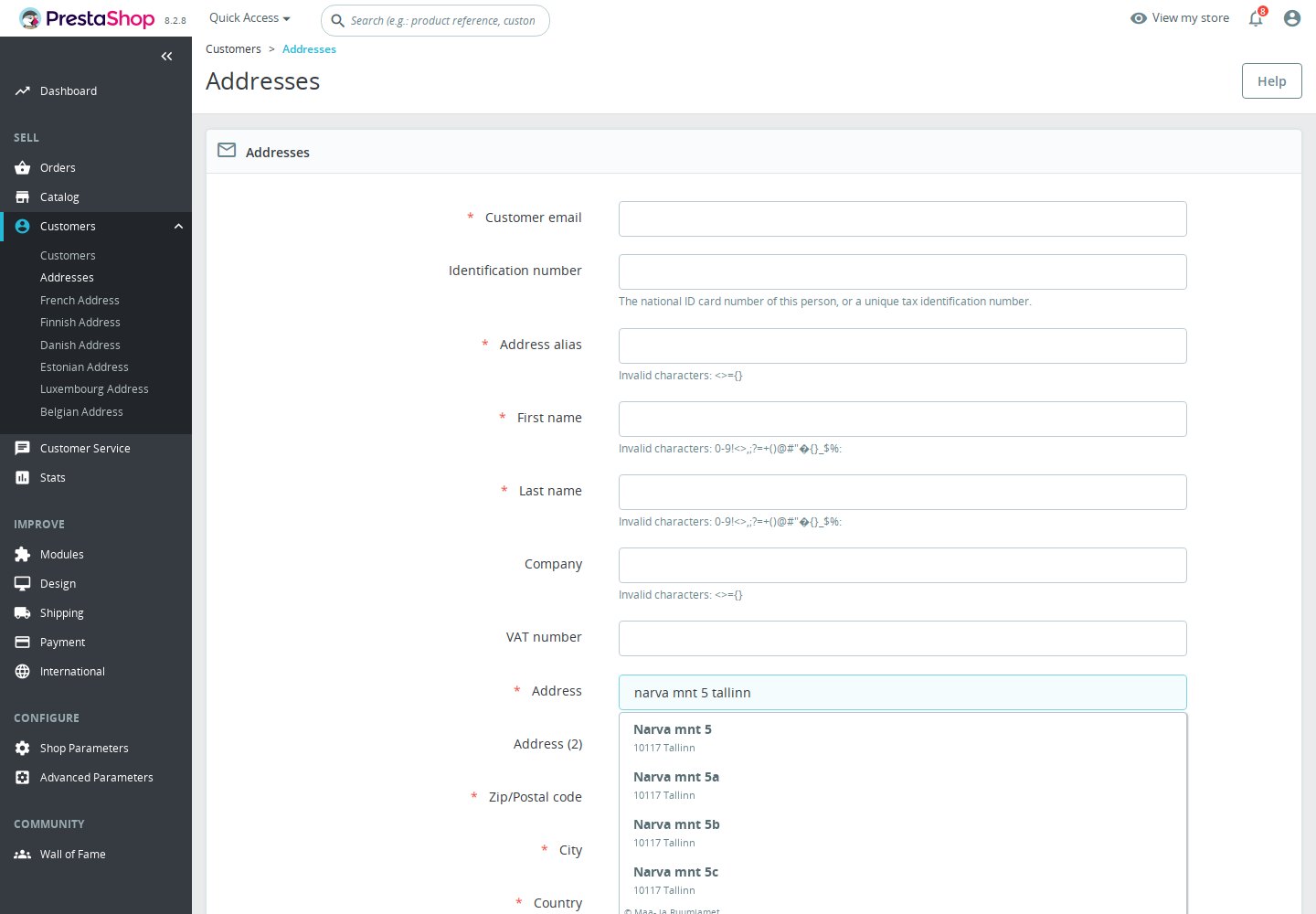
Staff entering an address after a telephone enquiry get suggestions in Customers > Addresses. Choosing an Estonian address fills the same native street, postcode and town fields. The back office switch is independent of the account and checkout switches.

The code also targets native new-order address windows served by the customer address page. Custom routes and third-party forms need checking. Checkout Revolution retains its own address experience and Google settings; this module can help staff on the native customer address page alongside it.

Estonian In-AKS suggestions in native back office Customers › Addresses

How does the list work on phones and with a keyboard?

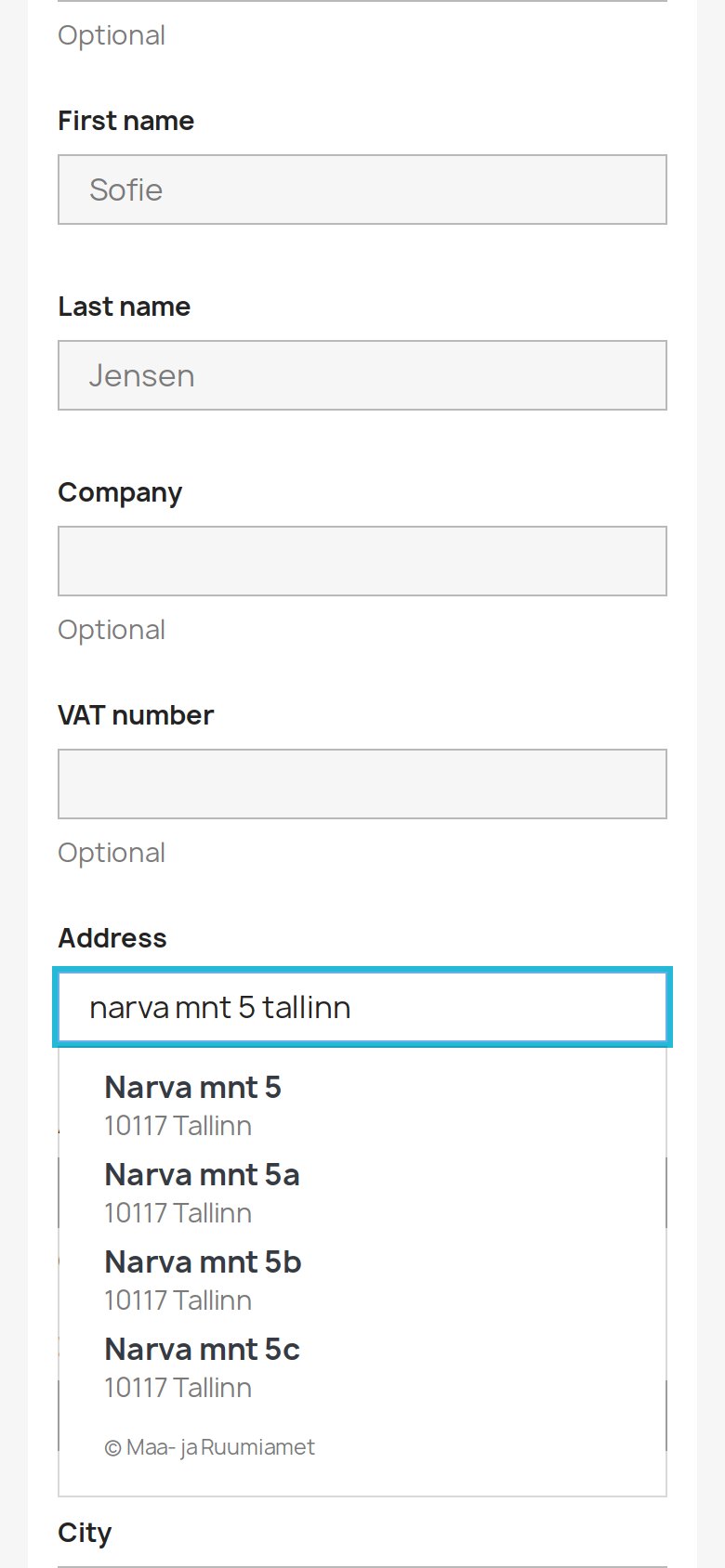
On a phone, tap a result beneath the street field. With a keyboard, use the arrows and Enter to select; Escape or Tab dismisses the list. Screen readers receive result announcements. The shared dropdown uses the theme’s Bootstrap presentation.

The list shows the credit © Maa- ja Ruumiamet. No match leaves the list closed, and service failure announces that suggestions are unavailable. Customers keep manual entry and editing. Saving an address never requires a suggestion, and the module does not validate delivery addresses on submission.

Estonian In-AKS address suggestions in the native form at phone width

What does setup involve for the merchant?

Install the free module and open Configure in Module Manager, or the Estonian Address entry in the back office menu. Keep the overall switch and the desired account, checkout and back office switches on, then save for the selected shop. No service registration, token or payment setup is needed.

While someone types, their browser sends the typed address search directly to In-AKS. Mention this in your privacy notice and allow its origin in an existing content security policy. Check that Estonia is active, then test a numbered address and manual entry on the forms you use.

Estonian Address settings: four switches, coverage, manual entry, privacy and CSP notes; no key field
  • Reference
    mprestonianaddress
  • Version
    1.0.2
  • Improvements
    6
  • Released
  • Updated
  • PrestaShop Compatibility
    PS 1.6 – 9.x
  • Pricing Model
    Free
  • Module Type
    Front & Back-office
  • GDPR Relevant
    Yes
  • Business Goal
    Streamline Operations
  • External Account Needed
    No
  • Module Complexity
    Feature-Rich Module
  • Customer Journey Stage
    Convert to Buyers
  • Works With Platform
    Maps & Location

What customers say about us

Company reviews
5.0 ★ ★ ★ ★ ★ (4 reviews)
Customer Reviews for PrestaShop Modules and Support

No product reviews yet

Be the first to share your experience with this product.

Write a Review

Estonian Address Autocomplete is a free PrestaShop module for entering addresses in Estonia. A chosen result fills the street with returned house, flat or building numbers, a five-digit postcode and town. Maa- ja Ruumiamet supplies national ADS address data through In-AKS without an account, key or cost per lookup.

Quick start

  1. Upload and install the module ZIP in PrestaShop. No In-AKS account, key or payment setup is needed.
  2. Open Configure, or the Estonian Address entry in the back office menu; in multishop select one shop you can manage.
  3. Check that Estonia is active and available on the native address forms you use.
  4. Choose the overall, account, checkout and back office switches, in that order, and save. There is no country selector here.
  5. Runs beside French Address Autocomplete, Google Address Autocomplete and Fetchify Address Autocomplete; keep all of them at their latest version.
  6. Merge the In-AKS origin into an existing CSP and mention the browser connection in your privacy notice.
  7. Select Estonia and type narva mnt 5 tallinn. Pick Narva mnt 5 and check 10117 Tallinn when returned. Also test a flat such as Narva mnt 5-10, a named farm, street-only completion, manual entry, guests, invoices, staff/new orders, France with French Address Autocomplete and phone width.

Features

  • Estonian address suggestions. Official In-AKS ADS data in native account and checkout forms, including guests.
  • Filled together. Street or farm name, returned house/flat numbers, NNNNN postcode and town.
  • Fixed Estonia coverage. National ADS data, flats and named farms; street-only results need completion.
  • Back office. The same postal address help for staff in Customers > Addresses.
  • Everyday entry. Phone taps, keyboard navigation and screen-reader announcements; manual entry remains.
  • No service account. A free module using free national data, with four separate switches and no key.

Configuration options

  • Suggest addresses while the customer types: overall switch, first in the form.
  • On the address form in the customer account: native account addresses.
  • On the checkout address forms (guests and separate invoice addresses included): native checkout.
  • On the address form in the back office (customer addresses, new orders): native Customers > Addresses.

Open Configure in Module Manager, or the Estonian Address entry in the back office menu. This release has one Settings page with Configuration, Integrity, License, Update and Support sections. The four switches above appear in that order, followed by Save. All default to on. There is no provider key, account or country field. In multishop select one authorized shop; settings are stored for that shop. After the form the notes cover coverage/free service, manual entry, privacy and CSP, followed by the shared sibling-service note. English, German, French, Polish, Italian, Spanish and Estonian settings strings are supplied; this does not promise address data in seven languages.

Use for these countries is available on worldwide siblings only. Empty means all countries available to the form; a selected list restricts that sibling. In-AKS remains fixed to EE. Runs beside French Address Autocomplete, Google Address Autocomplete and Fetchify Address Autocomplete; keep all of them at their latest version. For example leave a worldwide service for other destinations and enable Estonian Address for Estonia. No failed search automatically retries another service.

Estonian Address settings: four switches, coverage, manual entry, privacy and CSP notes; no key field

Customization examples

Allow In-AKS in your Content Security Policy

The source-derived external origin is https://aks.geoportaal.ee in connect-src. Runs beside French Address Autocomplete, Google Address Autocomplete and Fetchify Address Autocomplete; keep all of them at their latest version. No external In-AKS SDK or stylesheet is loaded. Merge this example with your existing policy, keeping theme rules, inline/nonces and other modules. With French Address Autocomplete also allow https://data.geopf.fr in connect-src.

script-src 'self';
style-src 'self';
connect-src 'self' https://aks.geoportaal.ee;

Retain apartment and delivery details

The selected country, second address line, name, company and telephone remain unchanged. A returned flat number stays in line one; keep extra floor or entrance details on line two. Check street or property name, all numbers, postcode and town before saving. Customers can edit the result or enter an address manually. A street-only choice clears the postcode and leaves the house number and postcode to complete.

Installation

Requirements

  • General PrestaShop range: PS 1.6 – 9.x. Exact declared floor: PrestaShop 1.6.1.0, PHP 7.1 or later.
  • Native address fields and Bootstrap 3, 4 or 5 presentation. Estonia must be available; activate it if you deliver there.
  • Check that Estonia is active and available on the native address forms you use.

Runs beside French Address Autocomplete, Google Address Autocomplete and Fetchify Address Autocomplete; keep all of them at their latest version. Estonian Address works alone.

Installation does not certify service availability or every platform/theme combination. Runs beside French Address Autocomplete, Google Address Autocomplete and Fetchify Address Autocomplete; keep all of them at their latest version.

Tallinn street search narva mnt 5 tallinn showing In-AKS address suggestions in PrestaShop

How it works

Suggestions begin after three characters and a 300 ms pause. The browser sends a direct GET to Maa- ja Ruumiamet In-AKS with results=10 and the trimmed typed query in address. Up to five unique valid suggestions are shown. Partial town text is passed to the service without local expansion or parallel searches; results and ranking depend on the service.

While the service is slow, the plain line “Searching addresses…” appears after 600 ms. After ten seconds the request gives up; customers can continue entering the address manually.

Selected address fields

The adapter takes address1 from aadresstekst and the unspaced five-digit postcode from sihtnumber. The town uses asustusyksus and omavalitsus: districts ending in linnaosa use their municipality, towns lose the suffix linn, and other settlements keep both parts. Missing parts fall back to the available one. No town means no result. Flat and building suffixes already in the address line are retained; kort_nr is not appended separately. Named farms are accepted without a number. Non-street rows require a postcode; liik 2 streets require none. Address rows take priority; streets appear only without typed digits and clear the postcode when chosen. Typed numbers must be accounted for, and a joined flat number must prefix the returned house token. These filters are not address validation. The options show street/property and numbers, then postcode + town. No state is supplied. Selection uses the returned address without another retrieval call.

Selected Estonian address fills Narva mnt 5, 10117 and Tallinn; line two stays intact

Use for these countries is available on worldwide siblings only. Empty means all countries available to the form; a selected list restricts that sibling. In-AKS remains fixed to EE. Runs beside French Address Autocomplete, Google Address Autocomplete and Fetchify Address Autocomplete; keep all of them at their latest version. For example leave a worldwide service for other destinations and enable Estonian Address for Estonia. No failed search automatically retries another service.

France chosen in the same form, where French Address Autocomplete answers instead of In-AKS

Staff entering an address after a telephone enquiry get suggestions in Customers > Addresses. Choosing an Estonian address fills the same native street, postcode and town fields. The back office switch is independent of the account and checkout switches.

The code also targets native new-order address windows served by the customer address page. Custom routes and third-party forms need checking. The shared engine supports address forms marked by a host such as Checkout Revolution. The host and this module share the same per-shop service settings.

Estonian In-AKS suggestions in native back office Customers › Addresses

On a phone, tap a result beneath the street field. With a keyboard, use the arrows and Enter to select; Escape or Tab dismisses the list. Screen readers receive result announcements. The shared dropdown uses the theme’s Bootstrap presentation.

The list shows the credit © Maa- ja Ruumiamet. No match leaves the list closed, and service failure announces that suggestions are unavailable. Customers keep manual entry and editing. Saving an address never requires a suggestion, and the module does not validate delivery addresses on submission.

Estonian In-AKS address suggestions in the native form at phone width

Privacy and data credit

The browser sends the trimmed street-search text in address, with results=10, directly to In-AKS at https://aks.geoportaal.ee. It adds no key, selected-country, language, name, email, phone, company or second-line parameter. Anything typed into the search is sent. The direct connection exposes the visitor’s IP and may carry browser/origin/referrer information under browser policy. Credentials are disabled. Requests give up after ten seconds; manual entry remains. No search history or shop proxy is implemented; diagnostics omit queries and returned addresses. Normal saving stays with PrestaShop. Mention the transfer in your privacy notice. Visible credit: © Maa- ja Ruumiamet.

Honest limits

  • Coverage and availability depend on In-AKS; neither every address nor continuous service is guaranteed. No exhaustive postcode directory or unlimited-use promise.
  • Address rows need address text, a town and a five-digit postcode; a named farm needs no house number. Malformed rows are discarded. Street-only results can appear when no address survives and no digit is typed; choosing one clears the postcode. Complete the house number and postcode manually. Number filters narrow results but do not validate the address. Inspect every field before saving.
  • 429 responses pause requests according to Retry-After or ten seconds. Failures leave manual entry. No automatic service failover.
  • Custom forms/themes and differently routed new-order windows need checking. Custom checkout forms need integration with the shared engine.
  • No map, geolocation, coordinate storage, submit-time validation, automatic country selection or delivery guarantee. Free module with lifetime updates, no included support commitment.

Troubleshooting

  • No Estonian results: select Estonia, check its active status and the overall/form switches, then try full street + number + town.
  • Runs beside French Address Autocomplete, Google Address Autocomplete and Fetchify Address Autocomplete; keep all of them at their latest version.
  • Street-only or no result: complete the house number, postcode and post town manually, and check the address before saving.
  • Unavailable suggestions: inspect browser network/CSP for In-AKS, wait after a rate limit and continue manual entry.
  • Custom form or layout issue: test a native address form, phone/keyboard use and the new-order route; check the shared per-shop service settings.

Open the full help page

Loading tab content...
30 days return right
Easy return - no questions asked
Plug & Play Modules
Install, set up and take profit
Dedicated Support First
Priority Help & Satisfaction Over Sales

Who builds and maintains this module

Built and maintained by David Miller and mypresta.rocks. David Miller has worked with PrestaShop since 2013, and the company behind this shop has been registered since 3 December 2018. Every module in this catalogue is our own work, so your questions to support reach the people who wrote the code. The changelog on this page lists every update with its date.

About us

More modules

Checkout Revolution

**Estonian Address Autocomplete helps staff on native customer addresses**. With its back office switch on, staff choose In-AKS suggestions in Customers > Addresses and fill Estonian street, postcode and town without a service key. **Checkout Revolution retains its own address experience and Google settings.** The Estonian module does not configure the suite or power its address step. Its custom account forms and checkout windows are separate and need their own checks. Together the practical use is **Estonian postal address help for staff alongside the checkout suite**. Configure the native back office help separately and test the new-order address window when it uses AdminAddresses. Customers retain manual entry and line-two details, including when the national service has no matching address.


Loading...
Back to top