Bank Transfer Accounts

PrestaShop bank transfer payments with the account for the order currency or all your bank accounts

Price: €49.00
Tax excluded

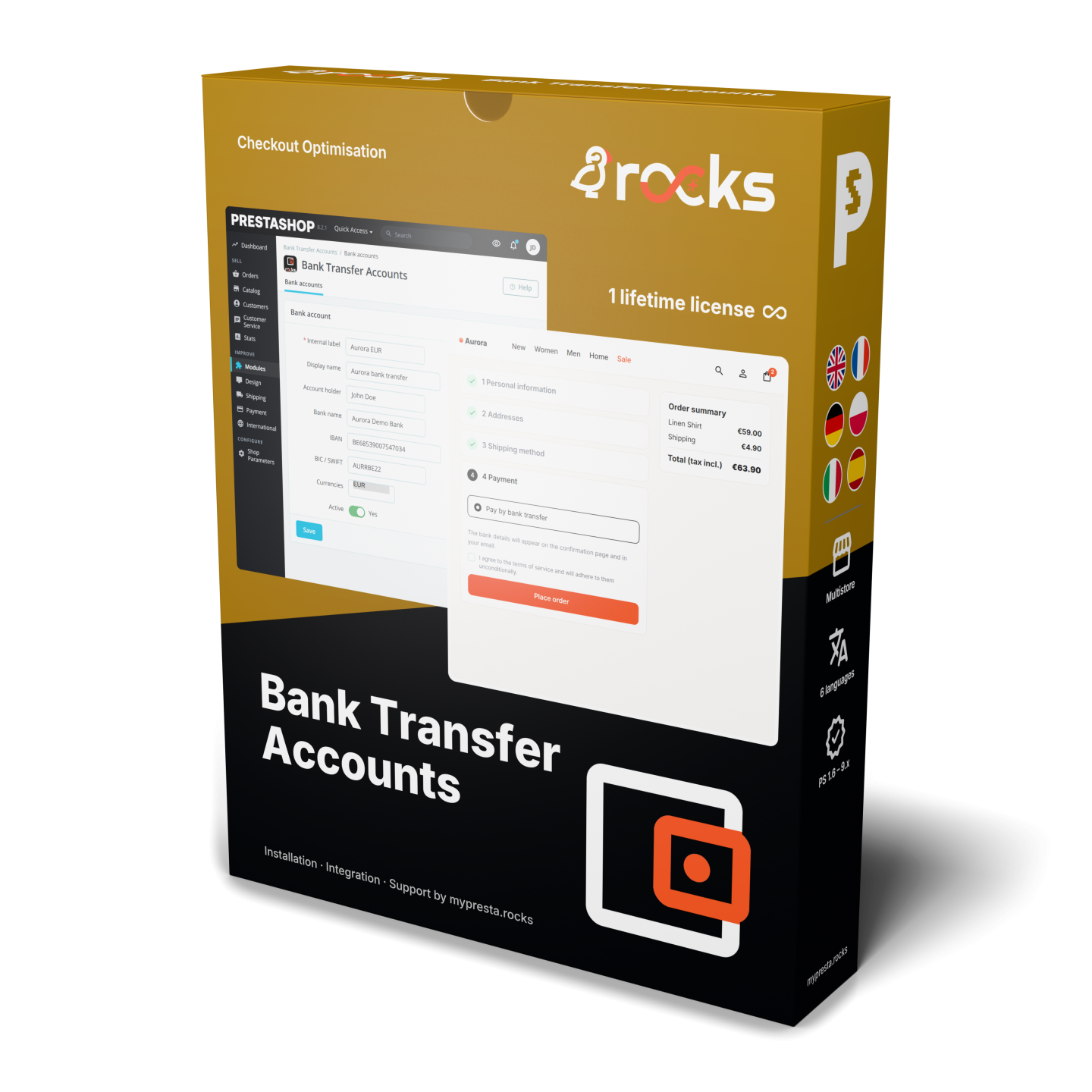
Bank Transfer Accounts adds one bank transfer payment option to PrestaShop. Add your bank accounts, assign their currencies and choose whether customers see the account for their order currency or all active accounts.

A customer ready to pay needs three things together: the amount, the order reference and your bank details. They appear on the confirmation page, in one instructions email per order and on the order details page while payment is awaited.

IBAN and BIC, UK sort codes and US routing numbers have their own fields. Translated account names, formatted instructions and extra labelled rows explain what the bank needs. Storefront copy buttons save retyping account details.

Your customer can make the transfer without asking you to send the details separately. You check receipt of payment and update the order yourself. Works with PrestaShop 1.6 to 9 and PHP 7.1 or later.

Product availability: In stock
Instant Live Demo Real store, ready in ~1 min See how it works in a few clicks. We spin up a real PrestaShop store on our own infrastructure in about a minute (with the module installed and demo data loaded) so you can click around and try everything, nothing to set up.
Buying as a company? €39.20 Business 20% Apply for Partner Account
Share
verified Lifetime license per domain, yours forever. Includes 3 months support & updates. Learn more
The demo is the complete module: buy anytime and activate the same installation, nothing to reinstall and nothing lost. Open the module's License tab and click "Activate from mypresta.rocks" (or paste your key); your settings and data stay exactly as they are. Updates install in one click from the Update tab.
Options total: €0.00
Selected total: €49.00

What does the customer need to make the transfer?

  • One bank transfer option at checkout
  • The order amount and reference alongside the bank details
  • The account assigned to the order currency or all active accounts
  • IBAN and BIC, UK and US account details
  • Translated instructions and up to 50 extra rows per account
  • One instructions email per order and details available while awaiting payment

Bank Transfer Accounts puts the information needed to pay in the places customers look after ordering. Your customer leaves checkout with a clear next step, and your team has fewer bank details to send by hand.

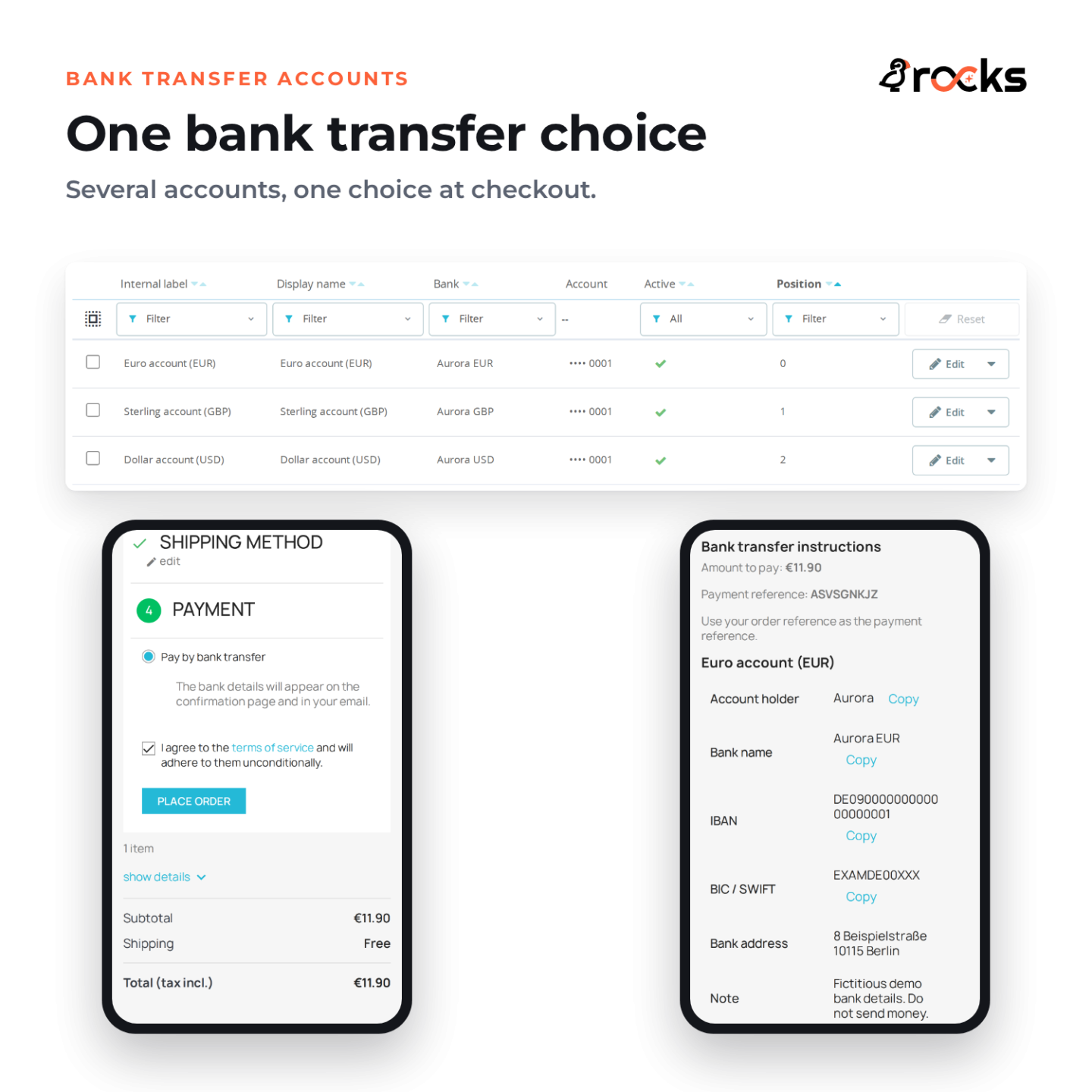
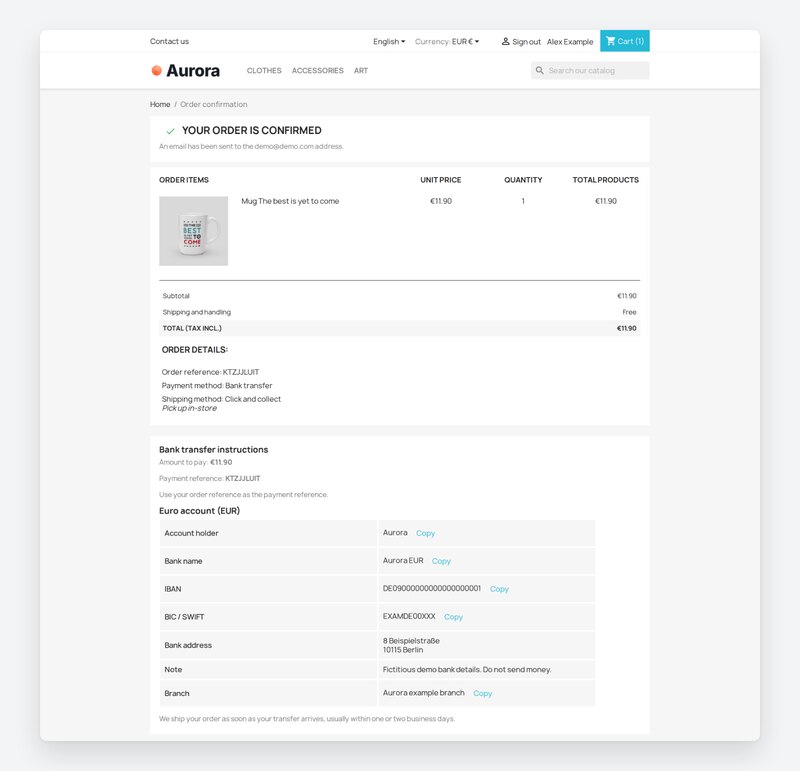
Aurora order confirmation from the page top with complete EUR bank instructions.

Which account should a customer use?

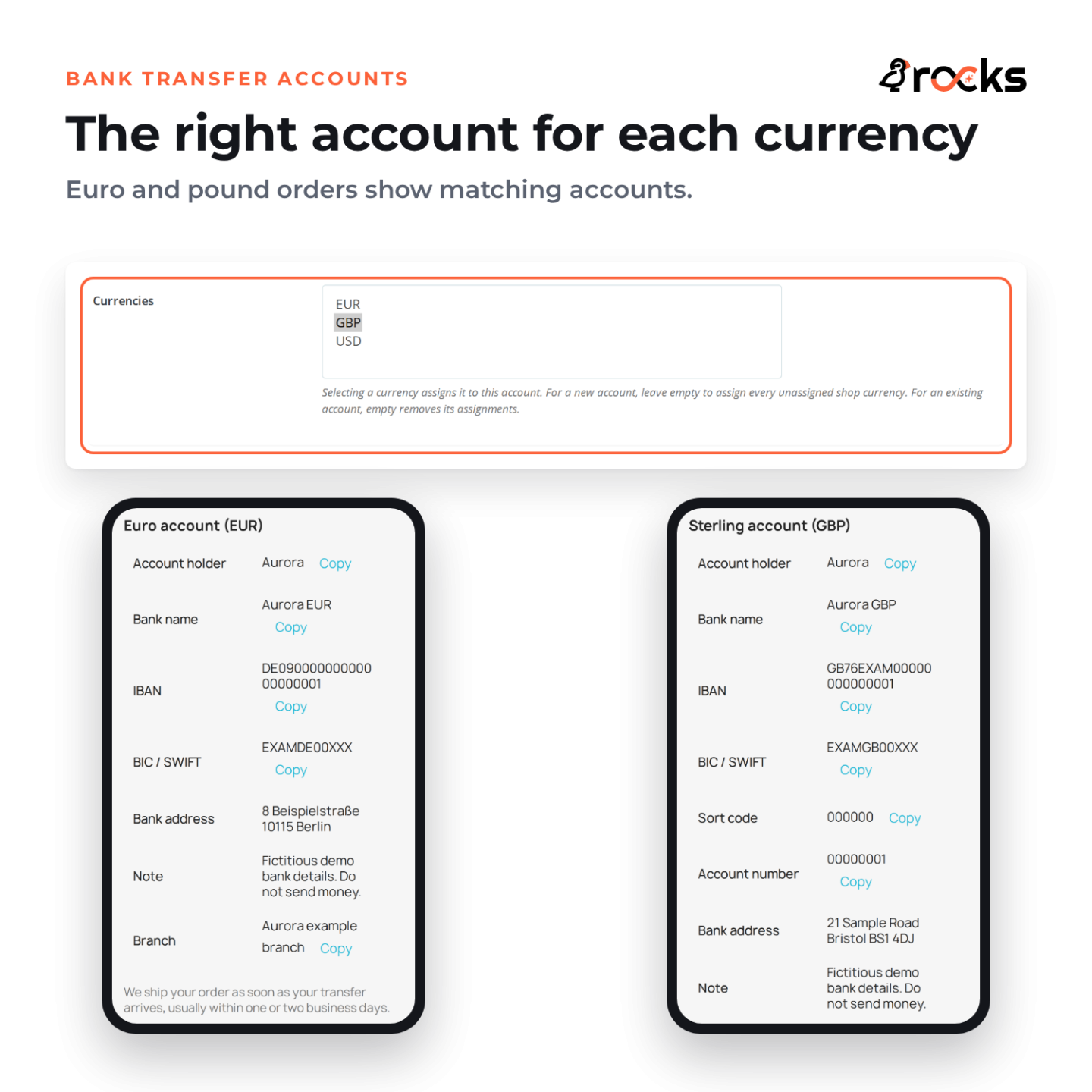
By default, customers receive the active account assigned to their order currency. A euro order can show your euro account while a pound order shows the account you assigned to pounds. If a currency has no active assigned account, the bank transfer option stays hidden for that currency.

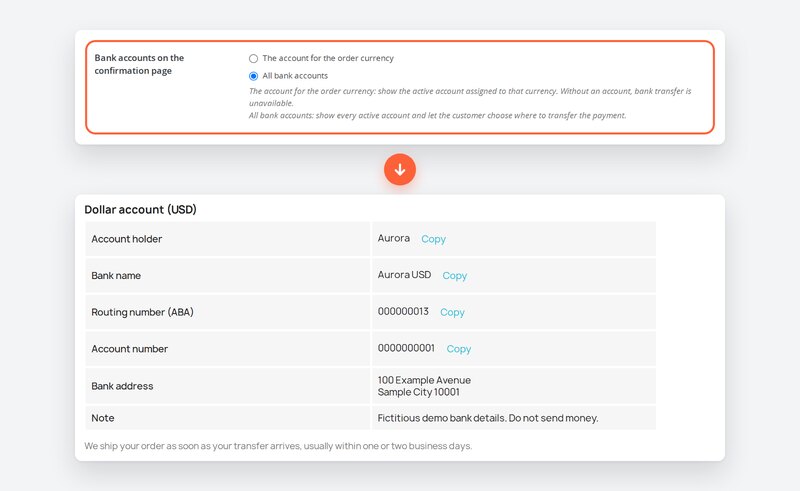
The only payment setting also offers an all-accounts mode. It shows every active account and lets the customer decide where to make the transfer. Checkout still has one bank transfer option, however many accounts you display afterwards.

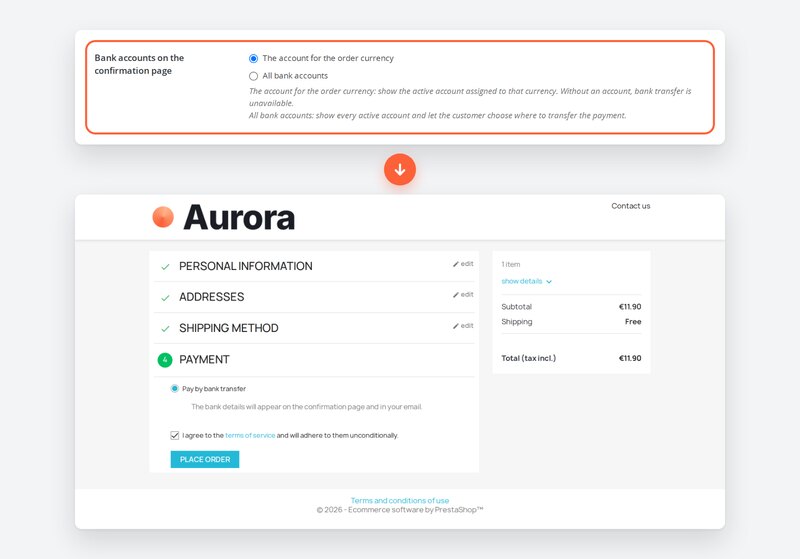
By-currency setting above the Aurora checkout at the page top with one bank transfer option.

Will your bank's details fit?

An account can hold IBAN and BIC, a UK sort code and account number, or a US routing number and account number. The account holder, bank name and bank address sit beside them. Customers can copy supported account fields on the storefront instead of retyping long numbers.

Each account has a translated display name, formatted payment instructions and a note. Up to 50 custom labelled rows per account give additional bank details their own place. You write the labels and values in your shop languages, so the customer sees instructions intended for them.

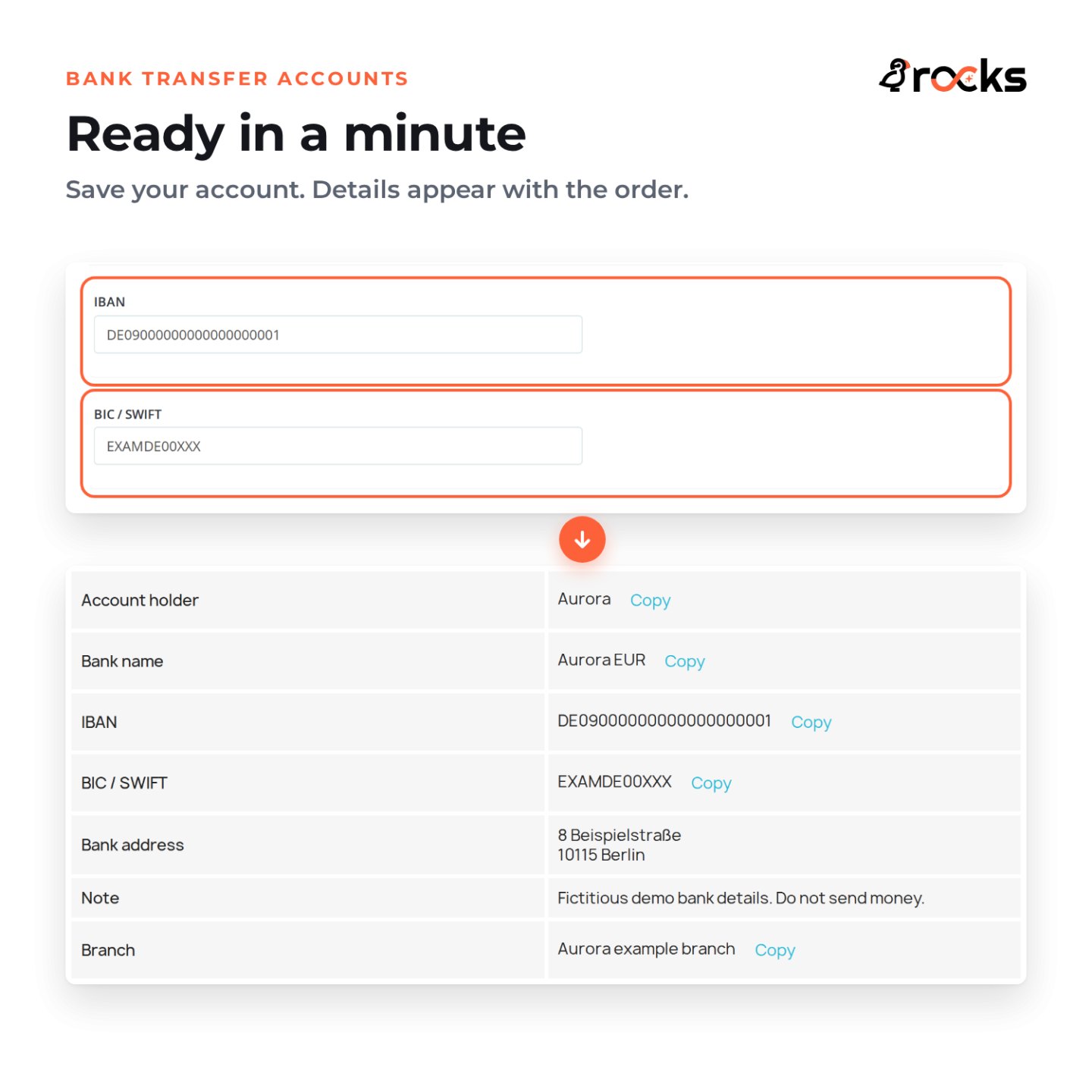
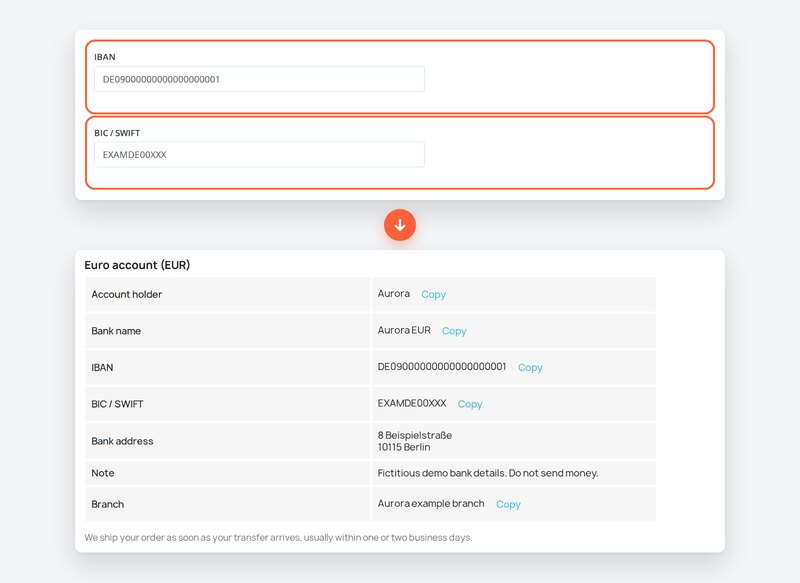
Outlined IBAN and BIC fields above the complete EUR account they produce.

Can the customer find the details again later?

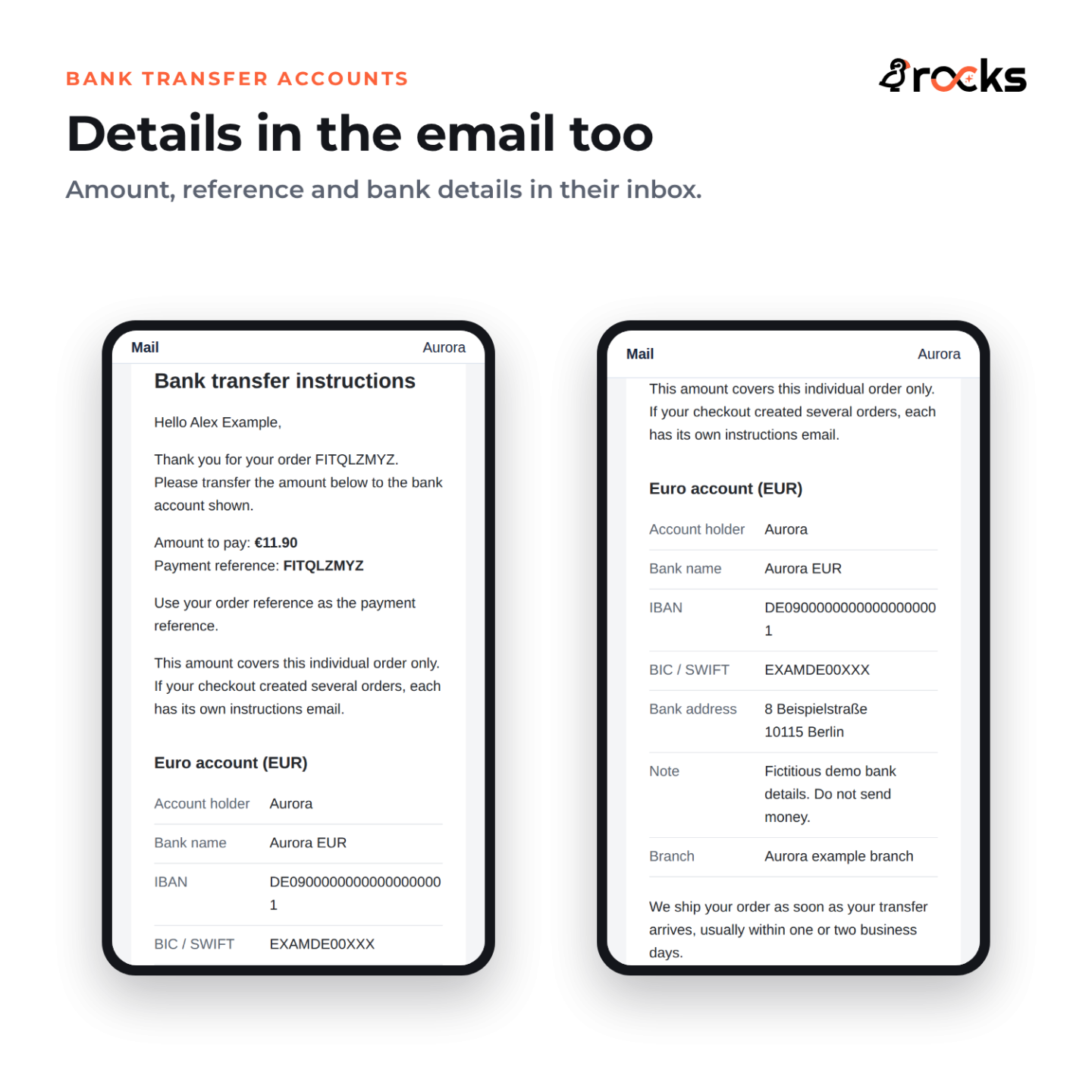
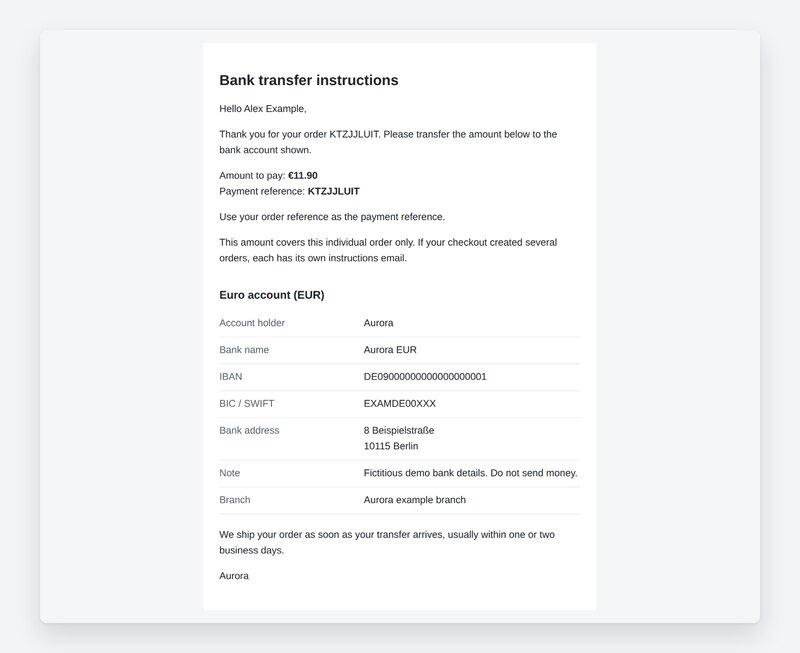
The confirmation page shows the amount, order reference and selected bank details. The module sends one instructions email per order, so customers can open the information when they are ready to use their banking service. Templates are included in English, German, French, Polish, Italian and Spanish.

This is one payment-instructions email, not a claim that PrestaShop sends only one message about the order. Your shop's usual order emails remain separate. No reminder schedule needs setting up in Bank Transfer Accounts.

Native bank instructions email body with the real amount, reference and EUR account.

What happens while you wait for payment?

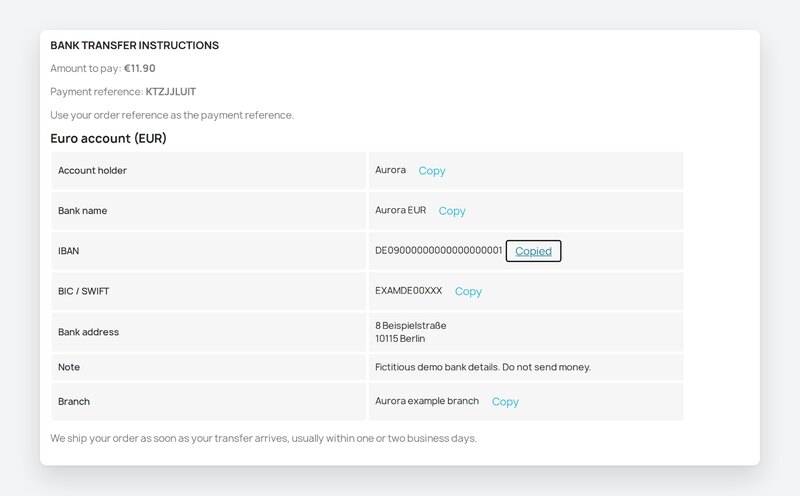
The order enters the module's own Awaiting bank transfer state. While it remains in that state, the customer can return to the order details page to find the amount, reference and bank details. You check your bank and change the order state once payment arrives.

Order pages use your current account details and display setting. Editing an account can therefore change the details shown for an order still waiting for payment. Emails already sent keep their original content. Keep that difference in mind when replacing a bank account.

Complete bank instructions on the reopened waiting order with IBAN Copied feedback.

How much setup does a straightforward transfer need?

Add your accounts, assign currencies and leave the default display mode selected if each order should show its currency's account. Choose all accounts when customers should see your full active list. In a multishop installation, configure the selected shop separately.

Bank Transfer Accounts covers giving customers the details they need to pay. Bank Transfer Revolution adds routing rules, payment discounts, QR codes, reminders, automatic cancellation and reconciliation. The upgrade carries over your bank accounts through the shared account engine.

All bank accounts setting above the additional USD account on a EUR order.
  • Reference
    mprbankaccounts
  • Version
    1.0.5
  • Improvements
    23
  • Released
  • Updated
  • PrestaShop Compatibility
    PS 1.6 – 9.x
  • Pricing Model
    One-time Purchase
  • Module Type
    Front & Back-office
  • GDPR Relevant
    Yes
  • Business Goal
    Streamline Operations
  • External Account Needed
    No
  • Module Complexity
    Feature-Rich Module
  • Customer Journey Stage
    Convert to Buyers
  • Works With Platform
    No External Platform

What customers say about us

Company reviews
5.0 ★ ★ ★ ★ ★ (4 reviews)
Customer Reviews for PrestaShop Modules and Support
No product reviews yet

Be the first to share your experience with this product.

Write a Review Customer Reviews for PrestaShop Modules and Support

Bank Transfer Accounts adds one Pay by bank transfer option to checkout. Keep several receiving accounts and show the account assigned to the order currency, or show all active accounts after the order is placed.

Have a question about this product? Our experts are here to help. Ask anything about installation, compatibility, or specifications.
Ask a question
1350 questions
9 categories
Which PrestaShop and PHP versions does it support? Published

Bank Transfer Accounts supports PrestaShop 1.6 to 9 and requires PHP 7.1 or later. Instructions email templates are included in English, German, French, Polish, Italian and Spanish.

What happens if a currency has no assigned account? Published

In the default currency mode, bank transfer is hidden when the order currency has no active assigned account. In all-accounts mode, every active account is shown regardless of the currency assignment. With no active accounts, the option is unavailable.

Does each bank account become a separate payment option? Published

No. Customers see one Pay by bank transfer option. After ordering, they see either the account for their order currency or all active accounts, according to your setting.

Can I use UK or US accounts without an IBAN? Published

Yes. Dedicated fields cover UK sort code and account number, and US routing number and account number, alongside IBAN and BIC. Each account also supports a holder, bank name, bank address, translated instructions, a note and up to 50 custom labelled rows.

Where do customers find the instructions, and how many emails are sent? Published

The amount, order reference and bank details appear on the confirmation page, in one instructions email per order and on the customer order details page while it is in the module's Awaiting bank transfer state. PrestaShop's usual order emails are separate. Copy buttons are available for supported account fields on the storefront, not in email.

Do waiting orders keep the old details after I edit an account? Published

Order pages use the current account details and display setting. An edit can change what a waiting customer sees there. An instructions email already sent keeps its original content. Bank Transfer Accounts does not freeze an account snapshot on each order.

When is Bank Transfer Revolution the right upgrade? Published

Bank Transfer Revolution adds routing rules, payment discounts, QR codes, reminders, automatic cancellation and reconciliation. Your bank accounts carry over through the shared account engine. Bank Transfer Accounts itself leaves checking incoming payments and updating order states to you.

v1.0.52026-10-18
  • Custom labelled rows in the account form stay on one line (label, value and compact move/remove buttons) instead of stacking.

Works Well With Bank Transfer Accounts

Modules our team genuinely pairs with this one, and exactly why each belongs in the same setup.

Workflow

Bank Transfer Accounts gives customers the information needed to pay: the amount, order reference and bank details together after ordering, in an instructions email and on waiting-order details. It suits a shop whose team checks incoming transfers and updates orders itself.

Bank Transfer Revolution adds payment and collection controls: routing rules, payment discounts, QR codes, reminders, automatic cancellation and reconciliation. These controls help when choosing an account and following up unpaid orders needs more than the two display modes in Bank Transfer Accounts.

The upgrade carries over your bank accounts through the shared account engine. Use Bank Transfer Accounts for a straightforward payment method, then move to Bank Transfer Revolution when the collection workflow needs those additional controls. The upgrade does not require customers to use two bank transfer methods together.

Complement

Bank Transfer Accounts gives shoppers the details needed to make a transfer after ordering. The amount, order reference and bank details remain available on the waiting-order page, and an instructions email lets the customer return to them later. That answers the practical payment question without a separate request to your team.

WhatsApp Chat Integration gives customers a conversation button in your shop. A shopper who still has a question can open WhatsApp and contact you through the service they use. You choose where the button appears and write its prepared messages.

Together they cover payment instructions and personal contact. The bank transfer module supplies the details; WhatsApp provides a way to ask for help. No bank payment is confirmed through this pairing, and the modules do not automatically send order or bank details into a chat.

Complement

Bank Transfer Accounts puts the transfer amount, order reference and account details in front of customers after ordering and in an instructions email. They can return to the waiting-order details when ready to pay, while your team checks payment receipt in the bank.

Tawk.to Chat Integration adds live chat to your PrestaShop store. You connect your Tawk.to account and choose the pages on which the widget appears. It gives shoppers a place to ask a question while they are still looking at your shop.

This pairing covers clear instructions and an available conversation. Use the chat where your shoppers need help and the bank transfer module to deliver the payment information. Chat messages do not reconcile a payment, and this pairing does not automatically transmit the customer's bank transfer instructions to Tawk.to.

0 open0 resolved
Report an issue

No known issues

There are currently no open or resolved issues registered for this module.

View all known issues

Feature Requests: 0

View full roadmap

Suggest a Feature

30 days return right
Easy return - no questions asked
Plug & Play Modules
Install, set up and take profit
Dedicated Support First
Priority Help & Satisfaction Over Sales

You might also like

More From This Category

Who builds and maintains this module

Built and maintained by David Miller and mypresta.rocks. David Miller has worked with PrestaShop since 2013, and the company behind this shop has been registered since 3 December 2018. Every module in this catalogue is our own work, so your questions to support reach the people who wrote the code. The changelog on this page lists every update with its date.

About us

Loading...
Back to top