


Verwalten Sie Werbe- und Analyse-Tracking für 15 Plattformen über ein zentrales PrestaShop-Register


Marketing Revolution ist ein Modul für PrestaShop-Shops, das die gesamte Marketingmessung des Shops führt: eine Ereignisschicht speist fünfzehn Werbe- und Analyseziele mit denselben verlässlichen Daten. Sie installieren es, hinterlegen die Kennungen der genutzten Netzwerke, und die Messung läuft.
Die Ziele sind die Dienste, mit denen ein Shop ohnehin wirbt und misst: Google Tag Manager, Google Analytics, Google Ads, Meta, TikTok, Pinterest, Snapchat, Reddit, X, Criteo, AdRoll, Outbrain, Quora, Taboola und Google Customer Reviews. Jedes Konto liefert die Kennung, nach der das Modul fragt; die Konten selbst kosten, was diese Netzwerke verlangen, und die meisten Messkonten sind kostenlos.
Das Modul hält die Einrichtung einfach und bietet zugleich tiefgehende Kontrolle. Jede Plattform hat ihren eigenen Schalter und Einstellungsbildschirm, und alle speist ein gemeinsamer Strom von Handelsereignissen: Seitenaufrufe, Produktansichten, Suchen, Warenkorbaktionen, Bestellschritte, Registrierungen und Käufe, mit Wert, Steuer, Versand, Währung, Gutschein und Positionsdetail. Produkte werden präzise gemeldet, bis zur exakten Variante, mit Marke, Preis, Menge und vier Kategorieebenen, und im Multistore behält jeder Shop eigene Kennungen.
Es misst auch, was Standardmessung übersieht: tiefes Stöbern, wiederholtes Galerieansehen, Bildzoom, Optionswahlen und abgeschlossene Konfigurationen verbinden sich zu einem Hochinteresse-Signal, auf das Ihre Kampagnen optimieren, und Remarketing-Zielgruppen entstehen aus angesehenen und in den Korb gelegten Produkten. Einwilligungen werden über vier Banner-Familien respektiert, doppelte Tags verhindert eine Eigentumsprüfung, Käufe reisen Server zu Server mit gehashten Kundendaten für besseres Matching bei Google und Meta, und eine stündliche Rückholung findet gültige Bestellungen, die der Browser nie meldete, und liefert sie nach.
Das Ergebnis: Werbebudget folgt echtem Umsatz statt Löchern, die Kampagne, die still ein Drittel ihrer Käufe verlor, bekommt endlich ihre Anerkennung, ein Modul ersetzt den Stapel von Einzelnetz-Trackern, und die Rechtsabteilung ist zufrieden, weil die Messung dem Cookie-Banner gehorcht.
Überblick über die Möglichkeiten des Moduls
Marketing Revolution gibt einem PrestaShop-Shop eine Messschicht für jedes Netzwerk, in dem er wirbt, gebaut, um die Wahrheit zu melden. Die Übersicht führt durch die sechs Teile dieser Seite.
- Fünfzehn Ziele, ein Strom: Google, Meta, TikTok und zwölf weitere, mit identischen Handelsdaten gespeist.
- Präzise Daten: exakte Varianten, Marke, Kategorien, Werte, Gutscheine, Währungen.
- Signale, die sonst niemand sendet: Hochinteresse-Verhalten, gemessen auf der Produktseite.
- Käufe, die immer ankommen: Serverlieferung plus stündliche Rückholung verlorener Bestellungen.
- Konformität ohne Blindheit: vier Einwilligungs-Familien verstanden, doppelte Tags verhindert.
- Betrieb: Überblick, Kaufregister, Diagnosen mit Ein-Klick-Reparaturen.

Wie viele Tracking-Module ersetzt dieses eine?
Alle. Google Tag Manager, Google Analytics, Google Ads, Meta, TikTok, Pinterest, Snapchat, Reddit, X, Criteo, AdRoll, Outbrain, Quora, Taboola und Google Customer Reviews sind je ein Schalter und ein Kennungsfeld, kein eigenes Modul. Jedes aktive Netzwerk erhält dieselben normalisierten Ereignisse, sodass die Zahlen endlich zueinander passen.
Jede Plattform behält ihren eigenen Einstellungsbildschirm, einschließlich der Zuordnung von Shop-Ereignissen zu den Conversions dieses Netzwerks, und im Multistore führt jeder Shop eigene Kennungen. Ein Netzwerk später einzuschalten heißt, eine Kennung einzufügen, nicht etwas zu installieren.

Was misst es, das Standardmessung übersieht?
Standardmessung sieht Seiten und Käufe. Dieses Modul sieht auch das Verhalten dazwischen: tiefes Stöbern im Katalog, wiederholtes Ansehen der Galerie, Bildzoom, gewählte Optionen, eine abgeschlossene Konfiguration, ein Warenkorbversuch, ein langer aufmerksamer Besuch. Daraus entsteht ein konsolidiertes Hochinteresse-Signal, gesendet als Ereignis, auf das Ihre Netzwerke optimieren.
Produkte werden bis zur exakten Variante gemeldet, mit Hersteller, Preis, Menge und bis zu vier Kategorieebenen; der Schuh in Größe 42 und der in Größe 44 sind verschiedene Fakten, und Remarketing-Zielgruppen entstehen aus den Produkten, die ein Besucher ansah und in den Korb legte. Kampagnen optimieren nicht mehr auf Seitenaufrufe, sondern auf Käufer.

Was geschieht mit Käufen, die der Browser verliert?
Eine Bestätigungsseite, die nie fertig lädt, ein Blocker, ein geschlossener Tab: Jeder Shop verliert so einen Teil seiner gemeldeten Käufe, und jeder verlorene Kauf lässt eine erfolgreiche Kampagne schwächer aussehen, als sie ist. Dieses Modul liefert Käufe Server zu Server an Google Analytics und Meta, außer Reichweite von Blockern, mit gehashten Kundendaten für bessere Trefferquoten.
Zusätzlich vergleicht ein stündlicher Lauf gültige Bestellungen mit dem eigenen Kaufregister des Moduls, findet jede Bestellung, die sich nie meldete, baut ihre vollständigen Daten neu auf und liefert sie nach. Die Folge ist die wichtigste dieser Seite: Ihre Netzwerke sehen Ihren echten Umsatz, und Budget fließt zu den Kampagnen, die ihn wirklich verdient haben.

Gehorcht es dem Cookie-Banner, und können Tags doppelt zählen?
Einwilligungen liest es aus vier Familien von Werkzeugen: dem MPR-Banner, Cookiebot, OneTrust und dem branchenüblichen Einwilligungssignal. Analyse- und Werbeeinwilligung gelten getrennt, die Verhaltensmessung wartet auf die Analyseeinwilligung, und doppelte Einwilligungsbefehle werden unterdrückt, wenn ein anderes Werkzeug sie besitzt. Die Messung gehorcht dem Banner, ohne dort zu erblinden, wo sie sehen darf.
Doppelzählung ist konstruktiv ausgeschlossen: Bevor ein Tag feuert, bestätigt eine Eigentumsprüfung, dass dieses Modul Plattform und Kennung besitzt; ein vergessenes Einzelnetz-Modul bringt Meta nicht zum Doppeltzählen. Wo ein nativer Tag existiert, den das Modul noch nicht koordiniert, sagt das Backoffice es ausdrücklich, statt zu schweigen.
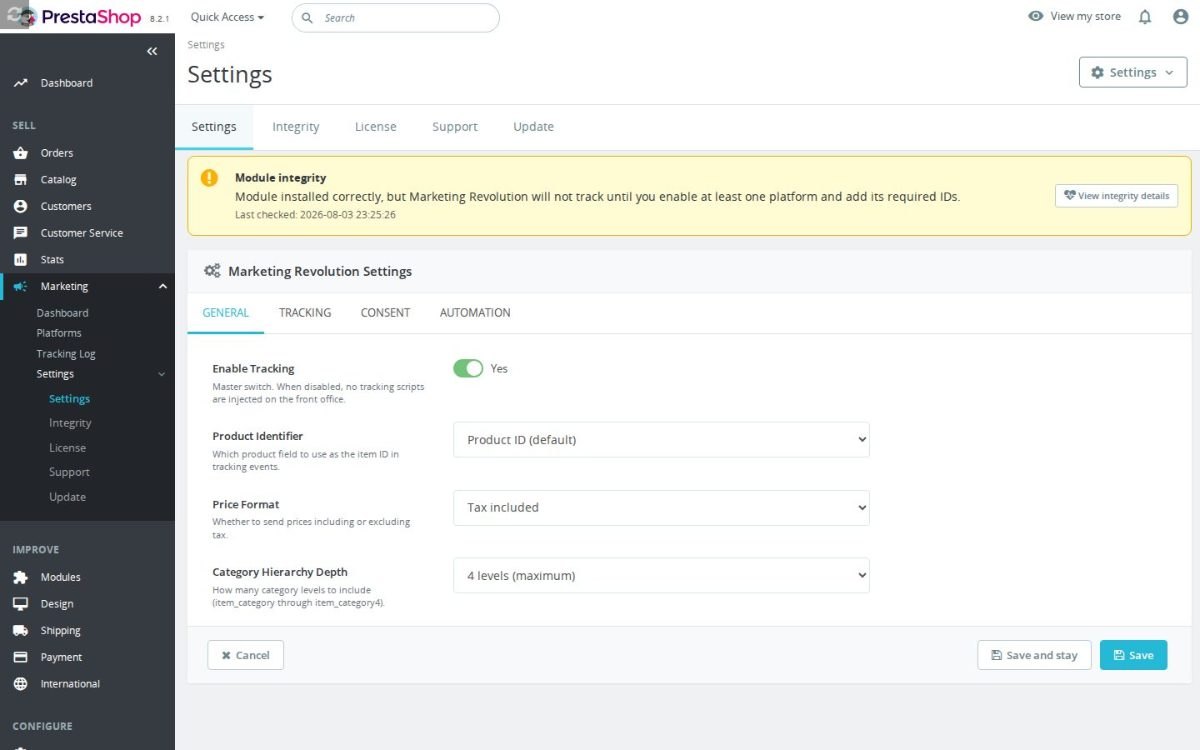
Woher weiß ich, dass das Ganze funktioniert?
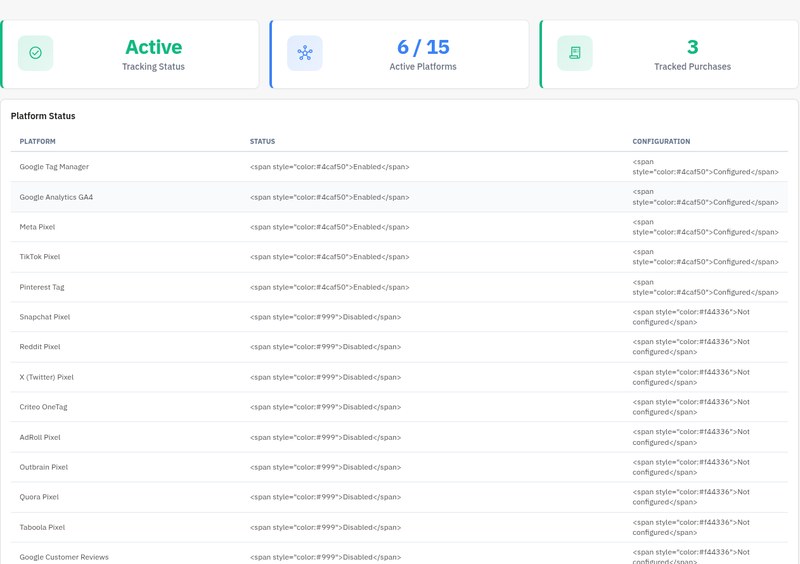
Der Überblick antwortet auf einen Blick: Messgesundheit, wie viele Plattformen leben, wie viele Käufe gemessen wurden. Das Register listet jeden erfassten Kauf, der Debug-Bildschirm zeigt die Ereignisse im Fluss, und der Diagnosebildschirm prüft Hauptschalter, Plattformregister, Pflichtkennungen und Logwachstum, mit Ein-Klick-Reparaturen für seine Funde, einschließlich des Abschaltens des Debug-Modus auf einem Produktivshop.
Das wiederkehrende Agenturgespräch, ob der Pixel kaputt sei, endet mit dem Screenshot eines grünen Überblicks, und das monatliche Zahlengespräch beginnt mit Werten, denen alle vertrauen.
-
Referenzmprmarketingrevolution
-
Auf Lager2147483647 Artikel
-
PrestaShop-KompatibilitätPS 1.6 – 9.x
-
PreismodellEinmalkauf
-
ModultypFront & Back-office
-
DSGVO-relevantJa
-
GeschäftszielMarketing & Retargeting
-
Externes Konto erforderlichJa
-
Modul-KomplexitätFunktionsreiches Modul
-
Phase der Customer JourneyBesucher anziehen
-
Funktioniert mit PlattformWerbe- & Analysenetzwerke
Was unsere Kunden über uns sagen
Unternehmensbewertungen
5.0
★
★
★
★
★
(4 Bewertungen)
Kundenbewertungen werden geladen...
Noch keine Produktbewertungen
Teilen Sie als Erste/r Ihre Erfahrung mit diesem Modul.
Bewertung schreiben
Ersetzen Sie einzelne Tracking-Module durch eine zentrale PrestaShop-Integration für GA4 Enhanced Ecommerce, Google Tag Manager, Google Ads, Meta Pixel, TikTok, Pinterest, Snapchat, Reddit, X, Criteo, AdRoll, Outbrain, Quora, Taboola und Google Customer Reviews. Konfigurieren Sie nur die Plattformen, die Sie tatsächlich nutzen, senden Sie konsistente Produkt- und Bestelldaten aus einer Quelle und vermeiden Sie doppelte Tracking-Skripte durch überlappende Module.
Haben Sie eine Frage zu diesem Produkt?
Unsere Experten helfen Ihnen gerne. Fragen Sie uns zu Installation, Kompatibilität oder technischen Daten.
1301
Fragen
9
Kategorien
2013
Modulbau seit
1.6–9
PrestaShop-Versionen
v1.2.132026-05-27
- AddedAdd native tracking config warnings
- Addedcomplete FR/DE/ES/IT/PL translations
- FixedComplete shared package release surface
Vollständiges Changelog wird geladen...
Passt gut zu Marketing Revolution
Module, die unser Team wirklich mit diesem kombiniert, und warum jedes davon in dasselbe Setup gehört.
Complement
Ein Shop, der Marketing Revolution einsetzt, bündelt Werbe- und Analyse-Events über viele Plattformen hinweg, GTM, GA4, Google Ads, Meta, TikTok, Pinterest und weitere, an einer kontrollierten Stelle statt in verstreuten Snippets. Das steuert, wie Shopping-Events gesendet werden, erzeugt aber nicht den Produktfeed, den Google-Shopping-Kampagnen brauchen, um überhaupt etwas bewerben zu können.
Smart Google Merchant Feed Manager deckt das ab, indem er Katalogdaten in geschützte XML-Feeds oder Content-API-Syncs für das Google Merchant Center formt, mit Profilen für Märkte, Sprachen, Währungen und Zielländer. Er baut den Produktfeed auf, eine von der Event-Erfassung getrennte Aufgabe.
Betreibst du beide, liefert dein Shop Shopping einen sauber aufgebauten Produktfeed und meldet die umgebenden Shopping-Events über eine gebündelte Tracking-Schicht. Der Feed sorgt dafür, dass Produkte gelistet werden, während Marketing Revolution konsistente E-Commerce-Event-Daten über Plattformen hinweg übernimmt, zwei unabhängige Teile, das eine speist die Listings, das andere misst die Aktivität rundherum.

Governance
Ein Shop, der Marketing Revolution einsetzt, sendet E-Commerce-Events von einer Stelle aus an viele Werbe- und Analyse-Plattformen. In der EU und ähnlichen Regionen sollten diese Marketing- und Analyse-Tags nur gemäß der Einwilligung des Kunden auslösen, und das Tracking-Modul selbst erfasst oder erzwingt diese Entscheidung nicht.
Cookies Revolution deckt das ab, indem es die Einwilligung erfasst und durchsetzt für notwendige, funktionale, Analyse- und Marketing-Cookies. Es blockiert passende externe und Inline-Skripte vor der Einwilligung, reaktiviert erlaubte, sobald sie erteilt ist, und protokolliert jede Entscheidung. Es steuert die Einwilligung, ein von der Event-Sendung getrenntes Anliegen.
Betreibst du beide, erfasst und erzwingt dein Shop die Kundeneinwilligung über Cookies Revolution, während Marketing Revolution die Plattform-Events selbst verwaltet. Die Einwilligungsschicht hält Marketing- und Analyse-Skripte zurück, bis der Besucher akzeptiert, und reaktiviert sie danach, sodass dein Shop ein gebündeltes Tracking und einen konformen, einwilligungsbewussten Ansatz dafür behält, wann diese Tags laufen dürfen.

Measurement
Ein Shop, der Marketing Revolution einsetzt, zentralisiert Werbe- und Analyse-Events über Plattformen hinweg, was den Stack aufgeräumter macht, aber für sich genommen nicht beweist, dass die durchlaufenden Daten korrekt sind, GTIN-Lücken, Preisabweichungen, defekte Tags oder doppelt gezählte Conversions können sich auch in einem sauber wirkenden Setup verbergen. Das Modul organisiert Events, es prüft sie nicht eigenständig.
Feed & Tracking Audit, Technical Review deckt das als Expertendienst ab und prüft Merchant-Feed-Qualität, GA4-/Ads-Conversion-Tracking, Pixel sowie Product-/Offer-Schema und findet die Fehler vor deiner nächsten Kampagne. Es ist eine menschliche Prüfung, getrennt vom Tracking-Tool.
Betreibst du beide, verwaltest du die Events im Alltag über Marketing Revolution und lässt einen Spezialisten bestätigen, dass Feed und Tracking vor dem Ausgeben wirklich solide sind. Das Modul hält den Stack gebündelt, während das Audit die Daten- und Messfehler aufdeckt, die still das Werbebudget verschwenden, sodass Probleme vor den Kampagnen auftauchen statt danach.
2
Geplant
8
Implementiert
10
Anfragen
Funktionswünsche werden geladen...
 30 Tage Rückgaberecht
Einfache Rückgabe, keine Fragen
 Plug & Play Module
Installieren, einrichten und profitieren
 Support an erster Stelle
Priorität für Hilfe & Zufriedenheit
Vielleicht gefällt Ihnen auch


