


Monitor uptime, cron and core health with alerts within minutes for your PrestaShop store
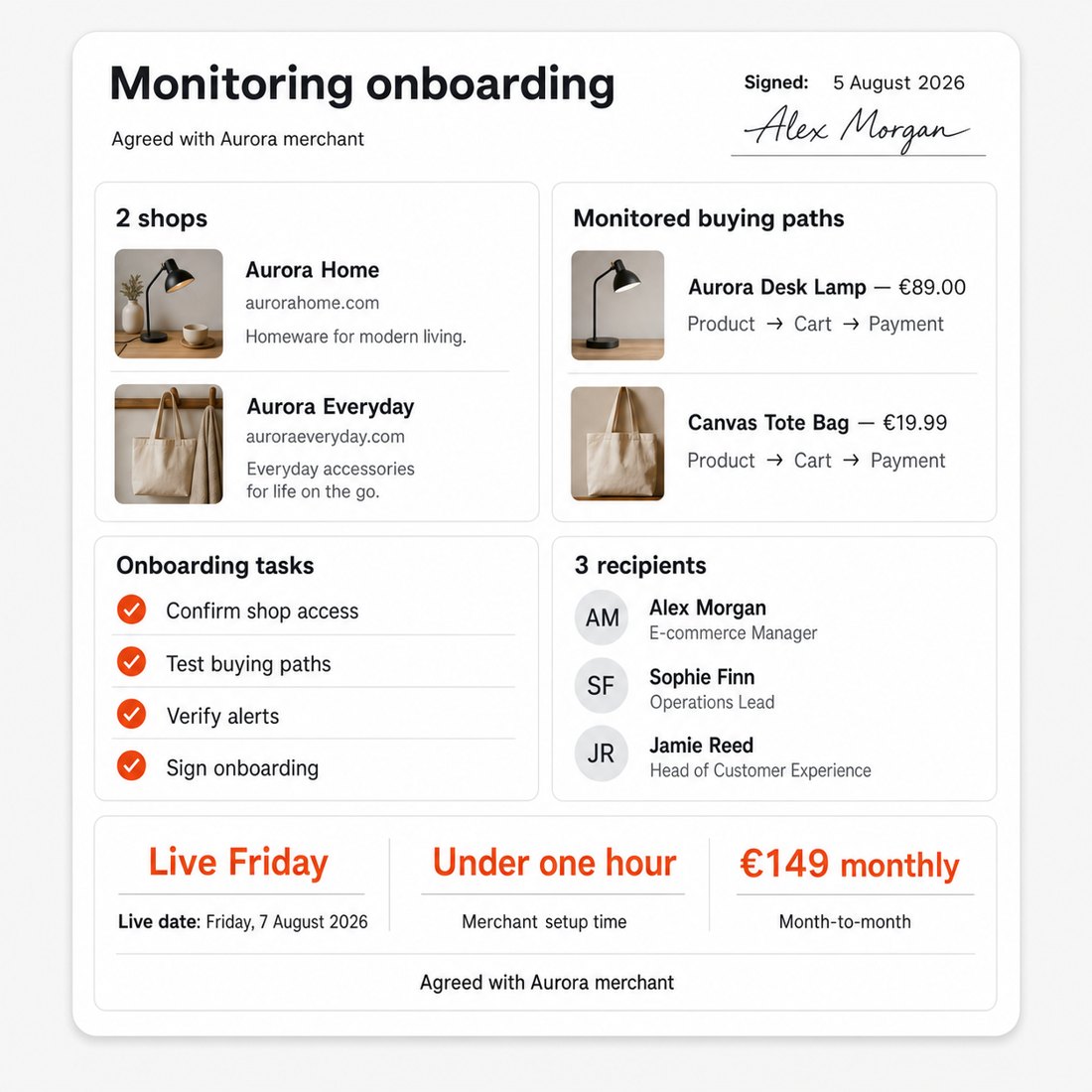
PrestaShop Uptime Monitoring & Alerts Plan watches your buying path through the final payment step and alerts you when ordering breaks. Guided setup takes under an hour of your time; monitoring starts within 1 to 2 working days.
A working homepage hides failures in checkout, stock updates or outgoing email. Checks run from several locations without charging cards or placing real paid orders.
You set frequency, warning limits, recipients and escalation. Email and text alerts carry severity and likely cause; the back-office dashboard keeps incident history. The plan costs €149 monthly with no fixed term. Automated alerts run around the clock; staffed round-the-clock response, hands-on repair and infrastructure work are excluded.
The person fixing an incident receives the failed step and its history instead of starting the investigation from scratch.
Summary of what the Uptime Monitoring & Alerts Plan offers
PrestaShop Uptime Monitoring & Alerts Plan watches the store as a working sales system for a fixed monthly fee: availability, a genuine buying path through the final payment step, and the scheduled work that keeps stock, messages, feeds and carts moving. A guided setup makes monitoring live within 1 to 2 working days, while detailed controls adapt it to one store or a whole portfolio.
- A synthetic buying path checked through to the final payment step, from several locations
- Quiet operational and security failures tracked before customers meet them
- Alerts by email and text message carrying severity, likely cause and an escalation order
- A live dashboard inside the back office with incident history and report exports
- Staff accounts, agency sub-accounts and a choice of interface and alert language
- A monthly plan whose incident records hand recovery to the right person
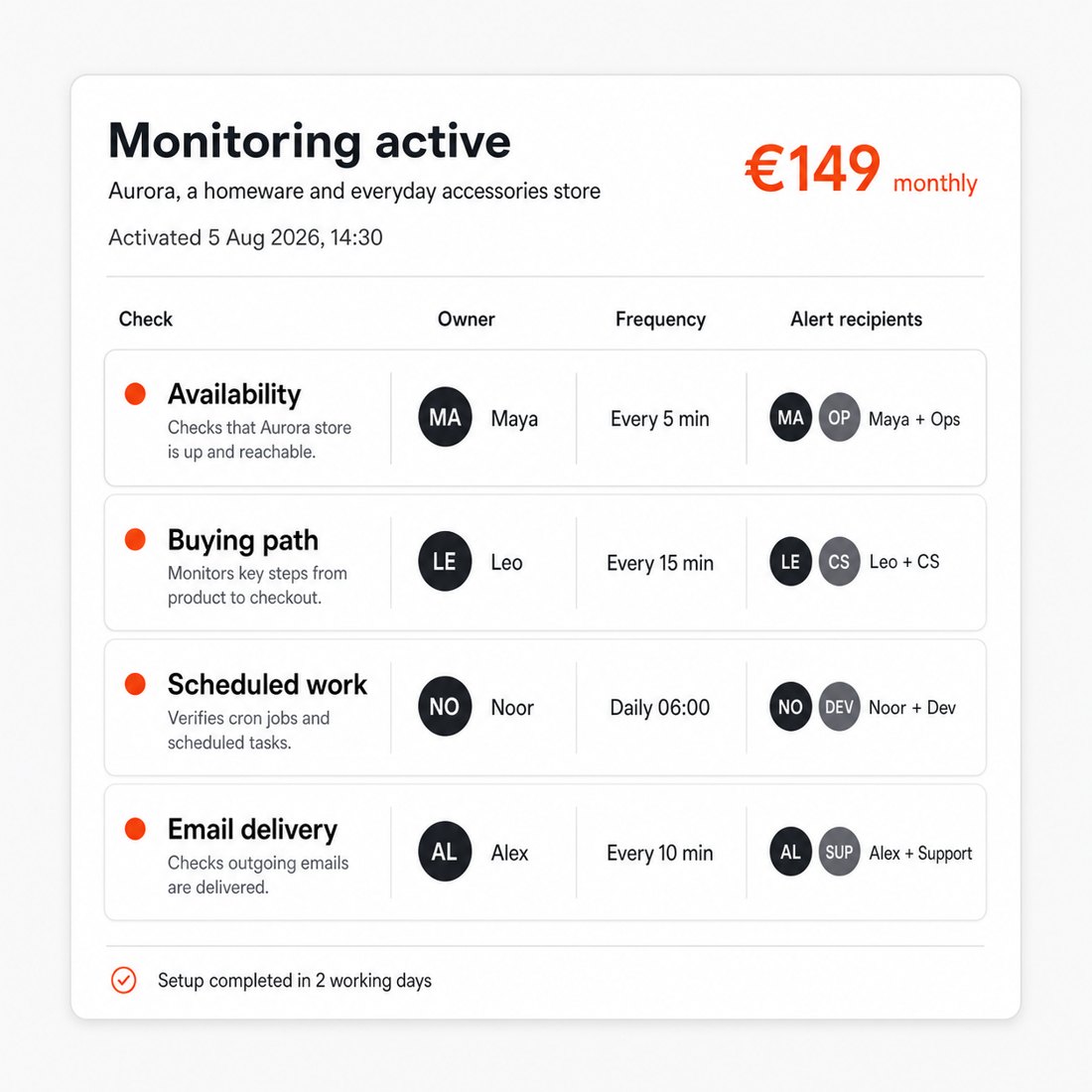
How does it detect a checkout that has stopped selling?
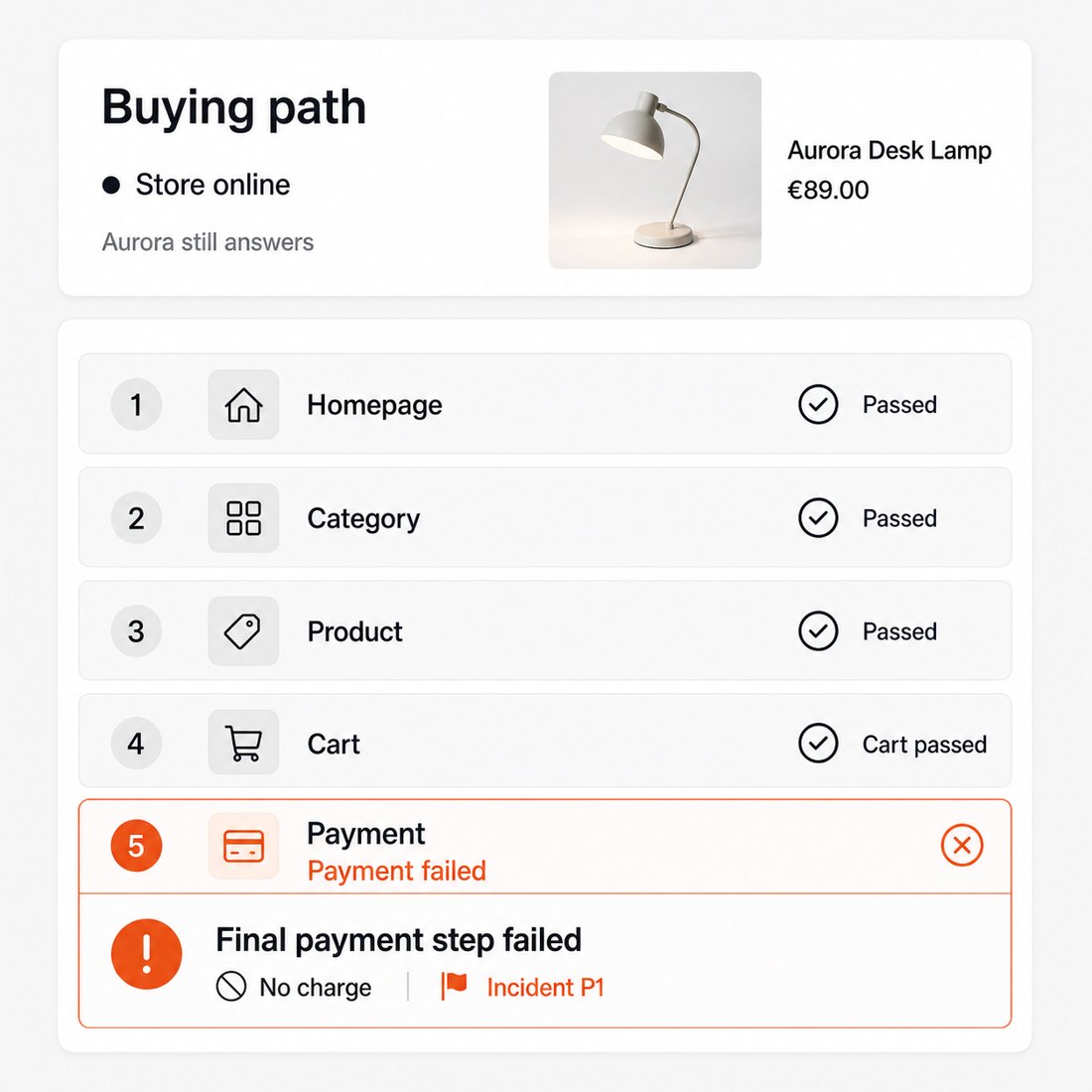
The monitored journey starts in the storefront, follows a genuine purchase and reaches the final payment step. A payment failure is therefore reported even when the homepage, catalogue and product pages still answer correctly. The journey exercises the buying path without charging a card, so detection never places a real paid order.
Availability is checked from several locations at the frequency selected for the store, and the test confirms the content expected at each important step rather than treating any response as success. A responsive homepage no longer hides a checkout that has stopped accepting orders.
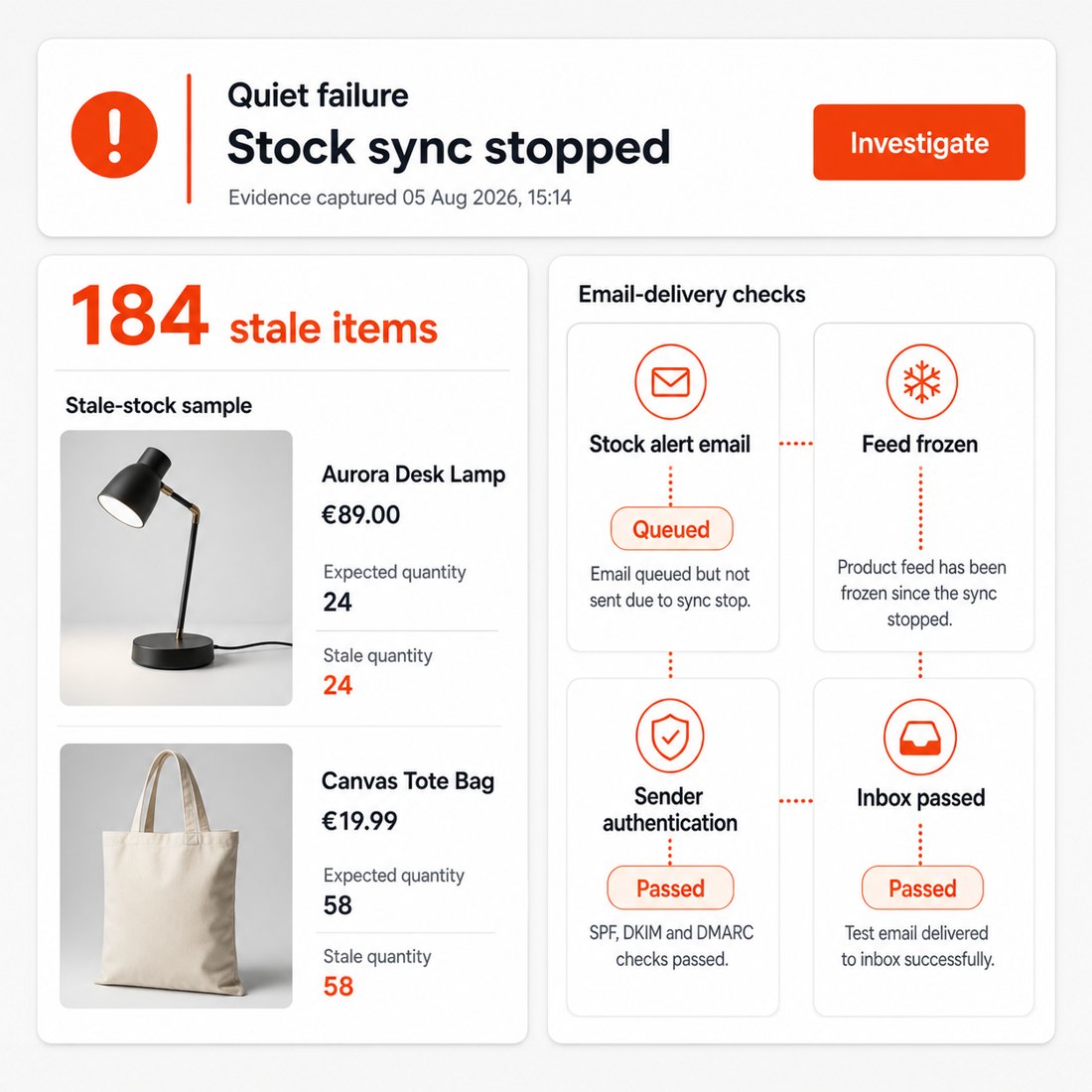
Which quiet failures become visible?
Scheduled work is monitored in terms of what it does for the shop. A stopped task is tied to stale stock, queued emails, frozen product feeds or carts that are no longer cleared, so the alert explains the consequence instead of merely naming a failed process.
Email monitoring follows a message to the inbox, identifies spam placement and verifies that the sender is recognised correctly. The plan also reports certificate expiry, sudden shifts in response time, changes to store or server settings and recurring error patterns.
The same view records installed modules, available updates and module changes, and matches them against known security weaknesses. It also identifies shop-engine and server releases that no longer receive security support, connecting a new failure with the change or unsupported software most likely to explain it.
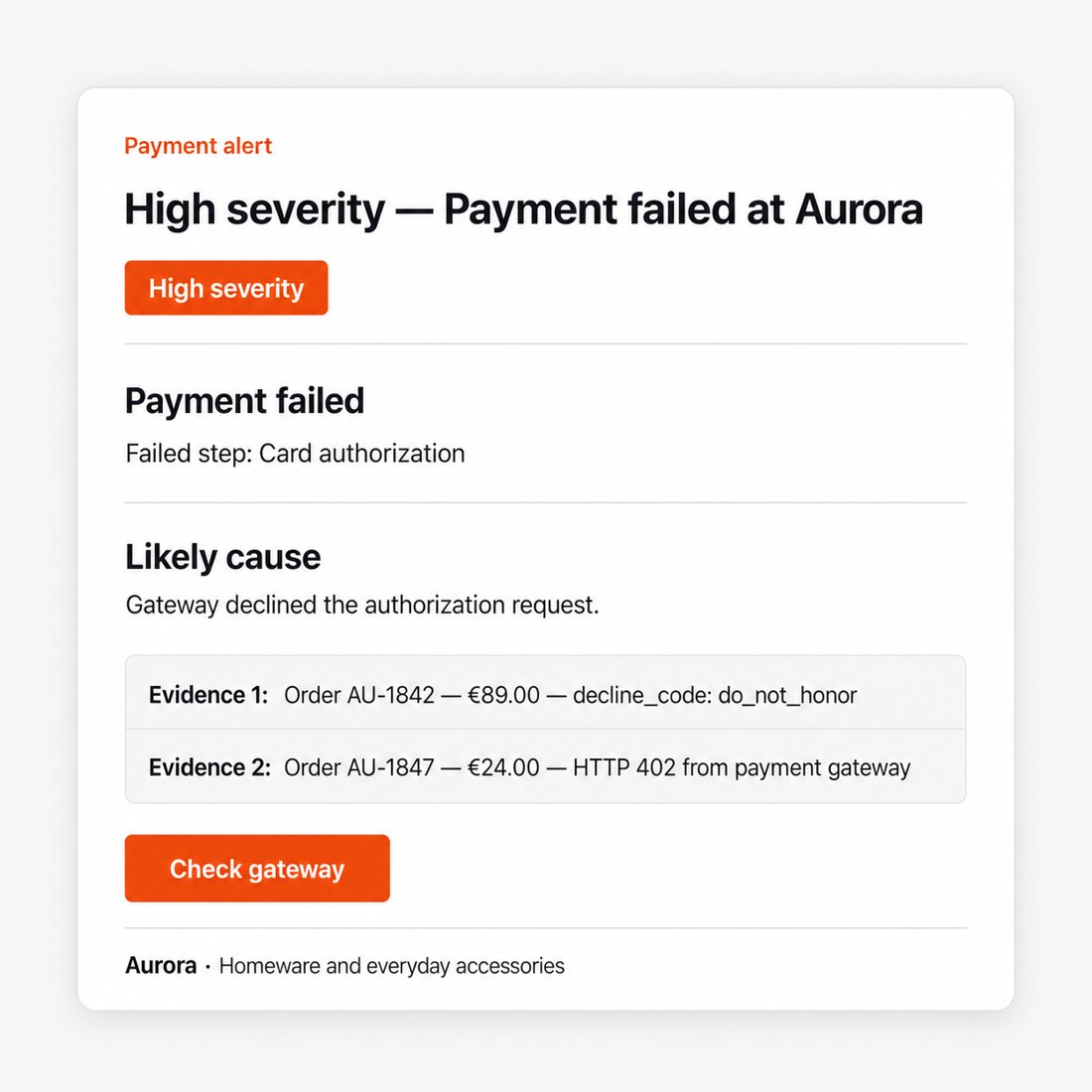
Why does each alert contain a useful next step?
Every store has its own rhythm. Results are measured against that store’s normal behaviour, while you define the warning limits for the buying path, response time and scheduled work. Routine peaks stay quiet and a meaningful deviation creates an alert.
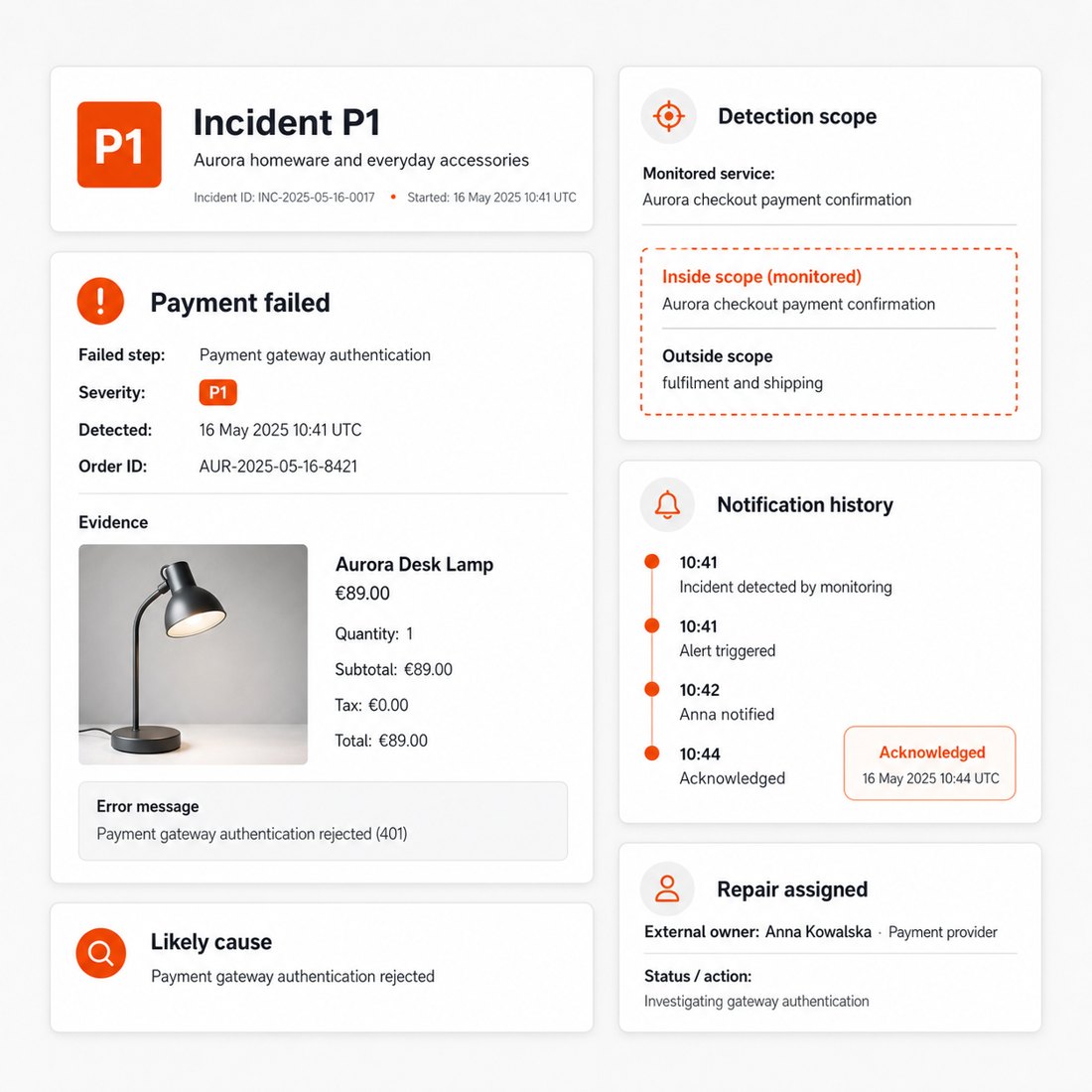
Each alert states the severity, an assessment of the likely cause and the affected store and process. Email and text-message delivery, acknowledgement rules and an ordered escalation path place the information with the right person when it matters. Alerting is automated around the clock; a staffed 24/7 desk with promised human response times is not part of the plan.
How does the monthly plan start and run?
The plan costs €149 each month and is billed monthly, month to month with no fixed term. Activation is a guided setup in which the shops, buying paths, scheduled work and alert recipients are selected in one place; it takes under an hour of your time, and monitoring is live within 1 to 2 working days.
The dashboard sits inside the PrestaShop back office and combines current health, incident history, report exports and a central view of every monitored store. Separate staff accounts limit each person to the stores they handle, sub-accounts organise client stores for an agency, and the chosen language applies to both the interface and the alerts. The plan runs until cancelled, cancellation takes effect at the end of the paid period, and incident history and reports remain exportable while the plan is active.
Who handles recovery after an alert?
The plan owns detection, prioritisation and evidence. The incident record keeps the failed step, severity, likely cause, notification history and acknowledgement together, so whoever repairs the fault starts with a defined problem instead of repeating the discovery work. Hands-on repair of what an alert finds belongs to your own specialist or to PrestaShop Store Care & Maintenance Plan, and server administration, hosting changes and infrastructure work of any kind stay outside the plan.
The plan suits a merchant or agency running one or several live stores who needs to know the moment ordering silently breaks, before customers or advertising spend find out. A merchant who wants the findings repaired as well is served by the care plan, and a pre-launch store without a working checkout has nothing for the monitoring to walk yet.
-
ReferenceCARE-MONITOR
-
Service typeCare plan (monitoring)
-
DeliverableLive health dashboard + monthly report
-
Access neededStore URL(s); read access optional
-
PrestaShop versions1.6 / 1.7 / 8 / 9
-
NDA / DPAAvailable on request
-
Included hours0 (watch-only; fixes quoted separately)
-
Monthly capNot applicable
-
Response SLAImmediate alert, business hours
-
Live dashboardIncluded
-
Monthly reportIncluded
-
BillingMonthly, no minimum term, cancel any time
-
Emergency coverBusiness hours
-
Price€149 / month
-
ResponseP1 alert immediately, business hours (Mon, Fri 09:00–18:00 CET)
Watch-only PrestaShop monitoring for uptime, checkout, cron, SSL and regressions, with alerts and monthly reporting.
Monitoring Plan keeps a live watch on the store but does not apply fixes. It is for owners who already have someone to act on alerts and want a clear dashboard, confirmed incidents and a plain-English monthly health report.
Plan type
Care plan - monitoring only
0 fix hours
Price /month
€149 / month
Monthly, no minimum term
Response time
We aim to send P1 alerts immediately during business hours
Mon-Fri 09:00-18:00 CET
Reporting
Live health dashboard + monthly report
Onboarding
Store URLs, monitored paths, alert recipients and cron inventory
What's covered
Uptime, checkout path, SSL, cron, fatal errors and regressions
Availability monitoring
The checks that tell you whether the store can be reached and used.
- Homepage and key storefront paths monitored continuously
- Checkout path check, not just homepage uptime
- SSL/TLS certificate expiry and validity watch
Core, cron & regression watch
The silent failures that make a store technically up but operationally broken.
- Cron jobs such as feeds, sitemaps, stock and mail checked for staleness
- Fatal-error and HTTP 500 detection on monitored pages
- TTFB or response-time regression alerts against baseline
Dashboard, alerts & monthly report
The operational view you can forward to the people who fix things.
- Live status, uptime %, response-time trend, certificate and cron health
- Incident log with severity, timing and likely cause where known
- Recommended actions each month, ordered by priority
How it works
-
Onboarding Setup weekWe collect URLs, shops/languages, monitored paths, alert recipients, channels and cron inventory.
-
Monitoring ContinuousChecks run against baseline for uptime, checkout, SSL, cron, fatal errors and response-time drift.
-
Incident handling As detectedWe confirm, classify, alert and log incidents; fixes are outside this plan.
-
Monthly report MonthlyYou receive uptime, incidents, cron/core health, regressions and recommended actions.
Plan boundaries
The Monitoring Plan is deliberately narrow: detection, alerting and reporting. It does not include hands-on repair.
Hours or scope
0 included fix hours
Watch-only
SLA & response
We aim to confirm P1 incidents and send alerts promptly during business hours
No repair SLA at this tier
Reporting cadence
Live dashboard plus monthly report
Cancellation
Billed monthly, no minimum term, cancel any time
A watch-only month in concrete terms
A monthly report might show: checkout returned 500 at 02:00 - confirmed P1, alerted during business hours, likely module conflict; sitemap cron stale for 3 days; TTFB doubled after deploy. The Monitoring Plan records and escalates those facts, then recommends the fix route without pretending repair is included.
Related services
Start monitoring €149/month · watch-only monitoring, dashboard and monthly report
What access do you need?
Usually store URLs and cron details. Deeper core-health visibility benefits from read access, but it is optional.
Is there an uptime guarantee?
No. The Monitoring Plan reports uptime but does not underwrite hosting or provider outages.
Can I upgrade later?
Yes. Many stores start on the Monitoring Plan and move to the Store Care Plan once they want fixes handled too.
Who is Monitoring Plan best for?
Monitoring Plan is best for stores that are stable and just want eyes on them, a dependable safety net without a monthly pool of work hours. If your PrestaShop store runs smoothly most of the time and you mainly want to be sure you'll hear about a problem fast, this is the right fit.
You'll get the most from Monitoring Plan if…
- Your store is established and reasonably trouble-free, and you rarely need hands-on changes.
- You want continuous uptime, cron and core-health monitoring with immediate alerts during business hours (every day, 08:00–20:00 Polish time).
- You'd rather pay for the occasional fix as a separate, approved quote than carry a monthly hours budget you might not use.
- You value a live dashboard and a monthly report as a clear, honest record of your store's health.
When to step up instead
If you also want the small fixes handled for you, configuration, cache, cron, module settings and obvious PHP errors, without quoting each one, step up to Store Care Plan. Store Care Plan includes everything in Monitoring Plan plus 2 hours of expert work per month (cap 6h, no rollover), so routine maintenance gets done rather than piling up. And if your priority is search visibility rather than uptime, SEO Care Plan focuses on technical SEO hygiene instead.
In short: choose the Uptime Monitoring & Alerts Plan when you want reliable early warning and a paper trail, and you're comfortable having fixes quoted as needed. Choose Store Care Plan when you'd like someone to quietly keep the small things tidy each month. Many owners start with the Monitoring Plan and move up once they see how much routine work they'd rather hand off.
How fast will I know if my store goes down?
When a check fails, an automatic alert goes out. For a P1 event, your storefront or checkout being down, our aim during business hours (every day, 08:00–20:00 Polish time) is to confirm the outage and alert you within minutes of detection, rather than leaving you to find out from a frustrated customer or a missed order.
What counts as P1
P1 is reserved for the things that directly cost you sales: your storefront not loading, or checkout failing so customers can't complete an order. These are the highest-priority signals on your dashboard precisely because every minute of an outage matters for a PrestaShop store.
How the alerting works
Monitoring Plan checks your storefront and checkout continuously. When a check fails, an automatic alert is raised and the incident is recorded on your live dashboard with a timestamp. That gives you two things at once: a heads-up, and a permanent record you can refer back to, useful for spotting patterns or confirming exactly when an issue started and ended.
An honest note
Monitoring Plan tells you fast, that's its core promise, but it's a monitoring and alerting plan, so the actual repair is quoted separately or handled by the monthly hours in Store Care Plan. We don't promise zero downtime; no honest provider can. What we do promise is that you won't be the last to know. The automatic alerts, plus our aim of confirming P1 outages and alerting you within minutes of detection during the business window, mean problems surface when the checks flag them, not after a customer takes the time to complain. Which is often the difference between a quick recovery and a lost afternoon of orders.
Does Monitoring Plan fix problems, or only alert me?
Monitoring Plan covers monitoring and alerting, it's the eyes on your store, not the hands. When a check fails, an automatic alert goes out to you; the actual fix is then quoted separately, or covered by the monthly expert hours in Store Care Plan. We're deliberate about this distinction so there are never any surprises about what the plan does and doesn't do.
How it works in practice
When a check fails (your storefront or checkout goes down, a cron job stalls, or a fatal error surfaces), Monitoring Plan raises an alert and logs the incident on your live dashboard. During business hours (every day, 08:00–20:00 Polish time) we aim to confirm a P1 outage, your storefront or checkout being down, and alert you within minutes of detection, rather than leaving you to find out from a frustrated customer. What Monitoring Plan does not do is automatically log in and repair the issue; the diagnosis and resolution are separate work.
Your options when something needs fixing
- Quote the fix separately, we scope the specific problem and you approve the work before anything is done.
- Step up to Store Care Plan, if you'd rather not deal with per-incident quotes, Store Care Plan includes everything in Monitoring Plan plus 2 hours of expert work per month (cap 6h) to handle the small problems, config, cache, cron, module settings and obvious PHP errors, as they appear.
Think of it this way: Monitoring Plan is designed to alert you fast and gives you a clear record of what happened. Store Care Plan adds someone to act on the small things without a fresh quote each time. Many store owners begin with the Uptime Monitoring & Alerts Plan for peace of mind and move up to Store Care Plan once they realise how much routine maintenance they'd rather hand off. Either way, larger projects, a new feature, a custom module, a migration, are always scoped and quoted on their own, so the line between monitoring and hands-on work stays clean and honest.
Detected problems are also classified.
What does Monitoring Plan include?
Monitoring Plan is the lightest of our PrestaShop Care Plans, a continuous, always-on safety net that watches your store so you don't have to. It's built for one job and does it well: telling you something is wrong before a customer emails you about it.
What's included
- Uptime monitoring. Your storefront and checkout are monitored, with alerts when checks detect an outage.
- Cron & core-health checks, we catch broken or stalled cron jobs and obvious fatal errors that quietly degrade a PrestaShop store (failed scheduled tasks, missing core processes, recurring PHP fatals).
- Security & performance watch. Basic regression alerts that flag when something has changed for the worse.
- Live dashboard + monthly report, a real-time view of uptime %, incidents and what we spotted, summarised each month so you have a clear paper trail.
What the dashboard and report show
The live dashboard gives you an at-a-glance health status: current uptime percentage, any open or recent incidents, and the latest checks. The monthly report rolls this up into uptime over the period, an incident log, and a short note on anything worth your attention, so even a hands-off owner stays informed.
An honest boundary
Monitoring Plan is monitoring and alerting only. It's the eyes on your store, not the hands. The actual repair work is quoted separately, or handled by the monthly expert hours in Store Care Plan. We keep that line clear on purpose, so you always know exactly what you're paying for. Business-hours coverage for flagged events runs every day, 08:00–20:00 Polish time.
If your store is stable and you simply want a dependable early-warning system, Monitoring Plan is the right starting point. When you'd rather have the small problems handled for you as they appear, Store Care Plan is the natural step up, it includes everything here plus a pool of expert hours each month.
 30 days return right
Easy return - no questions asked
 Plug & Play Modules
Install, set up and take profit
 Dedicated Support First
Priority Help & Satisfaction Over Sales
Who builds and maintains this module
Built and maintained by David Miller and mypresta.rocks. David Miller has worked with PrestaShop since 2013, and the company behind this shop has been registered since 3 December 2018. Every module in this catalogue is our own work, so your questions to support reach the people who wrote the code. The changelog on this page lists every update with its date.
More modules











Compliance & Legal
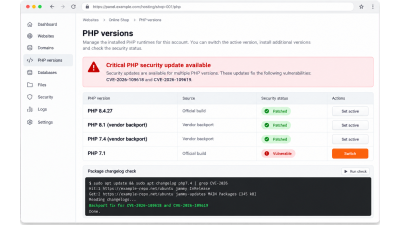
PHP2Shell: what PrestaShop shops should do about CVE-2026-109618 and CVE-2026-109619, even when they cannot upgrade
News & Updates
What's new at mypresta.rocks: September 2026
News & Updates
What's new at mypresta.rocks: August 2026

News & Updates
PrestaShop 9.2 native One Page Checkout: what it does and when you need more

News & Updates
Introducing Expert Services: PrestaShop audits before you buy another module

News & Updates