






Speed up faceted search on your PrestaShop store with clean filter URLs and SEO pages


Filter Revolution is a module for PrestaShop stores that narrows products across the main catalogue listings and turns selected filter combinations into dedicated landing pages for search. Installation creates starter layouts for categories, search results and brands, and one button prepares the catalogue data.
A large catalogue has two connected jobs: help a shopper reduce hundreds of products to a useful shortlist, and give search engines valuable combinations such as black office chairs under a chosen price their own destination. The module handles both jobs in one system, so filtering supports the sale before and after the shopper enters the store.
You choose the filter groups, their order and the listing areas that receive each layout. Catalogue attributes and features sit beside price, weight, brand, supplier, condition, availability, category and promotion, while tick boxes, single-choice buttons, lists, range controls, colour samples and images give each choice a suitable form. Counts, limits, columns and dependencies keep longer sets readable.
Selected combinations receive their own heading, search title, description, image and readable address in every store language. Products update inside the open listing, a mobile panel previews the number of matches, catalogue changes refresh the prepared filter data, and ordinary combinations remain outside search results unless the merchant promotes them.
The result is a shorter route to the right product, useful search entry pages, fewer dead ends on mobile, controlled indexing and an easy start with room for precise catalogue configuration.
What does Filter Revolution change in a product catalogue?
Filter Revolution combines fast product filtering with prepared landing pages for the combinations a store wants people to find in search. The overview below maps the six parts of that work.
- Product choice: ten catalogue sources become clear controls with live counts and dependencies.
- Shopping flow: products update in the open listing, selections remain available and useful sorting shortens the route further.
- Phones and design: a dedicated mobile panel previews the result total and the controls follow the shop’s appearance.
- Search visibility: selected combinations receive localized content, readable addresses and a place in the sitemap.
- Catalogue control: templates cover specific categories and seven main types of product listing.
- Upkeep: catalogue changes refresh the prepared data, with manual and scheduled full rebuilding as a safety net.

How does a shopper reach the right product faster?
Size, material and colour from the catalogue sit beside price, weight, brand, supplier, condition, availability, category and promotion. Depending on the type of choice, the shop displays tick boxes, single-choice buttons, a list, a range control, colour samples or image choices. Matching totals appear beside values, while options with no result are hidden, dimmed or left visible according to the shop’s policy.
Dependent groups keep a technical catalogue calm: a later choice appears only after the relevant earlier selection. You choose how values are ordered, using catalogue position, the alphabet, the number of matching products or a manual sequence. Shoppers sort results by relevance, sales, stock quantity or brand, and their selected filters stay with them when they move between listings or return later, until they clear them.

What happens on a phone and in the shop’s design?
On a phone, filters open in a dedicated panel. Its button shows how many choices are active, the panel summarizes them, and the confirmation button previews the number of products left by the pending selection. The shopper applies the whole set without losing the place in the listing.
The module reads the shop’s colours and uses them as the starting point for the filter interface. You choose the loading effect and one of three ways to move through results: numbered pages, a button that adds more products, or continuous loading while scrolling. Range filters use one or two handles and optional number fields, which makes an exact price, weight or measurement easy to enter on either screen size.

How does a filter combination become a search landing page?
A selected combination stops being only a temporary catalogue state when the merchant creates a landing page for it. That page receives its own main heading, page title, search description, text above and below the products, image and readable local address. Every language carries its own wording, while the selected products remain tied to the same catalogue facts.
You choose which prepared pages are active and allowed into search. Eligible pages join the store’s sitemap, while ordinary combinations stay outside search results and point back to the preferred base listing when required. Deeper filter links are kept away from further crawling, and request protection prevents automated visitors from turning countless combinations into avoidable server work.

How precisely does the catalogue team configure each area?
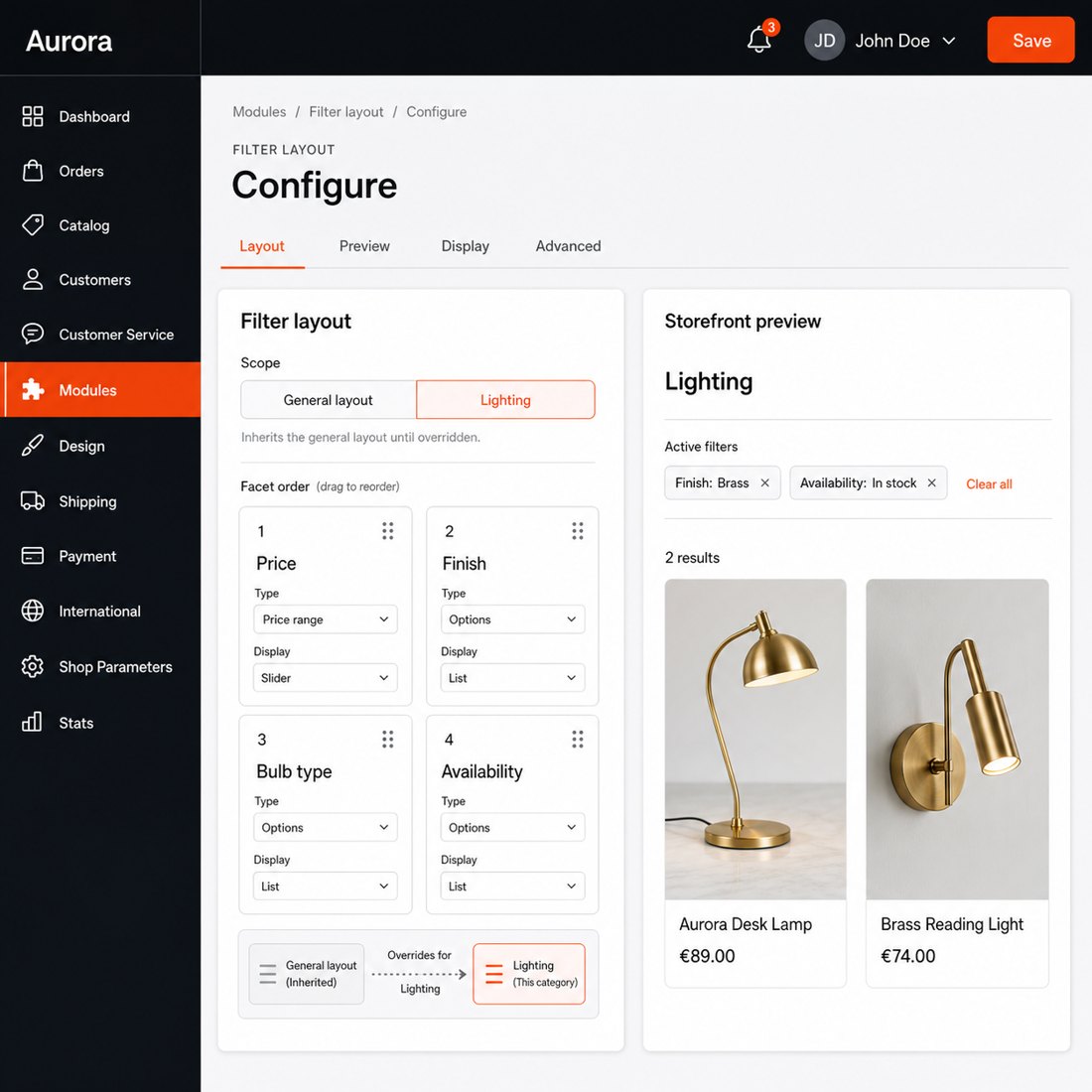
Filter layouts cover category pages, search results, brands, suppliers, best sellers, new products and price reductions. A general layout handles a listing type, while a selected category receives its own arrangement. The first installation already creates useful starting layouts, and an existing one is duplicated when another department needs a similar structure.
You choose the groups and drag them into order, then set the control, product count, visible-value limit, starting state, column count and dependency for each one. Individual values also follow a manual order or the number of matching products when that is more useful than catalogue or alphabetical order. Layouts and landing pages remain separated by shop in a multistore installation.
How much work remains after the first launch?
Installation creates starter layouts, and the first full preparation runs from one button with visible progress. After that, changes to products, combinations, stock, prices, categories, attributes, features and tax rules refresh the affected filter data automatically, instead of making the team rebuild everything after every catalogue edit.
A manual full rebuild remains available, and a protected scheduled rebuild provides a fallback for imports and exceptional catalogue work. The module prepares data in bounded batches and reuses recent results within merchant-set limits, so a large catalogue remains responsive. Simple defaults put the filter to work quickly, while the layout, behavior, performance, search and appearance settings remain available when the shop needs finer control.

-
Referencemprfilterrevolution
-
In stock2147483647 Items
-
PrestaShop CompatibilityPS 1.7 – 9.x
-
Pricing ModelOne-time Purchase
-
Module TypeFront & Back-office
-
GDPR RelevantNo
-
Business GoalBoost Conversions
-
External Account NeededNo
-
Module ComplexityComplete Solution
-
Customer Journey StageEngage Shoppers
-
Works With PlatformNo External Platform
What customers say about us
Company reviews
5.0
★
★
★
★
★
(4 reviews)
Loading customer reviews...
No product reviews yet
Be the first to share your experience with this module.
Write a Review
Filter Revolution adds AJAX filtering to PrestaShop listing pages so customers can narrow your catalogue by attributes, features, price, weight, brand, supplier, condition, availability, subcategories, and sale products. It also supports path-style filter URLs, selected SEO landing pages, SEO handling, and sitemap entries.
Have a question about this product?
Our experts are here to help. Ask anything about installation, compatibility, or specifications.
1301
questions
9
categories
2013
building modules since
1.6–9
PrestaShop versions
v2.8.102026-05-27
- AddedImprove responsive filter UX
- AddedUse shared theme style tokens
- AddedAdd localized listing sort URLs
Loading full changelog...
Works Well With Filter Revolution
Modules our team genuinely pairs with this one, and exactly why each belongs in the same setup.
Complement
Filter Revolution helps shoppers narrow large catalogues with faceted filters and can turn selected product combinations into SEO landing pages with clean filter URLs. Those landing pages are valuable, but search engines still need a reliable way to discover the full range of pages across your store.
Advanced SEO Sitemap Builder covers discovery as a separate tool, generating XML sitemaps from selectable URL sources across products, categories, CMS pages, brands and suppliers, with an optional HTML sitemap for shoppers. It is about crawl coverage, not filtering.
Used alongside each other, Filter Revolution shapes which filtered pages are worth ranking while the sitemap builder helps search engines find your pages in the first place. Together they support both sides of discoverability: useful entry pages on-site and clear crawl routes for the engines indexing them.

Workflow
Filter Revolution guides shoppers through large catalogues with faceted filters, clean filter URLs and SEO landing pages, which suits visitors who want to browse and narrow a listing. Not everyone browses, though; plenty of shoppers prefer to type exactly what they want.
Smart Search Revolution serves those shoppers as a separate tool, replacing weak native search with self-hosted results that guide high-intent visitors as they type, with suggestions and product context that reduce dead-end queries.
Used alongside each other, the two cover the two main discovery behaviours: filtering down a category and searching by name. Browsers refine listings with facets while searchers jump straight to matches, so whichever way a visitor prefers to find products, there is a strong path that keeps them moving toward the catalogue.

Complement
Filter Revolution helps shoppers narrow a big catalogue with faceted filters, which often means opening and comparing several products within a filtered set. In that flow it is easy to lose track of an item you looked at a few clicks earlier.
Recently Viewed Products addresses that as a separate tool, remembering viewed products in the shopper's browser for 30 days without requiring login and showing a compact history block, so familiar items stay one click away.
Used alongside each other, the filters help shoppers find candidates and the history block helps them return to the ones they liked. The pairing suits larger catalogues where people open several products while refining a listing, smoothing the back-and-forth of comparison and reducing the friction of re-finding an item already seen.

Complement
Filter Revolution lets shoppers narrow large catalogues with faceted filters and clean filter URLs, surfacing candidate products quickly. Once they have found interesting items, many are not ready to buy yet and want a way to set them aside for later.
Smart Wishlist covers that as a separate tool, showing heart buttons on lists and product pages, letting guests save items before sign-in and keeping logged-in customers' saved products on their account, so interest is not lost after one session.
Used alongside each other, the filters help shoppers discover products and the wishlist helps them hold onto the ones worth revisiting. The combination suits browsing-heavy catalogues where a single visit rarely ends in purchase, keeping product interest visible across sessions rather than evaporating when the shopper leaves.
 30 days return right
Easy return - no questions asked
 Plug & Play Modules
Install, set up and take profit
 Dedicated Support First
Priority Help & Satisfaction Over Sales
You might also like

- New


