


Auto-fill the password field during PrestaShop registration and checkout


Automatic Customer Password is a module for PrestaShop stores that creates a full customer account without asking the buyer to invent a password during registration or checkout. Installation and one settings screen are enough to start within a few minutes.
The password decision disappears, but the account remains. The customer finishes registration or the order with access to order history, saved addresses and future purchases, while the store keeps one continuous customer record from the first transaction.
The module works on registration, checkout or both. You decide whether password fields stay completely hidden or show a strong pre-filled value that the customer edits. It acts only on new-account fields and keeps the chosen value in place when a checkout form refreshes.
Every generated password follows the store’s active policy, using the selected length, uppercase letters, numbers and special characters. A strength indicator explains the rules when the customer edits the value. After account creation, the module sends the password, sends a one-time setup link valid for 24 hours, or sends no password message.
The result is fewer registration decisions, fewer rejected forms, full customer accounts from the first order and an onboarding policy that remains entirely under the merchant’s control.
What does Automatic Customer Password change?
- A full customer account without a password decision
- Automatic account creation on registration, checkout or both
- Secure passwords matched to the store’s active rules
- Hidden or editable pre-filled password fields
- Password email, one-time setup link or silent onboarding
- A quick launch with detailed control when the store needs it
Automatic Customer Password removes password creation from the new-account journey while preserving the normal customer account. The buyer completes registration or an order without stopping to invent and repeat a password, and the account is ready for order history, saved addresses and the next purchase.
The merchant controls the entire treatment from the store panel: where it applies, what appears in the form, how the password is constructed and what message follows account creation.
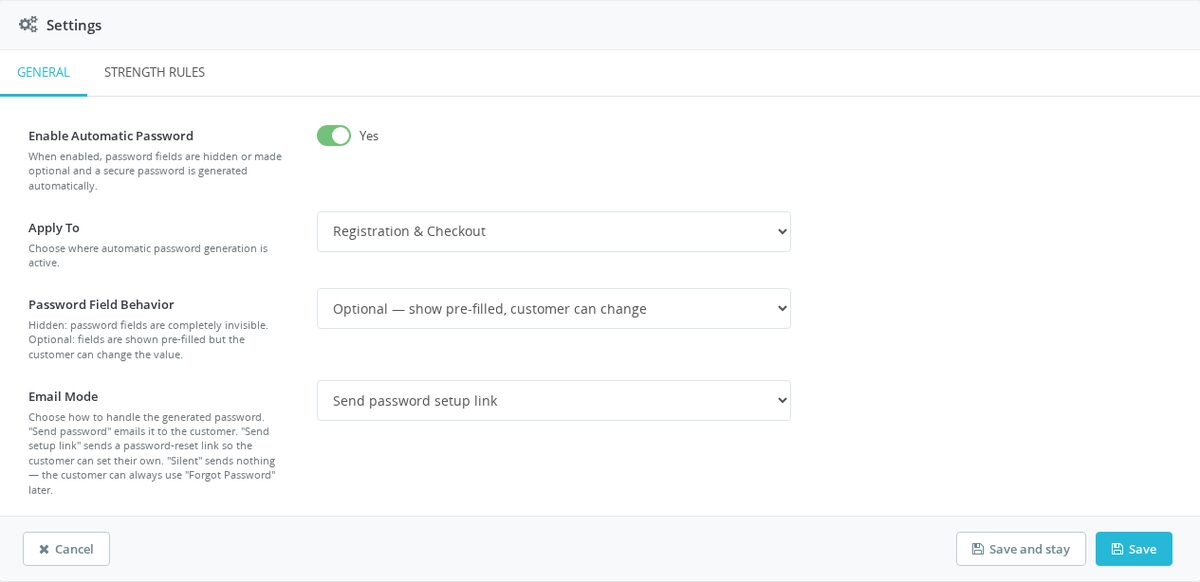
Where does automatic account creation apply?
The scope is registration, checkout or both. This separates a store that wants the shorter journey everywhere from one that only wants it during the order process.
The module identifies new-account forms and leaves login, current-password and account-edit fields untouched. When the checkout rebuilds part of the form after an address or delivery change, the generated value and its confirmation remain synchronized instead of making the customer repeat a step.

How does every password meet the store’s rules?
The generator reads the active password policy and produces a unique value that passes it on the first submission. The merchant sets the length and decides whether uppercase letters, numbers and special characters are required, while lowercase letters remain part of every password.
Secure random generation protects the value from predictable patterns. Invalid lengths are rejected in the settings, and the new-account form shows a clear strength indicator and the requirements whenever the customer edits the prepared password.

What does the customer see in the form?
Hidden mode removes the password fields from the customer’s view after filling them, leaving a shorter registration or checkout form. The account still receives a valid password and is created through the store’s normal customer process.
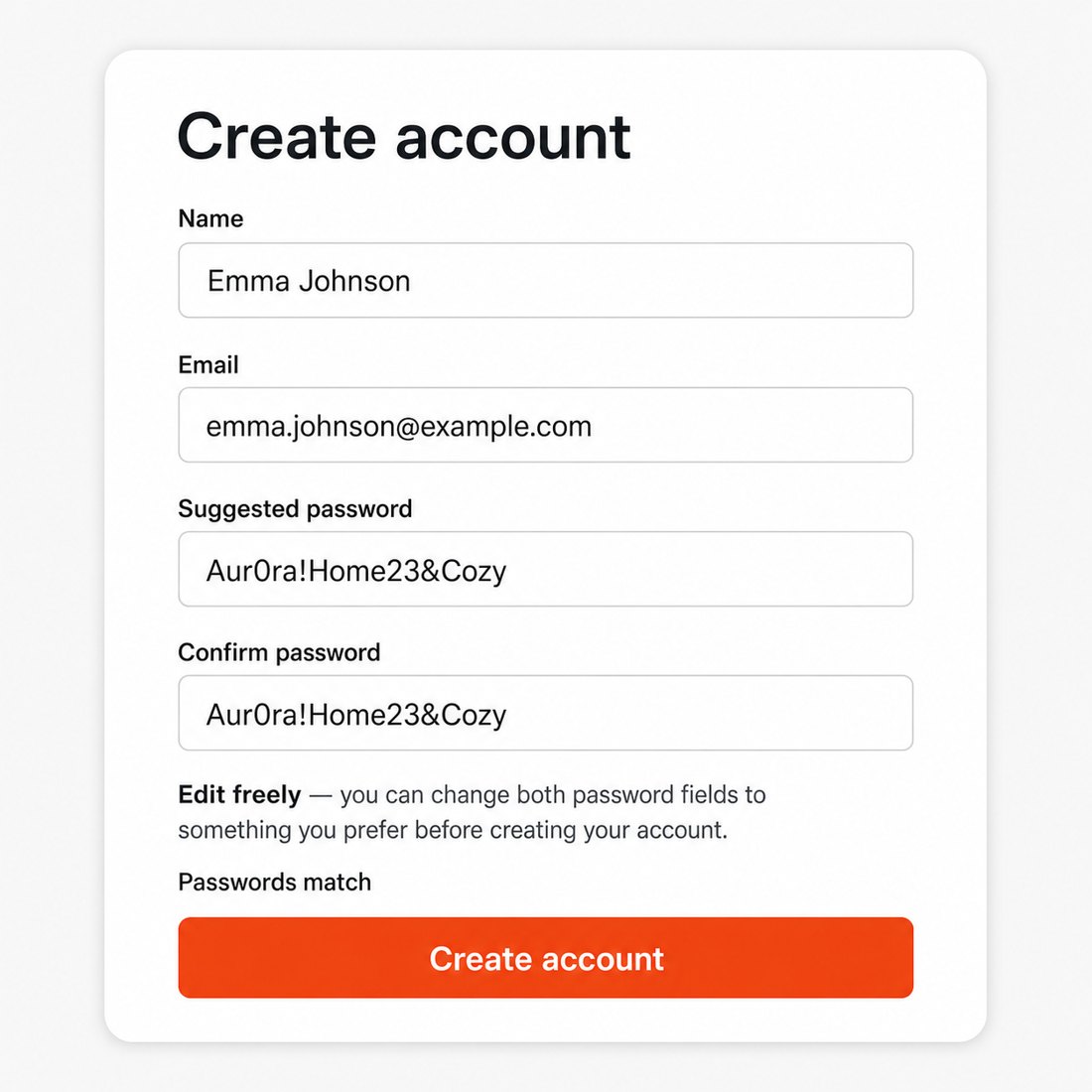
Pre-filled mode displays the generated password with a short explanation. The customer edits it freely, and the confirmation field follows until a personal change is made. The final value is checked against the store’s rules before the form is accepted.
How does the customer receive account access?
Three onboarding modes cover different store policies. The first sends the generated password, the second sends a one-time link where the customer sets a personal password, and the third sends no password message and leaves access to the store’s usual recovery journey.
The setup link expires after 24 hours and stops working after its first use. Delivery status appears in the module settings, and a failed message is resent safely without exposing a password in the panel. These messages apply only to accounts created with the module’s automatic password treatment.

How much work does launch and configuration take?
The initial setup takes a few minutes: install the module, enable it and select the scope, field treatment and onboarding mode. The default settings already create strong passwords, so the module starts working without a long implementation project.
When the store needs tighter control, the same screen provides separate General and Strength Rules tabs. Scope, form behavior, password composition and customer communication remain independent choices, giving a simple start and a detailed configuration that grows with the checkout policy.

-
Referencemprcustomerpassword
-
In stock2147483647 Items
-
PrestaShop CompatibilityPS 1.6 – 9.x
-
Pricing ModelOne-time Purchase
-
Module TypeBack-office
-
GDPR RelevantNo
-
Business GoalStreamline Operations
-
External Account NeededNo
-
Module ComplexityFeature-Rich Module
-
Customer Journey StageRetain Customers
-
Works With PlatformNo External Platform
What customers say about us
Company reviews
5.0
★
★
★
★
★
(4 reviews)
Loading customer reviews...
No product reviews yet
Be the first to share your experience with this module.
Write a Review
Automatic Customer Password removes the password step from PrestaShop registration and checkout by generating a customer password automatically. It keeps the normal customer account flow, so shoppers still get a real account with order history and can change their password later.
Have a question about this product?
Our experts are here to help. Ask anything about installation, compatibility, or specifications.
1301
questions
9
categories
2013
building modules since
1.6–9
PrestaShop versions
v1.1.72026-05-27
- Addedcomplete FR/DE/ES/IT/PL translations
Loading full changelog...
Works Well With Automatic Customer Password
Modules our team genuinely pairs with this one, and exactly why each belongs in the same setup.
Governance
Automatic Customer Password reduces friction at registration and checkout by filling password fields with generated values, so shoppers create real accounts without stopping to choose a password. Because that lowers the barrier to account creation, a store benefits from being able to review and control who is actually signing up when suspicious or abusive registration patterns appear.
Customer Extra Info (IP Ban) covers that oversight separately. It records selected technical details such as IP, user agent, parsed OS, browser and device type for customers or guests, and gives staff Back Office tools to review context, block risky patterns and keep trusted addresses whitelisted. It watches and controls access; the password module smooths the sign-up itself.
Run together they balance ease and control: one tool makes registering effortless for genuine shoppers, the other gives the team the visibility and blocking power to handle the abusive accounts that easy sign-up can attract. The store keeps a low-friction front door while still being able to see and stop the traffic it does not want.

Workflow
Automatic Customer Password is often deployed to remove a stumbling block during checkout, filling password and confirmation so a shopper trying to pay does not have to stop and invent credentials. That goal, getting a ready buyer through the purchase with as little hesitation as possible, points naturally toward improving the checkout surface itself.
Checkout Revolution is a separate one-page checkout that keeps contact details, address, carrier selection, vouchers, payment methods, terms, notes and order summary in a single controlled flow, with a Stripe-backed payment layer. It restructures the whole purchase path; the password module only removes the password pause within it.
Used together, the two attack checkout friction from different angles as independent tools: one compresses the steps and surfaces into a single tidy flow, the other quietly handles the account-credential moment that can otherwise interrupt it. A ready-to-buy shopper meets fewer pauses overall, which is exactly the outcome a store reaching for the password module is usually after.
- Online only

Complement
A store using Automatic Customer Password is trying to keep buyers moving by removing the password-creation pause, so shoppers who are ready to purchase are not slowed by account setup. The same intent, serving people who simply want to pay and leave, extends to offering faster payment routes for those high-intent shoppers.
Express Checkout addresses that as a separate tool, adding Stripe-powered fast payments such as Apple Pay, Google Pay, PayPal, Stripe Link, saved-card and card options from product, cart, selected product-list and checkout placements, while the normal PrestaShop checkout stays available. It speeds up payment; the password module smooths the account credential step.
Run alongside each other they shorten different parts of the same journey: one offers quick, familiar payment buttons for shoppers ready to commit, the other keeps account creation from interrupting them. Together they reduce the small frictions that make ready buyers hesitate, without forcing every customer down the same path.
 30 days return right
Easy return - no questions asked
 Plug & Play Modules
Install, set up and take profit
 Dedicated Support First
Priority Help & Satisfaction Over Sales
You might also like


