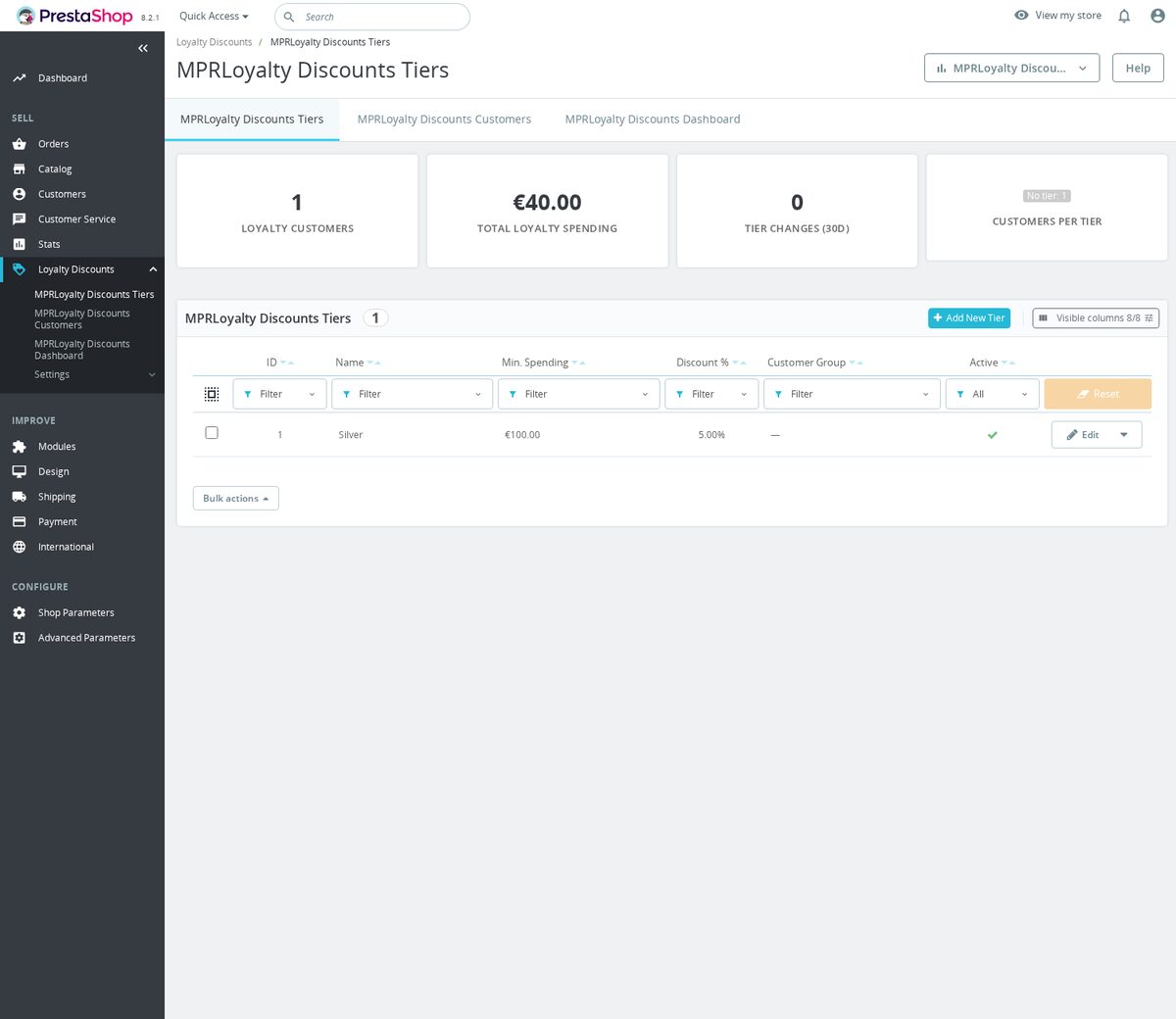
Loyalty Discounts System is a module for PrestaShop stores that turns cumulative spending or completed order count into automatic loyalty tiers and applies the benefit through the linked customer group. Setup stays compact: after installation, the merchant creates the tiers, connects each one to a group and chooses which purchases count.
Each qualifying order advances the customer toward a named level. Reaching the threshold assigns the appropriate group, so its discount, group price or access rule follows the customer into the next purchase without a points balance, voucher or redemption step. Existing wholesale and other group memberships remain in place.
The programme is simple to launch and detailed to govern. Thresholds use lifetime value, a rolling period or completed orders; tax, delivery, eligible statuses, promotional-product exclusions and the shop currency are handled by clear rules. Each store in a multistore installation keeps its own tiers and settings, while cancellations, returns and partial refunds remove the value that no longer qualifies.
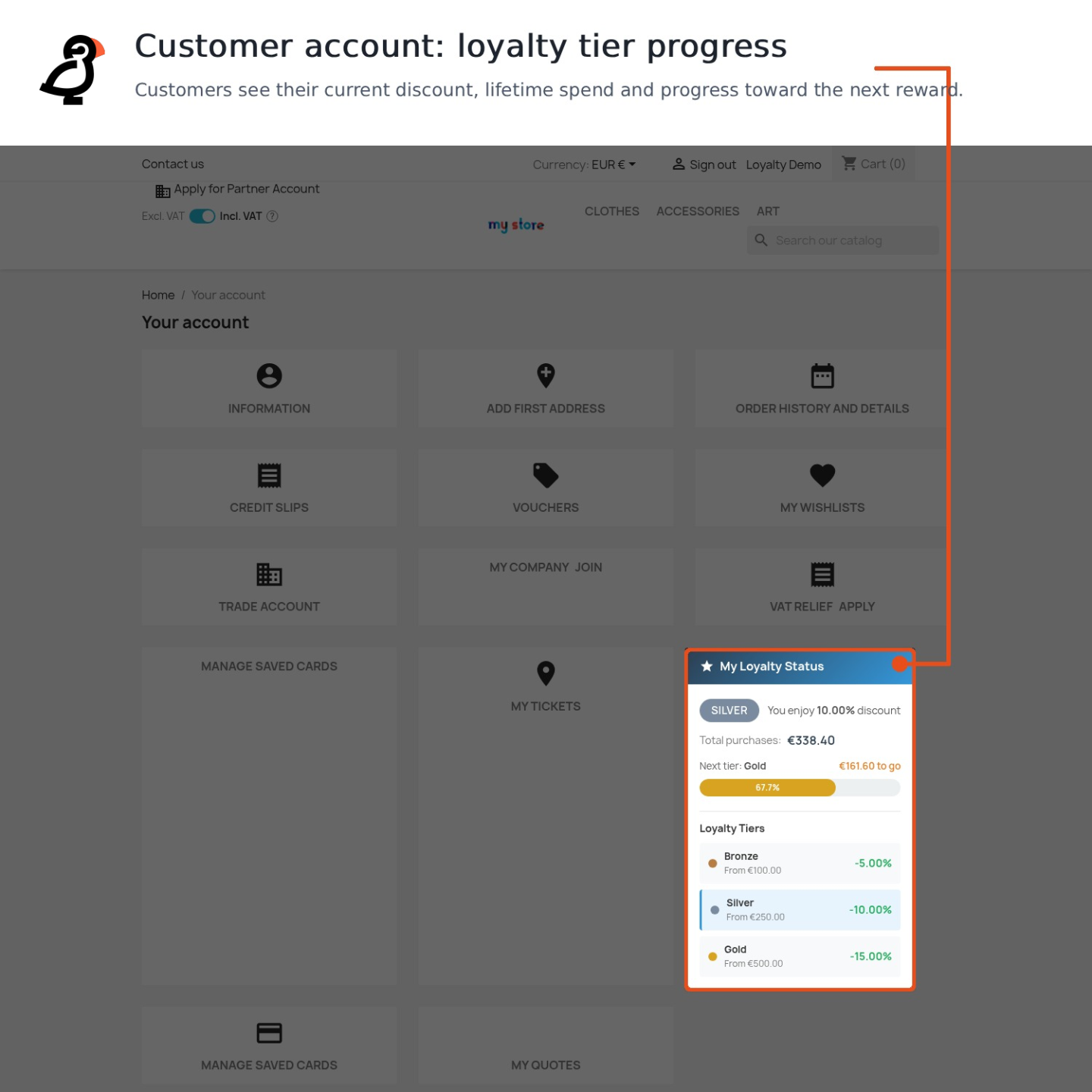
Customers see translated tier names and descriptions, their current benefit and the distance to the next level in the account, on product pages and in the cart. The team receives editable language-specific messages, a retention dashboard, a filterable customer list, full order-linked history, manual corrections with a reason and spreadsheet import for an existing programme.
The result is automatic recognition for returning customers, a visible reason to place the next order, controlled discount costs and a loyalty programme that starts quickly yet remains precise as the store grows.
What does Loyalty Discounts System do?
- Turns qualifying spending or completed orders into automatic loyalty tiers
- Applies each tier through the linked PrestaShop customer group
- Shows customers their current benefit and progress toward the next level
- Corrects progress after cancellations, returns and partial refunds
- Gives the team reporting, history, adjustments, export and import
- Checks programme integrity and keeps rules separate for each shop
Loyalty Discounts System gives a PrestaShop store a complete tier-based loyalty programme. It records qualifying purchases, selects the highest level earned and assigns the group that carries the intended discount, price or access benefit.
The sections below cover the reward mechanism, customer progress, corrections after returns, daily control by the team and the safeguards that keep the programme dependable. Installation leads into a short first setup, while deeper rules remain available for a larger catalogue, several languages and several shops.

How does an order become an automatic benefit?
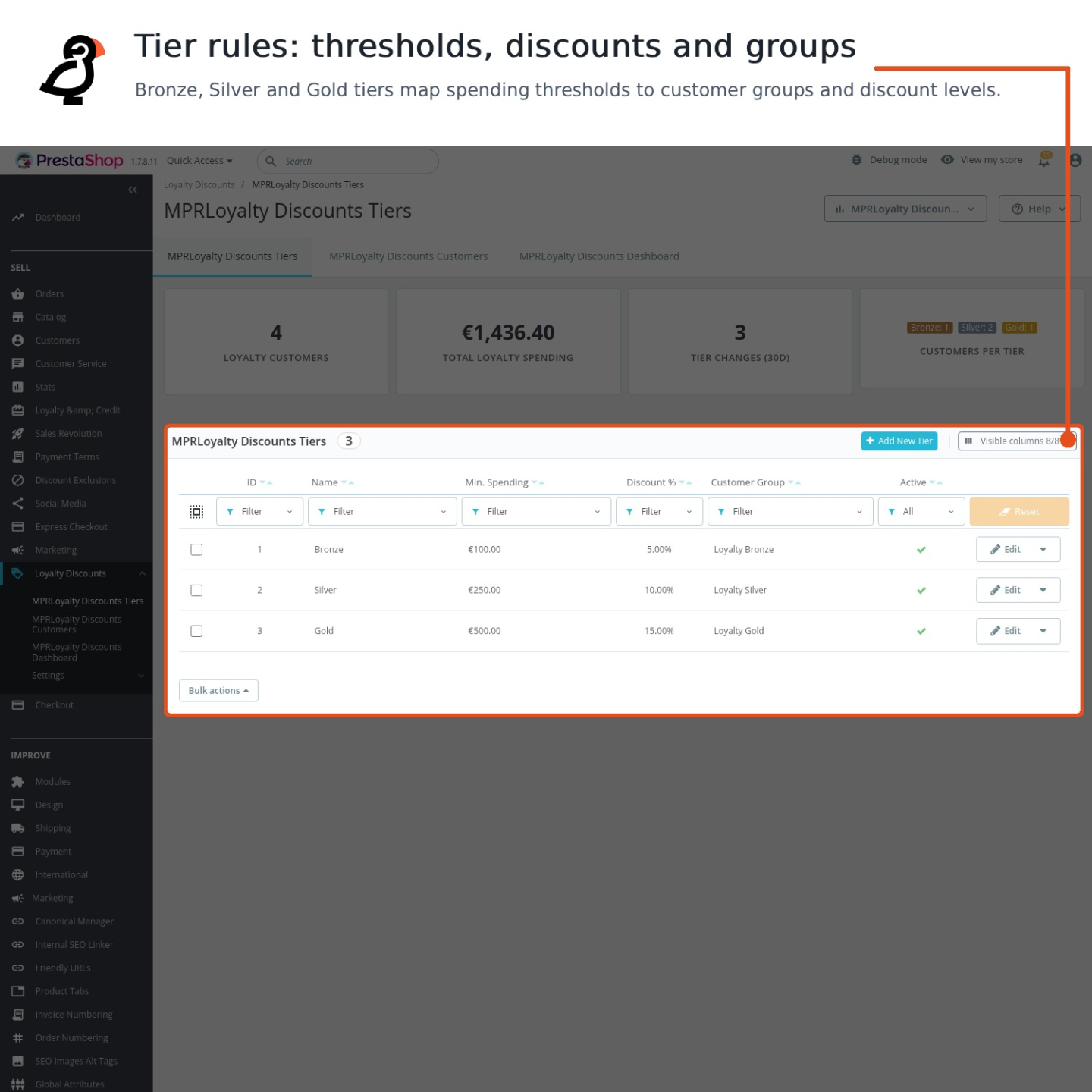
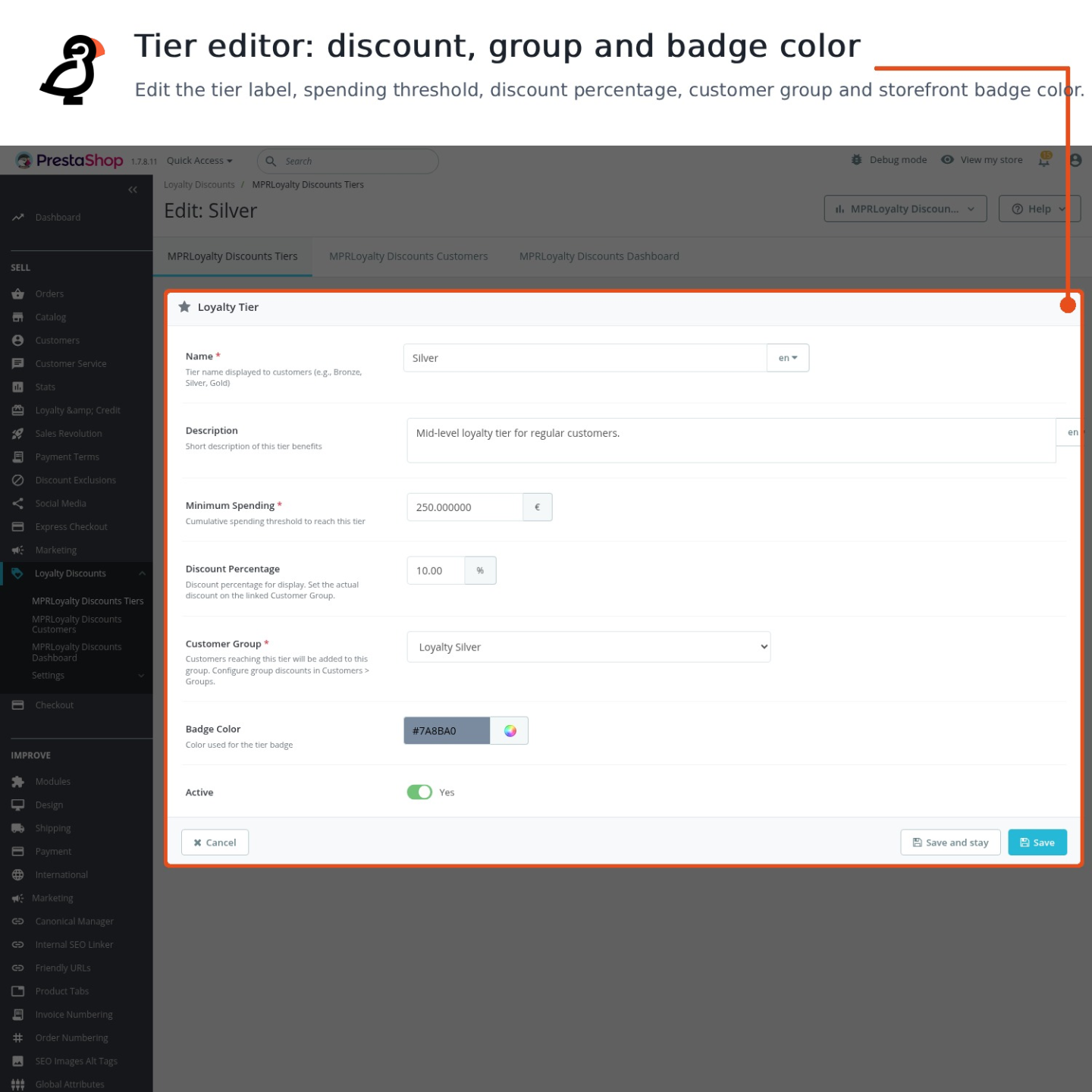
Every tier has a translated name and description, a colour, a threshold and a linked customer group. The threshold follows cumulative spending or a completed order count, and the percentage entered for the tier becomes the actual group discount. When the threshold is reached, the customer moves to the new loyalty group while wholesale, professional and other unrelated memberships stay intact.
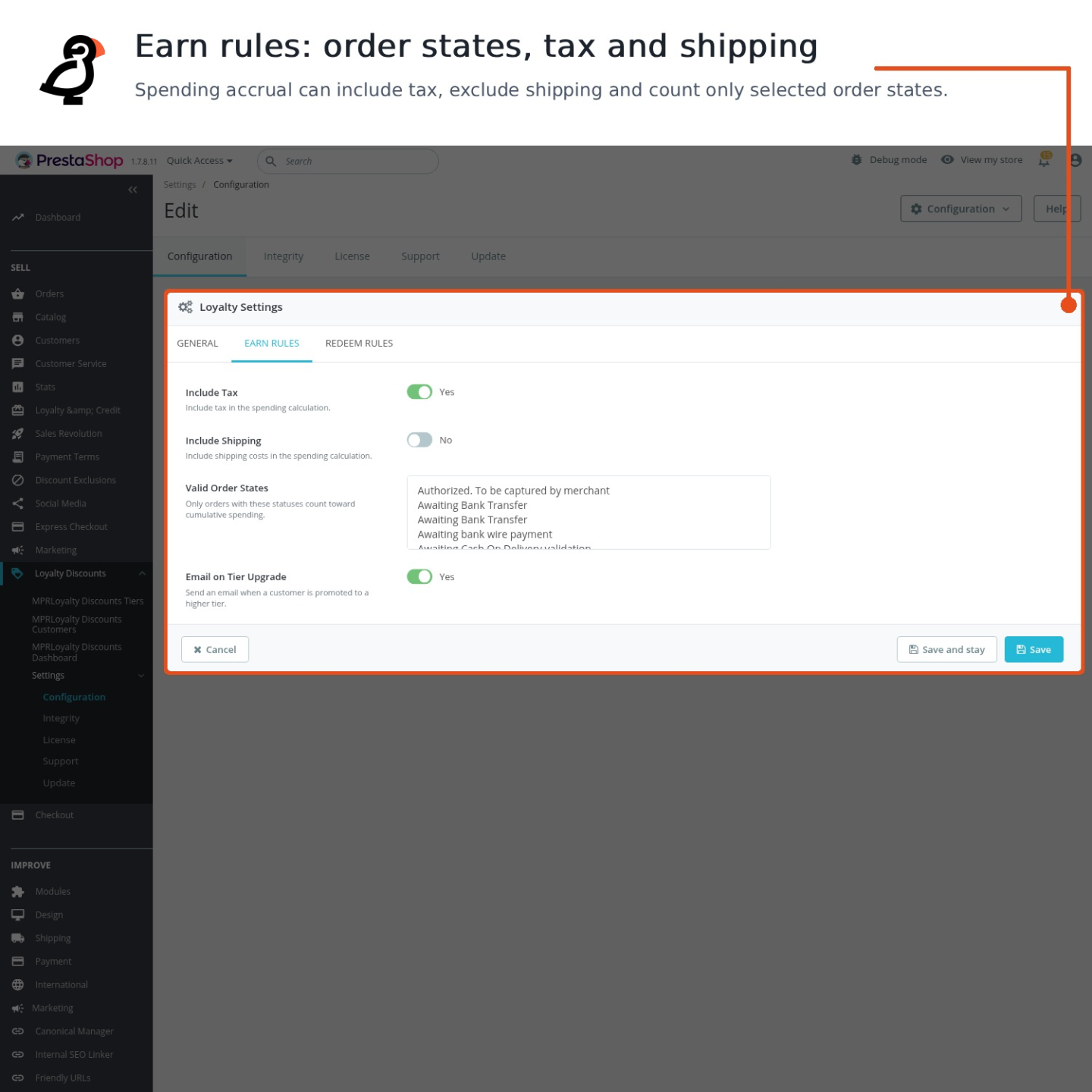
The merchant decides which order states qualify, whether tax and delivery enter the total, whether reduced or promotional products are excluded, and whether value is measured over the customer’s lifetime or a rolling period. Orders in different currencies are converted to one shop basis before they affect progress, so the same threshold means the same value throughout the store.

What tells the customer that the next level is close?
The customer account brings the current tier, benefit, recorded value or completed order count, next threshold and remaining progress together. The full ladder includes the colour, translated name, description and benefit of every active tier, so the programme explains both what the customer has earned and what comes next.
The same progress appears on product pages and in the cart, where it supports the next purchase decision. Upgrade, downgrade and rolling-period reminder messages are edited for every store language, and the merchant decides which messages are sent without changing what remains visible in the account.

What happens when an order is cancelled or refunded?
Cancellation, return and refund rules remove value that the customer did not retain. A full cancellation rebuilds the qualifying history, while a partial refund subtracts only the affected amount under the same tax, delivery, promotion and currency rules used when the purchase was recorded. The tier falls automatically when the remaining purchases no longer reach its threshold.
A complete recalculation also processes qualifying orders already stored in the selected shop, which brings established customers into the programme and restores consistent totals after a rule changes. History records the true value before and after each movement, the reason, the responsible employee and the related order, with filters and export available to the team.

How does the team run the programme day to day?
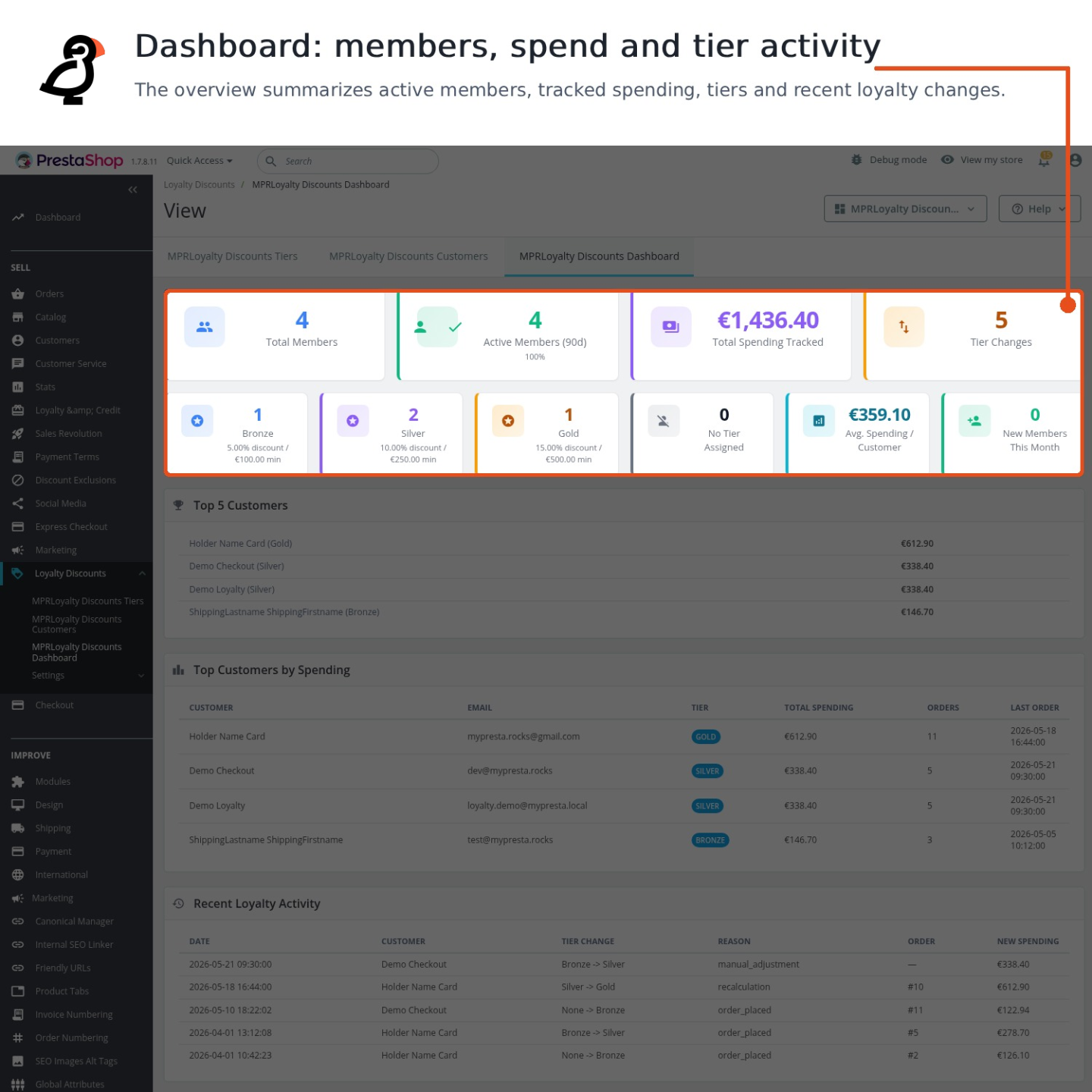
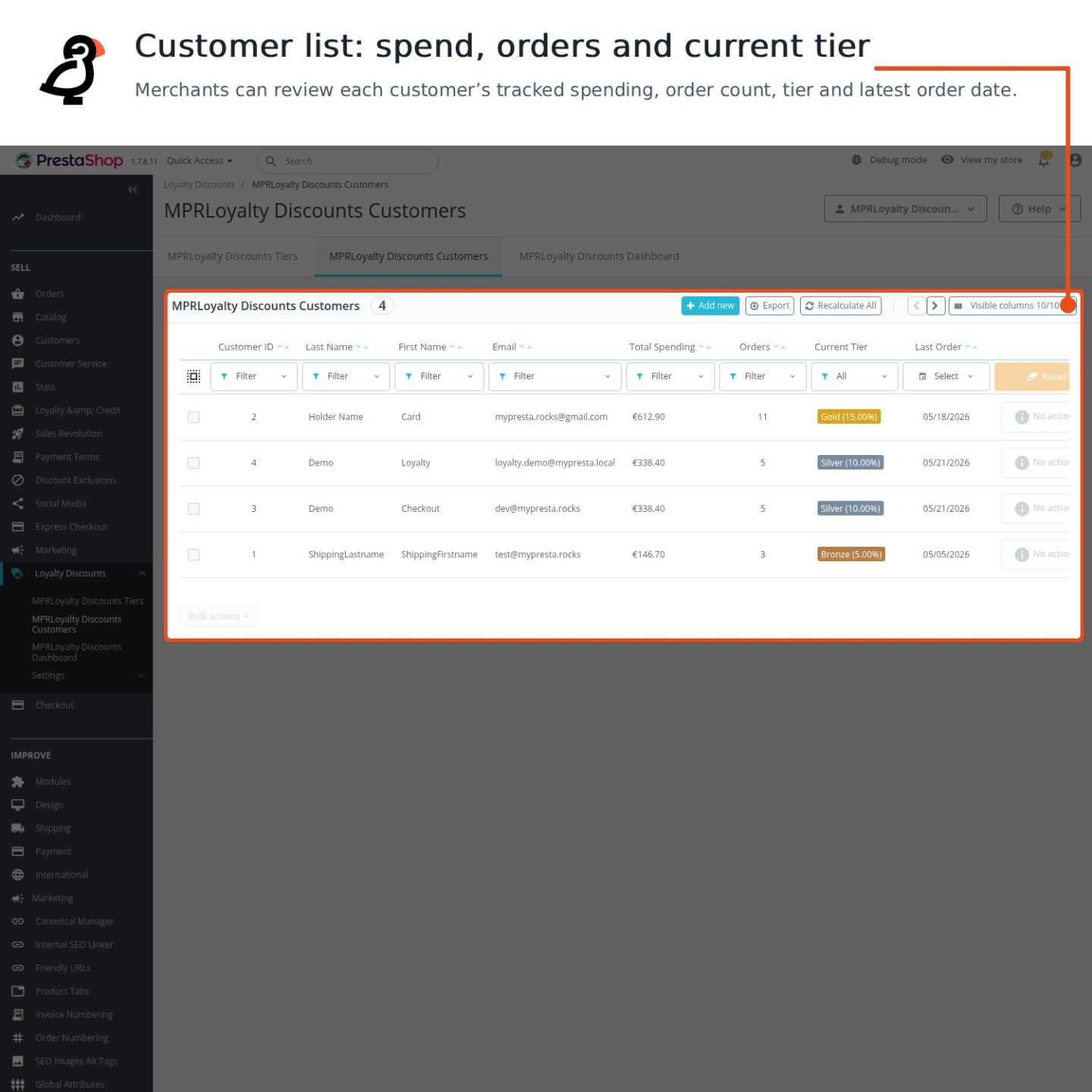
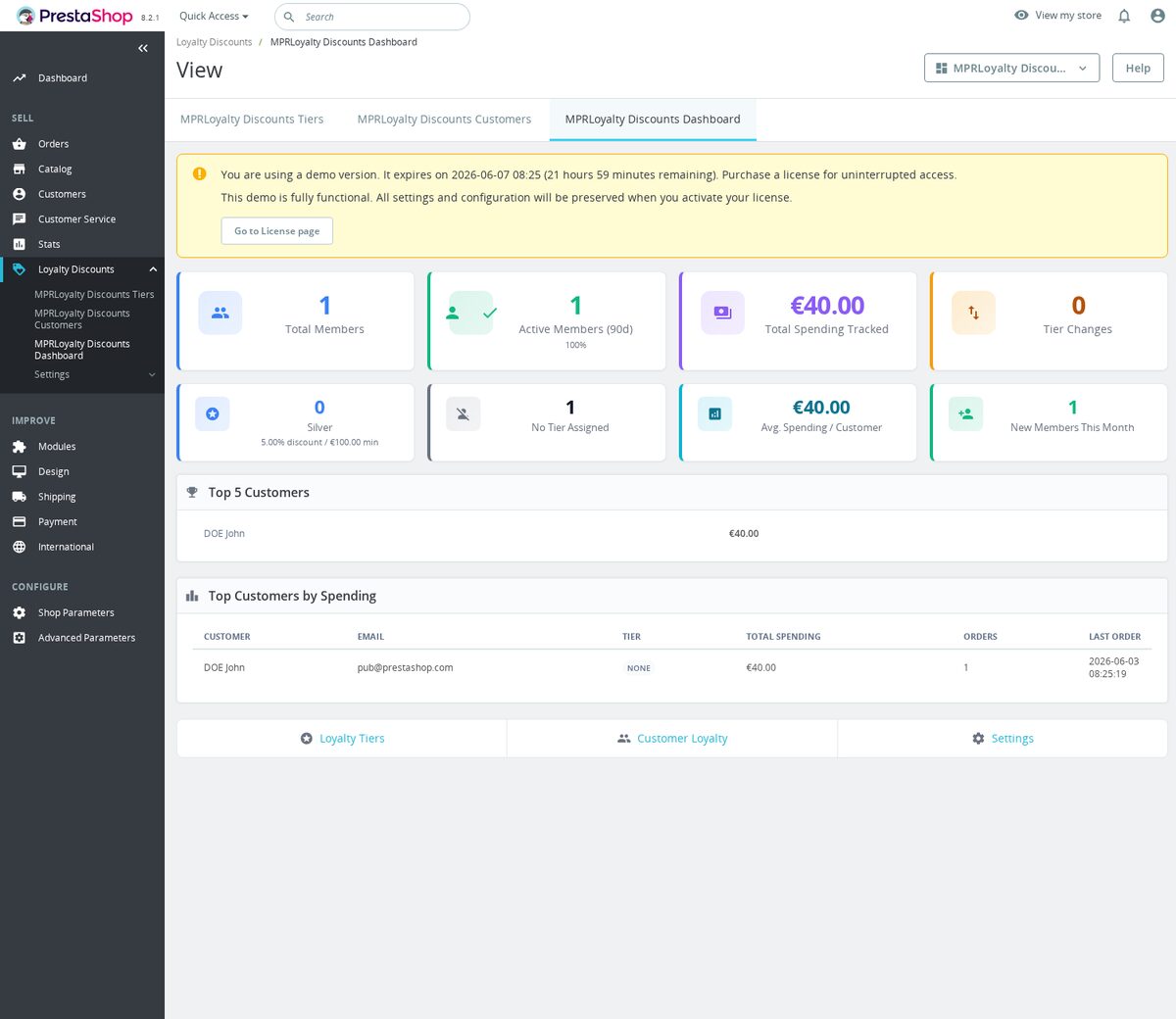
The dashboard shows total members, members active during the last 90 days, new members this month, average recorded spending, membership by tier, leading customers and recent tier movements. A separate customer list filters by identity, value, order count, tier and last purchase, exports the result and opens the loyalty record inside the customer profile.
Authorised staff adjust spending or a tier for one customer or a selected group, add a mandatory reason and choose whether the customer receives a message. Spreadsheet import brings existing loyalty values into the store with a preview before processing, while bulk recalculation rebuilds the programme from qualifying order history whenever that source is preferable.

How does the programme stay reliable as the store grows?
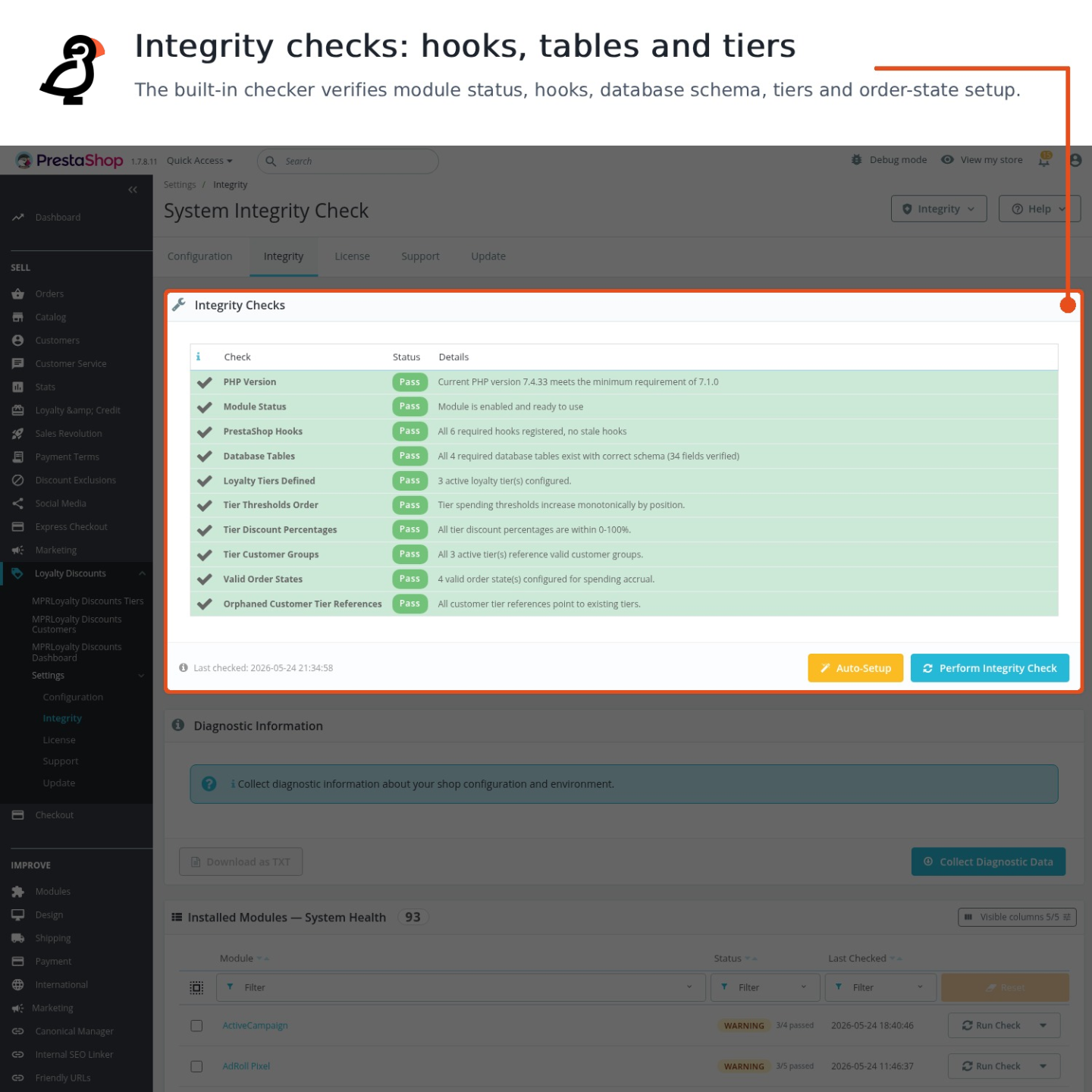
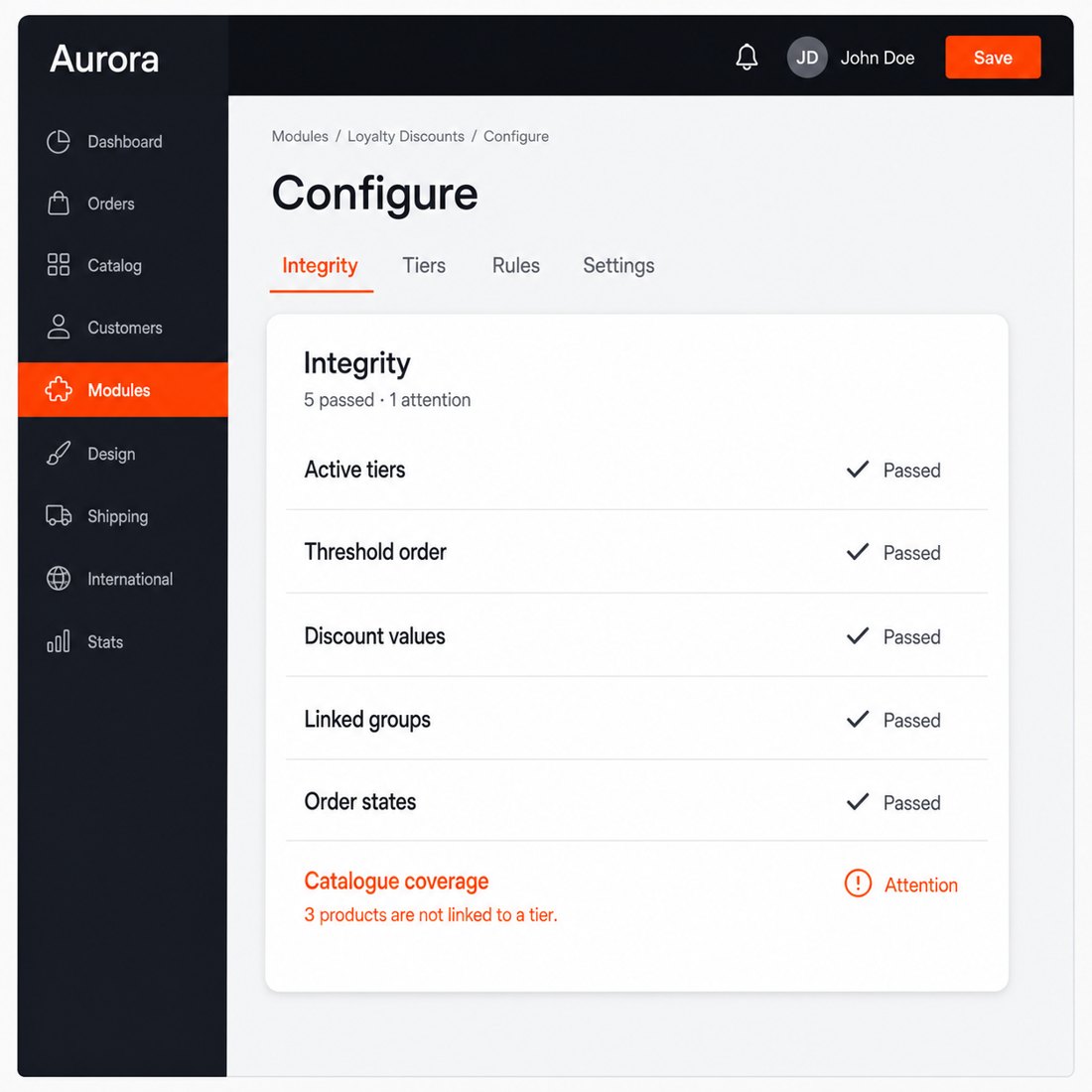
The integrity centre checks whether active tiers exist, thresholds are ordered correctly, discount values are sensible, linked groups still exist, qualifying order states are selected and customer records point to valid tiers. It restores standard qualifying states and clears orphaned tier references where automatic repair is safe, while the remaining findings identify the exact setting that needs attention.
Each shop keeps independent tiers, thresholds, messages and order rules, and customer totals remain separated by shop. The loyalty experience runs inside the store without a hosted loyalty account, retains unrelated customer groups during every tier change and combines a quick first launch with the control required for several markets and a long-running programme.

-
Referencemprloyaltydiscountssystem
-
In stock2147483647 Items
-
PrestaShop CompatibilityPS 1.7 – 8.x
-
Pricing ModelOne-time Purchase
-
Module TypeFront & Back-office
-
GDPR RelevantNo
-
Business GoalBoost Conversions
-
External Account NeededNo
-
Module ComplexityFeature-Rich Module
-
Customer Journey StageConvert to Buyers
-
Works With PlatformNo External Platform
What customers say about us
Be the first to share your experience with this module.
Write a Review
MPR Loyalty Discounts System rewards repeat customers by moving them into spending-based loyalty tiers automatically. When a customer reaches a threshold, the module assigns the linked PrestaShop customer group so your existing group pricing can give them the right discount.
- Addedcomplete FR/DE/ES/IT/PL translations
- FixedPersist loyalty order state settings
- FixedInstall loyalty tables through schema manager
Works Well With Loyalty Discounts System
Modules our team genuinely pairs with this one, and exactly why each belongs in the same setup.
A merchant running Loyalty Discounts System rewards repeat customers by assigning them to spending-based tiers linked to native PrestaShop groups, so loyal buyers receive the group treatment configured once their valid order spend crosses each threshold. Broad group-level pricing is powerful, but it can quietly reach products you never meant to discount.
Discount Exclusion Manager is a separate operational tool that protects selected products from cart-rule discounts while the rest of a promotion still runs, letting you exclude specific products, categories or manufacturers and resolving those rules into affected lines. It guards margin on gift cards, premium brands or low-margin items.
Run together, the loyalty system handles who earns better treatment and the exclusion manager handles which products stay off-limits to discounting. A merchant keeps a generous tier programme while protecting sensitive lines, so loyalty rewards do not accidentally erode margin where it matters most.
A merchant using Loyalty Discounts System builds long-term value by tiering customers on spending and giving loyal buyers ongoing group treatment. That programme rewards relationship over time, but it does not create the urgency or seasonal rhythm that drives a quieter week or moves specific stock.
Smart Dynamic & Scheduled Discounts is a separate tool for timed promotions, flash sales and recurring campaigns that start and stop automatically, storing type, dates, active state, priority and shop scope so offers run without manual price changes at awkward hours. It handles event-driven pricing rather than membership status.
Side by side, one rewards who a customer is and the other rewards when they buy. A merchant can keep steady loyalty perks running while layering scheduled campaigns on top, covering both the relationship and the calendar so promotions support sales without constant manual effort.
A merchant on Loyalty Discounts System keeps things lightweight, tiering shoppers by spend and mapping them onto native PrestaShop groups for automatic better treatment. That suits a mostly retail audience, but a store that also serves business buyers needs heavier account machinery the spend-tier tool does not provide.
Loyalty + Credit Revolution is a separate, broader module for shops where retail and business buyers need different approval, pricing and account workflows, supporting trade applications and status flows, company members and invites, B2B and B2C tier rules, credit accounts and trade discounts. It does its own account and credit job independently.
Used alongside each other, the spend-tier system can keep handling straightforward retail loyalty while the revolution module covers the trade-account and credit side for business customers. A merchant gets simple retail rewards plus a fuller B2B account layer, each operating on its own terms rather than feeding the other.
A merchant running Loyalty Discounts System is investing in keeping customers, tiering them by spend and rewarding repeat buyers with group treatment. Holding onto those relationships also means reaching customers off-site at the right moment, which a discount-tier tool inside PrestaShop does not do.
Klaviyo Integration is a separate tool that connects Klaviyo when enabled and the Site ID is saved, identifying logged-in customers and passing product interest and cart-page activity so browse and cart follow-up can be based on what shoppers actually did. It handles the email and SMS side of retention, not in-store discounting.
Working alongside each other, the loyalty system shapes how repeat buyers are rewarded on the store while Klaviyo carries the off-site follow-up that brings them back. A merchant covers both halves of retention, in-store reward and outbound messaging, as two complementary tools in the same customer-keeping effort.
Easy return - no questions asked
Install, set up and take profit
Priority Help & Satisfaction Over Sales