


Scan your PrestaShop store for malware with firewall monitoring and form protection


Security Revolution is a module for PrestaShop stores that brings traffic protection, security checks, staff access control and recovery into one control centre. Installation activates sensible first settings, while the firewall begins in observation mode so the shop starts safely and deeper rules remain ready to tune.
Store security is not one isolated check: abusive crawlers slow product and checkout pages, junk accounts create work, a weak staff login exposes orders, and an untested backup leaves no route back. The module connects prevention, evidence and recovery, so each warning leads to an action and the shop remains available for genuine buyers.
You choose trusted and blocked IP addresses, countries and Tor traffic, request limits for the whole shop and each crawler, stricter treatment after repeated abuse, and separate thresholds for registration, contact, reviews and carts. Filtered catalogue traffic has its own weighted limits, so mass page generation is restrained without treating an ordinary product comparison as an attack.
Automatic vulnerability, suspicious-code and file-change checks run on schedule, identify exposed directories and unused modules, and feed a security score and scheduled reports. Staff sign-in adds an authenticator app, one-use recovery codes, password rules and a named record of permission changes, while scheduled backups keep local and external restore points with integrity verification.
The result is a shop that stays responsive for buyers, less spam for the team, accountable staff access, earlier warning of weaknesses and a tested route back to sales.
How does one module protect the shop from prevention to recovery?
Security Revolution protects a PrestaShop store before, during and after an incident by joining layered traffic controls, continuous evidence and restore points with integrity verification in one module.
- One security centre: prevention, investigation, staff access and recovery share the same overview.
- Traffic and forms: crawlers, repeated requests, filtered pages, registrations, contact messages, reviews and carts each receive the right limits.
- Checks with consequences: automatic scans turn vulnerable software, suspicious files, exposed directories and unused modules into named actions.
- Accountable access: stronger sign-in, password rules and a staff audit trail protect the Back Office.
- Recovery and fleet: scheduled backups create restore points, while the fleet view shows which managed shop needs attention.
- Safe start, deep control: ready settings work after installation and remain adjustable when the shop needs a stricter policy.

How does the shop stop abusive traffic without blocking buyers?
The module assesses each storefront request through trusted and blocked addresses, country and Tor rules, crawler policy, whole-shop limits, budgets for individual crawlers, repeated-abuse penalties and behaviour signals. Filtered catalogue pages receive weighted limits of their own, so a machine opening hundreds of combinations is treated differently from a buyer comparing products.
You choose the thresholds for the entire shop, registrations, contact messages, product reviews and new carts. An invisible trap, disposable-domain blocks, risky-content checks and separate form limits keep junk out, while trusted addresses and observation modes protect genuine orders from an overstrict rule.

What does the next security check turn into a concrete task?
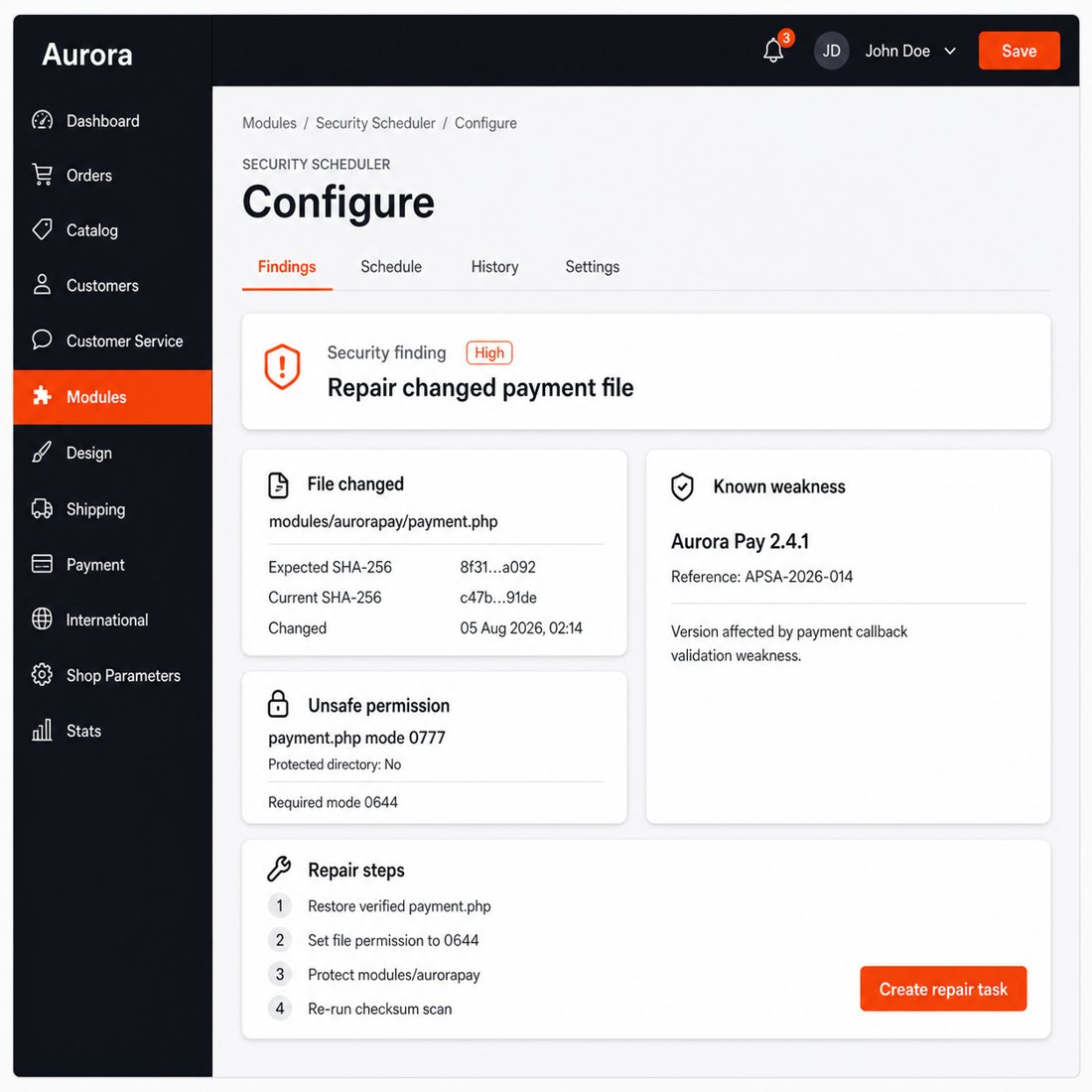
Vulnerability, suspicious-code and file-integrity checks run automatically on the schedule you set. They compare the known state of the shop with changed, new and missing files, examine the shop and installed modules for known weaknesses, and flag exposed files, weak permissions, unsafe settings and unprotected directories.
The results also identify unused modules and provide guarded actions to disable or remove them. A central protection score explains what lowers the result, while scheduled summaries show new findings, closed items and changes since the previous report, so security work has an order instead of becoming a list of alarms.
Who changed access, and is a password enough?
Staff sign-in uses an authenticator app, one-use recovery codes and lockouts after repeated failures. The shop also enforces password strength, history and expiry, rejects a session when its IP address changes, and provides an emergency recovery tool outside the Back Office if every administrator is locked out.
Changes to employees, profiles, permissions and sensitive configuration carry the employee name, time and source address. Important actions require a fresh second confirmation even inside an open session, so a stolen password or unattended screen does not silently become full control of the shop.

How does the shop return to sales after an incident?
Backups cover the database, files, the complete shop or a selected scope, and run hourly, daily, weekly or monthly. You choose retention by age and number of copies, verification, notifications and the destination: local storage, another server, compatible cloud storage or a private cloud drive.
Each dated restore point is available for verification, download and restoration, including retrieval from external storage when the local copy is gone. For an agency or multi-shop business, the fleet view adds registered-shop status, central findings and remote scan requests, so the next shop needing action is visible without opening every Back Office.

How quickly does protection start, and how far does configuration go?
Installation creates the security screens and activates practical first settings for forms, request limits, crawler management, filtered pages, sessions and browser protection. The firewall begins in observation mode, recording what it would stop before you switch to enforcement, which gives the first review evidence from the shop's own traffic.
You choose basic, standard or strict browser protection, report-first or active enforcement, trusted addresses, country and Tor rules, crawler budgets, behaviour scores, form thresholds and data-retention periods. Old security records, expired counters and session history are trimmed automatically, so the module remains simple to start and detailed enough for a high-traffic shop or a managed fleet.

-
Referencemprsecurityrevolution
-
PrestaShop CompatibilityPS 1.7 – 9.x
-
Pricing ModelOne-time Purchase
-
Module TypeFront & Back-office
-
GDPR RelevantNo
-
Business GoalLegal & Compliance
-
External Account NeededNo
-
Module ComplexityComplete Solution
-
Customer Journey StageManage Store
-
Works With PlatformNo External Platform
What customers say about us
Company reviews
5.0
★
★
★
★
★
(4 reviews)
Loading customer reviews...
No product reviews yet
Be the first to share your experience with this module.
Write a Review
Security Revolution protects your PrestaShop store from spam registrations, abusive form submissions, crawler overload, suspicious visitor behaviour, risky headers, unexpected file changes, known vulnerabilities, and backup gaps. It runs server-side, records what it blocks, and lets you tune each protection layer from the Back Office.
Have a question about this product?
Our experts are here to help. Ask anything about installation, compatibility, or specifications.
1315
questions
9
categories
v3.8.72026-05-27
- AddedTiered session retention — 90d humans, 24h bots, configurable
- Addedcomplete FR/DE/ES/IT/PL translations
- FixedPreserve dashboard notification tabs
Loading full changelog...
Works Well With Security Revolution
Modules our team genuinely pairs with this one, and exactly why each belongs in the same setup.
Governance
Security Revolution gives a store one back-office workflow for malware scanning, firewall controls, monitoring and operational cleanup, reducing damage from risky requests, spam and fake registrations. That broad protection focuses on requests and site health, but day-to-day a team also needs to act on specific abusive customers or addresses tied to logins and orders.
Customer Extra Info (IP Ban) handles that customer-level angle separately. It records technical details like IP, user agent, parsed OS, browser and device for customers and guests, and gives staff tools to review context, block risky patterns and whitelist trusted addresses. It targets individual offenders; Security Revolution covers the broader request and malware surface.
Run together as complementary tools, a store gets both layers of defence: one watches the site and traffic at large, the other lets staff investigate and block the particular customers or IPs behind suspicious logins and abuse. Security work stays easier to review, and the team can respond to both site-wide threats and individual bad actors.

Complement
A store running Security Revolution already consolidates malware scanning, firewall rules and monitoring into one back-office workflow to cut down abusive traffic and risky requests. That protection works largely on request content and site health; it is not specifically a gatekeeper that turns visitors away by IP, region or pattern before a page even loads.
Visitor Control covers that entry-gate role separately. It checks rules as pages start loading and blocks exact IPs, wildcard IPs, IP ranges, CIDR blocks, country codes and browser patterns, showing a configured 403 message instead of letting the visitor continue. It decides who gets in; Security Revolution scans and defends what does get through.
Used alongside each other they form two complementary layers: one stops unwanted visitors at the door by IP and country, the other monitors and cleans up the threats that matter for requests that proceed. A store reduces both the volume of abusive traffic and the damage from what slips past, with each tool tuned for its own job.

Complement
Security Revolution helps a store reduce spam, fake registrations and suspicious traffic through scanning, firewall controls and monitoring in one workflow. Much of that abuse arrives through public storefront forms, but Security Revolution is a broad protection layer rather than a dedicated challenge on the specific forms bots hammer.
reCAPTCHA & hCaptcha Protection focuses precisely there. It adds Google reCAPTCHA v2, reCAPTCHA v3 or hCaptcha challenges to contact, registration, login and newsletter forms, stopping bad submissions before PrestaShop continues. It guards the form submissions themselves; Security Revolution covers the wider security picture around them.
Run together they tackle automated abuse from two complementary directions: the captcha tool blocks bots at the exact form fields they target, while Security Revolution monitors, scans and cleans up across the rest of the site. The combination keeps fake accounts and spam down at the source and gives the team a fuller view of the threats that remain.
 30 days return right
Easy return - no questions asked
 Plug & Play Modules
Install, set up and take profit
 Dedicated Support First
Priority Help & Satisfaction Over Sales
You might also like
- Online only


