Custom Invoice Numbering

Document numbers that hold up in an audit, separate series, own resets, duplicates refused

Price: €49.00
Tax excluded

Custom Invoice Numbering gives PrestaShop invoices, delivery notes and credit slips their own numbering schemes. You build each format once in a visual editor with a live preview, then activate the module.

The shop's default format does not necessarily match the document sequence your accountant uses. Keeping all three document types on one scheme also leaves delivery notes and credit slips without their own numbering policy.

You choose separate counters and yearly, monthly, daily or continuous sequences, combining date and order fields with your text. A next-number setting continues an earlier system's sequence. Previously issued documents keep their numbers, and every new number enters a read-only log linked to its order and appears on the document itself.

Your team traces an invoice number back to its order without reconstructing how the number was assigned.

Product availability: In stock
Instant Live Demo Real store, ready in ~1 min See how it works in a few clicks. We spin up a real PrestaShop store on our own infrastructure in about a minute (with the module installed and demo data loaded) so you can click around and try everything, nothing to set up.
Buying as a company? €39.20 Business 20% Apply for Partner Account
Share
verified Lifetime license per domain, yours forever. Includes 3 months support & updates. Learn more
The demo is the complete module: buy anytime and activate the same installation, nothing to reinstall and nothing lost. Open the module's License tab and click "Activate from mypresta.rocks" (or paste your key); your settings and data stay exactly as they are. Updates install in one click from the Update tab.
build Professional Setup We fully configure the module to your needs: all options set, tested & verified within 1 business day. +€29.00
palette Visual Integration CSS & template adjustments to match your theme: includes cross-device verification and screenshot review. +€49.00
Options total: €0.00
Selected total: €49.00

Summary of what the module offers

Custom Invoice Numbering gives a PrestaShop store configurable document numbers: your format, your sequence, your resets, with proof of every number issued. Six features handle document formats, number sequences and the record of every number issued.

  • Own formats for invoices, delivery notes and credit slips, each independent
  • Fifty tags plus free text, assembled visually with live preview
  • Yearly, monthly, daily or continuous sequences without gaps or duplicates
  • A sequence that continues from your previous system
  • A read-only log of every issued number, linked to its order
  • The numbers printed on the actual PDF documents, per shop in a multistore
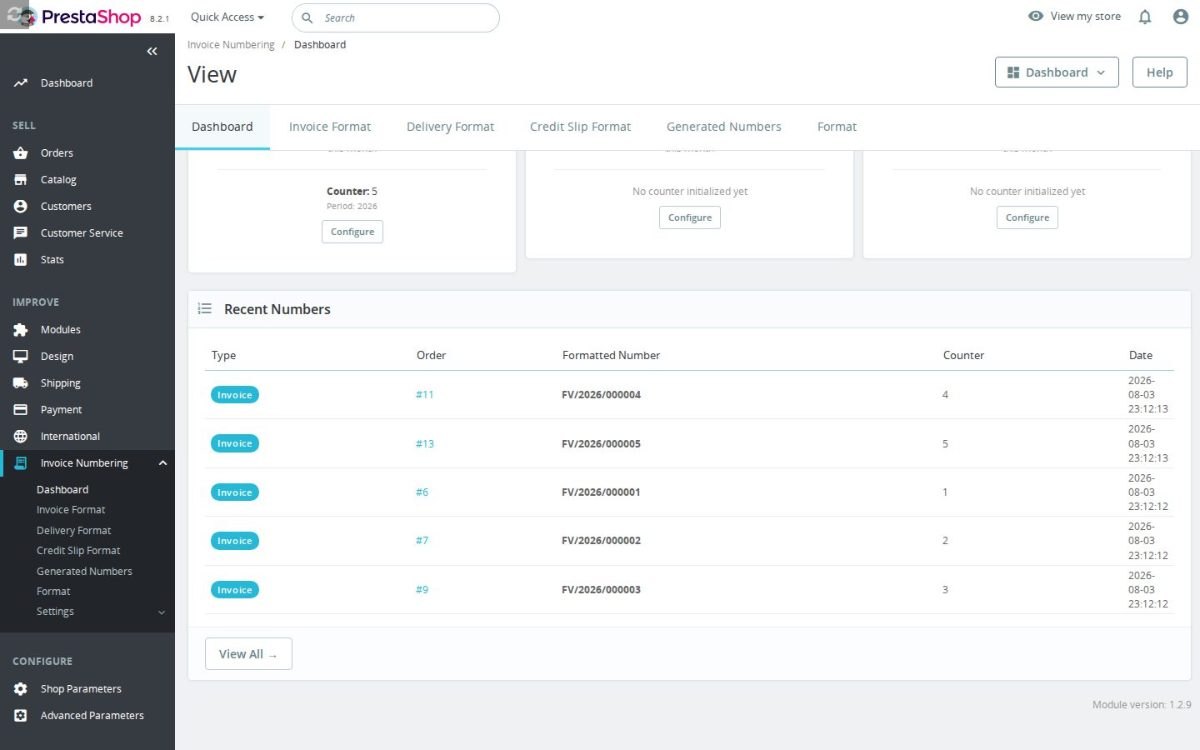
Invoice numbering dashboard with counters for invoices, delivery notes and credit slips and the recent numbers list

Will the tax office accept these numbers?

Acceptance depends on your jurisdiction and configuration; check the scheme with your accountant. You reproduce exactly the format your jurisdiction and your accountant prescribe: a prefix, the padded counter, the year, any separators, in any order. The sequence has no gaps and no duplicates, and it restarts yearly, monthly, daily or never, as your rules require.

Check the format and reset rules with your accountant before issuing documents.

The Custom Invoice Numbering configuration screen

How is the format built?

Visually, from a palette of fifty tags: full and short year, month, day, quarter, week, the counter from unpadded to eight digits, customer, country, shop, payment method, order references, even the dominant product of the order, mixed freely with your own text. A live preview shows the exact number the next document receives while you type.

Each of the three document types has its own format screen, so the credit slip scheme is designed with the same care as the invoice scheme, not inherited from it.

Back Office format builder with the tag palette and a live preview of the invoice number

What happens under load, and where is the proof?

The counter is atomic: two orders invoiced in the same second receive two consecutive numbers, never the same one. Every issued number is recorded in a log with its document type, its order and its date, and the log is read-only by design, because issued numbers are evidence, not editable rows.

When an inspector asks how a number was assigned, the answer is a screen, not a reconstruction.

Read-only log of generated numbers with document type, order reference, counter and date

What about the documents I issued before?

Nothing changes behind your back: documents issued before the module keep the numbers they were issued with. For the future, a one-time "next number" setting starts the sequence exactly where your previous system stopped, so a migration does not fork your numbering history.

Resets then take over: at the boundary you chose, the counter returns to one and the year or month tag keeps the numbers distinct.

The Custom Invoice Numbering dashboard

Which documents are covered?

All three that a store issues: invoices, delivery notes and credit slips. Each has its own format, counter and reset, and the formatted numbers appear on the actual PDF documents the customer and the accountant receive, not only in the panel.

In a multistore, every shop keeps its own formats and its own sequences, shared or separate as you decide, so two brands stop mixing their paperwork.

Numbering settings with separate abbreviations for invoices, delivery notes and credit slips and the override status for the PDF documents
  • Reference
    mprinvoicenumber
  • Version
    1.2.11
  • Improvements
    125
  • Released
  • Updated
  • PrestaShop Compatibility
    PS 1.6 – 9.x
  • Pricing Model
    One-time Purchase
  • Module Type
    Back-office
  • GDPR Relevant
    No
  • Business Goal
    Legal & Compliance
  • External Account Needed
    No
  • Module Complexity
    Feature-Rich Module
  • Customer Journey Stage
    Manage Store
  • Works With Platform
    No External Platform

What customers say about us

Company reviews
5.0 ★ ★ ★ ★ ★ (4 reviews)
Customer Reviews for PrestaShop Modules and Support
No product reviews yet

Be the first to share your experience with this product.

Write a Review Customer Reviews for PrestaShop Modules and Support

Take control of invoice, delivery note, and credit slip numbering in PrestaShop with custom formats built from tags. Use clear document prefixes, date parts, padded counters, and reset rules that match your accounting workflow.

Have a question about this product? Our experts are here to help. Ask anything about installation, compatibility, or specifications.
Ask a question
1343 questions
9 categories
How do the yearly, monthly and daily number resets work? Published
Each document type has its own reset mode: never, yearly, monthly or daily. The counter is stored per document type, shop and reset period, and when the period key changes (a new year, month or day) the counter starts again from the beginning for that period. Because the reset only affects the number, your pattern has to actually print the period - validation requires the matching date tag, so a yearly reset needs {YYYY} or {YY}, a monthly reset needs a month tag and so on, otherwise you would get repeated numbers. You can also set a specific next/start number per document type, which the module applies to the following generated document. The default reset mode for all three document types is yearly.
Does it support multistore, and what customer data does it store? Published
Counters are tracked per shop - the counter key is document type + shop + scope - so each store in a multistore installation advances its own sequence, and you can print {SHOP_ID} or {SHOP_NAME} in the pattern. On data: the module keeps its records inside your own database and calls no external service. It logs every generated number (document type, order, invoice or slip ID, counter, pattern and formatted string) and, when you use a per-customer counter, stores a small customer-reference row linking a customer to their reference. If you place tags such as {CUSTOMER_EMAIL} or {COUNTRY} in a pattern, that data becomes part of the printed document number, so choose a format that fits your privacy and accounting rules.
Does it change PrestaShop's internal order numbers? Published

No, the source description says PrestaShop's internal numeric values stay intact underneath. The module customizes the numbers shown on invoices, delivery slips and credit notes. If you need order references themselves customized, the source recommends using the separate Custom Order Numbering product.

The invoice module confirms that split in code: hookActionSetInvoice generates and logs the formatted invoice reference, but intentionally leaves PrestaShop's stored invoice number numeric/native. The displayed formatted string is supplied later through actionInvoiceNumberFormatted, and delivery note generation stores the numeric counter value in order_invoice.delivery_number.

Default invoice format: {DOC_TYPE}/{YYYY}/{NNNNNN}
Default delivery format: {DOC_TYPE}/{YYYY}/{NNNN}
Default credit slip format: {DOC_TYPE}/{YYYY}/{NNNN}

Generated values are recorded in mprinvoicenumber_number with document type, order, invoice or slip IDs, counter value, pattern and formatted number. That gives you custom customer-facing documents without changing order IDs or random order references; those are handled by mprordernumber.

Does it work with PrestaShop 1.6, 1.7, 8 and 9? Published
Yes, it is intended for PrestaShop 1.6, 1.7, 8 and 9 stores. Because invoice PDF templates and accounting practices vary, you should test invoice, delivery slip and credit note output before using a new sequence in production. That test should include saved PDFs and the generated-number log.
Will it slow down checkout or the storefront? Published
The module works around document generation and back-office numbering, not ordinary product browsing. It is not a storefront widget and does not add customer-facing scripts to category or product pages. The performance impact should be focused on document creation and logging when documents are generated.
What placeholder tags can I use to build a number format? Published
The Back Office format builder resolves a fixed set of tags. Date tags include {YYYY}, {YY}, {MM}, {DD}, {QUARTER} and {WEEK}; the counter itself is {N} up to {NNNNNNNN} for zero-padding, with separate {GLOBAL_N...} and {CUSTOMER_N...} variants. You can also insert order, customer and context data with tags such as {ORDER_ID}, {CUSTOMER_ID}, {CUSTOMER_EMAIL}, {COUNTRY}, {PRODUCT_ID}, {PRODUCT_REF}, {SHOP_ID}, {SHOP_NAME}, {CART_ID}, {INVOICE_ID} and {DOC_TYPE}. Invoices, delivery notes and credit slips each keep their own pattern and their own document-type abbreviation, and validation refuses to save a pattern that has no counter tag. The defaults are {DOC_TYPE}/{YYYY}/{NNNNNN} for invoices and {DOC_TYPE}/{YYYY}/{NNNN} for delivery notes and credit slips.
Can it prevent accounting mistakes completely? Published
No module can replace your accounting policy or legal review. It can reduce duplicate-number risk, keep a log and apply the format you configure, but your team must choose a numbering pattern that fits your jurisdiction and accountant's requirements. Treat the module as the controlled numbering tool, not as legal advice.
v1.2.92026-09-29
  • AddedSupport explicit scoped invoice counters
  • Addedcomplete FR/DE/ES/IT/PL translations
  • FixedUse international invoice document abbreviations

Works Well With Custom Invoice Numbering

Modules our team genuinely pairs with this one, and exactly why each belongs in the same setup.

Governance

Custom Invoice Numbering lets a store define formatted numbers for invoices, delivery notes and credit slips that match fiscal periods and reconciliation habits, while keeping PrestaShop's internal records intact. Clean document numbering matters most where the underlying customer tax data is also correct, particularly the VAT numbers on B2B invoices, which this tool does not validate.

Automatic EU VAT Checker covers that validation separately. It checks EU VAT numbers through VIES, gives shoppers live feedback on address pages, can require a number when a company name is entered, and stores the result so staff can see what was checked. It validates and records at checkout, applies the configured VAT treatment and preserves the order’s validation evidence.

Used together they improve invoice quality from two angles: one ensures the document reference is sensible and fiscal-period appropriate, the other helps ensure the VAT data on it was checked at the source. Each tool does its own job, but the pair makes a store's B2B invoices both well-referenced and better-founded.

Measurement

Custom Invoice Numbering gives invoices, delivery notes and credit slips formatted references that suit fiscal periods and reconciliation, while preserving PrestaShop's internal numeric records. Accounting also benefits from reviewing invoice data in a spreadsheet rather than only in the Back Office.

Invoice CSV List Exporter provides that extract separately. You choose an invoice date range and download a spreadsheet-ready file with invoice, order, customer, totals, payment, status, currency and note fields, with status and paid/unpaid filters. The exporter provides the selected invoice fields and filters for accounting review.

Used together they make invoice work both well-referenced and portable: one formats references on supported PDF documents, while the other exports selected invoice data for bookkeeping or tax review. The tools serve these separate accounting needs without a documented transfer of custom numbers between them.

Complement

Custom Invoice Numbering focuses on one thing well, giving each document type its own formatted reference for invoices, delivery notes and credit slips that match fiscal habits, without disturbing PrestaShop's internal records. That focused numbering sits naturally within a broader finance operation it does not itself provide.

Financial Revolution is that broader workflow, managing native invoices, corrections, proformas, expenses, VAT validation, tax reports, partners, templates and accounting exports in a Back Office finance menu. It runs the finance operation; the numbering module separately formats the supported PrestaShop documents.

Used together they cover document referencing and finance management as complementary tools. There is no pipeline between them beyond both touching invoices, but a store that wants both deliberate document numbers and an organised finance area gets each handled properly, the numbering tool making references fiscal-appropriate while Financial Revolution manages the invoices, VAT and reporting around them.

Complement

Custom Invoice Numbering brings structure to financial documents, defining formatted numbers for invoices, delivery notes and credit slips while keeping PrestaShop's internal records intact. Those documents stem from orders, and the orders themselves carry references that, by default, are opaque and unrelated to the tidy document numbers, leaving the order side inconsistent.

Custom Order Numbering addresses the order side separately, replacing random references with readable ones built from dates, counters, shop or customer context, prefixes and suffixes, previewed before a counter is consumed. It shapes order references; the invoice module shapes document references.

Used together they give a store consistent, deliberate referencing on both orders and the documents they generate, as two independent tools. Neither feeds the other, but running both means an order and its invoice each wear sensible, readable numbers, so staff and accounting work from a coherent set of references rather than structured documents tied to opaque orders.

0 open1 resolved
Report an issue
Invoice numbers have gaps when orders are cancelled before invoice generationResolved2025-09-18
View all known issues

Feature Requests: 3

View full roadmap

Suggest a Feature

30 days return right
Easy return - no questions asked
Plug & Play Modules
Install, set up and take profit
Dedicated Support First
Priority Help & Satisfaction Over Sales

You might also like

Returns Manager
€149.00
More From This Category
Mass Price Updater
€149.00

Who builds and maintains this module

Built and maintained by David Miller and mypresta.rocks. David Miller has worked with PrestaShop since 2013, and the company behind this shop has been registered since 3 December 2018. Every module in this catalogue is our own work, so your questions to support reach the people who wrote the code. The changelog on this page lists every update with its date.

About us

Loading...
Back to top