






Centralise PrestaShop accounting. Revenue, costs, VAT, invoices and reports in one place


Financial Revolution is a module for PrestaShop stores that turns orders, refunds and operating costs into profit, cash-flow and VAT figures in one finance workspace. Installation adds the Finances area with working defaults, so the first result is available quickly while detailed settings remain ready for the business.
Turnover does not show what remains after warehousing, advertising, software, shipping and supplier bills. The module records those expenses with their category, partner, tax, discount, refund, due date and payment state, then includes recurring commitments automatically and assigns costs to products or categories. The result reflects the real cost of running the shop.
You choose the reporting period, cost categories, daily, weekly, two-week, monthly, quarterly or yearly schedules, document-number patterns, reset cycle, invoice layout, logo, language content and file format. Reports keep currencies separate or convert them into a declared reporting currency, and every shop retains its own figures.
Invoices, payment balances, refunds, linked corrections and proformas stay connected to the same financial history. EU VAT numbers are checked before eligible business orders receive the correct tax treatment, while scheduled exports deliver invoices, costs, profit, cash flow and VAT directly to accounting and retain a record of what was sent.
The result is profit instead of turnover alone, earlier warning about liquidity, correct VAT treatment with evidence, consistent financial documents and less manual preparation for the accountant.
How does the shop move from turnover to a financial result?
Financial Revolution turns PrestaShop orders, refunds and recorded operating costs into profit, cash-flow and VAT results, with an internal cost ledger that explains exactly what remains after the business pays its bills.
- Real profit: shop revenue and refunds meet supplier bills, discounts and recurring operating costs.
- Liquidity: payments, refunds, settled expenses, receivables and payables show where cash is tied up.
- Documents: invoices, corrections, proformas, payment balances, numbering and layouts remain connected.
- VAT: customer numbers are checked, eligible EU business orders receive the right treatment and the evidence is retained.
- Accounting handover: scheduled exports and direct deliveries carry a chosen period into the accounting system with a history.
- Easy start, detailed control: useful defaults work after installation, while periods, costs, currencies, shops, templates and schedules remain configurable.

Which costs explain the profit?
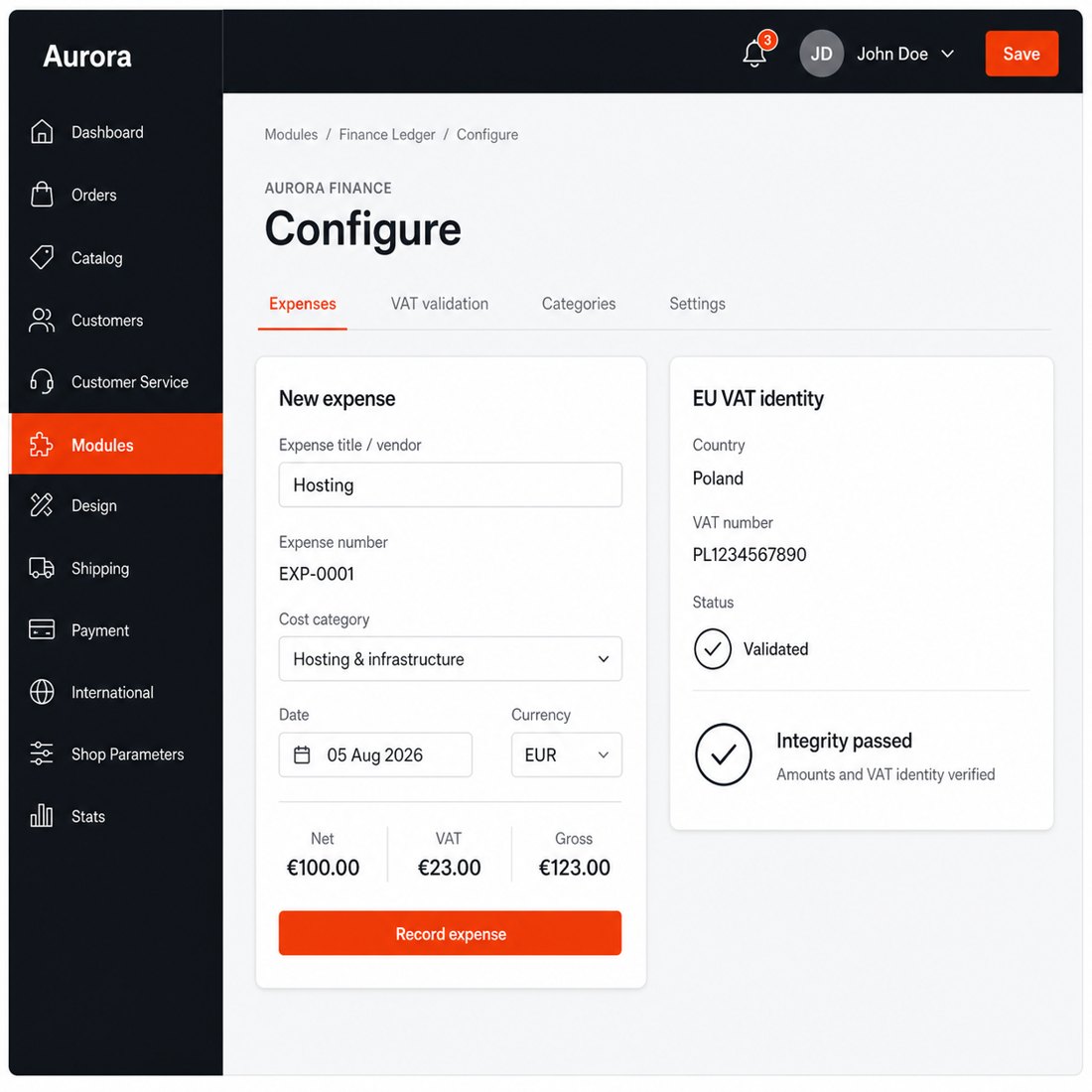
Each expense records its supplier, category, net value, tax, gross value, discount, supplier refund, due date, payment date and payment state. A bill or receipt stays attached to the entry, and allocation to products or categories turns it into a profitability figure that identifies where the shop earns and where cost absorbs the margin.
Rent, warehousing, software, accounting and other repeated commitments run on daily, weekly, two-week, monthly, quarterly or yearly schedules. Due entries are created automatically with their supplier and category, while late runs catch up without duplicates. The profit and loss report subtracts these operating costs from refund-adjusted revenue and shows profit, margin, cost ratio, monthly results and period comparison.

Was the profitable period also liquid?
The cash-flow view joins customer payments, refunds and paid operating costs into inflow, outflow and net movement. Daily movement, payment methods, unpaid bills and customer receivables explain why a profitable period still feels short of cash and which invoices need attention.
You choose the date range and reporting currency. Source amounts and exchange rates remain visible, while consolidated totals use the declared currency instead of adding unlike amounts. In a multi-shop business, each shop keeps isolated records and permissions, and an authorized overview places results side by side without mixing their source data.

What happens to documents and VAT after each order?
Orders issue invoices according to the chosen status rules. The central history shows the financial document number, platform reference, customer, total, due date, paid amount, balance and paid, partial or overdue state. A refund creates and links its correction with item, shipping and tax detail, so documents, receivables and reports change together.
Proformas convert into numbered invoice snapshots, and the same editor also creates invoices for telephone, email or marketplace sales with customer, address, product, tax, discount, shipping and currency lines. You choose among language-specific layouts, headers, footers, colours and logos. Separate number sequences use the selected prefix, pattern and reset cycle, while simultaneous documents receive different numbers.
EU VAT numbers are checked when a business address is submitted or saved. An authoritative result for an eligible cross-border transaction applies the correct zero-tax treatment before the order, and the normalized number, country, source, message and time remain available for an accountant or audit.

What reaches the accountant without a shop login?
Invoices, corrections, proformas, costs, VAT, profit and loss, cash flow, customer VAT evidence and financial change history leave the shop as spreadsheets, structured exchange files or finished report documents. Date, order state, country, currency, customer, product, brand and supplier filters keep each delivery limited to the accountant's actual question.
Exports run on the schedule you choose and deliver directly to the connected accounting system with mapped accounts, taxes, customers and documents. Retries, remote references and reconciliation state show what arrived. Every run retains its dataset, period, format, author, record count and result, while one append-only audit history explains who changed a financial record, when, why and from which value to which value.

How quickly does it start, and how far does control go?
Installation creates the Finances menu, data records and useful first settings for VAT checks, numbering and cost categories. Orders start feeding the dashboard, while expenses are entered through a clear form and the integrity screen checks the required files, configuration, upload location and optional checkout connection.
You choose reporting periods, categories, partners, recurring frequencies, allocation targets, currencies, shop scope, numbering, layouts, logo, VAT validation, report filters, schedules and accounting destinations. That makes Financial Revolution quick to start for one shop and detailed enough for a multilingual, multi-currency business managed across several shops.
-
Referencemprfinancialrevolution
-
In stock2147483647 Items
-
PrestaShop CompatibilityPS 1.7 – 9.x
-
Pricing ModelOne-time Purchase
-
Module TypeFront & Back-office
-
GDPR RelevantNo
-
Business GoalStreamline Operations
-
External Account NeededNo
-
Module ComplexityComplete Solution
-
Customer Journey StageManage Store
-
Works With PlatformNo External Platform
What customers say about us
Company reviews
5.0
★
★
★
★
★
(4 reviews)
Loading customer reviews...
No product reviews yet
Be the first to share your experience with this module.
Write a Review
Manage native PrestaShop invoice views, finance dashboard metrics, stored VAT records, configuration, installed finance tables, and refund records from a Finances area in the PrestaShop Back Office.
Have a question about this product?
Our experts are here to help. Ask anything about installation, compatibility, or specifications.
1301
questions
9
categories
2013
building modules since
1.6–9
PrestaShop versions
v1.0.172026-05-27
- Addedcomplete FR/DE/ES/IT/PL translations
- FixedSync entity selector package
- FixedMake migrateFromPsConfiguration public static for external invocation
Loading full changelog...
Works Well With Financial Revolution
Modules our team genuinely pairs with this one, and exactly why each belongs in the same setup.
Complement
Financial Revolution gives a store one finance workflow over invoices, corrections, proformas, expenses, VAT validation, tax reports and accounting exports, which matters most where business buyers and their terms are involved. The module organises the financial documents, but it is not the checkout mechanism that lets approved business customers pay later in the first place.
B2B Deferred Payment Terms provides that mechanism separately. It adds a controlled pay-later option for logged-in customers whose groups have active terms and whose carts stay within configured credit rules, seeding terms such as Net 15, Net 30 and Net 60. It governs how business orders are paid; Financial Revolution governs the documents and reporting around them.
Run together they fit a store serving trade accounts: one lets eligible businesses check out on invoice terms, the other keeps the resulting invoices, VAT and reports organised in the Back Office. The tools stay independent, each doing its own job, but the pair covers both the pay-later sale and the finance paperwork it creates.

Governance
Financial Revolution helps a store manage invoices, VAT reports and tax workflows in one finance area, where the correctness of B2B customer VAT numbers has a direct bearing on exemptions and clean reporting. Financial Revolution organises the documents and figures, but it is not the tool that validates a VAT number against VIES at the point of checkout.
Automatic EU VAT Checker does that validation separately. It checks EU VAT numbers through VIES, gives shoppers live feedback on address pages, can require a number when a company name is entered, and stores validation results so staff can later see what was checked. It validates and records at checkout; it does not feed finance modules, it simply keeps the result on file.
Used alongside each other they reduce VAT problems before they reach the books: the checker confirms numbers when the order is placed, while Financial Revolution handles the invoicing, tax reports and exports afterward. Each tool does its own job, but together they make a store's B2B VAT handling cleaner from checkout through to accounting.

Measurement
Financial Revolution centralises invoices, corrections, expenses, VAT and accounting exports inside the Back Office, giving owners a richer financial view than turnover alone. Even with that in place, a team often needs a plain order-level extract for an accountant, a partner or ad-hoc analysis, which is a different output from the finance module's document-centred workflow.
Orders CSV List Exporter handles that order extract separately. Staff pick the period, statuses, paid state, columns, separator and row limit, then download a dated CSV with practical default columns for order details, documents and totals. It reads existing order data and writes a file; it shares no data pipeline with the finance module beyond both touching orders.
Used together they cover finance from two angles: Financial Revolution manages the in-store documents and reporting, while the exporter produces flat order files for whoever needs them outside the shop. Each tool does its own job, and the merchant gets both an organised finance workflow and easy, repeatable order exports.

Measurement
A store running Financial Revolution keeps invoices, corrections, VAT and tax reports organised in one place, which is ideal for in-store finance work. But accountants and bookkeepers often want invoice data as a spreadsheet they can review or import, and that flat export is not what the finance workflow itself is built to hand over.
Invoice CSV List Exporter is the separate tool for that. You choose the invoice date range and download a spreadsheet-ready file with invoice, order, customer, totals, payment, status, currency and note fields, with status and paid/unpaid filters. It simply reads existing invoice data into a file; it does not connect into Financial Revolution beyond both dealing with invoices.
Run alongside each other they split the work cleanly: Financial Revolution manages and reports on invoices inside the store, while the exporter outputs clean invoice files for external bookkeeping or tax review. Each does its own job, and the team gets both an organised finance area and easy invoice extracts without copying lines by hand.
 30 days return right
Easy return - no questions asked
 Plug & Play Modules
Install, set up and take profit
 Dedicated Support First
Priority Help & Satisfaction Over Sales
You might also like

- New


