


Publish posts, categories and authors with SEO-friendly routes using a PrestaShop blog


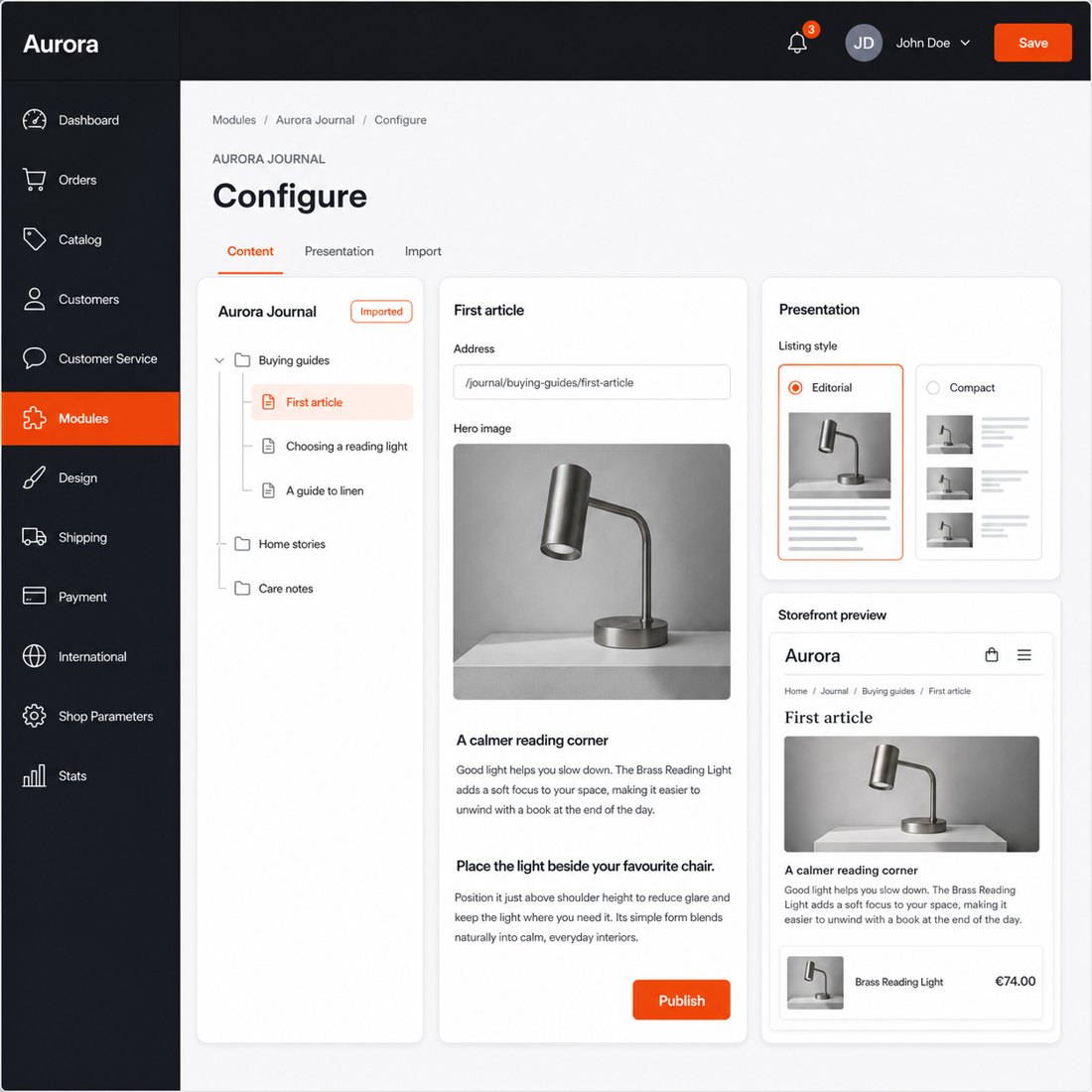
Blog Revolution is a module for PrestaShop stores that adds a complete multilingual publishing area and connects every article with the catalogue. Installation adds the editorial menu and matches the basic presentation to the shop theme; choosing the blog address and listing style is enough to start publishing.
A guide earns its place in a store when it carries the reader towards the right product. Blog Revolution places selected products, a catalogue category, new arrivals or bestsellers inside the article, then returns the relationship in the other direction by showing relevant guides on product and shop-category pages.
The merchant controls articles, hierarchical categories, tags, authors, galleries, video, customer-group access and comments from the PrestaShop administration. Recent and related content appears in the blog menu, shop search, homepage, footer, side columns and selected catalogue pages, while five listing styles and detailed presentation settings fit a simple news area or a substantial advice library.
Each language has its own content, address and search presentation. Drafts open in a protected storefront preview, the writing assistant prepares or improves the article and its search text, publication and withdrawal follow set times, and one editorial action sends the finished article to the shop’s managed social pages. Renamed addresses lead to the current article, subscribers receive each new publication and the dashboard shows which content earns attention.
The result is search traffic kept close to products, a repeatable editorial process, protected visibility after routine changes, stronger buying guidance and reader contact that continues after publication.
What does Blog Revolution add to the store?
Blog Revolution adds a complete publishing and reader-engagement area to PrestaShop. Articles and products support each other in both directions: the guide presents the relevant catalogue choice, while product and shop-category pages bring the matching guide back to the shopper.
- The first section maps the system: one editorial area connects content, catalogue, readers and reporting.
- The commerce section follows the buying path: products enter articles and articles return to catalogue pages.
- The continuity section protects discovery: every language has a clear address and renamed articles keep their accumulated route.
- The workflow section covers regular publishing: assisted writing, preview, timing, social publication and subscriber messages work together.
- The reader section covers discovery and participation: search, categories, authors, comments, ratings and privacy form one coherent experience.
- The setup section joins speed with depth: a quick start expands into layouts, placements, access, migration, backup and reporting.

How does a guide move the reader towards the right product?
The editor attaches hand-picked products to an article and controls their order. Product selections also appear at the exact paragraph where the explanation settles the choice. A block presents specified items, a shop category, new arrivals or current bestsellers without forcing the reader to leave the argument halfway through.
The route works in reverse as well. A product page presents its related articles, and a mapped shop category displays the guides relevant to that part of the catalogue. Recent content also reaches the homepage, footer and side columns. An article about sizing, care or compatibility therefore stays beside the products whose purchase it explains.
Related articles continue the research after the first guide, while the shop-wide search includes matching blog results beside the catalogue. Editorial content becomes part of product discovery instead of a separate archive that receives visits and loses the sale.

What protects an article when its address or language changes?
Every language receives its own article address, page title, search summary and preferred address. Equivalent language versions are connected, the shop language selector opens the matching article, and search engines receive the article, author, image and publication details they need to understand the page.
When an editor changes an article address, Blog Revolution remembers the previous one and sends readers and search engines permanently to the current page. Saved links continue to work and routine title improvements do not abandon the visibility the article has already earned.
Published articles, the blog home and substantive author pages enter the shop’s site map. Blog results appear in the shop search, social sharing carries the correct title, description and image, and the feed publishes either excerpts or complete articles. Paginated and thin pages receive deliberate indexing rules, so the blog grows without producing a disorderly trail of weak addresses.

How does the team keep publishing without extra manual work?
Articles move through draft, published, scheduled and archived states. The editor sets both publication and withdrawal times, and a protected link shows the draft in the real storefront before readers see it. Authors, hierarchical categories, tags, galleries, video and related products stay in the same administration as the catalogue.
The writing assistant prepares a complete article, excerpt and search text in the chosen language or improves content already in the editor. One editorial action then publishes the finished article to the social pages managed by the shop. Subscribers receive the new article automatically, so release work does not end with pressing publish.
An existing WordPress publication enters from its standard export file with articles, categories, tags, dates, states and optional comments. The editorial dashboard compares periods and shows views, published articles, comments and top content, turning the next subject choice into a decision based on reader activity.

How do readers find, assess and discuss the content?
Readers reach the library through the blog home, hierarchical categories, tags, author profiles, monthly archives, article search with suggestions and the shop-wide search. Five listing styles cover a grid, classic list, masonry, large covers and compact rows, while recent, popular and featured blocks create several routes into a growing archive.
Native comments include guest participation, moderation, threaded replies, staff highlights and optional star ratings. Each article also has likes and view counts. The merchant selects native discussion, Disqus, Facebook comments or a combined tabbed view; an external system starts only after the reader chooses its tab.
The merchant receives a new-comment notice, the commenter receives a message after approval and again after a reply, and subscribers receive each new article. Consent sits with the comment form, customer data enters the shop’s export and deletion tools, and customer-group rules restrict individual articles when a trade guide or private resource belongs to a defined audience.

How quickly does it start, and how far does the control go?
Installation adds the Blog menu, a working storefront and presentation that follows the shop’s basic colours. The merchant chooses the address, listing style and visible blocks, then publishes the first article. Existing content enters through the WordPress import screen, so a populated publication starts without rebuilding its hierarchy by hand.
Deeper settings cover columns, image sizes and quality, article details, comments, sharing, feeds, category navigation, side blocks and translated content for several shops. Uploaded blog images are also converted automatically into a modern browser format with a safe fallback, keeping the visual library efficient as it grows.
The module exports categories, tags, authors, articles and comments to XML or JSON, and the same file restores the blog with its relationships. Secure previews, per-article customer groups, privacy handling and the editorial dashboard complete the control. A small shop starts with a clean article list, while a multilingual content team receives the structure needed for a long-running commercial publication.
-
Referencemprblogrevolution
-
PrestaShop CompatibilityPS 1.7 – 9.x
-
Pricing ModelOne-time Purchase
-
Module TypeFront & Back-office
-
GDPR RelevantNo
-
Business GoalIncrease Traffic
-
External Account NeededNo
-
Module ComplexityComplete Solution
-
Customer Journey StageAttract Visitors
-
Works With PlatformNo External Platform
What customers say about us
Company reviews
5.0
★
★
★
★
★
(4 reviews)
Loading customer reviews...
No product reviews yet
Be the first to share your experience with this module.
Write a Review
Blog Revolution adds a native blog area to your PrestaShop store, so you can publish guides, news, buying advice, and SEO content without sending customers to another platform. It keeps articles, comments, ratings, RSS, social previews, and product links inside your shop.
Have a question about this product?
Our experts are here to help. Ask anything about installation, compatibility, or specifications.
1315
questions
9
categories
v2.4.142026-05-27
- AddedOpen previews on clean blog URLs
- AddedAdd signed blog post previews
- AddedIntegrate shared assets and style tokens
Loading full changelog...
Works Well With Blog Revolution
Modules our team genuinely pairs with this one, and exactly why each belongs in the same setup.
Complement
Blog Revolution is building a content engine inside your store, with native articles, categories, tags and clean blog pages that can attract search traffic. New content only earns traffic once search engines discover it, and a growing blog adds many URLs that need to be found reliably.
Advanced SEO Sitemap Builder covers discovery for the catalogue side, generating XML sitemaps across products, categories, CMS pages, brands, suppliers and core pages, with selectable URL sources. It complements the blog as a separate discovery tool for the store's broader URL set, working alongside it rather than as part of it.
Together your store grows content while keeping its wider URL inventory mapped for crawlers. The blog adds topical pages that lead readers toward products, and the sitemap keeps your products, categories and CMS pages explicitly surfaced to search engines, so content growth happens on a foundation where the rest of the catalogue stays efficiently discoverable.

Complement
Blog Revolution gives your store native articles, categories and clean blog pages, but its scope is the content itself. Structured data for your catalogue, the way products, categories and CMS pages are described to search engines, is a separate concern the blog does not address.
Automatic SEO Schema Rich Snippets covers that, adding schema markup for products, categories, CMS pages, breadcrumbs and site identity. It complements the blog by handling structured data on your catalogue and CMS pages, working independently while the blog grows your content. The schema module covers products, categories, CMS, breadcrumbs and identity, not article markup.
Used together, you build content while keeping your product and category pages well structured for search. The blog attracts readers researching topics around your products and the schema module helps those catalogue and CMS pages appear more richly in search results, so content growth and structured catalogue description advance side by side as distinct jobs.

Complement
Blog Revolution produces a steady stream of articles, guides and advice, which is exactly the kind of content that benefits from being connected to the products and categories it discusses. Left alone, though, posts can sit as isolated pages with few deliberate links into the catalogue.
Automatic Internal SEO Linker addresses that, turning chosen keywords across existing content into controlled internal links toward important products, categories and pages. It complements the blog by adding the linking layer, while the blog supplies the content; each is managed separately from the back office.
Together your editorial content does more than attract readers; it routes them and search relevance toward your catalogue. The blog brings people in on topical queries while internal linking helps guide them onward to relevant products and categories, so articles become part of the store's internal structure rather than dead-end pages, with each tool owning a clear role.

Complement
Blog Revolution includes its own article ratings and comments, but those are about engagement with your posts. Building visible trust on the pages where people actually decide to buy, products, categories and the store itself, is a different need the blog is not designed to fill.
Reviews & Ratings covers it, adding native moderated ratings, written feedback, optional photo reviews and review criteria for products, categories, CMS pages and the store itself, all inside PrestaShop. It complements the blog by handling commerce-side reviews, distinct from the blog's own article comments and ratings, and you moderate submissions.
Used together, your store earns trust in two contexts: engagement on editorial content through the blog and genuine product reviews through Reviews & Ratings. Each tool keeps its own moderation and scope, so readers can interact with articles while shoppers see real proof on product pages, without confusing blog-level feedback with catalogue reviews.
 30 days return right
Easy return - no questions asked
 Plug & Play Modules
Install, set up and take profit
 Dedicated Support First
Priority Help & Satisfaction Over Sales
You might also like

