SEO & Traffic Growth

Subtitles Manager

PrestaShop subtitles module, a second line on product, category, CMS, brand and supplier pages

Version
1.2.57
Updated
PrestaShop
1.7
Price: €99.00
Tax excluded
Partner price €79.20 Partner price for agencies Agencies with a partner account pay less on every module, depending on what they buy: 20% approved partner 25% from €1,000 a month 30% from €3,000 a month Average of the last 12 months, excl. VAT. Become a partner

Subtitles Manager adds a separate line below the main title on your PrestaShop product, category, information, manufacturer and supplier pages. An automatic theme scan places the first subtitles in minutes and previews positions that need a decision.

Page names appear in navigation, searches, invoices and product feeds. A subtitle explains the range or buying reason while the official name stays short.

You select pages or groups, set exclusions and decide which rule takes priority. Separate text for each language draws names, prices and attributes from your catalogue. Product listings have their own placement settings, independent of the main product page.

One catalogue-based pattern supplies specific subtitles across hundreds of pages, cutting repeated edits without lengthening the names used on invoices.

Professional Setup We fully configure the module to your needs: all options set, tested & verified within 1 business day. +€29.00
Visual Integration CSS & template adjustments to match your theme: includes cross-device verification and screenshot review. +€49.00

In the box

  • Lifetime licence for one shop
  • 12 months of updates, security fixes free forever
  • 3 months of support by mypresta.rocks
  • PrestaShop 1.7

Recent changes

  • Maintenance release 1.2.57: refreshed shared admin and storefront components, the current licensing and update libraries, and stability and compatibility fixes.
Full changelog

Summary of what Subtitles Manager offers

Subtitles Manager adds a managed subtitle directly below the existing page title. It covers products, categories, CMS pages, manufacturers, suppliers and product cards, with a separate field for every store language.

  • Subtitles cover products, categories, CMS pages, manufacturers, suppliers and product cards, with an automatic theme check during setup.
  • The page name stays short and clear while the subtitle explains the range, adds a search phrase or gives a reason to buy.
  • Templates draw on each item's catalogue data, so one rule produces relevant subtitles across hundreds of entries.
  • Targeting, exceptions and priorities select the right subtitles, with independent placement for product cards.
  • The module places subtitles automatically at clear positions in the active theme and provides a preview where placement needs a decision.
  • Text for each language and coverage reporting keep subtitles consistent as the catalogue grows.

Installation begins with a scan of the active theme. Clear placements are applied automatically, uncertain ones are shown with a preview, and the first subtitle is live within minutes. The same simple start opens into precise control over wording, scope, priority and presentation.

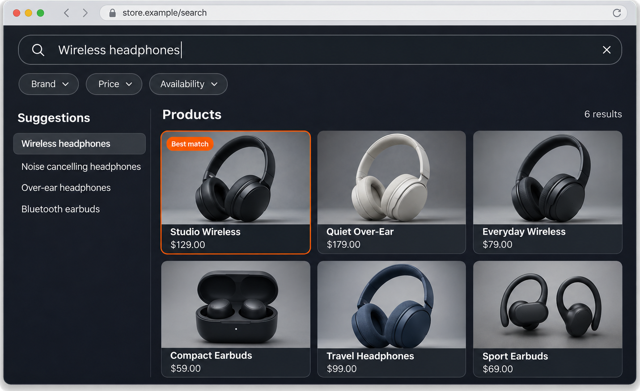
The line under the product name on this page comes from Subtitles Manager.

The Subtitles configuration screen

Why does the page name stay separate from the subtitle?

The main heading remains the clean operational name used in navigation, catalogue searches, invoices and product feeds. The subtitle carries the supporting message customers and search engines need: the purpose of the range, a material or use case, a secondary search phrase or the reason this page answers the query.

This separation works across all supported page types. A product keeps its recognisable model name, a category gains a clear description of the range, and manufacturer, supplier and CMS pages receive a meaningful second line without renaming the underlying record.

You choose whether the subtitle is output at any heading level or as a plain element, so it fits the page's semantic structure. The theme controls the visual treatment, so the subtitle belongs to the design instead of looking added afterwards.

The Subtitles dashboard

How does one rule cover hundreds of pages without generic wording?

A subtitle pattern draws from the catalogue entry currently being viewed. Product name, reference, price, manufacturer, default category, feature values and combination attributes enter the sentence automatically. Category, CMS, manufacturer and supplier pages use their own names.

You write a separate pattern for each language. The module selects the version for the active language and fills it with the corresponding catalogue values. One rule therefore removes repetitive editing without flattening every page into the same sentence.

Broad patterns and hand-written exceptions work together. A range-wide subtitle handles the common message, a narrower rule takes priority for one collection, and a dedicated subtitle wins on the single product that needs a distinct promise.

Admin mockup builds product subtitles from name, manufacturer, category and feature fields, with English and Polish previews.

Which pages and products receive each subtitle?

Targeting covers exact products, categories, CMS pages, manufacturers and suppliers, as well as grouped selections and exclusions. Product rules follow category, manufacturer and supplier relationships, and every condition shown in the targeting screen produces the same result in the storefront preview and on the live page.

Priority makes overlapping rules predictable. The store shows the highest-priority match or all matching subtitles in order, depending on the selected display mode. A store-wide baseline, a category message and a product-specific line therefore coexist without accidental duplication.

Product-listing cards have their own placement and presentation settings. The subtitle on a category grid stays independent from the one below the main product-page title, including its output element and active state.

Subtitle targeting rules list with category, brand, customer group and language targets and their priorities

How does the subtitle find its place in a customised theme?

The theme scanner starts from the templates used by each supported page, follows their shared parts and identifies the real title rather than the first heading it encounters. Each proposed position includes the surrounding context and a confidence assessment.

Clear matches are placed automatically during first setup. Uncertain layouts remain in the same guided flow with a preview and an explicit position choice. Child themes receive a minimal local placement when the title comes from the parent theme, so the shop keeps its custom structure.

The manager links each actual placement to every page type that shares it. Removing one page type leaves shared placements intact for the others, and the last removal restores the theme cleanly. Theme changes remain visible in the manager and reversible.

Template manager with a configured product page profile and the detected template file

What keeps a multilingual catalogue consistent as it grows?

The dashboard reports real coverage for products, categories, CMS pages, manufacturers and suppliers in the active store and language. It counts the pages actually reached by each rule, so a filtered selection does not appear as complete catalogue coverage and missing translations stay visible.

Once the right subtitle has been determined, the result is reused until relevant wording, rules or catalogue data change. Large product grids therefore avoid repeating the full matching and catalogue lookup work for every card, while a saved edit refreshes the affected result.

Deleting a catalogue entry also removes its dedicated subtitle. The module works from store data and theme output without a hosted SEO dependency or visitor tracking, giving the team one reliable place to manage subtitles throughout a growing catalogue.

subtitle editing in several languages with page targeting and priority
  • Reference
    mprproductseosubtitles
  • Version
    1.2.57
  • Released
  • Updated
  • PrestaShop Compatibility
    PS 1.6 – 9.x
  • Pricing Model
    One-time Purchase
  • Module Type
    Front & Back-office
  • GDPR Relevant
    No
  • Business Goal
    Increase Traffic
  • External Account Needed
    No
  • Module Complexity
    Feature-Rich Module
  • Customer Journey Stage
    Attract Visitors
  • Works With Platform
    No External Platform

What customers say about us

Company reviews
5.0 ★ ★ ★ ★ ★ (4 reviews)
Customer Reviews for PrestaShop Modules and Support

No product reviews yet

Be the first to share your experience with this product.

Write a Review

Quick start

  1. Install the ZIP in Modules > Module Manager and open Improve > SEO Subtitles.
  2. Review Default HTML Tag, Default CSS Class, and Display Mode in Settings > Configuration.
  3. Add a subtitle under Subtitles, fill Subtitle Text for your languages, and explicitly choose Target Entities.
  4. Set HTML Tag, Priority, and Active, then save.
  5. Open Templates, scan the active theme, review File and Line, and inject the hook, or place displayMprSubtitle manually.
  6. Open a targeted page and confirm the subtitle appears at the chosen location in each language.

Requires PrestaShop 1.6.1 or later and PHP 7.1 or later.

Open the full help page

Loading tab content...
30 days return right
Easy return - no questions asked
Plug & Play Modules
Install, set up and take profit
Dedicated Support First
Priority Help & Satisfaction Over Sales

Who builds and maintains this module

Built and maintained by David Miller and mypresta.rocks. David Miller has worked with PrestaShop since 2013, and the company behind this shop has been registered since 3 December 2018. Every module in this catalogue is our own work, so your questions to support reach the people who wrote the code. The changelog on this page lists every update with its date.

About us

More modules

Second Category Description

PrestaShop Product SEO Subtitles adds a subtitle right after the H1 on product, category, CMS, brand and supplier pages, and Second Category Description adds a second text block below category listings. Category pages get a strong opening and useful text at the bottom.

Product Extra Info Tabs

PrestaShop Product SEO Subtitles gives every product page a descriptive line under the title, and Product Extra Info Tabs organizes the details below in custom tabs. A clear headline followed by well-structured product information.

Custom Product Badges

PrestaShop Product SEO Subtitles explains the product in a line under the title, and Custom Product Badges marks it visually as New, Sale, Bestseller or any label you define. Words for search engines and readers, badges for a quick glance.

Loading...
Back to top