


Launch responsive homepage banner carousels with CTAs and scheduling on PrestaShop


Banner Revolution is a module for PrestaShop stores that creates full-width campaign banners and carousels for the homepage and other selected areas of the shop. Installation places the first slider on the homepage automatically, and the first campaign goes live after its images, text and destination are entered.
A strong promotional banner connects the artwork with the reason to buy. Each slide brings together a headline, supporting text, up to four proof points, a button and a destination for the entire banner, while start and end dates keep the message aligned with the campaign.
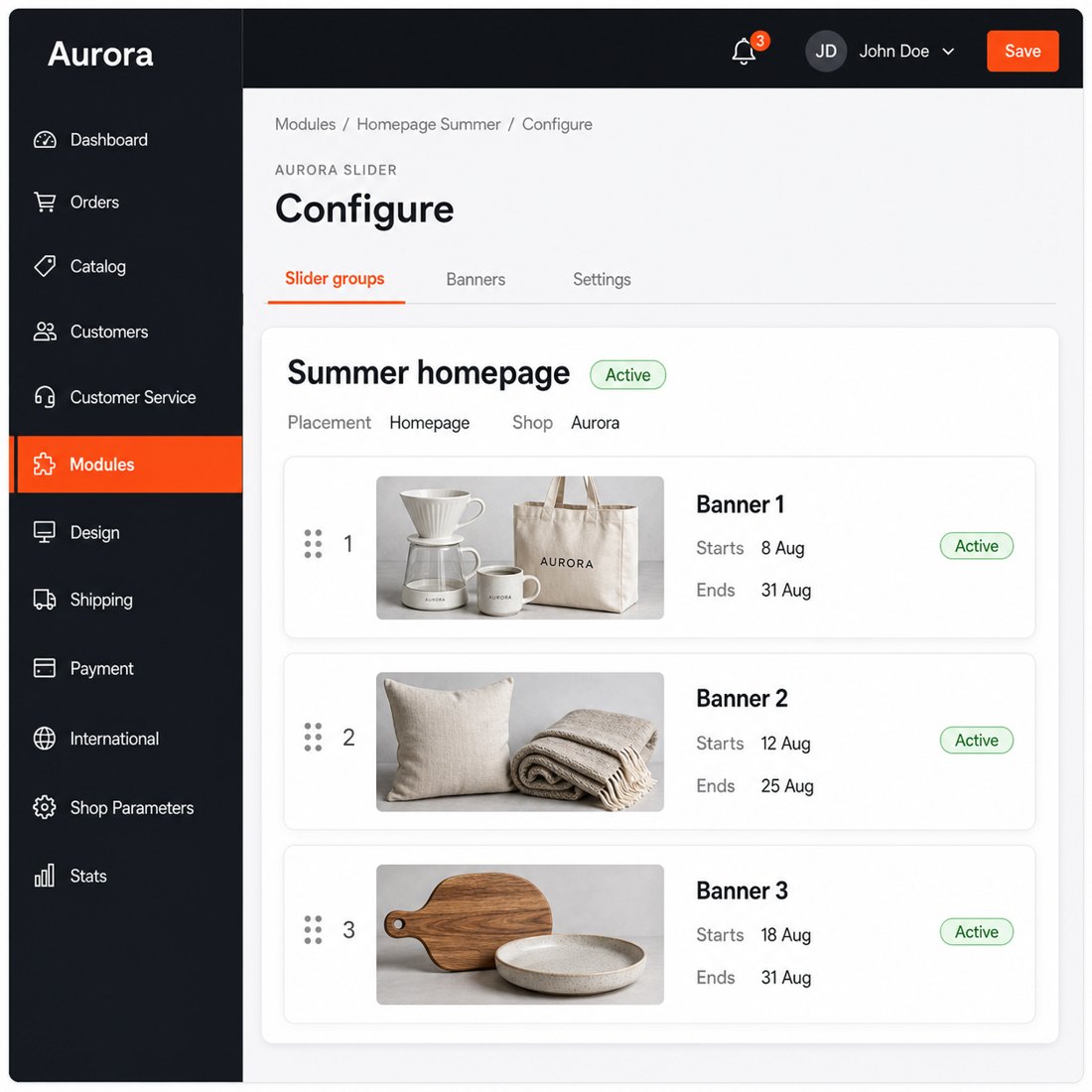
Setup is simple and the configuration still reaches into detail when the shop needs more control. You create separate slider groups, choose the pages where each group appears, set the publication period and order the banners. One banner stays fixed, while several form a carousel with adjustable rotation, transitions, arrows and position indicators.
Every store and language receives its own text, link, artwork and publication settings. Separate images serve computers and phones, and the preview shows the chosen height, overlay, alignment, colours and button before publication. Alternative image text is also written separately for each language.
Campaigns reach the right pages on time, their message stays readable on every screen and shoppers move through several offers without losing control. The merchant publishes quickly while retaining precise control over the final result.
Summary of what the module offers
Banner Revolution turns the shop's most prominent promotional areas into campaign surfaces managed from the PrestaShop panel.
- Quick first publication: the homepage slider is placed automatically after installation.
- Complete sales message: image, headline, supporting text, proof points and destination belong to one banner.
- Precise campaign control: slider groups, page assignments, publication dates and store-specific settings keep every offer in context.
- Design for every screen: computers and phones receive their own artwork and responsive composition.
- Respectful interaction: automatic rotation, progress, swipe, keyboard and motion preferences work together.
- Disciplined first view: the first image gets priority and later slides wait until they are needed.

What does each campaign banner contain?
Each banner combines desktop and phone artwork with a translated headline, supporting line, up to four short proof points and a clear destination. The proof points sit between the main message and the button, so delivery, warranty, returns or another purchase reason remains visible at the moment of decision.
The button has its own label and link, while the entire banner also leads to the chosen page. Internal and external destinations are supported, including a choice between the same tab and a new tab. Translated alternative text describes the image for shoppers who do not see it.

Where and when does each slider appear?
You create named slider groups for the homepage, category pages, product pages, CMS pages and other selected shop areas. Each banner belongs to one group, and drag ordering decides which message appears first.
Start and end dates publish and withdraw a campaign automatically. Artwork, active state, order, placement and dates remain independent for every store and language, so one storefront never inherits a promotion intended for another.
How does the design adapt to every screen?
A desktop image and a separate phone image keep the product and focal point in the right place. Height, overlay colour and strength, left, centre or right content placement, text colours and button styling are set in the panel and follow the shop's visual language.
The live preview assembles the image, copy, proof points and button before the banner is published. On a narrow screen the layout changes shape, removes visual clutter and preserves the message instead of squeezing the desktop composition.

How do shoppers move between offers?
One active banner remains fixed. Several banners form a carousel with adjustable timing, slide or fade transition, arrows, position indicators and a progress line that reflects the real time remaining. Hovering pauses the countdown and resumes from the same point, while a carousel outside the visible page stops until it returns.
Touch, mouse and pen gestures follow the shopper's movement, and short drags settle back without opening the banner link. Keyboard arrows reach every slide. A reduced-motion preference turns off automatic movement and image zoom while keeping manual controls available.

How does the hero stay light on the first page view?
The first hero image receives immediate priority, while later desktop and phone images wait until navigation approaches them. Upload processing prepares lighter image versions for compatible browsers and retains a reliable original as the fallback.
The carousel works entirely inside the shop and sends no visitor data to an outside service. Finished banner output is reused until content or settings change, and every edit refreshes it automatically. The campaign remains visually rich without making the first view carry every slide at once.

-
Referencemprbannerrevolution
-
PrestaShop CompatibilityPS 1.7 – 9.x
-
Pricing ModelOne-time Purchase
-
Module TypeFront & Back-office
-
GDPR RelevantNo
-
Business GoalBoost Conversions
-
External Account NeededNo
-
Module ComplexityComplete Solution
-
Customer Journey StageEngage Shoppers
-
Works With PlatformNo External Platform
What customers say about us
Company reviews
5.0
★
★
★
★
★
(4 reviews)
Loading customer reviews...
No product reviews yet
Be the first to share your experience with this module.
Write a Review
Banner Revolution adds a full-width homepage banner carousel with desktop/mobile images, overlay text, CTA buttons, and touch-friendly navigation. It helps store owners promote campaigns, categories, collections, and seasonal offers directly on the front page.
Have a question about this product?
Our experts are here to help. Ask anything about installation, compatibility, or specifications.
1315
questions
9
categories
v1.3.42026-05-27
- AddedAVIF support in picture element for banner images
- Addedautomatic theme detection for Classic and Hummingbird
- Addedcomplete FR/DE/ES/IT/PL translations
Loading full changelog...
Works Well With Banner Revolution
Modules our team genuinely pairs with this one, and exactly why each belongs in the same setup.
Governance
A merchant running Banner Revolution is promoting offers prominently, placing hero banners and calls to action that point shoppers toward sales and featured products. Driving attention to discounts works best when you are also sure those discounts behave, since broad promotions can creep onto products you meant to protect.
Discount Exclusion Manager is a separate tool that shields selected products, categories or manufacturers from cart-rule discounts while the rest of a promotion runs, resolving those rules into affected lines to guard margin on gift cards or premium brands. It enforces limits rather than displaying offers.
Used together, the banners advertise the campaign and the exclusion manager keeps protected lines out of reach of cart-rule reductions. A merchant can shout about a promotion on the homepage while quietly fencing off the products that should never be discounted, two complementary tools where one drives traffic to the offer and the other guards its boundaries.

Complement
A merchant using Banner Revolution can present promotions beautifully, managing hero banners, images and calls to action from the back office so campaigns get a clear storefront face. A banner announces an offer, but it does not by itself change any prices behind that offer.
Smart Dynamic & Scheduled Discounts is a separate tool that runs timed promotions and flash sales that start and stop automatically, storing type, dates, active state, priority and shop scope so pricing changes without manual edits at awkward hours. It supplies the actual discount logic.
Run alongside each other, the discounts engine handles when and where prices drop while Banner Revolution gives the campaign its prominent visual entry point. A merchant can schedule a flash sale and surface it with a hero banner at the same time, two complementary tools where one sets the price mechanics and the other makes sure shoppers notice the offer quickly.

Complement
A merchant running Banner Revolution already shapes the storefront's promotional surfaces, placing hero banners and calls to action where shoppers browse. Banners work well in the flow of browsing, but the very first moment a visitor lands is a distinct opportunity a static banner does not seize.
Welcome Popup is a separate tool that shows a timed first-visit modal for announcements, discounts or newsletter prompts, appearing after a configured delay and suppressed for returning visitors who closed it until the cookie duration passes. It owns the arrival moment specifically.
Used together, the popup makes a deliberate opening statement to new arrivals while the banners carry ongoing promotional messaging as shoppers explore. A merchant gets both a focused welcome and persistent on-page promotion, two complementary tools where one captures the first second and the other keeps offers visible throughout the visit.

Complement
A merchant using Banner Revolution promotes through images and calls to action, which is excellent for headline messages but does not place actual products in front of shoppers in a shoppable way. A banner points toward an offer; it does not surface the relevant items themselves.
Showcase Revolution is a separate tool that places curated and dynamic product widgets where shoppers browse, giving best sellers, new arrivals, sale items, featured collections and trending products more visibility across supported storefront areas. It puts real products on display, not just promotional artwork.
Run alongside each other, the banners carry the big promotional message and Showcase Revolution backs it with shoppable product widgets nearby. A merchant can announce a theme with a hero banner and immediately show matching products underneath, two complementary tools where one sets the headline and the other turns it into browsable, clickable merchandise.
 30 days return right
Easy return - no questions asked
 Plug & Play Modules
Install, set up and take profit
 Dedicated Support First
Priority Help & Satisfaction Over Sales
You might also like


