


Überwachen und verwalten Sie alle Ihre PrestaShop-Cron-Jobs von einem Back-Office-Dashboard aus


Cron Manager ist ein Modul für PrestaShop-Shops, das die geplanten Hintergrundarbeiten des Shops zuverlässig ausführt und jede Aufgabe, jeden Lauf und jeden Ausfall auf einem Bildschirm zeigt. Die Installation fügt dem Backoffice eine Steuerzentrale hinzu, die Wahl der Ausführungsart ist eine Einstellung, den Rest übernimmt der Shop.
Shops ohne Zugriff auf einen Server-Zeitplaner arbeiten mit cron-job.org zusammen, einem kostenlosen Dienst, der zu festgelegten Zeiten eine vereinbarte Adresse aufruft. Sie hinterlegen einen Schlüssel, und das Modul verwaltet den entfernten Auftrag selbst: Es legt ihn an, aktualisiert ihn bei Planänderungen, pausiert ihn, setzt ihn fort und prüft zuerst, ob der Shop von außen erreichbar ist. Ein Shop auf einfachem Shared Hosting erhält eine verlässliche äußere Uhr, ohne das Hosting-Panel anzufassen.
Das Modul verbindet den einfachen Start mit tiefer Kontrolle. Sein Überblick sammelt die geplanten Aufgaben jedes kompatiblen Moduls in einer Liste mit letztem Lauf, nächstem Lauf, Dauer, jüngsten Ausfällen und vollständiger Laufhistorie. Jede Zeile trägt eigene Aktionen: sofort ausführen, pausieren, fortsetzen, entfernen. Ganze Module werden mit einem Griff behandelt, und jeder Zeitplan entsteht aus fertigen Vorgaben oder als eigener präziser fünfteiliger Plan.
Eigene Aufgaben kommen dazu: Eine ruft eine Adresse auf, mit erwarteter Antwort und Zeitlimit, eine führt Arbeit im Shop aus, eine startet einen Serverbefehl, und jede besitzt eine Testtaste. Dahinter stehen vier Ausführungswege: der Zeitplaner des Servers, der verwaltete externe Auslöser, ein Auffangweg über Shopbesuche und einer über die Backoffice-Nutzung. Verstummt der Hauptweg, übernimmt der Seitenverkehr die Arbeit von selbst. Jede Aufgabe wird genau einmal beansprucht, überlappende Läufe verdoppeln also nie Arbeit, und jede läuft isoliert, sodass ein einzelner Absturz nie die übrigen stoppt.
Das Ergebnis sind Hintergrundarbeiten, um die Sie sich nicht mehr sorgen: Der Feed, der an einem Dienstag stirbt, ist am Mittwochmorgen sichtbar statt nach einer Delistung, der Shop auf bescheidenem Hosting führt seine Nachtarbeit weiter aus, Importe laufen genau einmal, und ob die Sicherung heute Nacht lief, beantwortet eine Zeile auf dem Bildschirm.
Überblick über die Möglichkeiten des Moduls
Cron Manager gibt der geplanten Hintergrundarbeit eines PrestaShop-Shops einen geschützten Eingang, eine Steuerzentrale und ein Sicherheitsnetz für den Tag, an dem der Hauptweg ausfällt. Die Übersicht führt durch die sechs Teile dieser Seite.
- Ein Bildschirm für alles: jede Aufgabe mit letztem Lauf, nächstem Lauf, Dauer, Ausfällen und Historie.
- Läuft ohne Serverzugriff: ein verwalteter externer Auslöser und Verkehrs-Auffangwege mit automatischem Wechsel.
- Eingebaute Sicherheit: keine doppelten Läufe, eine abstürzende Aufgabe stoppt nie die anderen.
- Eigene Aufgaben: Adressaufrufe, interne Arbeit oder Serverbefehle, jede mit Testtaste.
- Tägliche Kontrolle: ausführen, pausieren, fortsetzen und umplanen, je Zeile oder je Modul.
- Ein sauberer Shop: Kunden erhalten nichts Zusätzliches, und die Historie räumt sich selbst auf.

Wie sehe ich endlich, ob meine Hintergrundarbeit läuft?
Der Überblick beantwortet die Frage, die ein Händler sonst mit Hoffen beantwortet. Jede geplante Aufgabe jedes kompatiblen Moduls steht in einer Liste: wann sie zuletzt lief, wie lange sie brauchte, wann sie das nächste Mal läuft, was sie zurückgab und wie oft sie zuletzt scheiterte. Die vollständige Historie jedes Laufs bleibt verfügbar, mit Status, Dauer, Kontext und Ergebnis.
Die Folge: Stille bleibt nicht länger unsichtbar. Der still stehengebliebene Marktplatz-Feed ist am nächsten Morgen eine rote Zeile, keine Entdeckung nach einem Monat, wenn der halbe Katalog delistet wurde. Überfällige Arbeit ist als überfällig markiert, nicht bloß abwesend.
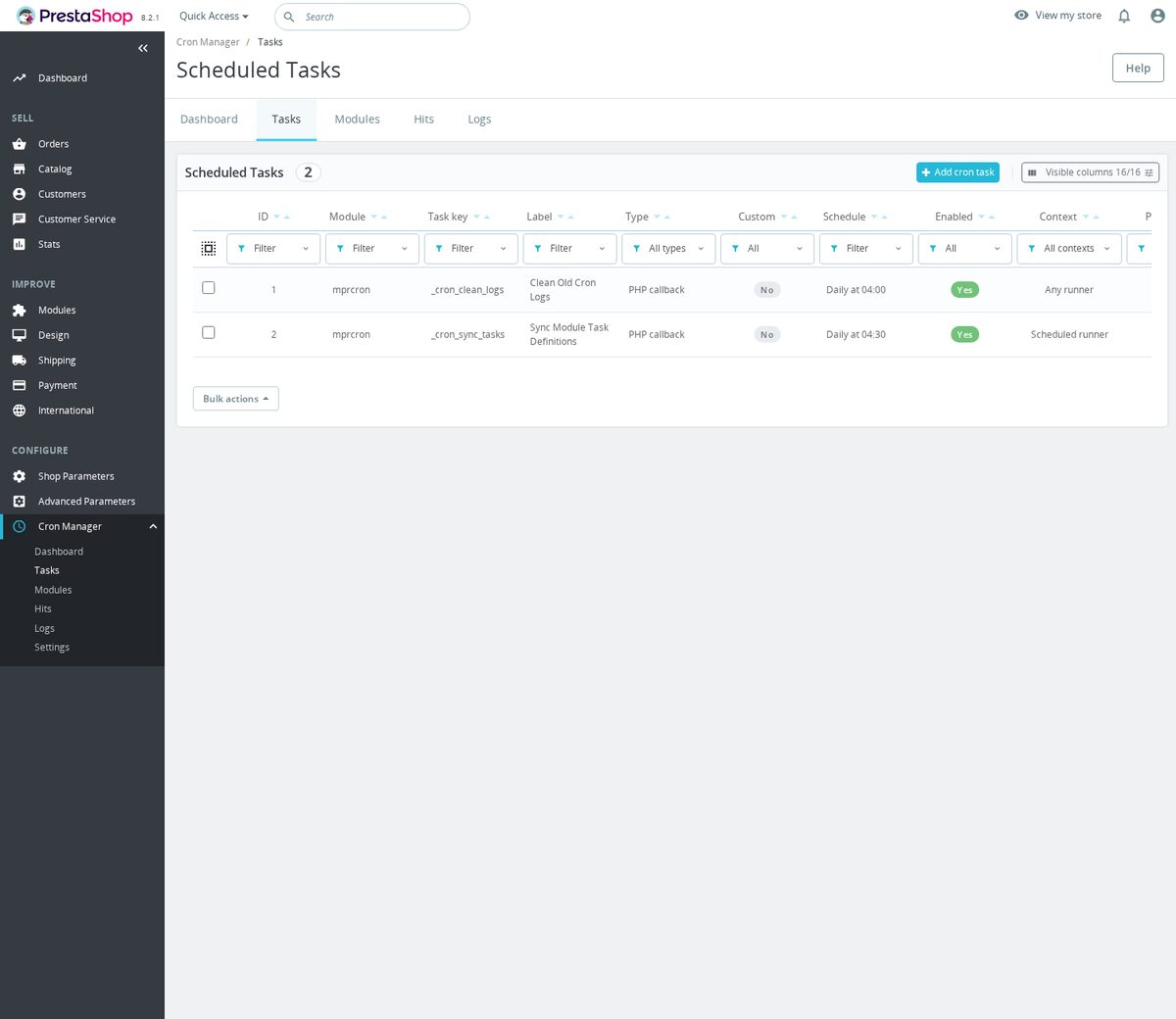
Was führt meine Aufgaben aus, wenn ich keinen Serverzugriff habe?
Hinter jeder Aufgabe stehen vier Wege: der Zeitplaner des eigenen Servers, wo es ihn gibt, der verwaltete cron-job.org-Auslöser, die Ausführung durch Shopbesuche und die Ausführung durch die Arbeit im Backoffice. Das Modul überwacht den Hauptweg mit einem regelmäßigen Herzschlag; wird dieser alt, beginnt der Seitenverkehr von selbst, fällige Arbeit auszuführen, und tritt zurück, sobald der Hauptweg wiederkehrt.
Der externe Auslöser ist verwaltet, nicht nur empfohlen: Mit einem gespeicherten Schlüssel legt das Modul den entfernten Auftrag an, aktualisiert ihn bei Planänderungen, pausiert ihn und setzt ihn fort, und prüft zuerst, ob der Shop von außen antwortet. Der Eingang selbst ist durch ein Geheimnis geschützt, das Außenstehende nicht besitzen.
So führt der Shop auf Shared Hosting, ohne Zeitplaner weit und breit, seine Exporte weiter um drei Uhr nachts aus, und niemand pflegt etwas in einem zweiten Kontrollzentrum.
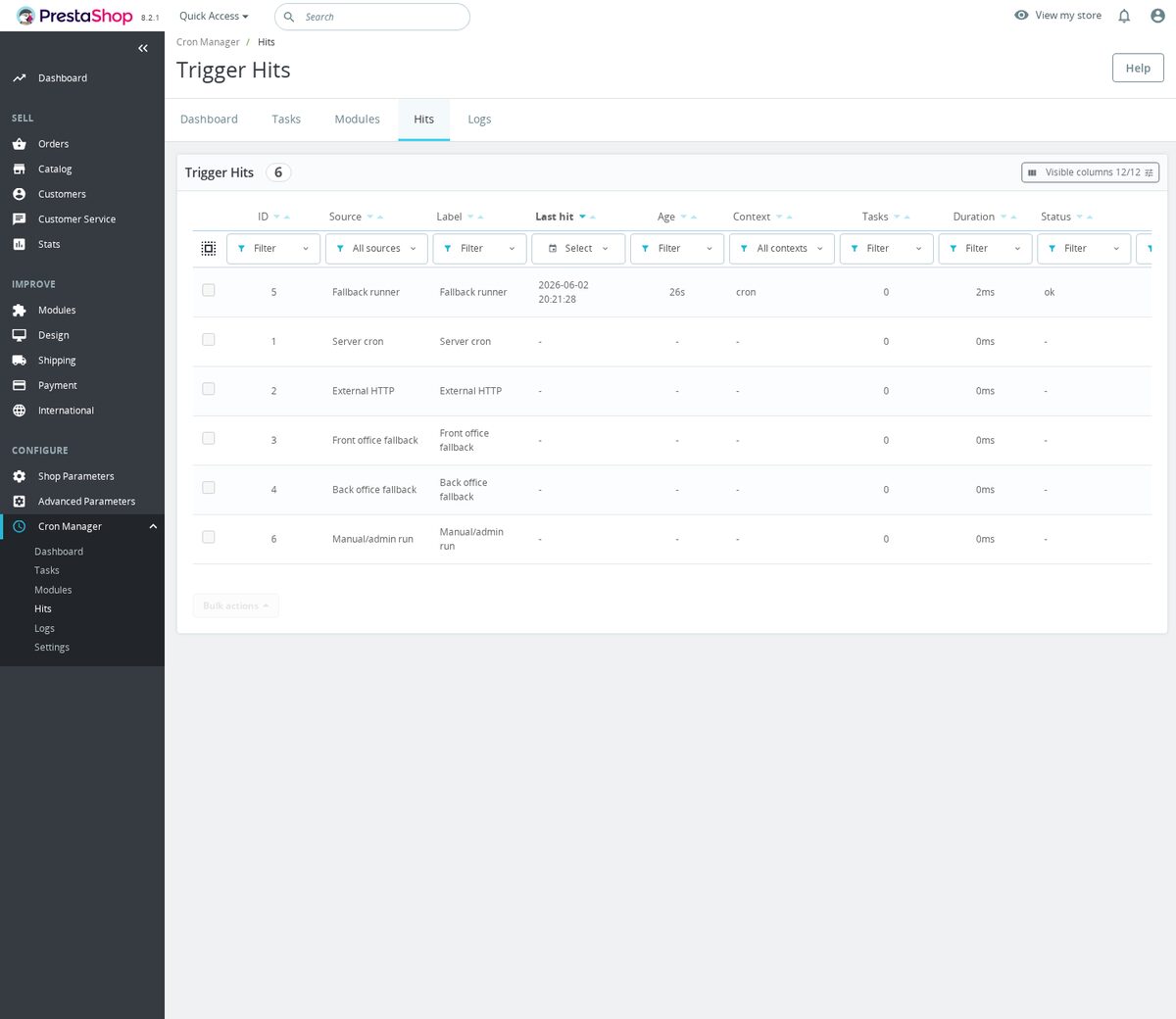
Was schützt die übrigen Aufgaben vor einer fehlerhaften?
Jede fällige Aufgabe wird vor dem Lauf genau einmal beansprucht, sodass zwei überlappende Prozesse dieselbe Arbeit nie doppelt ausführen. Der Import, der früher parallel lief und Zeilen verdoppelte, läuft einmal, jedes Mal.
Bei Serverläufen arbeitet jede Aufgabe in einem eigenen isolierten Prozess mit durchgesetztem Zeitlimit. Eine Aufgabe, die abstürzt oder hängt, wird abgeschnitten und als gescheitert verzeichnet, und die Aufgaben dahinter laufen trotzdem. Ein defektes Modul reißt nicht mehr die ganze Nachtarbeit mit sich.
Auch Testkopien des Shops sind geschützt: Aufgaben, die an äußere Dienste schreiben, werden auf Nicht-Produktionsinstallationen zurückgehalten, sodass eine Entwicklungskopie nie echte Daten hinausschickt.

Plane ich auch eigene Arbeit, nicht nur die Aufgaben anderer Module?
Ja, in drei Formen. Eine Aufgabe ruft eine äußere oder shopeigene Adresse auf, mit Methode, Kopfzeilen, Anfrageinhalt, erwarteter Antwort und Zeitlimit unter Ihrer Kontrolle; die Antwort wird geprüft und verzeichnet. Eine Aufgabe führt Arbeit direkt im Shop aus. Eine Aufgabe startet einen Serverbefehl. Jede Form besitzt eine Testtaste, die sie sofort ausführt und das Ergebnis zeigt.
Zeitpläne kommen als fertige Vorgaben, alle fünf Minuten, stündlich, nächtlich, wöchentlich, oder als eigener fünfteiliger Plan für präzise Rhythmen. Derselbe Editor plant bestehende Aufgaben um, legt einen Zeitplan auf viele Aufgaben zugleich und setzt eine angepasste Aufgabe auf den Standard ihres Moduls zurück.

Wie viel Kontrolle behalte ich im Alltag?
Jede Zeile wirkt auf sich selbst: sofort ausführen, pausieren, fortsetzen, entfernen. Jedes Modul wird als Flotte geführt: seine Aufgabendefinitionen abgleichen, alles Zugehörige pausieren oder fortsetzen, zurückgelassene Registrierungen bereinigen. Ein neues Modul mit eigener Hintergrundarbeit erscheint einfach in der Liste, bereits unter Aufsicht.
Der Shop-Auftritt bleibt unberührt: Kunden laden nichts Zusätzliches und sehen nichts Neues. Die Historie pflegt sich selbst, beschnitten nach Alter und Umfang, sodass die Laufaufzeichnung jahrelang nützlich bleibt, ohne grenzenlos zu wachsen.
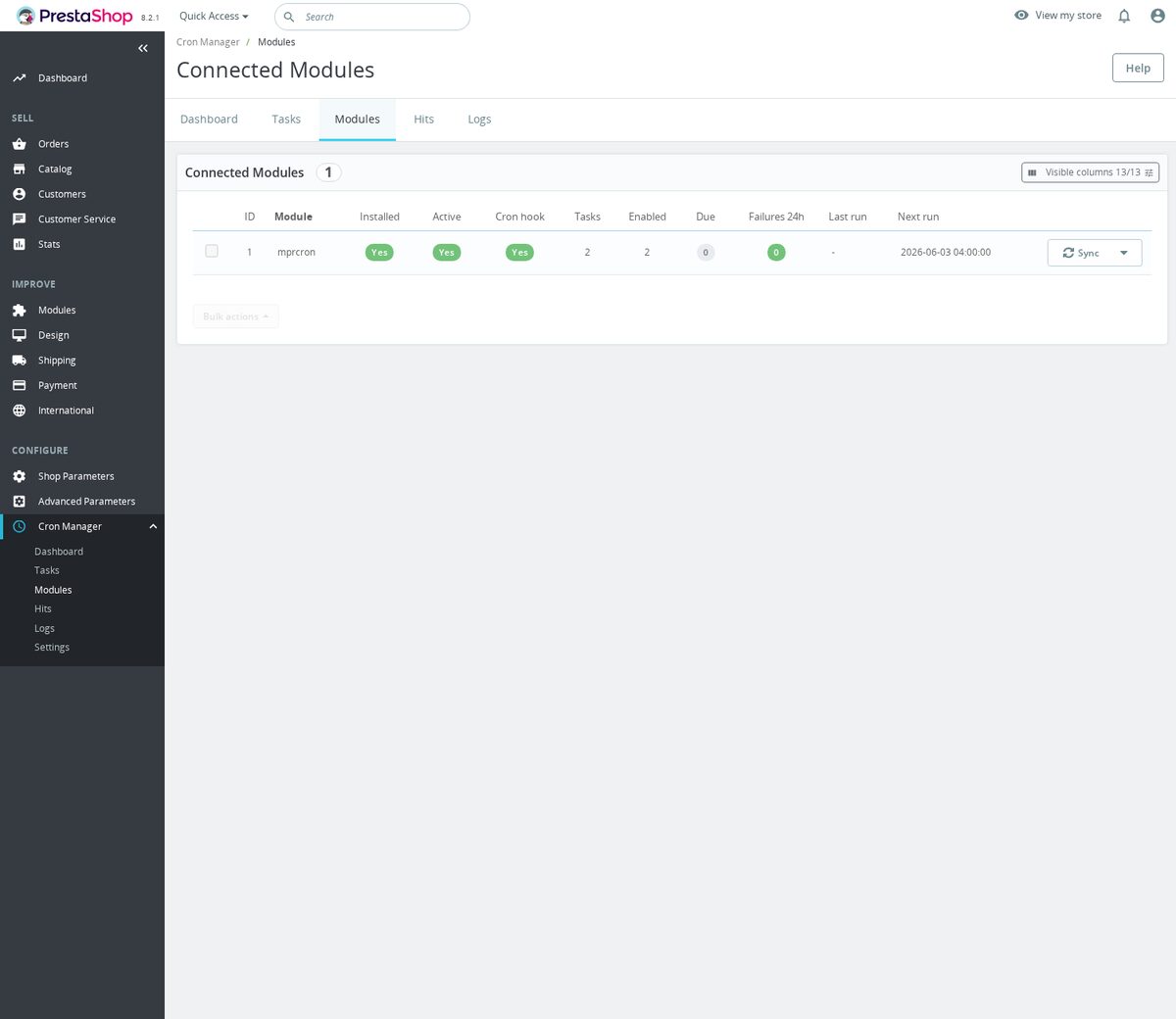
-
Referenzmprcron
-
Auf Lager2147483647 Artikel
-
PrestaShop-KompatibilitätPS 1.7 – 9.x
-
PreismodellEinmalkauf
-
ModultypBack-office
-
DSGVO-relevantNein
-
GeschäftszielAbläufe optimieren
-
Externes Konto erforderlichNein
-
Modul-KomplexitätLeichtgewichtiges Widget
-
Phase der Customer JourneyShop verwalten
-
Funktioniert mit PlattformKeine externe Plattform
Was unsere Kunden über uns sagen
Unternehmensbewertungen
5.0
★
★
★
★
★
(4 Bewertungen)
Kundenbewertungen werden geladen...
Noch keine Produktbewertungen
Teilen Sie als Erste/r Ihre Erfahrung mit diesem Modul.
Bewertung schreiben
Cron Manager bietet Ihrem PrestaShop-Shop einen zentralen Back-Office-Arbeitsbereich für geplante Aufgaben von MPR-Modulen. Damit können Sie wiederkehrende Jobs auslösen, planen, pausieren, testen und prüfen, ohne in jedem Modul separate Cron-Einstellungen pflegen zu müssen.
Haben Sie eine Frage zu diesem Produkt?
Unsere Experten helfen Ihnen gerne. Fragen Sie uns zu Installation, Kompatibilität oder technischen Daten.
1301
Fragen
9
Kategorien
2013
Modulbau seit
1.6–9
PrestaShop-Versionen
v1.3.122026-05-27
- AddedAdd custom cron task management
- AddedRelease cron manager 1.2.0
- Addedself-healing infrastructure with automatic diagnostics and repair
Vollständiges Changelog wird geladen...
Passt gut zu Cron Manager
Module, die unser Team wirklich mit diesem kombiniert, und warum jedes davon in dasselbe Setup gehört.
Governance
Wenn Sie den kostenlosen Cron Manager nutzen, möchten Sie eine zentrale Stelle im Back-Office, an der Sie bestätigen können, dass die routinemäßige Arbeit der MPR-Module tatsächlich läuft, mit geschützten Planungslinks, manuellen Ausführungen und Aufgabenstatus, damit Jobs nicht unbemerkt fehlschlagen. Diese Übersicht ist am wertvollsten, wenn es echte wiederkehrende Jobs zu überwachen gibt.
Advanced SEO Sitemap Builder erstellt XML-Sitemaps, kann eine HTML-Sitemap bereitstellen und sammelt auswählbare URL-Quellen über Produkte, Kategorien, CMS-Seiten, Marken, Lieferanten und Kernseiten hinweg, sodass Crawler einen sauberen, aktuellen Weg durch Ihren Shop erhalten. Es ist ein separates, kostenpflichtiges Modul, das Sie neu generieren, wenn sich Ihr Katalog ändert.
Zusammen eingesetzt halten Sie Ihre Sitemaps aktuell und erhalten einen klaren Überblick über Ihre geplante MPR-Arbeit. Der Sitemap Builder erzeugt die Dateien, auf die sich Suchmaschinen verlassen, während der Cron Manager Ihnen eine zentrale Stelle bietet, um jede vom Modul bereitgestellte geplante MPR-Aufgabe auszuführen und zu überwachen, sodass die Einrichtungsarbeit sichtbar bleibt und nicht nur vorausgesetzt wird.

Governance
Mit dem kostenlosen Cron Manager haben Sie eine zentrale Back-Office-Ansicht Ihrer geplanten MPR-Aufgaben, geschützte Planungslinks und Aufgabenstatus, entwickelt, um Feeds, Bereinigungen und Synchronisierungen vor unbemerktem Fehlschlagen zu schützen. Diese Überwachung ist am wichtigsten für Jobs, die aktuell bleiben müssen.
Smart Google Merchant Feed Manager ist ein gutes Beispiel. Er generiert und synchronisiert Produktdaten für Google Merchant Center mit separaten Feed-Profilen für Märkte, Sprachen, Währungen, Zielländer und Synchronisierungsmodi und kann geschützte XML-Feed-Links veröffentlichen oder über die API synchronisieren, sodass die Shopping-Daten aktuell bleiben. Es ist ein separates, kostenpflichtiges Modul.
Zusammen verbinden sie die Feed-Generierung mit einer klaren Übersicht über Ihre geplante MPR-Arbeit. Der Feed Manager gestaltet und liefert Ihre Google-Shopping-Daten, während der Cron Manager Ihnen ermöglicht zu prüfen, ob Ihre routinemäßigen MPR-Aufgaben laufen, und manuelle Ausführungen auszulösen, sodass ein veralteter oder stehen gebliebener Feed leichter auffällt, bevor er die Kampagnen beeinträchtigt.

Governance
Die Nutzung des kostenlosen Cron Managers zeigt, dass Sie sicher sein möchten, dass routinemäßige MPR-Jobs laufen, anstatt unbemerkt fehlzuschlagen, mit einer zentralen Stelle für Aufgabenstatus, geschützte Links und manuelle Ausführungen. Bei betriebsintensiven Modulen zählt diese Gewissheit am meisten.
Warehouse Revolution fügt eine echte Ebene für Bestand, Lagerorte, Einkauf, Fulfillment und Retouren hinzu, mit Lagern, Zonen, Regalfächern, Bestandsbewegungen, Reservierungen, Inventuren, Bestellungen, Wareneingang, Sendungen, RMA-Abwicklung und Stücklisten-Rezepten im Back Office, für Händler, denen einfache Produktmengen nicht mehr ausreichen. Es ist ein separates, kostenpflichtiges Modul.
Gemeinsam betrieben stehen umfangreiche Lagervorgänge neben einer klaren Übersicht über Ihre geplanten MPR-Aufgaben. Warehouse Revolution übernimmt die tägliche Bestands- und Fulfillment-Arbeit, während der Cron Manager Ihnen eine zentrale Stelle bietet, um jede vom Modul bereitgestellte geplante MPR-Aufgabe auszuführen und zu überwachen, sodass routinemäßige Jobs seltener unbemerkt durchrutschen.

Workflow
Der kostenlose Cron Manager bietet Ihnen eine Stelle im Back-Office, um zu sehen, ob routinemäßige MPR-Arbeit läuft, entwickelt, um Feeds, Bereinigungen und Synchronisierungen vor unbemerktem Fehlschlagen zu schützen, mit manuellen Ausführungen und Status griffbereit. Damit sich das lohnt, brauchen Sie tatsächliche wiederkehrende Wartung, die es zu überwachen gilt.
Database Cleanup ist ein natürlicher Begleiter. Es entfernt veraltete Warenkörbe, Suchstatistiken, abgelaufene Sonderpreise, Logs, Verbindungen, Gastdatensätze und alte Mail-Datensätze über einen einzigen Wartungsbildschirm, mit einem Prüfschritt vor dem Löschen, wodurch die tägliche Verwaltung mit der Zeit leichter bleibt. Es ist ein separates, kostenloses Modul, das sich auf die Bereinigung selbst konzentriert.
Zusammen decken sie sowohl das Erledigen der Aufräumarbeiten als auch deren Überwachung ab. Database Cleanup übernimmt das tatsächliche Entfernen angesammelter Betriebsdaten, während der Cron Manager Ihnen eine zentrale Stelle bietet, um jede von Ihnen eingerichtete geplante MPR-Aufgabe auszuführen und zu überwachen, sodass routinemäßige Wartung sichtbar bleibt und nicht vergessen wird.
 30 Tage Rückgaberecht
Einfache Rückgabe, keine Fragen
 Plug & Play Module
Installieren, einrichten und profitieren
 Support an erster Stelle
Priorität für Hilfe & Zufriedenheit
Vielleicht gefällt Ihnen auch


