


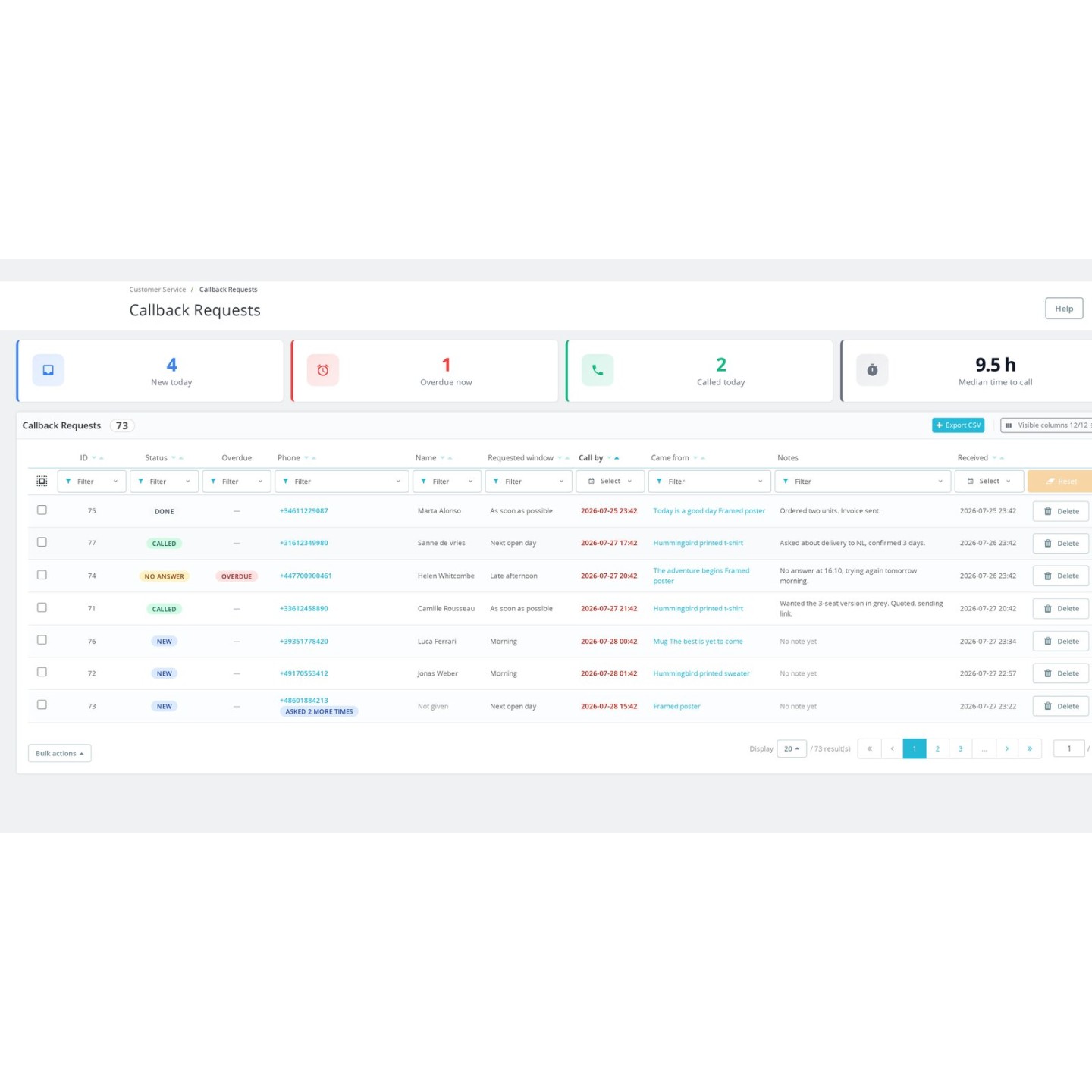


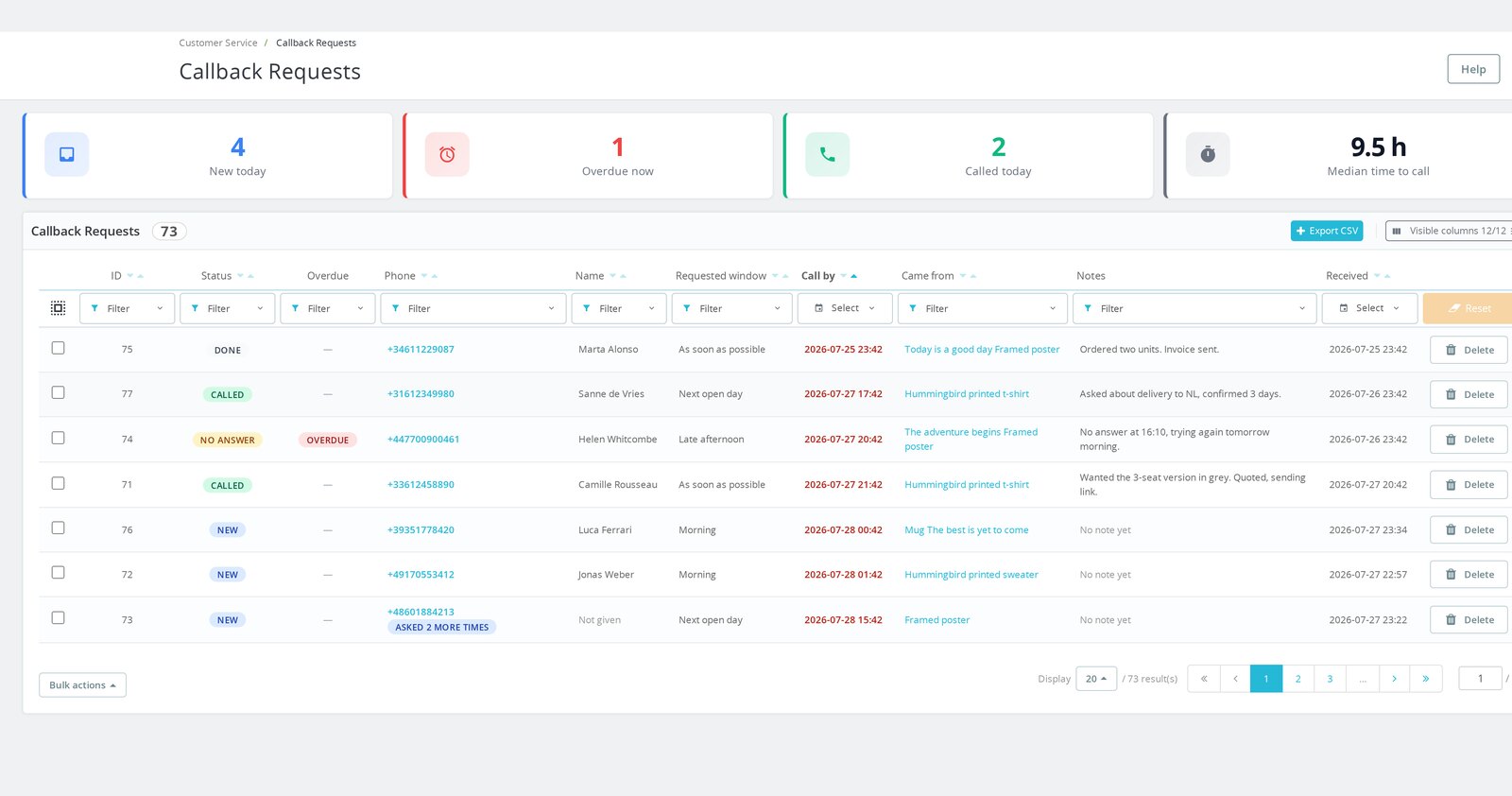
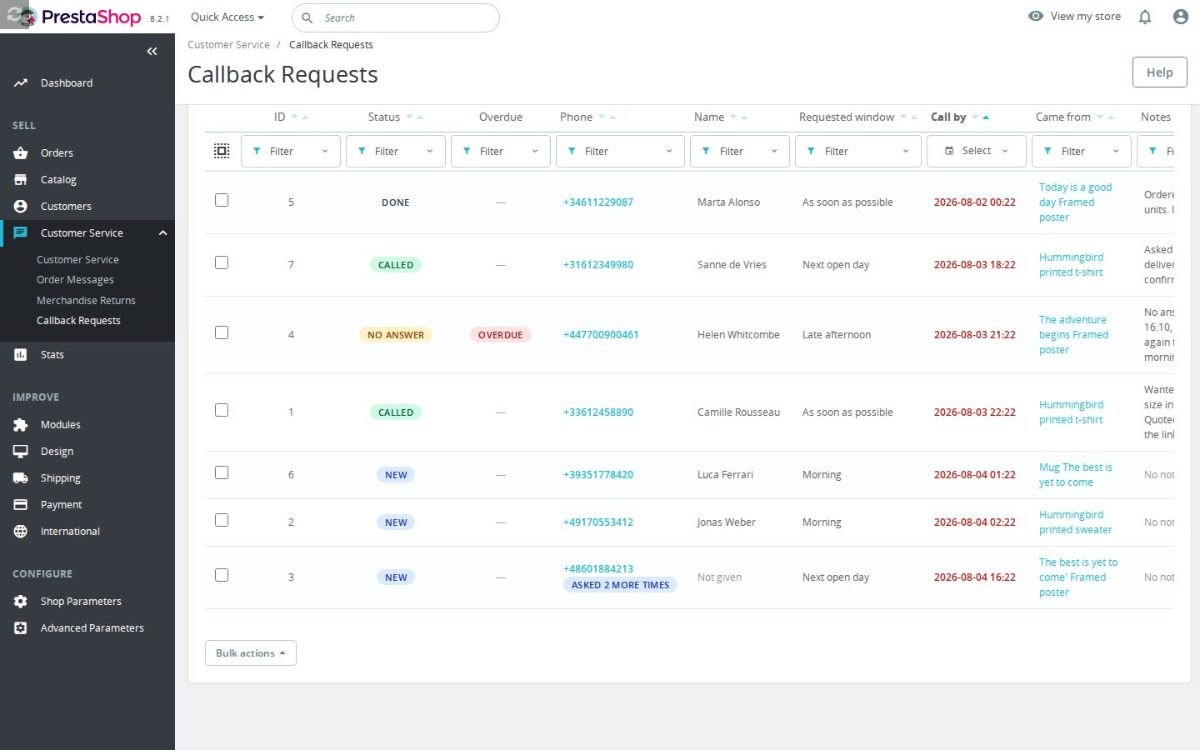
Callback Requests queue in the PrestaShop back office with statuses, overdue flag and click-to-call numbers


Callback Requests - Sales Call Lead Queue is a module for PrestaShop stores that collects callback requests and turns each one into a sales task with a promised time, customer context and clear status. After installation, enter the business hours; the shop email is already selected, and the button and queue are ready.
The module settles the part a basic callback form leaves open: who still needs a call, by when, and about which product. The customer receives a time based on real availability, while the team receives one shared lead with a deadline instead of an isolated message that disappears in a mailbox.
It is simple for the first request and detailed when the sales process grows. You choose working intervals, breaks, overnight shifts, exceptional dates and public holidays, then offer broad callback windows or exact bookable times. Form fields, translated wording, notification types and retention are controlled separately for each shop.
You also decide where the button appears, who sees it and how it looks. It sits in a floating corner, the header, beside Add to cart or a theme position, with rules for products, categories, pages, stock, price, login state and customer group. Colours, dimensions, spacing, a custom icon and phone visibility fit it to the storefront. Each lead carries the source page, product and variant into a filterable queue with notes, account links, team statuses, reminders and export.
You gain more phone-ready sales leads, callback promises the team is scheduled to keep, fewer forgotten requests and evidence of every accepted consent. Duplicate requests become one actionable contact, while overdue work remains visible until the conversation is resolved.
Summary of what the module offers
Callback Requests - Sales Call Lead Queue adds a callback button to a PrestaShop store and turns every request into controlled sales work. Basic operation starts with the shop's hours and notification address, while the scheduling, form, targeting, design, workflow and privacy settings support a larger team and several shops.
- Credible callback times: weekly hours, split shifts, overnight work, exceptions, public holidays, broad windows and exact bookable slots.
- One working queue: deadlines, live overdue state, click-to-call numbers, account links, statuses, notes, bulk handling and filtered export.
- Useful sales context: source page, product, variant, language and placement arrive with the request.
- A form that fits the business: selectable and required fields, translated labels, international phone handling and recorded consent.
- Precise storefront control: several placements, page and audience rules, visual settings, custom icon and phone visibility.
- Follow-up and privacy: separate notification controls, recovered delivery, overdue reminders, consent evidence and automatic retention.
Which callback times does the customer receive?
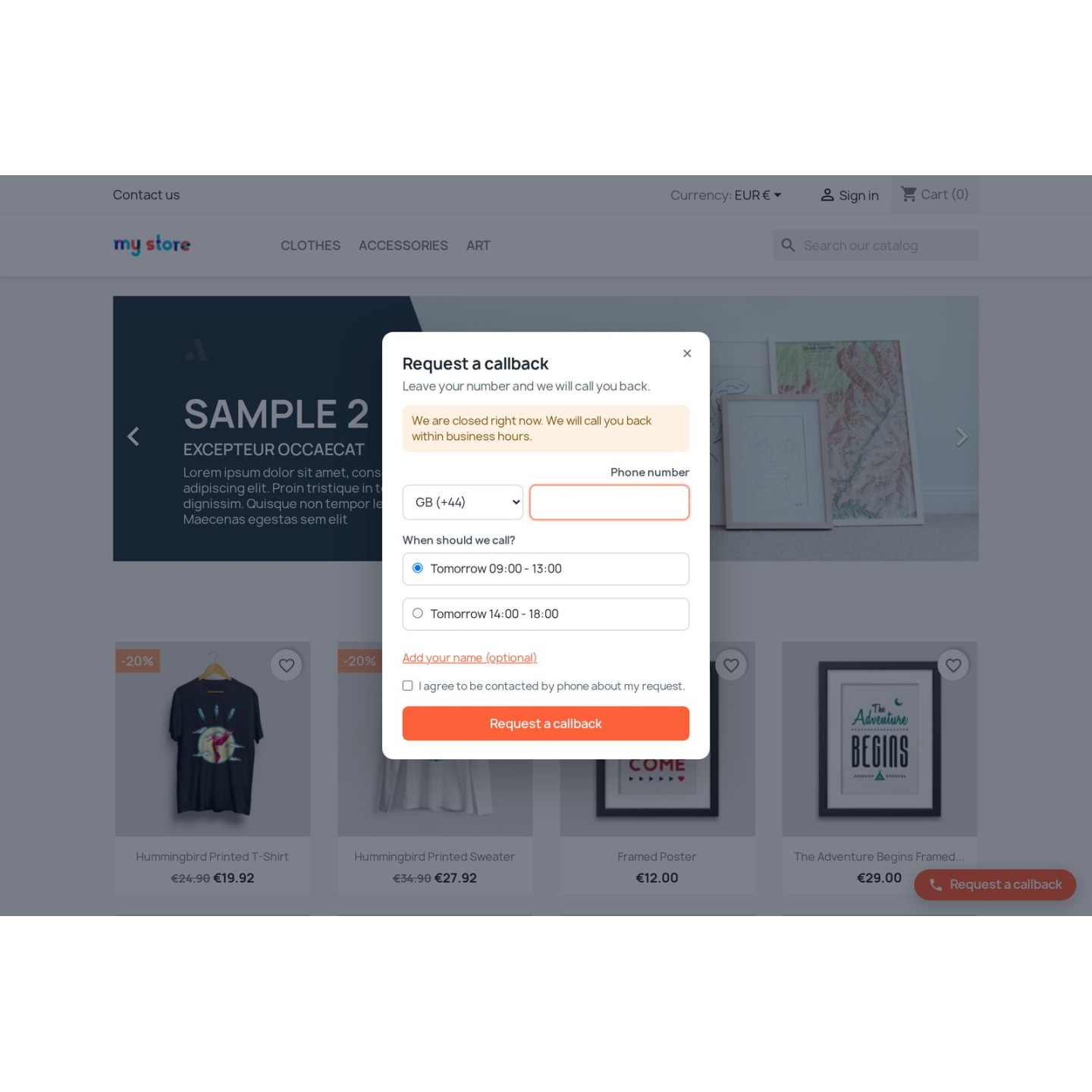
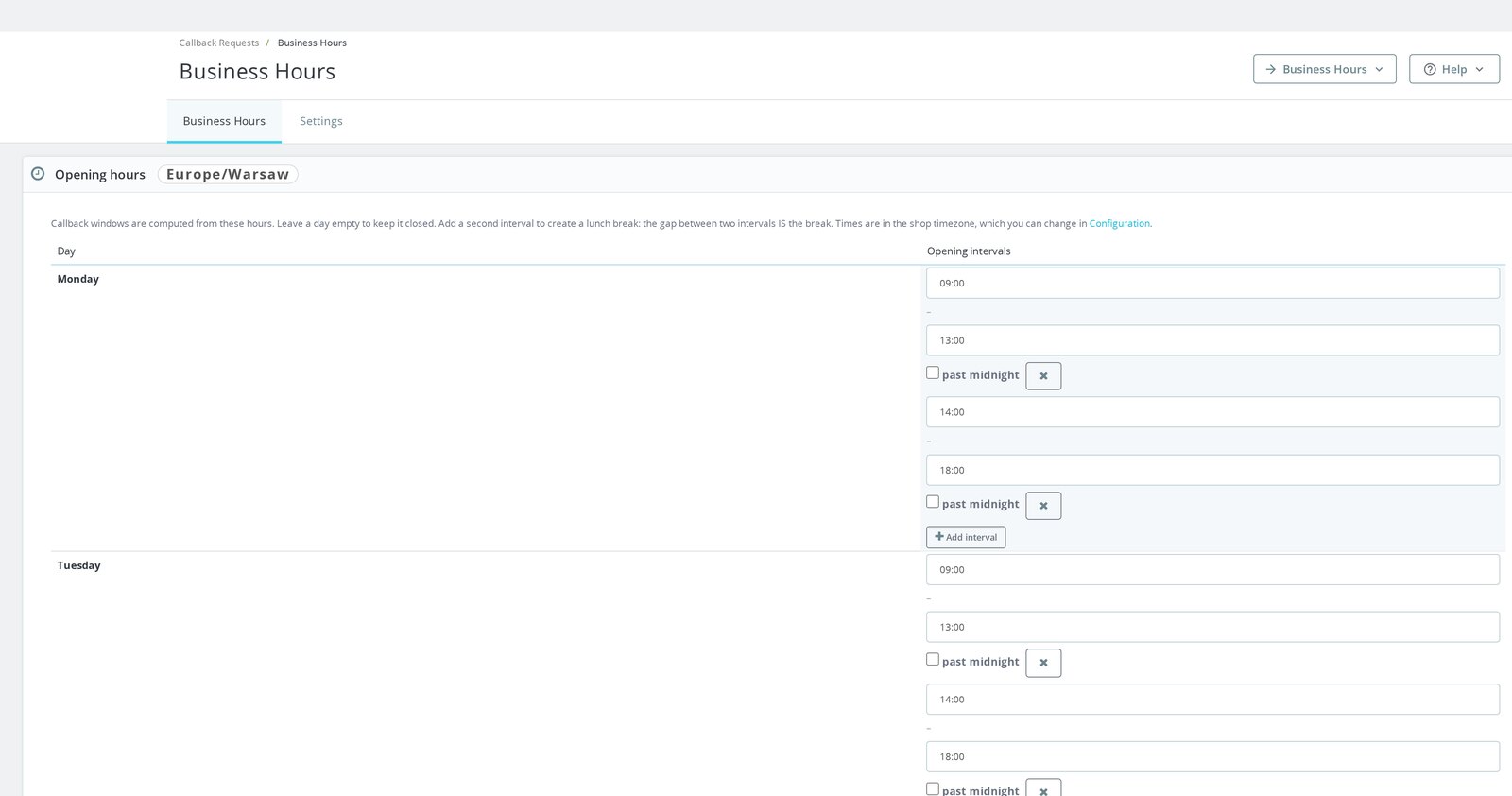
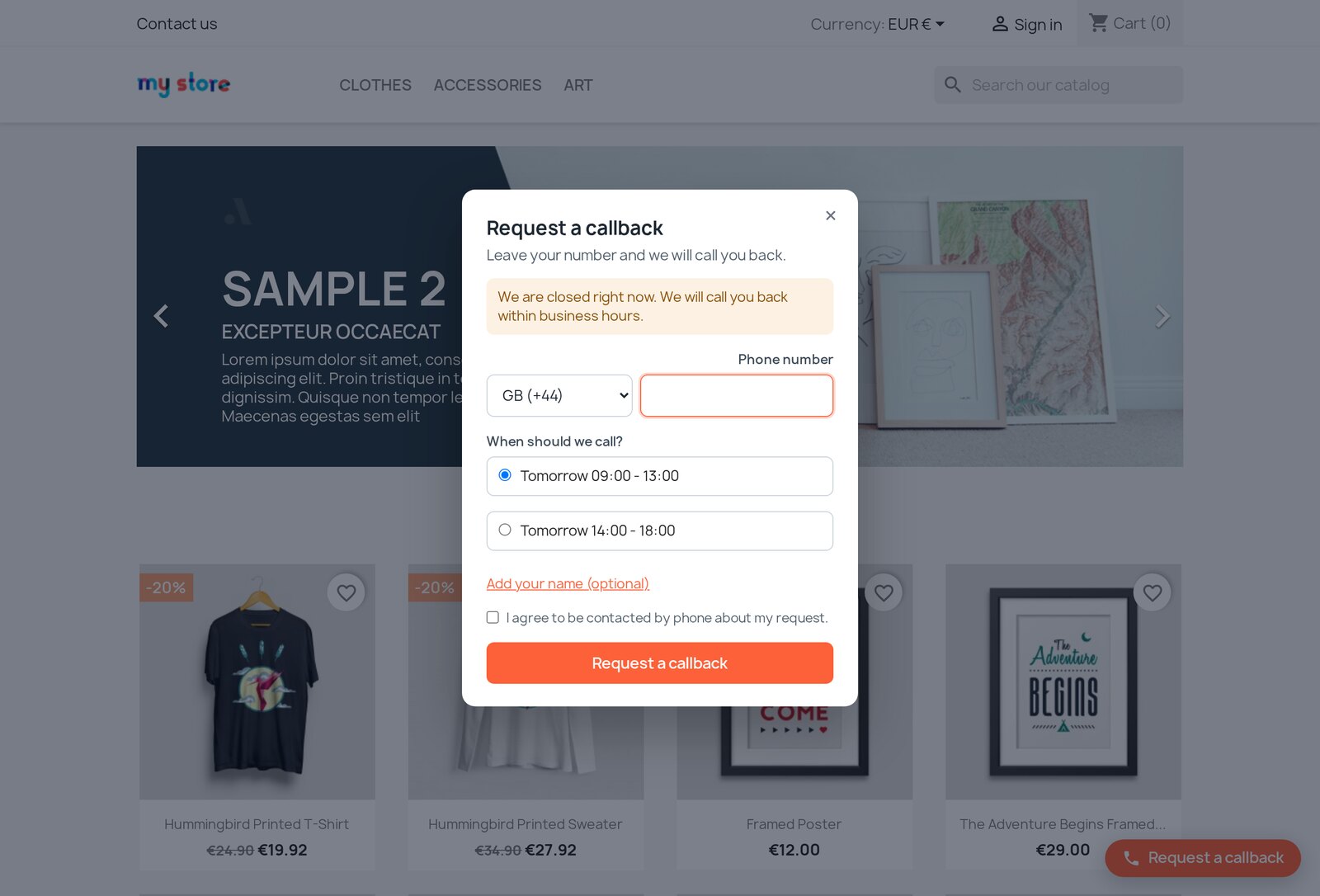
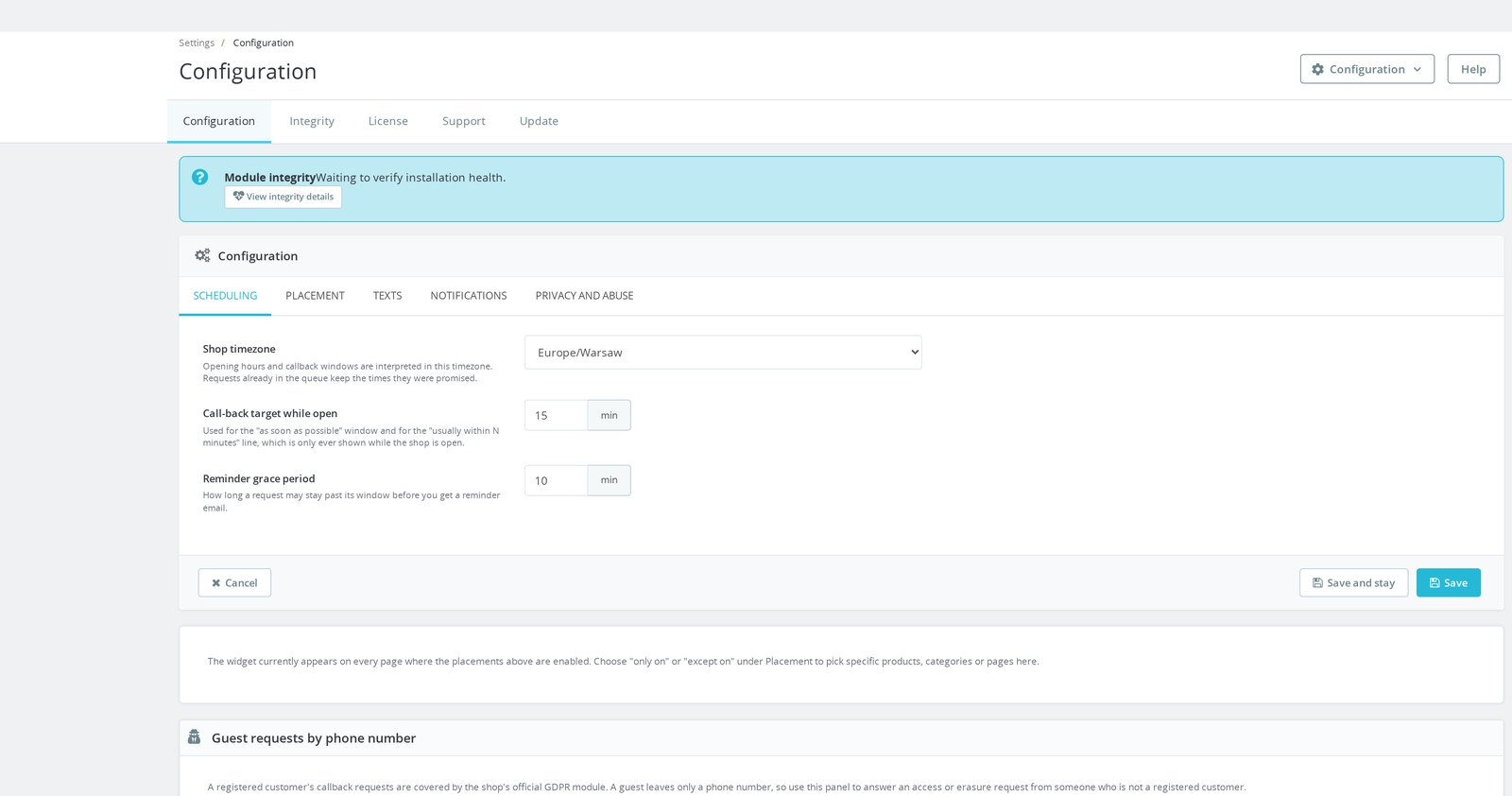
The form offers times calculated from the hours the team actually works. Each weekday holds several intervals, so a gap becomes a lunch break, a day stays closed when it has no interval, and an evening shift continues past midnight. The shop timezone keeps the promise consistent when clocks change.
Exceptional dates replace the normal schedule for a closure, stocktake or special opening. Public holidays for a selected country and year enter the calendar together, and a live preview shows the same choices a customer receives at that moment. The merchant offers simple choices such as as soon as possible or the next open day, or exact slots generated only inside available intervals.
Availability is refreshed when the form opens and checked again when the request is sent. An old page therefore never creates an expired promise, and the deadline shown in the queue is the end of the same window confirmed to the customer.
How does the team keep every promised call under control?
Every request becomes a row under Customer Service with a clickable phone number, requested window, call deadline, source, notes and received time. Overdue state is calculated when the list is viewed, so a missed deadline appears immediately. Four figures above the list show new requests today, overdue requests now, calls completed today and the median time to call.
The workflow covers New, Called, No answer, Recall, Cancelled and Done. Status and notes change directly in the list, bulk actions process a group of requests, and filters narrow the work by status, deadline, product or date. A signed-in buyer's row links to the customer account, while the current filtered result exports to CSV for reporting or handover.
Repeated submissions from the same number and customer identity become one lead inside the selected duplicate period. The row records the extra attempts, fills in missing product context and keeps the earlier deadline when the later request is more urgent. The team therefore calls one person once without losing the strongest promise.
What information reaches the salesperson with the request?
A lead from a product page carries the product and variant, localized product name, page address, page type, language and button placement. That context comes from the page itself and is protected before storage, so the customer never rewrites the request to look as though it came from another product. The call begins with the item already known.
The merchant builds the form around the sales conversation. Phone, callback time and consent remain the foundation, while name, email, company and message fields are enabled, required, labelled and ordered as needed. Button text, form title, introduction, consent wording and confirmation are written separately for every store language.
The country selector accepts local or international input and stores one consistent international number. Invalid prefixes and impossible lengths are rejected before the lead enters the queue. The exact consent wording accepted with the request is stored with its date and protected proof.
Where does the button appear, and who sees it?
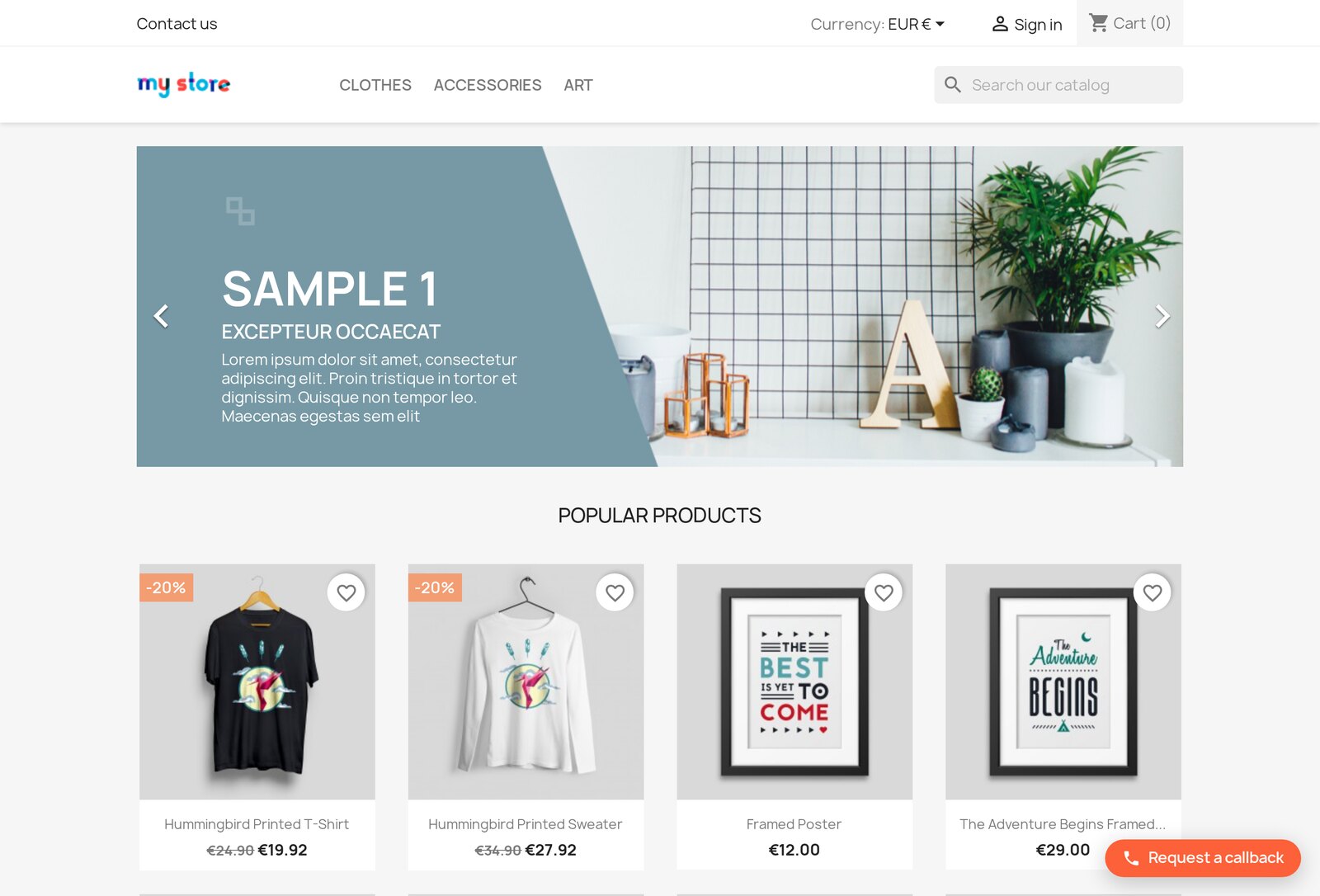
You choose a floating button in any corner, a header position, a button beside Add to cart or a position provided by the theme. Each placement has its own switch. Inclusion and exclusion rules then restrict the button to selected products, categories and content pages, or keep it away from them.
Product rules also use price, stock state and quantity. Audience conditions distinguish guests from signed-in customers and target selected customer groups, so a wholesale enquiry reaches a different form than a retail visit. Each shop keeps its own placements, recipients, schedule and text.
Colours, border radius, form width, spacing and launcher dimensions are set in the module, together with a custom phone icon or image. A separate phone switch hides the launcher on small screens when space matters. The default design is responsive from installation, while the visual controls bring it into line with the storefront without changing the theme.
What happens after a request is submitted?
The request is saved together with its notification, then the first message is sent immediately to the selected addresses. New-request, deadline-change and overdue messages have independent switches. Temporary delivery failures remain queued for another attempt, and an overdue reminder is created after the promised window plus the chosen grace period.
Every request preserves the consent sentence the customer accepted, its date and protected evidence. Registered customers use the store's privacy export and erasure process, while guest records are found, exported or permanently erased by a validated phone number. Automatic retention removes requests and their notification history after 30 or 90 days.
A hidden bot field, submission timing checks, request limits and protected form data keep automated abuse away from the sales queue. Network addresses are not stored in readable form. Lead, schedule and notification data stay in the shop, with no external calling service or off-site lead database.
-
Referencemprcallback
-
In stock2147483647 Items
-
PrestaShop CompatibilityPS 1.7 – 9.x
-
Pricing ModelOne-time Purchase
-
Module TypeFront & Back-office
-
GDPR RelevantIncrease Traffic
-
Business GoalBoost Conversions
-
External Account NeededNo
-
Module ComplexityFeature-Rich Module
-
Customer Journey StageEngage Shoppers
-
Works With PlatformNo External Platform
What customers say about us
Company reviews
5.0
★
★
★
★
★
(4 reviews)
Loading customer reviews...
No product reviews yet
Be the first to share your experience with this module.
Write a Review
Installation
- Upload the ZIP through Modules > Module Manager > Upload a module, or extract it into
/modules/mprcallback. - Install it. The module creates its own tables, registers its hooks for your PrestaShop version and adds a Callback Requests entry under Customer Service.
- Open Callback Requests > Business Hours and set your opening hours before anything else. Until you do, the widget has no window to offer and will not accept requests. This is deliberate: it is better to accept nothing than to promise a call you were never going to make.
Have a question about this product?
Our experts are here to help. Ask anything about installation, compatibility, or specifications.
1301
questions
9
categories
2013
building modules since
1.6–9
PrestaShop versions
v1.0.02026-07-28
- Initialrelease
- InitialBack-office callback queue with a filter on every column, computed overdue indicator, inline status and notes, click-to-call links, bulk actions and filtered CSV export
- InitialCallback windows computed from your opening hours, with breaks, exception dates, imported public holidays, per-shop timezone and daylight-saving handling
Loading full changelog...
Works Well With Callback Requests
Modules our team genuinely pairs with this one, and exactly why each belongs in the same setup.
Complement
Answer the predictable questions on the page and keep the phone for the ones that actually need a person. Fewer calls, better calls.

Complement
A callback request is personal data and so is the tracking on the same page. One module records the consent for the call, the other governs the consent for the visit.

Complement
A shopper stuck on a product page either types the question or asks to be called. Run both and you stop losing the ones who will not write.

Complement
The two halves of "contact us": a form for people who will type, and a callback for people who will not. Both land somewhere you can work rather than in an inbox.
Loading feature requests...
 30 days return right
Easy return - no questions asked
 Plug & Play Modules
Install, set up and take profit
 Dedicated Support First
Priority Help & Satisfaction Over Sales
You might also like


