


Capture clearer store inquiries with a custom PrestaShop contact form and saved submissions


Better Contact Form is a module for PrestaShop stores that turns the contact area into a complete enquiry and support centre, with purpose-built forms, a managed message list and a full business contact page. Installation creates a ready multilingual form, so the first launch needs only a recipient address, shop details and one contact-page switch.
Returns, quotations, product questions, trade applications and service requests need different facts. The module gives each process its own form, collects the order number, company details, product context or attachment before submission, and sends the message to the responsible department instead of starting another round of questions.
The visual builder combines a live preview with drag ordering, conditional questions and multi-step forms. Its field library covers text, email, phone, lists, radio choices, checkboxes, dates, numbers, addresses, ratings, sliders, hidden context and secure file attachments. Required fields, validation, multilingual confirmations and the destination after submission are set separately for every form.
Forms appear on the main contact page, product pages, content pages, selected theme positions or in a popup. The contact page also presents address, phone, WhatsApp, current opening status, map, social links and frequently asked questions, while automatic colour matching makes the result part of the shop. Separate language and shop settings provide detailed control as the business grows.
The benefits are complete enquiries at first reading, real leads preserved during spam filtering, clear ownership of every reply, fewer repetitive support questions and a module that starts simply while remaining powerful to configure.
What does Better Contact Form organise?
Better Contact Form replaces a generic contact area with purpose-built forms, a complete business contact page and a managed workflow for every submission. It collects the facts each team needs, keeps suspected spam reviewable and follows a genuine enquiry through to its reply.
- Separate forms for support, returns, quotations and trade enquiries
- Complete requests with conditional fields, context and attachments
- Invisible spam protection with a reviewable quarantine
- Business details, opening hours, map and answers on one contact page
- Assignment, replies, deadlines, history and export in the administration panel
- A ready first form with deep multilingual and multistore control
The sections below cover form design, spam handling, the customer-facing contact page, the team workflow and the path from quick installation to detailed configuration.

How does each form collect an answerable enquiry?
The visual builder arranges fields by dragging them into place and shows the form exactly as it appears in the shop. Short and long text, email, phone, lists, radio choices, checkboxes, dates, numbers, addresses, colour, ratings, sliders, location, hidden values and secure attachments cover enquiries from a simple product question to a detailed trade application. Every field has its own required state and validation, with a separate label and help text in each store language.
Conditional rules show only relevant questions, while a longer application is divided into clear steps. Hidden fields add the current product, customer and shop, and a form also accepts signed-in customers only when the process requires it. Department routing sends the result to the responsible people. Submission finishes on the same page with a tailored confirmation or continues to a selected destination, and customer and merchant email content is edited separately for every language.

How does spam protection keep real leads reviewable?
Several layers work before a notification reaches the team: a hidden trap, a minimum completion time, an hourly limit per visitor address, blocked sender addresses, blocked network addresses and blocked terms. A signed form check rejects forged requests, while optional visible verification adds another barrier to forms exposed to unusually persistent attacks.
A suspicious submission does not vanish. The module stores it in quarantine, marks it as spam and records every reason behind the decision, but suppresses the normal notification. Staff therefore retain the chance to recover a genuine quotation or wholesale lead without letting the daily inbox fill with automated messages.

What belongs on the contact page besides the form?
The page brings together the shop address, phone, email, WhatsApp link, social profiles, interactive OpenStreetMap and the weekly opening schedule. The status follows the selected timezone and handles hours that continue past midnight, so a visitor sees whether the business is open now rather than interpreting a timetable.
A multilingual editor maintains opening hours, social links and frequently asked questions in the same place. The visible business and question data is also prepared for search engines, which keeps the information they understand aligned with the page customers read. Automatic colour detection supplies a coherent starting design, and detailed controls cover spacing, borders, corners, shadows and contact-channel colours.

How does the team take an enquiry from arrival to reply?
Every submission is stored with its form, values, attachments, customer, shop, product context, time and spam findings. The dashboard separates new, legitimate and suspicious messages and shows activity by form. Staff mark an enquiry as important, assign an owner, set a response deadline and reply directly from the administration panel, where the sent message and status change remain in the history.
Delivery results show whether merchant notifications and customer acknowledgements arrived, with retries for failures. The same enquiries export to a spreadsheet, enter the customer service history in PrestaShop and travel automatically to the chosen customer-management or business system. A staff change therefore does not turn active cases into orphaned email threads.
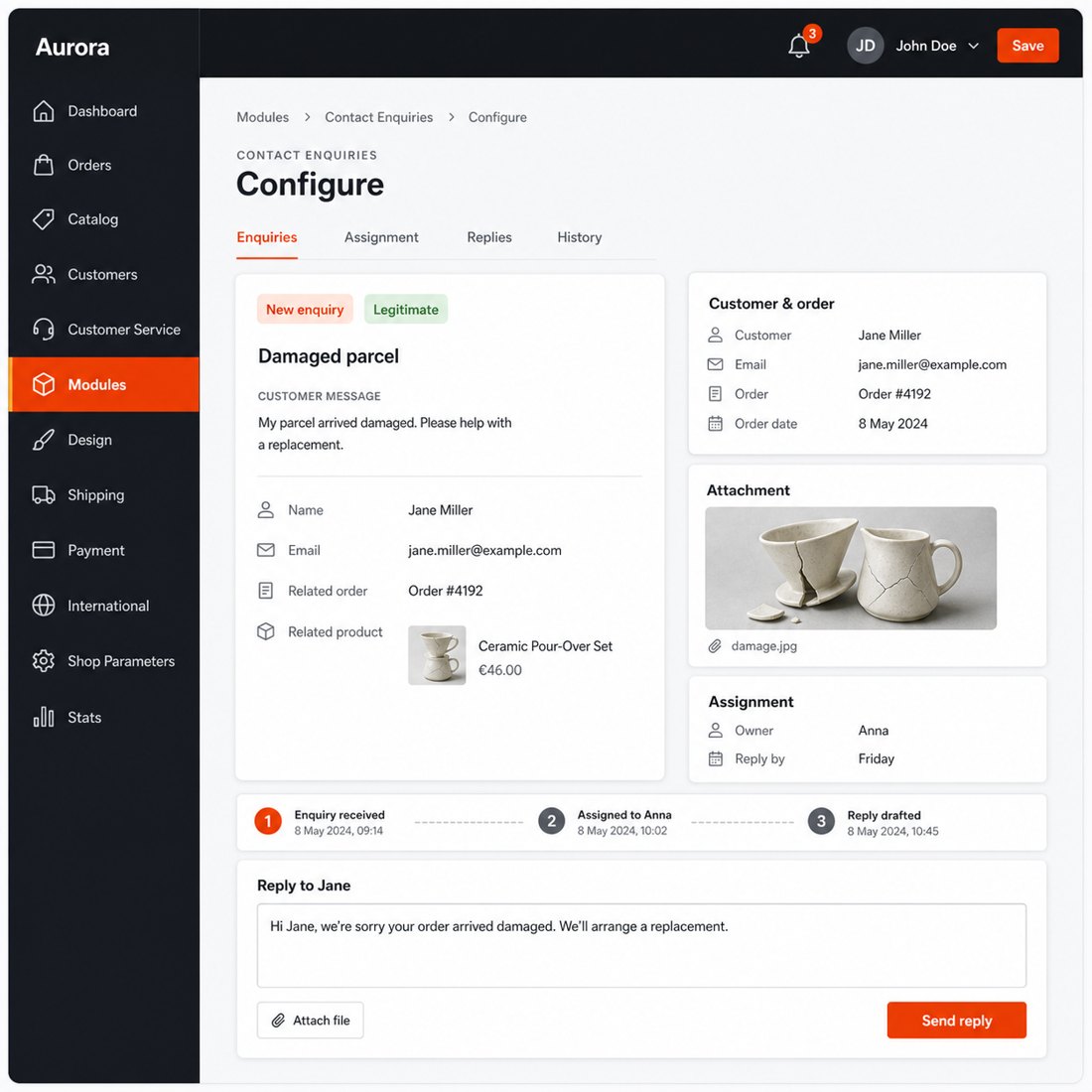
How quickly does it start, and how far does configuration go?
Installation creates a working multilingual form with the usual contact fields, consent wording, merchant notification and customer acknowledgement. One setting places it on the main contact page, while placement controls add selected forms to product pages, content pages, theme positions and popups. A straightforward shop therefore starts with a recipient address and business details.
Deeper control remains on the same side of the module: reusable form definitions, per-language content, shared or separate multistore settings, visual styling, selected post-submit destinations and import or export of complete form configurations. The built-in system check reviews forms, fields, recipient addresses, message templates and protection settings, reports gaps and repairs safe defaults.

-
Referencemprcontactform
-
PrestaShop CompatibilityPS 1.7 – 9.x
-
Pricing ModelOne-time Purchase
-
Module TypeFront & Back-office
-
GDPR RelevantNo
-
Business GoalCustomer Communication
-
External Account NeededNo
-
Module ComplexityFeature-Rich Module
-
Customer Journey StageEngage Shoppers
-
Works With PlatformNo External Platform
What customers say about us
Company reviews
5.0
★
★
★
★
★
(4 reviews)
Loading customer reviews...
No product reviews yet
Be the first to share your experience with this module.
Write a Review
Better Contact Form replaces the standard PrestaShop contact page when you want it to, and lets you build purpose-specific forms for support, returns, product questions, B2B requests and other customer workflows. Messages are saved in the back office, spam is flagged, and non-spam submissions can notify your team and the customer automatically.
Have a question about this product?
Our experts are here to help. Ask anything about installation, compatibility, or specifications.
1315
questions
9
categories
v1.4.82026-06-14
- FixedContact form stylesheet now loads on the native PrestaShop contact page (registered via actionFrontControllerSetMedia with a PS 1.6 link fallback)
Loading full changelog...
Works Well With Better Contact Form
Modules our team genuinely pairs with this one, and exactly why each belongs in the same setup.
Complement
Running Better Contact Form, you have multiple storefront forms for support, returns, quote requests and business messages, so shoppers send structured enquiries your team can act on. But many of those messages repeat the same questions about shipping, returns or compatibility, and answering them one by one is slow.
FAQ Manager works alongside the form as a separate self-service layer. It turns recurring questions into structured content connected to your catalogue, organised in categories with product assignments and translations, so customers can read the answer before they ever open a form.
Used together the two tools cover both sides of customer contact: clear published answers for the common cases, and clean structured enquiries for the rest. Shoppers who can self-serve do, and the questions that reach your inbox tend to be the ones that genuinely need a person.

Workflow
With Better Contact Form in place, your store collects clearer enquiries through dedicated forms for support, returns or quote requests, gathering the details your team needs before a conversation starts. The form is a good front door, but once a message needs back-and-forth you still want somewhere to track it.
Support Revolution adds a help desk workflow inside PrestaShop, where logged-in customers and staff handle questions with ticket history, customer identity and order context kept close to the data that matters. It is a separate tool focused on the conversation after contact, not the intake form itself.
Run alongside each other, the form handles structured first contact and the help desk handles the ongoing case. Staff work from real order and customer context rather than scattered emails, and shoppers get a clearer path from first question to resolution.

Complement
Better Contact Form gives your store several configurable storefront forms for support, returns, quotes and business messages, helping shoppers send the right details up front. Those forms are general-purpose, though, and a shopper deciding on one specific product often just wants to ask about that item without leaving the page.
Ask About Product covers that narrower moment. It adds an Ask a question button near the product details and opens a popup form with name, email and message fields, keeping the product context inside the enquiry so your team knows exactly what was being viewed.
Together they cover the full enquiry range: broad multi-topic forms for support and business messages, plus a focused product-page question route at the point of buying doubt. Fewer hesitations end as silent exits, and each enquiry arrives with the context that makes it faster to answer.

Governance
Better Contact Form opens up several storefront forms for support, returns, quotes and business messages, which is exactly the kind of public form that attracts automated spam. Once forms are easy to reach, bots find them, and staff time gets eaten triaging junk submissions instead of real enquiries.
reCAPTCHA & hCaptcha Protection is a separate safeguard that reduces and filters spam and bot submissions on the storefront forms bots target most, supporting reCAPTCHA v2, v3 and hCaptcha across contact, registration, login and newsletter checks. It does not read or clean your enquiry data; it screens submissions before they go through.
Running both, your store keeps rich contact forms open to customers while filtering out much of the automated noise. Genuine enquiries are easier to spot in a less cluttered inbox, and your team spends its time on people rather than bots.
 30 days return right
Easy return - no questions asked
 Plug & Play Modules
Install, set up and take profit
 Dedicated Support First
Priority Help & Satisfaction Over Sales
You might also like


