Integrations & Data Export

SendPulse Integration

PrestaShop contacts in SendPulse, separate newsletter and basket reminder choices, and scheduled opt-out checks.

Version
1.0.1
Improvements
23
Updated
PrestaShop
1.6.1 to 9
Price: Free

SendPulse Integration is a free PrestaShop module for merchants who send newsletters with SendPulse. It keeps consenting contacts current and records separate choices for newsletters and basket reminders. Setup starts with your SendPulse access details and the address books you want to use.

SendPulse holds your mailing contacts and runs your email campaigns in its own account. Your account and its conditions are separate from this free module. You prepare the messages and any reminder sequence in SendPulse.

The module is straightforward to connect and gives you control over what follows. You choose the address book for each purpose, confirmation options, reminder delay and how long cart records remain. Contact updates follow existing permission; creating an account does not subscribe a customer. You also edit the consent wording by language and choose when to start processing the work. Delivery starts switched off.

Customers manage their choices on a dedicated page linked from their account and checkout. Shop withdrawals are queued for SendPulse, while scheduled checks bring SendPulse opt-outs back into the module. Basket details feed your reminder flow; the email link lets shoppers review the basket, choose to merge it with their current basket or replace it, and confirm restoration.

Your permitted mailing contacts stay current, customers keep separate choices for different emails, and your team sees pending work and failures in the back office.

Pro account: €0.00 excl. VAT on approval, up to €0.00 excl. VAT depending on your purchases. Apply for a pro account

See the tiers
DiscountConditionThis product
−20% On approval €0.00 excl. VAT
−25% Average at least €1,000 in spending per month in the last 12 months €0.00 excl. VAT
−30% Average at least €3,000 in spending per month in the last 12 months €0.00 excl. VAT

By downloading, you accept the free-module terms and privacy policy.

In the box

  • Lifetime licence for one shop
  • Lifetime updates, including security fixes
  • No support included, available separately
  • PrestaShop 1.6.1 to 9

Recent changes

  • SendPulse Integration 1.0.1 brings the free download back, opens its configuration page on every shop and updates the shared components every module uses.
  • Fixes
  • The free download works again. Version 1.0.0 was refused at download because one of its shared components was older than the store requires.
Full changelog

How does SendPulse Integration keep email choices useful?

  • Contact updates. Email and available names follow the current customer, with existing permission.
  • Separate choices. Newsletters and basket reminders have their own consent and address book.
  • Confirmation. SendPulse must report Active with confirmation enabled, or New or Active with it disabled.
  • Basket reminders. Cart details and eligibility feed the email flow you configure in SendPulse.
  • Withdrawals. Shop opt-outs queue remote work; scheduled reads detect SendPulse opt-outs.
  • Oversight. Queues, failures, cart amounts by currency and the last worker activity in one panel.

SendPulse Integration connects your shop’s email preferences to SendPulse address books. A customer chooses newsletters and basket reminders separately, and the module records the wording they accepted. Your team sees whether contact work is waiting, accepted or failed. The connection serves the mailing relationship you already have with customers, with explicit permission for each purpose.

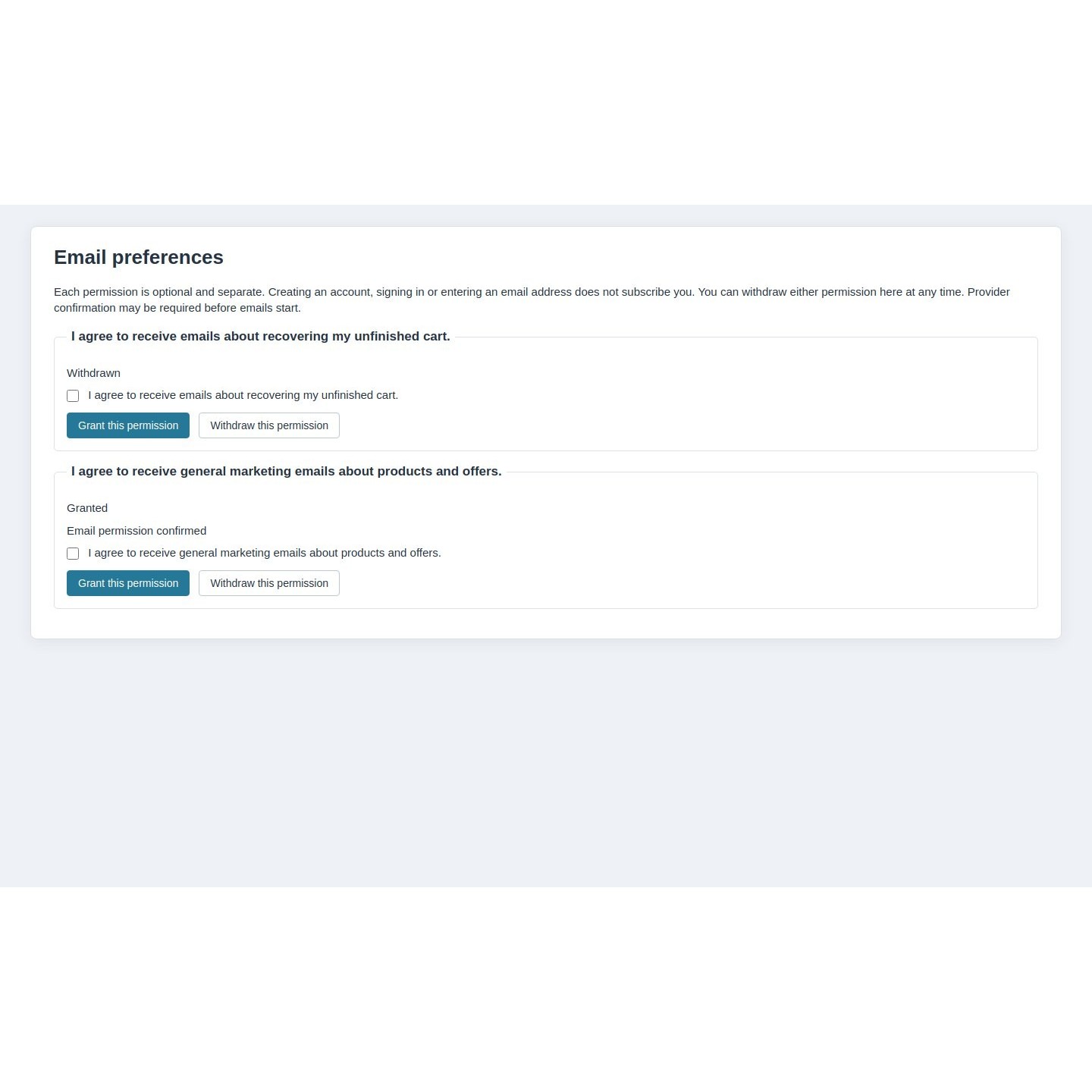
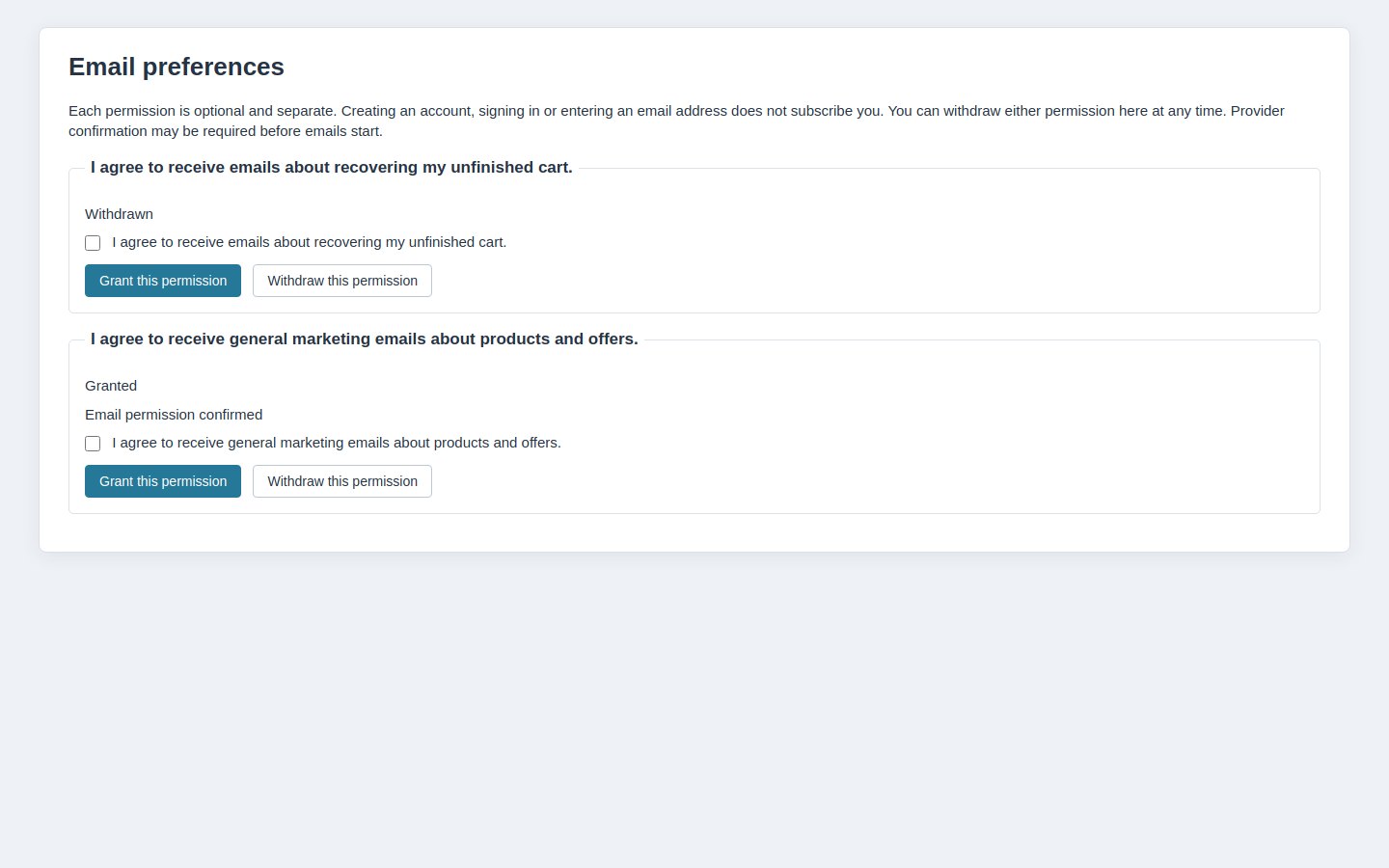
PrestaShop email preferences with separate newsletter and basket reminder choices and unchecked agreement boxes

Which customer details stay current in SendPulse?

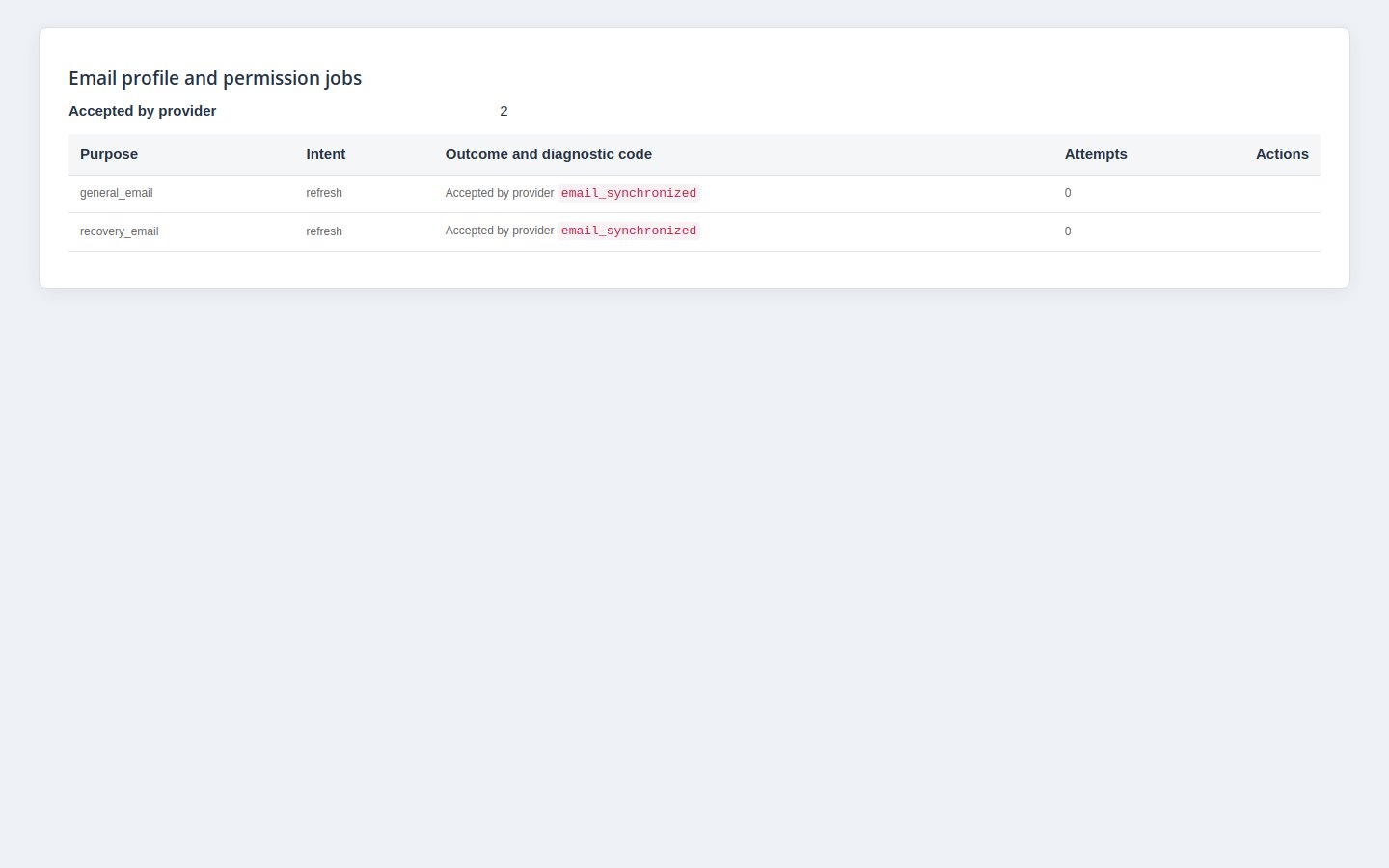
The module sends the customer’s email and available first and last names to the address book for the chosen purpose. When the current customer’s account details change, permitted profile updates enter background work. Refreshing a name does not subscribe the person again, and logging in does not create permission to email.

New membership requests follow your confirmation setting. With confirmation enabled, a submitted request remains pending until SendPulse reports the contact as confirmed. Existing SendPulse suppressions stay authoritative. The module follows known consenting identities; it does not import the whole customer database or turn the shop’s newsletter flag into consent.

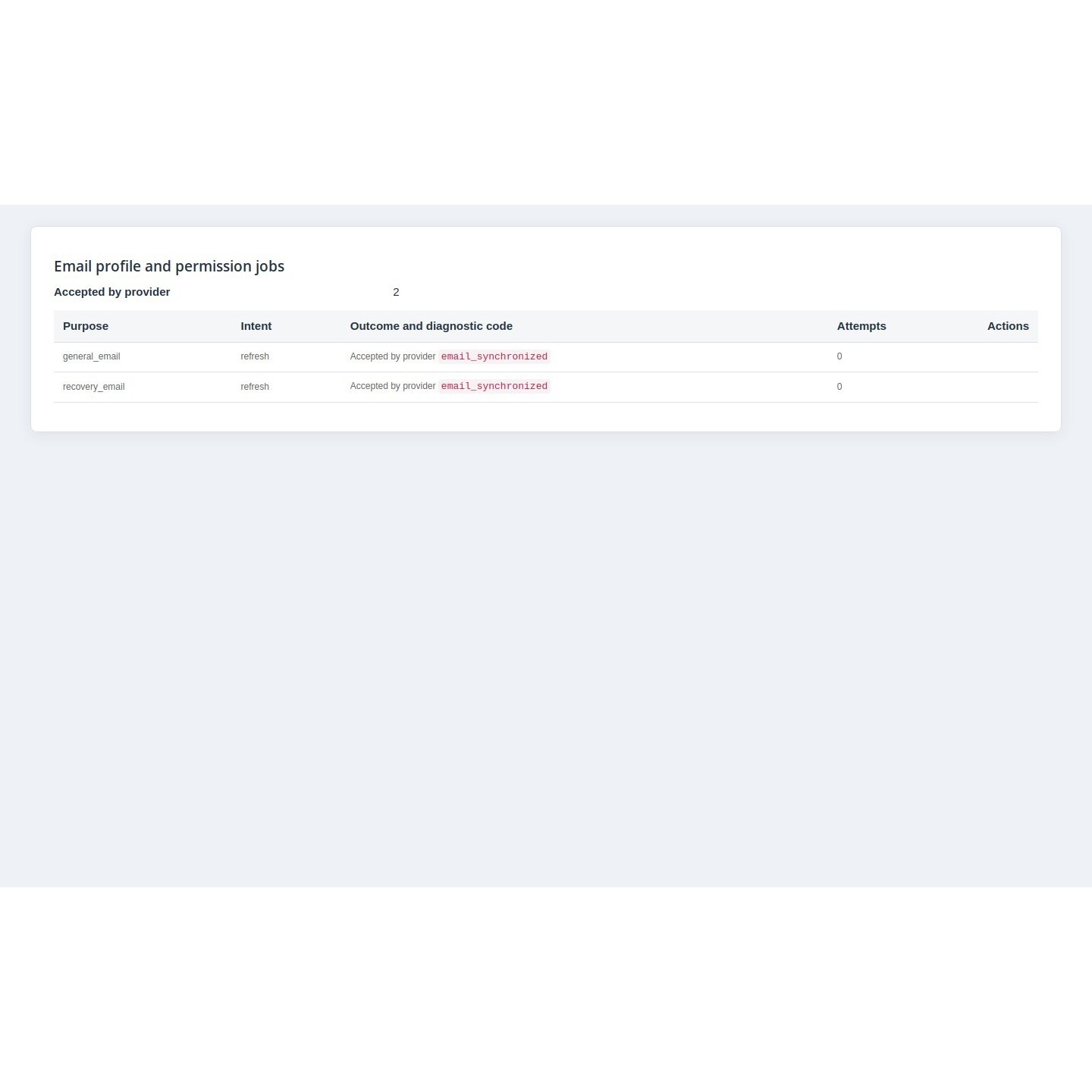
Contact synchronization jobs showing the purpose, intent and current confirmation or processing outcome

How do customers choose which emails they receive?

A link in the customer account and checkout opens a dedicated preferences page. Newsletters and basket reminders each have their own explanation, unchecked agreement box and withdrawal control. Choosing one purpose leaves the other independent. The customer makes an explicit choice rather than being subscribed by creating an account or accepting cookies.

You set separate SendPulse address books and edit the consent wording by language. The module keeps the actual wording, language, version and time of each recorded decision. That gives your team evidence of the choice made. It does not assess whether your wording or campaigns meet every legal obligation, and a cookie preference is never treated as email permission.

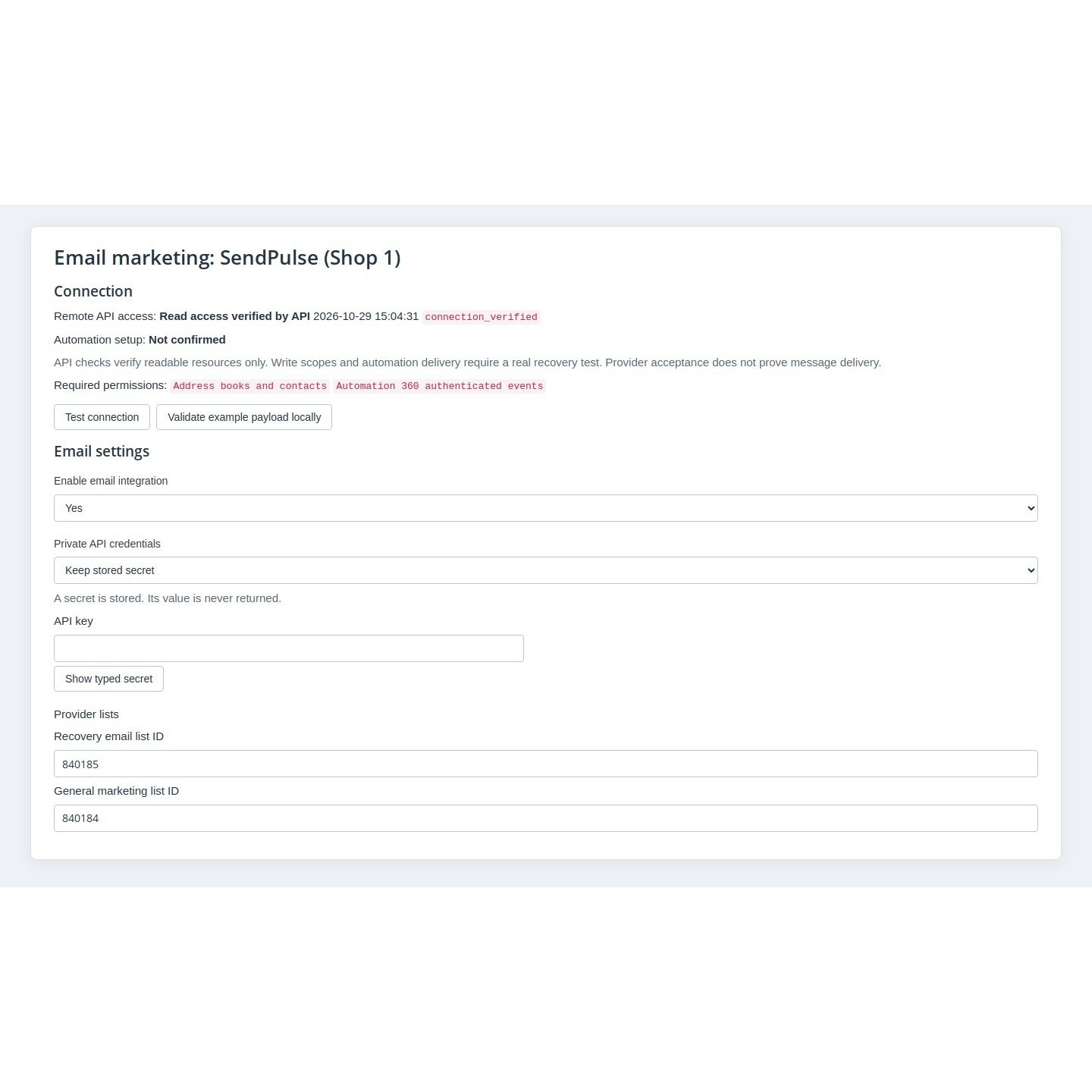
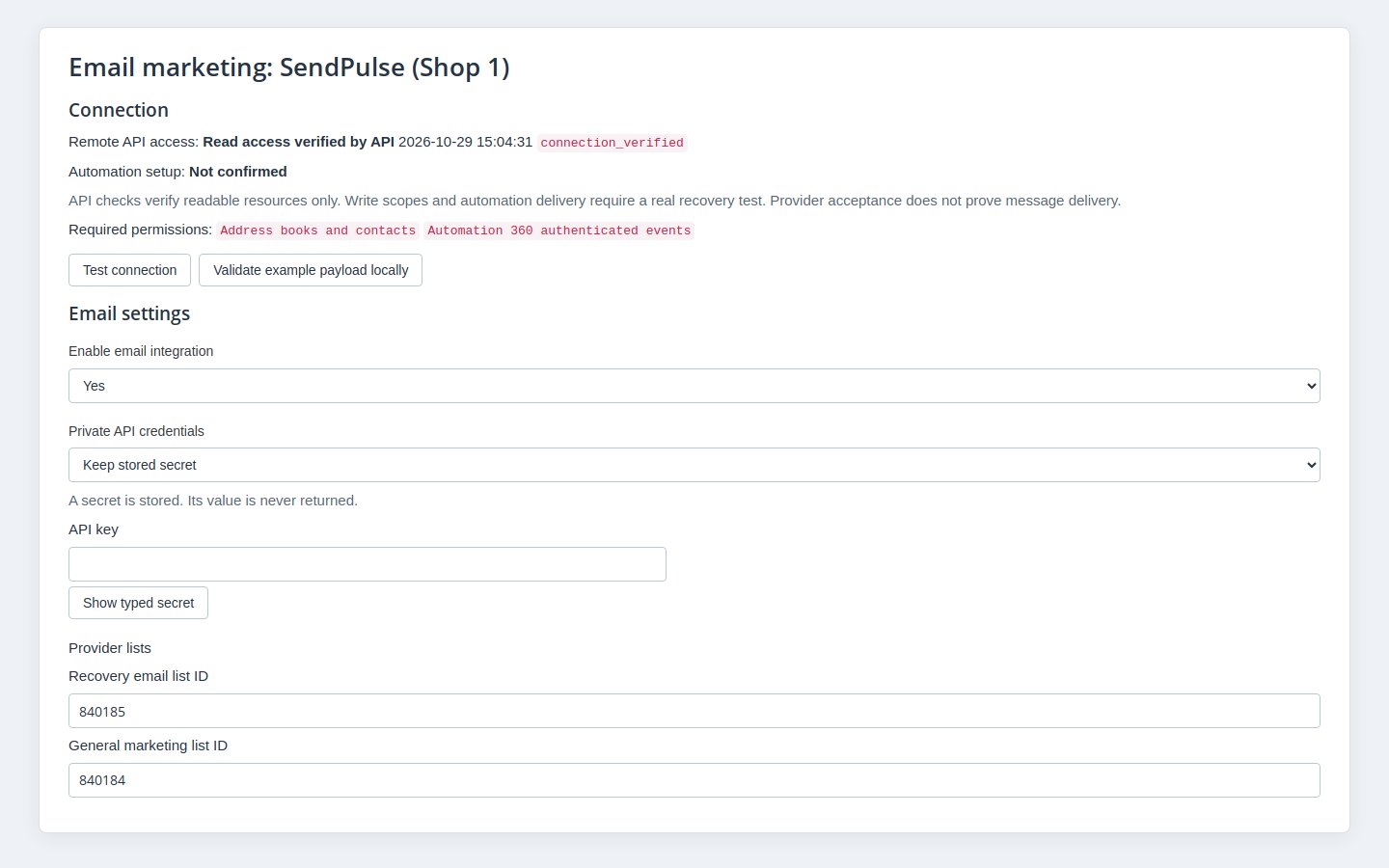
SendPulse connection settings with concealed credentials, separate address books and the read-access diagnostic

What does the module prepare for abandoned-basket emails?

After the inactivity period you choose, an eligible basket supplies SendPulse with its products, amount, currency and reminder link. The basket must still contain items, have no native order and have current recovery permission with a SendPulse status allowed by your confirmation setting. A newly eligible customer starts a fresh waiting period, so an old basket does not immediately trigger a reminder.

You build the reminder sequence in SendPulse and make it check current permission, basket eligibility and the current inactivity episode before each message. The module sends closing information when recovery stops. The reminder link is signed, specific to the shopper and time limited. Opening it changes nothing, so email link scanners cannot restore a basket. The shopper reviews the basket, chooses to merge it with the current basket or replace it, then confirms. Restoration rebuilds the basket with current prices and stock checks, including customizations and uploaded files. The connection check verifies read access, not a working reminder sequence or delivery to an inbox.

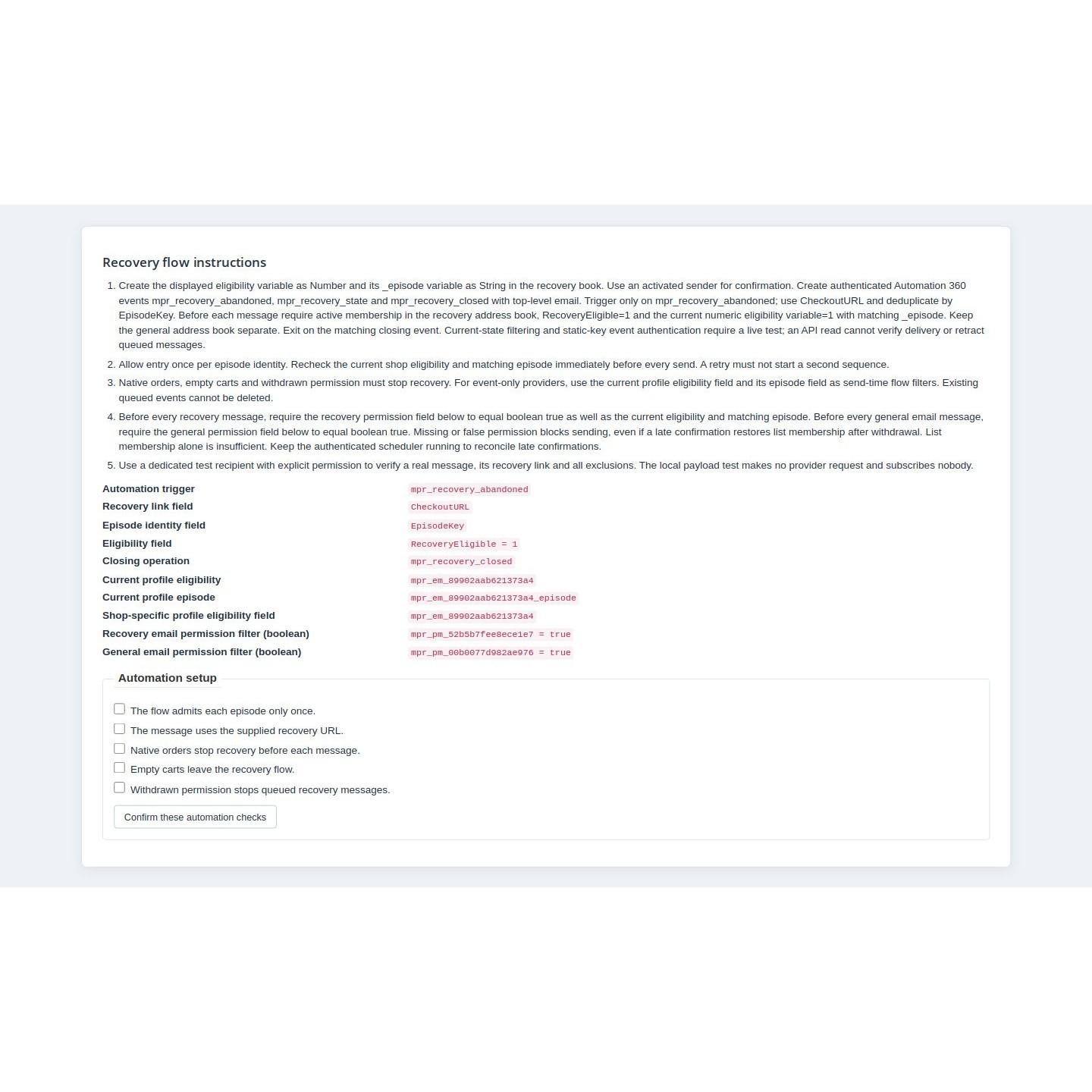
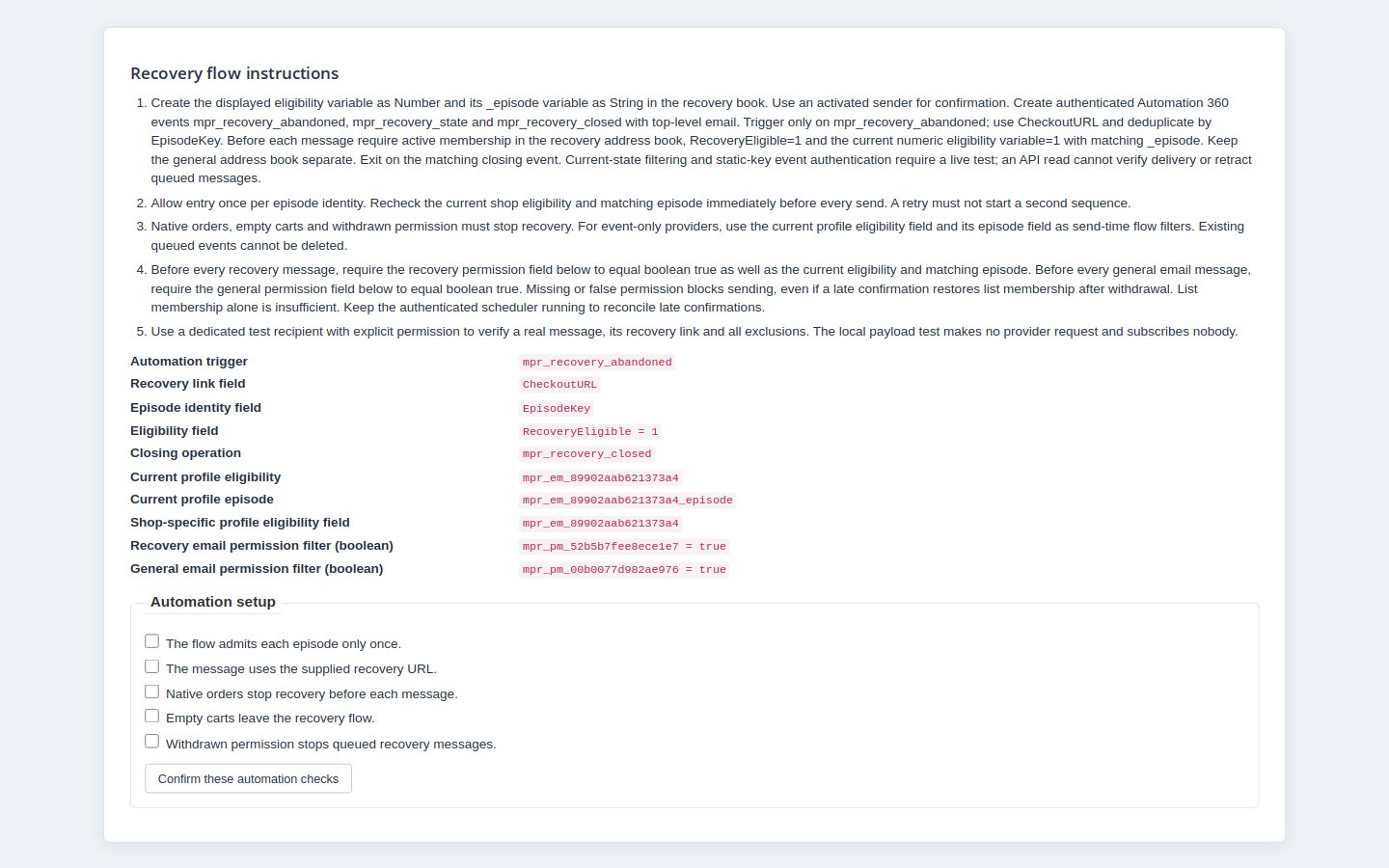
SendPulse recovery setup with the abandoned-basket trigger, eligibility fields and merchant verification checks

How are unsubscribes honoured in both directions?

Withdrawal on the shop’s preferences page blocks the selected permission locally and queues its SendPulse unsubscribe. Withdrawing basket reminders also invalidates the recovery links. Newsletter permission remains separate, so leaving one mailing purpose does not automatically withdraw the other. Remote work depends on the scheduled worker and the provider’s response.

The worker also reads SendPulse membership status and records detected opt-outs or suppressions as a local sending block. These are scheduled checks for known contacts, not instant notifications for every address in your SendPulse account. A new shop grant does not erase an existing SendPulse suppression. Messages already accepted by SendPulse cannot be recalled by the module.

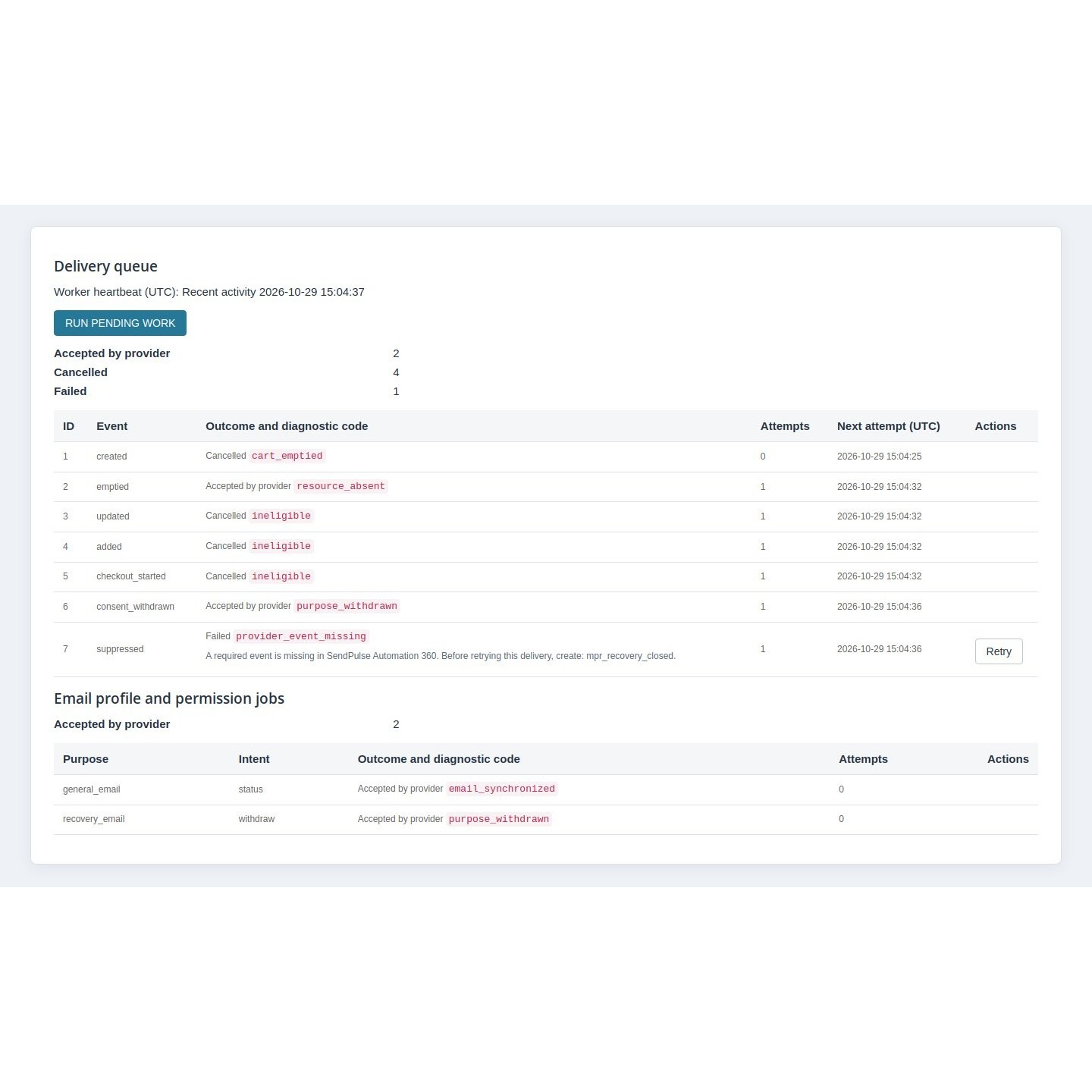
Purpose-specific withdrawal work in the SendPulse Integration back-office report

How does your team see what needs attention?

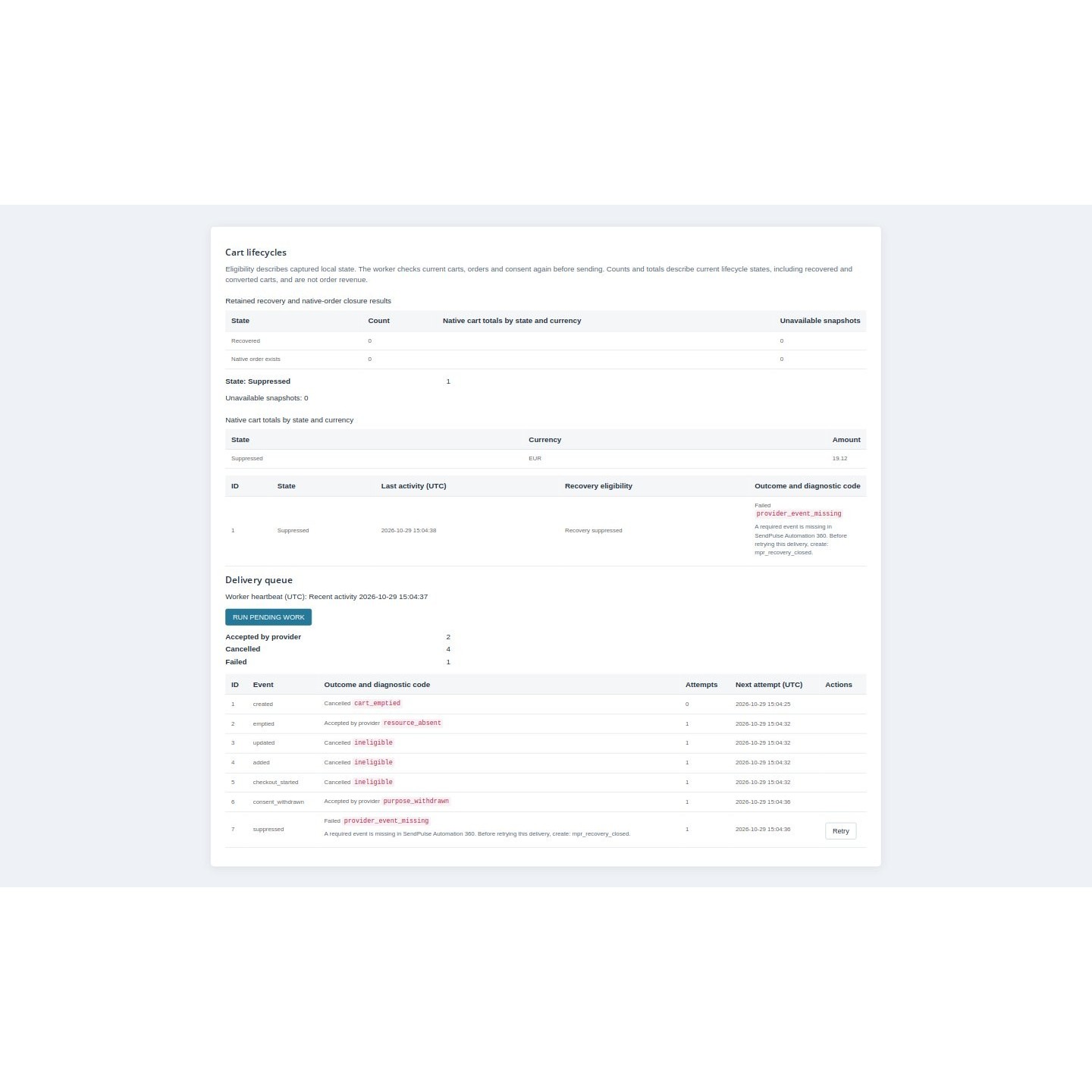
The configuration panel shows contact work, cart-event work, failures and the worker’s latest activity. You see the current captured eligibility and cart amounts grouped by currency, alongside retained recovery and order-closure counts. Those amounts describe carts; they do not attribute sales revenue to an email campaign or convert currencies.

You run pending work, retry eligible failures or cancel permitted work. An unclear SendPulse response stops automatic replay if the request might have been accepted. Your team checks the provider history before recording an outcome or authorizing a retry. Integration, profile updates and recovery start off; activation stays under your control.

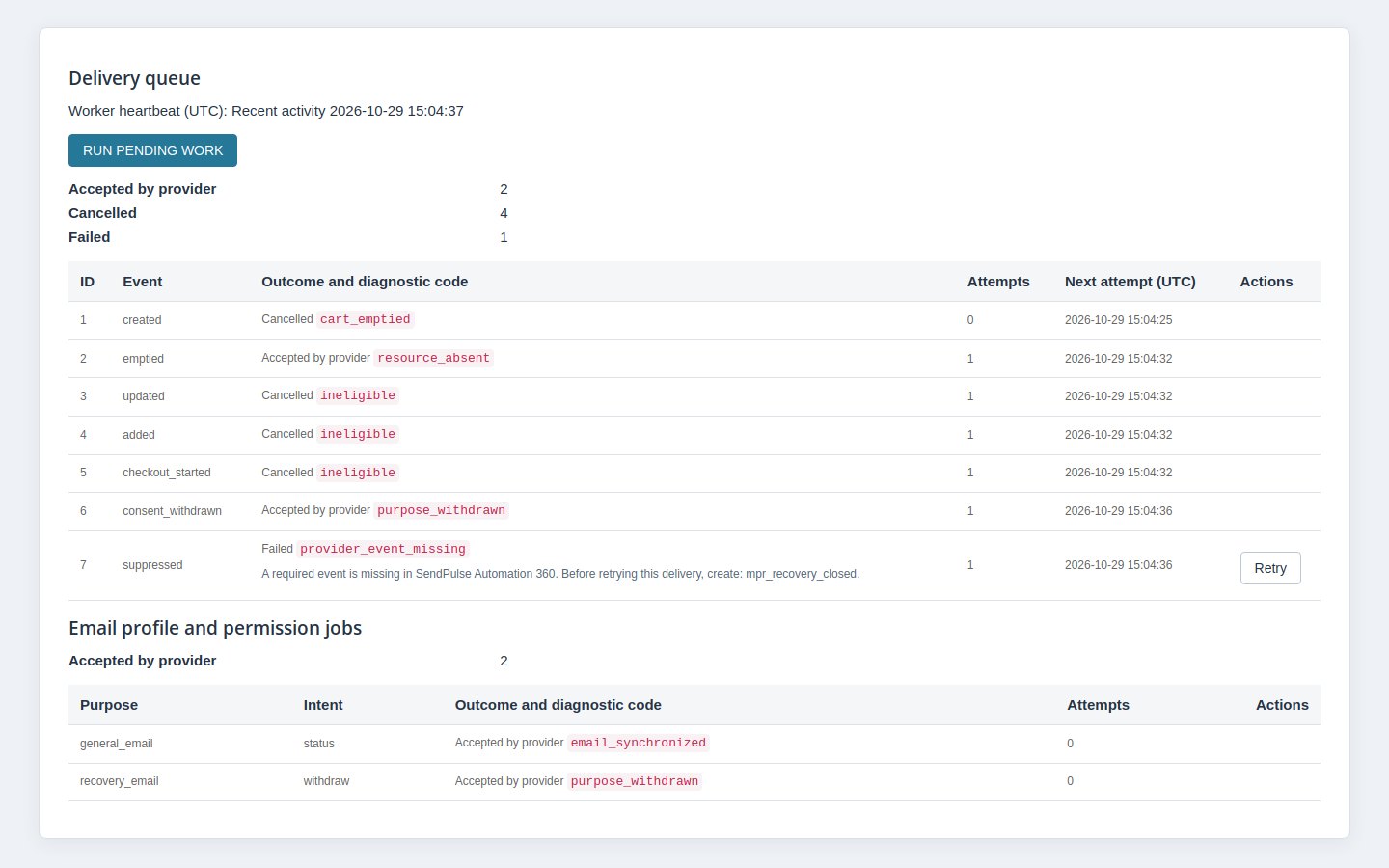
Cart states and amounts by currency, queue outcomes and worker activity in the module reports
  • Reference
    mprsendpulse
  • Version
    1.0.1
  • Improvements
    23
  • Released
  • Updated
  • PrestaShop Compatibility
    PS 1.6 – 9.x
  • Pricing Model
    Free
  • Module Type
    Front & Back-office
  • GDPR Relevant
    Yes
  • Business Goal
    Marketing & Retargeting
  • External Account Needed
    Yes
  • Module Complexity
    Feature-Rich Module
  • Customer Journey Stage
    Retain Customers
  • Works With Platform
    Email Marketing

What customers say about us

Company reviews
5.0 ★ ★ ★ ★ ★ (4 reviews)
Customer Reviews for PrestaShop Modules and Support

No product reviews yet

Be the first to share your experience with this product.

Write a Review

SendPulse Integration connects explicit PrestaShop email choices and permitted customer details to SendPulse. The module prepares cart-reminder events; SendPulse runs the email flow. The reminder link lets shoppers review their basket, choose merge or replace and confirm restoration.

Quick start

  1. Upload and install the release ZIP through the PrestaShop module manager.
  2. Open the module’s Configuration page and select the intended shop.
  3. Save the credential, purpose address books, confirmation settings and scheduler secret. Leave delivery off while checking the connection.
  4. Schedule an authenticated POST to that shop’s native scheduler URL. The web server must pass the Authorization header.
  5. Prepare the SendPulse flow and its current-state exclusions if using reminders. Validate contact work and a real email separately from the read-access test.
  6. Review the consent wording and privacy notice, then enable only the work you have checked. Exercise a shop withdrawal and a SendPulse opt-out. Test the reminder link with an account customer and a guest in the original browser, checking both merge and replace before confirmation.

Features

  • Contact updates. Email and available names follow the current customer, with existing permission.
  • Separate choices. Newsletters and basket reminders have their own consent and address book.
  • Confirmation. SendPulse must report Active with confirmation enabled, or New or Active with it disabled.
  • Basket reminders. Cart details and eligibility feed the email flow you configure in SendPulse.
  • Withdrawals. Shop opt-outs queue remote work; scheduled reads detect SendPulse opt-outs.
  • Oversight. Queues, failures, cart amounts by currency and the last worker activity in one panel.

Configuration options

  • Integration, profile synchronization and recovery: separate switches, all off initially. Profile refresh follows existing local grants. Enabling a switch does not grant customer permission.
  • Credential: the SendPulse API_key is used as a bearer credential. Saved secrets are concealed. Keep, replace and clear are explicit operations; replacement needs the full credential.
  • Address books: general_list_ID for newsletters and recovery_list_ID for reminders. Use dedicated books for this shop. Either purpose may be unused; both require different positive numeric IDs.
  • Confirmation: enabled unless explicitly disabled. Set an activated sender_email, message_lang and optionally template_id. Accepted language codes are en, ru, ua, tr, es, pt. Storefront consent translations do not expand that list.
  • Timing: inactivity 60 minutes by default, recovery links 14 days, cart snapshots 30 days, operational history 90 days. Snapshot retention must cover link lifetime. History cleanup does not erase consent evidence.
  • Work limits: defaults are 100 rows, 20 seconds, a 120-second lease, 300-second reconciliation overlap and 12 attempts. These bound work per run; they are not guarantees of instant processing.
  • Consent text: separate recovery and general-email text in en, de, fr, pl, it and es, with a disclosure version. Missing text uses the module’s translated wording. A changed form requires a fresh decision.
  • Scheduler secret: configure a long secret separately for each shop and use it in the scheduled task’s Authorization header. The panel does not reveal the stored secret.

The generic public identifier, account URL and field mappings do not add SendPulse tracking or arbitrary profile-field sync. Leave the account URL empty. The native shop selector controls scope. Changing credentials or books invalidates old destination work and links rather than forwarding them.

SendPulse connection settings with concealed credentials, separate address books and the read-access diagnostic

Customization examples

Start with newsletters

Configure only the general-email address book, confirmation sender and supported message language. Keep recovery off, save the settings and use the read-access diagnostic. Grant newsletter permission with a test customer through the module’s preferences page, then run pending work. A pending confirmation is not a confirmed subscription. Change the test customer’s name to check a permitted profile refresh.

Prepare a separate reminder flow

Configure a different recovery address book. The setup panel names mpr_recovery_abandoned, CheckoutURL, EpisodeKey, RecoveryEligible = 1 and the generated purpose permission and current episode fields. In SendPulse, require a subscription status allowed by your confirmation setting and the displayed numeric permission value 1, and recheck current eligibility and episode before every email. Treat a missing or zero guard as exclusion. Test order creation, an emptied basket and withdrawal as well as entry. The five merchant confirmations record your checks; they do not execute them.

Schedule work

Use the native scheduler URL for the actual shop. This example uses a placeholder origin and secret. Configure the task independently of visitor traffic and keep it running for withdrawal cleanup after disabling delivery:

curl --request POST --header "Authorization: Bearer YOUR_SCHEDULER_SECRET" "https://your-shop.example/module/mprsendpulse/scheduler"

Content Security Policy

The SendPulse requests run on the shop server. This integration needs no SendPulse browser origin in connect-src. The following is an example of an existing same-origin directive, not a replacement policy. Retain the other sources your shop uses:

connect-src 'self';

Installation

General declared compatibility: PS 1.6 – 9.x. Exact module minimum: PrestaShop 1.6.1.0. PHP 7.1 or later, cURL, HTTPS and a SendPulse account are required.

PrestaShop email preferences with separate newsletter and basket reminder choices and unchecked agreement boxes

How it works

Shop actions capture identity and cart state locally, without provider calls during checkout. The worker reconciles changes, processes queued work, checks membership and cleans expired operational data. Its first cart scan covers the current overlap window. Pending subscription checks target one minute and subscribed contact checks fifteen minutes, subject to scheduling and work limits. No SendPulse inbound webhook ships here.

Which customer details stay current in SendPulse?

The module sends the customer’s email and available first and last names to the address book for the chosen purpose. When the current customer’s account details change, permitted profile updates enter background work. Refreshing a name does not subscribe the person again, and logging in does not create permission to email.

New membership requests follow your confirmation setting. With confirmation enabled, a submitted request remains pending until SendPulse reports the contact as confirmed. Existing SendPulse suppressions stay authoritative. The module follows known consenting identities; it does not import the whole customer database or turn the shop’s newsletter flag into consent.

Contact synchronization jobs showing the purpose, intent and current confirmation or processing outcome

What does the module prepare for abandoned-basket emails?

After the inactivity period you choose, an eligible basket supplies SendPulse with its products, amount, currency and reminder link. The basket must still contain items, have no native order and have current recovery permission with a SendPulse status allowed by your confirmation setting. A newly eligible customer starts a fresh waiting period, so an old basket does not immediately trigger a reminder.

You build the reminder sequence in SendPulse and make it check current permission, basket eligibility and the current inactivity episode before each message. The module sends closing information when recovery stops. The reminder link is signed, specific to the shopper and time limited. Opening it changes nothing, so email link scanners cannot restore a basket. The shopper reviews the basket, chooses to merge it with the current basket or replace it, then confirms. Restoration rebuilds the basket with current prices and stock checks, including customizations and uploaded files. The connection check verifies read access, not a working reminder sequence or delivery to an inbox.

SendPulse recovery setup with the abandoned-basket trigger, eligibility fields and merchant verification checks

How are unsubscribes honoured in both directions?

Withdrawal on the shop’s preferences page blocks the selected permission locally and queues its SendPulse unsubscribe. Withdrawing basket reminders also invalidates the recovery links. Newsletter permission remains separate, so leaving one mailing purpose does not automatically withdraw the other. Remote work depends on the scheduled worker and the provider’s response.

The worker also reads SendPulse membership status and records detected opt-outs or suppressions as a local sending block. These are scheduled checks for known contacts, not instant notifications for every address in your SendPulse account. A new shop grant does not erase an existing SendPulse suppression. Messages already accepted by SendPulse cannot be recalled by the module.

Purpose-specific withdrawal work in the SendPulse Integration back-office report

How does your team see what needs attention?

The configuration panel shows contact work, cart-event work, failures and the worker’s latest activity. You see the current captured eligibility and cart amounts grouped by currency, alongside retained recovery and order-closure counts. Those amounts describe carts; they do not attribute sales revenue to an email campaign or convert currencies.

You run pending work, retry eligible failures or cancel permitted work. An unclear SendPulse response stops automatic replay if the request might have been accepted. Your team checks the provider history before recording an outcome or authorizing a retry. Integration, profile updates and recovery start off; activation stays under your control.

Cart states and amounts by currency, queue outcomes and worker activity in the module reports

Honest limits

  • SendPulse owns email sending: templates, timing inside the flow, plan access and inbox delivery belong to your SendPulse setup. Current permission/eligibility/episode filters are required before every message. The module cannot recall email already accepted remotely.
  • No automatic re-subscription: a new local grant cannot erase provider suppression. The polling adapter does not attest an explicit remote re-subscription.
  • No bulk consent migration: native newsletter flags, all historical customers and old baskets are not imported as email grants. Anonymous browsing alone supplies no verified recipient or permission.
  • No blanket GDPR guarantee: no official GDPR export/delete hooks ship here. Consent evidence and shared storage survive cleanup or uninstall; operational retention is not complete personal-data erasure. Contact email/names and public cart details go to SendPulse; private customization contents and upload references stay out of the provider cart payload.
  • No tracking or attribution suite: no browser tracker, SMS sync, purchase/refund publisher, currency conversion or attributed email-revenue report.

If work stays pending, check shop scope, switches, heartbeat, Authorization forwarding, address books and confirmation. Check SendPulse history before replaying an uncertain request, which could duplicate it. After a destination change, blocked withdrawals may need repair at the original account.

Open the full help page

Loading tab content...
30 days return right
Easy return - no questions asked
Plug & Play Modules
Install, set up and take profit
Dedicated Support First
Priority Help & Satisfaction Over Sales

Who builds and maintains this module

Built and maintained by David Miller and mypresta.rocks. David Miller has worked with PrestaShop since 2013, and the company behind this shop has been registered since 3 December 2018. Every module in this catalogue is our own work, so your questions to support reach the people who wrote the code. The changelog on this page lists every update with its date.

About us

More modules

Cookies Revolution

SendPulse Integration records **permission to receive email**, separately for newsletters and basket reminders. Customers use its own preferences page, and existing permission controls contact work. A cookie choice does not subscribe a customer or confirm SendPulse membership. Cookies Revolution manages **cookie categories and script choices** on the storefront. Its banner, category preferences and consent records address the visitor’s browsing choices. That is a separate task from agreeing to receive a newsletter. Together they help your team keep **two kinds of choice understandable**. Use Cookies Revolution for cookie preferences and SendPulse Integration for email purposes and scheduled unsubscribe work. Each retains its own responsibility; the pairing does not introduce an automatic consent bridge or turn a marketing-cookie choice into email permission.

Loyalty Discounts System

SendPulse Integration keeps **permitted mailing contacts current** in SendPulse and records newsletter and basket-reminder choices separately. It handles contact work and provider opt-out checks for those purposes, giving your team a clearer view of the email relationship. Loyalty Discounts System handles **loyalty benefits inside the shop**. Its qualification rules, programme windows and tier benefits determine the customer’s position, while account views show the current tier, next tier and remaining requirements. The two modules address separate parts of **keeping customers engaged**: permission-based contact and benefits available when they shop again. Loyalty Discounts System runs the tier programme; SendPulse Integration maintains the permitted contact. This pairing does not export tier data to SendPulse, synchronize discounts or create personalized loyalty campaigns.

Loading...
Back to top