Integrations & Data Export

Signal Chat Integration

PrestaShop Signal chat module, encrypted shopper contact without a hosted chat platform or a second inbox

Version
1.1.64
Updated
PrestaShop
1.6 to 9
Price: €49.00
Tax excluded
Partner price €39.20 Partner price for agencies Agencies with a partner account pay less on every module, depending on what they buy: 20% approved partner 25% from €1,000 a month 30% from €3,000 a month Average of the last 12 months, excl. VAT. Become a partner

Signal Chat Integration places a Signal contact button beside your PrestaShop buying journey and routes shoppers to the right number. Installation and one Signal phone number start the setup, with a readiness status and test link.

Signal is a free, donation-supported messenger with end-to-end encrypted messages and calls. Clicking the button opens a new tab and hands the conversation to Signal, where the exchange continues on the participants' devices.

You assign numbers by language, customer group and page, with office hours for each rule. Translated opening messages include the current page address. The contact point makes no connection to Signal before the shopper clicks.

A product enquiry reaches the chosen sales contact with the relevant page already identified in the prepared message.

Professional Setup We fully configure the module to your needs: all options set, tested & verified within 1 business day. +€29.00
Visual Integration CSS & template adjustments to match your theme: includes cross-device verification and screenshot review. +€49.00

In the box

  • Lifetime licence for one shop
  • 12 months of updates, security fixes free forever
  • 3 months of support by mypresta.rocks
  • PrestaShop 1.6 to 9

Recent changes

  • One download for every shop: each shop gets its own 30-day trial from installation, then you activate it with your licence key.
  • Shared components updated to the current release set.
Full changelog

How does Signal become a controlled shop contact point?

Signal Chat Integration adds shop-controlled Signal contact buttons to a PrestaShop store and routes each eligible shopper to the right Signal number without connecting the page to Signal before the click.

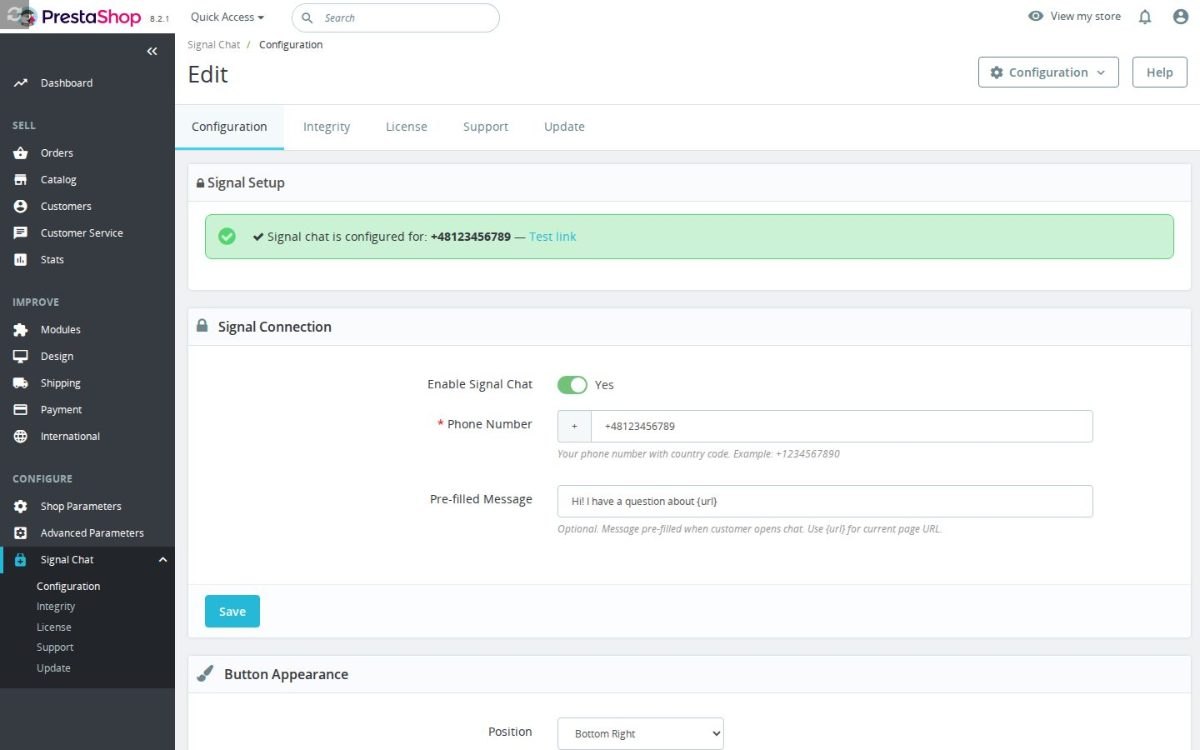
The first contact starts with one phone number, while the deeper settings cover destinations, audience, page context, language, office hours, appearance and timing.

  • Shop control: rules decide which Signal contact appears for each language, customer and part of the buying path.
  • Module value: the contact point stays absent from Signal until the shopper chooses it, and the handoff carries useful page context.
  • Signal service: the conversation continues in an independent, donation-supported, end-to-end encrypted messenger on the customer's own device.
  • Precise destination: each rule has its own number, text, page scope and office hours.
  • Storefront fit: format, side, colour, size, prompt, motion, phones and appearance timing remain adjustable.
  • Setup: a readiness status, number validation, test link and live preview turn a short start into a dependable configuration.
The Signal Chat Integration configuration screen

What does the module add to the Signal handoff?

Signal carries the conversation. Signal Chat Integration controls the shop around it: where the entry point appears, which contact receives the shopper, what the button says, which page context accompanies the opening message and when the button is available.

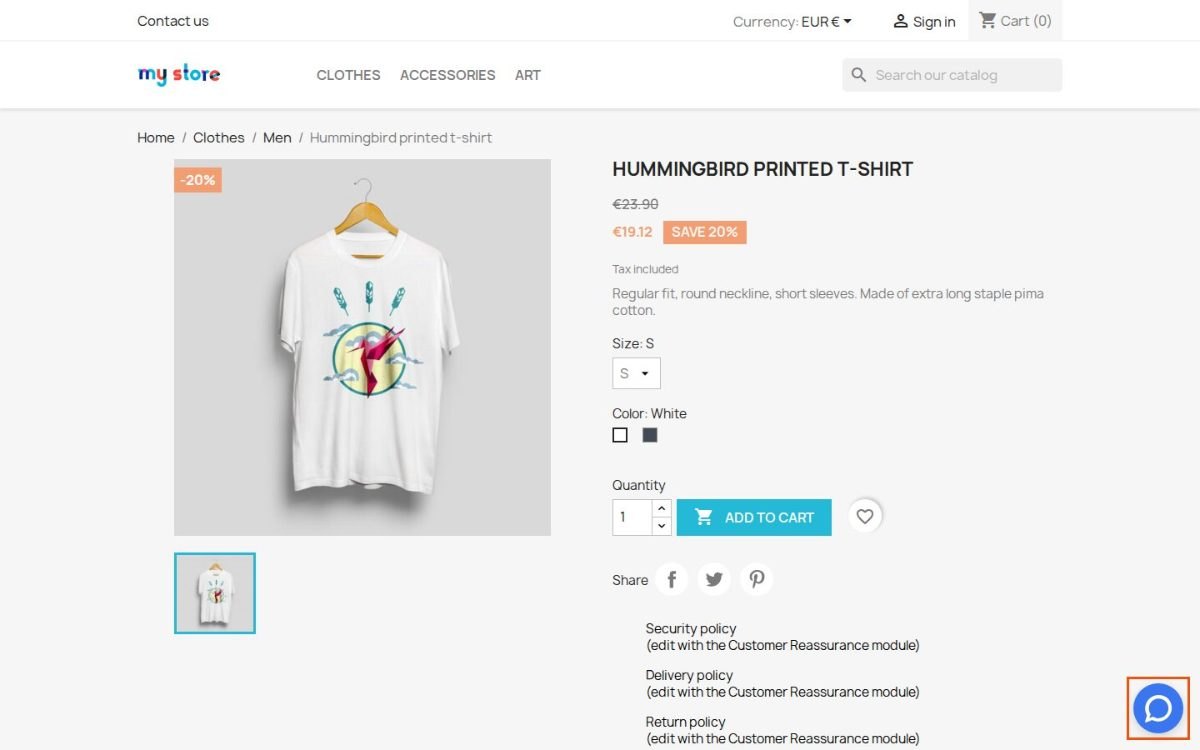
Before the shopper clicks, the shop makes no connection to Signal through this contact point and the module sends no customer identity or order details. The click opens signal.me in a new tab and hands the exchange to the Signal app, so the conversation happens in Signal rather than in an extra window on the product page.
Signal Chat Integration on a shop product page

What does Signal give a privacy-conscious customer?

Signal is free to use and is funded by grants and donations rather than advertising. By July 2026, its Android app had passed 100 million downloads on Google Play. Signal states that it places no advertising or tracking inside the messenger, and every message and call uses end-to-end encryption.

The customer sends text, voice notes, photos, videos and files, or moves from messages to an encrypted voice or video call. Signal works on phones and computers, while message history and shared material remain on the participants' devices. The price on this product page covers the PrestaShop module and its shop controls; Signal is the separate messaging service.

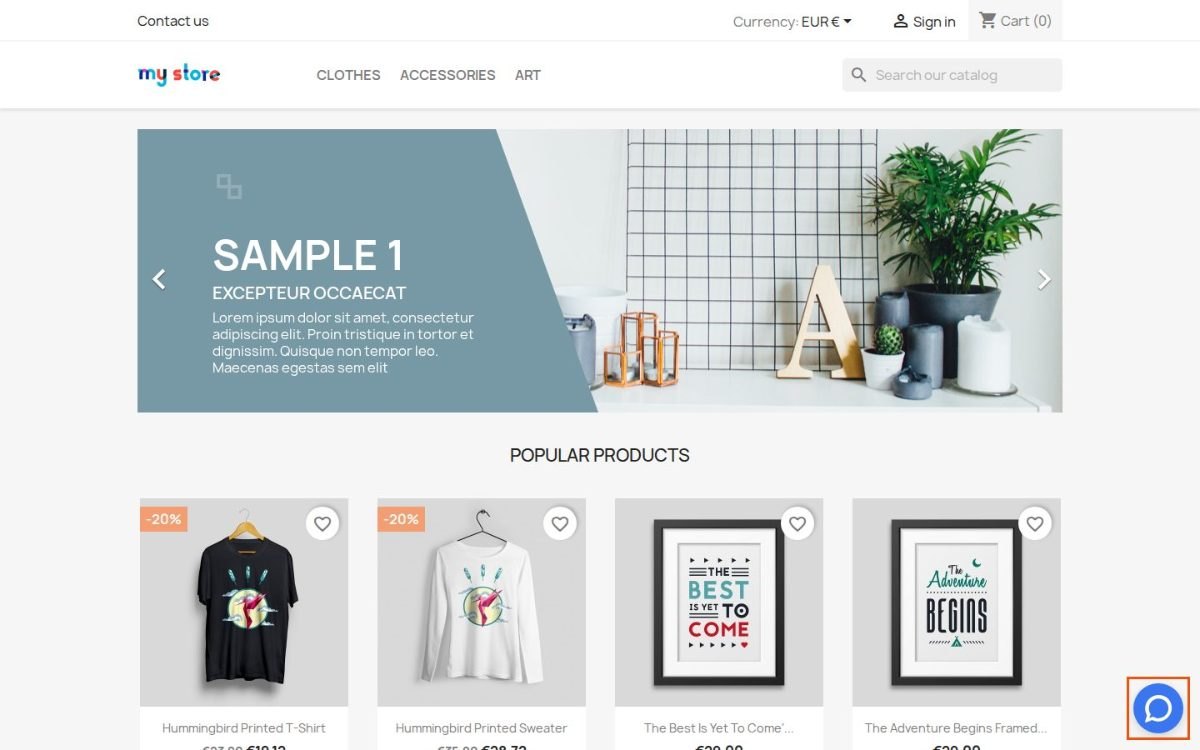
Signal Chat Integration on the shop front page

Which customer reaches which Signal contact?

You choose the conditions for every contact button: shop language, customer group, signed-in status, the whole shop, product pages, categories, cart and checkout, individual products or selected categories. Rules have a clear order and the first match supplies the number, so the result stays predictable.

Each destination also carries its own button text, prompt and prepared message in every store language. The current page address enters that message automatically. A wholesale group therefore reaches its account contact after signing in, while a shopper on a selected product reaches the sales number with that product page already identified. Every shop in a multistore installation keeps a separate set of contacts and rules.
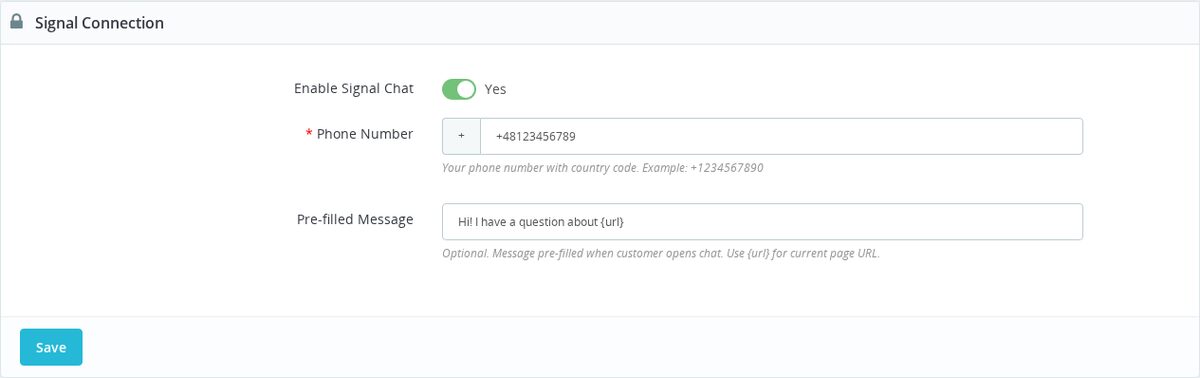
Signal Connection panel with the chat enabled, a phone number saved and a prefilled message using the page URL placeholder

How does the button fit the shop and the moment?

You choose a round icon or a bar with text, lower left or lower right placement, colour, size, distance from the screen edge, prompt and pulse, bounce or still display. The selected colour and size apply to the whole form, and the live preview shows every change before it reaches customers.

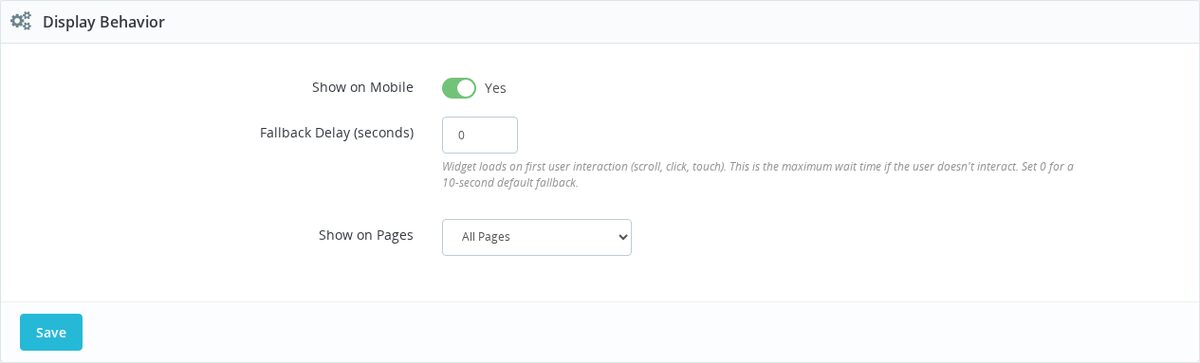
Each rule includes office hours, while the display timing waits for the first scroll, click or touch and uses the value in seconds as the maximum wait. A separate switch controls phones. On a narrow screen the button, text and prompt remain inside the visible area and preserve a comfortable touch target.

Display Behavior panel with mobile visibility, a delay in seconds and the page selector

How quickly does setup become a deliberate contact flow?

The simple path is the module installation and one Signal phone number with country code. The module validates the format, reports whether the contact point is ready and provides a test link; an invalid number never activates a storefront button.
The same screen then supports the deeper configuration: more destinations, ordered audience and page rules, language-specific wording, office hours, appearance, phones and timing. A small shop starts with one working contact in minutes, while a multilingual or B2B operation builds a precise route without changing its storefront theme.

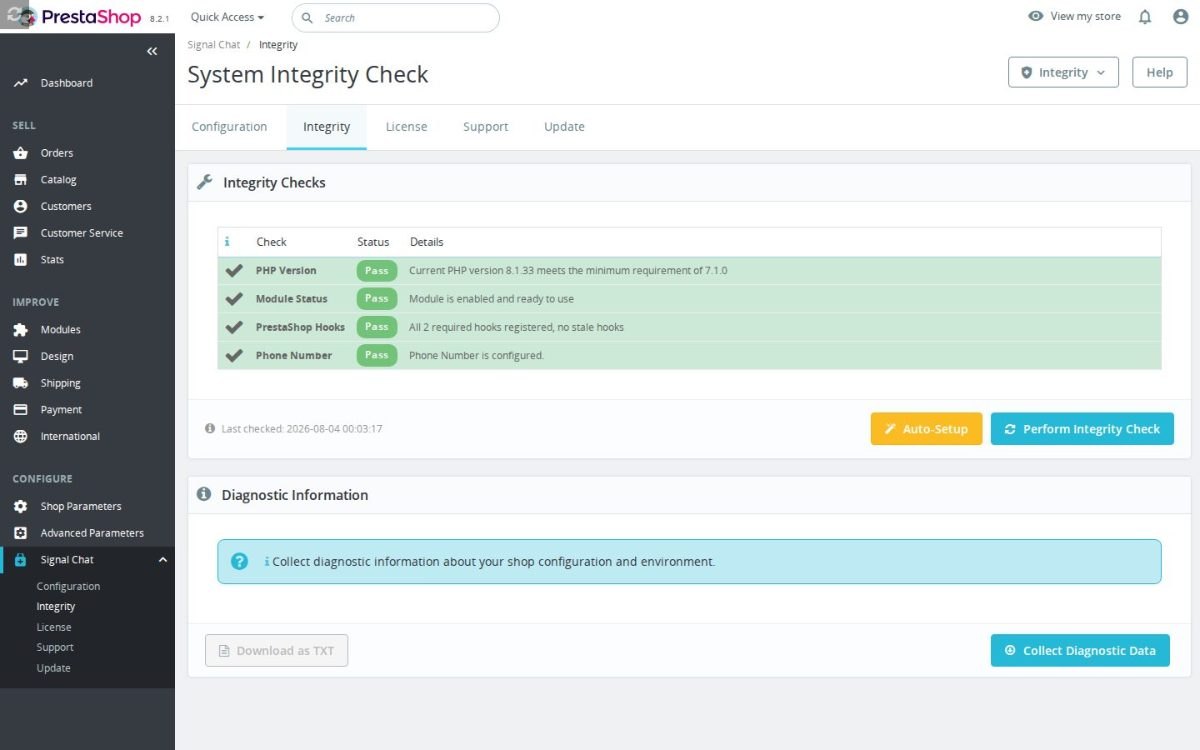
The Signal Chat Integration installation check
  • Reference
    mprsignalchatintegration
  • Version
    1.1.64
  • Released
  • Updated
  • PrestaShop Compatibility
    PS 1.6 – 9.x
  • Pricing Model
    One-time Purchase
  • Module Type
    Front-office
  • GDPR Relevant
    Yes
  • Business Goal
    Customer Communication
  • External Account Needed
    Yes
  • Module Complexity
    Lightweight Widget
  • Customer Journey Stage
    Engage Shoppers
  • Works With Platform
    Chat & Messaging

What customers say about us

Company reviews
5.0 ★ ★ ★ ★ ★ (4 reviews)
Customer Reviews for PrestaShop Modules and Support

No product reviews yet

Be the first to share your experience with this product.

Write a Review

Quick start

  1. In Modules > Module Manager, choose Upload a module and install the mprsignalchatintegration ZIP.
  2. Click Configure.
  3. In Signal Connection, enter Phone Number, for example +447700900123.
  4. Leave Enable Signal Chat set to Yes and choose the corner in Button Appearance > Position.
  5. In Display Behavior, leave Show on Pages at All Pages and Fallback Delay (seconds) at 0 for the first test.
  6. Click Save. Open an allowed storefront page with JavaScript enabled.
  7. Scroll or click the page, or wait 10 seconds. Check that the button appears and inspect its destination: +447700900123. Click it on a device that can open Signal and confirm the correct contact.

Requires PrestaShop 1.6 or later and PHP 7.1 or later.

Open the full help page

Loading tab content...
30 days return right
Easy return - no questions asked
Plug & Play Modules
Install, set up and take profit
Dedicated Support First
Priority Help & Satisfaction Over Sales

Who builds and maintains this module

Built and maintained by David Miller and mypresta.rocks. David Miller has worked with PrestaShop since 2013, and the company behind this shop has been registered since 3 December 2018. Every module in this catalogue is our own work, so your questions to support reach the people who wrote the code. The changelog on this page lists every update with its date.

About us

More modules

Better Contact Form

Signal Chat Integration offers a private, instant way to reach you on Signal, and Better Contact Form collects detailed requests with custom fields, anti-spam protection and submission tracking. Quick private chats and structured enquiries, both covered.

FAQ Manager

FAQ Manager answers common questions on a structured FAQ page, and Signal Chat Integration gives customers a direct line for everything else. Your Signal inbox stays focused on real questions.

Callback Requests

Signal Chat Integration serves customers who prefer messaging, and Callback Requests serves those who want a phone call, with business-hours callback windows and GDPR-clean storage. Every customer finds their preferred channel.

Loading...
Back to top