





Add Crisp live chat to your PrestaShop store with page targeting and mobile options


Crisp Chat Integration adds the official Crisp live chat widget to your PrestaShop storefront so shoppers can ask questions while they are still deciding. It gives your support team a direct channel to answer doubts about delivery, stock, sizing or returns on the page, instead of relying only on email or contact forms.
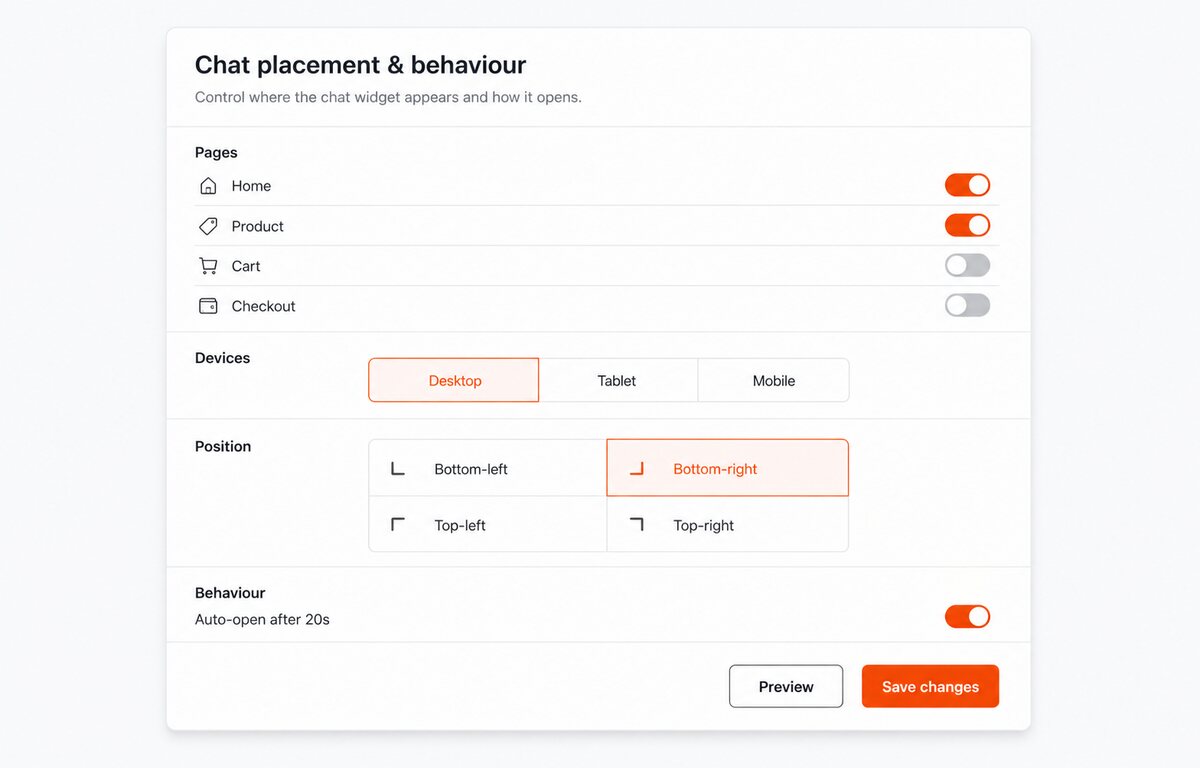
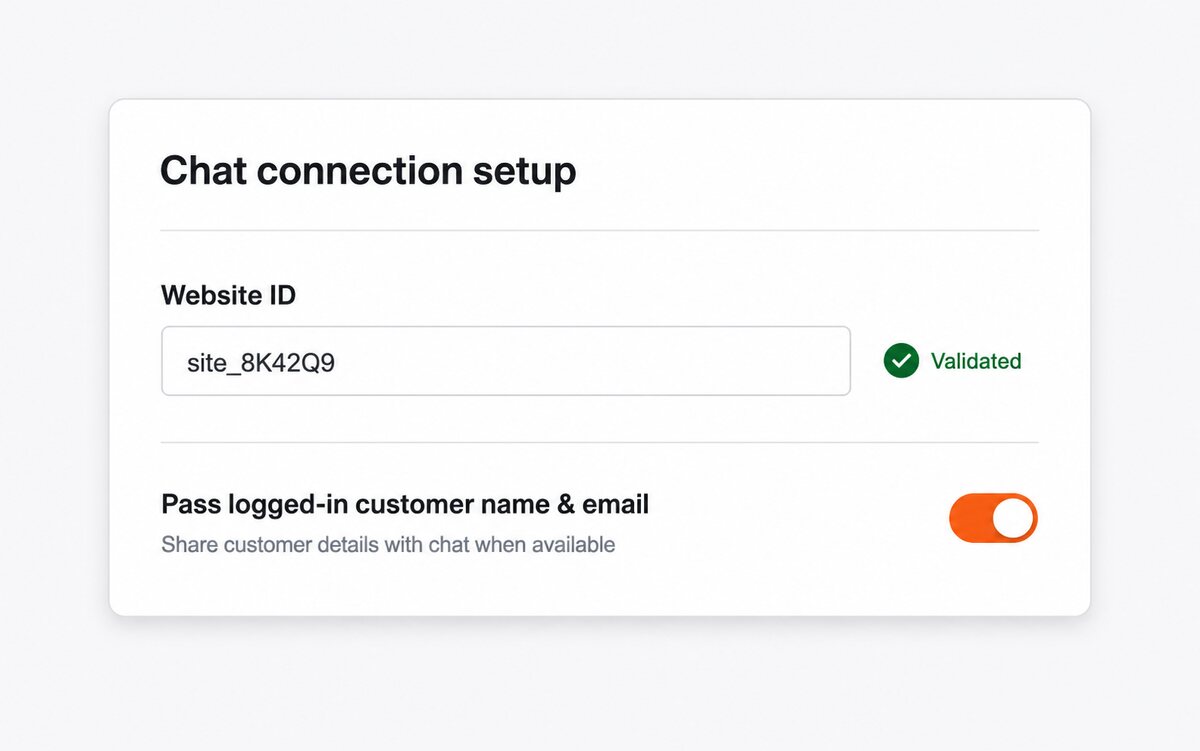
The module loads the Crisp script only after a valid Website ID is saved, and it checks that the ID uses the correct UUID format before anything is injected. You decide where the widget appears — everywhere, or only on product, category or checkout pages — hide it on mobile when you need a cleaner small-screen layout, and set a delay so the script waits for the first scroll, click or touch before loading.
For logged-in customers the module can hand the email address and first and last name to Crisp, so conversations start already identified. Everything is configured from a single Back Office panel with no theme template edits, and it runs on PrestaShop 1.6, 1.7, 8 and 9.
- Required account key. The module stays inactive until the required account key is saved and its format passes setup checks.
- Official messenger placement. The module loads Crisp near the end of the page after the required account key has been configured.
- Page-type targeting. Display settings can show the messenger everywhere or only on product, category or checkout-related pages.
- Control mobile display. A mobile toggle uses PrestaShop's mobile context to hide the widget for mobile visitors when disabled.
- Delay chat loading when configured. The delay setting is applied as seconds before the Crisp loader script is inserted.
- Shopper details handoff. When enabled and the buyer is signed in, the module sends email and firstname/lastname nickname to Crisp.
Crisp live chat widget for PrestaShop support
Crisp Chat Integration adds the Crisp messenger to your PrestaShop storefront so visitors can ask questions before they abandon the page. Many lost sales are not caused by price, but by one unanswered doubt about delivery, sizing, stock or returns. This module places Crisp through Back Office controls, with Website ID validation, page targeting, mobile display, delay settings and optional logged-in customer handoff.
Answer doubts while the shopper is still interested
Live chat gives customers a quick route to an answer at the moment they are deciding whether to buy. If they must search for a contact form or wait for email, the sale can disappear and the ad spend that brought them in is wasted. Crisp stays on the storefront where it can rescue those high-intent moments before the visitor leaves.

Give support useful customer context
When enabled, the module can pass a logged-in customer's name and email to Crisp. That saves your team from starting every conversation with basic identification questions and makes returning buyers feel recognised. Faster, more informed replies protect your reputation because shoppers judge the whole store by how quickly and clearly support responds.

Control where chat appears
Not every page needs a chat widget at the same moment, especially on mobile or during first page load. The module lets you choose page types, mobile visibility and a loading delay, so chat supports the sale without crowding the experience. That balance matters because an intrusive widget can hurt trust, while a missing widget can cost the order.
Website ID validation and optional customer handoff
It keeps the Crisp Website ID, visibility rules and customer handoff in one Back Office panel. It validates the UUID format for setup checks and warns when the Website ID is missing, so setup issues are visible in Back Office. Setup requires no theme editing, and the optional delay helps the page render before the external chat script is loaded.
-
Referencemprcrispchatintegration
-
In stock2147483647 Items
-
PrestaShop CompatibilityPS 1.6 – 9.x
-
Pricing ModelOne-time Purchase
-
Module TypeFront-office
-
GDPR RelevantYes
-
Business GoalCustomer Communication
-
External Account NeededYes
-
Module ComplexityLightweight Widget
-
Customer Journey StageEngage Shoppers
-
Works With PlatformChat & Messaging
What customers say about us
Company reviews
5.0
★
★
★
★
★
(4 reviews)
Loading customer reviews...
No product reviews yet
Be the first to share your experience with this module.
Write a Review
Crisp Chat Integration adds the Crisp live chat widget to your PrestaShop storefront with page targeting, mobile control, optional customer identification, and delayed loading. It helps visitors reach your team from the buying pages where chat matters most.
Have a question about this product?
Our experts are here to help. Ask anything about installation, compatibility, or specifications.
1256
questions
9
categories
2014
building modules since
1.7–9
PrestaShop versions
v1.1.142026-05-27
- Addedcomplete FR/DE/ES/IT/PL translations
- FixedClarify Crisp chat integration scope
- FixedMigrate chat config from ps_configuration to ConfigTable
Loading full changelog...
Works Well With Crisp Chat Integration
Modules our team genuinely pairs with this one — and exactly why each belongs in the same setup.
Complement
A store using Crisp Chat Integration loads the Crisp messenger after a valid Website ID is set, so support can answer storefront doubts about delivery, stock, sizing or returns in real time. Live chat works when staff are online, but it is poorly suited to gathering the full, structured details a return, quote or business enquiry needs before anyone can help.
Better Contact Form covers that by letting you build multiple storefront forms for support, returns, quote requests or business messages with custom fields and required validation, so shoppers supply complete information before a conversation begins. It is a separate, asynchronous intake channel from Crisp.
With both, immediate questions go through Crisp while detailed or after-hours requests arrive as structured submissions your team can act on. Shoppers pick the path that fits, and you cover quick chat and thorough enquiry capture without forcing every contact through one widget that only works when someone is available.

Complement
Crisp Chat Integration adds the Crisp messenger so shoppers can ask questions while they are still deciding. Many of those questions are the familiar ones, shipping, returns, compatibility or product use, and answering each individually in chat repeats work that good self-serve content could have handled first.
FAQ Manager covers that by turning repeated questions into structured, catalogue-connected content with categories, questions, translations and product assignments, helping customers decide faster while reducing routine support. It is a self-serve knowledge layer, distinct from Crisp's live channel.
Running both, the FAQ answers predictable questions instantly while Crisp stays open for the ones that genuinely need a person. Shoppers who prefer reading get an immediate answer, those who want to chat still can, and your team focuses Crisp conversations on real cases instead of retyping the same delivery or compatibility details all day.

Workflow
A store with Crisp Chat Integration uses the Crisp messenger for quick pre-sale conversations on the storefront. Crisp suits that immediacy, but its threads lack order context and are hard to track once a customer needs sustained, documented follow-up beyond a single chat session.
Support Revolution covers that with an in-shop help desk where logged-in customers open tickets, guests can be enabled, and staff work with ticket history, customer identity and order-related context near the relevant data. It is a structured ticketing workflow, separate from a chat widget.
Together they form an escalation path: Crisp handles the fast question, while anything needing history or order detail moves into ticketing. Your team answers casual queries where shoppers are comfortable and manages real service cases with proper records, so important issues do not disappear into a chat scrollback that nobody can search afterwards.

Complement
With Crisp Chat Integration, a store offers a general Crisp messenger for questions of any sort. Because that channel is broad and opens its own widget, a precise question about the specific product on screen can lose its product context once the conversation starts in Crisp.
Ask About Product covers that narrowly, placing an Ask a question button near the product details that opens a popup form with name, email and message fields, keeping the product context inside the enquiry workflow. It is a focused, product-anchored tool rather than a general chat.
Running both, wide-ranging questions go through Crisp while product-specific doubts are captured in context on the page. Your team sees immediately which product an enquiry concerns, and shoppers get a clean way to ask about fit or details without leaving the product or losing the link to what they were viewing.
 30 days return right
Easy return - no questions asked
 Plug & Play Modules
Install, set up and take profit
 Dedicated Support First
Priority Help & Satisfaction Over Sales
You might also like


