





Connect Olark live chat to your PrestaShop store with full visitor context


Olark live chat widget integration for PrestaShop helps shoppers reach your team before a product, delivery or checkout question turns into an abandoned order. The module connects your store to your Olark account and loads the official Olark widget on the storefront through PrestaShop, so live support can be added without editing theme files or pasting scripts into your template.
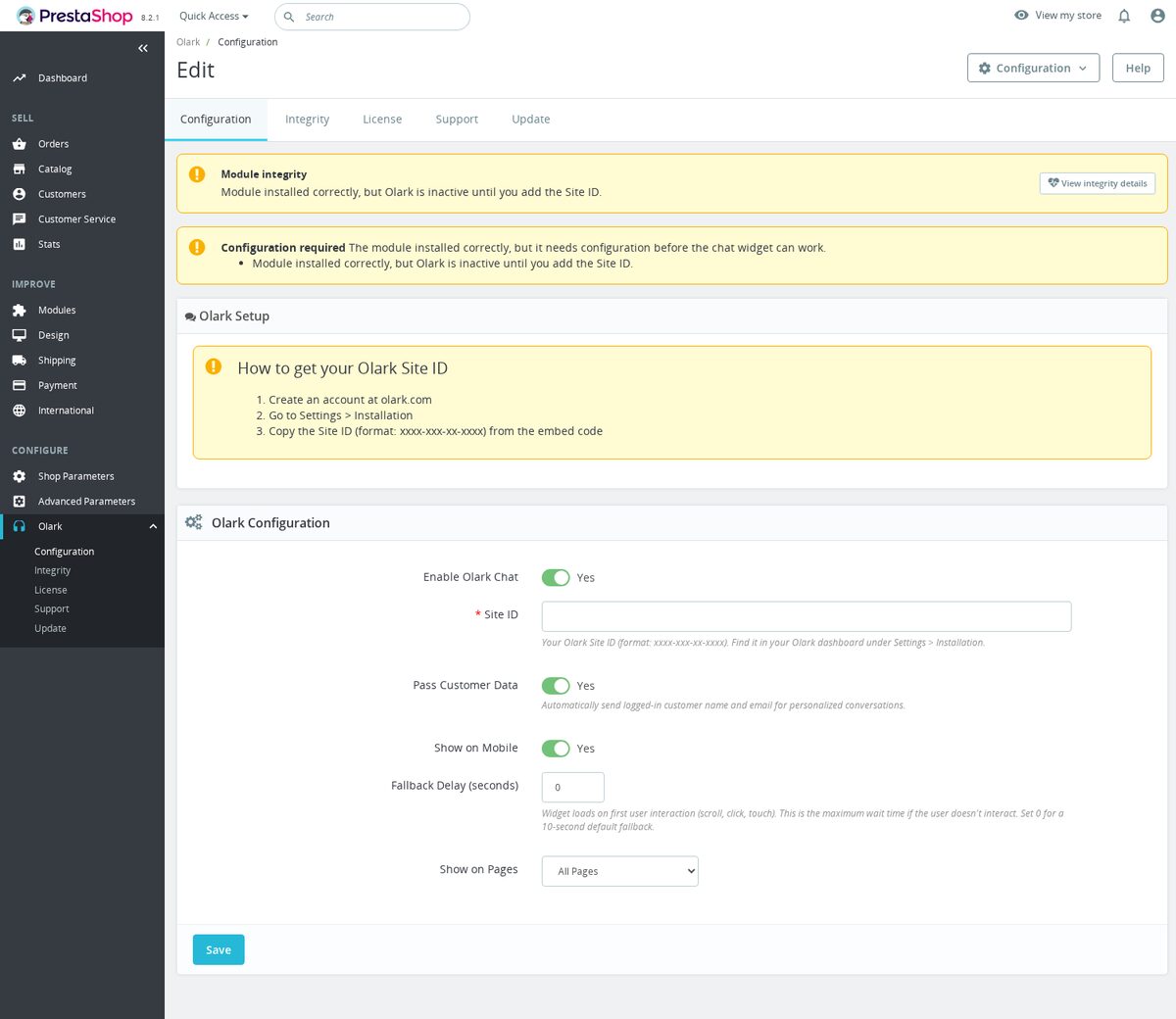
Setup stays clear in the Back Office: enter your Olark Site ID, enable the module and choose where the chat should appear. When customer data passing is turned on, the email address and full name of a logged-in shopper are sent to Olark, so agents open each conversation with the context of who they are talking to instead of starting from a blank slate.
Shared display controls let you limit the widget to selected storefront areas, hide it on mobile devices and add an optional loading delay. Because the widget is injected right before the closing body tag, it loads after your page content and keeps the storefront responsive on every page it runs on.
A required-configuration check keeps a missing Site ID visible in the Back Office, so an incomplete setup is caught early rather than leaving you waiting for a chat box that never appears.
- Olark Site ID connection. The module requires a non-empty Olark Site ID and shows a required-config warning until that field is configured.
- Official loader injection. The storefront template loads
static.olark.com/jsclient/loader.jsand configuressystem.site_idfrom Back Office settings. - Customer identification option. When customer data passing is enabled, logged-in shopper email and full name are sent to Olark through visitor update API calls.
- Page targeting. The shared chat settings include a pages field, so the widget can be limited to chosen storefront areas instead of loading across the whole storefront.
- Mobile display switch. The configuration includes a show-on-mobile setting to control whether the chat widget is active for mobile shoppers.
- Optional loading delay. The template wraps the Olark loader in
setTimeoutwhen a delay is configured. - No theme edit workflow. The module adds the Olark script near the end of the storefront page rather than requiring pasted theme code.
Olark live chat widget for PrestaShop support
PrestaShop Olark Live Chat Widget connects your store to your Olark account so shoppers can ask questions before uncertainty turns into abandonment. Many customers leave because one delivery, sizing, compatibility or payment question goes unanswered at the buying moment. This module loads the Olark widget through PrestaShop, can identify logged-in customers by name and email, and gives you page, mobile and delay controls so chat appears where it can protect revenue.
Recover sales that would otherwise leave silently
When a visitor is unsure, they often do not submit a contact form or wait for an email response. Live chat gives them a faster route to an answer while the product is still on screen. That matters because solving one objection in the moment can be the difference between a completed order and an abandoned session.

Give support agents better customer context
A chat that starts with an anonymous visitor forces your team to ask for details the store already knows. When the shopper is logged in, the module can pass their name and email to Olark so agents understand who they are helping. That saves time, reduces back-and-forth and makes the customer feel recognized rather than treated as a ticket number.
Keep chat useful without crowding the store
Chat can improve conversion, but showing it everywhere can distract shoppers or take too much space on mobile. The module lets you choose the pages where chat appears, decide whether it shows on mobile and delay loading until the page has settled. Those controls help you support customers without harming the browsing or checkout experience.

Site ID setup with visitor identity handoff
The module focuses on a clean Olark connection rather than trying to replace Olark's own chat platform. Setup is one main field for the Olark Site ID, and normal use requires no theme editing or pasted header code. Olark handles the live chat service outside this module, while the reviewed PrestaShop code embeds the loader, configures the Site ID, optionally passes customer name/email, and controls page, mobile and delay behavior.

-
Referencemprolark
-
In stock2147483647 Items
-
PrestaShop CompatibilityPS 1.6 – 9.x
-
Pricing ModelOne-time Purchase
-
Module TypeFront-office
-
GDPR RelevantYes
-
Business GoalCustomer Communication
-
External Account NeededYes
-
Module ComplexityLightweight Widget
-
Customer Journey StageEngage Shoppers
-
Works With PlatformChat & Messaging
What customers say about us
Company reviews
5.0
★
★
★
★
★
(4 reviews)
Loading customer reviews...
No product reviews yet
Be the first to share your experience with this module.
Write a Review
Connect Olark live chat to your PrestaShop storefront with a single Site ID. The module adds the Olark widget without editing theme templates, with controls for page targeting, mobile display, load delay, and logged-in customer identification.
Have a question about this product?
Our experts are here to help. Ask anything about installation, compatibility, or specifications.
1256
questions
9
categories
2014
building modules since
1.7–9
PrestaShop versions
v1.1.132026-05-27
- Addedcomplete FR/DE/ES/IT/PL translations
Loading full changelog...
Works Well With Olark Chat Integration
Modules our team genuinely pairs with this one — and exactly why each belongs in the same setup.
Complement
Choosing the free Olark Chat Integration means you want shoppers to reach your team in real time before a product, delivery or checkout question turns into an abandoned order, loading the official Olark widget through PrestaShop without theme edits. Live chat catches the people who want an answer right now.
Better Contact Form serves the shoppers who would rather write a structured message or who arrive when chat is offline. It lets you create multiple storefront forms for support, returns, quote requests or business messages, with multilingual text, custom fields and required validation, so people supply the details your team needs before a conversation starts. It is a separate, paid tool complementing live chat.
Together they cover both immediate and considered contact. Olark handles quick, live questions, while the contact forms capture detailed enquiries and out-of-hours messages with the right fields filled in, so fewer questions go unanswered regardless of how a shopper prefers to reach you.

Governance
Running the free Olark Chat Integration shows you are opening direct lines to shoppers, inviting questions through a live widget so doubts become conversations instead of lost orders. An open contact channel is good for sales, but it can also attract abusive or suspicious traffic.
Customer Extra Info (IP Ban) gives your team tools for that less welcome side. It records selected technical details such as IP, user agent, parsed OS, browser and device type for customers or guests, and lets you review context, block risky patterns and whitelist trusted addresses from the Back Office. It is a separate, paid module focused on visibility and control over who is interacting with you.
Used together, you keep contact easy for genuine shoppers while having a way to handle the ones who abuse it. Olark welcomes real questions, and the IP-ban tooling helps you spot and block disruptive patterns, so an open, helpful storefront does not leave you without recourse against bad actors.

Complement
With the free Olark Chat Integration, you are answering shopper questions live so a delivery, product or checkout doubt does not end in an abandoned cart. Live chat is excellent for the unexpected question, but it means your team fields the same routine questions again and again.
FAQ Manager addresses those repeat questions before they reach chat. It turns common questions about shipping, returns, compatibility and product use into structured content connected to your catalogue, with categories, translations and product assignments, helping shoppers decide faster. It is a separate, paid module that complements live support by handling the predictable queries.
Together they make support both immediate and self-service. The FAQ content answers the routine questions on the page, while Olark stays available for the specific or unusual ones, so shoppers get quick answers either way and your team spends live chat time on the conversations that really need a person.

Workflow
The free Olark Chat Integration is great for catching shoppers in the moment, letting them ask about a product, delivery or checkout before they leave. Live chat is immediate, but conversations that need follow-up, order context or a record can outgrow a chat widget.
Support Revolution provides that deeper layer as a help desk inside your shop. Logged-in customers can open tickets, guest ticket creation can be enabled with a private support area, and your team manages ticket history, customer identity and order-related issues close to the data that matters. It is a separate, paid module, a natural next step when chat alone is not enough.
Used alongside each other, they cover the full span of support. Olark handles quick, live questions, while Support Revolution keeps the longer, trackable cases with full history and order context, so your team can answer fast in the moment and still manage issues that need structured follow-up.
 30 days return right
Easy return - no questions asked
 Plug & Play Modules
Install, set up and take profit
 Dedicated Support First
Priority Help & Satisfaction Over Sales
You might also like


