


Edit category H1 headings for better SEO without renaming your PrestaShop categories


Custom Category H1 gives each PrestaShop category page a heading separate from its navigation name. For one category, setup means entering the heading in the category form and saving.
A short name fits a menu, but the landing page needs wording that explains the selection. Separating the two keeps menus, breadcrumbs and existing category addresses unchanged.
You write headings per language or assign reusable patterns to selected categories. Patterns insert the category name, product count or page number, with shop-specific settings and exclusions controlling their reach. Where no custom value applies, the original category name stays visible.
One shared pattern updates headings across a category branch, saving repeated edits while keeping navigation short and familiar.
What does Custom Category H1 change in the catalogue?
Custom Category H1 separates the visible category heading from the saved category name across a PrestaShop catalogue, combining a field inside each category with reusable rules for many categories.
One category is ready after entering its heading and saving. Deeper settings cover shared patterns, languages, shops, inherited wording and later result pages without turning the quick edit into a technical project.
- Separate roles: the menu keeps its short category name while the landing page receives fuller wording.
- One category: a multilingual field sits directly in the normal category form.
- A large catalogue: shared patterns, rules and file import replace repetitive editing.
- Languages and shops: each storefront receives the intended heading through a clear priority order.
- Later result pages: dynamic page wording avoids repeating the same heading.
- Predictable operation: clean output, assignment checks and installation diagnostics protect the catalogue plan.
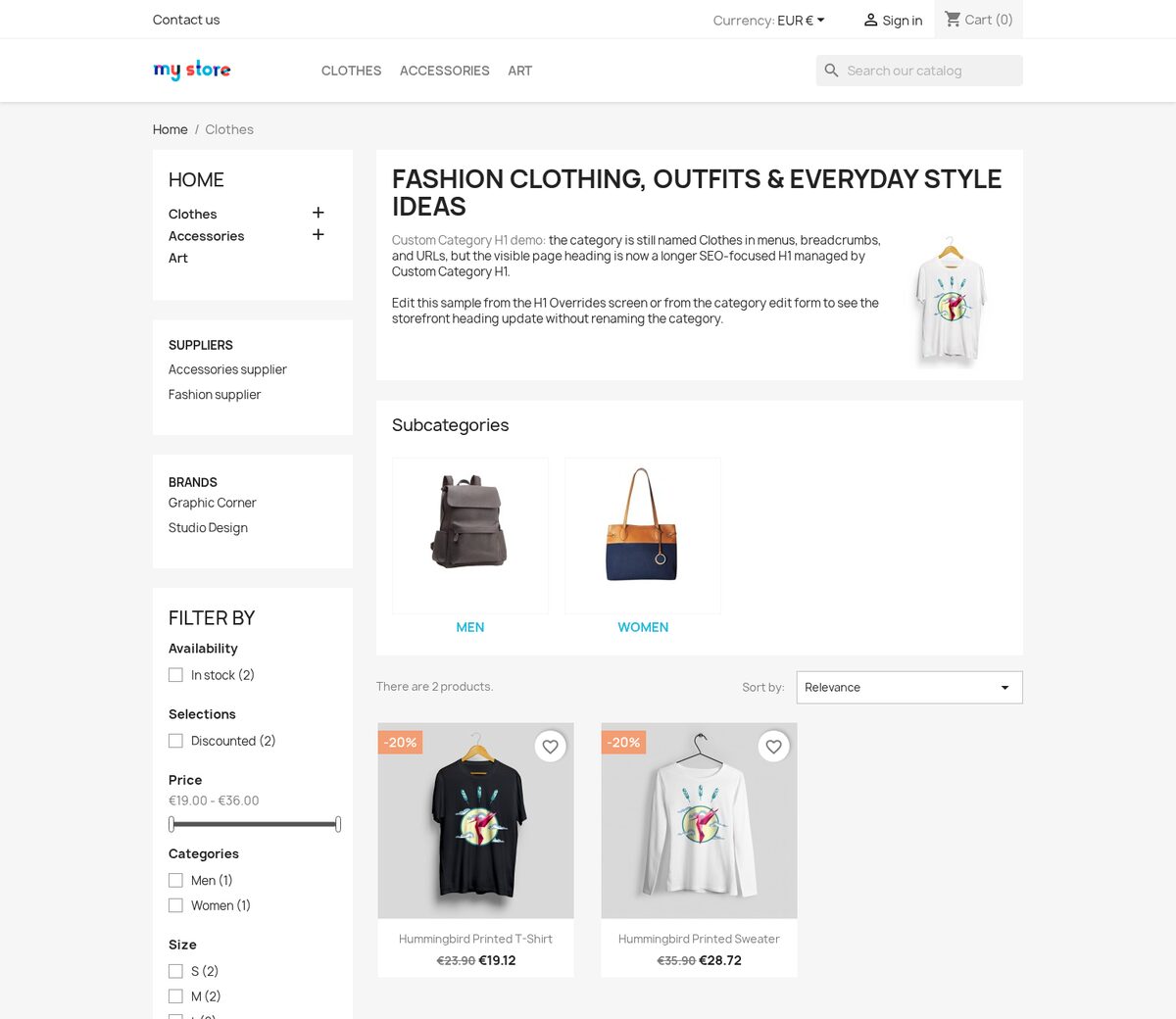
Why should the category name and page heading be separate?
The saved category name appears in compact places such as the menu, breadcrumb and category address. A category landing page has more room and a different job: its main heading describes the selection in the words a shopper uses when searching.
Custom Category H1 changes the page-facing heading and leaves the stored name intact. The product-list heading follows the same wording when that setting is active, so the heading above the selection agrees with the category page without making navigation longer or changing established addresses.

How quickly is one category edited?
The normal category form contains a multilingual Custom H1 field directly beside the category's core details. You choose the wording for each language, save the category and the new heading appears on its page. An empty field leaves the normal category name in place.
A category already covered by a shared pattern stays safe during a one-off edit. Changing it in the category form creates a direct heading only for that category, while every other category keeps the shared assignment. The module also lets you show or hide this field and decide whether the product-list heading uses the same value.

How does one pattern cover a large catalogue?
The Category Headings manager assigns one multilingual heading or pattern to many categories. You choose specific categories, condition groups, group exceptions and categories that are never included. The complete rule remains available for editing, refreshes its matches when the category tree changes and shows the resulting categories before publication.
Dynamic elements add the current category name, product count, page number, page label, shop name or language to the finished heading. A single pattern therefore produces precise wording throughout a branch instead of copying one rigid sentence everywhere. CSV import brings an existing heading plan into the same manager and identifies invalid categories, languages or shop scopes before anything is saved.

What happens across languages, shops and later result pages?
Every heading has language-specific wording. When one translation is deliberately empty, the priority order uses the default language and then another populated value, while an optional nearest-parent rule supplies the closest suitable pattern for categories that inherit their wording.
You choose a single shop or All shops for each assignment. A shop-specific heading takes priority and the shared value covers storefronts without their own entry. On page two and later, the pattern includes the current page or the automatic page label adds it when the heading has no page element of its own.

How do headings stay predictable after setup?
Before saving, the module rejects missing and root categories and prevents two active assignments from competing for the same category in one shop. Pasted formatting is removed and repeated spacing is cleaned, so the heading reaches the page as controlled text. If no custom value applies, the original category name remains visible.
The integrity area checks the enabled state, settings storage, category assignments and the two connections that place wording on the category page and above the product list. It restores supported installation problems and removes references to deleted categories, giving a simple first edit and a maintainable catalogue-wide system.

-
Referencemprcustomcategoryh1
-
PrestaShop CompatibilityPS 1.6 – 9.x
-
Pricing ModelOne-time Purchase
-
Module TypeFront & Back-office
-
GDPR RelevantNo
-
Business GoalIncrease Traffic
-
External Account NeededNo
-
Module ComplexityFeature-Rich Module
-
Customer Journey StageAttract Visitors
-
Works With PlatformNo External Platform
What customers say about us
Company reviews
5.0
★
★
★
★
★
(4 reviews)
Loading customer reviews...
No product reviews yet
Be the first to share your experience with this module.
Write a Review
Custom Category H1 lets you write SEO-focused category page headings without changing the short category names used in menus, breadcrumbs, URLs, and internal links. Use it to make category landing pages clearer for search engines and customers while keeping your store navigation tidy.
Have a question about this product?
Our experts are here to help. Ask anything about installation, compatibility, or specifications.
1343
questions
9
categories
v1.3.182026-05-27
- AddedRun integrity snapshot on install
- AddedSplit direct category H1 overrides
- AddedRelease support service workspace
Loading full changelog...
Works Well With Custom Category H1
Modules our team genuinely pairs with this one, and exactly why each belongs in the same setup.
Complement
Using the free Custom Category H1 means you are deliberately writing stronger visible headings for category pages without renaming the category used in menus, breadcrumbs and URLs. It is a focused way to make a page clearer for shoppers and more specific for SEO while keeping navigation tidy.
PrestaShop Product SEO Subtitles works in the same spirit just below the heading. It adds a managed second line under page headings for products, categories, CMS pages, manufacturers and suppliers, so you can add a benefit or context without stuffing the H1 with keywords. Where the free module sharpens the heading itself, this paid module gives you a supporting subtitle, as a separate but closely related tool.
Together they let you compose a cleaner page header in two parts. A strong custom H1 states what the page is, and a managed subtitle adds the extra clarity or selling point underneath, so category and product pages read well for shoppers while keeping titles focused rather than overloaded.

Complement
The free Custom Category H1 shows you are investing in how category pages present themselves, giving them stronger visible headings while keeping the underlying category name short for menus and URLs. That work improves the top of the page where shoppers first orient themselves.
Second Category Description complements it lower down the same page. It adds an extra multilingual content block stored per category, shop and language, placed below the product grid, so you can add richer SEO copy without pushing products further down. Where the H1 module improves the headline, this paid module gives you room for depth beneath the listing, as a separate tool.
Used together, they let you optimise a category page from top to bottom. A sharper H1 frames the page clearly for shoppers and search, while a second description block adds the supporting content depth below the products, so the page stays shopping-focused at the top yet carries real copy where it does not get in the way.

Complement
Running the free Custom Category H1 means you are already shaping how category pages read, writing clearer headings that help shoppers and give SEO landing pages more specific wording. It is page-level clarity work, one heading at a time.
Automatic Internal SEO Linker addresses a different layer of on-page SEO: the connections between pages. You define keyword link groups once and it adds controlled internal links across eligible storefront content, giving shoppers and search engines clearer paths to important products, categories and pages without editing hundreds of descriptions by hand. It is a separate, paid tool that complements the heading work.
Together they strengthen both how a category page presents itself and how it connects to the rest of the catalogue. The custom H1 makes each page clearer in isolation, while the internal linker weaves chosen keywords into helpful links across content, so important pages are both better worded and easier to reach.

Workflow
The free Custom Category H1 is a single, well-targeted SEO improvement: better visible category headings that do not disturb menus, breadcrumbs or URLs. If you have reached for it, you are tending to search presentation page by page, likely with other small edits scattered around.
Smart SEO Revolution Suite gathers that kind of work into one back-office place. It helps manage page details, structured data, canonicals, redirects and discovery workflows with meta templates, rich result data and Open Graph among its tools, so SEO is less spread across theme edits, spreadsheets and separate modules. It is a broader, paid suite, a natural next step once single-purpose fixes start adding up.
Used alongside the free H1 control, the suite handles the wider technical SEO signals while you keep precise control over category headings. Together they let you address both the big picture, canonicals, metadata and structured data, and the specific wording at the top of each category page, without losing the focused heading control you already rely on.
 30 days return right
Easy return - no questions asked
 Plug & Play Modules
Install, set up and take profit
 Dedicated Support First
Priority Help & Satisfaction Over Sales
You might also like


Who builds and maintains this module
Built and maintained by David Miller and mypresta.rocks. David has worked with PrestaShop since 2013, and the company behind this shop has been registered since 3 December 2018. Every module in this catalogue is our own work, so your questions to support reach the people who wrote the code. The changelog on this page lists every update with its date.