


Clean old carts, logs, searches and mail records out of your PrestaShop database


Database Cleanup removes the records your PrestaShop database keeps long after they stop being useful: abandoned carts, old searches and visits, expired price rules, guest records, mail history and logs. Its workspace shows how much each area has grown.
Orders, customer accounts, live products and every cart behind an order stay untouched. On a store with several shops, a cleanup covers only the shops you have selected.
You choose the areas, how long each one keeps its records and whether a cleanup runs on demand or on a schedule. Before anything is deleted you see the rows involved and a simulation of the exact work, and manual runs wait for your approval.
The database stays smaller and easier to back up, without anyone digging through tables by hand.
What does Database Cleanup do for a growing store?
Database Cleanup identifies stale operational records in a PrestaShop store, connects each warning to the appropriate repair and runs the selected maintenance manually or on a controlled schedule. It shows the scope before anything is removed, so database care begins with evidence rather than guesswork.
- The scope: which operational and orphaned records belong in the cleanup.
- The safety: counts, simulation, backups and relation-aware deletion before approval.
- The routine: retention, schedules, shop scope and bounded work for each scenario.
- The evidence: progress, history, errors and reclaimed space after every run.
- The control: permissions, enablement and clear choices for one task or the full set.
- The maintenance: health checks, repair, support information and protected updates.
The starting configuration uses conservative retention and work limits. You choose one cleanup area and run it immediately, then add separate schedules and deeper rules when the database needs regular care.

Which records leave the database?
The ready scenarios cover abandoned carts without orders, old search statistics, expired specific prices, shop logs, connection and visit history, traffic sources, guest records and mail history. Further scenarios remove missing-page statistics, expired cart rules and unused combinations, orphaned search entries, addresses and catalogue metadata that no longer belong to a live object.
You choose the retention period separately for every area. Recent activity stays available to the team, while data that has passed its useful lifetime becomes eligible. After deletion, selected database areas are reorganised so the storage released by cleanup is actually returned to the database.
The live catalogue, orders, customer accounts and active commercial rules stay outside the cleanup set. The module is a maintenance workspace for obsolete operational data, not a store-reset tool.

How does the module protect data that still matters?
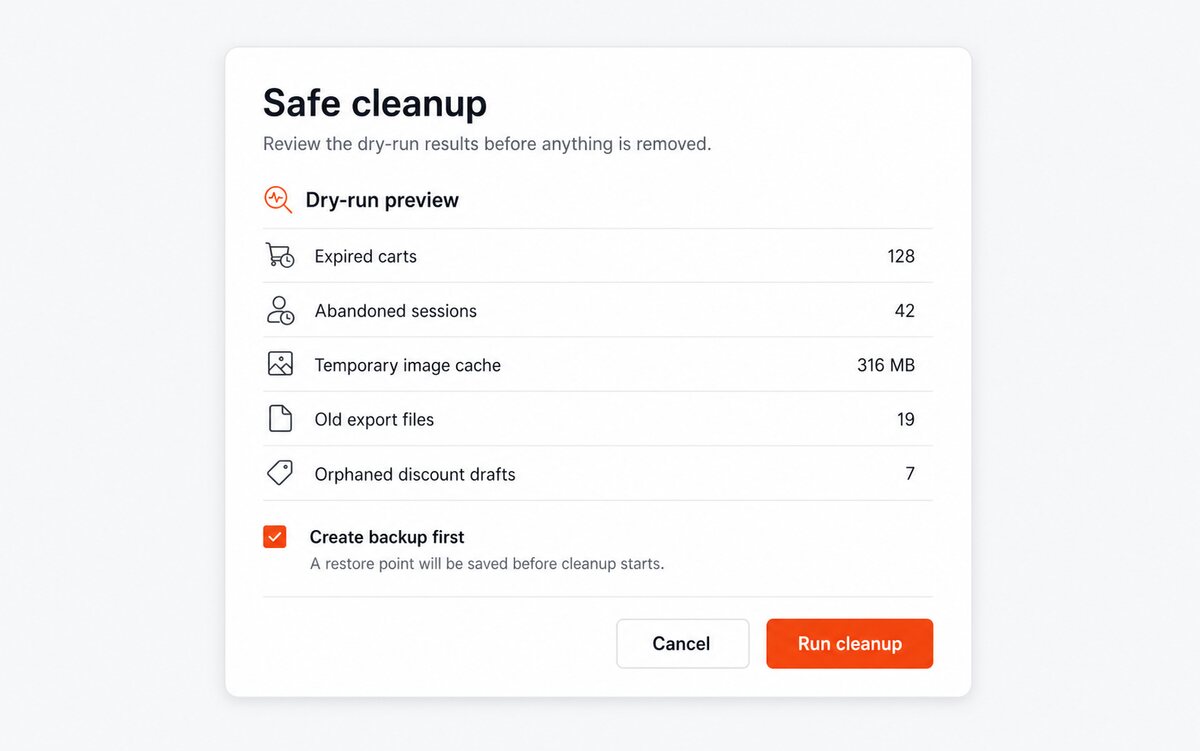
Every scenario begins with a read-only simulation. The screen lists the records and related areas affected, estimates the space involved and marks the risk level. Manual cleanup requires approval, and higher-risk scenarios also require a recent successful backup whose reference is stored with the run.
Relations are followed before parents are removed. A cart linked to an order is excluded, while an eligible abandoned cart is cleared together with its product, rule and customisation records. Old connection records leave with their page and source history, and guest data becomes eligible only after the configured period has passed.
Work proceeds in limited portions with a configurable ceiling. A lock prevents overlapping runs, recovers safely after an interrupted task and records partial results instead of presenting an incomplete cleanup as success.
How does automatic maintenance stay under control?
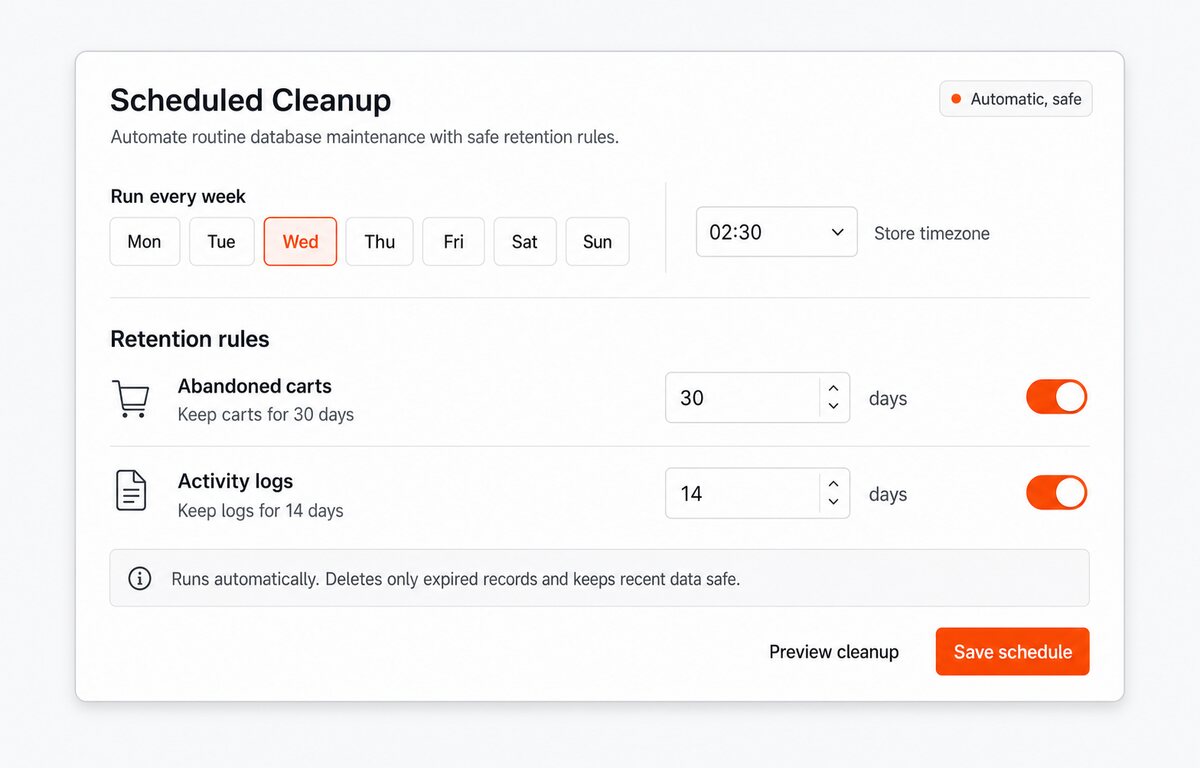
You choose which scenarios run automatically, on which schedule and for which shop. Retention, work limit and risk policy belong to the scenario, so a daily mail-history cleanup does not inherit the rules used for abandoned carts or catalogue orphans.
A protected task address and a server command are both available. The private key is replaceable, a test action checks the selected scenario without deleting data, and a one-time run accepts narrower settings without changing the saved schedule.
Before starting, the module checks that the required database areas exist, that another run is not active and that the selected shop scope is unambiguous. A temporary problem becomes a recorded skipped or failed run, not an uncontrolled repeat.
What evidence remains after each cleanup?
The run history records start and finish time, shop, operator, mode, scenario settings, eligible and removed rows, related records, duration, errors and the estimated and reclaimed space. Each cleanup area also shows when it last ran and which result it reached.
Current progress is visible for larger jobs. The final view separates cleaned, skipped and failed work, so the team knows whether another pass is useful and whether a database or permission issue needs attention. History filters keep one shop or one scenario easy to review.
This evidence turns maintenance into a repeatable store process. It also gives support a precise record of what happened without asking the merchant to reconstruct the run from memory.

What keeps the workspace ready for the next run?
The main switch governs every execution path. Permissions decide who sees simulations, approves manual cleanup, changes schedules or accesses higher-risk scenarios. Task names and explanations follow the language of the store panel, while each shop keeps separate settings and reports.
Health checks monitor stale carts, guests, logs, connections, mail and search records against clear thresholds. A missing database area becomes an informational result instead of breaking the screen, and each warning leads to the same repair engine used by the cleanup workspace. The module also restores missing administration access and prepares shop, server and database details for support.
Updates are handled from the module area. The package is checked, the current module files are backed up before replacement and the working copy is restored if installation fails, giving routine maintenance a defined recovery path.

-
Referencemprdatabasecleanup
-
PrestaShop CompatibilityPS 1.6 – 9.x
-
Pricing ModelOne-time Purchase
-
Module TypeBack-office
-
GDPR RelevantNo
-
Business GoalStreamline Operations
-
External Account NeededNo
-
Module ComplexityFeature-Rich Module
-
Customer Journey StageManage Store
-
Works With PlatformNo External Platform
What customers say about us
Company reviews
5.0
★
★
★
★
★
(4 reviews)
Loading customer reviews...
No product reviews yet
Be the first to share your experience with this module.
Write a Review
Remove old housekeeping rows that build up in a PrestaShop database, including abandoned carts, search statistics, expired specific prices, logs, connection records, guest records, and mail history. Database Cleanup lets you see row counts first, then clean one task at a time or run all available cleanup tasks from one Back Office workspace.
Have a question about this product?
Our experts are here to help. Ask anything about installation, compatibility, or specifications.
1343
questions
9
categories
v1.1.162026-05-27
- AddedRestore database cleanup config page
- Addedcomplete FR/DE/ES/IT/PL translations
Loading full changelog...
Works Well With Database Cleanup
Modules our team genuinely pairs with this one, and exactly why each belongs in the same setup.
Measurement
If you run the free Database Cleanup, you are already removing stale carts, search statistics, expired specific prices, logs, connections, guest records and old mail records to keep day-to-day administration lighter. That is housekeeping aimed at a tidier, less cluttered store.
Performance Revolution looks at speed from a wider angle and makes it measurable. It offers practical controls for caching, warming, asset handling and bottleneck analysis, with support for auto-detect, Redis and APCu, plus real-user measurements, so you can see where pages are actually slow rather than guessing. It is a separate, paid module that complements the cleanup work.
Together they cover two different contributors to a snappy store. The free cleanup keeps operational tables from bloating over time, while Performance Revolution gives you the caching and profiling tools to find and fix real bottlenecks, so you are both reducing clutter and measuring the speed that clutter can affect.

Workflow
Running the free Database Cleanup means you value keeping operational data under control, clearing out old carts, logs, statistics and mail records from a single maintenance screen so administration stays manageable. Doing that on a regular cadence, though, is easier to keep on top of with oversight.
Cron Manager addresses the routine side of MPR jobs. It centralizes MPR module tasks, protected scheduling links, manual runs and task status in one back-office place, helping you see whether routine module work is actually running and protect it from silent failure, with server scheduler and external scheduler options. It is a separate, paid tool that monitors scheduled MPR tasks generically.
Used together, you get both the cleanup itself and clearer oversight of your MPR scheduled work. The free module handles the actual removal of stale data, while Cron Manager gives you one place to run and monitor any MPR scheduled task you have set up, so routine maintenance is less likely to be quietly forgotten.

Complement
With the free Database Cleanup, you are working to keep the database lighter by pruning stale carts, statistics, logs and old records, which is one route to a store that stays quick and tidy as it ages. That work is about what sits in the database.
Instant Redis approaches store speed from the caching side instead. It gives you a back-office connection panel for host, port, optional password, selected Redis database and key prefix, tests the connection through the PHP redis extension, and reports Redis status and live metrics like version, uptime and memory. It is a separate, paid module focused on making Redis easy to configure and verify.
Together they tackle two different parts of keeping a store responsive. The cleanup reduces the operational data that accumulates over time, while Instant Redis helps you set up and check the cache layer that serves pages faster, so you are trimming the database and verifying caching with clear back-office tools side by side.
 30 days return right
Easy return - no questions asked
 Plug & Play Modules
Install, set up and take profit
 Dedicated Support First
Priority Help & Satisfaction Over Sales
You might also like


Who builds and maintains this module
Built and maintained by David Miller and mypresta.rocks. David has worked with PrestaShop since 2013, and the company behind this shop has been registered since 3 December 2018. Every module in this catalogue is our own work, so your questions to support reach the people who wrote the code. The changelog on this page lists every update with its date.