





Criteo OneTag Integration connects your PrestaShop shopping journey, product catalogue and paid orders to Criteo. Installation and one Partner ID start the standard connection.
Criteo provides dynamic product advertising and retargeting, using catalogue and shopping activity to build audiences and report attributed revenue. Advertising is billed separately under your Criteo agreement, independently of the module purchase.
You switch journey stages separately, maintain a product feed with matching identifiers and choose optional customer matching. Direct purchase delivery sends paid orders independently of the browser; failed attempts remain queued for retries or manual recovery. Marketing consent and employee exclusion govern collection, while duplicate protection keeps one integration responsible.
Current prices, stock and product identities stay aligned between the items shoppers view and the products represented in dynamic ads.
Summary of what the module offers
- A short standard setup with one Criteo Partner ID and a detailed configuration for larger stores
- The complete shopping journey plus a synchronized product feed using the same product identity
- Confirmed cart additions and paid purchases recorded once with the right value and products
- Direct purchase delivery from the shop with deduplication, automatic retries and manual recovery
- Merchant control over events, consent, employee traffic, customer matching and extra interactions
- A guided setup, real-store verification, readiness results and visible delivery health
Criteo OneTag Integration connects product interest, basket activity and paid revenue to Criteo. Standard tracking starts with one account identifier, while feed control, individual journey stages, privacy settings, additional rules and direct purchase delivery provide the deeper configuration.
The module keeps the catalogue, store activity and purchase records aligned, then shows whether every part of the connection is ready and whether purchase delivery succeeds.

How does Criteo receive the whole shopping journey?
The module records the homepage, category lists, search results, product views, basket and checkout entry, confirmed additions and purchases. Product activity carries the identifier, current price, availability and category path. Lists carry the products currently shown, while a purchase carries its reference, currency, products, prices and quantities.
The synchronized product feed uses the same identity as store events and paid orders. It publishes titles, current prices, stock, images and product addresses, updates them on schedule and reports mismatches before they reach Criteo. The product seen in the store therefore remains the product represented in a dynamic ad.

Which actions count as genuine buying intent?
An addition enters Criteo only after the basket confirms a positive quantity increase. Removal, a lower quantity, a failed request and repeated storefront notifications do not become fresh buying intent. The event carries the product and the quantity actually added once.
Purchase handling follows the same rule. Only a paid order enters direct delivery, and a delayed payment sends the order when its status changes to paid. One stable purchase identity prevents the immediate store event, a later status change and repeated processing from turning one sale into several.

What happens when a purchase does not reach Criteo?
Direct delivery records the paid order in the shop before attempting the transfer. A temporary Criteo rejection or connection problem leaves that purchase in a queue instead of creating a silent hole in campaign reporting. Repeated attempts use increasing intervals, and successful delivery closes the same unique record.
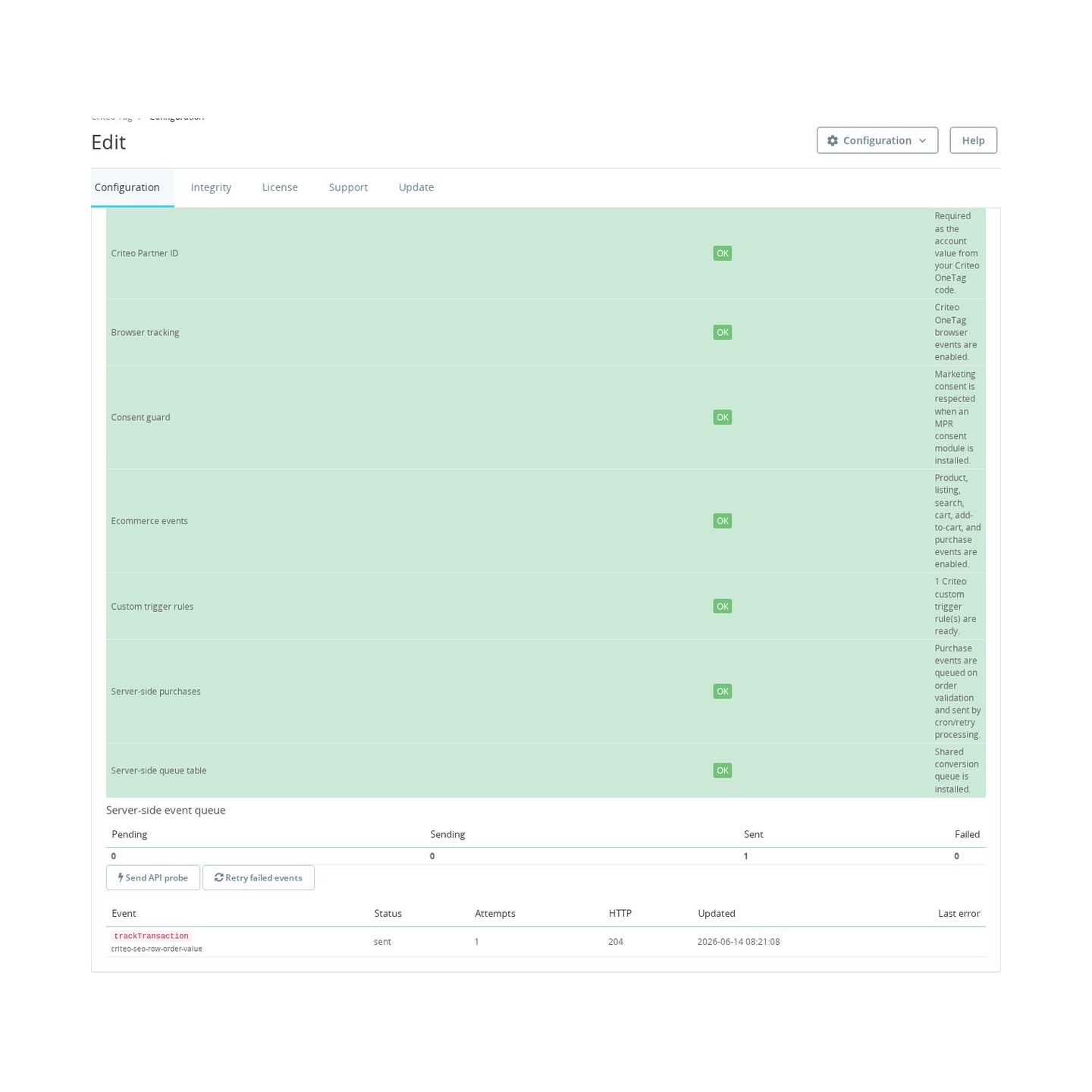
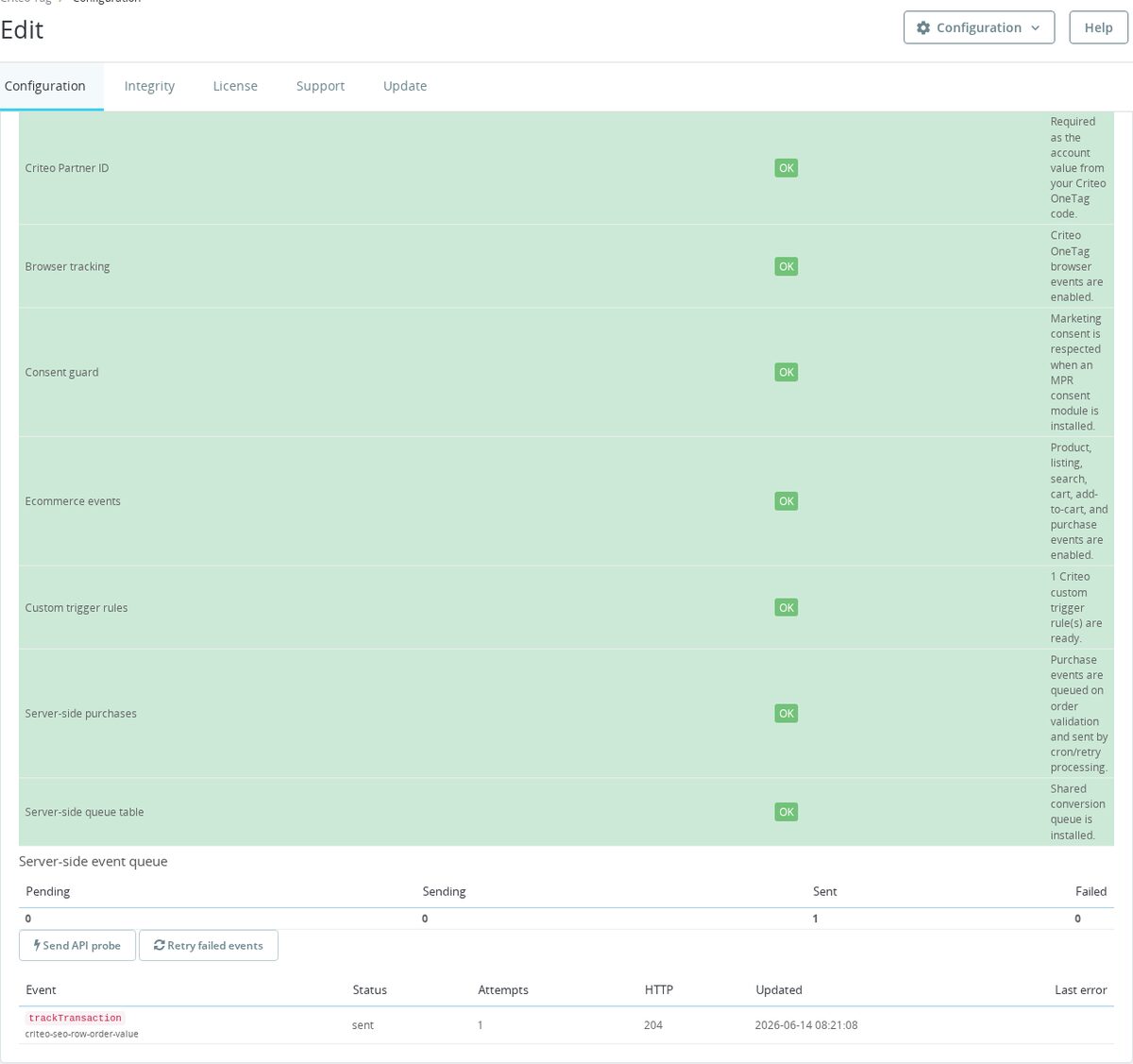
The administration panel shows pending, sending, delivered and failed totals together with the recent purchase identity, attempt count, response status and error. An exhausted record returns to eligible processing through manual recovery, while its earlier failure history remains available for diagnosis.

Which tracking decisions stay with the merchant?
You switch every standard journey stage separately. With MPR Cookies Revolution or MPR Cookie Banner installed, the shop's marketing decision controls whether Criteo starts, while logged-in employees stay outside advertising data. Customer matching is optional, and both the customer number and email are transformed before browser or direct shop delivery.
Additional rules attach supported Criteo actions to a chosen click, address fragment, shop page, page supplied by another module or named storefront action. Their values are validated and personal fields are removed. When another cooperating integration already owns the same Criteo account, this module stays inactive and names the owner instead of reporting every action twice.

How does setup prove that the connection works?
A guided assistant leads from the Partner ID through consent, the product feed and optional direct purchase delivery. It explains each requirement, saves progress and tests the real store path from a listing and product view through a confirmed addition, basket and paid order. The result ties the emitted product identity back to the feed.
The readiness area reports the account identifier, standard events, consent protection, extra rules, feed freshness, purchase settings and queue storage separately. A Criteo delivery probe, recent results and actionable errors complete the handover, so the quick start grows into a configuration whose operation remains visible after theme, consent or checkout changes.
-
Referencemprcriteotag
-
Version1.4.0
-
Improvements126
-
Released
-
Updated
-
PrestaShop CompatibilityPS 1.6 – 9.x
-
Pricing ModelOne-time Purchase
-
Module TypeFront-office
-
GDPR RelevantYes
-
Business GoalMarketing & Retargeting
-
External Account NeededYes
-
Module ComplexityLightweight Widget
-
Customer Journey StageAttract Visitors
-
Works With PlatformAd & Analytics Networks
Be the first to share your experience with this product.
Install Criteo OneTag on your PrestaShop store and send Criteo the ecommerce events it needs for retargeting, product recommendations, product ads, and conversion measurement. The module adds browser OneTag tracking from PrestaShop hooks and can optionally queue server-side purchase events for Criteo Retail Media.
Can the PrestaShop Criteo module send server-side purchase conversions?
Yes. The module has optional server-side Criteo Retail Media purchase tracking. To use it, purchase tracking must be enabled and the server-side settings must be configured: Criteo partner ID, S2S_ENABLED, region eu or us, desktop and mobile API page IDs, and a batch limit. The default server-side batch limit is 20, with validation clamped to 1 through 100.
When PrestaShop fires actionValidateOrder, the hook queues a trackTransaction conversion for provider criteo_retailmedia and immediately processes a small batch, but it does not inspect the order state or payment status itself. The queue path runs when module tracking can run, purchase tracking is enabled, server-side config is valid, and a loaded Order object is present. If you require paid-only semantics, that has to be guaranteed by the order-validation context or added as an explicit state check.
A cron task named send_criteo_retailmedia_conversions is also registered to process queued conversions every 300 seconds. The server request is sent to Criteo's Retail Media endpoint for the configured region, such as d.eu.criteo.com or d.us.criteo.com, with transaction ID, item, price, quantity, currency, visitor/customer data and page ID. The optional S2S_SEND_IP_UA setting controls whether IP and user-agent data are included. This server-side queue is separate from the browser trackTransaction event on the order-confirmation page, so failed server sends can be retried without relying on the customer's browser session.
The server-side feature is installed with the shared conversion queue table and cron registration. It is disabled by default: S2S_ENABLED=0, S2S_REGION=eu, desktop page ID trackTransactionApiDesktop, mobile page ID trackTransactionApiMobile, S2S_SEND_IP_UA=1 and S2S_BATCH_LIMIT=20. The Partner ID must be numeric and 4 to 20 digits, the region must be eu or us, and page IDs may contain letters, numbers, underscore, colon and hyphen.
On order validation, the module checks the high-level tracking guards first: Criteo must be active, purchase tracking must be enabled, consent must allow tracking when the consent guard is on, and the server-side settings must pass validation. If any of those checks fails, no server event is queued.
The purchase payload is built from order line data. Item IDs, prices and quantities are joined with pipe characters for the Criteo Retail Media query. If no item IDs can be mapped, the module sends a fallback item=None, price=0.00 and quantity=1 rather than an empty required field. The environment value is selected from the user agent as desktop d, mobile m or tablet t, and that environment chooses the desktop or mobile page ID.
The admin controller also exposes operational tools for this queue: it can show pending/sending/sent/failed counts, send an API probe, and move failed Criteo server-side events back to pending for retry.
Required server-side setup:
ENABLED=1
PARTNER_ID=12345
TRACK_PURCHASE=1
S2S_ENABLED=1
S2S_REGION=eu or us
S2S_DESKTOP_PAGE_ID=trackTransactionApiDesktop
S2S_MOBILE_PAGE_ID=trackTransactionApiMobileCan merchants create custom Criteo OneTag triggers in PrestaShop?
Yes, merchants can define custom trigger rules for supported Criteo events. The PrestaShop configuration accepts validated JSON rules using click, URL, controller or DOM-event triggers, then normalizes custom event names to Criteo's supported OneTag vocabulary before sending.
How do I add Criteo OneTag tracking to PrestaShop?
You can add Criteo OneTag to PrestaShop by configuring a numeric Criteo Partner ID and enabling browser tracking. The module then builds OneTag events in the header for supported ecommerce pages and keeps tracking inactive when the Partner ID is missing or invalid.
Does Criteo OneTag for PrestaShop send hashed customer identifiers?
Yes, when SEND_CUSTOMER_IDENTIFIERS is enabled. The module builds separate Criteo customer events alongside the normal page or purchase events. It never sends the plain email in those customer events; it lowercases and trims the email, then hashes it with SHA-256. The customer id is also hashed with a customer: prefix.
[{"event":"setCustomerId","id":"sha256(customer:123)"},{"event":"setEmail","email":"sha256(alice@example.com)"}]The values above are placeholders showing the shape only. In the real storefront output the hash fields contain 64-character SHA-256 hex strings. The events are omitted entirely when customer identifiers are disabled or when no valid customer can be loaded from the current context or order.
The setting defaults to disabled, so a merchant has to opt in before these events are created. For normal page events, the module uses the current PrestaShop customer from the storefront context. For order-confirmation purchase events, it can load the customer from the order's id_customer. In both paths, the source checks that a valid customer object exists before adding either identifier event.
The browser templates place these identifier events in the universal queue with setAccount and setSiteType, before the page, basket or purchase event is pushed to window.criteo_q. The module does not send the customer's name, phone number, postal address or raw PrestaShop customer ID in those browser customer events.
For server-side purchase tracking, the same opt-in flag can also add a hashed email value to the Retail Media query when the order customer has an email address. That server-side path still depends on the normal tracking guards: the module must be active, consent must allow tracking when enabled, purchase tracking must be on, and the server-side Criteo settings must be valid.
Does the Criteo PrestaShop module respect cookie consent?
Yes, it can respect cookie consent when RESPECT_CONSENT is enabled, which is the module default. The module checks mprcookiesrevolution first by parsing the mprcr_consent cookie and looking for marketing:1. If that cookie is missing, it falls back to mprcookiesrevolution's DEFAULT_CONSENT value.
If Cookies Revolution is not active, it checks mprcookiebanner. A cookie value of mprcookie_consent=granted allows Criteo; any other present value blocks it. If the banner cookie is absent, the module uses mprcookiebanner's DEFAULT_CONSENT.
If no supported MPR consent module is installed or active, hasMarketingConsent() returns allowed, so Criteo is not blocked by consent alone. For a strict consent-first setup, keep Respect marketing consent enabled and run one of the supported MPR consent modules. The client-side consent gate is only enabled when Respect marketing consent is on and either mprcookiesrevolution or mprcookiebanner is active.
The consent check is part of canTrack(), which is used before header events, order-confirmation purchase events and server-side purchase queueing. So when the server-side consent check blocks tracking, the module does not build normal browser events and does not enqueue the server-side conversion from actionValidateOrder.
The browser template also includes a client-side consent check when the consent gate is active. It can call window.MPRCR.isGranted('marketing') when Cookies Revolution exposes that helper, or it can read the same mprcr_consent and mprcookie_consent cookies directly. If that JavaScript check returns false, it stops before pushing Criteo events into window.criteo_q.
RESPECT_CONSENT=0: consent check is bypassed
RESPECT_CONSENT=1 + mprcr_consent contains marketing:1: allowed
RESPECT_CONSENT=1 + mprcookie_consent=granted: allowed
RESPECT_CONSENT=1 + no supported MPR consent module: allowed by this module
Consent is not the only tracking guard. Browser tracking still also requires ENABLED=1 and a valid numeric Criteo Partner ID, and employee browsing can be excluded when EXCLUDE_EMPLOYEES is enabled.
Which Criteo events can the PrestaShop OneTag module send?
The module maps PrestaShop storefront pages and hooks to Criteo OneTag events, with separate settings for each standard event.
| Event | Where it fires | Notes |
|---|---|---|
viewHome | Home page from displayHeader | Controlled by the home tracking setting. |
viewItem | Product page from displayHeader | Uses the current product context. |
viewCategory | Category/listing page from displayHeader | Uses category/listing context and visible product data where available. |
viewSearchResult | Search results page from displayHeader | Includes search context and matching product data where available. |
viewBasket | Cart or checkout page from displayHeader | Uses the current cart line items. |
addToCart | Front-office JavaScript in the header template | Captured from cart update and add-to-cart interactions. |
trackTransaction | Order confirmation from displayOrderConfirmation | Uses order reference, currency and purchased line items. |
custom | Configured click, URL, controller or DOM-event rules | Only runs when custom-event tracking is enabled and rules match. |
All browser events still depend on the module being active, a configured Criteo partner ID, the visitor passing the module's tracking/consent checks and the relevant per-event toggle being enabled.
- AddedHarden Criteo release surface
- AddedAdd Criteo custom trigger rules
- AddedAdd Criteo server-side purchase tracking
Works Well With Criteo OneTag Integration
Modules our team genuinely pairs with this one, and exactly why each belongs in the same setup.

Running Criteo OneTag, your store sends shopping signals to Criteo for retargeting, product interest and purchase reporting across home, product, category, search, basket, add-to-cart and transaction flows. Criteo works from your product catalogue, so how well it performs depends heavily on the quality and structure of the product data behind it, which the integration maintains through its own synchronized feed.
Smart Google Merchant Feed Manager is a separate module that generates and shapes product data for Google Merchant Center, with separate feed profiles for markets, languages, currencies, target countries and sync modes, and can publish protected XML feed links. It gives you disciplined, deliberate control over how your catalogue data is structured for shopping platforms rather than relying on ad-hoc exports.
Used together, they let you keep tidy, well-shaped product data supporting your Shopping presence while Criteo handles retargeting, two complementary tools that both depend on clean catalogue information. The payoff is paid-product marketing built on data you manage on purpose: your feed stays organised and market-appropriate, Criteo maintains its own feed and shopping signals, and the catalogue underpinning both is something you control rather than leave to chance.

With Criteo OneTag running, your store sends retargeting and purchase signals to Criteo across the main storefront flows, from home and product through basket and transaction. That is Criteo's own attribution view, useful for optimising the channel, but it describes Criteo only in its own terms and gives you no neutral reporting home to compare it fairly against your other traffic sources.
Google Analytics GA4 is a separate module that sends ecommerce activity to your GA4 property after validating the Measurement ID, covering product views, cart activity, checkout starts, purchases, searches, logins and account creation. It provides channel-agnostic reporting across the store, placing Criteo inside the same funnels and revenue view as every other source.
Used alongside Criteo OneTag, GA4 keeps Criteo's conversion view for campaign tuning while showing how it performs against everything else. The payoff is cross-channel context for retargeting spend: you optimise Criteo with platform data yet allocate budget from a neutral report, so a channel that looks good in isolation is always weighed against its real contribution to the store.

A store running Criteo OneTag sends shopping signals for retargeting and usually manages other marketing tags too. Keeping those coordinated by hand across the theme is fiddly and prone to breakage, and OneTag only handles its own platform, so the broader collection of pixels and analytics snippets has no shared, event-aware structure to keep it consistent as the stack grows and changes.
Google Tag Manager is a separate module that adds your GTM container and feeds it GA4-formatted ecommerce events from real shopping behaviour, giving surrounding marketing and analytics tags a consistent delivery layer. Configure GTM’s shared container for other tags and keep Criteo assigned to the dedicated module, so your dedicated Criteo tag stays exactly as configured.
Running both keeps Criteo's OneTag intact while GTM organises the broader tag landscape. The payoff is a cleaner, more maintainable setup: your Criteo measurement stays independent and reliable, other tags live in a tidy structure, and future changes are far less likely to break existing tracking, so your effort goes into results rather than snippet maintenance.

Because Criteo OneTag loads browser tracking and can send purchases from the server, it applies marketing consent to both delivery paths when a supported consent manager governs the decision. Cookies Revolution supplies that decision layer and records the shopper’s choices.
Cookies Revolution is a separate consent manager that collects and enforces choices for necessary, functional, analytics and marketing cookies. It blocks matching external and inline scripts before consent, reactivates allowed ones afterwards once it is granted, and records each decision.
Used alongside Criteo OneTag, it holds marketing scripts until a shopper agrees and keeps a record of those choices, so your Criteo retargeting rests on a consent-respecting foundation. The payoff is tracking you can defend: you keep measuring shoppers who opt in, you can evidence how consent was captured, and compliance stays a separate, manageable layer rather than something patched around your retargeting tag.
Criteo product catalog feed URL returns 404 after module update
 30 days return right
Easy return - no questions asked
 Plug & Play Modules
Install, set up and take profit
 Dedicated Support First
Priority Help & Satisfaction Over Sales
You might also like


Who builds and maintains this module
Built and maintained by David Miller and mypresta.rocks. David Miller has worked with PrestaShop since 2013, and the company behind this shop has been registered since 3 December 2018. Every module in this catalogue is our own work, so your questions to support reach the people who wrote the code. The changelog on this page lists every update with its date.