Integrations & Data Export

Brevo (Sendinblue) Integration

Tie storefront browsing to the right Brevo contact and send new registrations across automatically

Version
1.2.36
Updated
PrestaShop
1.6 to 9
Price: €99.00
Tax excluded
Partner price €79.20 Partner price for agencies Agencies with a partner account pay less on every module, depending on what they buy: 20% approved partner 25% from €1,000 a month 30% from €3,000 a month Average of the last 12 months, excl. VAT. Become a partner

Brevo (Sendinblue) Integration keeps PrestaShop contacts current in Brevo, supplies shopping events and routes store email through its delivery service. Setup takes two keys from your Brevo account.

Brevo combines campaign editing, segmentation and automated email, SMS and WhatsApp marketing. Its free account sends up to 300 emails a day; paid plans start at about $9 a month for 5,000 emails.

You choose the contact list, automatic or consent-based subscription, and double confirmation. Customer edits update existing contacts instead of creating duplicates, and Brevo unsubscribes are honoured in the shop. Each shop keeps its own keys and list. Store messages use your sender name and reply-to address.

A changed newsletter choice reaches Brevo automatically, keeping campaign lists aligned with the customer information held in your shop.

Professional Setup We fully configure the module to your needs: all options set, tested & verified within 1 business day. +€29.00
Visual Integration CSS & template adjustments to match your theme: includes cross-device verification and screenshot review. +€49.00

In the box

  • Lifetime licence for one shop
  • 12 months of updates, security fixes free forever
  • 3 months of support by mypresta.rocks
  • PrestaShop 1.6 to 9

Recent changes

  • One download for every shop: each shop gets its own 30-day trial from installation, then you activate it with your licence key.
  • Shared components updated to the current release set.
Full changelog

Summary of what the module offers

Brevo (Sendinblue) Integration connects a PrestaShop store to the Brevo marketing platform and keeps the data behind your campaigns complete and current. Six features connect your contacts, consent, automations and store email with Brevo.

  • Contacts: registrations, profile changes, orders and the existing customer base land on the list you choose.
  • Consent: automatic or consent-based subscription, double confirmation, an unsubscribe honoured on both sides.
  • Automations: the signed-in shopper is recognised by email, and product, cart and purchase events feed your scenarios.
  • Store email: order and account messages are delivered through Brevo under your own sender.
  • The service: Brevo includes campaign editing, automations and segmentation, with a free account and paid plans.
  • Setup: two keys, a named status for each, and no effect on store speed.
Brevo (Sendinblue) Integration (Sendinblue) Integration setup status panel showing which credentials are already in place

Who ends up on the Brevo list?

Every new registration becomes a Brevo contact on the list you choose, updated rather than duplicated when the address already exists. Later changes follow by themselves: an edited name, a changed newsletter choice, a guest who turns a purchase into an account, and a completed order all refresh the contact, together with the details your segments feed on, such as birthday and order history figures. The existing customer base enters Brevo in one action, so the integration starts complete instead of starting from zero.

You decide how consent works: automatic subscription, subscription only for customers who agreed, or double confirmation where Brevo asks the customer to confirm. An unsubscribe in Brevo is honoured in the store as well, so the list never contains a person who already said no.

Contact list selection and the automatic subscription switch

What do your automations see?

On the storefront the module introduces the signed-in customer to Brevo by email before any activity is recorded, so behaviour attaches to the right contact instead of to anonymous traffic. Brevo then receives the events your scenarios are built on: the page viewed, the product viewed, the cart updated, and the purchase with its amount, currency and order number.

The practical effect shows in the flows. The abandoned-cart message goes to the person who abandoned the cart, the win-back series starts from a real last-purchase date, and the welcome flow greets a customer Brevo already knows by name.

Customer recognised card showing a matched signed-in shopper with their email and recent orders

What happens to order and account email?

Order confirmations, shipping notices and account messages leave the store through Brevo's delivery infrastructure, under the sender name and reply-to address you set. Delivery stops depending on the hosting's mail server and its reputation.

A delivered confirmation can reduce questions about whether the order went through, and every sent message appears in Brevo's statistics next to your campaigns.

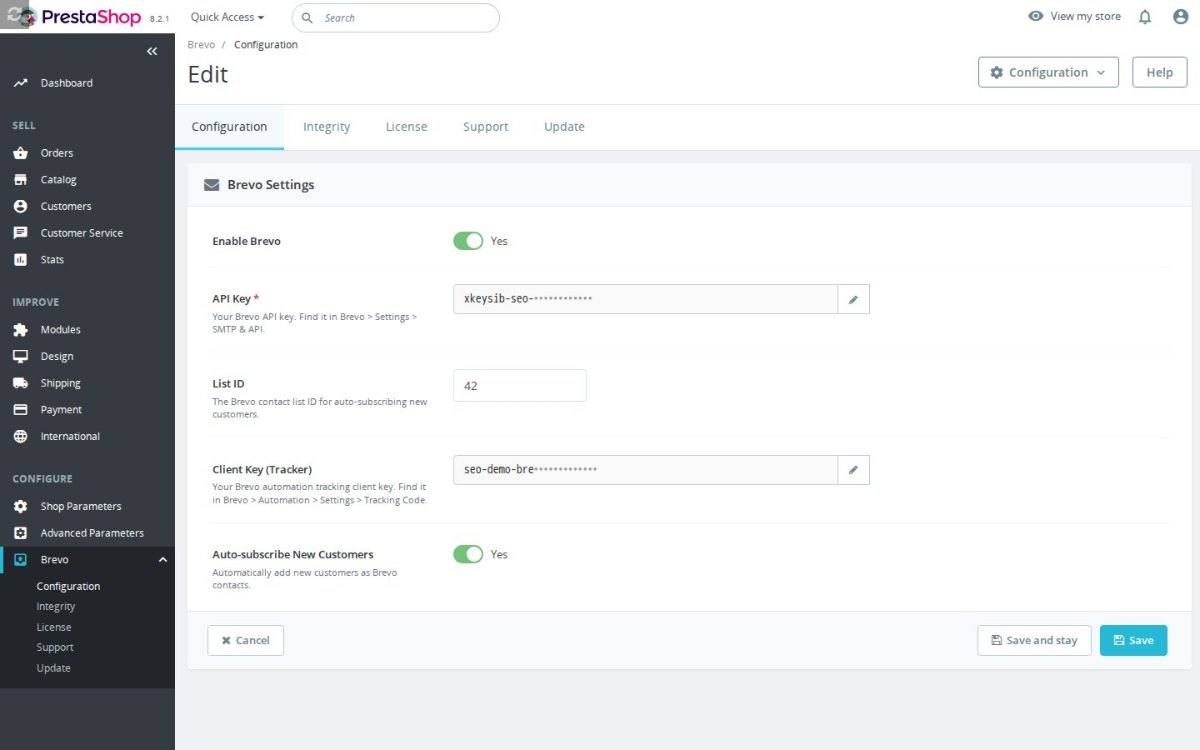
The Brevo (Sendinblue) Integration (Sendinblue) Integration configuration screen

What does Brevo itself provide and what does it cost?

Brevo is a marketing platform operated in the browser. The account is free and sends up to three hundred emails a day, and paid plans start at about nine dollars a month for five thousand emails. It includes a campaign editor built on ready blocks, automation scenarios such as welcome, abandoned cart and win-back, contact segmentation, and campaigns over email, SMS and WhatsApp.
The division of labour is clear: Brevo owns the writing and the sending, the module owns the data. Campaigns are exactly as good as the contacts and events behind them, and that is the part the module keeps complete.
The Brevo (Sendinblue) Integration (Sendinblue) Integration installation check

How does setup work and does the store slow down?

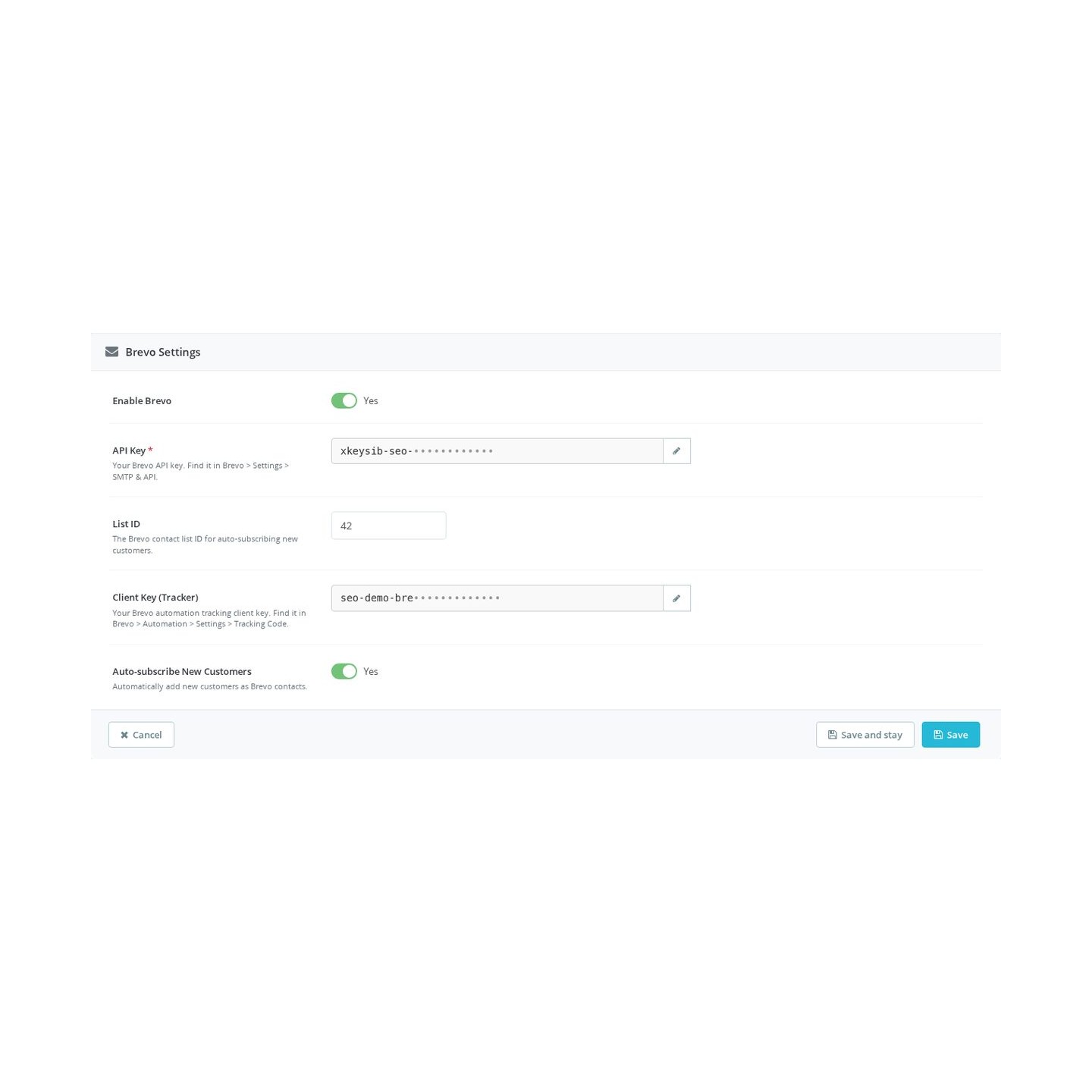
Setup consists of copying two keys from the Brevo panel into the module: one for contact synchronisation, one for storefront tracking. Both fields are masked, and the configuration screen states separately for each key whether it is in place and which feature waits on it, so a half-configured integration announces itself instead of failing silently. A built-in integrity screen checks the installation and repairs it.

The tracking script loads in the background after the page, and with the module disabled or the keys missing the storefront receives nothing at all. The module keeps no copy of your customers: data goes straight to your Brevo account. In a multistore installation every shop keeps its own keys and its own list.

Brevo (Sendinblue) Integration (Sendinblue) Integration settings with the masked API key, list ID, tracker client key and auto-subscribe switch
  • Reference
    mprbrevo
  • Version
    1.2.36
  • Released
  • Updated
  • PrestaShop Compatibility
    PS 1.6 – 9.x
  • Pricing Model
    One-time Purchase
  • Module Type
    Front & Back-office
  • GDPR Relevant
    Yes
  • Business Goal
    Marketing & Retargeting
  • External Account Needed
    Yes
  • Module Complexity
    Feature-Rich Module
  • Customer Journey Stage
    Retain Customers
  • Works With Platform
    Email Marketing

What customers say about us

Company reviews
5.0 ★ ★ ★ ★ ★ (4 reviews)
Customer Reviews for PrestaShop Modules and Support

No product reviews yet

Be the first to share your experience with this product.

Write a Review

Quick start

  1. Upload and install the mprbrevo ZIP in Module Manager.
  2. Click Configure to open Brevo Settings.
  3. Enter API Key and an optional List ID.
  4. Enter Client Key (Tracker) for storefront tracking.
  5. Enable Auto-subscribe New Customers if you want eligible newsletter contact sync.
  6. Enable Brevo and save.
  7. Create a new newsletter-opted-in customer and verify the Brevo contact; check tracker requests with marketing consent.

Requires PrestaShop 1.6 or later and PHP 7.1 or later.

Open the full help page

Loading tab content...
30 days return right
Easy return - no questions asked
Plug & Play Modules
Install, set up and take profit
Dedicated Support First
Priority Help & Satisfaction Over Sales

Who builds and maintains this module

Built and maintained by David Miller and mypresta.rocks. David Miller has worked with PrestaShop since 2013, and the company behind this shop has been registered since 3 December 2018. Every module in this catalogue is our own work, so your questions to support reach the people who wrote the code. The changelog on this page lists every update with its date.

About us

More modules

Welcome Popup

Welcome Popup collects newsletter signups from new visitors, and Brevo (Sendinblue) Integration synchronizes contacts with Brevo for marketing automation and transactional emails. New subscribers enter your Brevo automation from day one.

Loyalty Discounts System

Loyalty Discounts System gives loyal customers tiered benefits, and Brevo (Sendinblue) Integration keeps them engaged with automated email through Brevo. Rewards and communication for the customers who matter most.

Checkout Revolution

Brevo (Sendinblue) Integration brings customers back with automation, and Checkout Revolution lets them buy again quickly with saved cards, wallets and social login. Retention emails that end in fast repeat orders.

Loading...
Back to top