Conversions & Sales Boosters

Pack Product Badges

PrestaShop pack badges, a Bundle pill on listings and a counted included-products tab on the product page

Version
1.3.2
Improvements
138
Updated
PrestaShop
1.7 to latest
Price: €69.00
Tax excluded
Partner price €55.20 Partner price for agencies Agencies with a partner account pay less on every module, depending on what they buy: 20% approved partner 25% from €1,000 a month 30% from €3,000 a month Average of the last 12 months, excl. VAT. Become a partner

Pack Product Badges marks PrestaShop packs in category and search listings and adds a product-page tab showing their contents. One switch starts the feature, with existing packs recognised automatically.

A bundle otherwise looks like an ordinary product in a listing, while its contents remain buried in the description. Customers need to see which items are included and how their combined value relates to the pack price.

You set badge wording for each store language and turn the feature on or off. The contents grid links to each included product with its image, name and individual price; free items are marked accordingly. Colours and styling follow your theme, and contents use the current shop and language.

Shoppers see what the bundle contains and reach any included item's own page directly from the pack.

Professional Setup We fully configure the module to your needs: all options set, tested & verified within 1 business day. +€29.00
Visual Integration CSS & template adjustments to match your theme: includes cross-device verification and screenshot review. +€49.00

In the box

  • Lifetime licence for one shop
  • 12 months of updates, security fixes free forever
  • 3 months of support by mypresta.rocks
  • PrestaShop 1.7 to latest

Recent changes

  • Product packs retrieve their saved details more reliably.
  • Fixes
  • Corrects database lookups that could fail when retrieving pack details.
Full changelog

Summary of what the module offers

Pack Product Badges gives bundle products the two things that sell them: visibility in listings and transparency on the product page. Six features identify packs and present their contents and value:

  • A badge on every pack in category and search listings
  • A product page tab listing every included product with image, name and price
  • The value of the parts shown next to the pack price
  • Automatic pack recognition and per-language badge wording
  • Styling taken from the theme itself, no design work
  • One switch to run it, nothing to maintain
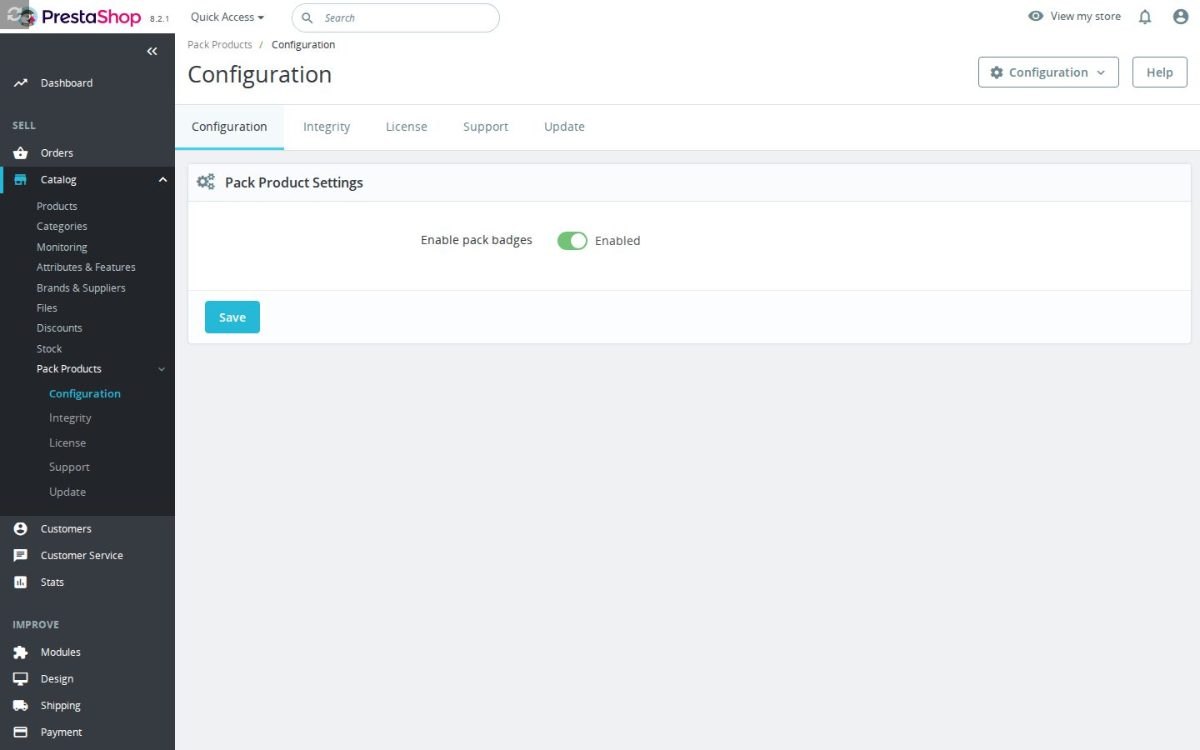
The Pack Product Badges configuration screen in the PrestaShop back office

Why does a bundle need a badge?

On a listing card, a pack looks exactly like a single product. A customer scrolling a category may give a pack the same half-second glance as any other product, even if it offers, for example, five products for the price of three.

The badge changes that at the only moment it matters, before the click. Packs are recognised automatically and every pack card carries the mark, in the wording you set per language.

Product row on the storefront where one card carries the teal PACK badge among ordinary products

What does the customer see on the product page?

A tab that answers the contents question completely. Every included product appears in a grid with its cover image, its name and its own price; items included at no charge are marked as free. The customer counts the parts, sees what each is worth, and compares that value with the pack price to check for any saving.

Each entry is a real link to the product's own page, so a customer who wants to know more about one part reaches it in one click and comes back convinced rather than doubtful.

Storefront pack page listing the products included in a bathroom starter pack with the pack price

How much design work does it take?

None. The module reads your theme's own colors, corner radius, shadows and transitions and applies them to the badge and the tab, so both look like parts of the theme rather than additions to it.

The grid adapts to the screen by itself, from wide desktop pages to phones, and the included products' images load only when the customer scrolls to them, so the product page stays fast.

The Pack Product Badges configuration screen

What does it do for the rest of the catalogue?

Every included product gains a genuine link from every pack that contains it. That helps customers move between the set and the single item, and it strengthens the internal linking of the catalogue, which search engines read as a signal of structure.

The image of each part carries the product name as its description for search engines and screen readers, so the tab contributes to accessibility and image search instead of being decoration.

Related products row on a product page where one card carries the PACK marker

How is it configured and what happens in a multistore?

One switch turns the whole feature on or off, and the badge wording is set per store language. There are no rules to build and no lists to maintain: a new pack in the catalogue receives its badge and its contents tab the moment it exists.

Contents are read for the current shop and language, so each shop of a multistore shows its own packs correctly, and each language its own names and prices.

Pack product settings in the back office with the enable pack badges switch
  • Reference
    mprpackproducts
  • Version
    1.3.2
  • Improvements
    138
  • Released
  • Updated
  • PrestaShop Compatibility
    PS 1.6 – 9.x
  • Pricing Model
    One-time Purchase
  • Module Type
    Front-office
  • GDPR Relevant
    No
  • Business Goal
    Boost Conversions
  • External Account Needed
    No
  • Module Complexity
    Lightweight Widget
  • Customer Journey Stage
    Convert to Buyers
  • Works With Platform
    No External Platform

What customers say about us

Company reviews
5.0 ★ ★ ★ ★ ★ (4 reviews)
Customer Reviews for PrestaShop Modules and Support

No product reviews yet

Be the first to share your experience with this product.

Write a Review

Quick start

  1. Install the mprpackproducts ZIP on a compatible PrestaShop version.
  2. Open Configure > Pack Product Settings and keep Enable pack badges on.
  3. Edit a test product reference to start with mpr-pack- and save it.
  4. Open a listing containing the product and check its Bundle or existing native pack flag.
  5. Refresh the listing with a facet and confirm the flag remains.
  6. If you need the contents tab, add real pack mappings to the prefixed mpr_pack_content table.
  7. Open the pack product and verify the included-product cards and displayed base prices.

Requires PrestaShop 1.7 or later and PHP 7.1 or later.

Open the full help page

Loading tab content...
30 days return right
Easy return - no questions asked
Plug & Play Modules
Install, set up and take profit
Dedicated Support First
Priority Help & Satisfaction Over Sales

Who builds and maintains this module

Built and maintained by David Miller and mypresta.rocks. David Miller has worked with PrestaShop since 2013, and the company behind this shop has been registered since 3 December 2018. Every module in this catalogue is our own work, so your questions to support reach the people who wrote the code. The changelog on this page lists every update with its date.

About us

More modules

Sales Revolution

Pack Product Badges highlights pack products in listings and shows the included products on the pack page, and Sales Revolution creates bundles and frequently bought together suggestions. Shoppers notice your packs and understand what they get.

Showcase Revolution

Showcase Revolution builds product widgets and collections for your pages, and Pack Product Badges marks pack products with a badge in product listings. Value packs stand out wherever shoppers browse.

Filter Revolution

Filter Revolution helps shoppers narrow your catalogue, and Pack Product Badges makes pack products recognizable in listings and shows what each pack contains. Shoppers spot the better deal while browsing.

Loading...
Back to top