


Tracking & Analytics Pack brings eight PrestaShop measurement modules together for your advertising and analytics channels. Each installs separately and starts with its platform identifier in the shop panel, without theme edits.
The pack covers Meta, Google Analytics, Google Tag Manager, TikTok, Pinterest, LinkedIn, Bing UET and Microsoft Clarity. Platform accounts remain with their providers; Clarity adds recordings and heatmaps while the other connections support campaign and commerce measurement.
You configure each module separately and select its events. Activation waits for a supported consent signal. Seven modules provide server delivery and seven exclude staff sessions; Meta, TikTok, Pinterest and LinkedIn share purchase identifiers across browser and server reports to prevent duplicates.
Your advertising platforms retain purchase evidence through server reporting when a browser blocks the corresponding conversion.
Summary of what the pack offers
Tracking & Analytics Pack is eight measurement modules in one purchase, covering every major advertising and analytics platform a PrestaShop store uses. Six benefits bring together platform coverage, complete measurement and bundle savings.
- Eight platforms: Meta, GA4, Google Tag Manager, TikTok, Pinterest, LinkedIn, Bing UET, Microsoft Clarity
- Conversions sent from the server as well as the browser
- One purchase identifier across both paths, so no order is counted twice
- The same commerce events with value and currency on every platform
- Consent respected before anything activates, staff sessions excluded
- €553 of paid modules for €399, with the GA4 module included free

Which platforms are covered?
One module per platform, each with its own settings screen and its own licence: Meta Pixel for Facebook and Instagram advertising, Google Analytics GA4, Google Tag Manager, TikTok Pixel, Pinterest Tag, LinkedIn Insight Tag, Bing UET for Microsoft Advertising, and Microsoft Clarity, which adds session recordings and heatmaps to the picture.
There is no umbrella construction to fight with: each module installs on its own, is configured with its platform's identifier, and is updated on its own. A shop that adds a channel next year configures one more screen.

Why are the numbers finally right?
Browsers block a share of measurement, and every blocked conversion is a sale your ad platform never learns about and never bids on. Seven of the eight modules therefore send conversions from your server as well as the browser, so the sale is reported even when the browser stays silent or the customer never sees the confirmation page.
Counting twice is the opposite lie, and it is prevented by design: Meta, TikTok, Pinterest and LinkedIn receive the same purchase identifier on both paths and keep exactly one copy of each order. GA4 verifies its identifier before it measures anything and reports the purchase directly from the server when the confirmation page is missed.

What do the events contain?
Commerce, not page hits. Product views, carts, checkout starts, searches, sign-ups and purchases are all reported, and purchases carry order value and currency. Every platform receives the same events built from the same store data.
That symmetry is what makes channels comparable: when Meta, Google and TikTok all define a purchase the same way, the platform that looks best in a report is the one that actually sells best.

How are consent and privacy handled?
Each module waits for a supported consent signal before it activates, so a visitor who declines is never measured, and one who accepts is measured from that moment on. Nothing loads ahead of the decision.
Staff sessions are excluded from the data in seven of the eight modules, so your own team's daily clicking stops polluting the numbers your bidding learns from.

What is included in the purchase?
Eight modules with their licences and updates, of which seven are paid products worth €553 together; the pack price is €399, about 28% less, and the GA4 module is included free. Every module in the pack is the same product sold on its own page, at full depth.
The result is one coherent measurement layer across all channels, installed without touching a single theme file, and cheaper than assembling it piece by piece.
-
Referencempr-pack-tracking-analytics
-
PrestaShop CompatibilityPS 1.6 – 9.x
-
Pricing ModelBundle Deal
-
Module TypeFront & Back-office
-
GDPR RelevantYes
-
Business GoalMarketing & Retargeting
-
External Account NeededYes
-
Module ComplexityComplete Solution
-
Customer Journey StageAttract Visitors
-
Works With PlatformAd & Analytics Networks
Be the first to share your experience with this product.
The Tracking & Analytics Pack gives PrestaShop stores one purchase for multi-channel conversion tracking, analytics tags, advertising pixels, and cookie consent tooling. It is useful when you need consistent product, cart, checkout, purchase, revenue, currency, and order-ID data across Google, Meta, TikTok, Pinterest, Snapchat, Reddit, X, Criteo, AdRoll, Outbrain, Quora, Taboola, and consent-managed tracking.
Which platforms are included in Tracking & Analytics Pack?
The Tracking & Analytics Pack is a licence bundle for tracking and analytics modules, sold together for less than buying the same modules separately. Each module is a purpose-built module with its own settings screen, installed and configured independently with its own account IDs and consent behaviour.
For the current list of included modules, and the PrestaShop version each one supports, see the Tracking & Analytics Pack product page.
Can I add custom Meta Pixel events for PrestaShop storefront actions?
Yes. Facebook Pixel lets you define browser-side custom Meta Pixel events from the module configuration. The module supports rules based on clicks, URL matches, PrestaShop controller/module context, or a DOM event.
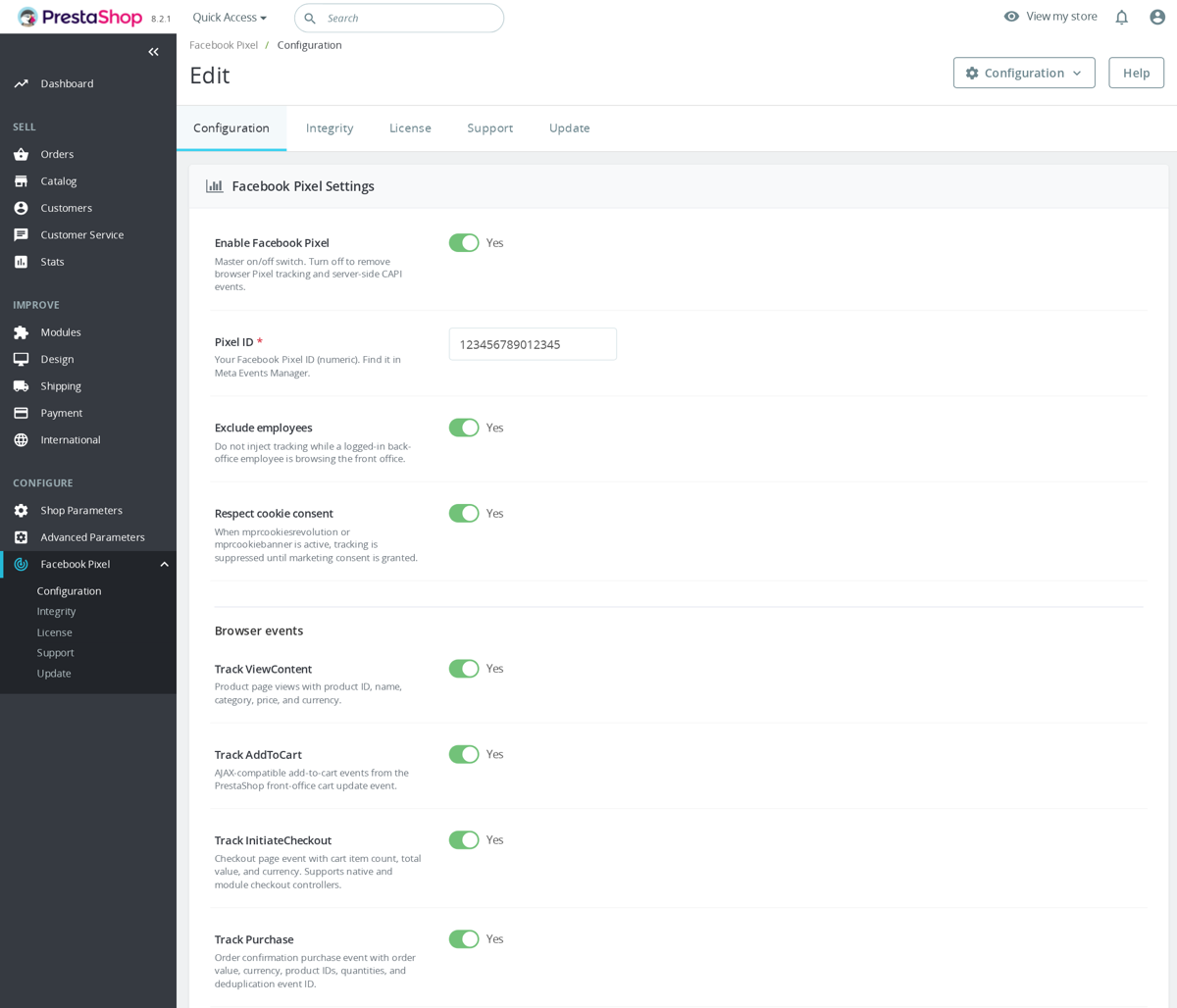
Use a custom event name only for something that is not already a standard Meta event. The module rejects standard/reserved names such as Purchase, AddToCart, Search, ViewContent and InitiateCheckout. Custom names must start with a letter and use only letters, numbers or underscores, with a 50-character limit.
Example: send a custom event when a shopper opens a size guide on a product page.
[{"event":"SizeGuideOpen","trigger":"click","selector":"#size-guide-link, .js-size-guide","once":true,"params":{"placement":"product_page","source":"faq_example"}}]That rule sends fbq('trackCustom', 'SizeGuideOpen', ...) when the clicked element matches the selector, and it includes the parameters from the rule payload. Test the event in Meta Pixel Helper or Events Manager after saving, because a selector that does not exist in the active theme will never fire.
The module validates custom rules before saving. It accepts either a plain events array or a wrapped object format, ignores disabled rules, enforces trigger-specific required fields, and caps the distinct custom event names at 50. Click rules need a selector, URL rules need a contains value, controller rules need controller context, and DOM-event rules need the event name to listen for.
Parameter handling is intentionally defensive. Custom parameters are sanitized, invalid keys are dropped, nested depth and total parameter count are limited, and sensitive or reserved fields such as email, phone, IP and event ID are not accepted from custom-event params. That keeps custom events useful for behavior tracking without turning the config box into a place to leak personal data.
Custom browser events only run when Pixel tracking itself is active. The module checks that tracking is enabled, that a numeric Pixel ID exists, and that employee exclusion and marketing-consent rules allow tracking. The header script waits for the consent gate when configured, initializes Pixel once, sends PageView and page-specific standard events, then binds AddToCart, wishlist and custom-event listeners.
Do not use custom events to duplicate standard ecommerce events. The module already has standard browser-side events and a separate server-side CAPI purchase queue with event IDs for deduplication. Use custom events for theme-specific interactions such as size-guide opens, finance calculator use, quote-button clicks or configurator steps that Meta does not already model as a standard event.
Does the TikTok tracking module work with PrestaShop 9?
Yes. The TikTok Pixel & Events API module for PrestaShop runs on PrestaShop 9 and other current versions without overrides or theme edits.
It tracks the standard TikTok commerce events used for ad optimisation and audience building, ViewContent, AddToCart, InitiateCheckout, Purchase/CompletePayment mapping, CompleteRegistration, Search, Subscribe and AddToWishlist. Each event has its own toggle in the back office, so you fire only what you actually need.
Completed purchases are also sent server-side through TikTok's Events API using the same event_id as the browser pixel, so TikTok deduplicates the two Purchase signals instead of double-counting. That keeps purchase reporting honest when iOS, ad blockers or a flaky connection drop the browser pixel. Employee exclusion can stop logged-in staff visits, and consent gating holds firing until marketing consent is granted, so a built-in integrity check confirms the hooks are registered and the pixel actually fires.
To go live: paste your Pixel Code and access token, confirm the events in TikTok Ads Manager's Test Events tool, and you are tracking.
Works Well With Tracking & Analytics Pack
Modules our team genuinely pairs with this one, and exactly why each belongs in the same setup.

Once the pack is collecting clean data, this conversion audit turns those analytics into a concrete plan of storefront and checkout improvements aimed at lifting your tracked conversion rate.

A hands-on audit that checks the pack’s pixel and GA4 events along a real checkout for correct firing and purchase deduplication, documenting missing or double-counted conversions for your team to correct.

Your pixels and GA4 attribute revenue to specific products; the Smart Google Merchant Feed Manager keeps that same catalogue flowing to Google Shopping, closing the loop from product feed to ad click to tracked purchase.

Every pixel and analytics tag in this pack should only fire after a shopper agrees. Cookies Revolution manages that consent and holds tracking back until it is granted, keeping your data collection privacy-compliant.
No known issues
There are currently no open or resolved issues registered for this module.
 30 days return right
Easy return - no questions asked
 Plug & Play Modules
Install, set up and take profit
 Dedicated Support First
Priority Help & Satisfaction Over Sales
You might also like


Who builds and maintains this module
Built and maintained by David Miller and mypresta.rocks. David Miller has worked with PrestaShop since 2013, and the company behind this shop has been registered since 3 December 2018. Every module in this catalogue is our own work, so your questions to support reach the people who wrote the code. The changelog on this page lists every update with its date.