


Lock your PrestaShop front office behind a password for launches and private sales


Password Protection puts your whole PrestaShop storefront or selected pages behind a password gate. Installation and one saved password activate the basic protection, with scope and presentation refined on the same screen.
An unfinished shop, wholesale range or private collection should reach its intended audience. The gate checks access before building protected content, so an uninvited visitor receives the password screen instead of the page.
You select products, categories and content pages with exceptions, assign shared or separate passwords and write the gate message. Protected categories include their products. An optional bypass admits employees and addresses authorised for maintenance. Search protection signals temporary unavailability and requests no indexing; the branded gate loads no outside service.
Invited visitors enter the exact page they requested after the password, keeping a private product link useful.
Summary of what Password Protection offers
Password Protection gates a PrestaShop storefront, entirely or page by page, behind a password, while search engines are told the shop is temporarily unavailable. Six features govern protected access and daily operation:
- What stays hidden and from whom: pre-launch shops, wholesale ranges, private collections.
- How precisely the scope is chosen: whole store or selected products, categories and CMS pages.
- What the visitor meets: a branded gate, your message, and the exact page they wanted after the password.
- What search engines receive: a temporary-unavailability signal and a request not to index.
- How the team keeps working: employees and authorized addresses pass without the password.
- How the start looks: one screen, a module that names anything missing, and guarded updates.

What stays hidden, and from whom?
Three situations bring merchants here. A shop under construction lives at a public address months before launch, and the merchant decides who previews it. A wholesale range with trade prices is meant for approved buyers, not for retail customers or competitors with a bookmark. A members-only line inside a public shop is for people who were given the word.
In each case the stakes are the same: whoever holds the password enters, everyone else meets a gate, and the content behind it is never built for the uninvited visitor at all. The check happens before the protected page exists, so there is nothing to view, copy or index.

How precisely do you choose what is protected?
The scope is one decision with two answers. Entire storefront: every page waits behind the gate, the natural setting before launch. Selected scope: a selector lists your products, categories and CMS pages, takes single items or whole types at once, and accepts exceptions, so all products except two demonstration items is one rule, not two hundred clicks. A protected category covers its landing page and the products inside it.
Each protected area carries its own password or shares the store one, so the wholesale range and the private collection admit different circles. Changing a password later is one field on one screen.

What does the visitor actually see?
A calm, branded door. The gate shows your shop logo and name automatically, your own message in your own words, a password field and nothing else. It loads no outside scripts and calls no third party.
A wrong password returns clear feedback. The right one takes the visitor to the exact page they originally requested, so the invitation you send by email links straight to the private product, and the customer who typed the password arrives there, not on the homepage looking for it again.

What do search engines record meanwhile?
They cannot fetch the protected content, but existing search results can remain. With the search setting on, every gated request answers that the shop is temporarily unavailable and asks not to be indexed, with a signal to return later. Search engines treat the closed period as exactly that, a closed period.
These signals ask search engines not to index protected pages, such as the unfinished shop or a half-priced test product; they do not guarantee removal of existing results or cached copies. A gate without this signaling protects visitors but sacrifices the search image; this one protects both.
How do you and your team keep working?
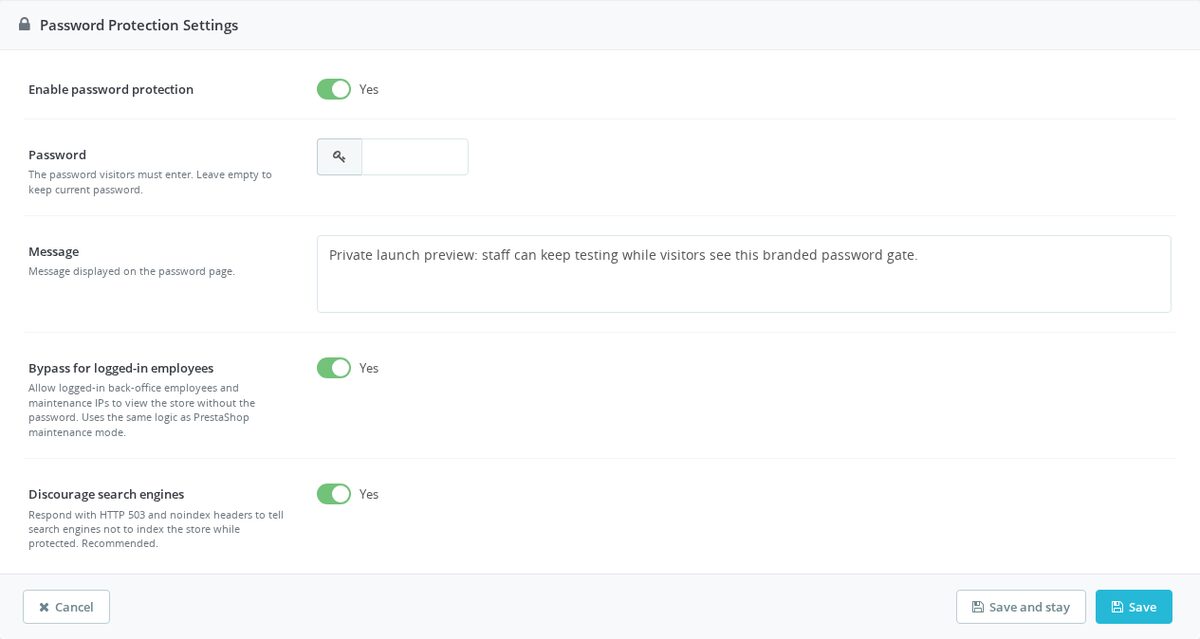
One switch lets logged-in employees and maintenance-authorized addresses through without the visitor password, using the same authorization the shop already trusts for maintenance mode. Designers check layouts, the photographer reviews product pages, and the owner shows the shop from a phone without typing the visitor password.
Setup is one screen: password, message, scope, two switches. While anything required is missing, the module states which field, and saving it completes the activation. A dedicated integrity screen checks and repairs the installation, and updates create a full backup before changing anything. Protection this important fails loudly or not at all.

-
Referencemprpasswordprotect
-
PrestaShop CompatibilityPS 1.6 – 9.x
-
Pricing ModelOne-time Purchase
-
Module TypeFront & Back-office
-
GDPR RelevantNo
-
Business GoalLegal & Compliance
-
External Account NeededNo
-
Module ComplexityFeature-Rich Module
-
Customer Journey StageManage Store
-
Works With PlatformNo External Platform
What customers say about us
Company reviews
5.0
★
★
★
★
★
(4 reviews)
Loading customer reviews...
No product reviews yet
Be the first to share your experience with this module.
Write a Review
Password Protection lets you place a password gate in front of your PrestaShop storefront for pre-launch previews, private catalog access, or temporary maintenance periods. Visitors enter one shared password before they can browse, while your team can keep controlled access during setup.
Have a question about this product?
Our experts are here to help. Ask anything about installation, compatibility, or specifications.
1343
questions
9
categories
v1.0.182026-05-27
- Addedcomplete FR/DE/ES/IT/PL translations
- FixedMigrate password protection config storage
- FixedSync nested module copy with ConfigTable migration
Loading full changelog...
Works Well With Password Protection
Modules our team genuinely pairs with this one, and exactly why each belongs in the same setup.
Governance
Using the free Password Protection means you are gating an unfinished, private or staging storefront so casual visitors cannot see it, while authorised people still reach the shop after entering the password. That covers access while you prepare and can also keep selected areas private inside a public store.
Security Revolution addresses the broader, ongoing security picture once the store is open. It brings malware scanning, firewall controls, monitoring and operational cleanup into one back-office workflow, helping reduce damage from risky requests, spam, fake registrations and suspicious traffic before they cost staff time or shopper trust. It is a separate, paid module aimed at a running shop, not a launch gate.
Together they fit different phases of a store's life. Password Protection keeps a not-yet-public site behind a gate during preparation, while Security Revolution defends the live storefront against active threats, so you have a sensible answer for both keeping a build private and protecting it once real traffic and orders arrive.

Complement
The free Password Protection puts a shared access gate in front of your storefront so unfinished, private or staging shops are not exposed to casual visitors, redirecting anyone without the password. It can cover the whole site or selected products, categories and CMS pages with shared or separate passwords.
Visitor Control offers rule-based access management for a store that needs to stay open to most people. It checks rules as pages start loading and can ban exact IPs, wildcard IPs, IP ranges, CIDR blocks, country codes and browser patterns, returning your configured 403 message to blocked visitors. It is a separate, paid module that targets specific unwanted traffic based on visitor rules.
Together they give you both password-based and visitor-rule control over who reaches the store. Password Protection is ideal for sealing off a whole site during a build or review, while Visitor Control selectively blocks abusive or unwanted traffic on a live shop, so you can lock down completely when needed and filter narrowly when the store is public.

Workflow
Reaching for the free Password Protection often means you are preparing a launch, private catalogue or review environment, sealing the storefront behind a password while you get things ready. That setup and teardown phase tends to leave behind test data and clutter.
Database Cleanup helps tidy what accumulates during that work. It removes old operational data such as stale carts, search statistics, expired specific prices, logs, connections, guest records and old mail records from one maintenance screen, with a review step before anything is deleted. It is a separate, free module focused on housekeeping rather than access.
Used together, they suit the rhythm of preparing and opening a store. Password Protection keeps the site private while you build and test, and Database Cleanup clears the test carts, logs and records that build up during that period, so when you lift the gate the store is both private beforehand and tidier afterwards.

Bundle
If you are using the free Password Protection, you are very likely in launch mode, keeping the storefront private while you finish setup before real traffic arrives. That gate is one piece of getting ready, but a store needs more than privacy on day one.
Store Launch Kit bundles the other launch essentials: a lightweight cookie banner with accept/deny consent, reCAPTCHA & hCaptcha bot protection, a usable menu and a contact form that filters spam, as four paid modules plus two free extras. It is a separate package aimed at the same moment Password Protection serves, the run-up to opening.
Together they round out launch preparation. Password Protection keeps the work-in-progress hidden while you build, and the Launch Kit equips the store with consent, bot protection, navigation and spam-filtered contact for the moment you go public, so the same project covers both the private build phase and a ready-for-traffic opening.
 30 days return right
Easy return - no questions asked
 Plug & Play Modules
Install, set up and take profit
 Dedicated Support First
Priority Help & Satisfaction Over Sales
You might also like


Who builds and maintains this module
Built and maintained by David Miller and mypresta.rocks. David has worked with PrestaShop since 2013, and the company behind this shop has been registered since 3 December 2018. Every module in this catalogue is our own work, so your questions to support reach the people who wrote the code. The changelog on this page lists every update with its date.