

PrestaShop Security Hardening: The Complete Checklist
Comprehensive security guide for PrestaShop stores: server hardening, admin protection, module audits, database security, and incident response.
What a compromised PrestaShop actually looks like
Most of the hacked shops we've been called in to clean since 2013 looked fine from the front page. The owner only found out because Google flagged the site, the card processor froze payouts, or a customer rang up about a "weird redirect after checkout." By that point the attacker had usually been inside for weeks.
The patterns repeat. A vulnerable third-party module leaks the database. A scraped admin URL gets brute-forced over a weekend. A fake-image PHP shell lands in img/. A backdoor injects a card-skimmer into order-confirmation.tpl. None of these are exotic. All of them are preventable with the checklist below.
This page is what we hand to clients before we agree to manage their shop. It applies to PrestaShop 1.7, 8.x and 9.x, paths and PHP versions shift slightly, the hardening doesn't. For the non-technical version, send the shop owner to our plain-English security guide.
1. How PrestaShop shops actually get hacked
SQL injection in a third-party module
This is the number-one vector, by a wide margin. The core is reasonably battle-tested; the modules are not. A junior developer ships a front controller that concatenates $_GET['id'] straight into a query, an automated scanner finds it, the attacker dumps ps_customer and ps_orders before lunch. We've seen this with modules from the official Addons marketplace, not just nulled forums.
Admin brute force
PrestaShop has no native rate limiting on the admin login form. Once an attacker knows your admin directory (and they will, because half the shops we audit still use /admin/ or /admin123/) they'll throw thousands of password attempts per minute. Any account with welcome2024 or the shop name is gone in minutes.
Use login rate limits, IP-based blocks and alerts when employee accounts are attacked. These controls complement strong passwords and 2FA; they do not replace them.
File-upload to PHP shell
A "profile picture" or "product image" upload that doesn't validate the actual file content, only the extension. Attacker uploads shell.php.jpg, server is configured to execute anything matching .php in the path, game over. The fix on the web-server side (block PHP execution in img/, upload/, download/) is below. Set it once and it neutralises an entire class of bad modules.
End-of-life PHP and unpatched software
PHP 7.4 has been EOL since November 2022. We still see it in production. Every publicly documented exploit against PHP 7.x is a free win for an attacker, and the same applies to MySQL 5.7, Apache 2.2, and PrestaShop 1.7.6 with three years of unpatched CVEs.
Exposed config files
A misconfigured web server happily serves /.env, /.git/config, or /app/config/parameters.php to anyone who asks. Database password, cookie key, admin folder name: all of it, plaintext, in a single GET request. We run this check on every shop we onboard.
Reality check: "My shop is too small to be a target" is what every owner tells us before the cleanup invoice. Scanners don't read your About page, they sweep every IPv4 address on the internet looking for PrestaShop signatures. Size is irrelevant.
2. Server-level hardening
PHP version and configuration
Run the newest PHP your PrestaShop version supports, PHP 8.1+ for PS 8.x, PHP 8.1–8.4 for PS 9.x. If you're stuck on something older than PHP 8.1 because of a module, the answer is to replace the module, not stay on EOL PHP.
The php.ini hardening we apply by default:
disable_functions = exec,passthru,shell_exec,system,proc_open,popen
expose_php = Off
allow_url_include = Off
display_errors = Off
log_errors = On
session.cookie_httponly = 1
session.cookie_secure = 1
session.use_strict_mode = 1
session.cookie_samesite = Lax
open_basedir = /var/www/html:/tmp:/usr/share/php
A handful of modules (older image processors, some PDF generators) genuinely need exec(). Don't reopen the whole list to make one module work. Re-enable the single function it asks for, log the decision, and if you can replace the module with one that doesn't shell out, do it at the next maintenance window.
File permissions
The three numbers that matter:
- 755 on directories: owner can write, world can list and traverse
- 644 on files: owner can write, world can read
- 400 on
app/config/parameters.php: only the owner can read it. This file has your database credentials. Treat it like a private key.
chown -R www-data:www-data /var/www/html/prestashop
find /var/www/html/prestashop -type d -exec chmod 755 {} \\;
find /var/www/html/prestashop -type f -exec chmod 644 {} \\;
chmod 400 /var/www/html/prestashop/app/config/parameters.php

# Writable directories PrestaShop needs
chmod -R 775 /var/www/html/prestashop/var/cache
chmod -R 775 /var/www/html/prestashop/var/logs
chmod -R 775 /var/www/html/prestashop/img
chmod -R 775 /var/www/html/prestashop/upload
chmod -R 775 /var/www/html/prestashop/download
If a tutorial, support article, or hosting helpdesk tells you to chmod 777 anything, ignore them and find a better source. There is no scenario where 777 is the right answer on a production shop.
SSL/TLS and security headers
Turn on SSL in Shop Parameters → General, force the redirect at the web-server level, and add HSTS so the browser refuses to downgrade.
# Apache .htaccess
RewriteEngine On
RewriteCond %{HTTPS} off
RewriteRule ^(.*)$ https://%{HTTP_HOST}%{REQUEST_URI} [L,R=301]
Header always set Strict-Transport-Security "max-age=31536000; includeSubDomains"
# Nginx
server {
listen 80;
server_name yourdomain.com;
return 301 https://$server_name$request_uri;
}
server {
listen 443 ssl http2;
add_header Strict-Transport-Security "max-age=31536000; includeSubDomains" always;
add_header X-Frame-Options "SAMEORIGIN" always;
add_header X-Content-Type-Options "nosniff" always;
add_header Referrer-Policy "strict-origin-when-cross-origin" always;
}Content Security Policy
CSP can blunt the impact of an injected card-skimmer or XSS payload, but a strict policy on PrestaShop will break checkout the first time you try it. Payment widgets, analytics, chat, fonts, and a long tail of module JavaScript pull from third-party origins. Roll it out in two stages:
# Apache: monitor first, do not enforce immediately
Header always set Content-Security-Policy-Report-Only "default-src 'self'; img-src 'self' data: https:; script-src 'self' 'unsafe-inline' https:; style-src 'self' 'unsafe-inline' https:; font-src 'self' data: https:; connect-src 'self' https:; frame-src 'self' https:; object-src 'none'; base-uri 'self'; frame-ancestors 'self'; report-uri /csp-report"
# Nginx: monitor first, do not enforce immediately
add_header Content-Security-Policy-Report-Only "default-src 'self'; img-src 'self' data: https:; script-src 'self' 'unsafe-inline' https:; style-src 'self' 'unsafe-inline' https:; font-src 'self' data: https:; connect-src 'self' https:; frame-src 'self' https:; object-src 'none'; base-uri 'self'; frame-ancestors 'self'; report-uri /csp-report" always;Leave it in Report-Only for at least a week of real traffic. Collect violations, replace the wildcard https: with your actual provider domains (Stripe, PayPal, Adyen, Klarna, GA, GTM, Hotjar, etc.), and only flip to enforcement once a full checkout test goes through clean. Keep 'unsafe-inline' for as long as your theme needs it, removing it requires nonce or hash support across every template.
Block directory listing and sensitive files
The .htaccess rules we drop into the root of every shop we host:
Options -Indexes

# Block sensitive file types
<FilesMatch "\\.(env|yml|yaml|log|sql|bak|old|orig|save|swp|dist|config|ini|phps)$">
    Require all denied
</FilesMatch>

# Block hidden files and directories (.git, .env, etc.)
<IfModule mod_rewrite.c>
    RewriteEngine On
    RewriteRule (^\\.|/\\.) - [F]
</IfModule>

# Block composer files
<FilesMatch "^(composer\\.json|composer\\.lock)$">
    Require all denied
</FilesMatch>

# Block config, vendor, and log directories
<IfModule mod_rewrite.c>
    RewriteRule ^config/ - [F]
    RewriteRule ^vendor/ - [F]
    RewriteRule ^var/logs/ - [F]
    RewriteRule ^app/config/ - [F]
</IfModule>

# Block PHP execution in upload directories
<Directory "/var/www/html/prestashop/upload">
    <FilesMatch "\\.ph(p[3457]?|t|tml)$">
        Require all denied
    </FilesMatch>
</Directory>

<Directory "/var/www/html/prestashop/img">
    <FilesMatch "\\.ph(p[3457]?|t|tml)$">
        Require all denied
    </FilesMatch>
</Directory>
Nginx equivalent:
location ~* \\.(env|yml|yaml|log|sql|bak|old|swp|dist|config|ini)$ { deny all; return 404; }
location ~ /\\. { deny all; return 404; }
location ~* ^/(upload|img|download)/.*\\.php$ { deny all; return 404; }
location ~* ^/(config|vendor|var/logs|app/config)/ { deny all; return 404; }
autoindex off;
Verify it. Openhttps://yourshop.com/.envandhttps://yourshop.com/app/config/parameters.phpin an incognito window after deploying. 403 or 404 is correct. Anything else and you're handing out credentials.
3. Admin panel hardening
Security settings in PrestaShop 8 Back Office.
Token protection and password policy are the two settings here. Token protection should stay on; password score should be at least 3.

Rename the admin directory: properly
PrestaShop installs a random admin folder by default. If yours is still /admin/ or any guessable word (/backoffice, /panel, the shop name, the developer's initials) rename it to ten or more random characters today:
mv /var/www/html/prestashop/admin /var/www/html/prestashop/admin-x7k9m2p4
rm -rf /var/www/html/prestashop/var/cache/*
It's not security on its own, it's the difference between being on every scanner's target list and not. Bookmark the new URL, store it in your password manager, and move on.
Strong passwords and 2FA: not optional
Every admin account: 16+ characters, generated by a password manager, never reused. PrestaShop 1.7.6 and later support TOTP (Google Authenticator, Authy, 1Password, Bitwarden) natively at Advanced Parameters → Administration. Turn it on for every employee, no carve-outs. This one switch defeats the overwhelming majority of brute-force and credential-stuffing attacks we see.
Security Revolution enforces 2FA, audits employee account hardening, and surfaces accounts that have drifted out of policy. The baseline rule with or without the module is the same: 2FA enabled on every account that can reach /admin/.
IP-restrict the admin if you can
If your team works from a fixed office IP or a VPN, lock the admin to those addresses:
# .htaccess inside admin directory
<IfModule mod_rewrite.c>
    RewriteEngine On
    RewriteCond %{REMOTE_ADDR} !^203\\.0\\.113\\.10$
    RewriteCond %{REMOTE_ADDR} !^198\\.51\\.100\\.20$
    RewriteRule .* - [F,L]
</IfModule>
VPN-only is the sweet spot: employees can work from any café in Europe, the admin still rejects everyone else at the web-server level before PrestaShop's login code even runs. When abuse comes from repeat customer or visitor IPs rather than fixed admin attacks, Customer Extra Info & IP Ban gives support staff a safer review and block path than editing web-server rules by hand.
Cull employee accounts
Open Advanced Parameters → Team → Employees right now. Every account is a credential that can be phished. Delete:
- Anyone who left the company more than 30 days ago
- Test accounts the original developer made and forgot
- Contractors whose project ended
And demote anyone who doesn't need SuperAdmin. Warehouse staff don't need to reset the cookie key. Customer service doesn't need to install modules.
Fail2ban on the login endpoint
# /etc/fail2ban/filter.d/prestashop-admin.conf
[Definition]
failregex = ^<HOST> -.*"POST .*/admin.*/index\\.php\\?controller=AdminLogin.*" (200|302)

# /etc/fail2ban/jail.d/prestashop.conf
[prestashop-admin]
enabled = true
filter = prestashop-admin
logpath = /var/log/apache2/access.log
maxretry = 5
findtime = 600
bantime = 3600
Fail2ban watches server logs. For customer-facing forms where bots never touch the admin endpoint, reCAPTCHA & hCaptcha Protection adds the challenge layer before spam becomes account, contact-form or registration abuse.
4. Module security
Modules are the single largest attack surface on any PrestaShop install. Treat every one as untrusted code running with full database access until it proves otherwise.
Where to get modules, and where not to
Acceptable sources: the official PrestaShop Addons marketplace, established vendors with a public track record, and well-maintained open-source projects on GitHub where you can read the code yourself. Everywhere else is a risk.
Nulled modules will get you hacked. This is not theoretical. Whoever cracked the module added a backdoor before re-uploading it, that's the point of the operation. We've cleaned shops where a single nulled "free download" module silently exfiltrated every order to a third party for six months. No exceptions, no "I'll just use it on staging." It ends up on production.
Audit module code before you install
Open the ZIP. Grep for these:
# Dangerous: arbitrary code execution
eval($variable)
eval(base64_decode($something))
assert($user_input)

# Dangerous: remote code loading
file_get_contents('http://external-domain.com/...')
include('http://...')

# Dangerous: unsanitized SQL
"SELECT * FROM ps_table WHERE id = " . $_GET['id']
Db::getInstance()->execute("... " . $_POST['value'] . " ...")
What clean module code looks like:
// SAFE: Cast to integer, use pSQL()
$id = (int)Tools::getValue('id');
$name = pSQL(Tools::getValue('name'));
If you don't have the time or the PHP background to audit, at least check whether the developer has a security advisories page, ships changelogs, and responds to issues. Silence after a CVE is a red flag.
Keep them updated
- Weekly check for module updates at minimum
- Subscribe to your vendor's security mailing list
- Follow Friends of Presta for PrestaShop module CVEs. This is the closest thing the ecosystem has to a coordinated disclosure feed
- Back up before every update. Always.
Disabling is not removing
A disabled module's PHP files are still on disk and its front controllers still reachable by direct URL. If it has an SQL injection, disabling it does nothing. The only safe state is gone:
# Uninstall via Back Office, then delete the files
rm -rf /var/www/html/prestashop/modules/unused_module
Open your modules list and do this now. Every module you tested in 2022 and never used is unnecessary risk.
Permissions on the modules directory
find /var/www/html/prestashop/modules -type d -exec chmod 755 {} \\;
find /var/www/html/prestashop/modules -type f -exec chmod 644 {} \\;
5. Database security
Don't run PrestaShop as root
The database user in parameters.php should have exactly the permissions PrestaShop needs and nothing else:
CREATE USER 'prestashop_user'@'localhost' IDENTIFIED BY 'long-random-password';
GRANT SELECT, INSERT, UPDATE, DELETE, CREATE, DROP, INDEX, ALTER,
      CREATE TEMPORARY TABLES, LOCK TABLES
      ON prestashop_db.* TO 'prestashop_user'@'localhost';
FLUSH PRIVILEGES;
When SQL injection lands (and on a 50-module shop it eventually will) a scoped user is the difference between "dumped one database" and "dumped every database on the server, read /etc/passwd via LOAD_FILE, and wrote a webshell via INTO OUTFILE."
Backups that actually work
# Crontab entries
# Database backup: daily at 3 AM
0 3 * * * mysqldump -u backup_user -p'password' prestashop_db | gzip > /backups/db/ps_$(date +\\%Y\\%m\\%d).sql.gz

# File backup: daily at 3:30 AM
30 3 * * * tar -czf /backups/files/ps_files_$(date +\\%Y\\%m\\%d).tar.gz /var/www/html/prestashop/

# Cleanup backups older than 30 days
0 4 * * * find /backups/ -name "*.gz" -mtime +30 -delete
The rules we've earned the hard way:
- Off-server. Backups on the same box are deleted by the same attacker who deleted the originals. S3, a second VPS, anywhere with separate credentials.
- Test the restore monthly. Untested backups are stories, not insurance. Restore to a staging container and load the homepage.
- Encrypt before they leave the server. SQL dumps contain customer PII and password hashes.
gpgorage, the keys live somewhere only you and one other person can reach. - 30 days minimum retention. Some compromises only surface weeks later. A 7-day rotation will not save you.
phpMyAdmin: remove it, or contain it
Our default position is don't install it on production at all. An SSH tunnel does the same job without exposing a fat web-based attack surface:
# From your LOCAL machine
ssh -L 3307:localhost:3306 user@yourserver.com
# Then connect your local MySQL client to localhost:3307
If you have to keep phpMyAdmin: random URL path, IP restriction, HTTP Basic Auth in front of it, and root login disabled:
$cfg['Servers'][$i]['AllowRoot'] = false;
$cfg['Servers'][$i]['AllowNoPassword'] = false;
6. Monitoring and detection
File integrity monitoring
An attacker who's inside will modify files, webshell in img/, skimmer in a template, extra admin in ps_employee. A daily hash check catches the file half of this:
#!/bin/bash
# /usr/local/bin/prestashop-integrity-check.sh
SHOP_DIR="/var/www/html/prestashop"
BASELINE="/var/backups/prestashop-file-hashes.txt"
CURRENT="/tmp/prestashop-file-hashes-current.txt"
ALERT_EMAIL="admin@yourdomain.com"

find "$SHOP_DIR" -type f \\
    -not -path "*/var/cache/*" \\
    -not -path "*/var/logs/*" \\
    -not -path "*/img/p/*" \\
    -not -path "*/img/c/*" \\
    -exec md5sum {} \\; | sort > "$CURRENT"

if [ -f "$BASELINE" ]; then
    DIFF=$(diff "$BASELINE" "$CURRENT")
    if [ -n "$DIFF" ]; then
        echo "$DIFF" | mail -s "ALERT: PrestaShop files modified" "$ALERT_EMAIL"
    fi
fi
Generate the baseline right after a clean deployment, schedule the script daily, and tune the exclusions until you only get alerts on real changes. Expect noise the first week.
Security Revolution bundles this and a few other checks if you'd rather not maintain a cron script and a baseline file yourself.
Log monitoring
# SQL injection attempts
grep -iE "(union\\s+select|or\\s+1=1|information_schema)" /var/log/apache2/access.log

# File inclusion attempts
grep -iE "(etc/passwd|\\.\\.\\/\\.\\.\\/)" /var/log/apache2/access.log

# Direct module file access (potential exploit attempts)
grep -E "modules/.*/ajax|modules/.*/api" /var/log/apache2/access.log
A nightly cron that emails the matches is the cheap version. Sending logs to Graylog, Loki, or Papertrail and alerting on patterns is the proper version.
Uptime monitoring: content check, not just HTTP 200
- UptimeRobot, HetrixTools, or self-hosted Uptime Kuma, all fine
- Monitor homepage and checkout, a partial breach often kills only the checkout flow
- Check for specific page text ("Add to cart", your shop name), not just a 200 response. A defaced shop still returns 200.
- 1–5 minute intervals, alerts via SMS or Slack: email alone gets buried
Admin login alerts
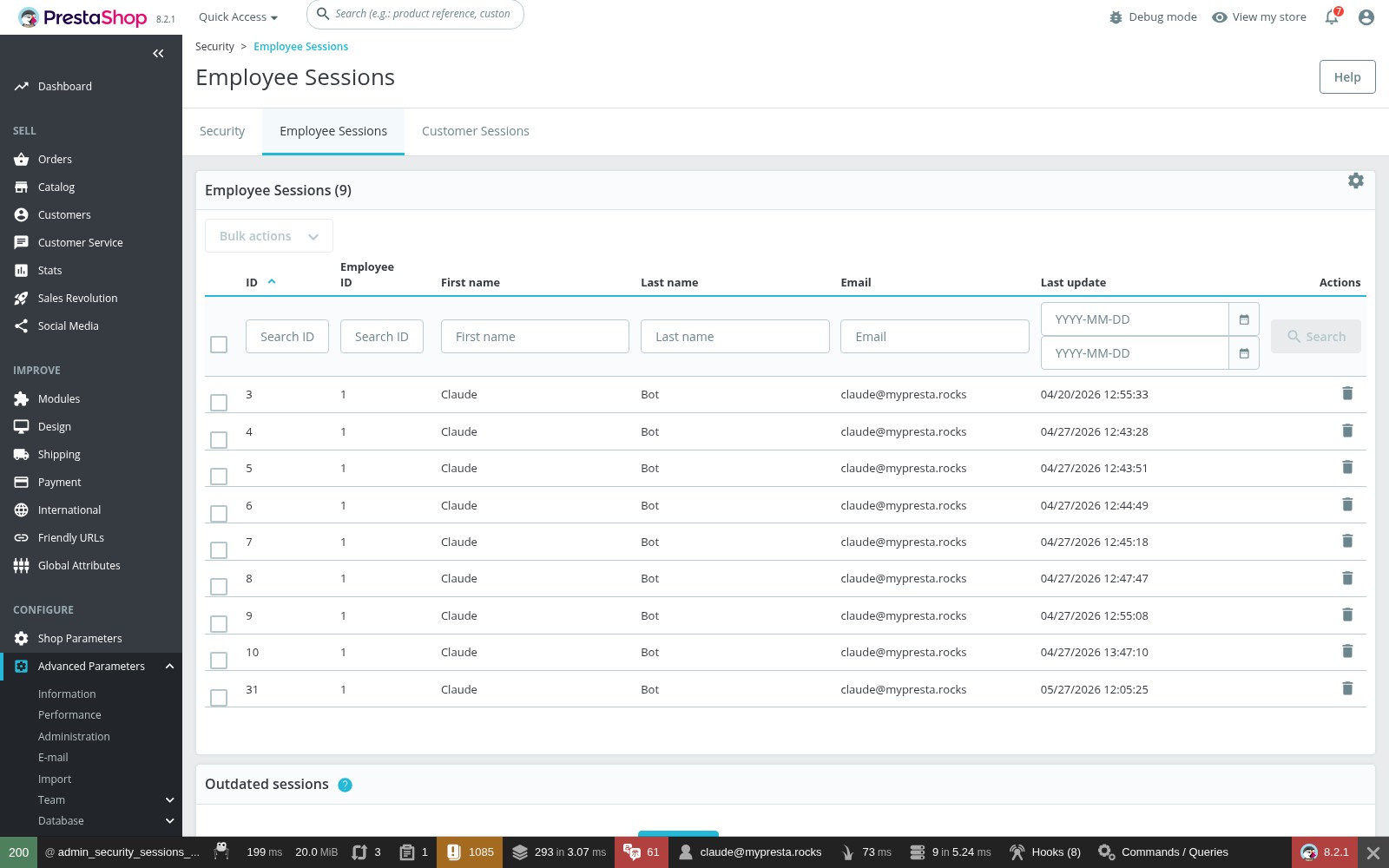
Employee Sessions in PrestaShop 8.
This page shows every active admin session with employee name, email, and last activity timestamp. If you suspect an unauthorised login, this is the first place to check.
A small custom module hooked into the post-login event emails security every time someone logs in. Cheap to ship, instantly tells you if a credential leaked:
public function hookActionAdminLoginControllerLoginAfter($params)
{
    $employee = $params['employee'];
    $ip = Tools::getRemoteAddr();

    Mail::Send(
        (int)Configuration::get('PS_LANG_DEFAULT'),
        'alert_admin_login',
        "Admin Login: {$employee->email} from {$ip}",
        ['{body}' => "Employee: {$employee->email}
IP: {$ip}
Time: " . date('Y-m-d H:i:s')],
        'security@yourdomain.com',
        'Security Alert'
    );
}
7. You've been hacked. Now what.
First 30 minutes
- Don't delete anything yet. The compromised state is forensic evidence. You'll need it to find the entry point.
- Take the shop offline with a maintenance page or temporary password gate: stop the bleed immediately.
- Rotate every credential. SSH, FTP, database, every admin account, hosting panel, payment gateway API keys, anything stored in the compromised
parameters.php. - Snapshot the compromised state (full
tar+mysqldump) and label it. You'll want it for analysis after the dust settles. - Phone your payment processor if you handle card data directly. They'd rather hear from you first.
# Quick maintenance mode
RewriteEngine On
RewriteCond %{REMOTE_ADDR} !^YOUR\\.IP\\.ADDRESS$
RewriteCond %{REQUEST_URI} !^/maintenance\\.html$
RewriteRule .* /maintenance.html [R=503,L]
Find the backdoor: they always leave one
Cleaning the visible damage without finding the persistence mechanism gets you re-compromised within a week. The places to look:
# Search for backdoor patterns
grep -rn "eval(" /var/www/html/prestashop/ --include="*.php" | grep -v "vendor\\|cache"
grep -rn "base64_decode" /var/www/html/prestashop/ --include="*.php" | grep -v "vendor\\|cache"
grep -rn "shell_exec\\|passthru\\|system(" /var/www/html/prestashop/ --include="*.php" | grep -v "vendor\\|cache"

# Find recently modified PHP files
find /var/www/html/prestashop/ -name "*.php" -mtime -7 -not -path "*/cache/*"

# Find PHP files in directories where they should not exist
find /var/www/html/prestashop/img/ -name "*.php"
find /var/www/html/prestashop/upload/ -name "*.php"

# Check for obfuscated code (very long single lines)
find /var/www/html/prestashop/ -name "*.php" -exec awk 'NR==1 && length>5000' {} +
Don't stop at the filesystem, attackers also persist via the database:
SELECT id_cms, meta_title FROM ps_cms_lang WHERE content LIKE '%<?php%' OR content LIKE '%eval(%';
SELECT * FROM ps_employee ORDER BY date_add DESC LIMIT 10;
That second query catches a classic move: the attacker creates their own admin account so they keep access after you change every password.
Recovery
- Find the entry point in access logs. Look for unusual POSTs to
modules/*/ajax.phpormodules/*/api.phparound the time the integrity check first flagged a change. - Restore from a known-clean backup if one exists and predates the compromise.
- If no clean backup: replace all core files with a fresh download of your exact PS version, reinstall every module from its original source, keep only your theme and
img/directory after scanning them thoroughly. - Scan the database for injected content in
ps_configuration,ps_cms_lang, andps_meta_lang. Skimmers love these. - Patch everything: core, modules, PHP, MySQL, OS. Don't bring the shop back up on the same software that let them in.
After cleanup
- Fix the specific vulnerability that was exploited. Disabling the bad module isn't fixing it, remove or patch it.
- Monitor harder for the first 30 days. They'll try to come back.
- A WAF in front of the shop (Cloudflare's free tier is a reasonable starting point) catches a lot of the same scanners on the next pass.
- If customer or payment data was potentially exposed, talk to a lawyer about GDPR breach notification, there's a 72-hour clock running.
Hard truth: If you can't determine how they got in, assume they will get in again. A one-off professional audit costs far less than a second breach plus the regulatory fallout.
8. The checklist
Print this and work through it. Every unchecked box is a way in.
Server and PHP
- PHP version current and supported
- Dangerous PHP functions disabled
-
expose_php = Off -
display_errors = Offin production -
allow_url_include = Off - Session cookies: HttpOnly, Secure, SameSite
-
open_basedirset - OS, MySQL, web server up to date
- SSH key auth on, password auth off
- Firewall. Only the ports you need
File system
- Directories 755, files 644
-
parameters.phpat 400 - Nothing set to 777
- PHP execution blocked in
upload/,img/,download/ - Directory listing off
-
.env,.git, YAML, config files all blocked from the web -
vendor/andvar/logs/blocked from the web
SSL and HTTPS
- Valid certificate with auto-renewal
- HTTP→HTTPS redirect at the web server
- HSTS header set
- SSL on for all pages in PrestaShop
- No mixed-content warnings
Admin panel
- Admin directory is a random string
- All passwords 16+ characters from a password manager
- 2FA enabled on every account, no exceptions
- Admin IP-restricted where feasible
- Unused accounts deleted, ex-employees removed
- Every employee on least-privilege profile
- fail2ban or equivalent on the login endpoint
Modules
- Every module from a trusted source
- Zero nulled modules
- All modules current
- Unused modules deleted, not just disabled
- Module code spot-checked for
eval()and unsanitised SQL - Subscribed to your vendors' security advisories
Database
- Dedicated database user, not root
- Minimum required permissions only
- 20+ character database password
- MySQL bound to localhost
- phpMyAdmin removed or IP-restricted
- Table prefix changed from default
ps_
Backups
- Daily database dump automated
- Daily file backup automated
- Backups stored off-server
- Backups encrypted before transfer
- 30+ days retention
- Restore tested in the last 30 days
Monitoring
- File integrity checks running
- Access logs scanned for attack patterns
- Uptime monitoring with content-string check
- Admin login alerts active
- Security headers shipping on every response
Incident readiness
- Incident response plan written down
- Hosting and payment processor contacts at hand
- GDPR notification process documented
- Maintenance page ready to deploy
- Every critical credential in a password manager
Security is a maintenance task, not a project. Put a quarterly reminder on your calendar to walk this list again. The first time you do it will take a day. After that it's an hour. Start at the top: update everything, enable 2FA on every account, delete the modules you don't use, get backups running off-server. The rest follows.
Related reading
- PrestaShop Backup & Disaster Recovery: build the restore path before you need it
- GDPR Compliance for PrestaShop Stores: align security work with data-protection obligations
- PrestaShop Hosting Guide: server requirements, PHP limits, and hosting-level hardening
- PrestaShop Troubleshooting: diagnosing 500s, white screens, and recovery after an incident
- PrestaShop Hooks Guide: context for auditing risky module customisations
- Security Revolution: 2FA enforcement, file integrity checks, and admin hardening in one module
- Total Defender: admin brute-force protection and login monitoring