


Add Apple Pay, Google Pay and PayPal express checkout buttons to your PrestaShop store


Express Checkout is a module for PrestaShop stores that turns the whole purchase, address, delivery, payment and confirmation, into one window that opens on the page where the customer has already decided: the product page, a listing, the cart. Install it, connect your payment account with two keys, and the first buttons are selling.
Payments run through Stripe, one of the largest payment platforms in the world. The account is free and there is no monthly charge; the cost is a commission per transaction, paid to the provider. One account brings cards, Apple Pay, Google Pay, PayPal, Stripe Link and local payment methods, along with fraud screening, payouts to your bank and a full transaction history on the provider's side.
The module is quick to launch and unusually deep to govern. Express buttons appear on product pages, listings, the cart, the checkout and any custom placement, each with its own design or the shared one, and a complete single-page checkout replaces the default flow when you want the entire shop to buy this way, with your other payment and shipping modules taking part. Every payment method is targeted by shop, customer group, language, browser, page type, currency and country, carriers are calculated live with names, prices and transit times, and payment-and-delivery combinations you exclude are rejected. You choose which address fields appear, which are required and in what order. Bank transfer and cash on delivery run through the same records as card payments.
Shoppers buy as guests with an optional account at the end, sign in with Google, Facebook, Apple or Microsoft, or with a one-time code sent to their email, and addresses complete themselves as they type. Interrupted payments finish in the background and the order is created regardless, refunds full or partial run from the order screen, each method charges immediately or authorizes now and captures at shipment, and one ledger holds online charges with fees, exchange rates and risk outcomes next to manually confirmed payments. A dashboard shows opens, orders, conversion, abandoned carts and recovered revenue, with every session carrying its campaign, device and source.
Carts stop dying between decision and payment, phones become buying devices instead of browsing devices, money operations live in one place instead of three, and the marketing budget finally sees which click became which paid order.
Summary of what Express Checkout offers
Express Checkout compresses the distance between decision and payment to one window, anywhere in the shop, on top of the payment methods customers already carry. This page answers six questions:
- Where the buying happens: product, listing, cart, checkout, custom placements, or a full single-page checkout.
- How customers pay and what the service costs: wallets, cards and manual methods on one provider account.
- Who sees which method: targeting by seven dimensions plus delivery compatibility.
- How shoppers identify and receive: guest, social and code sign-in, live carriers, digital delivery.
- What survives interruptions: background order creation, recovery and refunds.
- What the merchant sees: conversion, attribution, one financial ledger and a self-repairing installation.

Where does the buying happen?
Wherever the decision happens. Express buttons sit on product pages, in listings, on the cart and in checkout, plus any custom placement your theme calls for, and each placement inherits the shared design or carries its own buttons, colours and labels. The customer taps, one window opens over the page, and address, delivery and payment happen right there; items and quantities are edited in the same window and voucher codes update the total live.
When you want the whole shop to buy this way, the complete single-page checkout replaces the default flow: one page holding personal details, delivery and payment together, with your other payment and shipping modules taking part. The native checkout meanwhile remains untouched for everything you leave to it, which makes the rollout a decision, not a risk.

How do customers pay, and what does the service cost?
With whatever they already carry. Cards, Apple Pay, Google Pay, PayPal, Stripe Link and local methods arrive through one Stripe account, which is free to open and charges a commission per transaction with no monthly fee; fraud screening and payouts to your bank are part of the service. Returning customers pay with saved cards, managed by themselves in their account, and each method either charges immediately or authorizes now and captures when you ship.
Offline money is a first-class citizen: bank transfer and cash on delivery run through the same transaction, confirmation and refund records as cards. Refunds, full or partial, run from the order screen, and one ledger holds every charge with its processing fee, exchange rate, receipt and risk outcome next to manually confirmed payments with their amount, date and reference. The accountant reconciles in one place.
Who sees which payment method?
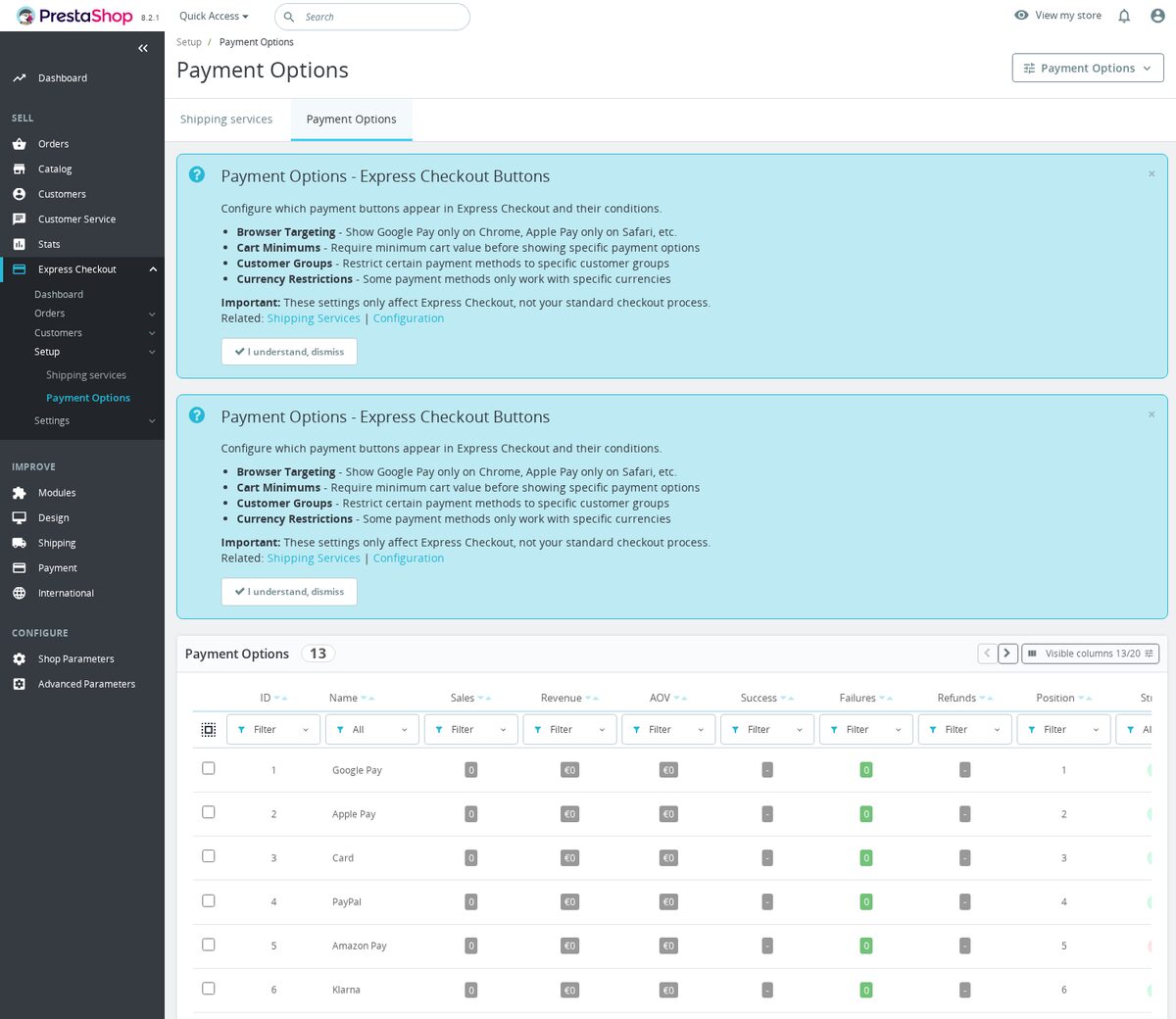
Exactly who you decide. Every method is scoped by shop, customer group, language, browser, page type, currency and country, so cash on delivery exists only for the domestic market, the B2B group sees bank transfer first, and a wallet appears only where the visitor's device supports it. Methods are enabled, ordered and given a default with drag and drop.
Delivery talks to payment: combinations you exclude are rejected, so the courier who refuses cash never meets a cash order, and a carrier requiring special handling never pairs with the wrong method. These rules run in the background of every checkout without the shopper seeing anything but a clean, valid choice.

How do shoppers identify themselves and receive the order?
With the least possible typing. Guests buy without an account and get the offer of one afterwards, a single optional password. Returning customers sign in with Google, Facebook, Apple or Microsoft, or with a one-time code sent to their email, no password remembered. Addresses complete themselves as the customer types, saved addresses are one tap, billing folds into shipping with a checkbox, and you decide which address fields appear, which are required and in what order.
Delivery is calculated live: real carriers with names, prices and transit times, a default preselected, and a dedicated digital delivery for virtual products that grants access immediately after payment. Terms and privacy checkboxes, worded per language, complete the legal side inside the same window.

What survives interruptions, and what does the merchant see?
The order survives. Payments interrupted by a closed tab, a dropped connection or a wandering shopper finish in the background: the module creates the order regardless and resumes the confirmation on its own, with provider confirmations as the safety net. Abandoned carts are listed with their value, and the dashboard counts opens, orders, conversion and recovered revenue.
Every session carries its origin: campaign fields, ad click identifiers, referrer, device, browser, language, currency and wallet availability, all filterable in the back office, so attribution lives where the orders are. Before launch, live visibility is restricted to your own addresses and logged-in administrators, the design adapts to your theme automatically, and a self-repairing integrity system checks and fixes the installation while updates back everything up first. A checkout is the one module that must never fail quietly, and this one is built accordingly.

-
Referencemprexpresscheckout
-
PrestaShop CompatibilityPS 1.6 – 9.x
-
Pricing ModelOne-time Purchase
-
Module TypeFront & Back-office
-
GDPR RelevantNo
-
Business GoalBoost Conversions
-
External Account NeededYes
-
Module ComplexityLightweight Widget
-
Customer Journey StageConvert to Buyers
-
Works With PlatformPayment Processing
What customers say about us
Company reviews
5.0
★
★
★
★
★
(4 reviews)
Loading customer reviews...
No product reviews yet
Be the first to share your experience with this module.
Write a Review
Express Checkout adds fast, Stripe-powered payment buttons to your product pages, cart and product lists so ready-to-buy shoppers can pay in one step with Apple Pay, Google Pay, PayPal, Stripe Link, a saved card or a regular card, without losing the standard PrestaShop checkout for everyone else. It is built to recover the sales you lose when a confident buyer is forced through a long multi-step path.
Have a question about this product?
Our experts are here to help. Ask anything about installation, compatibility, or specifications.
1315
questions
9
categories
v1.13.62026-05-27
- AddedGroup admin menu into Orders/Customers/Setup/Settings + fix AdvancedFilters
- Addedcomplete FR/DE/ES/IT/PL translations
- ImprovedReplace hardcoded Stripe modal with generic MPRConfigModal
Loading full changelog...
Works Well With Express Checkout
Modules our team genuinely pairs with this one, and exactly why each belongs in the same setup.
Complement
A merchant running Express Checkout captures ready-to-buy shoppers with fast Stripe-powered payment routes like Apple Pay and Google Pay from product, cart and checkout placements. Speed wins the immediate sale, but a frictionless one-tap purchase does little on its own to encourage those buyers to come back and spend again.
Loyalty Discounts System is a separate tool that assigns shoppers to spending-based tiers linked to native PrestaShop groups, so repeat buyers receive the group treatment you configure once their valid spend crosses each threshold. It rewards the relationship over time, where express checkout serves the single fast purchase.
Used together, Express Checkout makes the immediate buy effortless and the loyalty system gives those buyers a reason to return. A merchant covers both the quick conversion and the long-term value, two complementary tools where one speeds the sale and the other rewards repeat spending across future orders.

Measurement
A merchant using Express Checkout adds fast-payment buttons to capture impulse-ready buyers, but offering multiple express routes from several placements raises the question of which ones shoppers actually use and complete. The checkout buttons themselves do not report on that behaviour.
Google Analytics GA4 is a platform-neutral measurement tool that sends ecommerce activity to Google Analytics 4, validating the Measurement ID and reporting product views, cart activity, checkout starts, purchases and searches built from real PrestaShop actions. It observes the funnel rather than processing payment.
Used together, Express Checkout offers the fast routes and GA4 lets you watch checkout starts and completed purchases to see how those routes perform. A merchant gets funnel evidence to judge where express payment helps most, two complementary tools where one speeds the buy and the other measures how shoppers move through it.

Complement
A merchant running Express Checkout offers fast Stripe-powered payment for shoppers ready to buy immediately, from product and cart placements, while keeping the normal checkout available. The express route suits impulse buyers, but those who prefer a full, structured checkout still need a controlled path through contact, address, carrier and payment.
Checkout Revolution is a separate tool that keeps contact details, address, carrier selection, vouchers, payment, terms, notes and order summary in one purchase flow, built for shoppers who want a controlled checkout surface. It serves the deliberate buyer where express serves the impulsive one.
Used together, Express Checkout provides the fast lane and Checkout Revolution provides the structured lane, both available at once. A merchant covers two distinct buying styles without forcing either, two complementary tools that present a one-tap route and a full-flow route side by side rather than one driving the other.

Complement
A merchant using Express Checkout speeds the purchase for ready-to-buy shoppers, but a fast payment route works on the buyer who has already decided; it does nothing to reassure the hesitant visitor that the store is active and others are buying. That nudge is a separate need.
Sales Popup is a separate tool that shows controlled recent-purchase messages across the storefront from real valid orders, generated notifications or a mix, helping a quiet shop feel busy as people browse. It builds confidence earlier in the journey than the payment step.
Run alongside each other, Sales Popup encourages the undecided shopper toward a purchase and Express Checkout makes completing it effortless once they commit. A merchant supports both the decision and the transaction, two complementary tools where one provides social-proof reassurance during browsing and the other removes friction at the moment of payment.
 30 days return right
Easy return - no questions asked
 Plug & Play Modules
Install, set up and take profit
 Dedicated Support First
Priority Help & Satisfaction Over Sales
You might also like


