

Custom category H1: why your category heading should not be your category name


Verified against PrestaShop 1.7.6+, 8.x and 9.x category templates and the filterCategoryContent hook.
In PrestaShop, one field does four jobs. The category name you type into Catalog → Categories becomes the menu label, the breadcrumb text, the value used to generate the friendly URL slug (unless you edit the Friendly URL field), and the H1 heading at the top of the category page. That's tidy until you realise the menu and the heading want opposite things. A menu label needs to be short enough to fit in a navigation bar and be scanned in half a second. An H1 is the single biggest on-page topical signal Google reads, and the first thing a visitor sees after a click. It wants to be specific, descriptive, and intent-matched. Forcing both out of one field means one of them is always compromised, and on most stores it's the H1 that loses.
This post is about exactly that one element: the visible H1 on a category page, why it should be allowed to differ from the category name, and how to make that split happen in PrestaShop without breaking your menu, breadcrumbs or URLs. It is deliberately narrow. The wider question of how to structure your category tree for SEO is its own subject, see PrestaShop category structure, and the layout, filters and description that sit below the heading are covered in category pages that convert. Here we stay on the heading itself.
Why PrestaShop ties the H1 to the category name in the first place
Open any default PrestaShop theme and look at the category template (templates/catalog/listing/category.tpl, which pulls its data from CategoryController and the category object). The H1 is rendered from {$category.name}, the exact same value used by ps_mainmenu for the menu, by the theme/core breadcrumb trail, and by the friendly-URL writer for the slug. There is no separate "page heading" field in the stock category form. PrestaShop made a reasonable simplifying assumption: one short name, reused everywhere. For a small catalogue with obvious categories, that assumption holds and you should not fight it.
It stops holding the moment your category name is a good label but a weak heading. "Knives" is a perfect menu entry. As the H1 of a page you'd like to rank for "professional kitchen knives" and convert chefs and home cooks on, the bare word "Knives" tells Google almost nothing it couldn't already guess and gives the visitor no reassurance they've landed somewhere worth their time. You cannot fix that by renaming the category, because renaming it to "Professional Kitchen Knives for Home Cooks & Chefs" drops a 47-character phrase into your menu bar and your breadcrumb, where it wraps, truncates, and looks broken on mobile.
What the H1 actually controls, and what it doesn't
It's worth being precise, because the H1 gets blamed for and credited with things it has nothing to do with. The H1 is not the meta title (the clickable line in Google's results, set by {$page.meta.title} / the SEO tab's Meta title field). The two should target the same primary keyword but are written for different jobs, the meta title competes in a crowded SERP and is length-capped at the pixel level; the H1 is read after the click, on the page, with room to be more complete. It is also not the category description, the rich text block that renders below the heading and does the heavy keyword and reassurance work. Confusing these is the most common reason a "category SEO" change underperforms.
| Element | PrestaShop source | Seen by | Wants to be |
|---|---|---|---|
| Menu label | category name (ps_mainmenu) | Every visitor, every page | Short, scannable, fits the bar |
| Breadcrumb | category name (theme/core breadcrumb) | Visitors mid-journey + Google | Short, matches the menu |
| URL slug | category link-rewrite | Google, link-sharers | Short, stable, keyword-clean |
| H1 heading | category name (category.tpl) | Google + the visitor post-click | Specific, intent-matched, descriptive |
| Meta title | SEO tab meta_title | Google searchers (pre-click) | Keyword-first, pixel-capped |
Four of those five are happy sharing the short name. Only the H1 has a genuinely different job, which is exactly why it's the one element that deserves to be unhooked from the name.
Why a tailored category H1 is worth the effort
So what does decoupling the H1 actually buy you? Three concrete things, none of which require touching the menu.
- Relevance for long-tail queries. "Shoes" as an H1 competes with everything. "Men's Running Shoes, Lightweight and Cushioned" matches a real, lower-competition, higher-intent query. The H1 carries weight precisely because it's the page's declared headline; a specific one aligns the page with the searches that actually convert.
- Post-click reassurance. A visitor who searched for "eco-friendly cleaning products" and lands on a page headed "Eco-Friendly Cleaning Products, Chemical-Free & Biodegradable" knows in a glance they're in the right place. A page headed "Cleaning" makes them check the navigation again to be sure. That hesitation is bounce risk you've manufactured for no reason.
- Differentiation between siblings. If you have three running-shoe subcategories, three near-identical "Running Shoes" headings teach Google nothing about why they're separate pages, the classic recipe for them cannibalising each other. Distinct H1s ("Lightweight Running Shoes for Marathon Training" vs "Trail Running Shoes for Off-Road" vs "Cushioned Running Shoes for Daily Wear") give each page its own reason to exist. Matching the heading to how people actually search is its own discipline, see smart search for how to learn what those queries are.
How to split the H1 from the name in PrestaShop
There are three realistic routes. They suit different situations, and none is wrong.
| Route | Effort | Survives theme/core updates? | Best when… |
|---|---|---|---|
| Theme heading field (if yours has one) | None, already there | Tied to that theme | Your theme already exposes a separate heading field and you're not changing themes. |
| Template override of category.tpl | Medium, a developer edit | Risky. Forks the theme, can break on theme update | You have a developer and only a handful of categories to handle by hand. |
| Dedicated H1 module | Low, install & configure | Yes, hooks in, doesn't fork the theme | You want per-category control across a real catalogue, from the back office, that survives upgrades. |
Before reaching for a module, check the cheap option: a few PrestaShop themes do expose a separate heading or "page title" field in the category editor. Open Catalog → Categories → [your category] and look for a field beyond the standard Name. If it's there, you already have the capability, use it and move on.
If it isn't, the question becomes whether to override the template or add the field properly. A template override of category.tpl works but forks your theme: the next theme update can silently revert or conflict with it, and it gives you no back-office field. You'd be editing custom logic, not typing a heading. That's fine for two categories; it doesn't scale to a catalogue, and it puts an SEO setting in a developer's hands instead of the merchant's.
To see exactly what you'd be editing, this is the relevant line in a default-theme templates/catalog/listing/category.tpl. The heading is rendered straight from the category name:
{block name='page_title'}
  <h1 class="h1">{$category.name}</h1>
{/block}
A by-hand override copies that file to themes/your-theme/templates/catalog/listing/category.tpl and hard-codes the per-category logic, for example:
{block name='page_title'}
{if $category.id == 12}
<h1 class="h1">Professional Kitchen Knives for Home Cooks & Chefs</h1>
{else}
<h1 class="h1">{$category.name}</h1>
{/if}
{/block}That works, but notice what it costs: the heading is now in a template keyed by category ID, not in the back office; every new category that needs a custom H1 is another developer edit; and the override sits in the upgrade path of your theme. Fine for a handful of pages, unworkable as a catalogue policy. Which is the gap the field-adding route below closes.
Doing it cleanly with Custom Category H1
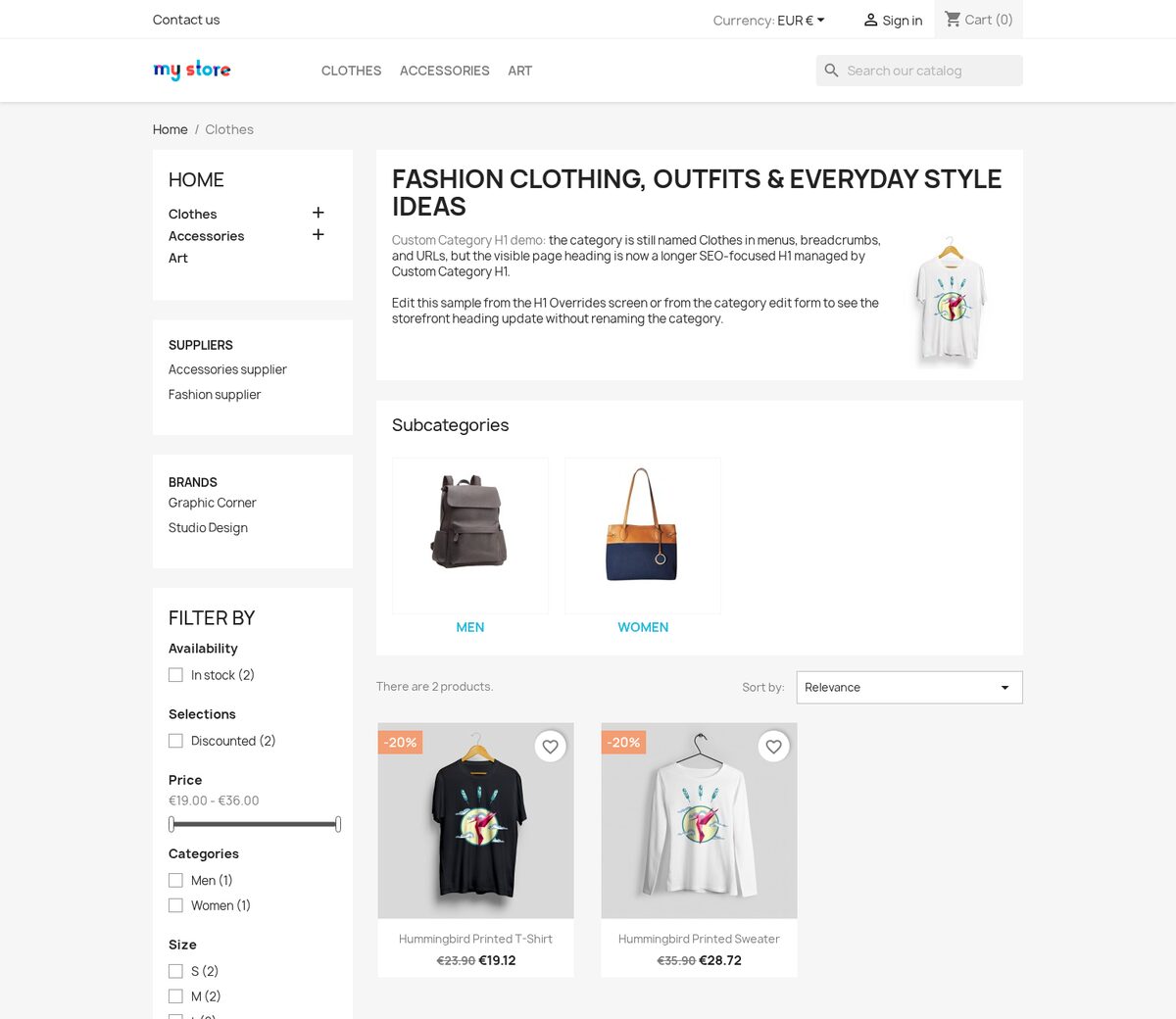
The module route exists for exactly this gap: per-category H1 control that a non-developer can manage and that doesn't fork the theme. Our Custom Category H1 module adds the missing field rather than reusing an existing one. A Custom H1 heading input sits directly after the Name field on the standard PrestaShop category form, so editing one category's heading is where you'd already expect it. Under the hood it swaps the H1 server-side through the filterCategoryContent hook before the page renders, not with a JavaScript replacement after load, so Google reads the intended heading on first crawl and there's no flash of the old text. What that means for you: the menu, breadcrumb and URL keep using the short category name untouched; only the visible heading on the page changes.
A few specifics that matter once you're past a single category:
- Multilingual. H1 values are per-language, so a store running EN/DE/FR/PL sets a properly localised heading for each, not one English string bolted onto every shop language.
- Placeholders for catalogue-scale work. Instead of hand-writing hundreds of headings, you can template them: {category_name}, {nb_products}, {page}, {page_label} and {shop_name} resolve at render time, e.g. a parent rule of "{category_name}, {nb_products} products in stock" cascades to children while each keeps its own name.
- Bulk targeting with fallbacks. A dedicated H1 Overrides screen lets you apply one heading or pattern to many categories via rule-based selection, with exceptions and a preview of which categories will match. A category with no override falls back to a parent override, then to its own category name, so nothing ever ends up headingless.
- One field on the category page, one rule elsewhere. Editing a single category's H1 from its own edit screen gives just that category a direct override; clearing the field lets it drop back to whichever shared rule or parent applies. You never have to choose between "edit one" and "manage many", both workflows coexist.
Writing a category H1 that earns its place
The mechanism is only half the job; the heading still has to be good. A handful of rules:
- Lead with the primary keyword, written as a real heading. "Women's Summer Dresses, Casual & Elegant Styles" reads naturally. "Women Dresses Summer Casual Elegant Buy Online Cheap" is keyword-stuffing and will be read as such.
- Keep it roughly under 70 characters. Longer headings lose punch and wrap awkwardly, and since a large share of category-page traffic now comes from phones, test how it breaks on a narrow screen before committing. (More on that constraint in mobile commerce.)
- Match the intent the page is for, not the broadest possible term. If the data shows people reach the page via "best running shoes for flat feet," let the H1 acknowledge that audience rather than defaulting to "Running Shoes."
- Don't let the H1 do the description's job. The heading sets the topic in one line; the category description block below it does the depth. Keep the H1 a headline and let the description (and the rest of the page) carry the weight, see category pages that convert for that layer.
The one-line version
PrestaShop reuses your category name as the H1 because, for a simple store, that's the sensible default. The moment a name is a good menu label but a weak page heading, you've hit the limit of that default, and the fix is to unhook the H1 alone, leaving the menu, breadcrumb and URL on the short name they were built for. Whether you do that with a theme field, a careful template override, or a module that adds the field properly and applies it at catalogue scale, the principle is the same: let the heading be specific where it's read, and stay short where it has to fit.
Frequently asked questions
Does changing the category H1 change my URL or break my menu?
No, that's the whole point of splitting them. The URL slug comes from the category's link-rewrite (friendly URL) field, the menu label and breadcrumb come from the category name, and only the visible H1 changes. Decoupling the heading touches none of the other three, so existing links keep resolving and your navigation bar stays short.
Is the H1 the same as the meta title I set on the SEO tab?
No. The meta title ({$page.meta.title}, set in the category's SEO tab) is the clickable line in Google's results and is read before the click. The H1 is the on-page heading read after the click. They should target the same primary keyword but are written for different jobs. The meta title is pixel-capped for the SERP; the H1 has room to be more complete.
Will a custom H1 hurt SEO if it differs from the category name?
No. Google reads the H1 as the page's declared topic; a more specific, intent-matched heading is generally an advantage, not a penalty. The name still appears in the menu, breadcrumb and URL, so the keyword signal isn't lost, you're adding specificity to the heading, not removing it from the rest of the page.
Can I set a different H1 per language?
If you use a template override you'd have to branch on language in the template, which gets unwieldy. A field-based approach stores the H1 per language the same way the category name is, so a store running EN/DE/FR/PL sets a properly localised heading for each shop language rather than bolting one English string onto every language.
What happens to a category I never give a custom H1?
It keeps showing its category name as the heading, exactly as PrestaShop does by default. With a rule/override approach, a category with no override of its own falls back to a parent override and then to its own name, so a page is never left without a heading, whether or not you've touched it.
Related reading
- PrestaShop category structure for SEO-optimized navigation, the tree above the heading: how to organise categories so each page has a clear job.
- Category pages that convert: layout, filters and sorting. What sits below the H1, where the description and listing do the conversion work.
- Smart search for PrestaShop. How to learn the real queries your H1s should match.


