


Add a what3words address field to PrestaShop with suggestions and three words on delivery documents


what3words Integration is a free module for PrestaShop stores that adds a what3words address field to the address form your customers already use, in their account and in the checkout, guests included. Setup is one field: your own what3words key.
what3words has divided the world into 3 metre squares and given each one its own address of three words, more than 57 trillion of them, in over 60 languages and in use in 193 countries. Where a street address stops at the building, three words point to the front door, the side gate or the loading bay. The app and map are free for your customers, and the free what3words business plan covers what the field needs.
The module is quick to start and goes as deep as your deliveries need. Suggestions appear as the customer types, with the nearest place, limited to the country of the address, and words that do not exist there are flagged and never saved with the address. You choose the countries, whether the field is required, and whether the words also go into the address notes for carriers.
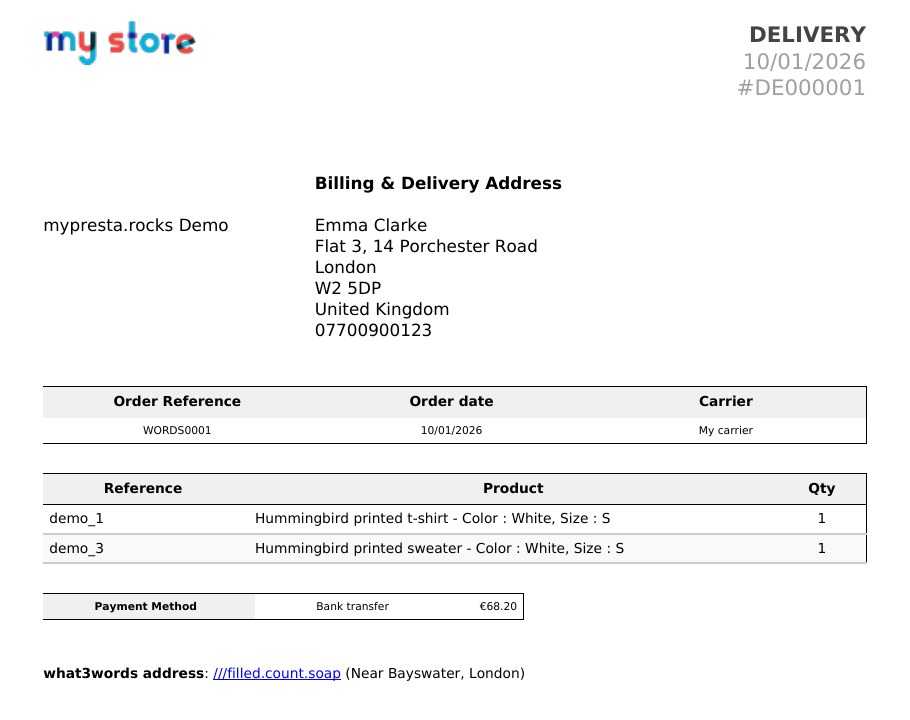
After the order, the three words are on the order in your back office with a link to the exact square, on the invoice and delivery slip, and in both order emails. Each order keeps the words it was placed with.
Parcels reach the spot the customer chose, drivers stop phoning to ask for the right door, and none of it costs anything.
What does what3words Integration do?
- A what3words address field in the customer's own address form, in the account and in the checkout
- Suggestions with the nearest place while the customer types, limited to the country of the address
- Words checked before the address is saved, optional or required, in the countries you choose
- The three words on the back office order, the invoice, the delivery slip and both order emails
- Each order keeps its own words, whatever happens to the address later
- Your what3words key kept on your own server, with look-ups limited per visitor
what3words Integration connects your address form to the what3words service and carries the three words from the checkout to every document your team and your carrier work from. Everything is set on one settings screen in your back office.
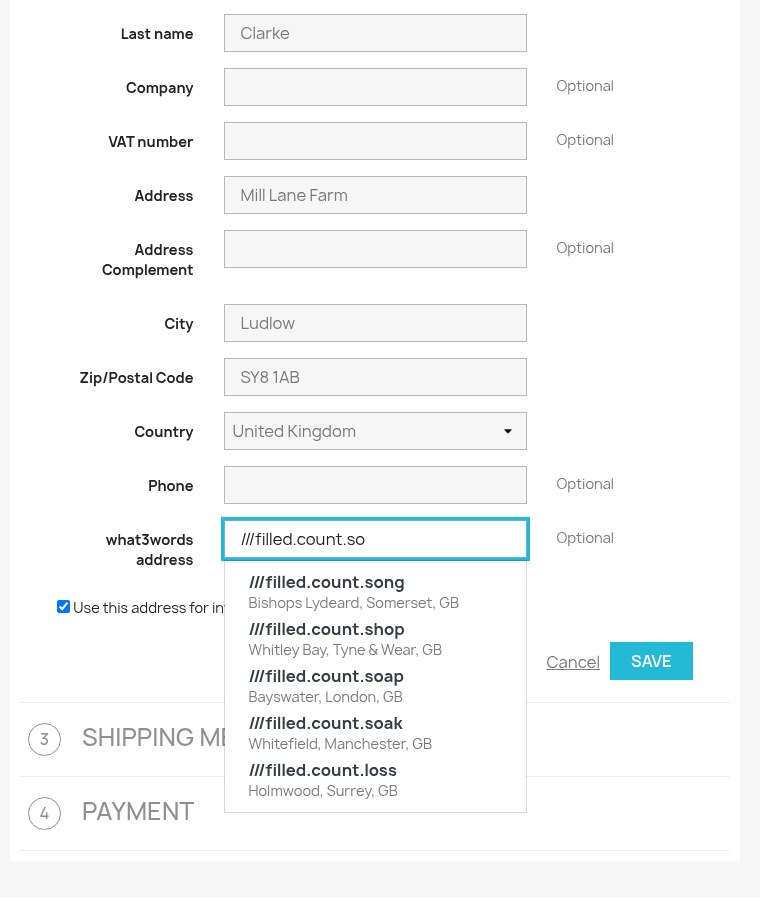
Where does the customer enter the three words?
The field sits in the address form your theme already shows, in the same style as the fields around it: in the customer account, in the address step of the checkout, and in the guest checkout for customers who never create an account. Nothing in your checkout is replaced.
As soon as the customer starts the third word, suggestions appear with the nearest town or district, so people recognise their own square instead of having to remember it letter for letter. A short "What is what3words?" note under the field explains the idea to customers who have never used it. Saved addresses show their three words in the address book and on the address cards in the checkout.
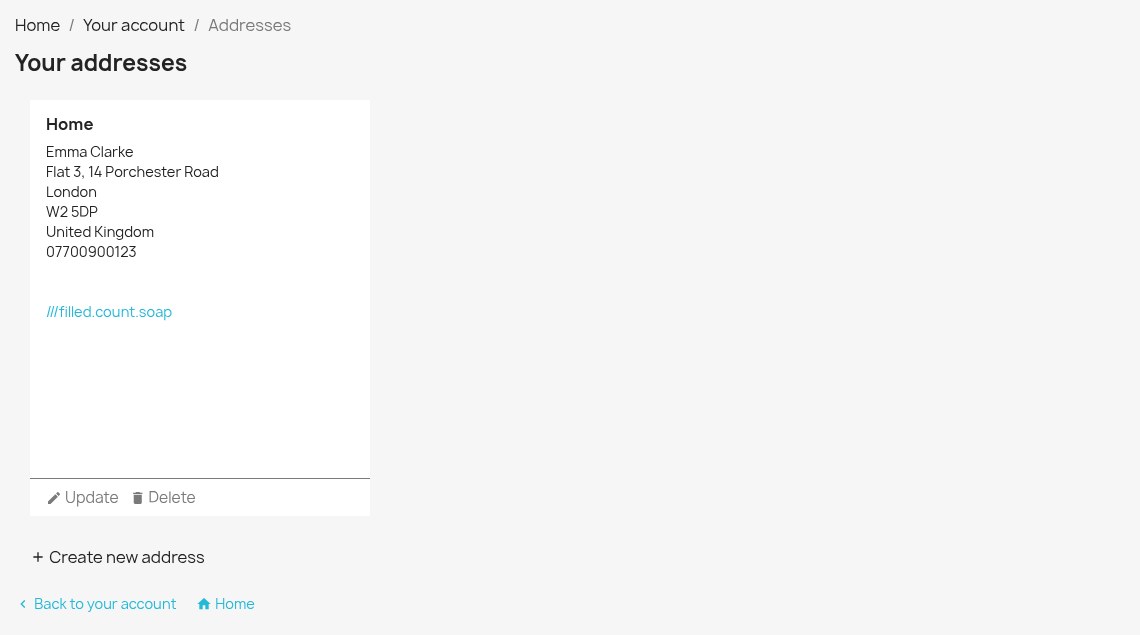
What happens when the words do not match the address?
Suggestions and checks are limited to the country selected in the address, so a slip of the finger never points a parcel at another country. When the words typed do not exist in that country, the field says so, and the address is not saved until they are corrected or removed. On the PrestaShop 1.6 address page, the field is checked in the browser, and words that do not exist are left out of the saved address.
The field is optional out of the box, as what3words recommends: three words add precision to the street address, they do not replace it. One switch makes it required, and a country list decides where it appears at all. Customers in other countries never see it.
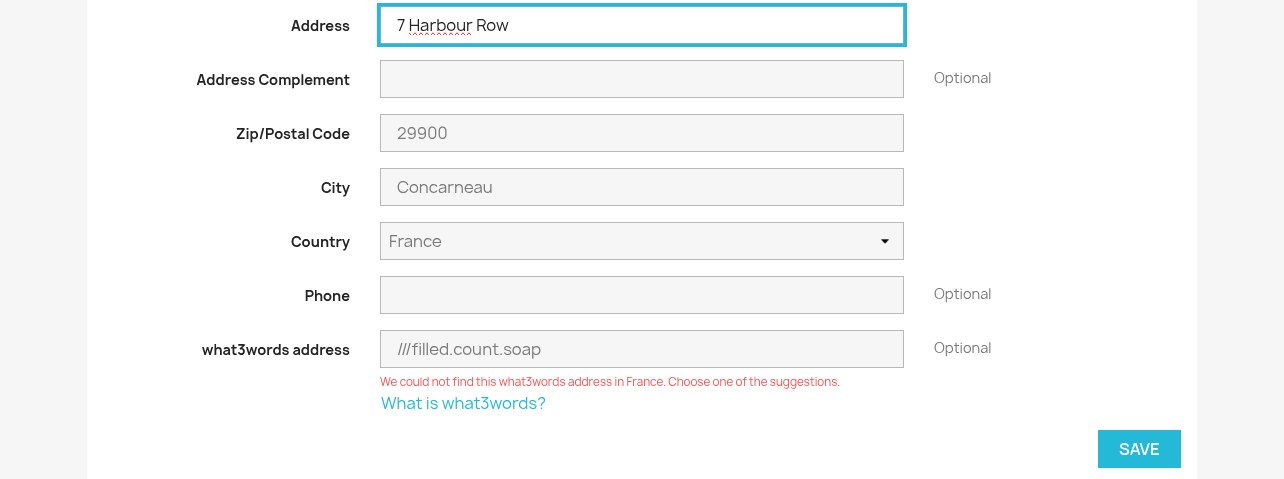
Where do your team and your carrier see the words?
On the order page in your back office, next to the customer and the addresses, with a link that opens the exact square on the what3words map. On the invoice and the delivery slip. In the delivery address of the customer's order confirmation and of the new order alert your shop sends you. And on the order in the customer's own order history.
Some carrier modules and label printers read only the address notes. For them, one setting adds the three words to the end of the notes, after anything the customer wrote there, which is always kept.
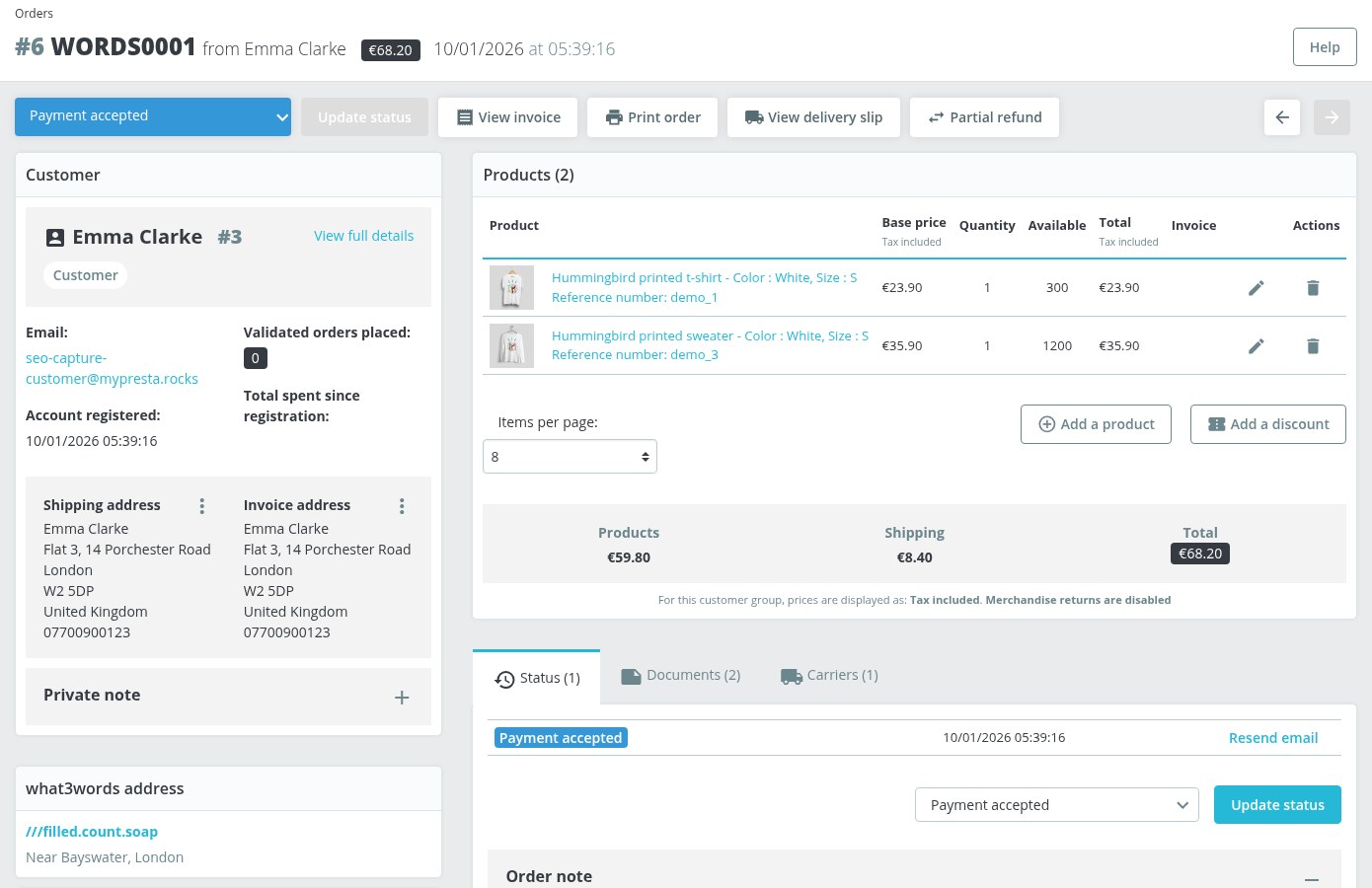
What happens to past orders when an address changes?
Customers edit their addresses. PrestaShop keeps the old address for orders already placed and saves the edit as a new address, and the three words move with the customer to the new one. Every order also keeps its own copy of the words it was placed with, so a change next month never rewrites the delivery slip your carrier already printed.
When a customer asks for a copy of their data, or for its deletion, through the official PrestaShop GDPR module, their what3words addresses are included.
What does setup take?
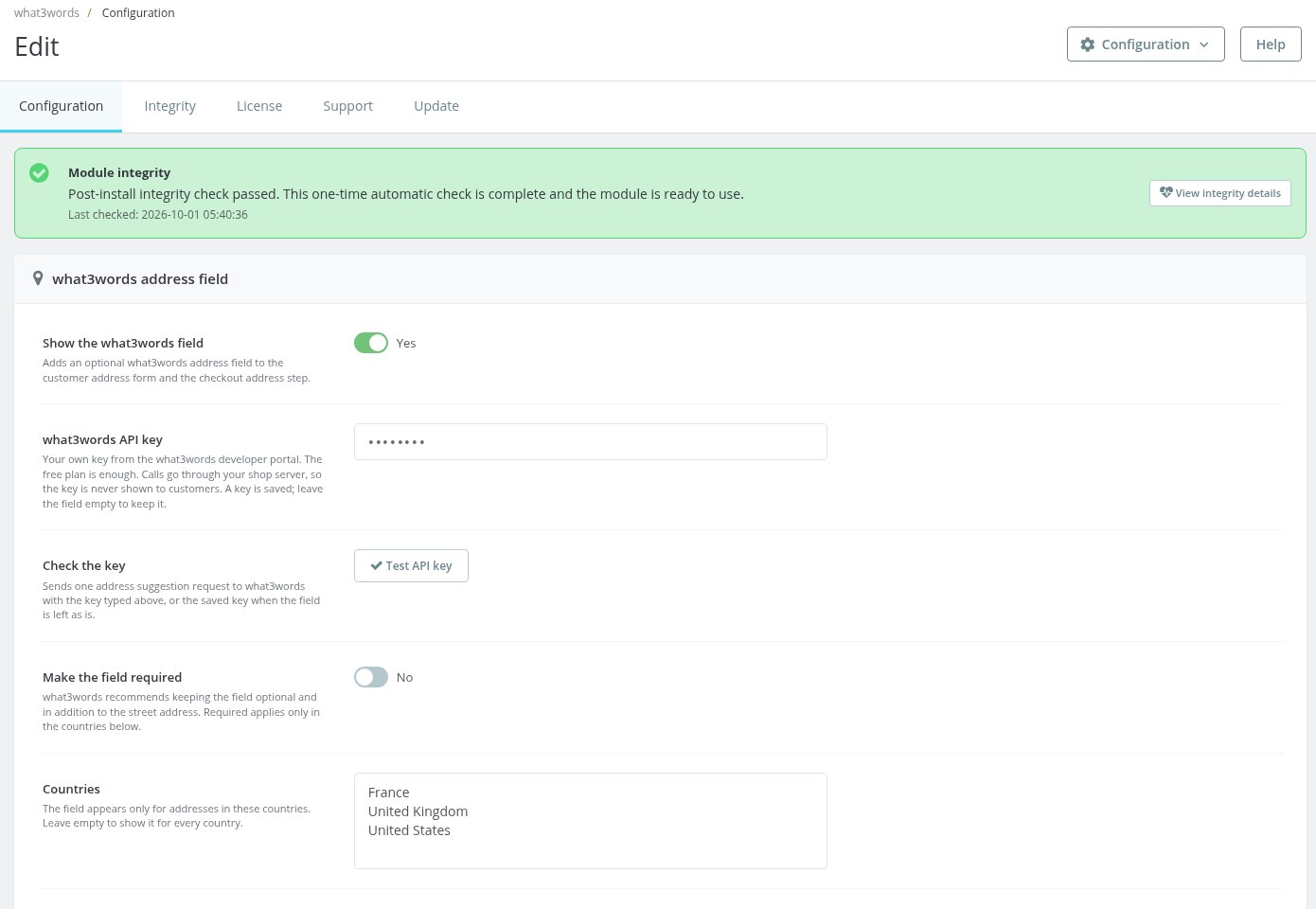
A free what3words developer account gives you a key. The key goes into one field in the settings, a button checks it on the spot, and the field is live in the countries you chose. The free what3words plan covers suggestions and checks; a paid plan is needed only to store each address with its map coordinates as well.
The key never reaches the customer's browser. Every look-up goes through your own shop, which also limits how many each visitor makes, so no single visitor runs through your plan. Shops that use Checkout Revolution with its built-in what3words field switched on keep that field, and this module hides its own so customers never see two. what3words is a trademark of what3words Limited. what3words Integration is an independent module by mypresta.rocks and is not affiliated with or endorsed by what3words.
-
Referencemprwhat3words
-
In stock2147483647 Items
-
PrestaShop CompatibilityPS 1.6 – 9.x
-
Pricing ModelFree
-
Module TypeFront & Back-office
-
GDPR RelevantYes
-
Business GoalStreamline Operations
-
External Account NeededYes
-
Module ComplexityFeature-Rich Module
-
Customer Journey StageConvert to Buyers
-
Works With PlatformMaps & Location
What customers say about us
Company reviews
5.0
★
★
★
★
★
(4 reviews)
Loading customer reviews...
No product reviews yet
Be the first to share your experience with this module.
Write a Review
what3words Integration adds a what3words address field to the PrestaShop address form, in the customer account and in the checkout, and shows the three words on orders, invoices, delivery slips and order emails.
Have a question about this product?
Our experts are here to help. Ask anything about installation, compatibility, or specifications.
1315
questions
9
categories
2013
building modules since
1.6–9
PrestaShop versions
v1.0.22026-10-01
- The module is now named what3words Integration in the back office and in all six translations, matching its product page.
Loading full changelog...
Works Well With what3words Integration
Modules our team genuinely pairs with this one, and exactly why each belongs in the same setup.
Complement
what3words Integration adds a three-word address field to the address form already used by your store. It suits merchants who want customers to identify a precise delivery point while keeping their existing account and checkout forms. The words remain available alongside the ordinary address for the order and its delivery documents.
Checkout Revolution covers a broader change: a one-page checkout that already includes its own what3words field. Consider it when your requirement concerns the whole purchase process as well as address precision. Its built-in field offers a route to collecting three words within that checkout.
The choice depends on the scope of your project. Keep the standalone module for the existing address flow, or use Checkout Revolution when rebuilding checkout. If its built-in what3words field is enabled, this module hides its own field, so customers do not have to enter the same information twice.

Complement
what3words Integration captures a precise delivery point when the customer saves an address. The three words accompany the ordinary address on the order and delivery documents, helping the team identify a particular entrance or gate. Capturing that detail does not itself give customers a way to change the address selected for an order already placed.
Order Address Change: Customer Self-Service handles that separate task. Customers can choose another saved address for an eligible existing order, subject to the statuses, carriers and limits you configure. The module provides the address-change workflow and its confirmation instead of requiring staff to handle each request manually.
Together they address two different sources of delivery questions: which saved address the customer intended to use and which exact point belongs to that address. Keep the order-change rules and delivery details clear to the customer, and check the resulting order before preparing the shipment.

Complement
what3words Integration adds location detail to the delivery address. A customer can identify a particular door, gate or loading bay with three words, and those words are available on the order and delivery documents. This answers where the parcel should go, but the address field does not tell the shopper when to expect it.
The delivery estimate module answers that timing question by showing customers when their order is expected to arrive. It gives shoppers information they can use while deciding whether the delivery fits their plans. An expected arrival date does not itself identify the entrance or access point at the destination.
Used together, the modules present the two details separately: when to expect the order and where to deliver it. Customers can plan around the displayed estimate and supply a precise point alongside their ordinary address. Your team retains that location detail for preparing the delivery documents.

Complement
what3words Integration records a precise delivery point alongside the customer’s ordinary address. Three words can identify the right entrance, side gate or loading bay, and remain available on the order and delivery documents for the team preparing the shipment.
Smart Carrier Rules controls which carriers the customer can choose. You set conditions such as country, zone, postcode, products in the cart or total weight to match the available carriers to the destination and the order. A local service can be offered within its delivery area, while unsuitable options are hidden according to your rules.
The two modules cover complementary decisions: who can deliver where, and the exact point to reach. Smart Carrier Rules shapes the carrier choice for that address and cart; the three words collected by what3words Integration tell the chosen carrier which entrance or gate the customer means. This is useful when a carrier covers the area but the street address alone leaves the final delivery point unclear.
Loading feature requests...
 30 days return right
Easy return - no questions asked
 Plug & Play Modules
Install, set up and take profit
 Dedicated Support First
Priority Help & Satisfaction Over Sales
You might also like
- Online only


