


Monitor and manage all your PrestaShop cron jobs from one Back Office dashboard


Cron Manager is a module for PrestaShop stores that runs the store’s scheduled background work dependably and shows every task, every run and every failure on one screen. Installation adds a control centre to the back office, choosing how tasks run is one setting, and the store takes it from there.
For stores without access to a server scheduler, the module works hand in hand with cron-job.org, a free service that calls an agreed address at set times. You paste one key, and the module manages the remote job by itself: it creates it, updates it when schedules change, pauses and resumes it, and first checks that the store is reachable from outside. A shop on simple shared hosting gets a dependable external clock without touching the hosting panel.
The module joins a simple start with deep control. Its dashboard gathers the scheduled tasks of every compatible module into one list with last run, next run, duration, recent failures and complete run history. Each row carries its own actions: run now, pause, resume, remove. Whole modules are handled in one motion, and every schedule is set from ready-made choices or as your own precise five-part schedule.
You also create your own tasks: one calls an address with the response it expects and a time limit, one runs work inside the store, one runs a server command, and each has a test button. Four run methods stand behind them, the server’s own scheduler, the managed external trigger, a storefront fallback and a back-office fallback, and when the primary method goes quiet, page traffic takes over by itself. Every task is claimed exactly once, so overlapping runs never duplicate work, and each one runs in isolation, so a single crash never stops the rest.
The result is background work you stop worrying about: the feed that dies on a Tuesday is visible on Wednesday morning instead of after a delisting, the store on modest hosting still runs its nightly jobs, imports run exactly once, and the question of whether the backup ran last night is answered by reading a row.
Summary of what the module offers
Cron Manager gives the scheduled background work of a PrestaShop store one protected entry point, one control centre and a safety net for the day the primary method fails. The overview below maps the six parts of this page.
- One screen for everything: every task with last run, next run, duration, failures and logs.
- Runs without server access: a managed external trigger and traffic fallbacks with automatic failover.
- Safety built in: no duplicated runs, one crashing task never stops the others.
- Your own tasks: address calls, internal work or server commands, each with a test button.
- Everyday control: run, pause, resume and reschedule per row or per module.
- A clean storefront: shoppers receive nothing extra, and history cleans itself up.

How do I finally see whether my background jobs run?
The dashboard answers the question a merchant normally answers by hoping. Every scheduled task of every compatible module appears in one list: when it last ran, how long it took, when it runs next, what it returned and how often it failed in the recent past. The full history of each run stays available, with status, duration, context and result.
The consequence is that silence stops being invisible. The marketplace feed that quietly stopped is a red row the next morning, not a discovery made a month later when half the catalogue has been delisted. Overdue work is flagged as overdue, not merely absent.
What runs my jobs when I have no server access?
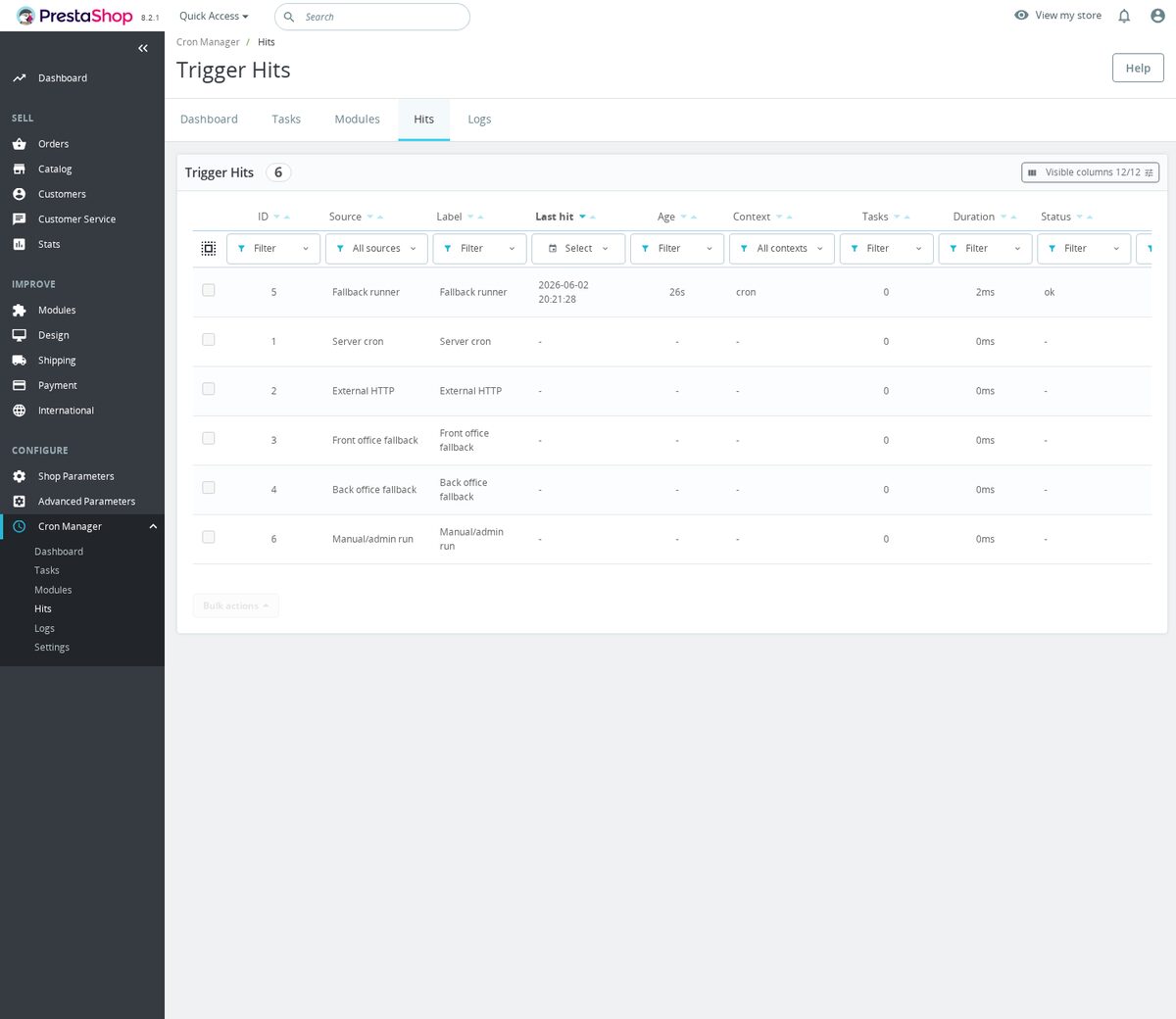
Four methods stand behind every task: the server’s own scheduler for stores that have one, the managed cron-job.org trigger, execution carried by storefront visits, and execution carried by back-office use. The module watches the health of the primary method through a regular heartbeat, and when that heartbeat goes stale, page traffic starts executing due work by itself, then steps back once the primary method returns.
The external trigger is managed, not merely suggested: with one saved key the module creates the remote job, updates it when your schedules change, pauses and resumes it, and first verifies that the store answers from the outside. The entry point itself is protected by a secret that outsiders do not have.
So the store on shared hosting without a scheduler in sight still runs its exports at three in the morning, and no one maintains anything in a second control panel.
What keeps one bad task from hurting the rest?
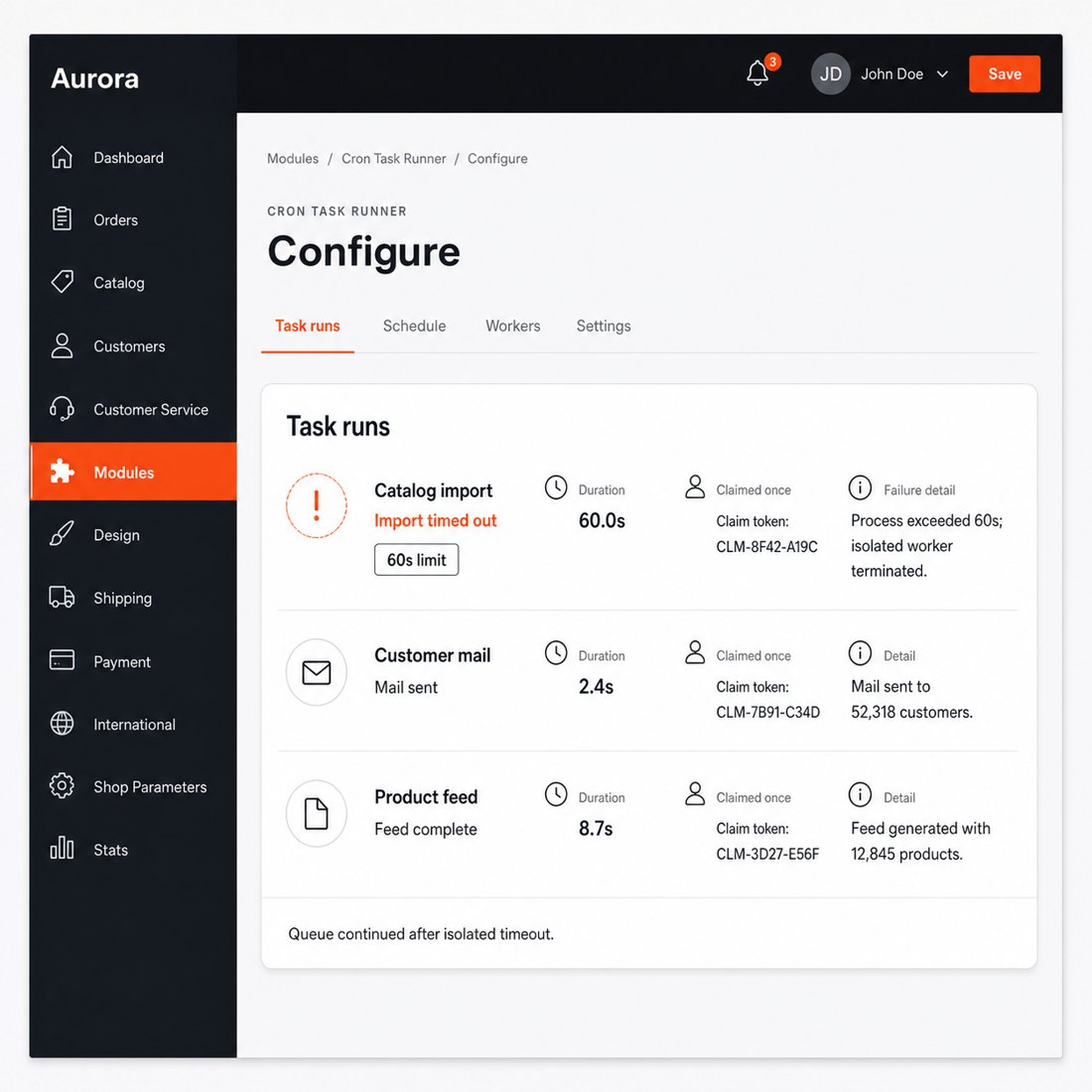
Each due task is claimed exactly once before it runs, so two overlapping runners never execute the same work twice. The import that used to run in parallel and duplicate rows runs once, every time.
On server runs, every task executes in its own isolated process with an enforced time limit. A task that crashes or hangs is cut off and recorded as failed, and the tasks behind it in the queue still run. One broken module no longer takes the whole night’s work down with it.
There is a guard for test copies of the store as well: tasks that write to outside services are held back on non-production installations, so a development copy never sends real data anywhere.
Can I schedule my own work, not just other modules’ tasks?
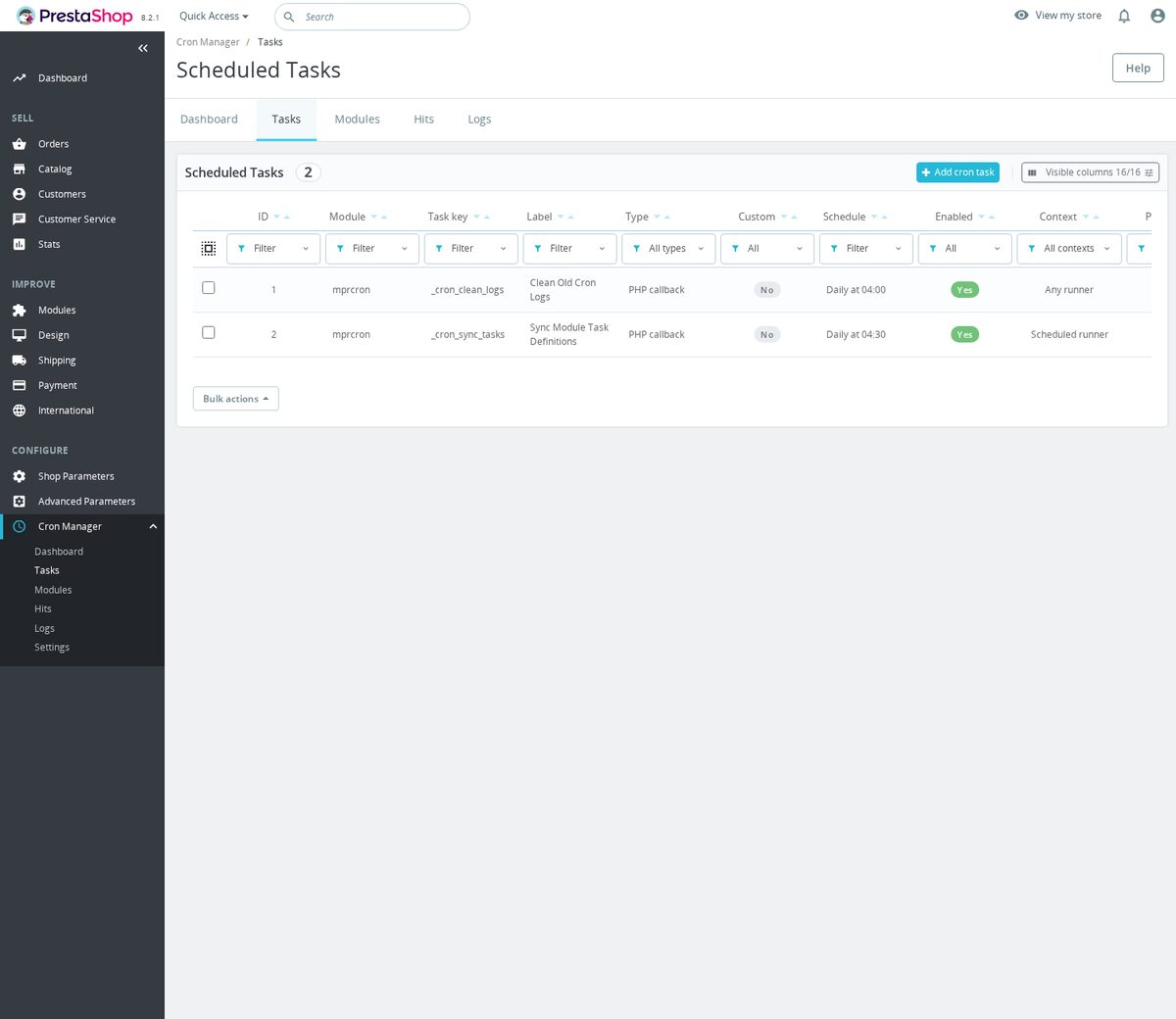
Yes, in three forms. A task calls an outside or store address, with the method, headers, request body, expected response and time limit under your control, and the answer is checked and recorded. A task runs work inside the store directly. A task runs a server command. Each form has a test button that executes it immediately and shows the outcome.
Schedules come as ready-made choices, every five minutes, hourly, nightly, weekly, or as your own five-part schedule for precise patterns. The same editor reschedules existing tasks, applies one schedule to many tasks at once, and returns an adjusted task to its module’s own default.

How much control do I keep day to day?
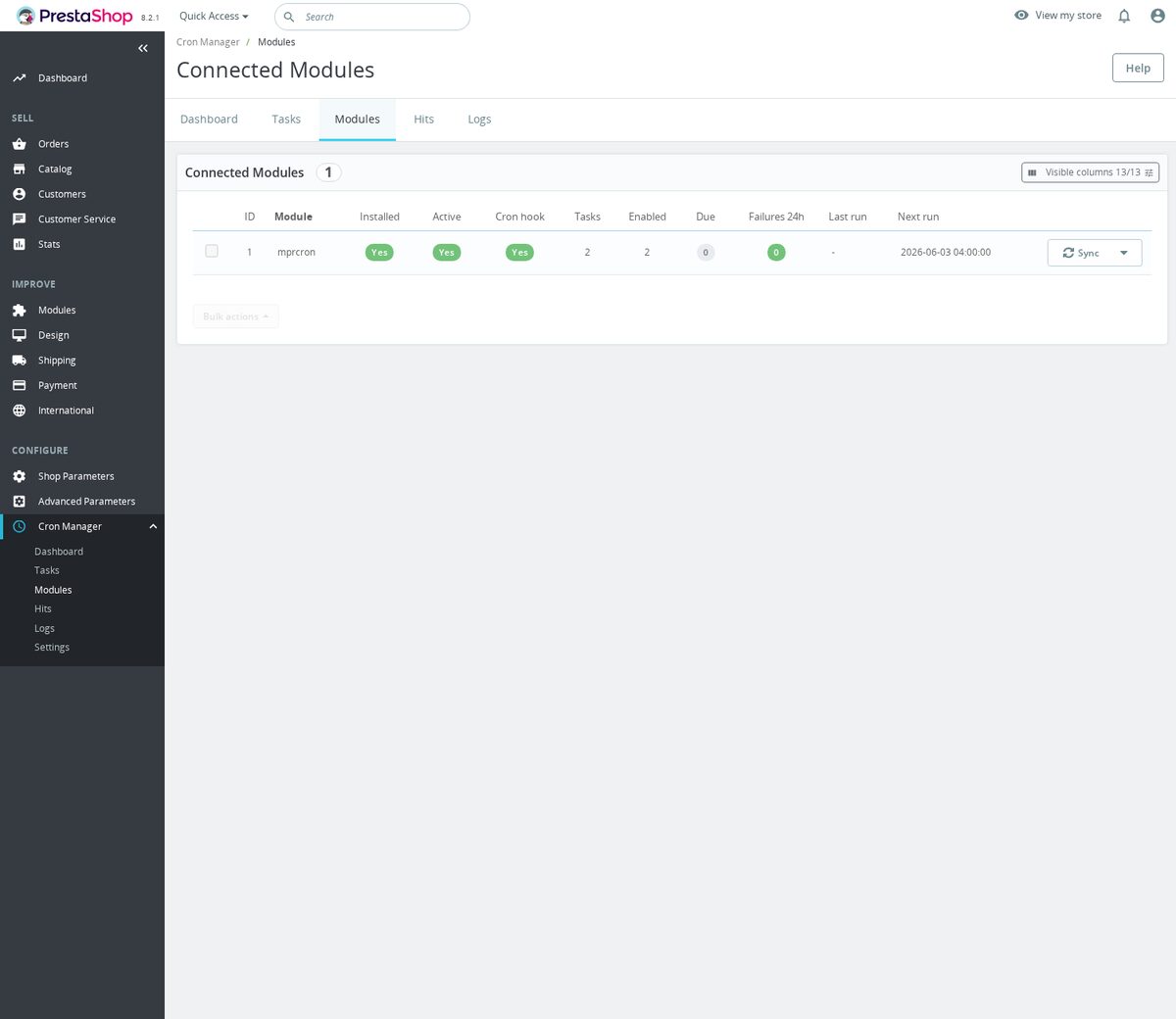
Every row acts on itself: run now, pause, resume, remove. Every module is handled as a fleet: synchronize its task definitions, pause or resume everything it owns, clear registrations it left behind. A new module that brings its own scheduled work simply appears in the list, already governed.
The module adds nothing to the storefront: shoppers download nothing extra and see nothing new. History maintains itself, trimmed by age and size, so the record of runs stays useful for years without growing without limit.
-
Referencemprcron
-
In stock2147483647 Items
-
PrestaShop CompatibilityPS 1.7 – 9.x
-
Pricing ModelOne-time Purchase
-
Module TypeBack-office
-
GDPR RelevantNo
-
Business GoalStreamline Operations
-
External Account NeededNo
-
Module ComplexityLightweight Widget
-
Customer Journey StageManage Store
-
Works With PlatformNo External Platform
What customers say about us
Company reviews
5.0
★
★
★
★
★
(4 reviews)
Loading customer reviews...
No product reviews yet
Be the first to share your experience with this module.
Write a Review
Cron Manager gives your PrestaShop store one Back Office workspace for scheduled MPR module tasks. It lets you trigger, schedule, pause, test, and inspect recurring jobs without maintaining separate cron settings in each module.
Have a question about this product?
Our experts are here to help. Ask anything about installation, compatibility, or specifications.
1301
questions
9
categories
2013
building modules since
1.6–9
PrestaShop versions
v1.3.122026-05-27
- AddedAdd custom cron task management
- AddedRelease cron manager 1.2.0
- Addedself-healing infrastructure with automatic diagnostics and repair
Loading full changelog...
Works Well With Cron Manager
Modules our team genuinely pairs with this one, and exactly why each belongs in the same setup.
Governance
Running the free Cron Manager means you want one back-office place to confirm that routine MPR module work is actually running, with protected scheduling links, manual runs and task status so jobs do not fail silently. That oversight is most valuable when there are real recurring jobs to watch.
Advanced SEO Sitemap Builder creates XML sitemaps, can provide an HTML sitemap, and collects selectable URL sources across products, categories, CMS pages, brands, suppliers and core pages, so crawlers get a clean, current route through your store. It is a separate, paid module you regenerate as your catalogue changes.
Used alongside each other, you keep your sitemaps up to date and gain a clear view of your scheduled MPR work. The sitemap builder produces the files search engines rely on, while Cron Manager gives you one place to run and monitor any MPR scheduled task the module exposes, so setup work stays visible rather than assumed.

Governance
With the free Cron Manager, you have a single back-office view of your MPR scheduled tasks, protected scheduling links and task status, built to protect feeds, cleanups and synchronizations from silent failure. That monitoring matters most for jobs that have to stay current.
Smart Google Merchant Feed Manager is a strong example. It generates and syncs product data for Google Merchant Center with separate feed profiles for markets, languages, currencies, target countries and sync modes, and can publish protected XML feed links or sync through the API, keeping Shopping data fresh. It is a separate, paid module.
Together they pair feed generation with clear oversight of your scheduled MPR work. The feed manager shapes and serves your Google Shopping data, while Cron Manager lets you check that your MPR routine tasks are running and trigger manual runs, so a stale or stalled feed is easier to notice before it affects campaigns.

Governance
Using the free Cron Manager shows you want confidence that routine MPR jobs are running rather than failing in silence, with one place for task status, protected links and manual runs. Operations-heavy modules are where that reassurance counts most.
Warehouse Revolution adds a real layer for stock, storage locations, purchasing, fulfilment and returns, with warehouses, zones, rack cells, stock movements, reservations, stock takes, purchase orders, receiving, shipments, RMA handling and BOM recipes in the Back Office, for merchants who have outgrown flat product quantities. It is a separate, paid module.
Run together, heavy warehouse operations sit alongside clear oversight of your scheduled MPR tasks. Warehouse Revolution handles the day-to-day stock and fulfilment work, while Cron Manager gives you one place to run and monitor any MPR scheduled task the module exposes, so routine jobs are less likely to slip unnoticed.

Workflow
The free Cron Manager gives you a back-office place to see whether routine MPR work is running, designed to protect feeds, cleanups and synchronizations from silent failure, with manual runs and status on hand. To make that worthwhile you need actual recurring maintenance to oversee.
Database Cleanup is a natural companion. It removes stale carts, search statistics, expired specific prices, logs, connections, guest records and old mail records from one maintenance screen, with a review step before deletion, keeping daily administration lighter over time. It is a separate, free module focused on the cleanup itself.
Together they cover both doing the housekeeping and keeping an eye on it. Database Cleanup handles the actual removal of accumulated operational data, while Cron Manager gives you one place to run and monitor any MPR scheduled task you set up, so routine maintenance stays visible rather than forgotten.
 30 days return right
Easy return - no questions asked
 Plug & Play Modules
Install, set up and take profit
 Dedicated Support First
Priority Help & Satisfaction Over Sales
You might also like


