


Smart Carrier Rules, carrier availability rules engine for PrestaShop


Smart Carrier Rules is a module for PrestaShop stores that decides which delivery methods appear during checkout, what shipping price they carry and how they are described. After installation, the first rule is built on one screen and checked in the simulator before it reaches customers.
Shipping becomes difficult when one cart belongs to several realities at once: a wholesale group, a bulky product, a remote postcode, a promotion and a delivery deadline. The module turns those details into one predictable answer, so an unsuitable method does not take the order, erase the margin or leave checkout without a valid choice.
You choose customer groups, products, categories, manufacturers, suppliers, countries, zones, postcodes, cities, voucher use, cart value, quantity, physical or dimensional weight and schedule. Cart value uses the basis you need, including tax, shipping and discounts. Conditions work together or as alternatives, each one has its own on or off state, and any condition is reversed when the rule concerns everything except the selected target.
Matching rules hide delivery methods, leave only selected ones, set an exact rate, add a fixed or percentage surcharge, apply a discount, grant free shipping, rename the method and add a delivery estimate in the customer’s language. Priority settles overlaps, progress messages show the amount or weight still needed for free shipping, and the simulator explains both successful and failed conditions for every method.
The result is correct delivery choices, protected shipping margin, fewer abandoned checkouts and a clear answer whenever a customer or employee asks why a method appeared.
What does Smart Carrier Rules settle during checkout?
Smart Carrier Rules controls delivery-method visibility, shipping prices and customer-facing wording, then proves each result in a simulator that explains every matched and failed condition before the rule goes live.
- Order recognition: rules read the customer, cart contents, destination, value, weight, voucher and schedule.
- Delivery outcome: they hide methods, narrow the choice, set prices, add adjustments and grant free shipping.
- Customer information: names, extra labels, delivery estimates and progress messages follow the store language.
- Conflict order: priority and a fixed decision order turn several matching rules into one result.
- Proof before launch: the simulator reproduces a cart and shows why each method wins, changes or disappears.
- Manageable growth: carrier profiles, rule switches and shop-specific settings keep a large delivery policy organised.
Which orders does a rule recognise?
You choose the exact commercial context: customer group, product, category and its parent categories, manufacturer, supplier, country, zone, postcode or city. Postcodes accept an exact value, a pattern and a numeric range. Voucher use forms its own condition, while subtotal, quantity, physical weight and dimensional weight cover the shape and value of the cart.
The subtotal basis is explicit for every rule, including or excluding tax, shipping and discounts. Calendar ranges and recurring schedules control temporary offers and operational hours. Conditions require all selected facts or any selected fact, and each row has a separate switch. Reversing a row expresses rules such as every country except one or every manufacturer outside a chosen list without rebuilding the rule.

What changes when the conditions match?
A rule hides selected delivery methods or leaves only an approved set. Price actions set an exact shipping rate, use a weight or value table, add a fixed or percentage surcharge, subtract a fixed or percentage discount, subsidise shipping or make it free above the chosen threshold. The charged order total follows the result through the completed purchase.
Customer-facing actions replace or extend the delivery name and add a delivery estimate, with separate wording for every store language. Product pages, the cart and checkout also show how much value or weight remains before free shipping. The message updates with the cart, so the customer sees a useful next step while the merchant keeps the threshold tied to the same rule that grants the benefit.

How does one result emerge when several rules match?
Every rule has an active state, a start and end window and a priority. Hidden methods are removed first. The highest-priority valid restricted set decides which methods remain, fixed price changes are settled before percentage changes, free shipping overrides surcharges, and the highest-priority wording decides the final name and delivery estimate.
The rule list makes that order visible, and rule names, descriptions, labels and estimates are maintained per language. Each shop in a multistore installation owns its rules and carrier profiles. A carrier target follows the carrier’s stable identity after its settings are edited, so a routine carrier update does not quietly detach an established delivery policy.

How does the simulator prove the result before launch?
The Test control beside a rule opens the simulator with that rule selected. A test cart contains real products, categories or manufacturers together with customer group, destination, postcode, subtotal, weight, quantity and date. It runs through the same carrier calculation as the real purchase, including prices returned by installed delivery providers.
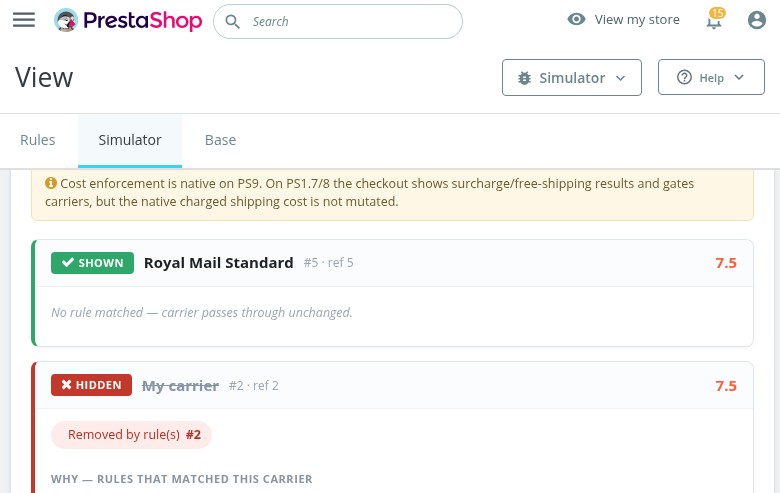
For every method, the result shows visibility, original and final price, label, delivery estimate, matching rules and the winning priority. The full trace also shows rules that failed, the expected value, the actual cart value and the precise condition that stopped each action. A prominent warning identifies a cart with no delivery method left, so a complex policy is corrected before a customer encounters it.

How does setup stay manageable as the store grows?
Setup begins with existing delivery methods. You choose a method, create a rule on one screen and run a representative cart through the simulator. The module is useful with one visibility rule, while deeper settings add price tables, combined conditions, schedules, language-specific wording and carefully ordered exceptions without changing the basic workflow.
Carrier profiles add another layer for categories and zones. A profile keeps an eligible method available beyond its normal weight range or restores it when a minimum order amount would otherwise remove it. Rules and individual conditions switch on or off without deletion, and the simulator preserves the reason behind every result. Daily changes therefore remain reversible and understandable even when the store serves several markets and customer groups.

-
Referencemprshippingrules
-
PrestaShop CompatibilityPS 1.7 – 9.x
-
Pricing ModelOne-time Purchase
-
Module TypeFront & Back-office
-
GDPR RelevantNo
-
Business GoalBoost Conversions
-
External Account NeededNo
-
Module ComplexityFeature-Rich Module
-
Customer Journey StageConvert to Buyers
-
Works With PlatformNo External Platform
What customers say about us
Company reviews
5.0
★
★
★
★
★
(4 reviews)
Loading customer reviews...
No product reviews yet
Be the first to share your experience with this module.
Write a Review
A carrier-availability rules engine for PrestaShop with a built-in Rule Simulator / Checkout Debugger. Hide, show-only, surcharge, free-ship, rename or add an ETA to your existing carriers by cart contents, customer group, category, brand, postcode, country, zone, subtotal, weight, quantity or date, and see exactly why each carrier appears at checkout.
v1.1.0 — 2026-07-05
- ▸New: Carrier Setup — a carrier-centric panel to tie an existing PrestaShop carrier to the categories and zones it should serve, plus a weight mode, without writing rules by hand.
- ▸Restrict a carrier to selected categories and/or delivery zones (offered only when the cart matches).
- ▸Ignore weight mode (PrestaShop 8 / 9): keep a carrier available even when the cart weight is outside its native ranges — cost is taken from its highest defined range. On PrestaShop 1.7 the category/zone restriction applies and this mode is safely skipped.
- ▸Runs through the same engine as the Rules and Simulator, so every carrier decision stays testable and explainable. No core overrides.
v1.0.1 — 2026-07-04
- ▸Reliability & correctness hardening across the rules engine, simulator and checkout integration.
- ▸Smarter "show only carriers" handling: a targeted carrier that is unavailable no longer removes every option, and when rules overlap the highest-priority rule decides the visible set.
- ▸Simulator matches live checkout more precisely for weight, subtotal and quantity test scenarios, including tax display modes.
- ▸Stricter numeric condition validation, shop-timezone date/time windows, and deterministic priority conflict resolution.
- ▸Per-language carrier labels and delivery-time (ETA) text; multishop and performance refinements.
v1.0.0 — 2026-07-04
- ▸Initial release, carrier-availability rules engine with a built-in Rule Simulator / Checkout Debugger.
- ▸AND / OR conditions: customer group, category, product, brand, postcode / ZIP, country / zone, subtotal, weight, quantity, and date / day / time window.
- ▸Actions: hide, show-only, fixed & percentage surcharge, free-shipping threshold, rename / append label, and per-rule ETA.
- ▸Priority-based conflict resolution (hide beats show-only; free shipping beats surcharge; highest priority wins label & ETA).
- ▸Rule Simulator / Checkout Debugger reuses the exact live checkout engine, per-carrier shown / hidden, condition trace, winning rule, surcharge & free-shipping breakdown, and a "NO CARRIER LEFT" banner.
- ▸PrestaShop 1.7 / 8 / 9, multishop and multi-language, with no core class overrides.
- ▸Native charged-cost enforcement on PrestaShop 9 (actionCartGetPackageShippingCost); surfaced and validation-gated on 1.7 / 8.
Loading tab content...
Have a question about this product?
Our experts are here to help. Ask anything about installation, compatibility, or specifications.
1315
questions
9
categories
Works Well With Smart Carrier Rules
Modules our team genuinely pairs with this one, and exactly why each belongs in the same setup.
Complement
Smart Carrier Rules decides which carriers appear at checkout and why, while Checkout Revolution controls how that checkout looks and flows as a single one-page surface.
The rules engine hides, surcharges or free-ships carriers by cart, group, zone and weight; Checkout Revolution keeps contact, address, carrier and payment in one tight flow.
Run together, shoppers see a clean one-page checkout showing exactly the right carriers, one tool curates the delivery options, the other presents them smoothly.

Complement
Smart Carrier Rules governs which carriers a shopper can pick; Estimated Delivery Date tells them when each choice will arrive.
The rules engine can already rename a carrier and attach an ETA label, and Estimated Delivery Date adds a full calculated delivery-date estimate per carrier and product.
Used together, a shopper sees the right carriers plus a credible arrival date for each. One controls availability, the other sets delivery expectations.
- Online only

Complement
Smart Carrier Rules keeps carrier availability correct for the standard checkout, while Express Checkout adds one-tap Apple Pay, Google Pay and PayPal for ready-to-buy shoppers.
The rules engine makes sure no cart is left with a wrong or missing carrier; Express Checkout gives impatient buyers a fast lane that still respects those shipping choices.
Together you cover both the structured checkout and the instant one without carrier logic breaking in either.

Complement
Smart Carrier Rules decides the carrier at checkout; Advanced Order Workflow takes over once the order exists, automating statuses and post-purchase steps.
The rules engine gets the right shipping method onto the order; the workflow module then drives fulfilment, notifications and state changes from there.
Run together, delivery is correct at purchase and well-managed afterwards, one shapes the shipping choice, the other runs the order that follows.
 30 days return right
Easy return - no questions asked
 Plug & Play Modules
Install, set up and take profit
 Dedicated Support First
Priority Help & Satisfaction Over Sales
You might also like


