

Cron Manager – Documentation
Cron Manager gives your PrestaShop store one Back Office workspace for scheduled MPR module tasks. It lets you trigger, schedule, pause, test, and inspect recurring jobs without maintaining separate cron settings in each module.
Features
- Single cron entry point. One
mprcron/cron.phpcommand or one HTTP URL can dispatch due tasks across registered MPR modules. - Back Office task registry. The
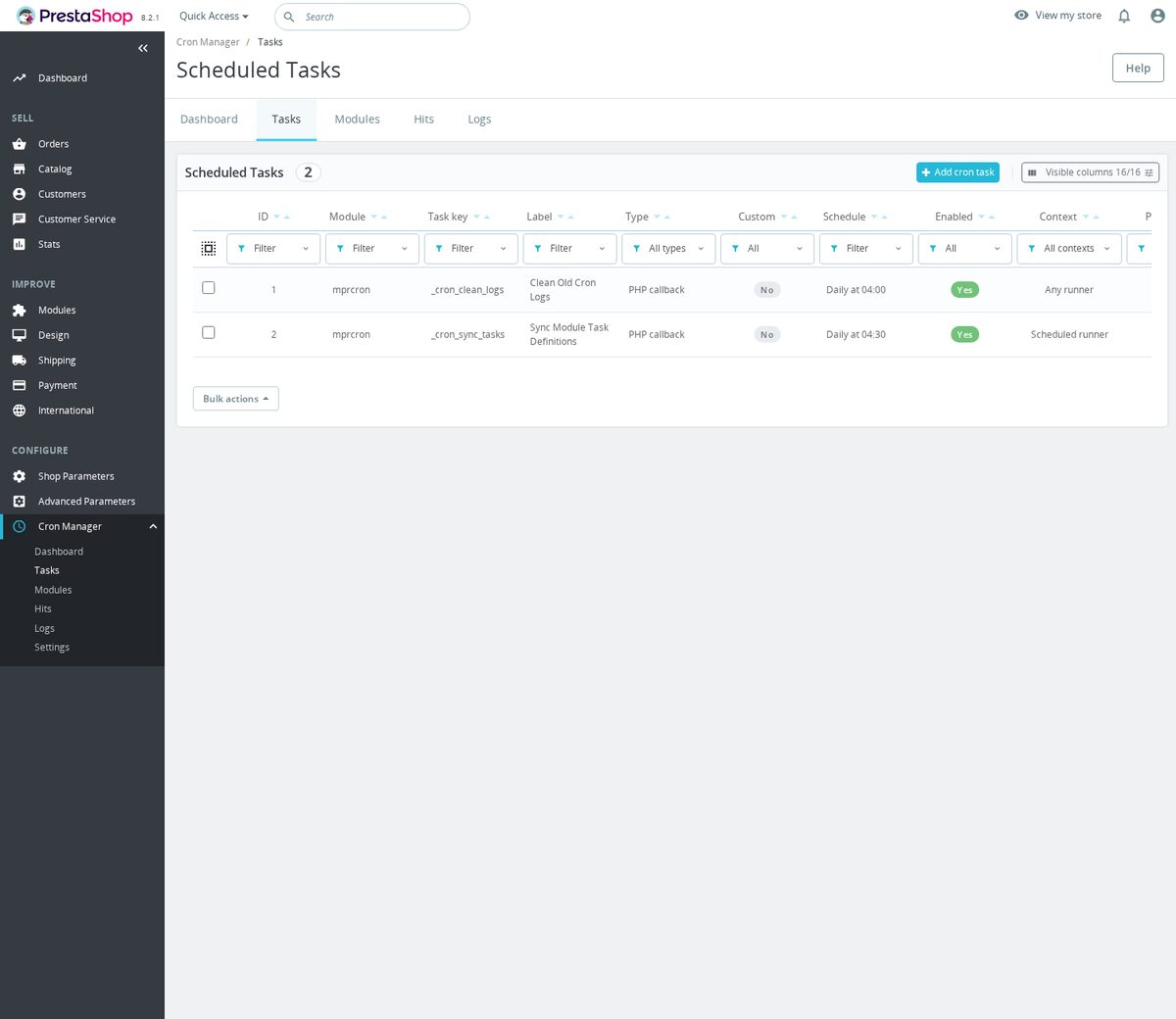
Taskspage lists module, task key, label, type, schedule, enabled state, context, priority, timeout, last run, and next run. - Task frequency overrides. You can change a module-defined task schedule from Cron Manager and reset it to the module default later.
- Custom task creation. Merchants can add URL, PHP callable, or CLI command tasks from the Back Office.
- Manual execution. Individual tasks can be run immediately, and custom tasks can be tested before or after saving.
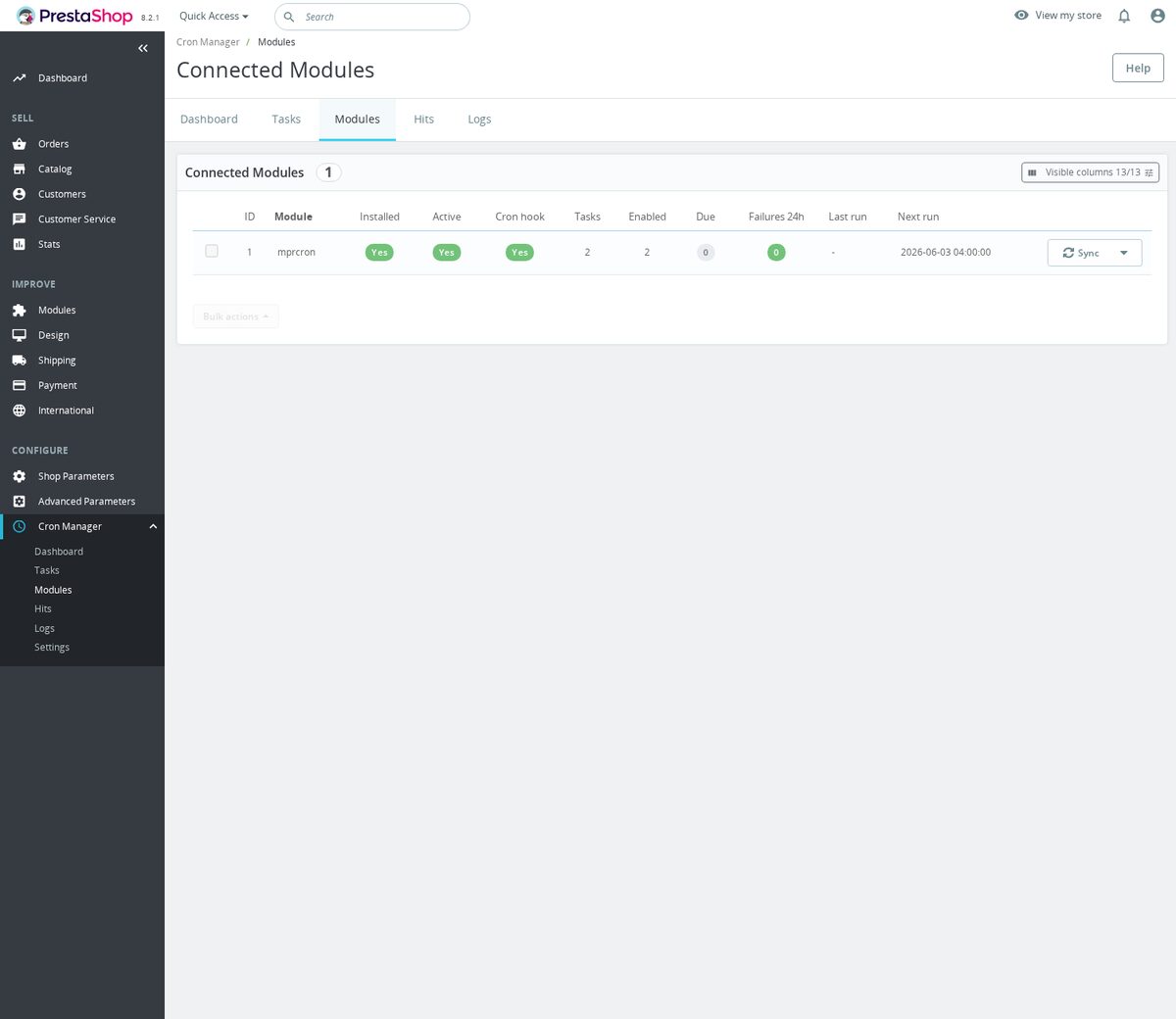
- Module-level controls. The
Modulespage can sync task definitions, pause all tasks for a module, resume them, or remove registrations. - Trigger monitoring. The
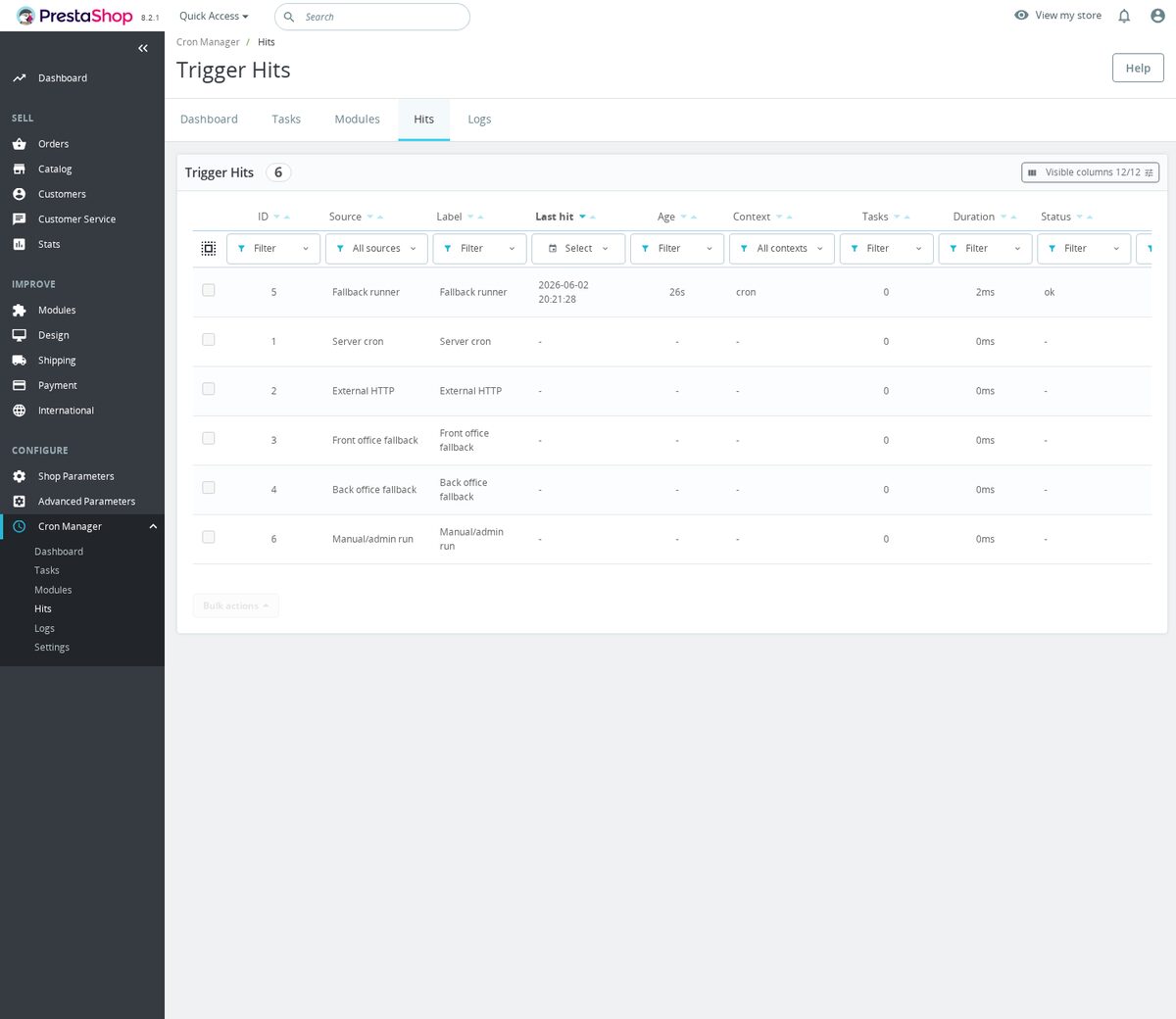
Hitspage records server, external, front office, Back Office, fallback, and manual trigger activity. - Execution logs. The
Logspage stores task status, context, duration, result preview, and execution date. - cron-job.org integration. The module can save an API key, create or sync the external cron-job.org job, pause it, resume it, delete it, and test public reachability.
- Fallback execution hooks. Front office and Back Office fallback modes are loaded through the module hooks
actionDispatcherBefore,displayHeader,displayBackOfficeHeader,displayAdminAfterHeader, andactionAdminControllerSetMedia. - CLI task isolation. When the server CLI runner can use subprocesses, a crashed task is logged without stopping the parent runner from continuing with other due tasks.

Configuration options
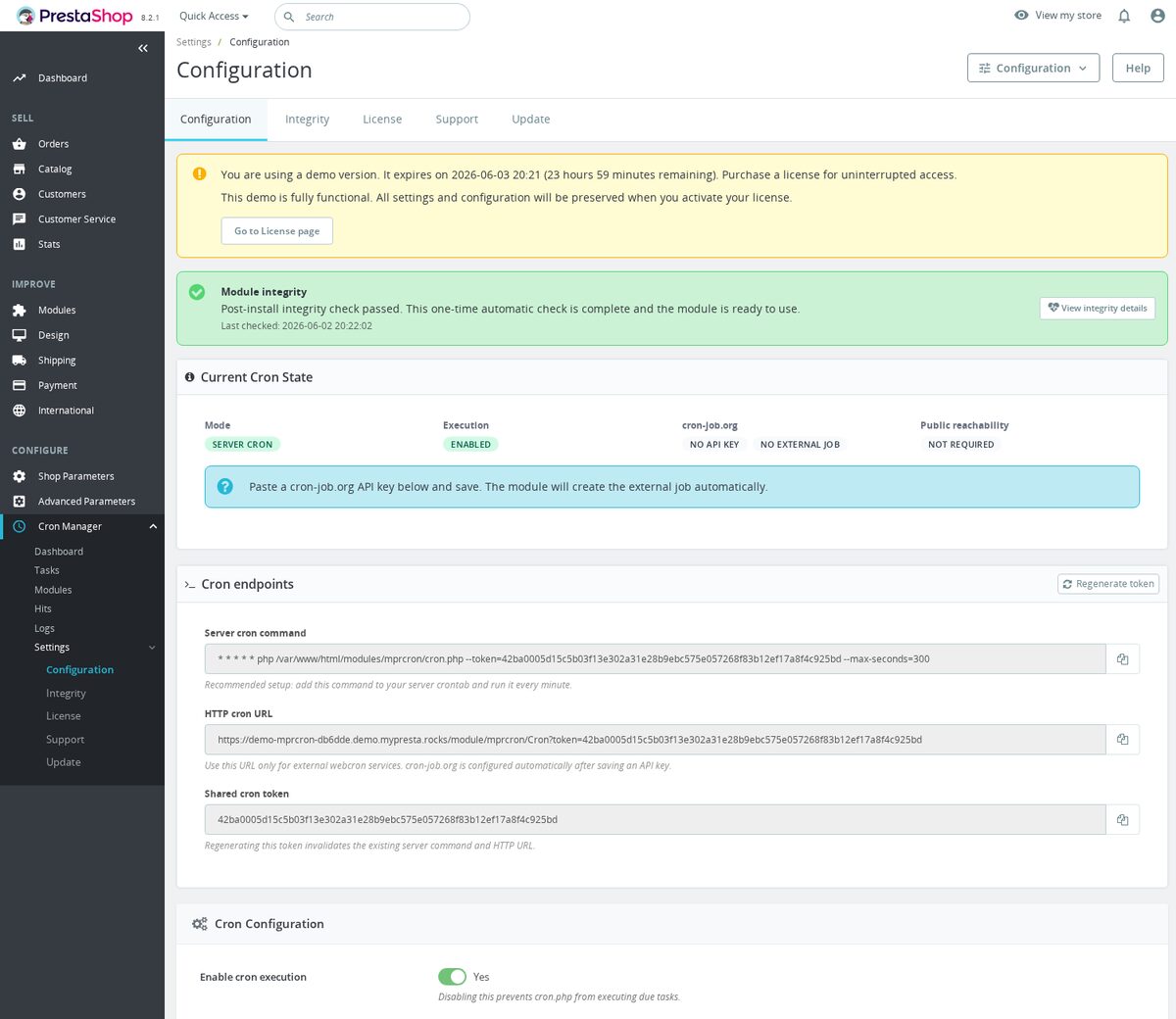
- Enable cron execution. Controls whether authenticated cron calls execute due tasks; default:
1. Set it inCron Manager > Settings > Configuration. - Primary trigger mode. Selects
server,cronjob_org,front, oradmin; default:server. Set it inCron Manager > Settings > Configuration. - cron-job.org API key. Connects the module to cron-job.org so it can create and maintain the external trigger; default:
empty. Set it inCron Manager > Settings > Configuration. - cron-job.org interval. Controls the external cron-job.org schedule; default:
hourly. Available values arehourly,every_30,every_15,every_5, andevery_minute. - Shared cron token. Protects the CLI and HTTP cron endpoints; default:
generated 64-character hex token. Regenerate it from theCron endpointspanel. - Server cron command. Copy-only crontab command for hosting cron; generated from the shop runtime module directory as
* * * * * php [module directory]/mprcron/cron.php --token=TOKEN --max-seconds=300. - HTTP cron URL. Copy-only URL for external webcron services; default:
https://yourshop.com/module/mprcron/cron?token=TOKEN. - Maximum tasks per run. Limits how many due tasks a single runner call executes; default:
20, allowed range:1to100. Use--max-tasksfor CLI ormax_tasksfor HTTP. - Maximum seconds per run. Limits total runner time; default:
300, allowed range:10to300. Use--max-secondsfor CLI ormax_secondsfor HTTP. - Execution context. Chooses the runner context for a call; default:
cron. Supported values arecron,front, andadmin. - Custom task name. Display label for a custom task; default:
empty. - Custom task type. Selects
url,callable, orcommand; default:url. - Custom task schedule. Controls when the task becomes due; default:
hourly:00. - Custom task owner module. Assigns the custom task to an installed module in the registry; default:
mprcron. - Custom task enabled. Controls whether the custom task is active; default:
1. - Custom task priority. Orders due tasks, with lower values handled first by the task query; default:
50. - Custom task timeout. Sets the per-task timeout in seconds; default:
55, minimum saved value:10. - URL task URL. HTTP or HTTPS target called by a URL task; default:
empty. - URL task secret token. Optional bearer token sent as
Authorization: Bearer TOKENwhen no Authorization header is already provided; default:empty. - URL task method. HTTP method for URL tasks; default:
GET. Supported values areGET,POST,PUT,PATCH, andDELETE. - URL task expected HTTP status. Required response code for URL task success; default:
200. A value of0accepts any2xxor3xxresponse. - URL task headers. Extra HTTP headers, one per line; default:
empty. - URL task body. Request body for
POST,PUT, andPATCHURL tasks; default:empty. - Callable task callable. PHP callable in
ClassName::methodormodule_name::methodformat; default:empty. - Command task command. Shell command executed only by the server CLI runner or an explicit Back Office test run; default:
empty.

Customization examples
Server crontab entry with explicit run limits:
* * * * * php /path/to/prestashop/modules/mprcron/cron.php --token=YOUR_TOKEN --max-tasks=20 --max-seconds=300 --context=cron
HTTP trigger and JSON status endpoints:
https://yourshop.com/module/mprcron/cron?token=YOUR_TOKEN
https://yourshop.com/module/mprcron/cron?token=YOUR_TOKEN&max_tasks=20&max_seconds=300
https://yourshop.com/module/mprcron/cron?token=YOUR_TOKEN&action=status
https://yourshop.com/module/mprcron/cron?token=YOUR_TOKEN&action=health
https://yourshop.com/module/mprcron/cron?token=YOUR_TOKEN&action=tasks
https://yourshop.com/module/mprcron/cron?token=YOUR_TOKEN&action=tasks&module=mprcron
https://yourshop.com/module/mprcron/cron?token=YOUR_TOKEN&action=run&id_task=123
Supported schedule expressions:
hourly:00
daily:04:00
weekly:1:08:00
weekly:1,3:08:00
every:3600
*/15 * * * *
0 3 * * *
30 2 * * 1
Custom URL task values:
Name: Nightly supplier import
Type: URL
URL: https://example.com/import/run
Method: POST
Expected HTTP status: 200
Schedule: daily:02:30
Secret token: YOUR_SECRET
Headers:
Content-Type: application/json
Body:
{"source":"prestashop","mode":"scheduled"}
Custom callable task value:
Type: PHP callback
Callable: module_name::method
Schedule: every:3600
Context: cron
Custom command task value:
php /path/to/script.php
Example task definition for an MPR module that uses the shared cron package:
use MyPrestaRocks\Cron\CronTrait;

class mymodule extends Module
{
    use CronTrait;

    public function getCronTasks(): array
    {
        return [
            'refresh_feed' => [
                'label' => 'Refresh product feed',
                'callable' => 'mymodule::cronRefreshFeed',
                'schedule' => 'daily:03:00',
                'context' => 'cron',
                'priority' => 50,
                'timeout' => 120,
            ],
        ];
    }
}

Installation
- In your PrestaShop Back Office, go to Modules > Module Manager.
- Click Upload a module.
- Select the
mprcronZIP file. - Install the module.
- Open Configure to access the Cron Manager configuration page.
- Copy the generated server cron command or HTTP cron URL.
- Add the server cron command to your hosting crontab when your hosting allows it.

How it works
Cron Manager stores registered jobs in shared cron tables. Each runner call checks which tasks are due, claims them so the same task is not started twice, executes them according to their saved context, and records the result.
In the Back Office, you see separate pages for Dashboard, Tasks, Modules, Hits, Logs, and Settings. The dashboard summarizes task health; the task and module pages are for daily management; the hit and log pages are for checking whether automation is actually running.


Honest limits
- Server cron is the best trigger when your hosting supports it; front office and Back Office fallback modes depend on customer traffic or admin activity.
- Command tasks do not run from external HTTP triggers or fallback page loads. They run from the server CLI cron runner or from an explicit Back Office test run.
- cron-job.org mode requires a public URL that cron-job.org can reach. Maintenance pages, HTTP auth, firewalls, or invalid tokens can block it.
- Regenerating the shared token invalidates existing cron commands and URLs, so the hosting cron entry or external service must be updated.
- Disabling cron execution does not delete tasks. Authenticated cron calls return successfully with zero executed tasks.
- Uninstalling Cron Manager unregisters its own tasks but does not remove the shared cron tables, because other MPR modules may still use them.

Frequently Asked Questions
Do I need one cron job for each MPR module?
No. Add the single Cron Manager command or URL once. Cron Manager then dispatches due tasks across registered MPR modules.
Should I use the server command or the HTTP URL?
Use the server command when your hosting supports crontab. Use the HTTP URL when your hosting cannot run a local cron command, or when using an external service such as cron-job.org.
Can I use cron-job.org directly from the module?
Yes. Save your cron-job.org API key, choose the interval, and the module can create, sync, pause, resume, or delete the external job. The module also checks public reachability.
What happens if a task fails?
The run is recorded in the execution log as failed, timeout, or crashed. The next run is advanced with a minimum retry delay, so the same failing task does not retry in a tight loop.
What happens if a task is already running?
Cron Manager uses task claiming. If another runner has already claimed the task, the second attempt is skipped.
Can I run a task immediately?
Yes. Use Run in the Tasks list. Custom tasks also have Test run and Save and test run actions.
Can I disable all cron execution temporarily?
Yes. Turn off Enable cron execution in Configuration. Cron calls will still answer, but they will not execute due tasks.
Where are the module pages in the Back Office?
Cron Manager adds these Back Office sections:
Cron Manager
Dashboard
Tasks
Modules
Hits
Logs
Settings > Configuration
Settings > Integrity
Settings > License
Settings > Support
Settings > Update
Compatibility: PrestaShop 1.6 to 9.0 (latest), PHP 7.1+. We continue to support upcoming PrestaShop versions.
