




Custom Order Numbering — Documentation
Replace PrestaShop's random order references such as XKBHMQWNY with readable, structured order numbers like ORD-2026-000042. Order Number gives your shop a configurable reference format for customer service, accounting, and daily order handling.
Features
- Custom order reference format. Build new PrestaShop order references with date tags, counter tags, customer context, shop context, product context, prefixes, and suffixes.
- Format Builder in the Back Office. Use Improve → Order Numbering → Format Builder to type a pattern, click available tags, and preview the result before saving.
- Sequential counters. Generate padded counters such as
{NNNN},{NNNNNN},{GLOBAL_NNNNNN}, or{CUSTOMER_NNNN}. - Reset policies. Reset counters never, yearly, monthly, or daily, with validation that the pattern contains the required date tags.
- Global or per-customer numbering. Use one sequence per shop or give each customer their own sequence with a required unique discriminator.
- Multi-shop counter storage. Counters are stored by
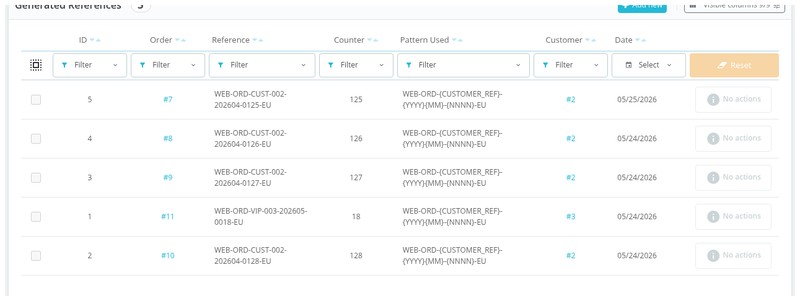
id_shop, so each shop can keep its own sequence. - Generated reference log. Review generated references, order links, customer links, counter values, patterns used, and dates in Generated References.
- Dashboard overview. See this month's generated references, total generated references, current counter value, recent references, and module version.
- PrestaShop hook integration. On newer PrestaShop versions the module uses
actionGenerateDocumentReferenceand links audit rows after order creation withactionValidateOrder. - Legacy order override. On versions without the native document reference hook, the included
Order::generateReference()override lets new orders receive the custom reference. - Longer reference storage. During installation the module widens
orders.referenceandorder_payment.order_referencetoVARCHAR(64).

Configuration options
- Enable Custom Order Numbering. Turns custom order references on or off; default:
1. Set it in Settings → General. - Order Number Format. Controls the main pattern used to build each order reference; default:
{YYYY}/{MM}/{NNNNNN}. Set it in Format Builder or Settings → Format. - Prefix. Adds static text before the pattern; default: ``. Set it in Format Builder → Counter Settings or Settings → Format.
- Suffix. Adds static text after the pattern; default: ``. Set it in Format Builder → Counter Settings or Settings → Format.
- Set Next Number. Forces the next generated counter value once, then clears itself; default: ``. Set it in Format Builder → Counter Settings or Settings → Sequence.
- Counter Reset. Chooses when the counter resets:
never,yearly,monthly, ordaily; default:yearly. Yearly reset requires{YYYY}or{YY}, monthly reset also requires{MM}, and daily reset also requires{DD}. - Counter Scope. Chooses whether the main counter is shared by the shop or counted per customer; default:
global. Usecustomeronly with a globally unique tag such as{CUSTOMER_REF},{CUSTOMER_ID},{CART_ID},{RAND6},{RAND7},{RAND8}, or{RAND9}.

Customization examples
Annual shop-wide references:
order_prefix=ORD-
order_format={YYYY}-{NNNNNN}
order_suffix=
order_reset_mode=yearly
order_counter_scope=global
Example output:
ORD-2026-000042
Monthly references with country code:
order_format={COUNTRY}-{YYYY}-{MM}-{NNNNNN}
order_reset_mode=monthly
order_counter_scope=global
Example output:
PL-2026-06-000042
Per-customer references with a stable customer discriminator:
order_format=CUST-{CUSTOMER_REF}-{CUSTOMER_NNNN}
order_reset_mode=never
order_counter_scope=customer
Example output:
CUST-ASDQWEQWE-0007
Multi-shop references:
order_format=SHOP-{SHOP_ID}-{YYYY}-{NNNNN}
order_reset_mode=yearly
order_counter_scope=global
Most useful runtime tags:
{YYYY} {YY} {MM} {DD} {QUARTER} {WEEK}
{N} {NN} {NNN} {NNNN} {NNNNN} {NNNNNN} {NNNNNNN} {NNNNNNNN}
{GLOBAL_N} {GLOBAL_NNNNNN}
{CUSTOMER_N} {CUSTOMER_NNNN}
{CUSTOMER_ID} {CUSTOMER_EMAIL} {CUSTOMER_REF}
{COUNTRY} {SHOP_ID} {SHOP_NAME} {CART_ID}
{PRODUCT_ID} {PRODUCT_REF}
{ORDER_REF} {RAND2} {RAND4} {RAND6} {RAND7} {RAND8} {RAND9}
Tags not available while PrestaShop is creating an order reference:
{ORDER_ID}
{INVOICE_ID}
{DOC_TYPE}
{PAYMENT}
Custom integration example for another module that reacts after the order exists:
public function hookActionValidateOrder($params)
{
    if (empty($params['order']) || !Validate::isLoadedObject($params['order'])) {
        return;
    }

    $orderReference = $params['order']->reference;
    // Send $orderReference to your ERP, accounting tool, or support system.
}
Legacy override path used on versions without the native document reference hook:
/modules/mprordernumber/override/classes/order/Order.php

Installation
- In your Back Office, go to Modules → Module Manager.
- Click Upload a module and select the module ZIP file.
- Once installed, click Configure.
- Open Improve → Order Numbering.
- Check Format Builder and save your preferred pattern before taking new orders.

How it works
When a customer places an order, PrestaShop asks for an order reference. Order Number validates your saved pattern, increments the needed counter in the database, resolves the tags, checks that the reference is not already used in orders, payments, or the module log, and returns the formatted reference.
In the Back Office you see four pages: Dashboard, Format Builder, Generated References, and Settings. Customers see the new value as the normal PrestaShop order reference wherever your theme or emails display it, including order history, order confirmation messages, and invoices.

Honest limits
The module changes references for new orders only. Existing orders keep their original PrestaShop references.
The generated reference is limited to 64 characters. The module validates the preview against this limit and widens the native order reference columns during installation.
Per-customer counters must include a unique customer, cart, order-reference, or random tag. Without that discriminator, two different customers could otherwise produce the same visible reference.
If another module or custom override already changes Order::generateReference() on older PrestaShop versions, the override may need manual review.
Cancelled orders keep their assigned reference. The module does not reuse generated numbers, so gaps in the sequence can happen.

Frequently Asked Questions
Will existing orders get new references?
No. Existing orders keep their original PrestaShop references. Only new orders use the custom format after the module is installed and configured.
Can customers see the new order reference?
Yes. This is the normal PrestaShop order reference, so customers can see it in places such as customer account pages, order emails, and invoices.
What happens if two orders are placed at the same moment?
The counter is incremented inside a database transaction using SELECT ... FOR UPDATE, so each order receives its own counter value.
Can I include the month in the reference?
Yes. Use {MM} in the format, for example ORD-{YYYY}-{MM}-{NNNNNN}.
Can I reset the counter every month?
Yes. Set the reset mode to monthly and include {YYYY} or {YY} plus {MM} in the pattern.
Can I reset the counter every day?
Yes. Set the reset mode to daily and include {YYYY} or {YY}, {MM}, and {DD}.
Can every customer have their own counter?
Yes. Set the counter scope to customer and include a unique customer or random tag, for example C-{CUSTOMER_ID}-{CUSTOMER_NNNN}.
What happens if custom numbering is disabled?
PrestaShop returns to its normal random reference generation.
What happens if the format is invalid?
The module refuses to save invalid formats in the Format Builder. If an invalid configuration is encountered during order creation, the module logs the issue and does not return a custom reference for that order.
What happens if an order is cancelled?
The order keeps the reference it was assigned. The module does not reuse numbers already generated for orders.
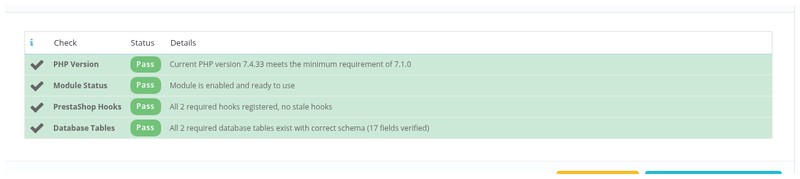
Compatibility: PrestaShop 1.6 to 9.0 (latest), PHP 7.1+. We continue to support upcoming PrestaShop versions.
