PrestaShop Hotjar heatmaps and events connect Hotjar recordings and heatmaps with real shopping context, so you can study how shoppers behave before they buy or abandon. That makes it easier to spot friction on product pages, checkout steps, forms and calls to action instead of guessing from revenue reports alone.
The module loads Hotjar from a numeric Site ID and can respect supported marketing consent, exclude logged-in employees, and send configured events for page views, product and category views, add to cart, saved products, checkout start, search, purchase and registration. Custom tracking rules can target chosen page elements, URLs, store pages or on-page actions through the Hotjar browser Events API.
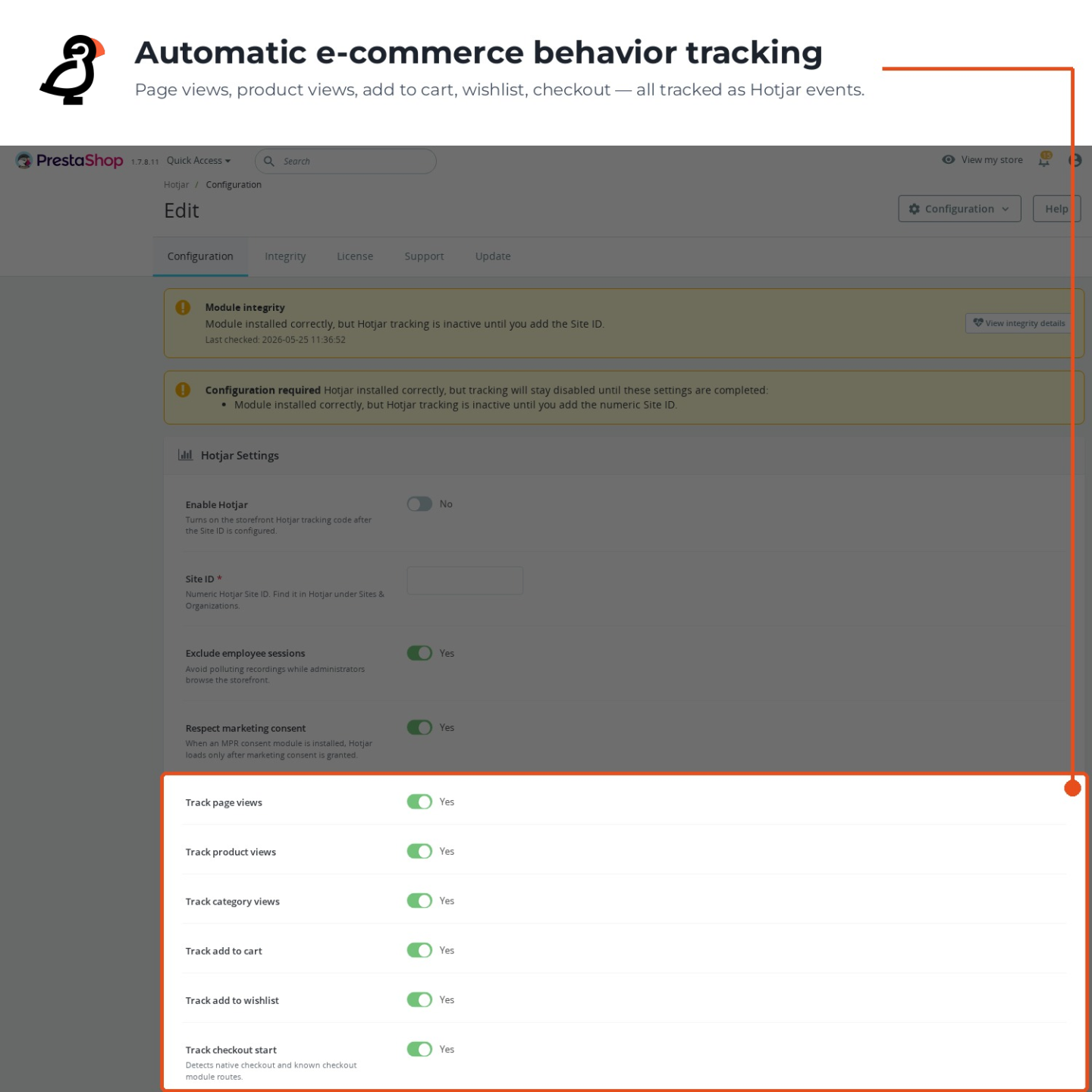
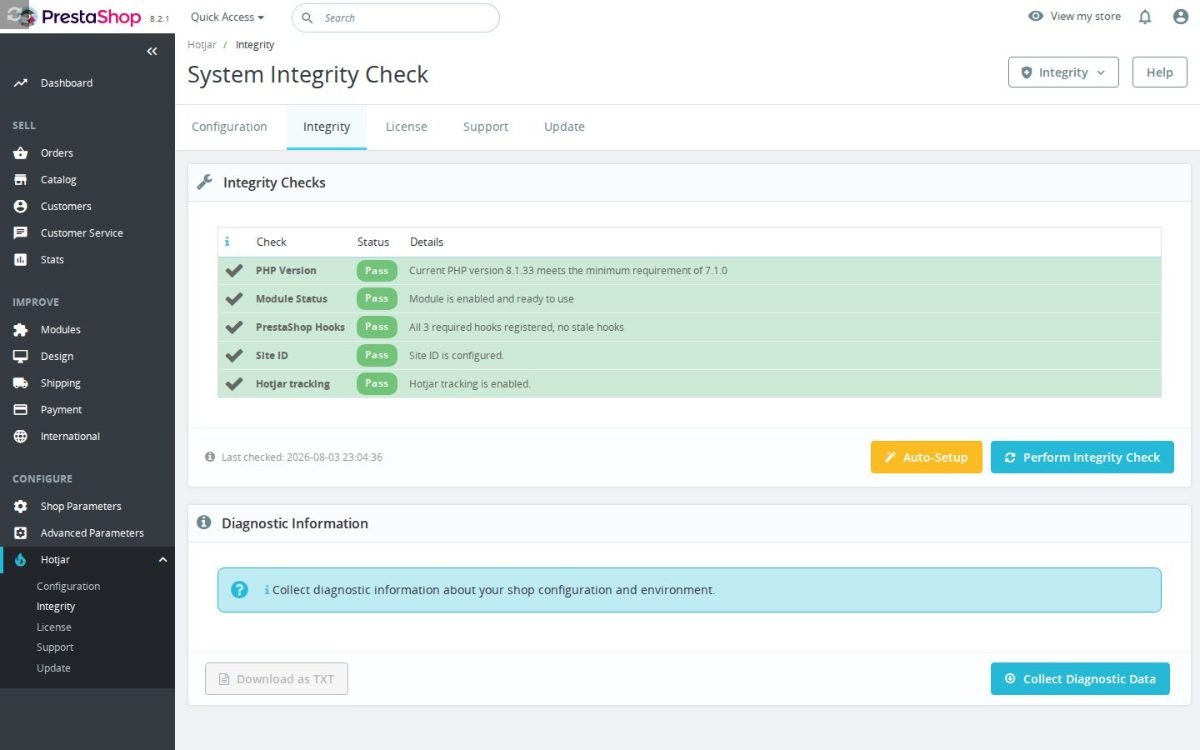
Everything is configured from the Back Office, and the storefront renders nothing until the required Site ID is present, so a half-finished setup never leaks broken tracking code to visitors. A built-in readiness check shows exactly what is still missing before tracking goes live.
Consent-aware loading depends on your store's consent setup and the options you enable, and the module is built to run across PrestaShop 1.6 through 9.x.
- Numeric Site ID setup. Hotjar tracking requires the module to be enabled and a numeric Site ID to be configured.
- Permission check before load. When the setting is enabled and supported preferences are present, storefront measurement checks marketing permission before Hotjar starts.
- Employee traffic exclusion. The module can skip tracking for logged-in employees so administrator browsing does not pollute Hotjar data.
- Store event coverage. Settings cover page views, product views, category views, add to cart, saved products, checkout start, search, purchase, registration, and custom events.
- Hotjar event sending. The module sends the ecommerce and custom events you enable, helping Hotjar recordings and heatmaps show more useful shopping context.
- Order confirmation purchase event. After a completed order, the module prepares the purchase details Hotjar needs so successful checkout sessions can be easier to review.
- Merchant-defined event triggers. Rules can target page elements, URLs, page types or on-page activity, letting merchants measure shop interactions without editing the theme.
PrestaShop Hotjar heatmaps events for visitor insight
Hotjar connects your PrestaShop store to Hotjar tracking so you can understand how visitors behave before they buy or abandon. Sales reports show what happened, but they often do not show why shoppers missed a call to action, struggled with a form or left a product page. This module adds the Hotjar tracker from the back office, supports consent-aware loading, sends ecommerce events and lets you define custom event rules, so recordings and heatmaps become easier to interpret in the context of real shopping behavior.
Find friction that costs conversions
Small usability problems can quietly cost money every day. A button below the fold, a confusing product section or a checkout field that shoppers hesitate on may not be obvious from revenue reports alone. With Hotjar running on your PrestaShop store, you can review heatmaps and recordings to see where customers slow down, miss key information or abandon the journey.

Connect behavior to ecommerce moments
Recordings are far more useful when you can filter them by meaningful actions. Watching random sessions wastes time, while reviewing sessions that viewed a product, added to cart, started checkout or purchased gives better clues about what helps or hurts revenue. The module can send product views, cart, saved-product actions, checkout, search, sign-up and purchase events to Hotjar, each switched on or off as you choose.

Respect consent while learning from visitors
Behavior analytics can create legal and trust risks if it runs without the right consent setup. Customers expect stores to be careful with tracking, and careless scripts can damage reputation as well as create compliance work. This module supports consent-aware loading through the store's consent setup and renders nothing when the Site ID is missing, which helps prevent broken or unwanted tracking output.

Track store-specific actions
Every store has important moments that are not covered by a generic analytics setup. A size-guide click, finance information page, quote button or configurator step can reveal why shoppers decide to buy or leave. Hotjar custom event rules let you capture specific clicks and page matches beyond the built-in events, so your analysis can focus on the behavior that matters to your business.

Consent-aware behavior tracking and custom rules
Hotjar keeps the Site ID, event switches, consent gating and custom event rules in the PrestaShop back office instead of scattering snippets through theme files. It is easy to set up because you paste the numeric Site ID, enable tracking and choose which ecommerce events should be sent. The module is designed to avoid broken storefront output when configuration is incomplete, and delayed or consent-aware tracking means you keep more control over when the external Hotjar script loads.

-
Referencemprhotjar
-
In stock2147483647 Items
-
PrestaShop CompatibilityPS 1.6 – 9.x
-
Pricing ModelOne-time Purchase
-
Module TypeFront-office
-
GDPR RelevantYes
-
Business GoalMarketing & Retargeting
-
External Account NeededYes
-
Module ComplexityLightweight Widget
-
Customer Journey StageAttract Visitors
-
Works With PlatformAd & Analytics Networks
What customers say about us
Be the first to share your experience with this module.
Write a Review
Hotjar for PrestaShop adds Hotjar tracking and browser Events API events to your storefront, so you can study heatmaps, recordings, feedback, and key shopping actions from your Hotjar dashboard. It helps you see where shoppers click, scroll, hesitate, search, add products, start checkout, and complete orders.
- AddedExpand Hotjar event tracking
- Addedcomplete FR/DE/ES/IT/PL translations
Works Well With Hotjar
Modules our team genuinely pairs with this one — and exactly why each belongs in the same setup.
With Hotjar running, your store connects heatmaps and session recordings to real shopping context, so you can study how visitors behave on product pages, checkout steps, forms and calls to action before they buy or abandon. That behavioural footage is valuable for spotting friction, but recordings on their own cannot tell you how many shoppers a problem affects or how much revenue is at stake, and without that scale it is hard to know which observed issue to tackle first.
Google Analytics GA4 is a separate module that sends ecommerce activity to your GA4 property after validating the Measurement ID, covering product views, cart activity, checkout starts, purchases, searches, logins and account creation. It supplies the quantified funnels and drop-off figures that turn an anecdote from a recording into a measured problem you can size and rank against everything else happening on the store.
Used together, they let you spot a weak step in a Hotjar recording and then confirm its scale in GA4, or notice a drop in GA4 and go watch why it happens in Hotjar. The payoff is disciplined prioritisation: you fix issues in order of how many shoppers and how much revenue they actually affect, so your optimisation effort follows evidence you can both see and measure rather than gut feeling.
A store using Hotjar is investing in qualitative insight: heatmaps and session recordings tied to real shopping context, so friction on product pages, checkout and forms becomes visible rather than guessed at. Hotjar is deliberately focused on behaviour and does nothing to organise the growing collection of marketing and analytics tags a store accumulates, which tend to sprawl across the theme and become hard to keep firing consistently.
Google Tag Manager is a separate module that adds your GTM container to the store and feeds it ecommerce shopping events from real product views, cart changes, checkout starts, purchases, searches, logins and sign-ups. It gives your analytics and marketing scripts a single, event-aware delivery layer instead of scattered snippets, keeping the wider tag stack tidy and consistent as it grows.
Running both keeps behavioural research and tag orchestration in their own lanes: Hotjar reveals where shoppers struggle while GTM manages how your measurement tags are delivered. The payoff is that the improvements you learn from watching recordings land on top of a clean, well-organised tracking foundation, so you are refining a page whose events you can actually trust rather than debugging tag chaos and UX friction at the same time.
If you run Hotjar, you already care about conversion behaviour and want to see where consumer shoppers stall on their way to purchase. Recordings surface individual friction points vividly, but they leave the harder commercial question open: across the whole buying journey, which leak is costing you the most, and what should you fix first? Watching sessions can absorb a lot of time without ever producing a ranked, revenue-weighted plan.
B2C Conversion Audit is an expert service, not a module: a specialist walks your real buying journey on mobile and desktop, analyses the funnel from view to purchase, and pinpoints exactly where shoppers leave, across product-page clarity, checkout friction, trust and social proof, mobile layout and post-purchase reassurance. You receive a prioritised conversion report mapping each leak to its likely revenue impact with a concrete fix.
Commissioned alongside your Hotjar setup, the audit turns scattered recording observations into a structured, prioritised verdict from an outside expert. The payoff is direction: your own session-watching gains a clear answer on what to change first and what to leave alone, so the effort you already put into understanding shopper behaviour converts into a focused list of fixes rather than an open-ended stream of interesting but unranked clips.
Easy return - no questions asked
Install, set up and take profit
Priority Help & Satisfaction Over Sales