






A boxed day of work with its task counter and hourly timeline


PrestaShop Full-Day Store Setup Service is a specialist service for existing PrestaShop stores that turns a mixed setup list into one focused working day. Starting takes the task list, its business priorities and the access details; the request receives a response within one business day, a live video consultation settles the scope, and the booked day is scheduled by agreement, typically within 5 to 10 working days of scope confirmation.
It resolves the backlog that sits between routine store management and a real project: a buying button obscured on a phone, an order email that needs checking, a product-feed address to verify, a module displayed in the wrong place, sales counted twice in reports. Related jobs share one preparation, one backup and one verification instead of carrying that overhead again and again.
Before the booked day, every item is classified as clearly suitable, dependent on details, or larger than the day, each suitable item with an upfront time estimate. You set the priority order, work proceeds from the top, and the time spent on each item is recorded, so small jobs stay easy to submit while the list stays under precise control.
The day covers store settings, new and existing module setup, ready-made theme installation and adjustment, menus, headers, footers, safe visual corrections, obvious mobile problems, scheduled store tasks, product feeds, order emails, checks that each sale is counted once, bounded fault diagnosis and small tailored changes. Speed work starts with a measurement and ends with a repeated one. Within 2 working days after the day, a written improvement plan and a live video handover arrive with completed work, changed settings, measurements, remaining risks and prioritised next actions; items larger than the day return with an estimate for separate work, and module and theme licences and third-party fees stay separate.
The result is a shorter backlog, order-critical work handled first, one shared setup cost and verified improvements with a written next step.
Summary of what the Full-Day Store Setup Service delivers
PrestaShop Full-Day Store Setup Service gives an existing store one dedicated working day of specialist work for a mixed list of bounded improvements. Access, backup, store familiarisation and verification form one shared preparation, while you keep control through priorities, upfront estimates and a time record.
- A response within one business day and a live video consultation that settles the scope
- Every list item classified in advance: clearly suitable, dependent on details, or larger than the day
- Settings, modules, theme adjustments, feeds, order emails and sales counting in one day
- Speed work with a recorded baseline and a repeated measurement as evidence
- A written improvement plan and a live video handover within 2 working days after the day
- A clear boundary where the day ends and a separate project begins
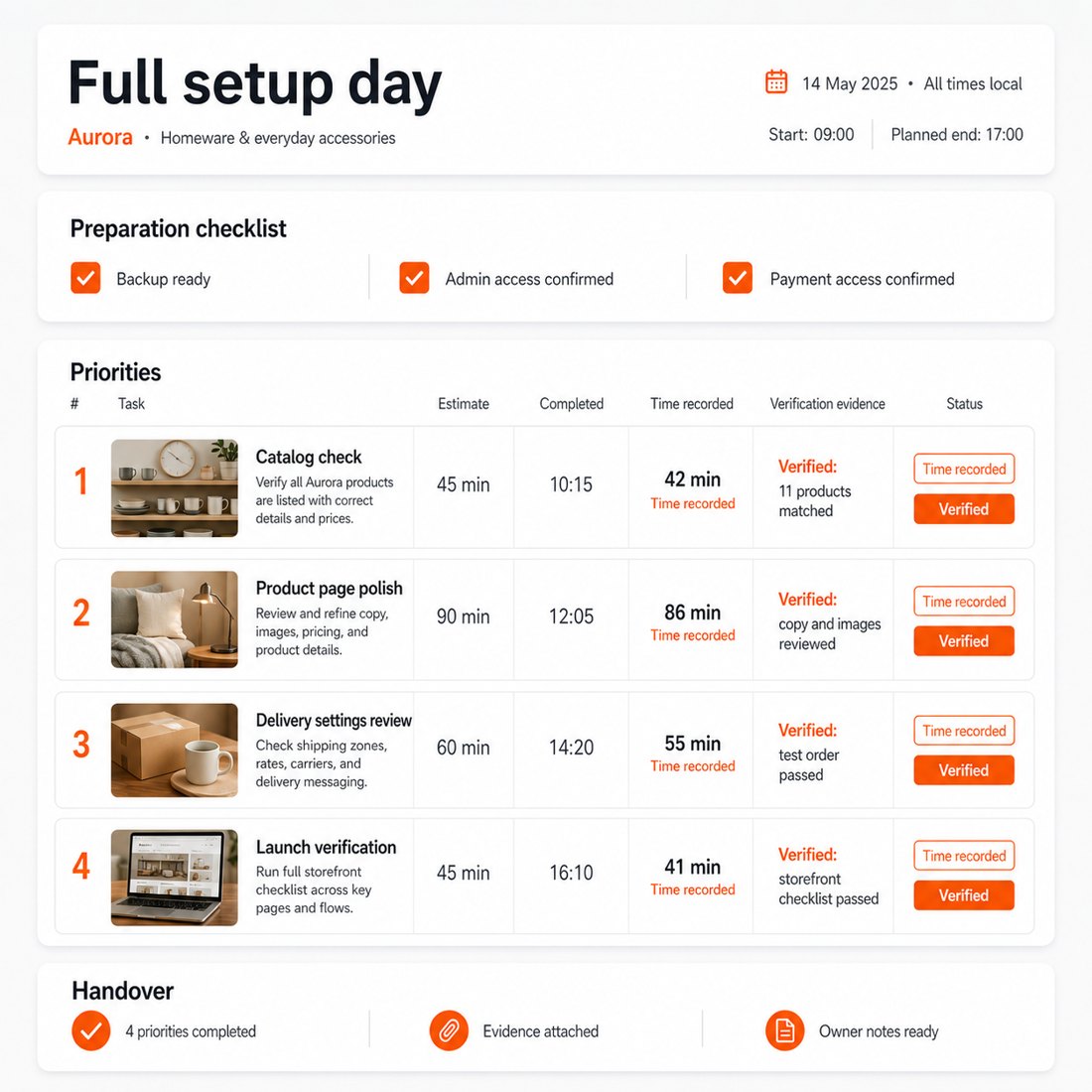
How does the work start under control?
The request receives a response within one business day, and a live video consultation clarifies the desired result, available access and business importance of each item; it happens within a few business days of the order, and the booked day itself is scheduled by agreement, typically within 5 to 10 working days of scope confirmation. The list is divided into clearly suitable work, points that depend on missing details, and work that needs more than the booked day.
Each suitable item receives an upfront time estimate, and you set the final order, so an order or payment problem stays ahead of a cosmetic footer correction. One list, one conversation and one agreed order, backed by detailed control over how the day is spent.

Which store jobs belong on the list?
The list brings together general store settings, the installation and configuration of new or existing modules, supported placement changes, and the installation or adjustment of a ready-made theme. Menus, headers, footers, small visual corrections and obvious mobile-layout problems sit in the same day when their result is clearly defined.
Scheduled store tasks, product-feed addresses, order emails and checks that each sale is counted once also belong here. Bounded fault diagnosis and small tailored changes are completed inside the day, while module and tool selection includes a shortlist, trade-offs and a recommended choice instead of a bare product name.

How are speed and store behaviour verified?
Speed work begins with a recorded baseline. The day applies selected improvements that fit the agreed scope, repeats the same measurement and records the difference. The merchant receives evidence of the result rather than a vague statement that the store feels faster.
Verification also follows the business consequence. A scheduled task runs at the expected time, a product feed reaches its destination with the expected data, an order email arrives, and one sale produces one measurement. Each check answers what changed for the store, not merely whether a setting was touched.

What arrives with the handover?
Work proceeds from the top of the agreed list, and time is recorded against every completed item, each result checked before handover. Within 2 working days after the day, the written improvement plan arrives with completed work, changed settings, measurements, remaining risks and prioritised next actions, and a live video handover explains the results and leaves reusable notes.
When another module, theme or tool is the stronger choice, the recommendation arrives as a shortlist with trade-offs and a recommended pick; when more spending solves nothing, the report says so plainly. Follow-on work carries upfront estimates, so the next step is a decision rather than a renegotiation.
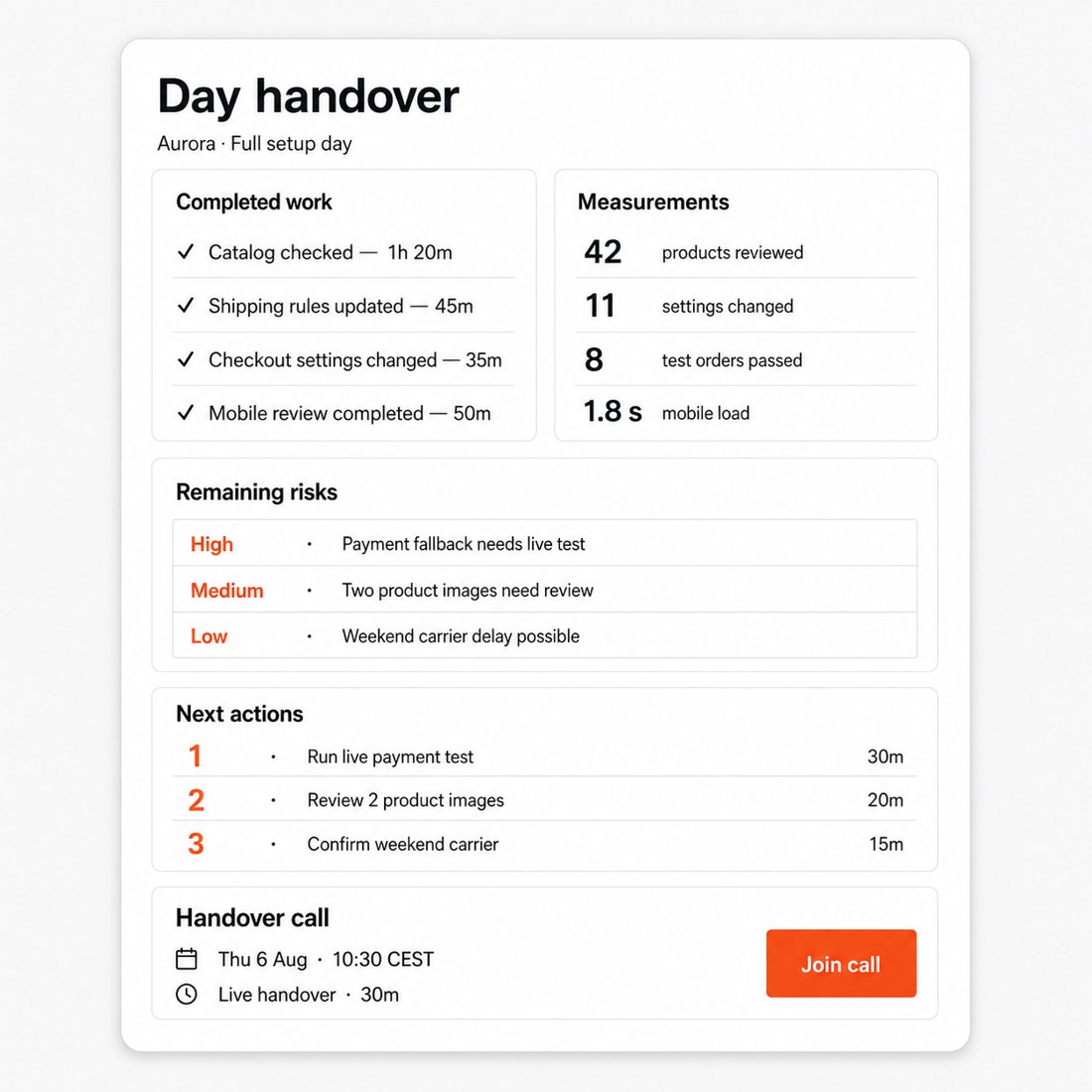
Where does a focused day end?
The day is built for work with a testable finish, and the amount completed depends on the size of the work, not on a promised task count; the day is accountable for completed and verified progress. Items classified in advance as larger than the day come back with an upfront estimate for separate work instead of silently eating the booked hours, and a discovery that exceeds the remaining time still ends usefully: the cause established so far, the risk, and a written plan with an estimate.
Full redesigns, large migrations and multi-system builds keep their own project scope, and module and theme licences and third-party fees stay separate. The day suits a store with a backlog of small, well-bounded jobs where one shared day of preparation, backup and verification beats paying that overhead per task; a store needing continuous month-to-month care is served by PrestaShop Store Care & Maintenance Plan.

-
ReferenceSVC-SETUP-DAY
-
In stock999999 Items
-
Service typeFocused setup day
-
PrestaShop versions1.6 / 1.7 / 8 / 9
-
PriceEUR 890 fixed day block
What customers say about us
Company reviews
5.0
★
★
★
★
★
(4 reviews)
Loading customer reviews...
No product reviews yet
Be the first to share your experience with this module.
Write a Review
One focused day for a prioritised batch of small setup and configuration tasks.
We turn a list of small PrestaShop setup jobs into one controlled work block: triage, prioritise, install/configure/tweak, verify and hand over. It is cleaner than buying tiny tasks one by one.
Service type
Setup day block
Existing modules, themes and settings
Price
EUR 890 fixed
One focused day
Turnaround
Scheduled work day
Intake needed before the day
Scope
Several small install/config/tweak tasks, prioritised
What we verify
Each completed task gets a smoke check or clear note
PrestaShop versions
1.6 / 1.7 / 8 / 9
Task triage and prioritisation
The day starts with a controlled list, not a vague pile of requests.
- Review your task list, store version, access, packages, credentials and constraints before the day
- Mark items as in-scope, risky/needs more detail or better handled as a quote
- Order the list so the highest-value setup work is handled first
Setup and configuration work
We batch related small jobs while the context is already loaded.
- Install or configure existing modules and theme settings where supported
- Adjust hooks, blocks, cache, cron, feed, tracking, email, tax, shipping or SEO URL settings
- Make minor child-theme-safe CSS/template tweaks that do not become redesign work
Verification and day report
Every completed item is checked and documented.
- Smoke-test affected storefront, back-office, cron, feed or tracking paths where practical
- Record completed work, skipped items, risks and any quote-needed next steps
- Hand over a concise report so your team knows exactly what changed
How it works
-
Intake Before the dayYou send the task list, priorities, access, modules/themes, credentials and any launch constraints.
-
Triage Before/startWe sort the list into in-scope setup tasks, risky items and quote-needed work.
-
Work block Scheduled dayWe install, configure and tweak from the top of the agreed priority list.
-
Verify During/final hourCompleted items get smoke checks or a clear note when deeper verification is not possible in the day.
-
Handover End of dayYou receive completed work, checks, skipped items, risks and recommended next steps.
What the day includes
The day is designed for several bounded setup tasks using existing PrestaShop, module or theme capabilities.
Included
Triage, prioritised setup/configuration/tweaks, smoke checks and day report
Not included
Custom builds, full redesigns, content migration, deep integrations or unlimited tasks
Quoted separately
Warranty
We correct mistakes in completed setup work from the day
Vendor defects and new scope are separate
Access needed
Back-office admin, staging/live access, relevant module/theme packages and credentials
The day is bounded by honesty
A good Setup Day might clear six small tasks and identify one custom feature that should not be squeezed into a day. We stop and flag that bigger item instead of quietly burning the block on work that needs Custom Module Development or a scoped quote.
FAQ
How many tasks fit in a Setup Day?
It depends on complexity. Several small, related setup tasks fit well; one complex payment/feed/theme task may consume most of the day. We prioritise before starting.
Can the day include module and theme work together?
Yes. That is often the point: module setup, theme settings, hook placement and small layout fixes can be handled together when they are related.
What if a task is too big?
We tell you and either skip it, reduce it to a safe setup step, or quote it separately. New behaviour belongs in Custom Module Development.
Is this better than Module Setup or Theme Setup?
Use Module Setup or Theme Setup for one substantial module or theme job. Use Setup Day when you have a batch of smaller tasks.
Do you work on live stores?
Yes when needed, but staging is preferred. For live work we agree timing, backup status and rollback expectations first.
What do I receive after the day?
A report listing completed tasks, changed settings/files, checks performed, skipped items, risks and recommended next steps.
Related services
Book a Setup Day EUR 890 fixed day block for several small setup and configuration tasks
Have a question about this product?
Our experts are here to help. Ask anything about installation, compatibility, or specifications.
1301
questions
9
categories
2013
building modules since
1.6–9
PrestaShop versions
Be the first to ask about this product
No questions yet. Ask anything about installation, compatibility, or specifications — our experts will answer.
Loading feature requests...
 30 days return right
Easy return - no questions asked
 Plug & Play Modules
Install, set up and take profit
 Dedicated Support First
Priority Help & Satisfaction Over Sales
You might also like
- New


