





Set up Redis cache in PrestaShop from the Back Office and test the connection instantly


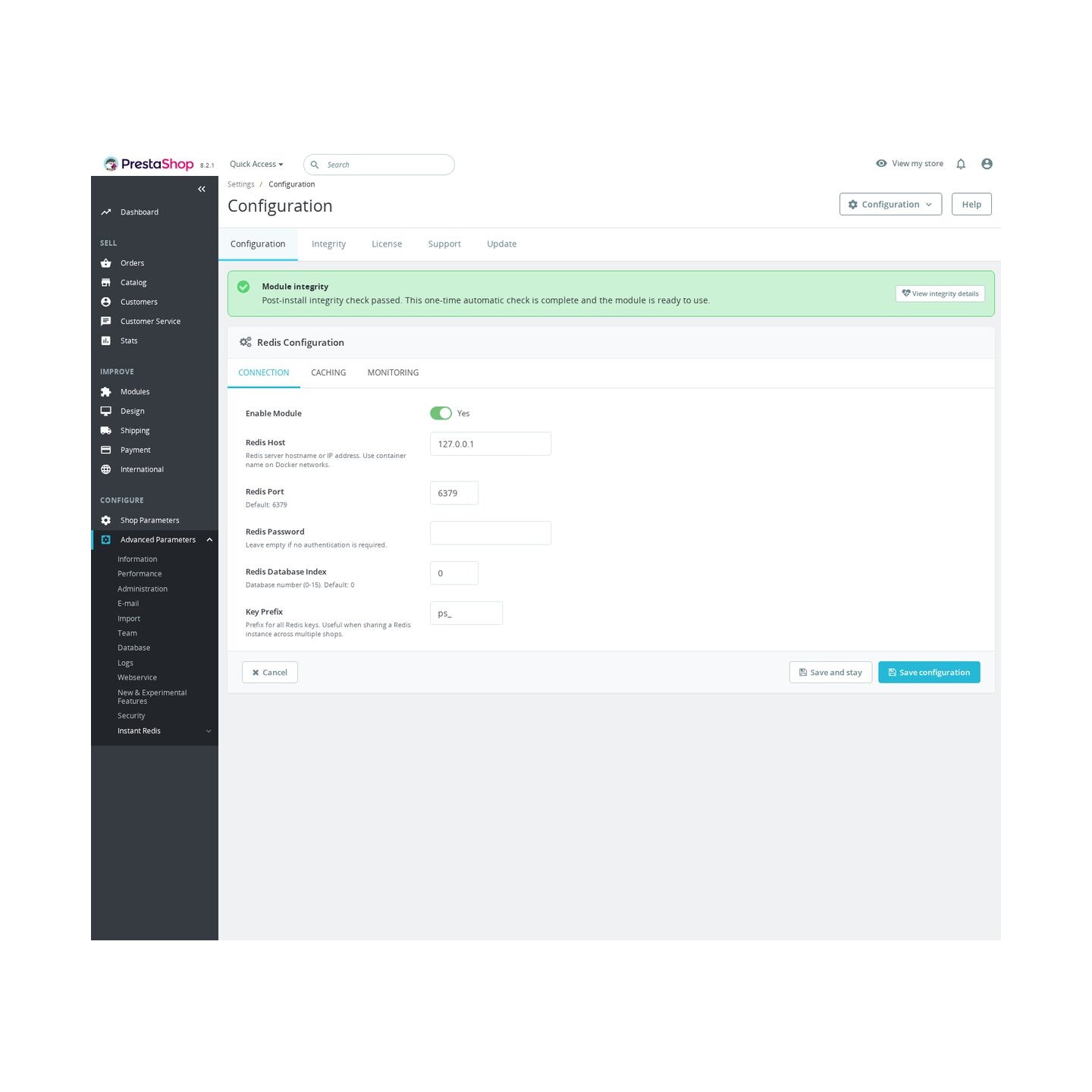
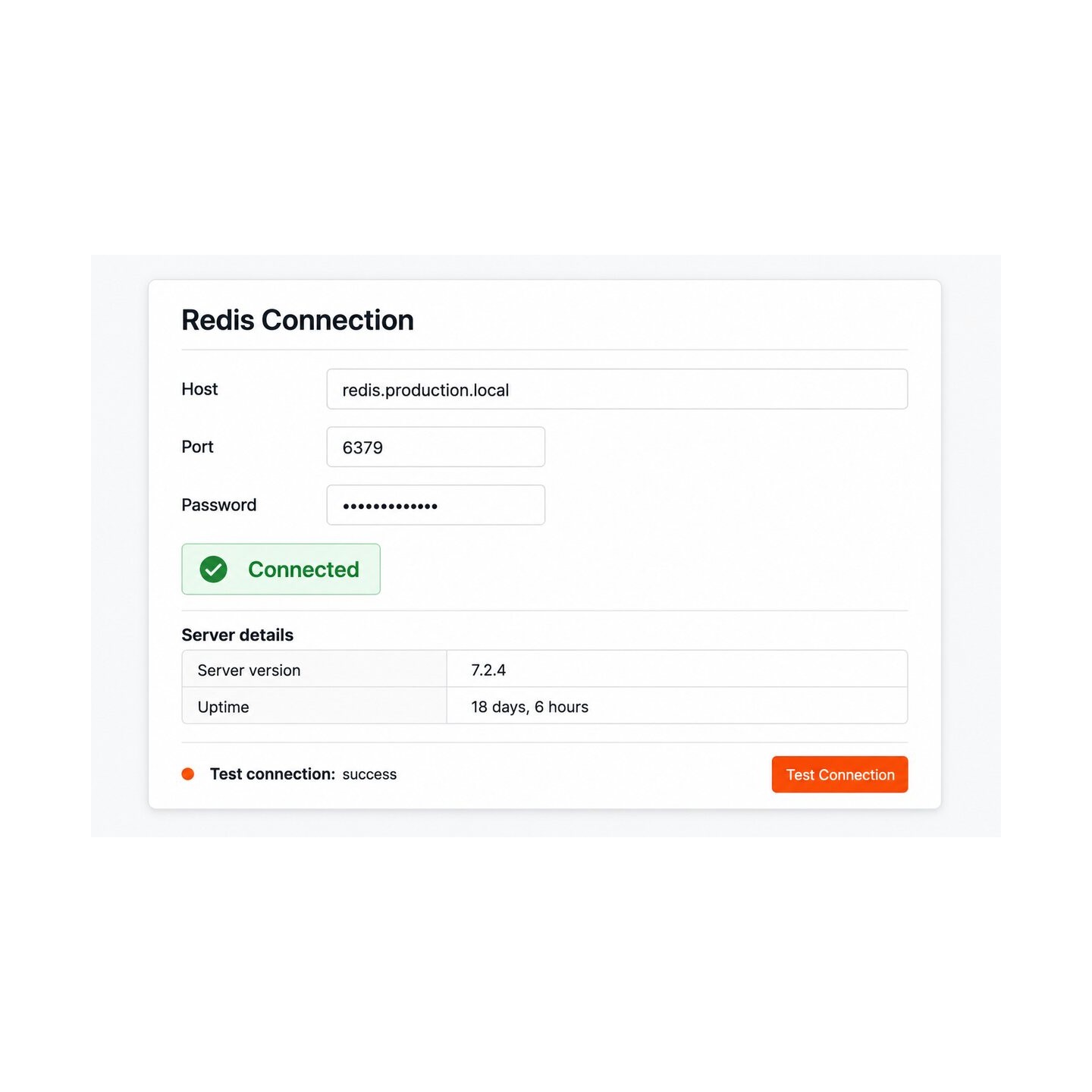
Redis Cache Manager & Monitor is a module for PrestaShop stores that puts Redis to work for the shop and hands the merchant full view and control of it: stored data, customer sessions and visitor pages are answered from working memory, while a dashboard and a key browser show exactly what Redis is doing. Setup is four connection fields, and saving them runs a live connection test.
Redis is free, open software that keeps data in the server's working memory and answers in fractions of a millisecond. It runs on the store's own server or comes ready from the hosting provider, and one installation serves several applications side by side.
The module starts simple and configures deep. Three switches decide what Redis takes over: stored data and query results, customer sessions shared across servers, and complete pages for visitors who are not signed in, with the stored copies renewed automatically the moment a product or its pictures change. A key prefix gives the store its own area on a shared Redis, you choose the database it uses, and the password stays masked.
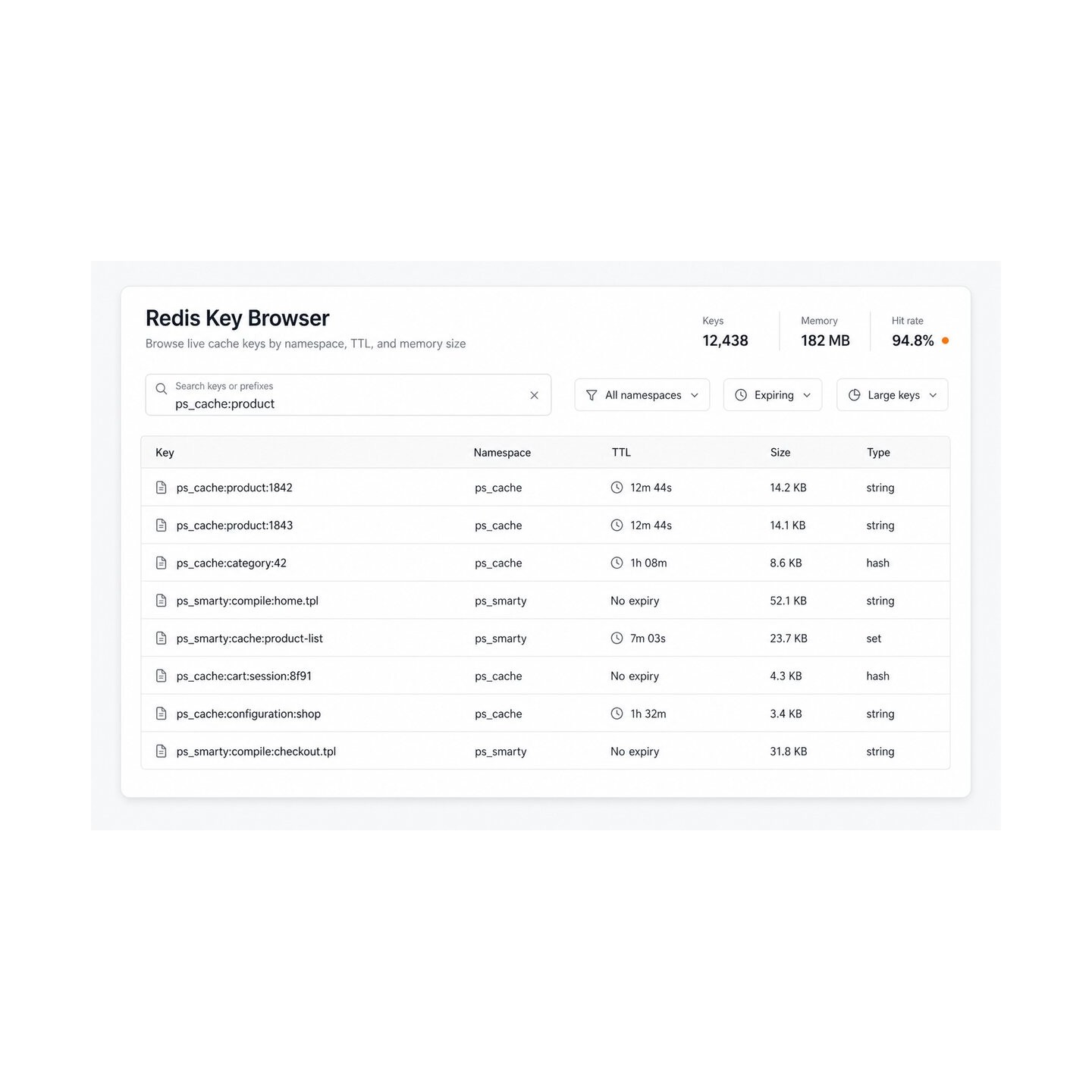
The dashboard reports memory use, hit rate, operations per second, connected clients, evictions, expirations, server role, the memory ceiling, the eviction policy and fragmentation, refreshing itself at the interval you set. The key browser lists real keys with type, size and expiry, opens their values, and deletes one key or a selected batch, always inside the store's own area. A complete wipe of the database exists too, but only behind an explicit acknowledgement that names every other application it would touch.
Pages answer from memory and the database breathes again, traffic spikes stop being emergencies, a cleanup never again logs out a neighbouring application, and trouble inside Redis shows on the dashboard before customers feel it.
Summary of what the module offers
Redis Cache Manager & Monitor makes Redis carry the store's load and makes Redis itself transparent and safe to operate. The map below covers the six parts of that work.
- Speed: data, query results, sessions and visitor pages answered from working memory.
- Freshness: stored copies renewed automatically when products or pictures change.
- Visibility: a dashboard with the numbers that predict trouble, refreshing live.
- Precision: a key browser with types, sizes, expiry and exact deletion.
- Safety: a private key area, overlap detection and a guarded full wipe.
- Setup: four connection fields and a live test, entirely in the back office.

What does the store answer from memory?
Three switches decide what Redis takes over. Stored data and query results stop being recomputed on every request. Customer sessions live in Redis and stay shared when the shop runs on more than one server, so a signed-in customer stays signed in wherever the request lands. Complete pages for visitors who are not signed in are served ready-made, which is where the largest share of traffic goes.
Freshness is automatic: when a product, a price or a picture changes, the affected stored copies are renewed, so speed never costs correctness. The result is a storefront that answers from memory while the database handles orders instead of repetition.

What does the dashboard show?
One screen reports what Redis is doing right now: memory used against its ceiling, keys held, hits, misses and the hit rate, operations per second, connected clients, evictions and expirations, the server's role, the configured eviction policy and memory fragmentation. The counts belong to the database the store actually uses, and the screen refreshes itself at the interval you set, with an off-switch when you want stillness.
These are the numbers that predict incidents: climbing evictions mean the memory ceiling is near, a falling hit rate means the working set changed. The dashboard shows both while the storefront is still fast.

How does the key browser work?
The browser lists the store's real keys, filtered by a pattern and a limit, and shows for each one its type, its size or element count and its remaining lifetime. The detail view opens the value itself, whether it is a text, a list, a set, a sorted set or a field map.
Deletion is precise: one key from its row, or a selected batch in one confirmed action. Every deletion is checked against the store's own key area first, so a typo in a pattern removes nothing that belongs to anyone else.

What protects a shared Redis?
One Redis often serves the shop, a staging copy and whatever else the host installed. The module gives the store a literal key prefix and confines every destructive operation to it. When another registered application's keys overlap, the clearing action is blocked outright instead of quietly harming a neighbour.
The full wipe of a whole database still exists for the rare day it is needed, but it demands an explicit acknowledgement and a typed confirmation phrase, and it lists the other key areas it would destroy before it does anything. The dangerous button explains its consequences; it never hides them.

What is Redis, and how does setup work?
Redis is free, open software that holds data in the server's working memory and answers in fractions of a millisecond. Many hosting plans include it ready to use; otherwise it runs on the store's own server. There is nothing to subscribe to and nothing to pay for.
Setup is four fields: address, port, password and database number, plus the key prefix. Saving runs a live connection test and reports the server's version, memory and key count immediately, so a wrong password is caught at the moment of typing it, not in tonight's traffic. The module lives entirely in the back office and adds nothing to the storefront's pages.

-
Referencemprinstantredis
-
PrestaShop CompatibilityPS 1.7 – 9.x
-
Pricing ModelOne-time Purchase
-
Module TypeBack-office
-
GDPR RelevantNo
-
Business GoalStreamline Operations
-
External Account NeededNo
-
Module ComplexityFeature-Rich Module
-
Customer Journey StageManage Store
-
Works With PlatformNo External Platform
What customers say about us
Company reviews
5.0
★
★
★
★
★
(4 reviews)
Loading customer reviews...
No product reviews yet
Be the first to share your experience with this module.
Write a Review
Redis Dashboard & Key Manager lets you manage an existing Redis cache from the PrestaShop Back Office, without SSH or terminal commands. It helps you verify the connection, watch Redis health, inspect stored keys, and clear cache data with safer scoped actions.
Have a question about this product?
Our experts are here to help. Ask anything about installation, compatibility, or specifications.
1315
questions
9
categories
v1.1.52026-05-27
- Addedcomplete FR/DE/ES/IT/PL translations
Loading full changelog...
Works Well With Redis Cache Manager & Monitor
Modules our team genuinely pairs with this one, and exactly why each belongs in the same setup.
Complement
Instant Redis helps you configure, check and clean Redis from the Back Office, with a connection panel for host, port, password, database and key prefix, testing the link through the PHP redis extension and reporting status and live metrics. That covers the Redis connection itself; broader performance work spans more than one cache.
Performance Revolution covers that wider scope as a separate tool, with controls for caching, warming, asset handling and bottleneck analysis across Redis, APCu and auto-detect layers, plus real-user measurements.
Used alongside each other, Instant Redis focuses on setting up and verifying the Redis layer while Performance Revolution manages the full performance picture around it. One makes the Redis connection easy to confirm and the other tunes caching, assets and bottlenecks more broadly, two complementary tools for keeping the store fast and its cache layer healthy.

Complement
Instant Redis makes the Redis cache layer easy to configure, test and clean from the Back Office, reporting status and live metrics so cache setup is simple to verify. A fast cache helps delivery, but the underlying database and file system still collect clutter that no cache addresses.
Cleanup Revolution covers that as a separate tool, finding reclaimable database space and items ready to clean so stale carts, logs, temporary files and orphaned images can be removed with less guesswork.
Used alongside each other, Instant Redis keeps the cache layer healthy while Cleanup Revolution keeps the data underneath it lean. One speeds how the store serves and the other reduces what it stores, two complementary maintenance jobs, so the store stays both quick to respond and uncluttered beneath the surface.

Workflow
Instant Redis helps you set up, test and clean Redis from the Back Office, with a connection panel and live metrics so the cache layer is easy to verify. Alongside it, routine MPR module work often needs oversight, and a quiet failure there can go unnoticed until something breaks.
Cron Manager covers that as a separate tool, centralising MPR module tasks, protected scheduling links, manual runs and task status so routine jobs are protected from silent failure.
Used alongside each other, Instant Redis keeps the cache layer configured and visible while Cron Manager gives you one place to run and monitor any MPR scheduled task you have set up. They are independent tools; together they support a dependable maintenance routine, where caching is verifiable and the scheduled MPR jobs around it are watched rather than assumed to be working.
 30 days return right
Easy return - no questions asked
 Plug & Play Modules
Install, set up and take profit
 Dedicated Support First
Priority Help & Satisfaction Over Sales
You might also like


